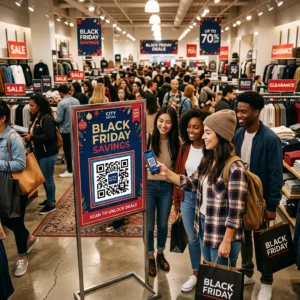
Verursachen verlorene Besucher und überfüllte Helpdesks Engpässe an Ihrem Veranstaltungsort? Navigationsverwirrung führt zu verpassten Sitzungen, frustrierten Gästen und überlastetem Veranstaltungspersonal. Die Implementierung von QR-basierter Wegführung bietet den Teilnehmern sofortigen mobilen Zugang zu interaktiven Karten und standortspezifischen Wegbeschreibungen direkt auf ihren Smartphones.
Warum mobile QR-Codes die Navigation am Veranstaltungsort verbessern
Große Kongresszentren, Festivals mit mehreren Bühnen und weitläufige Messehallen überfordern Besucher oft. Traditionelle, auf statischen Eingangstafeln gedruckte Grundrisse neigen dazu, dichte Menschenmassen anzuziehen, was zu erheblichen Staus in den Hauptkorridoren führt. Wenn sich außerdem während einer Veranstaltung eine Standzuweisung ändert oder ein Raumplan verschiebt, werden physische Kartentafeln schnell veraltet und irreführend.
Die Verwendung von QR-Codes für die Navigation am Veranstaltungsort verwandelt physische Beschilderungen in interaktive digitale Portale. Die Positionierung von Codes an kritischen Entscheidungspunkten schafft lokalisierte „Sie sind hier“-Stationen in Ihrer Einrichtung. Beim Scannen laden diese Codes sofort mobilfreundliche Karten, schrittweise Wegbeschreibungen für Innenräume oder Echtzeit-Zeitplanseiten.
Da dynamische QR-Codes es Ihnen ermöglichen, Ziellinks nach dem Druck zu bearbeiten, können Sie Grundrisse aktualisieren oder Verkehrsflüsse sofort umleiten, ohne physische Schilder zu ersetzen. Die Integration digitaler Grundrisse mit einer dedizierten QR-Code für Veranstaltungen erstellen optimiert das gesamte Besuchermanagement und bietet den Teilnehmern sofortige Klarheit.
Praktische Möglichkeiten zur Implementierung von QR-Code-Wegführung
Die Implementierung der QR-Code-Navigation an Ihrem Veranstaltungsort erfordert eine strategische Platzierung, die auf die spezifischen Bedürfnisse der Teilnehmer abgestimmt ist. Hier sind vier praktische Anwendungen für die Veranstaltungs-Wegführung:
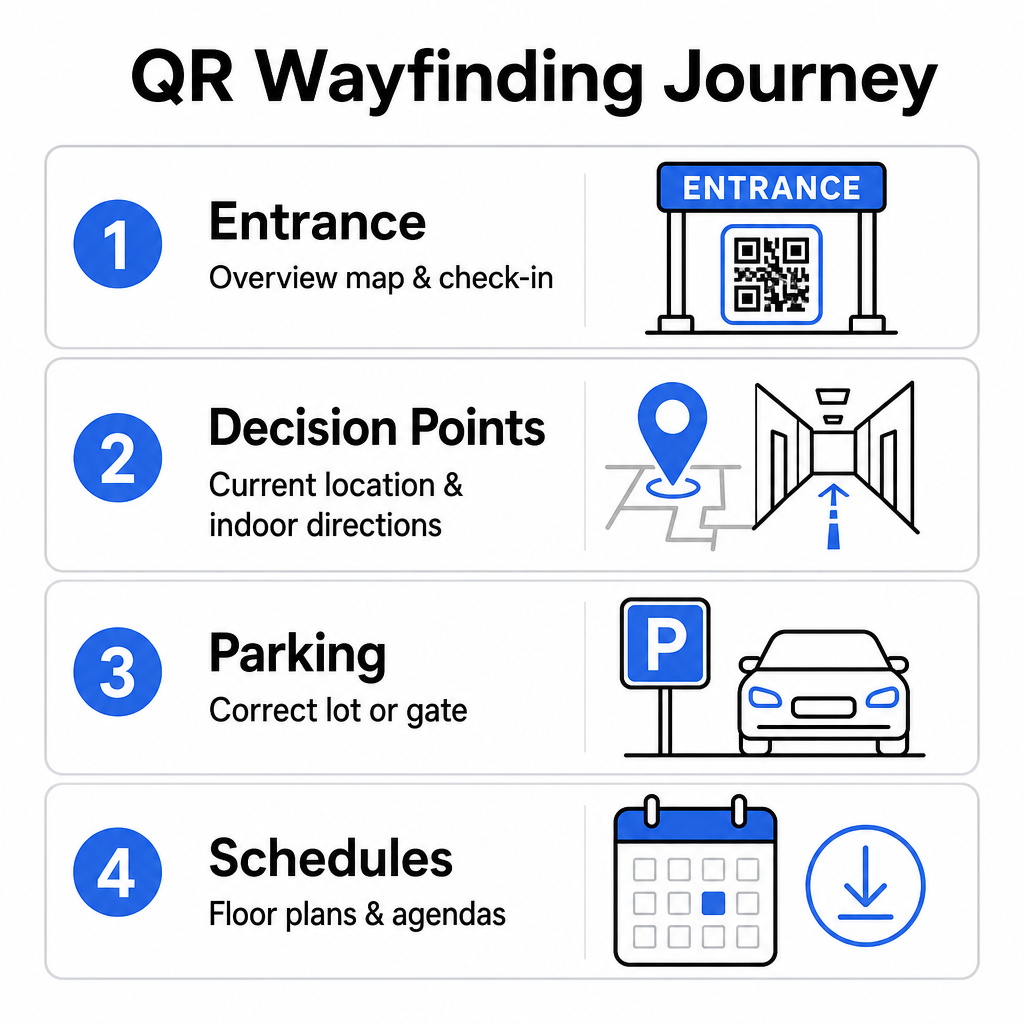
- Eingangs- und Registrierungsbereiche: Platzieren Sie gut sichtbare Codes in der Nähe von Eingangstoren und Registrierungsschaltern, um ankommenden Gästen eine sofortige Übersichtskarte der Einrichtung sowie Check-in-Anweisungen zu geben. Die Integration digitaler Navigation an den Eingangspunkten ergänzt moderne Event-Check-in-Systeme.
- Lokalisierte „Sie sind hier“-Entscheidungspunkte: Stationsspezifische QR-Codes an wichtigen Flurkreuzungen, Aufzugslobbys, Treppenhauseingängen und Essbereichen. Verknüpfen Sie jeden Code, um eine digitale Karte zu öffnen, die vorkonfiguriert ist, um den genauen aktuellen Standort des Benutzers im Gebäude anzuzeigen.
- Wegbeschreibung zum Veranstaltungsort und Parkmöglichkeiten: Leiten Sie die Teilnehmer zum richtigen Parkplatz oder Gebäudeeingang, bevor sie zu Fuß ankommen. Die Einbindung eines Google Maps QR-Code erstellen Links auf digitalen Ticketbestätigungen oder Outdoor-Eingangsbannern leitet Fahrer direkt zu den ausgewiesenen Ankunftstoren.
- Herunterladbare Zeitpläne und Grundrisse: Bieten Sie offline zugängliche Karten für Veranstaltungsorte mit schwacher Mobilfunkabdeckung. Die Nutzung eines PDF QR-Code Generator ermöglicht es Gästen, hochauflösende Grundrisse des Veranstaltungsortes und Programmführer direkt auf ihren Mobilgeräten zu speichern.
Vereinfachen Sie die Navigation am Veranstaltungsort noch heute Müssen Sie benutzerdefinierte, mobilfreundliche Kartenlinks für Ihre bevorstehende Veranstaltung erstellen? Nutzen Sie den QR-Code für Veranstaltungen erstellen um dynamische, verfolgbare Codes in wenigen Minuten zu erstellen.
Platzierungs- und Zugänglichkeitsrichtlinien für Wegeleitschilder
Ein Wegeleitsystem ist nur dann effektiv, wenn die Teilnehmer physische Beschilderung bequem finden und scannen können. Eine durchdachte Platzierung stellt sicher, dass Navigationshilfen funktional und für jeden Besucher zugänglich bleiben.
Optimale physische Platzierung
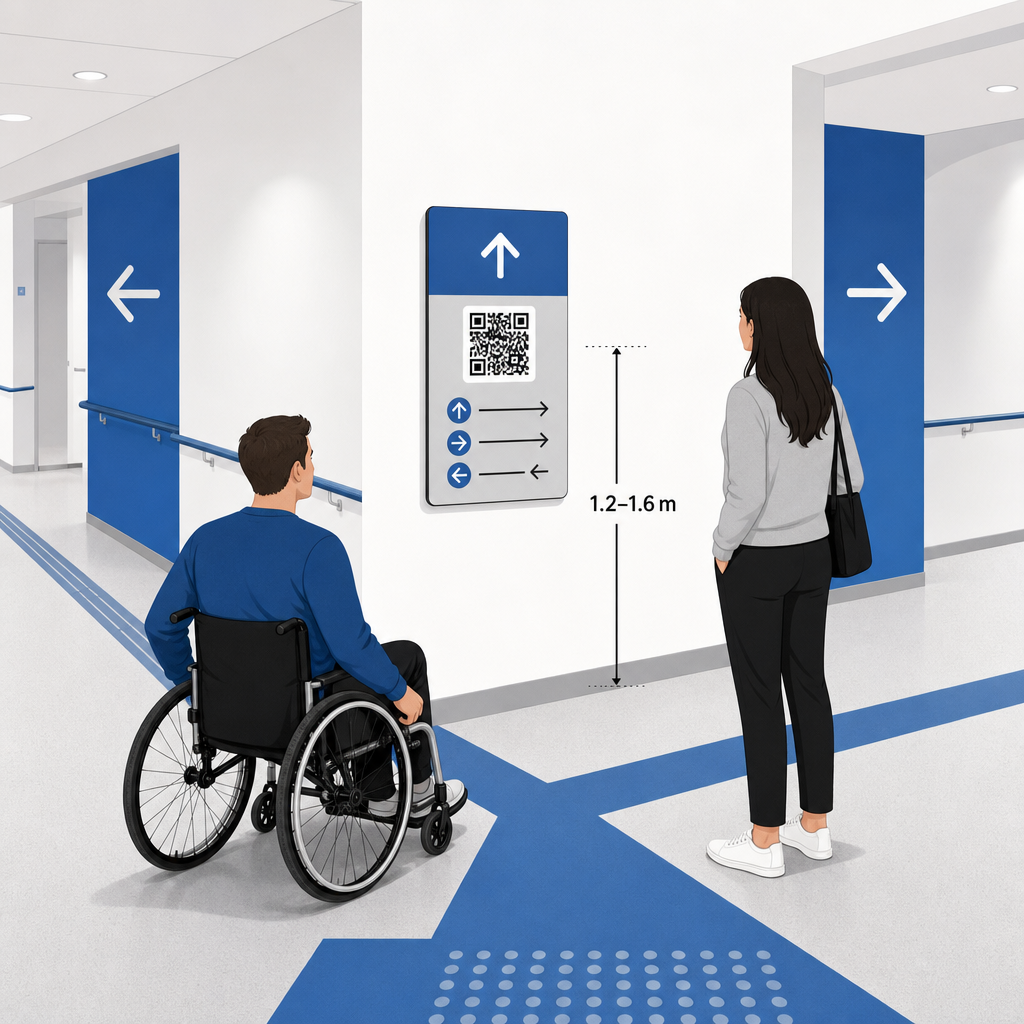
Positionieren Sie Wegeleitschilder dort, wo Besucher naturgemäß innehalten, um Routenentscheidungen zu treffen, wie z.B. an Flurkreuzungen, Rastbereichen, Food Courts und Aufzugsbereichen. Montieren Sie gedruckte Codes auf einer zugänglichen Augenhöhe – typischerweise zwischen 1,2 bis 1,6 Meter (3,5 bis 5,5 Fuß) über dem Boden – damit sie sowohl für stehende Besucher als auch für Rollstuhlfahrer bequem erreichbar bleiben.
ADA- und Barrierefreiheit-Konformität
Offizielle Zugänglichkeitsstandards gemäß dem Americans with Disabilities Act (ADA) verlangen, dass Richtungsbeschilderung klaren visuellen Regeln folgt, einschließlich hohem Dunkel-zu-Hell-Kontrast, blendfreien Oberflächen und spezifischen Proportionen visueller Zeichen. Digitale Tools wie QR-Codes dienen als Ergänzung zu, und nicht als Ersatz für, standardmäßige zugängliche physische Beschilderung.
Um die vollständige Konformität und Zugänglichkeit zu gewährleisten:
- Sorgen Sie neben jedem Code für sichtbaren Alternativtext, gedruckte Wegbeschreibungen oder Personalunterstützung.
- Versehen Sie Codes mit klaren, beschreibenden Bezeichnungen, die angeben, welche Informationen der Benutzer beim Scannen erhält.
- Erstellen Sie mobile Landingpages, die Screenreader unterstützen und beschreibende Alternativtexte für Kartengrafiken enthalten.
Klare Handlungsaufforderungen
Ein unbeschrifteter QR-Code lässt Besucher über seinen Zweck rätseln. Versehen Sie jeden Code immer mit einem klaren Call-to-Action (CTA)-Rahmen oder einer Textbeschriftung, wie z.B. „Für interaktiven Lageplan scannen“ oder „Weg finden – Für Karte scannen.“ Das Befolgen bewährter Richtlinien für Platzierung von QR-Codes auf Plakaten erhöht Engagement und Scanraten erheblich.
Technische Best Practices für scannbare Beschilderung
Um ein schnelles, zuverlässiges Scannen über Hunderte verschiedener Smartphone-Modelle hinweg zu gewährleisten, ist die strikte Einhaltung grundlegender Grafikstandards erforderlich.
| Faktor | Technischer Standard | Praktischer Zweck |
|---|---|---|
| Mindestdruckgröße | Mindestens 3 x 3 cm; 2 x 2 cm für Nahaufnahmen | Verhindert Kamerafokussierungsfehler bei dichten Datenmodulen. |
| Scan-Distanz-Verhältnis |
Verhältnis 10:1 (1 Einheit Codeweite pro 10 Einheiten Abstand) | Stellt sicher, dass Codes auf großen Hänge transparenten aus der Ferne scannbar bleiben. |
| Farbkontrast | Mindestens 4:1 Kontrastverhältnis (dunkle Module auf hellem Hintergrund) | Hilft Smartphone-Kamerasensoren, Module sofort vom Hintergrund zu unterscheiden. |
| Ruhige Zone Puffer | Mindestens 4 Module breit (ca. 0,25 Zoll Rand) | Verhindert, dass umgebende Grafiken und Texte die Decodierung des Scanners stören. |
| Dateiformat | Vektorformate (SVG, EPS, PDF) | Sorgt für gestochen scharfe Kanten ohne Verpixelung beim Druck auf großen Schildern. |
Beim Drucken von Wegeleit-Plakaten und Wandschildern wählen Sie matte, nicht-reflektierende Materialien gegenüber glänzenden Oberflächen. Matte Oberflächen eliminieren starke Reflexionen durch Deckenbeleuchtung, die eine der Hauptursachen für Scanfehler mobiler Kameras darstellen. Für detaillierte Maßrichtlinien konsultieren Sie unser umfassendes Leitfaden zur QR-Code-Größe und überprüfen Sie die wesentlichen Praktiken für die Lesbarkeit von QR-Codes.
Führen Sie Teilnehmer direkt zu Ihrem Veranstaltungsort Stellen Sie sicher, dass Gäste ohne Verwirrung den richtigen Eingang oder das richtige Parktor finden. Generieren Sie ortsgenaue Pins mit Hilfe der Google Maps QR-Code erstellen.
Testen und Aktualisieren Ihres Event-Wegeleitsystems
Eine gründliche Validierung vor der Öffnung der Türen verhindert technische Ausfälle während der Stoßzeiten.
Überprüfung vor der Veranstaltung
- Optimierung der Landingpage-Geschwindigkeit: Scannen Sie jeden veröffentlichten Code sowohl mit Apple iOS- als auch mit Android-Geräten über die standardmäßigen integrierten Kameraanwendungen.
- Bewertung der Umgebungsbeleuchtung: Überprüfen Sie gedruckte Beschilderungen unter den tatsächlichen Veranstaltungsort-Lichtern, um mögliche Blendungen oder Schatten durch Hallenleuchten zu erkennen.
- Überprüfung von Scan-Winkeln und -Distanzen: Versuchen Sie, von realistischen Stehpositionen und Seitenwinkeln aus zu scannen, um zu bestätigen, dass der Code in 3 Sekunden oder weniger.
- Überprüfung der Netzwerkladezeiten: Testen Sie die Antwortzeiten von Karten-Landingpages über Mobilfunknetze und Gast-WLAN, um schnelle Ladezeiten unter Netzwerkbelastung zu bestätigen.
Live-Updates mit dynamischen QR-Codes verwalten
Selbst sorgfältig geplante Veranstaltungslayouts erleben kurzfristige Zeitplanänderungen oder Standverlegungen. Durch die Nutzung dynamischer QR-Codes behalten Sie die volle Kontrolle über die Ziel-Landingpages. Wenn sich ein Präsentationsraum ändert oder ein Notausgang hervorgehoben werden muss, aktualisieren Sie einfach die Ziel-URL in Ihrem Verwaltungs-Dashboard. Der auf der Wand gedruckte Code bleibt identisch, aber die Teilnehmer werden sofort zur aktualisierten Karte weitergeleitet.
Darüber hinaus ermöglichen Ihnen integrierte Analysen, das Scan-Volumen in verschiedenen Veranstaltungsbereichen in Echtzeit zu überwachen. Hohe Scan-Zahlen an bestimmten Entscheidungspunkten zeigen an, wo Besucher häufig Wegbeschreibungen suchen, und liefern umsetzbare Daten, um bei Bedarf zusätzliches Personal oder ergänzende Wegweiser einzusetzen. Für fortschrittliche Positionierungsstrategien lesen Sie unsere vollständigen Leitfaden zur QR-Code-Platzierung.
Häufig gestellte Fragen
Nein. Barrierefreiheitsvorschriften erfordern, dass physische Wegweiser unabhängig voneinander spezifische visuelle Standards, taktile Anforderungen oder Regeln für hohen Kontrast erfüllen. QR-Codes dienen als hilfreiche digitale Ergänzung, um die Teilnehmer zu leiten, dürfen aber primäre physische Beschilderung oder zugängliche Textalternativen nicht ersetzen.
Exportieren Sie Ihren QR-Code immer in skalierbaren Vektorformaten wie SVG, EPS oder PDF. Vektordateien lassen sich auf jeder Größe von Bannern oder Wandbildern skalieren, ohne scharfe Modulkanten zu verlieren, was eine zuverlässige Scannbarkeit gewährleistet.
Dynamische QR-Codes trennen das gedruckte Bild vom Zielinhalt. Wenn ein Stand verschoben wird oder sich ein Seminarraum ändert, aktualisieren Sie den Ziel-Weblink in Ihrem Dashboard, ohne die physischen Schilder, die am Veranstaltungsort hängen, neu drucken oder ersetzen zu müssen.
Die Umwandlung komplexer Veranstaltungsort-Navigation in ein digitales Self-Service-Erlebnis reduziert die Frustration der Teilnehmer und sorgt für einen reibungslosen Ablauf der Veranstaltung. Durch die Auswahl strategischer Entscheidungspunkte, die Durchsetzung kontrastreicher visueller Standards und die Verknüpfung von Codes mit responsiven Karten-Landingpages ermöglichen Sie den Gästen, sich eigenständig zurechtzufinden. Beginnen Sie noch heute mit der Gestaltung Ihres Navigationssystems für den Veranstaltungsort, indem Sie die dynamischen Tools von Pageloot nutzen, um Echtzeit-Kartenzugang in Ihrer gesamten Einrichtung bereitzustellen.