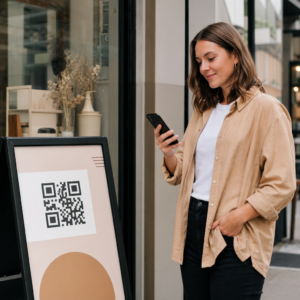
Menguruskan ratusan – atau ribuan – kod QR merentasi kempen, lokasi dan barisan produk adalah lebih sukar daripada yang disangka. Tanpa sistem yang jelas, pasukan akan berdepan dengan pautan rosak, penjenamaan yang tidak konsisten, dan tiada keterlihatan sebenar tentang apa yang berkesan. Panduan ini merangkumi strategi dan alatan praktikal yang memastikan penggunaan kod QR berskala besar teratur, boleh dijejak dan mudah dikemas kini.
Pilih Jenis Kod QR yang Betul Sebelum Anda Berskala
Keputusan paling penting yang akan anda buat sebelum menskalakan mana-mana program kod QR ialah memilih antara kod dinamik dan statik – kerana pilihan itu menentukan apa yang boleh anda ubah, jejak dan automatikkan kemudian.
Kod QR dinamik gunakan URL pengalihan pendek yang anda kawal. Oleh kerana kod yang dicetak hanya menunjuk kepada pengalihan itu, anda boleh mengemas kini destinasi, menukar kandungan, atau mengubah parameter penjejakan pada bila-bila masa tanpa mencetak semula apa-apa. Ia juga membuka kunci keupayaan penjejakan termasuk kiraan imbasan, cap masa, lokasi geografi, jenis peranti dan sistem pengendalian. Ini menjadikannya pilihan yang tepat untuk kempen pemasaran, promosi, menu restoran, bahan acara, dan sebarang kes penggunaan di mana kandungan berubah atau data prestasi penting.
Kod QR statik mengekod destinasi terus ke dalam corak itu sendiri. Setelah dicetak, data itu kekal – anda tidak boleh mengemas kini pautan atau menjejak imbasan tanpa menjana kod baharu. Ia sangat sesuai untuk maklumat yang benar-benar tidak pernah berubah: kata laluan Wi-Fi tetap, dokumen kawal selia kekal, atau pameran muzium dengan kandungan stabil.
| Ciri | Kod QR Dinamik | Kod QR Statik |
|---|---|---|
| Boleh diedit selepas dicetak | ✅ Boleh | ❌ Tidak |
| Penjejakan imbasan | ✅ Boleh | ❌ Tidak |
| Analitis geografi | ✅ Boleh | ❌ Tidak |
| Analisis masa nyata | ✅ Boleh | ❌ Tidak |
| kos | Langganan diperlukan | Percuma |
| Terbaik untuk | Kempen, menu, promosi | Kandungan tetap, kekal |
Untuk melihat dengan lebih mendalam bagaimana kedua-dua pilihan ini dibandingkan, lihat sepenuhnya perbandingan kod QR statik vs. dinamik.
Mula Mengurus Kod QR Dinamik Hari Ini Perlukan kod yang boleh diedit dengan penjejakan terbina dalam dan papan pemuka berpusat? The Penjana Kod QR Dinamik membolehkan anda membuat, mengemas kini dan memantau semua kod anda di satu tempat.
Bina Sistem Penamaan dan Organisasi yang Berskala
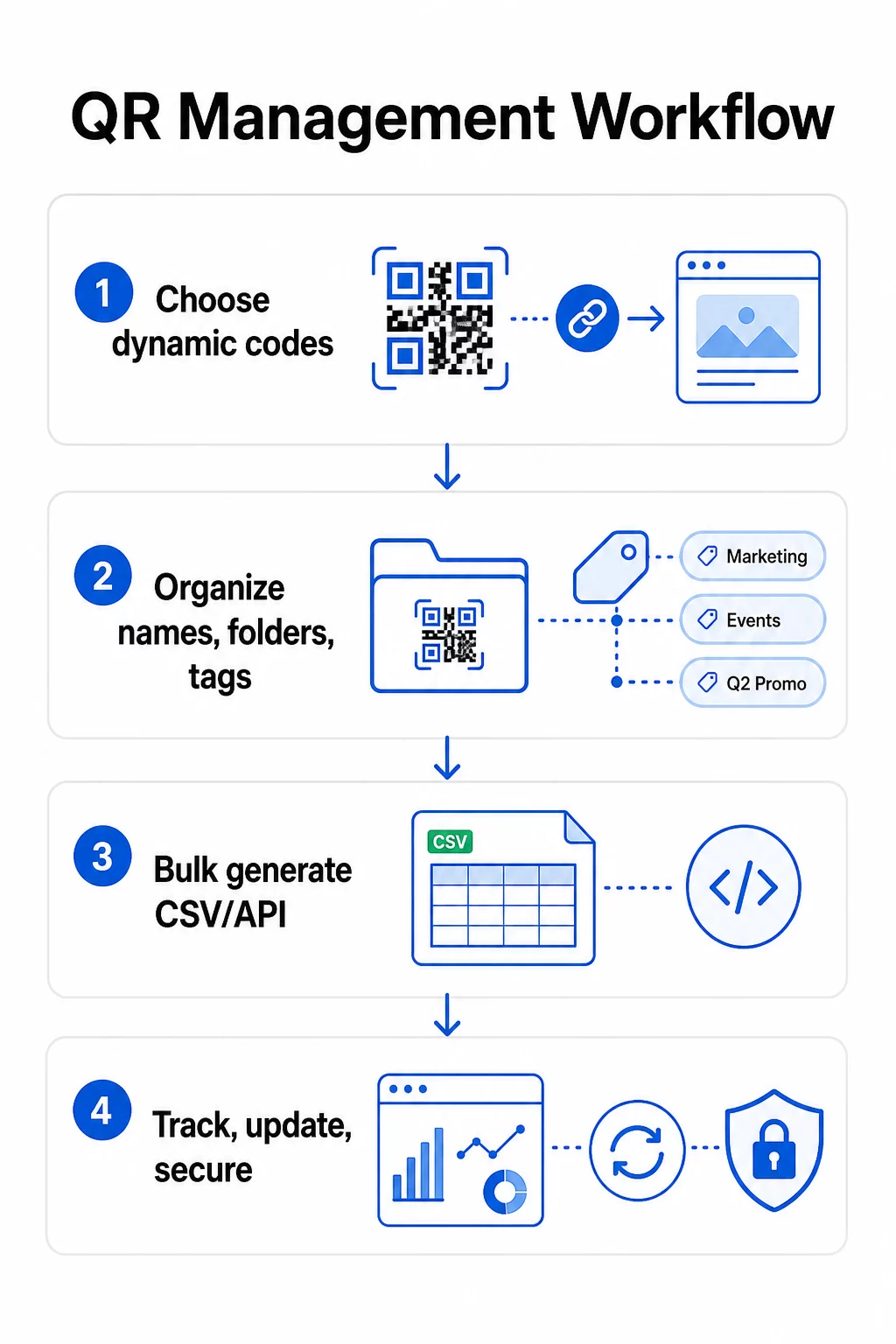
Apabila anda menguruskan berdozen kod, konvensyen penamaan yang longgar adalah satu kesulitan. Pada ratusan atau ribuan, ia menjadi masalah operasi yang serius. Struktur penamaan yang konsisten, digabungkan dengan hierarki folder yang logik, memastikan pasukan anda selaras dan kod anda mudah dicari pada mana-mana peringkat kempen.
Gunakan Konvensyen Penamaan Piawai
Format penamaan yang boleh dipercayai merangkumi semua yang anda perlukan untuk mengenal pasti kod tanpa membukanya. Satu struktur praktikal:
`Dept-KempenSaluran-GeoObjektif-JenisAsetVersiStatus`
Contohnya: `MKT-MusimPanas25OOH-ASPromo-Posterv2AKTIF`
Tetapkan tarikh dalam format YYYY-MM, gunakan nombor versi (v1, v2) untuk membezakan lelaran, dan sentiasa sertakan penunjuk status (AKTIF, DIJEDA, DIARKIBKAN). Ini mengelakkan kekeliruan apabila beberapa versi kempen yang sama disiarkan secara serentak.
Rekod Metadata Berstruktur untuk Setiap Kod
Selain nama, setiap kod QR harus membawa metadata berstruktur yang boleh dirujuk oleh sesiapa sahaja dalam pasukan anda. Medan untuk disertakan:
- Pemilik (individu atau pasukan yang bertanggungjawab)
- Unit perniagaan atau barisan produk
- URL sasaran dan URL sandaran
- Jenis kod (dinamik atau statik)
- Tarikh mula dan tarikh tamat
- Salinan seruan tindakan
- Tahap akses atau keselamatan
Tarikh tamat dan URL sandaran amat penting pada skala besar – ia menghalang imbasan jalan buntu selepas kempen ditutup, dan URL sandaran memastikan pengguna masih mendarat di tempat yang berguna jika destinasi utama tidak berfungsi.
Susun dengan Folder dan Tag
Struktur folder dua peringkat berfungsi dengan baik untuk kebanyakan pasukan: folder peringkat atas untuk unit perniagaan atau barisan produk, dan subfolder untuk kempen atau lokasi individu. Tag menambah lapisan penapisan kedua – tandakan kod mengikut wilayah (AS, EU), saluran (e-mel, luar rumah, pembungkusan), jenis penempatan (poster, botol, skrin), dan status (aktif, diarkibkan).
Pageloot Ciri folder kod QR menyokong perkongsian folder berasaskan pasukan dengan kebenaran berasaskan peranan, jadi anda boleh memberikan ahli pasukan baharu akses baca kepada analitik sambil menyekat siapa yang boleh mengedit atau memadam kod. Ini amat berguna untuk agensi yang menguruskan pelbagai pelanggan atau perusahaan yang menjalankan kod merentasi jabatan.
Jana Kod Secara Pukal Tanpa Kehilangan Kawalan
Setelah penamaan dan struktur folder anda ditetapkan, penciptaan pukal menjadi mudah – dengan syarat data input anda bersih dan proses anda termasuk langkah pengesahan sebelum menjana dalam jumlah besar.
Gunakan Fail CSV untuk Penjanaan Kelompok
Penjanaan pukal berasaskan CSV adalah kaedah paling praktikal untuk mencipta sejumlah besar kod dengan cekap. Fail CSV yang berstruktur baik untuk penjanaan kod QR harus merangkumi:
- `unique_id` – pengecam dalaman anda
- `jenis_qr` – URL, PDF, vCard, borang, dsb.
- `url_destinasi` – destinasi sasaran
- `nama_kempen` – untuk pelaporan dan penapisan
- `folder` – tempat kod itu sepatutnya berada dalam papan pemuka anda
- `nama_templat` – reka bentuk berjenama untuk digunakan
- `parameter_utm` – sumber, medium, kempen, kandungan
- `tarikh_mula``tarikh` / `tarikh_tamat``tarikh` – tempoh kempen
- `status` – aktif atau dijeda
- `pemilik` – ahli pasukan yang bertanggungjawab
Sebelum memuat naik, sahkan CSV: sahkan semua medan yang diperlukan telah diisi, semak bahawa URL adalah aktif dan diformat dengan betul, dan jalankan kelompok ujian lima hingga sepuluh kod merentasi peranti yang berbeza untuk mengesan ralat sebelum ia merebak melalui keseluruhan pelaksanaan.
Untuk penjanaan pukal automatik pada skala perusahaan, pengurusan kod QR berasaskan API membolehkan anda menghantar parameter secara programatik, mencetuskan penciptaan kelompok daripada sistem anda sendiri, dan mengemas kini URL destinasi merentasi ribuan kod secara serentak menggunakan permintaan PATCH atau PUT.
Tambah Parameter UTM Secara Konsisten
Parameter UTM adalah yang menghubungkan imbasan kod QR kepada timbunan analitik anda yang lebih luas. Tanpa mereka, anda boleh melihat bahawa seseorang telah mengimbas kod, tetapi anda tidak dapat mengaitkan imbasan itu dengan mudah kepada kempen, saluran, atau penempatan tertentu dalam Google Analytics.
Ikuti konvensyen ini untuk memastikan data anda bersih:
- Gunakan huruf kecil secara keseluruhan – penjejakan UTM adalah peka huruf besar-kecil, dan penggunaan huruf besar-kecil yang bercampur-campur akan menghasilkan pelaporan yang terpecah-pecah
- Pastikan nilai parameter deskriptif tetapi ringkas: `utmsource=storedisplay`, `utmmedium=qrcode`, `utmcampaign=summersale_2025`
- Gunakan `utmcontent` untuk membezakan antara penempatan dalam kempen yang sama (cth., `windowposter` berbanding `checkout_counter`)
- Dokumenkan taksonomi penamaan anda dalam dokumen rujukan kongsi supaya setiap ahli pasukan mengikut peraturan yang sama
Untuk panduan lengkap persediaan UTM dan pelaporan Google Analytics 4, lihat parameter UTM untuk kod QR.
Sambungkan Imbasan QR Anda ke Analitik Kempen Pageloot platform agensi dan pasukan menyokong penambahan UTM automatik, kawalan akses berasaskan peranan, dan laporan pelanggan yang boleh dikongsi – menjadikan penjejakan atribusi jauh lebih mudah merentasi penggunaan berskala besar.
Kekalkan Penjenamaan Konsisten Merentasi Setiap Kod
Pada skala besar, konsistensi visual penting atas dua sebab: ia membina pengiktirafan dan kepercayaan dengan orang yang mengimbas kod anda, dan ia menghalang reka bentuk yang tidak sepadan daripada mencairkan identiti jenama anda.
Sebelum menjana kelompok besar, tentukan dan kunci piawaian reka bentuk anda:
- Penempatan logo dan saiz minimum
- Palet warna jenama (latar depan gelap pada latar belakang cerah kekal sebagai corak yang paling boleh dipercayai untuk pengimbasan)
- Gaya sudut dan modul
- Keperluan zon senyap (sekurang-kurangnya empat modul ruang kosong di semua sisi)
- Saiz cetakan minimum (sekurang-kurangnya 2 × 2 cm untuk pengimbasan jarak dekat; tingkatkan menggunakan peraturan 10:1 – lebar kod hendaklah sekurang-kurangnya satu per sepuluh jarak pengimbasan yang dijangkakan)
- Format fail: SVG atau PDF untuk bahan cetakan (300+ DPI), PNG untuk kegunaan digital
Kod QR dinamik menawarkan kelebihan praktikal di sini: kerana ia mengekod URL pengalihan pendek dan bukannya destinasi yang panjang, corak asasnya kurang padat. Ini meninggalkan lebih banyak ruang untuk menggabungkan logo dan warna tersuai tanpa menjejaskan kebolehimbasan.
Simpan piawaian ini sebagai templat berjenama yang boleh digunakan semula dalam platform kod QR anda. Pageloot membolehkan anda mencipta templat untuk konteks yang berbeza – format padat untuk kad perniagaan, versi yang lebih berani untuk papan tanda format besar – dan menggunakannya secara konsisten merentasi setiap larian penjanaan pukal.
Sebelum melakukan cetakan besar, uji sampel cetakan fizikal merentasi pelbagai peranti dan keadaan pencahayaan. Jika mana-mana kod gagal diimbas dengan pasti, tingkatkan saiz fizikal, kuatkan kontras warna, atau luaskan zon senyap.
Jejaki Prestasi Dengan Metrik yang Betul
Menjana kod dengan cekap hanyalah separuh daripada tugas. Memahami cara ia berfungsi – dan bertindak berdasarkan data tersebut – adalah apa yang mendorong peningkatan berterusan.
Metrik utama yang perlu dipantau untuk penggunaan berskala besar adalah:
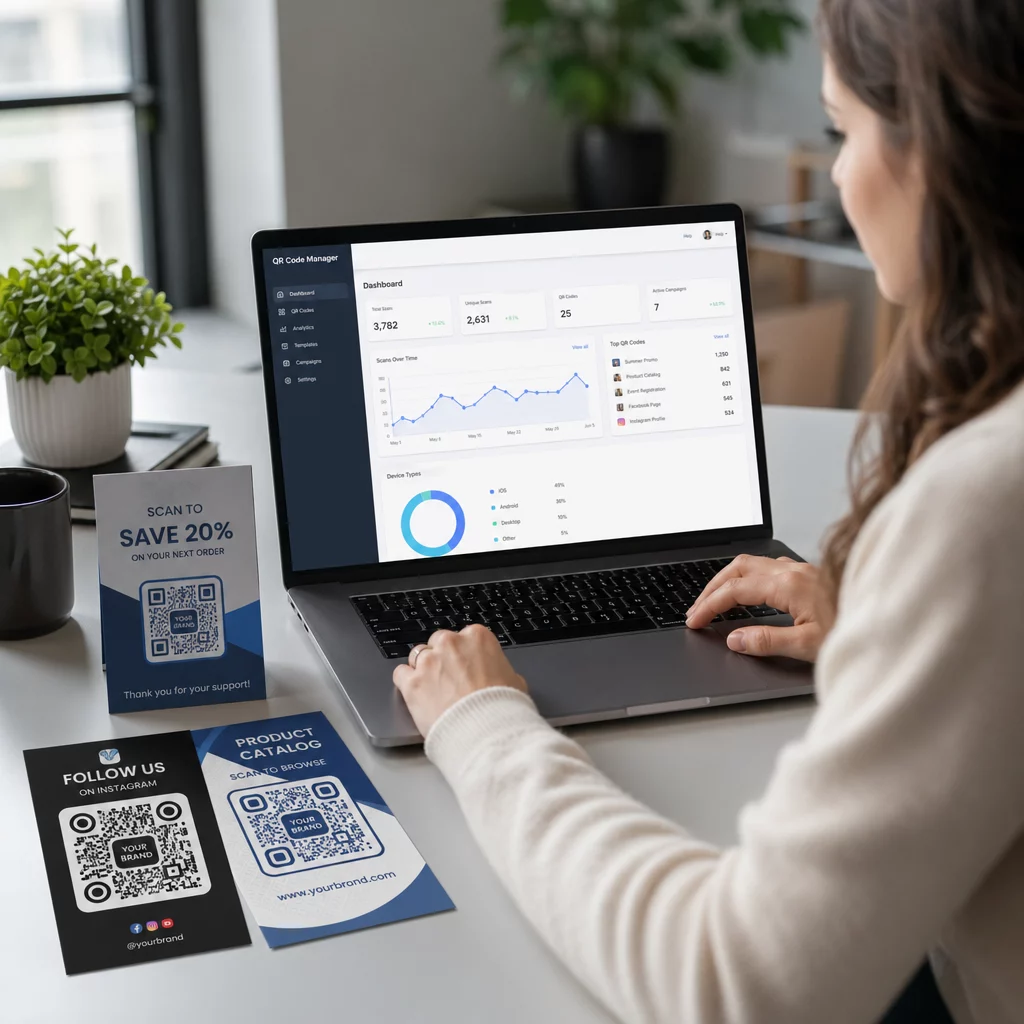
- Jumlah imbasan dan imbasan unik: Jumlah imbasan menunjukkan penglibatan keseluruhan; imbasan unik mendedahkan jangkauan sebenar anda. Nisbah tinggi jumlah kepada imbasan unik mungkin menunjukkan penglibatan berulang yang kuat atau, dalam beberapa kes, halaman pendaratan yang kurang dioptimumkan yang mendorong pengguna untuk mengimbas beberapa kali.
- Taburan geografi: Analitik Pageloot menyediakan data imbasan berasaskan lokasi, tepat sehingga ke peringkat bandar. Gunakan ini untuk mengenal pasti wilayah atau penempatan mana yang berprestasi lebih baik daripada yang lain dan memperuntukkan semula sumber dengan sewajarnya.
- Peranti dan sistem pengendalian: Jika majoriti imbasan anda datang daripada jenis peranti tertentu, utamakan pengujian halaman pendaratan anda pada platform tersebut. Pengoptimuman mudah alih-pertama adalah penting untuk kebanyakan kempen yang didorong oleh QR.
- Trend berasaskan masa: Data imbasan dari semasa ke semasa mendedahkan tempoh penglibatan puncak. Untuk kempen sensitif masa – promosi runcit, acara – data ini membantu anda menjadualkan perubahan kandungan pada masa yang tepat.
- Penjejakan penukaran: Jumlah imbasan sahaja tidak menunjukkan kejayaan kempen. Tetapkan matlamat hiliran yang jelas (penyerahan borang, pembelian, muat turun aplikasi) dan gunakan data UTM serta platform analitik anda untuk mengukur sama ada imbasan membawa kepada tindakan yang anda inginkan.
Untuk pendekatan terperinci dalam membina paparan laporan berdasarkan metrik ini, lihat panduan untuk menggunakan papan pemuka analitik kod QR.
Bina Papan Pemuka yang Menampilkan Wawasan Boleh Tindakan
Data imbasan mentah merentasi ratusan kod menjadi sukar diurus tanpa paparan berstruktur. Susun pelaporan anda kepada:
- Papan pemuka peringkat kempen: Bandingkan prestasi merentasi kempen aktif, ditapis mengikut tempoh masa. Jejaki kos-per-imbasan, kadar penukaran, dan ROI berbanding penanda aras kempen.
- Paparan berasaskan lokasi: Petakan pengedaran imbasan secara geografi untuk mengenal pasti penempatan berprestasi tinggi dan memaklumkan keputusan penempatan masa hadapan.
- Segmentasi audiens: Kumpulan pengguna mengikut jenis peranti, kekerapan imbasan, atau corak tingkah laku untuk menyesuaikan kandungan susulan.
Sediakan makluman automatik untuk sisihan ketara – peningkatan mendadak dalam imbasan dari sumber geografi yang luar biasa boleh menunjukkan pengalihan yang rosak atau aktiviti penipuan, manakala penurunan mendadak mungkin menandakan pautan rosak yang memerlukan perhatian segera.
Kemas Kini dan Kekalkan Kod Tanpa Mencetak Semula
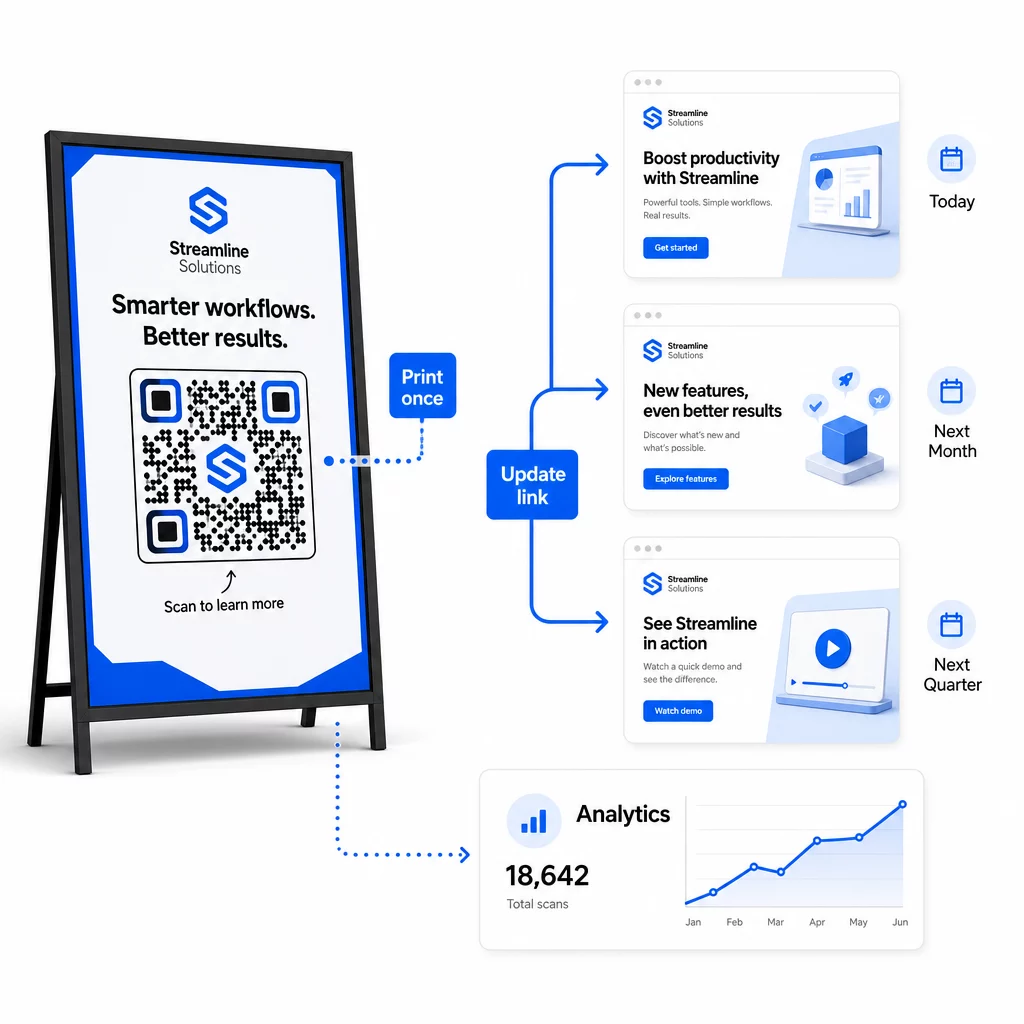
Salah satu kelebihan operasi utama kod QR dinamik ialah keupayaan untuk mengedit URL destinasi selepas mencetak – tiada kod baharu, tiada cetakan baharu, tiada gangguan kepada bahan aktif. Pada skala besar, keupayaan ini menjadi penting.
Laksanakan Kawalan Versi untuk Perubahan Destinasi
Setiap kali anda mengemas kini destinasi kod QR dinamik, log perubahan dengan:
- Tarikh dan masa kemas kini
- URL destinasi sebelumnya
- URL destinasi baharu
- Sebab perubahan
- Siapa yang membenarkannya
Gunakan skema versi – v1.0 untuk pelancaran awal, v1.1 untuk pelarasan kecil, v2.0 untuk perubahan destinasi yang signifikan – supaya pasukan anda sentiasa tahu versi mana yang aktif dan boleh kembali ke versi sebelumnya jika berlaku kerosakan. Untuk pasukan dengan pelbagai penyumbang, kebenaran berasaskan peranan memastikan hanya pengguna yang dibenarkan boleh membuat perubahan pada kod aktif.
Automasi Pengalihan Berasaskan Masa
Untuk kempen dengan jadual kandungan yang boleh diramal, pengalihan masa menghapuskan keperluan untuk campur tangan manual. Sebuah restoran boleh menyajikan menu sarapan, makan tengah hari, dan makan malam dari satu kod QR bercetak dengan menjadualkan perubahan destinasi pada masa yang ditetapkan. Seorang peruncit boleh mengkonfigurasi kod untuk mengalihkan ke halaman promosi semasa tempoh jualan dan kembali ke halaman produk standard secara automatik apabila promosi berakhir.
Pendekatan ini amat berharga apabila kod QR dicetak pada bahan dengan masa persediaan yang panjang. Anda boleh memuktamadkan pengeluaran fizikal lebih awal, yakin bahawa kod tersebut akan menyajikan kandungan yang betul apabila kempen dilancarkan.
Pantau Pautan Secara Automatik
Pada skala besar, menyemak secara manual sama ada setiap URL destinasi aktif adalah tidak praktikal. Sediakan pemantauan pautan automatik untuk memaklumkan pasukan anda apabila destinasi mengembalikan ralat, supaya anda boleh mengalihkan imbasan ke URL sandaran sebelum pengguna menghadapi pengalaman yang rosak. Mendokumentasikan URL sandaran dalam metadata anda – seperti yang diterangkan dalam bahagian konvensyen penamaan di atas – bermakna pasukan anda sentiasa mempunyai sandaran yang sedia.
Lindungi Program Kod QR Anda Seiring Pertumbuhan
Kecekapan operasi pada skala besar memerlukan tadbir urus – pemilikan yang jelas, kawalan akses yang sesuai, dan pemantauan proaktif untuk melindungi data anda dan pengguna anda.
Kawalan akses berasaskan peranan adalah asas kepada program kod QR yang selamat dan ditadbir dengan baik. Berikan kebenaran yang sepadan dengan tanggungjawab setiap ahli pasukan: pelihat analitik boleh melihat data imbasan tetapi tidak boleh mengedit kod; pengurus kempen boleh mengemas kini destinasi tetapi tidak boleh memadam kod; pentadbir mempunyai akses penuh. Struktur ini menghalang perubahan tidak sengaja atau tidak dibenarkan sambil membolehkan kerjasama merentasi pasukan besar.
Untuk perusahaan yang mengurus kod QR merentasi pelbagai jabatan, Pageloot menyokong kawalan akses peringkat ruang kerja dan perkongsian folder pasukan, membolehkan pasukan terdesentralisasi mengurus kod mereka sendiri tanpa keterlihatan ke dalam kempen kumpulan lain.
Selain kawalan akses, perhatikan corak imbasan yang tidak normal – lonjakan volum yang tidak dijangka, kepekatan imbasan yang tinggi dari satu julat IP, atau taburan geografi yang tidak konsisten dengan penempatan kempen anda. Corak ini boleh menunjukkan aktiviti bot atau pengimbasan penipuan lain yang akan merosakkan data analitik anda. Pemantauan automatik yang menandakan corak ini lebih awal melindungi integriti data anda dan pandangan prestasi kempen anda.
Kekalkan log audit semua perubahan pada kod aktif: siapa yang mengubah apa, bila, dan mengapa. Apabila isu kempen timbul, rekod ini adalah laluan terpantas untuk diagnosis dan penyelesaian.
Soalan Lazim
Kod QR Dinamik membolehkan anda mengemas kini URL destinasi atau kandungan selepas kod dicetak, tanpa menjana atau mencetak semula apa-apa. Pada skala besar, ini bermakna anda boleh membetulkan pautan rosak, mengemas kini promosi bermusim, atau mengalihkan pengguna ke kandungan baharu merentasi ribuan kod yang digunakan dari satu papan pemuka – menghapuskan kos pencetakan semula dan masa henti operasi.
Gunakan huruf kecil secara keseluruhan, pastikan nilai-nilai deskriptif dan ringkas, dan seragamkan struktur parameter anda dalam dokumen rujukan bersama. Corak yang boleh dipercayai ialah: `utmsource` untuk penempatan tertentu (cth., `storedisplay`), `utmmedium=qrcode` secara konsisten merentasi semua kod, `utmcampaign` untuk nama kempen dengan tarikh (cth., `summersale2025`), dan `utmcontent` untuk membezakan penempatan individu dalam kempen yang sama. Elakkan pautan UTM dalaman, dan jalankan semakan QA pra-pelancaran untuk mengesahkan semua parameter dihantar dengan betul ke platform analitik anda.
Takrifkan piawaian reka bentuk anda – penempatan logo, warna jenama, saiz zon senyap, dimensi cetakan minimum, dan format fail – sebelum menjana sebarang kelompok, kemudian simpan ini sebagai templat berjenama yang boleh diguna semula dalam platform kod QR anda. Gunakan templat yang sama pada setiap kod dalam larian kelompok. Kod QR dinamik menjadikan ini lebih mudah kerana data terkod yang lebih pendek menghasilkan corak yang kurang padat, meninggalkan lebih banyak ruang untuk logo dan warna tersuai tanpa menjejaskan kebolehimbasan.