Gerenciar centenas – ou milhares – de códigos QR em campanhas, locais e linhas de produtos é mais difícil do que parece. Sem um sistema claro, as equipas acabam com links quebrados, branding inconsistente e nenhuma visibilidade real sobre o que está a funcionar. Este guia aborda as estratégias e ferramentas práticas que mantêm as implementações de códigos QR em larga escala organizadas, rastreáveis e fáceis de atualizar.
Escolha o Tipo Certo de Código QR Antes de Escalar
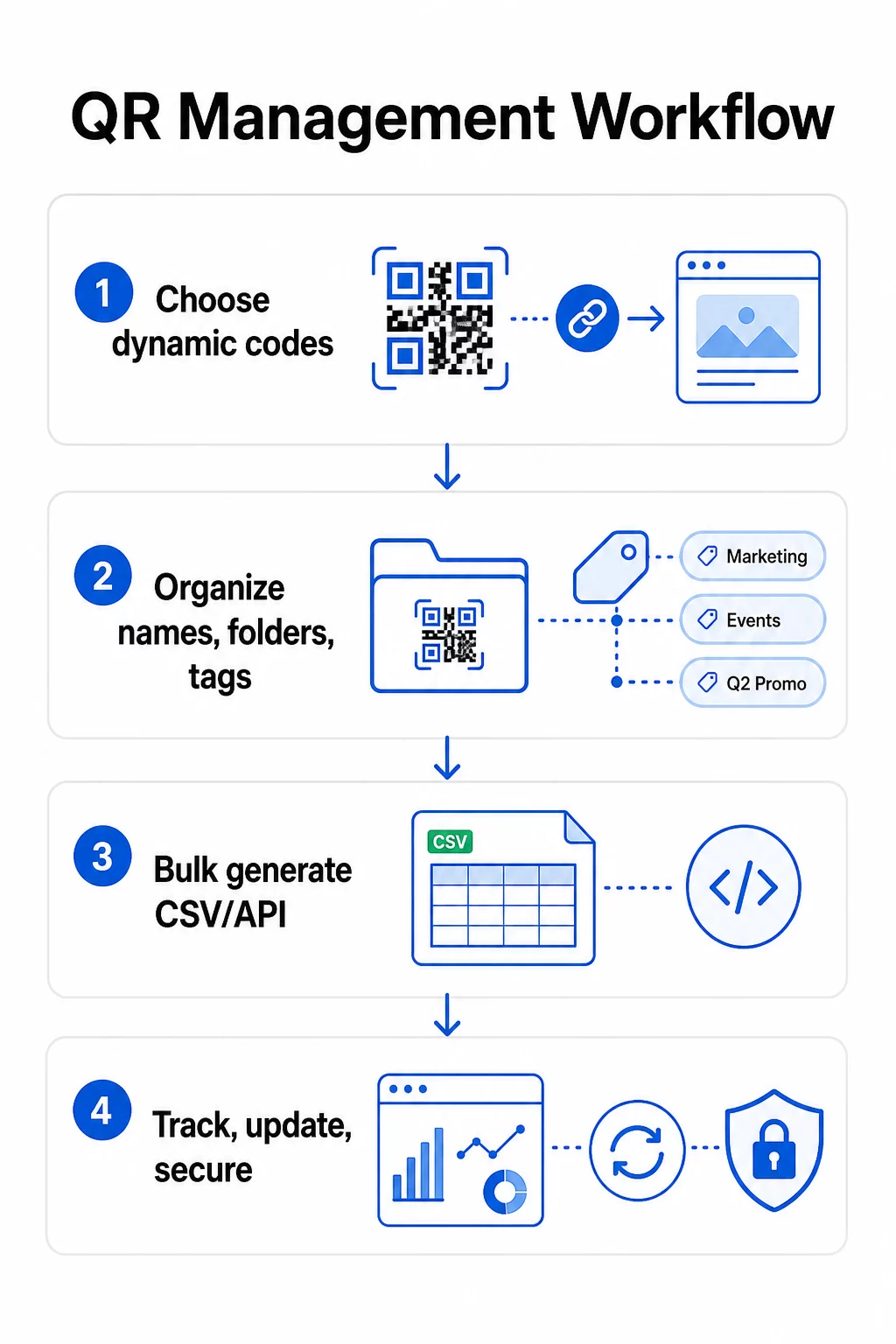
A decisão mais importante que tomará antes de escalar qualquer programa de código QR é escolher entre códigos dinâmicos e estáticos – porque essa escolha determina o que poderá alterar, rastrear e automatizar mais tarde.
Códigos QR dinâmicos utilize um URL de redirecionamento curto que você controla. Como o código impresso aponta apenas para esse redirecionamento, você pode atualizar o destino, trocar o conteúdo ou alterar os parâmetros de rastreamento a qualquer momento, sem reimprimir nada. Eles também desbloqueiam capacidades de rastreamento incluindo contagens de scans, carimbos de data/hora, localização geográfica, tipo de dispositivo e sistema operativo. Isso os torna a escolha certa para campanhas de marketing, promoções, menus de restaurantes, materiais de eventos e qualquer caso de uso onde o conteúdo muda ou os dados de desempenho são importantes.
Códigos QR estáticos codificam um destino diretamente no próprio padrão. Uma vez impressos, esses dados são permanentes – você não pode atualizar o link ou rastrear scans sem gerar um novo código. São adequados para informações que genuinamente nunca mudam: uma senha de Wi-Fi fixa, um documento regulatório permanente ou uma exposição de museu com conteúdo estável.
| Recurso | Códigos QR Dinâmicos | Códigos QR Estáticos |
|---|---|---|
| Editável após a impressão | ✅ Sim | Não |
| Rastreamento de digitalização | ✅ Sim | Não |
| Análise geográfica | ✅ Sim | Não |
| Análise em tempo real | ✅ Sim | Não |
| Custo | Assinatura necessária | Grátis |
| Melhor para | Campanhas, menus, promoções | Conteúdo fixo, permanente |
Para uma análise mais aprofundada de como estas duas opções se comparam, consulte a análise completa comparação de códigos QR estáticos vs. dinâmicos.
Comece a Gerenciar Códigos QR Dinâmicos Hoje Precisa de códigos editáveis com rastreamento integrado e um painel centralizado? O Gerador de Código QR Dinâmico permite criar, atualizar e monitorizar todos os seus códigos num só lugar.
Crie um Sistema de Nomenclatura e Organização Escalável
Quando você está gerenciando dezenas de códigos, convenções de nomenclatura soltas são um inconveniente. Em centenas ou milhares, elas se tornam um sério problema operacional. Uma estrutura de nomenclatura consistente, combinada com uma hierarquia de pastas lógica, mantém sua equipe alinhada e seus códigos encontráveis em qualquer estágio de uma campanha.
Use uma Convenção de Nomenclatura Padronizada
Um formato de nomenclatura confiável captura tudo o que você precisa para identificar um código sem abri-lo. Uma estrutura prática:
`Departamento-CampanhaCanal-GeoObjetivo-TipoDeAtivoVersãoStatus`
Por exemplo: `MKT-Verão25OOH-EUAPromo-Cartazv2ATIVO`
Defina as datas no formato AAAA-MM, use números de versão (v1, v2) para distinguir iterações e sempre inclua um indicador de status (ATIVO, PAUSADO, ARQUIVADO). Isso evita confusão quando várias versões da mesma campanha estão ativas simultaneamente.
Registre Metadados Estruturados para Cada Código
Além do nome, cada código QR deve conter metadados estruturados que qualquer pessoa da sua equipe pode consultar. Campos a incluir:
- Proprietário (pessoa ou equipe responsável)
- Unidade de negócio ou linha de produto
- URL de destino e URL de backup
- Tipo de código (dinâmico ou estático)
- Data de início e data de término
- Texto de chamada para ação
- Nível de acesso ou segurança
Datas de término e URLs de backup são especialmente importantes em escala – elas evitam digitalizações sem saída após o encerramento de uma campanha, e um URL de backup garante que os usuários ainda cheguem a um lugar útil se o destino principal cair.
Organize com Pastas e Tags
Uma estrutura de pastas de dois níveis funciona bem para a maioria das equipes: pastas de nível superior para unidades de negócio ou linhas de produto, e subpastas para campanhas ou locais individuais. As tags adicionam uma segunda camada de filtragem – marque os códigos por região (EUA, UE), canal (e-mail, out-of-home, embalagem), tipo de posicionamento (cartaz, garrafa, tela) e status (ativo, arquivado).
Da Pageloot Recurso de pastas de código QR suporta o compartilhamento de pastas baseado em equipe com permissões baseadas em função, para que você possa dar aos novos membros da equipe acesso de leitura a análises, enquanto restringe quem pode editar ou excluir códigos. Isso é especialmente útil para agências que gerenciam vários clientes ou empresas que executam códigos em diferentes departamentos.
Gere Códigos em Massa Sem Perder o Controle
Uma vez que sua estrutura de nomenclatura e pastas esteja estabelecida, a criação em massa se torna simples – desde que seus dados de entrada estejam limpos e seu processo inclua uma etapa de validação antes de gerar em volume.
Use Arquivos CSV para Geração em Lote
A geração em massa baseada em CSV é o método mais prático para criar grandes volumes de códigos de forma eficiente. Um arquivo CSV bem estruturado para geração de código QR deve incluir:
- `unique_id` – seu identificador interno
- `qr_type` – URL, PDF, vCard, formulário, etc.
- `destination_url` – o destino alvo
- `campaign_name` – para relatórios e filtragem
- `folder` – onde o código deve residir no seu painel
- `template_name` – o design de marca a aplicar
- `utm_parameters` – origem, meio, campanha, conteúdo
- `startdate` / `enddate` – janela da campanha
- `status` – ativo ou pausado
- `owner` – membro da equipa responsável
Antes de carregar, valide o CSV: confirme que todos os campos obrigatórios estão preenchidos, verifique se os URLs estão ativos e formatados corretamente, e execute um lote de teste de cinco a dez códigos em diferentes dispositivos para detetar erros antes que se propaguem por toda a execução.
Para geração em massa automatizada em escala empresarial, Gestão de códigos QR baseada em API permite-lhe passar parâmetros programaticamente, acionar a criação em lote a partir dos seus próprios sistemas e atualizar URLs de destino em milhares de códigos simultaneamente usando pedidos PATCH ou PUT.
Adicione Parâmetros UTM Consistentemente
Parâmetros UTM são o que conectam as leituras de códigos QR à sua pilha de análise mais ampla. Sem eles, você pode ver que alguém leu um código, mas não pode atribuir facilmente essa leitura a uma campanha, canal ou posicionamento específico no Google Analytics.
Siga estas convenções para manter seus dados limpos:
- Use minúsculas em tudo – o rastreamento UTM diferencia maiúsculas de minúsculas, e a capitalização mista cria relatórios fragmentados
- Mantenha os valores dos parâmetros descritivos, mas concisos: `utmsource=storedisplay`, `utmmedium=qrcode`, `utmcampaign=summersale_2025`
- Use `utmcontent` para distinguir entre posicionamentos dentro da mesma campanha (por exemplo, `windowposter` vs. `checkout_counter`)
- Documente sua taxonomia de nomenclatura em um documento de referência compartilhado para que cada membro da equipe siga as mesmas regras
Para um guia completo de configuração de UTM e relatórios do Google Analytics 4, consulte parâmetros UTM para códigos QR.
Conecte Suas Leituras de QR à Análise de Campanha Da Pageloot plataforma de agência e equipe suporta anexação automática de UTM, controle de acesso baseado em função e relatórios de cliente compartilháveis – tornando o rastreamento de atribuição significativamente mais fácil em grandes implementações.
Mantenha a Consistência da Marca em Cada Código
Em escala, a consistência visual é importante por duas razões: ela constrói reconhecimento e confiança com as pessoas que escaneiam seus códigos, e evita que uma colcha de retalhos de designs incompatíveis dilua a identidade da sua marca.
Antes de gerar um grande lote, defina e bloqueie seus padrões de design:
- Posicionamento do logotipo e tamanho mínimo
- Paleta de cores da marca (fundo escuro em primeiro plano claro continua sendo o padrão mais confiável para escaneamento)
- Estilo de canto e módulo
- Requisitos de zona silenciosa (no mínimo quatro módulos de espaço livre em todos os lados)
- Tamanho mínimo de impressão (pelo menos 2 × 2 cm para escaneamento de perto; aumente usando a regra 10:1 – a largura do código deve ser de pelo menos um décimo da distância de escaneamento esperada)
- Formatos de arquivo: SVG ou PDF para materiais impressos (300+ DPI), PNG para uso digital
Os códigos QR dinâmicos oferecem uma vantagem prática aqui: como eles codificam uma URL de redirecionamento curta em vez de um destino longo, o padrão subjacente é menos denso. Isso deixa mais espaço para incorporar logotipos e cores personalizadas sem comprometer a escaneabilidade.
Salve esses padrões como modelos de marca reutilizáveis em sua plataforma de códigos QR. Pageloot permite que você crie modelos para diferentes contextos – um formato compacto para cartões de visita, uma versão mais ousada para sinalização de grande formato – e os aplique consistentemente em cada execução de geração em massa.
Antes de se comprometer com uma grande tiragem de impressão, teste uma amostra de impressões físicas em vários dispositivos e condições de iluminação. Se algum código não escanear de forma confiável, aumente o tamanho físico, reforce o contraste de cores ou amplie a zona silenciosa.
Acompanhe o Desempenho Com as Métricas Certas
Gerar códigos de forma eficiente é apenas metade do trabalho. Entender como eles se comportam – e agir com base nesses dados – é o que impulsiona a melhoria contínua.
As principais métricas a serem monitoradas para implementações em larga escala são:
- Total de digitalizações e digitalizações únicas: O total de digitalizações mostra o envolvimento geral; as digitalizações únicas revelam o seu alcance real. Uma alta proporção de digitalizações totais para únicas pode indicar um forte envolvimento repetido ou, em alguns casos, uma página de destino mal otimizada que leva os utilizadores a digitalizar várias vezes.
- Distribuição geográfica: As análises do Pageloot fornecem dados de digitalização baseados na localização, precisos até aproximadamente ao nível da cidade. Use isto para identificar quais regiões ou posicionamentos superam outros e realocar recursos de acordo.
- Dispositivo e sistema operativo: Se a maioria das suas digitalizações provém de um tipo de dispositivo específico, priorize o teste das suas páginas de destino nessa plataforma. A otimização mobile-first é essencial para a maioria das campanhas impulsionadas por QR.
- Tendências baseadas no tempo: Os dados de digitalização ao longo do tempo revelam picos de envolvimento. Para campanhas sensíveis ao tempo – promoções de retalho, eventos – estes dados ajudam a agendar alterações de conteúdo no momento certo.
- Monitorização de conversões: O volume de digitalizações por si só não indica o sucesso da campanha. Defina metas claras a jusante (envios de formulários, compras, downloads de aplicações) e use dados UTM mais a sua plataforma de análise para medir se as digitalizações levam às ações que deseja.
Para uma abordagem detalhada à construção de vistas de relatórios em torno destas métricas, consulte o guia para usar um painel de análise de códigos QR.
Construa Painéis Que Revelam Insights Acionáveis
Dados brutos de digitalização em centenas de códigos tornam-se difíceis de gerir sem vistas estruturadas. Organize os seus relatórios em:
- Painéis de nível de campanha: Compare o desempenho entre campanhas ativas, filtrado por período de tempo. Acompanhe o custo por digitalização, a taxa de conversão e o ROI em relação aos benchmarks da campanha.
- Visualizações baseadas em localização: Mapeie a distribuição de digitalizações geograficamente para identificar posicionamentos de alto desempenho e informar futuras decisões de implementação.
- Segmentação de público: Agrupe usuários por tipo de dispositivo, frequência de digitalização ou padrões de comportamento para adaptar o conteúdo de acompanhamento.
Configure alertas automatizados para desvios significativos – um pico repentino de digitalizações de uma fonte geográfica incomum pode indicar um redirecionamento quebrado ou atividade fraudulenta, enquanto uma queda acentuada pode sinalizar um link quebrado que precisa de atenção imediata.
Atualize e Mantenha Códigos Sem Reimprimir
Uma das principais vantagens operacionais dos códigos QR dinâmicos é a capacidade de editar URLs de destino após a impressão – sem novos códigos, sem novas tiragens, sem interrupção de materiais ativos. Em escala, essa capacidade torna-se essencial.
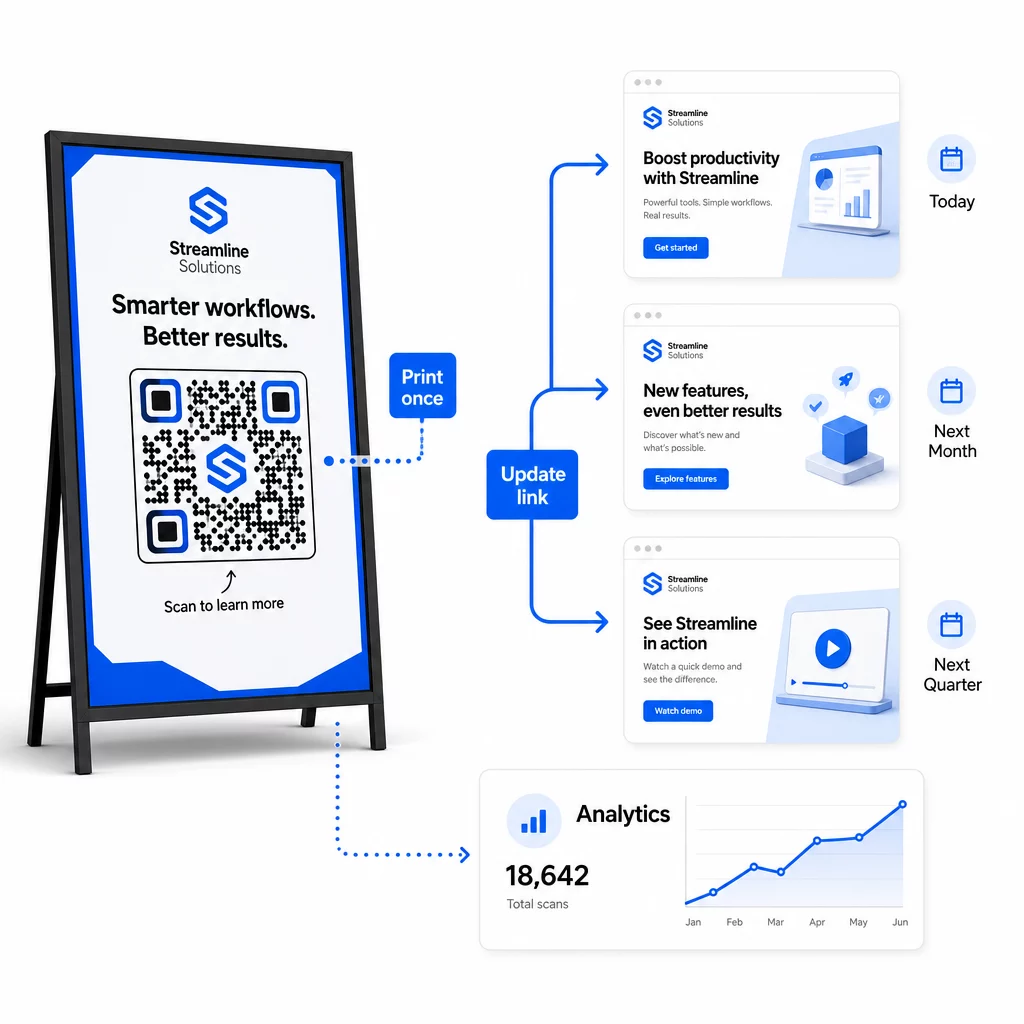
Implemente Controle de Versão para Alterações de Destino
Cada vez que você atualiza o destino de um código QR dinâmico, registre a alteração com:
- Data e hora da atualização
- URL de destino anterior
- Novo URL de destino
- Motivo da alteração
- Quem autorizou
Use um esquema de versionamento – v1.0 para o lançamento inicial, v1.1 para ajustes menores, v2.0 para uma mudança de destino significativa – para que sua equipe sempre saiba qual versão está ativa e possa reverter se algo quebrar. Para equipes com múltiplos colaboradores, as permissões baseadas em função garantem que apenas usuários autorizados possam fazer alterações nos códigos ativos.
Automatize Redirecionamentos Baseados em Tempo
Para campanhas com cronogramas de conteúdo previsíveis, os redirecionamentos programados eliminam a necessidade de intervenção manual. Um restaurante pode servir menus de café da manhã, almoço e jantar a partir de um único código QR impresso, agendando mudanças de destino em horários definidos. Um varejista pode configurar um código para redirecionar para uma página promocional durante uma janela de vendas e retornar à página de produto padrão automaticamente quando a promoção terminar.
Esta abordagem é particularmente valiosa quando os códigos QR são impressos em materiais com longos prazos de entrega. Você pode finalizar a produção física com bastante antecedência, confiante de que o código servirá o conteúdo certo quando a campanha for lançada.
Monitore Links Automaticamente
Em escala, verificar manualmente se cada URL de destino está ativo não é prático. Configure o monitoramento automático de links para alertar sua equipe quando um destino retornar um erro, para que você possa redirecionar as leituras para um URL de backup antes que os usuários encontrem uma experiência quebrada. Documentar URLs de backup em seus metadados – conforme descrito na seção de convenção de nomenclatura acima – significa que sua equipe sempre terá um plano de contingência pronto.
Proteja Seu Programa de Código QR à Medida que Cresce
A eficiência operacional em escala requer governança – propriedade clara, controles de acesso apropriados e monitoramento proativo para proteger seus dados e seus usuários.
Controle de acesso baseado em função é a base de um programa de código QR seguro e bem governado. Atribua permissões que correspondam às responsabilidades de cada membro da equipe: visualizadores de análises podem ver dados de leitura, mas não editar códigos; gerentes de campanha podem atualizar destinos, mas não excluir códigos; administradores têm acesso total. Esta estrutura previne alterações acidentais ou não autorizadas, ao mesmo tempo que permite a colaboração entre grandes equipes.
Para empresas que gerenciam códigos QR em múltiplos departamentos, o Pageloot suporta controles de acesso em nível de espaço de trabalho e compartilhamento de pastas de equipe, permitindo que equipes descentralizadas gerenciem seus próprios códigos sem visibilidade das campanhas de outros grupos.
Além do controle de acesso, observe padrões de leitura anômalos – picos de volume inesperados, altas concentrações de leituras de um único intervalo de IP ou distribuições geográficas inconsistentes com os posicionamentos de sua campanha. Esses padrões podem indicar atividade de bot ou outras leituras fraudulentas que corromperiam seus dados analíticos. O monitoramento automatizado que sinaliza esses padrões precocemente protege tanto a integridade dos seus dados quanto os insights de desempenho da sua campanha.
Mantenha um registro de auditoria de todas as alterações nos códigos ativos: quem mudou o quê, quando e por quê. Quando um problema de campanha surge, este registro é o caminho mais rápido para o diagnóstico e a resolução.
Perguntas Frequentes
Os códigos QR dinâmicos permitem-lhe atualizar o URL de destino ou o conteúdo depois de o código ter sido impresso, sem gerar ou reimprimir nada. Em grande escala, isto significa que pode corrigir links quebrados, atualizar promoções sazonais ou redirecionar utilizadores para novo conteúdo em milhares de códigos implementados a partir de um único painel de controlo – eliminando custos de reimpressão e tempo de inatividade operacional.
Use minúsculas em todo o texto, mantenha os valores descritivos e concisos, e padronize a estrutura dos seus parâmetros em um documento de referência compartilhado. Um padrão confiável é: `utmsource` para o posicionamento específico (por exemplo, `storedisplay`), `utmmedium=qrcode` consistentemente em todos os códigos, `utmcampaign` para o nome da campanha com data (por exemplo, `summersale2025`), e `utmcontent` para distinguir posicionamentos individuais dentro da mesma campanha. Evite links UTM internos, e execute verificações de QA pré-lançamento para confirmar que todos os parâmetros estão sendo transmitidos corretamente para sua plataforma de análise.
Defina seus padrões de design – posicionamento do logotipo, cores da marca, tamanho da zona de silêncio, dimensões mínimas de impressão e formatos de arquivo – antes de gerar qualquer lote, em seguida, salve-os como modelos de marca reutilizáveis em sua plataforma de código QR. Aplique o mesmo modelo em todos os códigos em uma execução em lote. Os códigos QR dinâmicos tornam isso mais fácil porque seus dados codificados mais curtos produzem padrões menos densos, deixando mais espaço para logotipos e cores personalizadas sem comprometer a capacidade de leitura.