Управлението на стотици – или хиляди – QR кодове в различни кампании, локации и продуктови линии е по-трудно, отколкото изглежда. Без ясна система екипите се сблъскват със счупени връзки, непоследователно брандиране и липса на реална видимост за това какво работи. Това ръководство обхваща практическите стратегии и инструменти, които поддържат широкомащабните внедрявания на QR кодове организирани, проследими и лесни за актуализиране.
Изберете правилния тип QR код, преди да мащабирате
Най-важното решение, което ще вземете, преди да мащабирате която и да е програма за QR кодове, е да изберете между динамични и статични кодове – защото този избор определя какво можете да променяте, проследявате и автоматизирате по-късно.
Динамични QR кодове използвайте кратък URL адрес за пренасочване, който контролирате. Тъй като отпечатаният код сочи само към това пренасочване, можете да актуализирате дестинацията, да сменяте съдържание или да променяте параметри за проследяване по всяко време, без да препечатвате нищо. Те също така отключват възможности за проследяване включително брой сканирания, времеви клейма, географско местоположение, тип устройство и операционна система. Това ги прави правилния избор за маркетингови кампании, промоции, менюта на ресторанти, материали за събития и всеки случай на употреба, където съдържанието се променя или данните за ефективността са важни.
Статични QR кодове кодират дестинация директно в самия шаблон. Веднъж отпечатани, тези данни са постоянни – не можете да актуализирате връзката или да проследявате сканирания, без да генерирате нов код. Те са добре подходящи за информация, която наистина никога не се променя: фиксирана Wi-Fi парола, постоянен регулаторен документ или музейна експозиция със стабилно съдържание.
| ФУНКЦИЯ | Динамични QR кодове | Статични QR кодове |
|---|---|---|
| Редактируеми след отпечатване | ✅ Да | ❌ Не |
| Проследяване на сканирането | ✅ Да | ❌ Не |
| Географски анализи | ✅ Да | ❌ Не |
| Статистика в реално време | ✅ Да | ❌ Не |
| Разходи | Изисква се абонамент | Безплатно |
| Най-добър за | Кампании, менюта, промоции | Фиксирано, постоянно съдържание |
За по-задълбочен поглед върху това как се сравняват тези две опции, вижте пълния анализ на статични срещу динамични QR кодове.
Започнете да управлявате динамични QR кодове днес Нуждаете се от редактируеми кодове с вградено проследяване и централизирано табло за управление? The Динамичен QR код генератор ви позволява да създавате, актуализирате и наблюдавате всичките си кодове на едно място.
Изградете система за именуване и организация, която се мащабира
Когато управлявате десетки кодове, свободните конвенции за именуване са неудобство. При стотици или хиляди те се превръщат в сериозен оперативен проблем. Последователна структура за именуване, комбинирана с логическа йерархия на папките, поддържа екипа ви в синхрон и кодовете ви лесно откриваеми на всеки етап от кампанията.
Използвайте стандартизирана конвенция за именуване
Надеждният формат за именуване улавя всичко, от което се нуждаете, за да идентифицирате код, без да го отваряте. Една практична структура:
`Отдел-КампанияКанал-ГеоЦел-ТипАктивВерсияСтатус`
Например: `MKT-Лято25OOH-САЩПромо-Плакатv2АКТИВЕН`
Задавайте дати във формат ГГГГ-ММ, използвайте номера на версии (v1, v2), за да различавате итерациите, и винаги включвайте индикатор за статус (АКТИВЕН, ПАУЗИРАН, АРХИВИРАН). Това предотвратява объркване, когато няколко версии на една и съща кампания са активни едновременно.
Записвайте структурирани метаданни за всеки код
Освен името, всеки QR код трябва да съдържа структурирани метаданни, които всеки от вашия екип може да използва. Полета за включване:
- Собственик (отговорно лице или екип)
- Бизнес звено или продуктова линия
- Целеви URL адрес и резервен URL адрес
- Тип код (динамичен или статичен)
- Начална дата и крайна дата
- Текст за призив към действие
- Ниво на достъп или сигурност
Крайните дати и резервните URL адреси са особено важни в голям мащаб – те предотвратяват сканирания без изход след приключване на кампания, а резервният URL адрес гарантира, че потребителите все пак ще попаднат на полезно място, ако основната дестинация спре да работи.
Организирайте с папки и тагове
Двустепенна структура на папките работи добре за повечето екипи: папки от най-високо ниво за бизнес звена или продуктови линии и подпапки за отделни кампании или местоположения. Таговете добавят втори слой филтриране – маркирайте кодове по регион (САЩ, ЕС), канал (имейл, външна реклама, опаковка), тип разположение (плакат, бутилка, екран) и статус (активен, архивиран).
На Pageloot Функция за папки с QR кодове поддържа споделяне на папки на екипна база с разрешения, базирани на роли, така че можете да дадете на новите членове на екипа достъп за четене до анализи, като същевременно ограничавате кой може да редактира или изтрива кодове. Това е особено полезно за агенции, управляващи множество клиенти, или предприятия, използващи кодове в различни отдели.
Генерирайте кодове в насипно състояние, без да губите контрол
След като вашата структура за именуване и папки е налице, масовото създаване става лесно – при условие че входните ви данни са чисти и процесът ви включва стъпка за валидиране, преди да генерирате в голям обем.
Използвайте CSV файлове за генериране на партиди
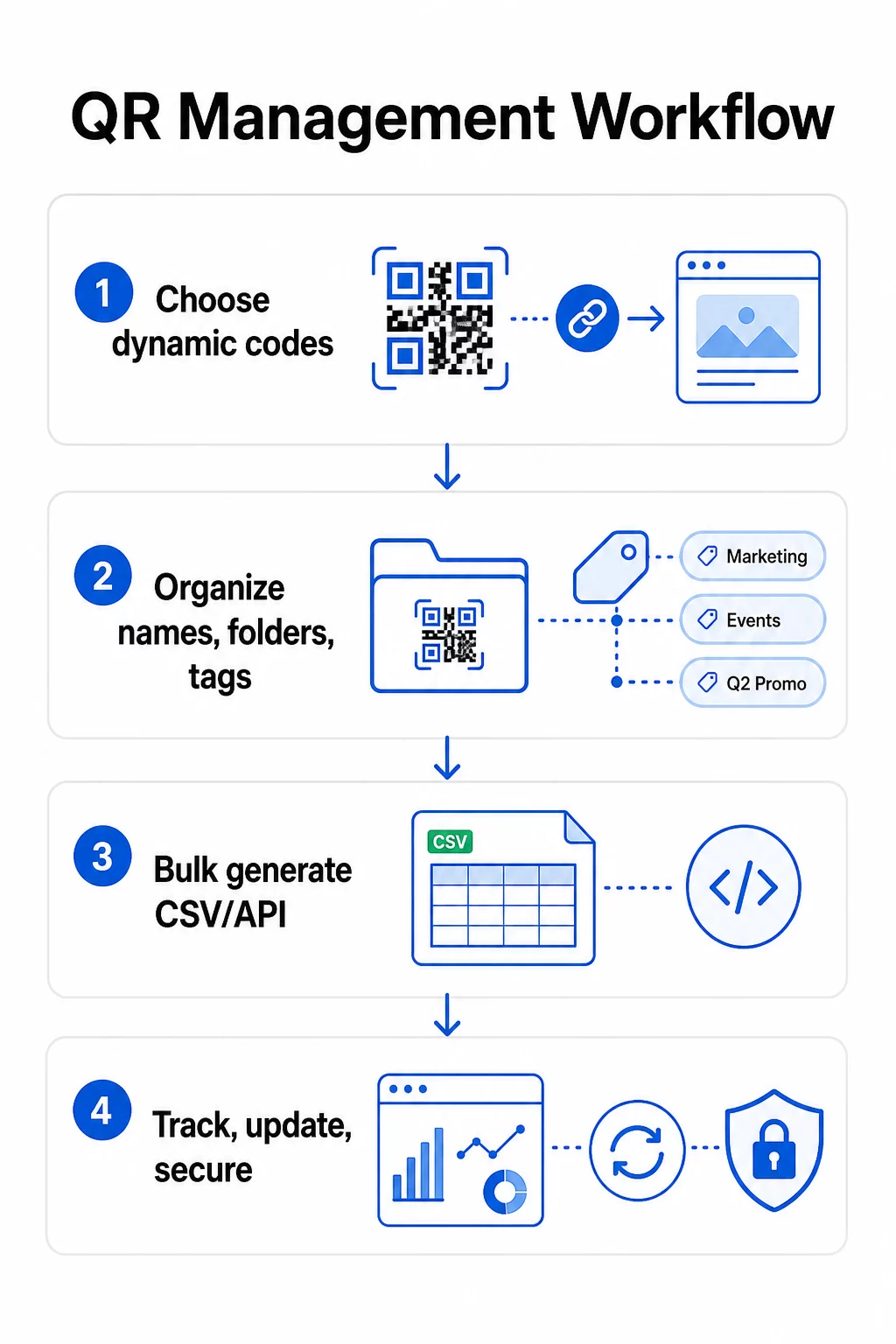
Масовото генериране, базирано на CSV, е най-практичният метод за ефективно създаване на големи обеми кодове. Добре структуриран CSV файл за генериране на QR кодове трябва да включва:
- `unique_id` – вашият вътрешен идентификатор
- тип на QR – URL, PDF, vCard, формуляр и т.н.
- URL на дестинацията – целевата дестинация
- име на кампанията – за отчитане и филтриране
- папка – където кодът трябва да се намира във вашето табло за управление
- име на шаблон – брандираният дизайн за прилагане
- UTM параметри – източник, среда, кампания, съдържание
- началнадата / крайнадата – период на кампанията
- статус – активен или на пауза
- собственик – отговорен член на екипа
Преди качване, валидирайте CSV файла: потвърдете, че всички задължителни полета са попълнени, проверете дали URL адресите са активни и правилно форматирани, и стартирайте тестова партида от пет до десет кода на различни устройства, за да хванете грешки, преди да се разпространят в целия процес.
За автоматизирано генериране на голям обем в корпоративен мащаб, Управление на QR кодове чрез API ви позволява да предавате параметри програмно, да задействате групово създаване от вашите собствени системи, и да актуализирате URL адресите на дестинациите за хиляди кодове едновременно, използвайки PATCH или PUT заявки.
Добавяйте UTM параметри последователно
UTM параметрите са това, което свързва сканиранията на QR кодове с по-широкия ви аналитичен стек. Без тях можете да видите, че някой е сканирал код, но не можете лесно да припишете това сканиране на конкретна кампания, канал или разположение в Google Analytics.
Следвайте тези конвенции, за да поддържате данните си чисти:
- Използвайте малки букви навсякъде – UTM проследяването е чувствително към регистъра и смесеното използване на главни и малки букви създава фрагментирани отчети
- Поддържайте стойностите на параметрите описателни, но кратки: `utmsource=storedisplay`, `utmмедиум=qrcode`, `utmcampaign=summersale_2025`
- Използвайте `utmcontent`, за да разграничите разположенията в рамките на една и съща кампания (напр. `windowposter` срещу `checkout_counter`)
- Документирайте вашата таксономия на именуване в споделен референтен документ, така че всеки член на екипа да спазва едни и същи правила
За пълно ръководство за настройка на UTM и отчитане в Google Analytics 4, вижте UTM параметри за QR кодове.
Свържете вашите QR сканирания с анализите на кампаниите На Pageloot платформа за агенции и екипи поддържа автоматично добавяне на UTM, контрол на достъпа на базата на роли и споделяеми клиентски отчети – което прави проследяването на приписването значително по-лесно при големи внедрявания.
Поддържайте последователна марка във всеки код
В голям мащаб визуалната последователност е важна по две причини: тя изгражда разпознаваемост и доверие у хората, които сканират вашите кодове, и предотвратява размиването на идентичността на вашата марка от мозайка от несъответстващи дизайни.
Преди да генерирате голяма партида, дефинирайте и заключете вашите дизайнерски стандарти:
- Разположение на логото и минимален размер
- Цветова палитра на марката (тъмен преден план на светъл фон остава най-надеждният модел за сканиране)
- Стил на ъглите и модулите
- Изисквания за тиха зона (минимум четири модула чисто пространство от всички страни)
- Минимален размер за печат (поне 2 × 2 см за сканиране от близко разстояние; мащабирайте, като използвате правилото 10:1 – ширината на кода трябва да бъде поне една десета от очакваното разстояние за сканиране)
- Файлови формати: SVG или PDF за печатни материали (300+ DPI), PNG за цифрова употреба
Динамичните QR кодове предлагат практическо предимство тук: тъй като кодират кратък URL адрес за пренасочване, а не дълга дестинация, основният модел е по-малко плътен. Това оставя повече място за включване на лога и персонализирани цветове, без да се компрометира възможността за сканиране.
Запазете тези стандарти като шаблони за многократна употреба с марка във вашата платформа за QR кодове. Pageloot ви позволява да създавате шаблони за различни контексти – компактен формат за визитки, по-смела версия за широкоформатни табели – и да ги прилагате последователно при всяко масово генериране.
Преди да се ангажирате с голям тираж, тествайте проба от физически отпечатъци на множество устройства и при различни условия на осветление. Ако някой код не се сканира надеждно, увеличете физическия размер, засилете цветовия контраст или разширете тихата зона.
Проследявайте ефективността с правилните показатели
Ефективното генериране на кодове е само половината от работата. Разбирането как те се представят – и предприемането на действия въз основа на тези данни – е това, което движи непрекъснатото подобрение.
Ключовите показатели за наблюдение при широкомащабни внедрявания са:
- Общ брой сканирания и уникални сканирания: Общият брой сканирания показва цялостната ангажираност; уникалните сканирания разкриват действителния ви обхват. Високото съотношение на общия брой към уникалните сканирания може да показва силна повтаряща се ангажираност или, в някои случаи, лошо оптимизирана целева страница, която кара потребителите да сканират многократно.
- Географско разпределение: Анализите на Pageloot предоставят данни за сканиране въз основа на местоположението, точни до приблизително нивото на града. Използвайте това, за да идентифицирате кои региони или разположения се представят по-добре от другите и да преразпределите ресурсите съответно.
- Устройство и операционна система: Ако по-голямата част от сканиранията ви идват от определен тип устройство, дайте приоритет на тестването на целевите си страници на тази платформа. Оптимизацията за мобилни устройства е от съществено значение за повечето кампании, задвижвани от QR кодове.
- Времеви тенденции: Данните от сканирането във времето разкриват пиковите периоди на ангажираност. За кампании, чувствителни към времето – промоции на дребно, събития – тези данни ви помагат да планирате промените в съдържанието в точния момент.
- Проследяване на реализациите: Само обемът на сканиранията не показва успех на кампанията. Задайте ясни последващи цели (изпращане на формуляри, покупки, изтегляния на приложения) и използвайте UTM данни плюс вашата аналитична платформа, за да измерите дали сканиранията водят до желаните от вас действия.
За подробен подход към изграждането на изгледи за отчитане около тези показатели, вижте ръководството за използване на табло за анализ на QR кодове.
Изградете табла, които разкриват приложими прозрения
Необработените данни от сканиране на стотици кодове стават трудни за управление без структурирани изгледи. Организирайте отчитането си в:
- Табла на ниво кампания: Сравнете ефективността на активните кампании, филтрирани по период от време. Проследявайте разходите за сканиране, процента на реализация и ROI спрямо еталонните показатели на кампанията.
- Изгледи, базирани на местоположение: Картографирайте разпределението на сканиранията географски, за да идентифицирате високоефективни места и да информирате бъдещи решения за разполагане.
- Сегментиране на аудиторията: Групирайте потребителите по тип устройство, честота на сканиране или модели на поведение, за да адаптирате последващото съдържание.
Настройте автоматизирани сигнали за значителни отклонения – внезапен скок в сканиранията от необичаен географски източник може да показва счупено пренасочване или измамна дейност, докато рязък спад може да сигнализира за счупена връзка, която се нуждае от незабавно внимание.
Актуализиране и поддържане на кодове без препечатване
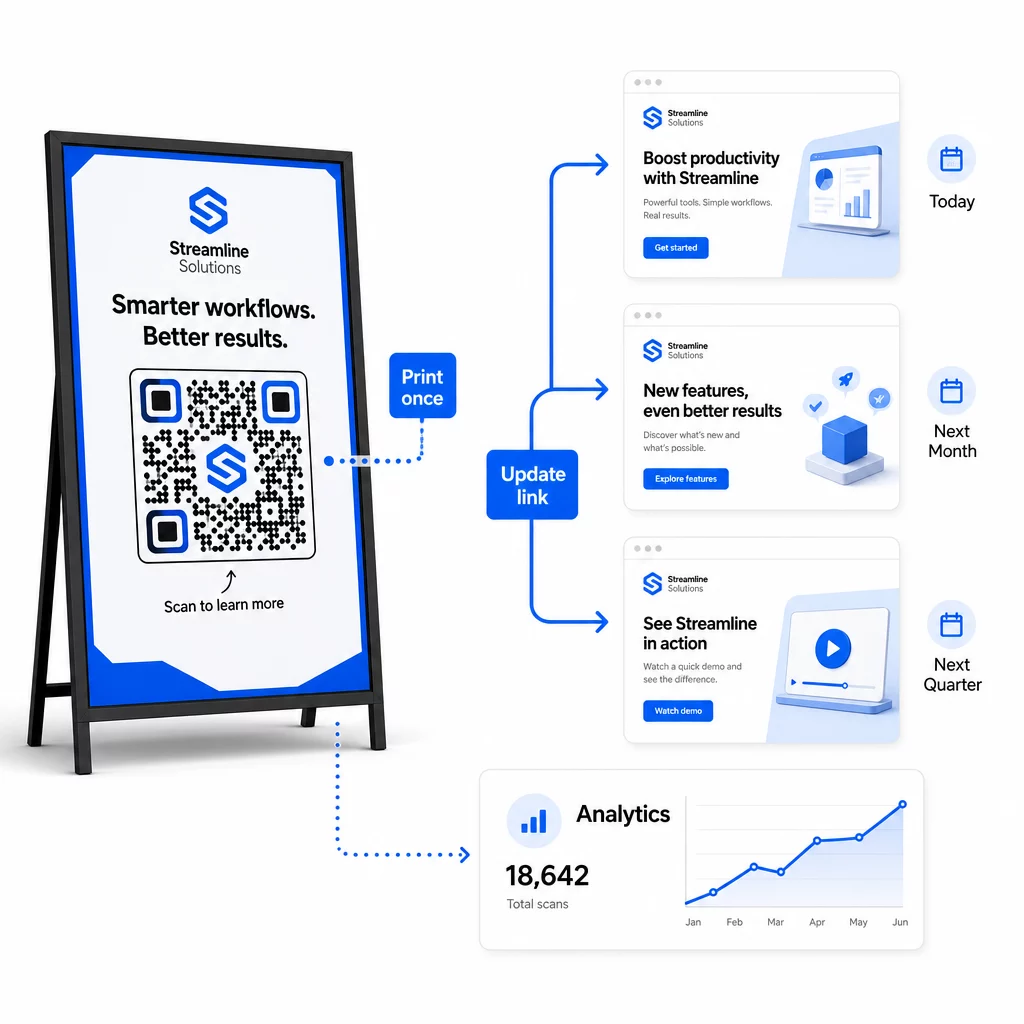
Едно от основните оперативни предимства на динамичните QR кодове е възможността да редактирате целеви URL адреси след отпечатване – без нови кодове, без нови тиражи, без прекъсване на активните материали. В голям мащаб тази възможност става съществена.
Въведете контрол на версиите за промени в дестинациите
Всеки път, когато актуализирате дестинацията на динамичен QR код, регистрирайте промяната с:
- Дата и час на актуализацията
- Предишен целеви URL адрес
- Нов целеви URL адрес
- Причина за промяната
- Кой я е разрешил
Използвайте схема за версии – v1.0 за първоначално стартиране, v1.1 за малки корекции, v2.0 за значителна промяна на дестинацията – така че вашият екип винаги да знае коя версия е активна и да може да се върне назад, ако нещо се повреди. За екипи с множество сътрудници, разрешенията, базирани на роли, гарантират, че само оторизирани потребители могат да правят промени в активните кодове.
Автоматизирайте пренасочвания, базирани на време.
За кампании с предвидими графици на съдържанието, пренасочванията с времеви интервал премахват нуждата от ръчна намеса. Ресторант може да предлага менюта за закуска, обяд и вечеря от един отпечатан QR код, като планира промени в дестинацията в определени часове. Търговец на дребно може да конфигурира код да пренасочва към промоционална страница по време на период на разпродажба и автоматично да се връща към стандартната продуктова страница, когато промоцията приключи.
Този подход е особено ценен, когато QR кодовете са отпечатани върху материали с дълги срокове за изработка. Можете да финализирате физическото производство доста по-рано, уверени, че кодът ще обслужва правилното съдържание, когато кампанията стартира.
Автоматично наблюдавайте връзките.
В голям мащаб, ръчната проверка дали всеки URL адрес на дестинация е активен не е практична. Настройте автоматизирано наблюдение на връзките, за да предупреждавате екипа си, когато дестинация върне грешка, така че да можете да пренасочите сканиранията към резервен URL адрес, преди потребителите да се сблъскат с неработещо преживяване. Документирането на резервни URL адреси във вашите метаданни – както е описано в раздела за конвенции за именуване по-горе – означава, че вашият екип винаги има готовност за резервен вариант.
Защитете вашата програма за QR кодове, докато расте.
Оперативната ефективност в голям мащаб изисква управление – ясна собственост, подходящи контроли за достъп и проактивно наблюдение за защита на вашите данни и вашите потребители.
Контрол на достъпа, базиран на роли е основата на сигурна и добре управлявана програма за QR кодове. Задайте разрешения, които съответстват на отговорностите на всеки член на екипа: зрителите на анализи могат да виждат данни от сканиране, но не могат да редактират кодове; мениджърите на кампании могат да актуализират дестинации, но не могат да изтриват кодове; администраторите имат пълен достъп. Тази структура предотвратява случайни или неоторизирани промени, като същевременно позволява сътрудничество между големи екипи.
За предприятия, управляващи QR кодове в множество отдели, Pageloot поддържа контроли за достъп на ниво работно пространство и споделяне на екипни папки, което позволява на децентрализирани екипи да управляват собствените си кодове без видимост към кампаниите на други групи.
Отвъд контрола на достъпа, следете за аномални модели на сканиране – неочаквани пикове в обема, високи концентрации на сканирания от един IP диапазон или географски разпределения, несъответстващи на разположенията на вашите кампании. Тези модели могат да показват бот активност или друго измамно сканиране, което би повредило вашите аналитични данни. Автоматизираното наблюдение, което открива тези модели рано, защитава както целостта на вашите данни, така и прозренията за ефективността на вашата кампания.
Поддържайте одитна пътека на всички промени в активните кодове: кой какво е променил, кога и защо. Когато възникне проблем с кампанията, този запис е най-бързият път към диагностика и разрешаване.
Често задавани въпроси
Динамичните QR кодове ви позволяват да актуализирате целевия URL адрес или съдържанието, след като кодът е отпечатан, без да генерирате или препечатвате нищо. В голям мащаб, това означава, че можете да коригирате счупени връзки, да актуализирате сезонни промоции или да пренасочвате потребители към ново съдържание през хиляди разгърнати кодове от едно табло за управление – елиминирайки разходите за препечатване и оперативното време за престой.
Използвайте малки букви навсякъде, поддържайте стойностите описателни и кратки и стандартизирайте структурата на параметрите си в споделен референтен документ. Надежден модел е: `utmsource` за конкретното разположение (напр. `storedisplay`), `utmmedium=qrcode` последователно във всички кодове, `utmcampaign` за името на кампанията с дата (напр. `summersale2025`) и `utmcontent` за разграничаване на отделни разположения в рамките на една и съща кампания. Избягвайте вътрешни UTM връзки и извършвайте QA проверки преди стартиране, за да потвърдите, че всички параметри се предават правилно към вашата аналитична платформа.
Определете вашите дизайнерски стандарти – разположение на логото, цветове на марката, размер на тихата зона, минимални размери за печат и файлови формати – преди да генерирате която и да е партида, след това ги запазете като шаблони за многократна употреба с марката във вашата платформа за QR кодове. Приложете същия шаблон към всеки код в партидна серия. Динамичните QR кодове правят това по-лесно, защото техните по-къси кодирани данни произвеждат по-малко плътни модели, оставяйки повече място за лога и персонализирани цветове, без да компрометират възможността за сканиране.