Gestionar cientos –o miles– de códigos QR en campañas, ubicaciones y líneas de productos es más difícil de lo que parece. Sin un sistema claro, los equipos terminan con enlaces rotos, una marca inconsistente y sin visibilidad real de lo que funciona. Esta guía cubre las estrategias y herramientas prácticas que mantienen las implementaciones de códigos QR a gran escala organizadas, rastreables y fáciles de actualizar.
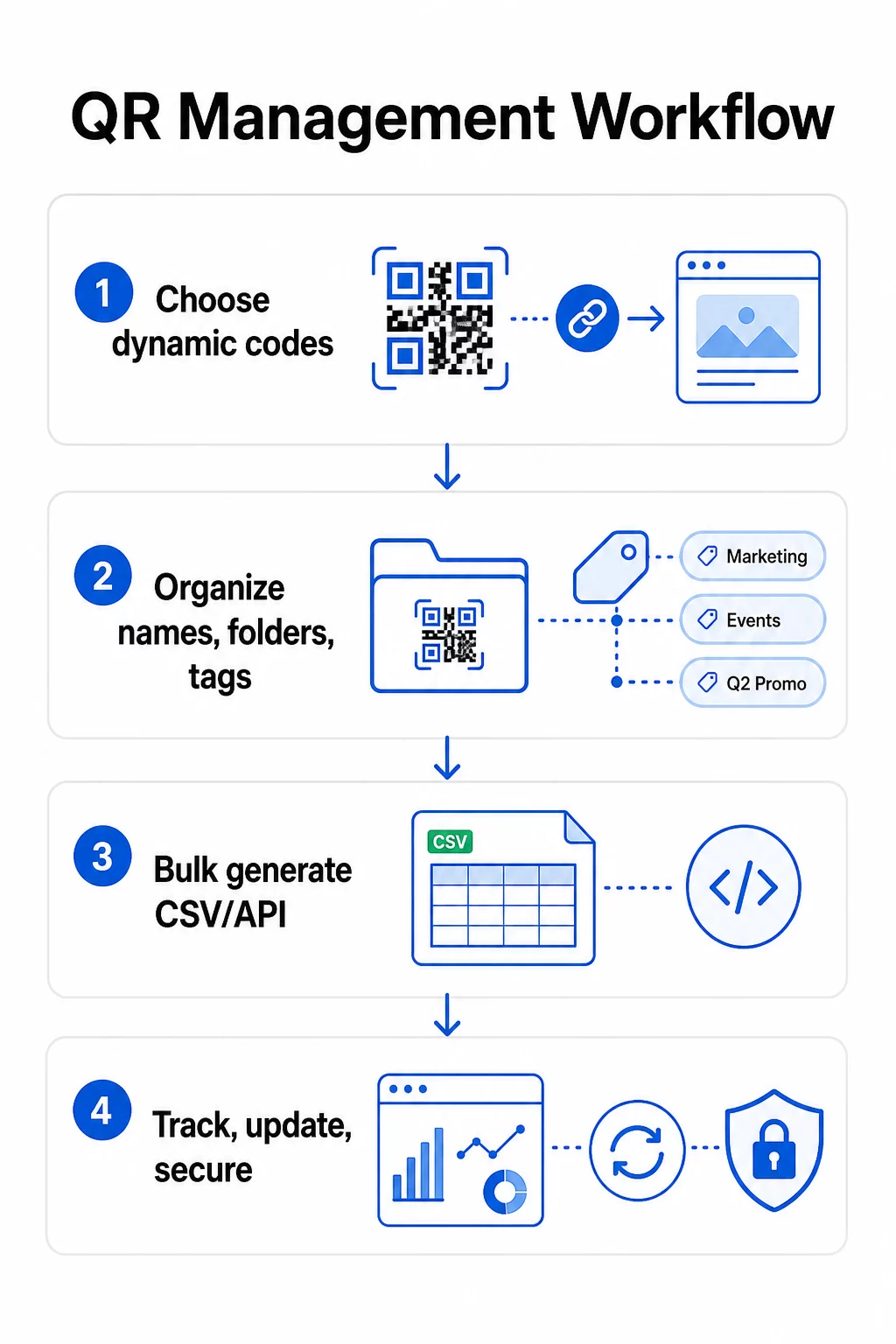
Elige el Tipo de Código QR Correcto Antes de Escalar
La decisión más importante que tomarás antes de escalar cualquier programa de códigos QR es elegir entre códigos dinámicos y estáticos, porque esa elección determina lo que podrás cambiar, rastrear y automatizar más tarde.
Códigos QR dinámicos utilizan una URL de redirección corta que tú controlas. Debido a que el código impreso solo apunta a esa redirección, puedes actualizar el destino, intercambiar contenido o cambiar los parámetros de seguimiento en cualquier momento sin reimprimir nada. También desbloquean capacidades de seguimiento incluyendo recuentos de escaneos, marcas de tiempo, ubicación geográfica, tipo de dispositivo y sistema operativo. Esto los convierte en la elección correcta para campañas de marketing, promociones, menús de restaurantes, materiales para eventos y cualquier caso de uso donde el contenido cambie o los datos de rendimiento sean importantes.
Códigos QR estáticos codifican un destino directamente en el patrón mismo. Una vez impresos, esos datos son permanentes; no puedes actualizar el enlace ni rastrear los escaneos sin generar un nuevo código. Son adecuados para información que realmente nunca cambia: una contraseña de Wi-Fi fija, un documento regulatorio permanente o una exhibición de museo con contenido estable.
| FUNCIÓN | Códigos QR dinámicos | Códigos QR Estáticos |
|---|---|---|
| Editables después de la impresión | ✅ Sí | ❌ No |
| Seguimiento de escaneo | ✅ Sí | ❌ No |
| Análisis geográficos | ✅ Sí | ❌ No |
| Estadísticas en tiempo real | ✅ Sí | ❌ No |
| Coste | Suscripción requerida | Libre |
| Mejor para | Campañas, menús, promociones | Contenido fijo y permanente |
Para una mirada más profunda a cómo se comparan estas dos opciones, consulta el desglose completo de códigos QR estáticos vs. dinámicos.
Empieza a Gestionar Códigos QR Dinámicos Hoy ¿Necesitas códigos editables con seguimiento integrado y un panel centralizado? El Generador de códigos QR dinámicos te permite crear, actualizar y monitorear todos tus códigos en un solo lugar.
Crea un Sistema de Nomenclatura y Organización Escalable
Cuando gestionas docenas de códigos, las convenciones de nomenclatura laxas son un inconveniente. Con cientos o miles, se convierten en un problema operativo grave. Una estructura de nomenclatura consistente, combinada con una jerarquía de carpetas lógica, mantiene a tu equipo alineado y tus códigos localizables en cualquier etapa de una campaña.
Usa una Convención de Nomenclatura Estandarizada
Un formato de nomenclatura fiable captura todo lo que necesitas para identificar un código sin abrirlo. Una estructura práctica:
`Dpto-CampañaCanal-GeoObjetivo-TipoActivoVersiónEstado`
Por ejemplo: `MKT-Verano25OOH-EEUUPromo-Pósterv2ACTIVO`
Establece las fechas en formato AAAA-MM, usa números de versión (v1, v2) para distinguir iteraciones y siempre incluye un indicador de estado (ACTIVO, PAUSADO, ARCHIVADO). Esto evita confusiones cuando varias versiones de la misma campaña están activas simultáneamente.
Registra Metadatos Estructurados para Cada Código
Más allá del nombre, cada código QR debe llevar metadatos estructurados que cualquier miembro de tu equipo pueda consultar. Campos a incluir:
- Propietario (persona o equipo responsable)
- Unidad de negocio o línea de producto
- URL de destino y URL de respaldo
- Tipo de código (dinámico o estático)
- Fecha de inicio y fecha de finalización
- Texto de llamada a la acción
- Nivel de acceso o seguridad
Las fechas de finalización y las URL de respaldo son especialmente importantes a escala: evitan escaneos sin salida después de que una campaña finaliza, y una URL de respaldo garantiza que los usuarios sigan llegando a un lugar útil si el destino principal deja de funcionar.
Organizar con Carpetas y Etiquetas
Una estructura de carpetas de dos niveles funciona bien para la mayoría de los equipos: carpetas de nivel superior para unidades de negocio o líneas de productos, y subcarpetas para campañas o ubicaciones individuales. Las etiquetas añaden una segunda capa de filtrado: marca los códigos por región (EE. UU., UE), canal (correo electrónico, publicidad exterior, embalaje), tipo de ubicación (póster, botella, pantalla) y estado (activo, archivado).
De Pageloot Función de carpetas de códigos QR admite el uso compartido de carpetas basado en equipos con permisos basados en roles, para que puedas dar a los nuevos miembros del equipo acceso de lectura a los análisis mientras restringes quién puede editar o eliminar códigos. Esto es especialmente útil para agencias que gestionan múltiples clientes o empresas que utilizan códigos en diferentes departamentos.
Generar Códigos en Masa Sin Perder el Control
Una vez que tu estructura de nombres y carpetas esté establecida, la creación masiva se vuelve sencilla, siempre que tus datos de entrada estén limpios y tu proceso incluya un paso de validación antes de generar en volumen.
Usar Archivos CSV para la Generación por Lotes
La generación masiva basada en CSV es el método más práctico para crear grandes volúmenes de códigos de manera eficiente. Un archivo CSV bien estructurado para la generación de códigos QR debe incluir:
- `unique_id` – tu identificador interno
- `qr_type` – URL, PDF, vCard, formulario, etc.
- `destination_url` – el destino objetivo
- `campaign_name` – para informes y filtrado
- `folder` – donde el código debe residir en su panel de control
- `template_name` – el diseño de marca a aplicar
- `utm_parameters` – fuente, medio, campaña, contenido
- `startdate` / `enddate` – ventana de campaña
- `status` – activo o en pausa
- `owner` – miembro del equipo responsable
Antes de subir, valide el CSV: confirme que todos los campos obligatorios estén rellenados, verifique que las URL estén activas y correctamente formateadas, y ejecute un lote de prueba de cinco a diez códigos en diferentes dispositivos para detectar errores antes de que se propaguen por toda la ejecución.
Para la generación masiva automatizada a escala empresarial, Gestión de códigos QR basada en API le permite pasar parámetros programáticamente, activar la creación por lotes desde sus propios sistemas y actualizar las URL de destino en miles de códigos simultáneamente utilizando solicitudes PATCH o PUT.
Añadir parámetros UTM de forma consistente
Los parámetros UTM son lo que conecta los escaneos de códigos QR con tu pila de análisis más amplia. Sin ellos, puedes ver que alguien escaneó un código, pero no puedes atribuir fácilmente ese escaneo a una campaña, canal o ubicación específica en Google Analytics.
Sigue estas convenciones para mantener tus datos limpios:
- Usa minúsculas en todo – el seguimiento UTM distingue entre mayúsculas y minúsculas, y la capitalización mixta crea informes fragmentados
- Mantén los valores de los parámetros descriptivos pero concisos: `utmsource=storedisplay`, `utmmedio=qrcode`, `utmcampaign=summersale_2025`
- Usa `utmcontent` para distinguir entre ubicaciones dentro de la misma campaña (p. ej., `windowposter` vs. `checkout_counter`)
- Documenta tu taxonomía de nombres en un documento de referencia compartido para que cada miembro del equipo siga las mismas reglas
Para una explicación completa de la configuración de UTM y los informes de Google Analytics 4, consulta parámetros UTM para códigos QR.
Conecta tus escaneos QR a la analítica de campañas De Pageloot plataforma para agencias y equipos admite la adición automática de UTM, el control de acceso basado en roles y los informes de clientes compartibles, lo que facilita significativamente el seguimiento de la atribución en implementaciones a gran escala.
Mantén la coherencia de la marca en cada código
A escala, la coherencia visual es importante por dos razones: genera reconocimiento y confianza con las personas que escanean tus códigos, y evita que un mosaico de diseños dispares diluya la identidad de tu marca.
Antes de generar un lote grande, define y bloquea tus estándares de diseño:
- Ubicación del logotipo y tamaño mínimo
- Paleta de colores de la marca (el primer plano oscuro sobre fondo claro sigue siendo el patrón más fiable para el escaneo)
- Estilo de esquina y módulo
- Requisitos de la zona tranquila (mínimo cuatro módulos de espacio libre en todos los lados)
- Tamaño mínimo de impresión (al menos 2 × 2 cm para escaneo a corta distancia; escala usando la regla 10:1 – el ancho del código debe ser al menos una décima parte de la distancia de escaneo esperada)
- Formatos de archivo: SVG o PDF para materiales impresos (300+ DPI), PNG para uso digital
Los códigos QR dinámicos ofrecen una ventaja práctica aquí: porque codifican una URL de redirección corta en lugar de un destino largo, el patrón subyacente es menos denso. Esto deja más espacio para incorporar logotipos y colores personalizados sin comprometer la capacidad de escaneo.
Guarda estos estándares como plantillas de marca reutilizables en tu plataforma de códigos QR. Pageloot te permite crear plantillas para diferentes contextos – un formato compacto para tarjetas de visita, una versión más audaz para señalización de gran formato – y aplicarlas de manera consistente en cada ejecución de generación masiva.
Antes de comprometerte con una gran tirada de impresión, prueba una muestra de impresiones físicas en múltiples dispositivos y condiciones de iluminación. Si algún código no se escanea de forma fiable, aumenta el tamaño físico, refuerza el contraste de color o amplía la zona tranquila.
Rastrea el rendimiento con las métricas adecuadas
Generar códigos de manera eficiente es solo la mitad del trabajo. Comprender cómo funcionan – y actuar sobre esos datos – es lo que impulsa la mejora continua.
Las métricas clave a monitorear para implementaciones a gran escala son:
- Escaneos totales y escaneos únicos: Los escaneos totales muestran el compromiso general; los escaneos únicos revelan tu alcance real. Una alta proporción de escaneos totales a únicos puede indicar un fuerte compromiso repetido o, en algunos casos, una página de destino mal optimizada que lleva a los usuarios a escanear varias veces.
- Distribución geográfica: Los análisis de Pageloot proporcionan datos de escaneo basados en la ubicación, precisos aproximadamente a nivel de ciudad. Utiliza esto para identificar qué regiones o ubicaciones superan a otras y reasignar recursos en consecuencia.
- Dispositivo y sistema operativo: Si la mayoría de tus escaneos provienen de un tipo de dispositivo específico, prioriza probar tus páginas de destino en esa plataforma. La optimización mobile-first es esencial para la mayoría de las campañas impulsadas por códigos QR.
- Tendencias basadas en el tiempo: Los datos de escaneo a lo largo del tiempo revelan los períodos de máxima participación. Para campañas sensibles al tiempo – promociones minoristas, eventos – estos datos te ayudan a programar cambios de contenido en el momento adecuado.
- Seguimiento de conversiones: El volumen de escaneos por sí solo no indica el éxito de la campaña. Establece objetivos claros posteriores (envíos de formularios, compras, descargas de aplicaciones) y utiliza datos UTM más tu plataforma de análisis para medir si los escaneos conducen a las acciones que deseas.
Para un enfoque detallado sobre cómo construir vistas de informes en torno a estas métricas, consulta la guía de uso de un panel de análisis de códigos QR.
Crea Paneles Que Revelen Información Procesable
Los datos de escaneo brutos de cientos de códigos se vuelven inmanejables sin vistas estructuradas. Organiza tus informes en:
- Paneles a nivel de campaña: Compara el rendimiento entre campañas activas, filtrado por período de tiempo. Rastrea el costo por escaneo, la tasa de conversión y el ROI frente a los puntos de referencia de la campaña.
- Vistas basadas en la ubicación: Mapee la distribución de escaneos geográficamente para identificar ubicaciones de alto rendimiento e informar futuras decisiones de implementación.
- Segmentación de audiencia: Agrupe a los usuarios por tipo de dispositivo, frecuencia de escaneo o patrones de comportamiento para adaptar el contenido de seguimiento.
Configure alertas automatizadas para desviaciones significativas: un pico repentino en los escaneos desde una fuente geográfica inusual podría indicar una redirección rota o actividad fraudulenta, mientras que una caída brusca podría señalar un enlace roto que necesita atención inmediata.
Actualice y Mantenga Códigos Sin Reimprimir
Una de las principales ventajas operativas de los códigos QR dinámicos es la capacidad de editar las URL de destino después de la impresión – sin códigos nuevos, sin nuevas tiradas de impresión, sin interrupción de los materiales activos. A escala, esta capacidad se vuelve esencial.
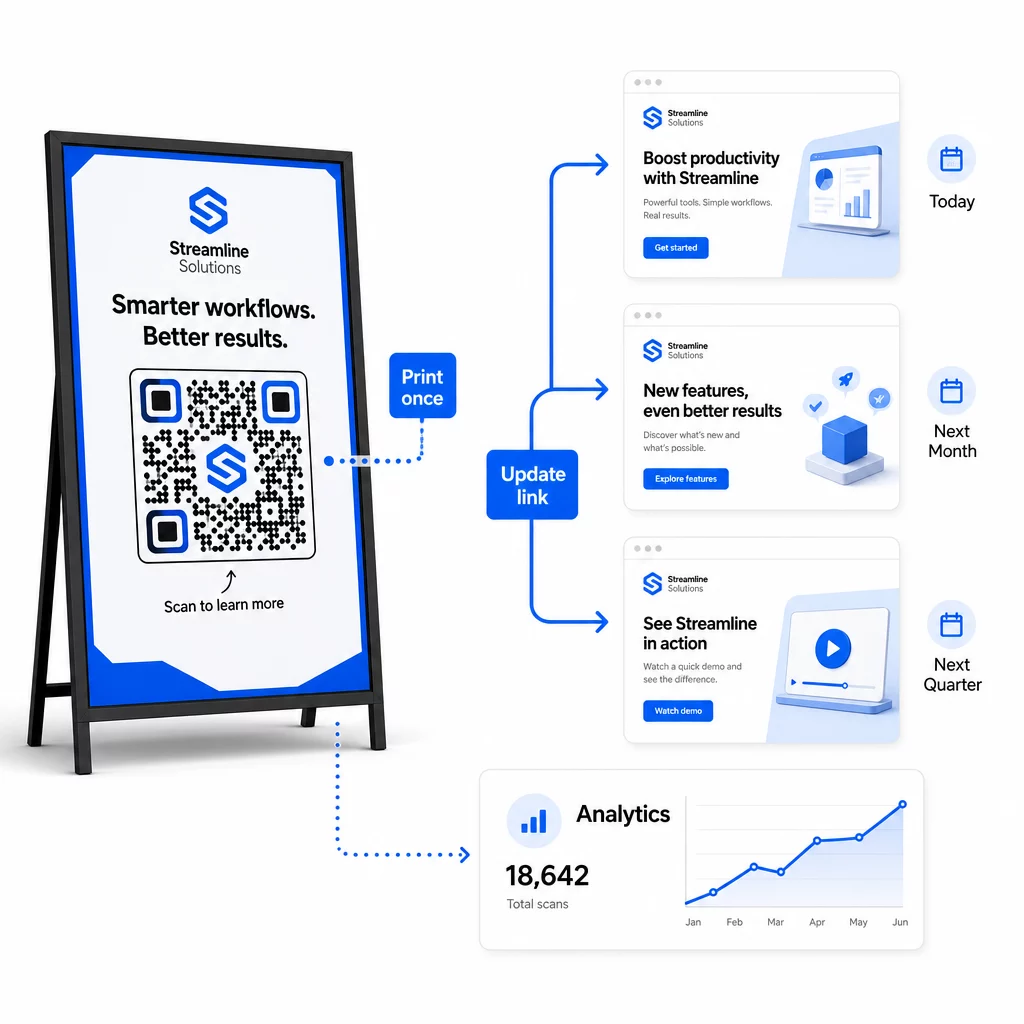
Implemente Control de Versiones para Cambios de Destino
Cada vez que actualice el destino de un código QR dinámico, registre el cambio con:
- Fecha y hora de la actualización
- URL de destino anterior
- Nueva URL de destino
- Motivo del cambio
- Quién lo autorizó
Utilice un esquema de versionado – v1.0 para el lanzamiento inicial, v1.1 para ajustes menores, v2.0 para un cambio de destino significativo – para que su equipo siempre sepa qué versión está activa y pueda revertir si algo falla. Para equipos con múltiples colaboradores, los permisos basados en roles aseguran que solo los usuarios autorizados puedan realizar cambios en los códigos activos.
Automatice las redirecciones basadas en tiempo
Para campañas con horarios de contenido predecibles, las redirecciones programadas eliminan la necesidad de intervención manual. Un restaurante puede servir menús de desayuno, almuerzo y cena desde un único código QR impreso programando cambios de destino en horarios establecidos. Un minorista puede configurar un código para redirigir a una página promocional durante una ventana de venta y volver a la página de producto estándar automáticamente cuando finaliza la promoción.
Este enfoque es particularmente valioso cuando los códigos QR se imprimen en materiales con largos plazos de entrega. Puede finalizar la producción física con mucha antelación, con la confianza de que el código servirá el contenido correcto cuando la campaña se active.
Monitoree los enlaces automáticamente
A gran escala, verificar manualmente si cada URL de destino está activa no es práctico. Configure un monitoreo automático de enlaces para alertar a su equipo cuando un destino devuelve un error, de modo que pueda redirigir los escaneos a una URL de respaldo antes de que los usuarios encuentren una experiencia rota. Documentar las URL de respaldo en sus metadatos – como se describe en la sección de convención de nombres anterior – significa que su equipo siempre tiene una alternativa lista.
Proteja su programa de códigos QR a medida que crece
La eficiencia operativa a escala requiere gobernanza: propiedad clara, controles de acceso apropiados y monitoreo proactivo para proteger sus datos y a sus usuarios.
Control de acceso basado en roles es la base de un programa de códigos QR seguro y bien gobernado. Asigne permisos que coincidan con las responsabilidades de cada miembro del equipo: los espectadores de análisis pueden ver los datos de escaneo pero no editar códigos; los gerentes de campaña pueden actualizar destinos pero no eliminar códigos; los administradores tienen acceso completo. Esta estructura previene cambios accidentales o no autorizados al tiempo que permite la colaboración en equipos grandes.
Para empresas que gestionan códigos QR en múltiples departamentos, Pageloot admite controles de acceso a nivel de espacio de trabajo y uso compartido de carpetas de equipo, lo que permite a los equipos descentralizados gestionar sus propios códigos sin visibilidad de las campañas de otros grupos.
Más allá del control de acceso, esté atento a patrones de escaneo anómalos: picos de volumen inesperados, altas concentraciones de escaneos desde un único rango de IP o distribuciones geográficas inconsistentes con la ubicación de sus campañas. Estos patrones pueden indicar actividad de bots u otros escaneos fraudulentos que corromperían sus datos analíticos. El monitoreo automatizado que detecta estos patrones tempranamente protege tanto la integridad de sus datos como sus conocimientos sobre el rendimiento de la campaña.
Mantenga un registro de auditoría de todos los cambios en los códigos activos: quién cambió qué, cuándo y por qué. Cuando surge un problema en una campaña, este registro es el camino más rápido para el diagnóstico y la resolución.
Preguntas frecuentes
Los códigos QR dinámicos le permiten actualizar la URL de destino o el contenido después de que el código ha sido impreso, sin generar ni reimprimir nada. A gran escala, esto significa que puede corregir enlaces rotos, actualizar promociones estacionales o redirigir usuarios a contenido nuevo a través de miles de códigos desplegados desde un único panel de control – eliminando los costos de reimpresión y el tiempo de inactividad operativa.
utilice minúsculas en todo, mantenga los valores descriptivos y concisos, y estandarice la estructura de sus parámetros en un documento de referencia compartido. Un patrón fiable es: `utmsource` para la ubicación específica (p. ej., `storedisplay`), `utmmedium=qrcode` de forma consistente en todos los códigos, `utmcampaign` para el nombre de la campaña con fecha (p. ej., `summersale2025`), y `utmcontent` para distinguir ubicaciones individuales dentro de la misma campaña. Evite los enlaces UTM internos, y realice comprobaciones de control de calidad previas al lanzamiento para confirmar que todos los parámetros se están transmitiendo correctamente a su plataforma de análisis.
Define tus estándares de diseño – ubicación del logotipo, colores de marca, tamaño de la zona tranquila, dimensiones mínimas de impresión y formatos de archivo – antes de generar cualquier lote, luego guarda estos como plantillas de marca reutilizables en tu plataforma de códigos QR. Aplica la misma plantilla a cada código en una ejecución por lotes. Los códigos QR dinámicos facilitan esto porque sus datos codificados más cortos producen patrones menos densos, dejando más espacio para logotipos y colores personalizados sin comprometer la escaneabilidad.