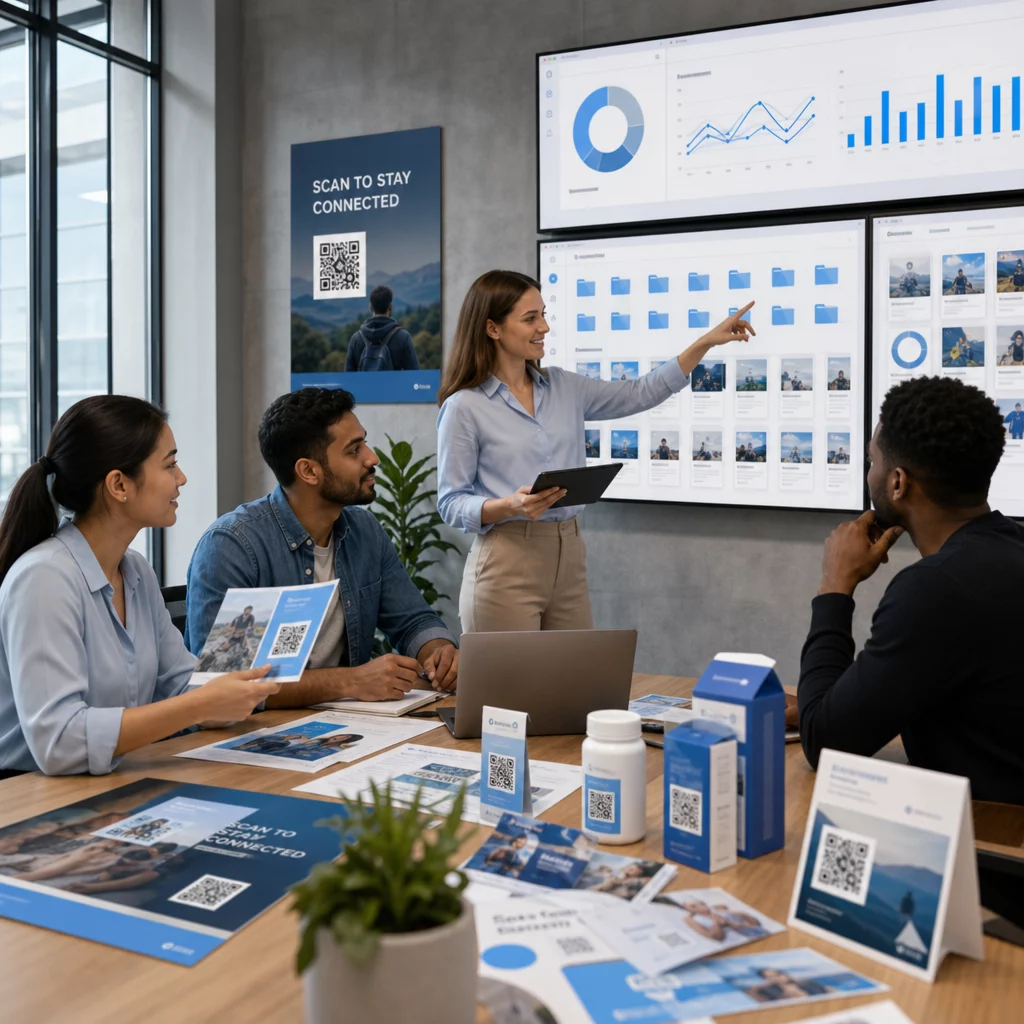
Upravljanje stotin – ali tisočev – QR kod v različnih kampanjah, lokacijah in linijah izdelkov je težje, kot se zdi. Brez jasnega sistema ekipe končajo z pokvarjenimi povezavami, nedosledno blagovno znamko in brez pravega vpogleda v to, kaj deluje. Ta vodnik zajema praktične strategije in orodja, ki ohranjajo obsežne uvedbe QR kod organizirane, sledljive in enostavne za posodabljanje.
Izberite pravi tip QR kode, preden se razširite
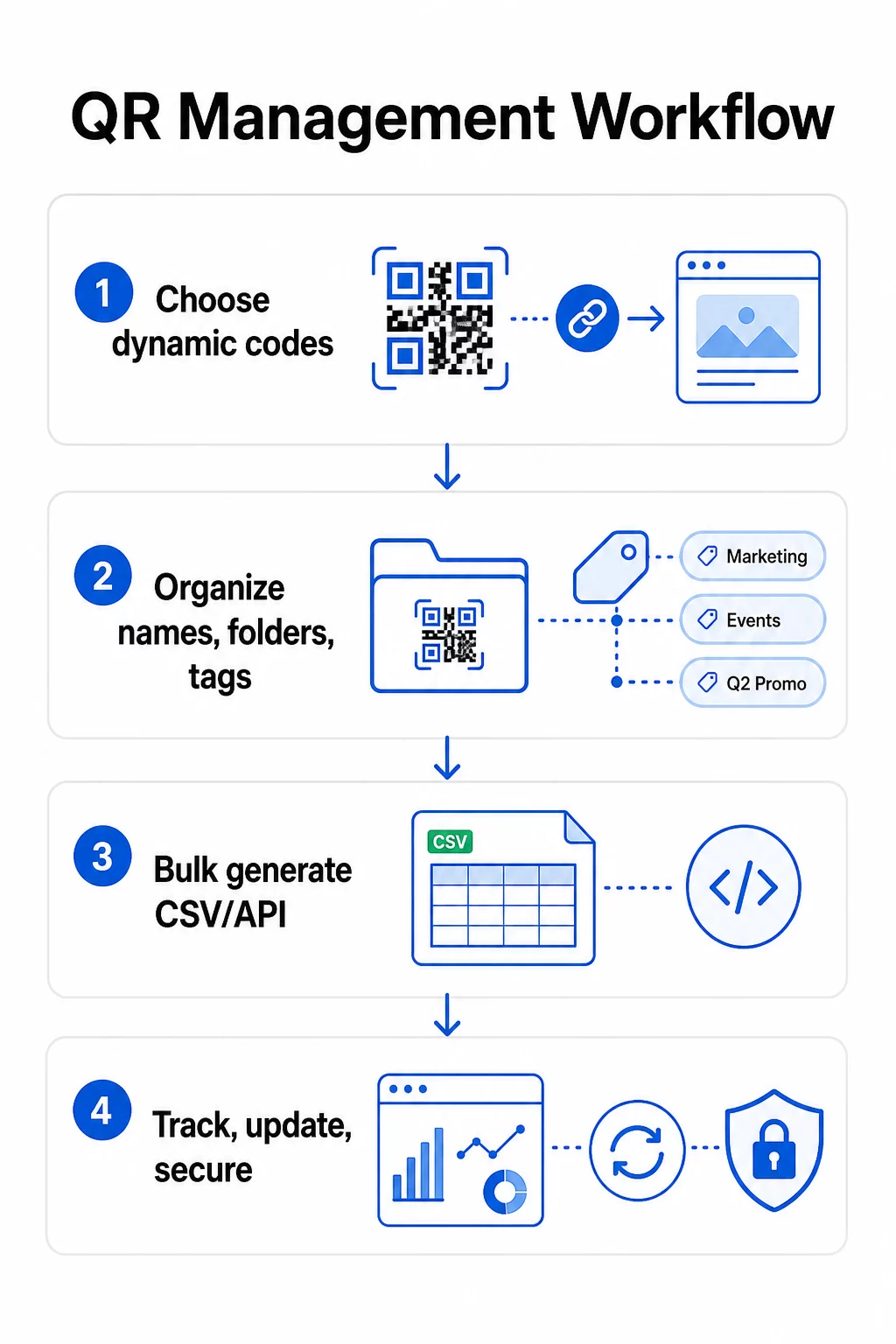
Najpomembnejša odločitev, ki jo boste sprejeli pred razširitvijo katerega koli programa QR kod, je izbira med dinamičnimi in statičnimi kodami – saj ta izbira določa, kaj lahko kasneje spremenite, sledite in avtomatizirate.
Dinamične kode QR uporabite kratek preusmeritveni URL, ki ga nadzirate. Ker natisnjena koda kaže le na to preusmeritev, lahko kadar koli posodobite destinacijo, zamenjate vsebino ali spremenite parametre sledenja, ne da bi karkoli ponovno natisnili. Prav tako omogočajo zmožnosti sledenja vključno s številom skeniranj, časovnimi žigi, geografsko lokacijo, vrsto naprave in operacijskim sistemom. Zaradi tega so prava izbira za marketinške kampanje, promocije, menije restavracij, dogodkovno gradivo in vsak primer uporabe, kjer se vsebina spreminja ali so pomembni podatki o uspešnosti.
Statične kode QR kodirajo destinacijo neposredno v sam vzorec. Ko so natisnjeni, so ti podatki trajni – povezave ne morete posodobiti ali slediti skeniranjem, ne da bi ustvarili novo kodo. Dobro so primerni za informacije, ki se resnično nikoli ne spremenijo: fiksno geslo za Wi-Fi, trajen regulativni dokument ali muzejska razstava s stabilno vsebino.
| FUNKCIJA | Dinamične kode QR | Statične QR kode |
|---|---|---|
| Uredljivo po tiskanju | ✅ Da | ❌ Ne |
| Sledenje skeniranja | ✅ Da | ❌ Ne |
| Geografska analitika | ✅ Da | ❌ Ne |
| Analitika v realnem času | ✅ Da | ❌ Ne |
| Stroški | Potrebna naročnina | prost |
| Najboljše za | Kampanje, meniji, promocije | Fiksna, trajna vsebina |
Za podrobnejši vpogled v primerjavo teh dveh možnosti si oglejte celoten razčlenitev statičnih in dinamičnih QR kod.
Začnite upravljati dinamične QR kode danes Potrebujete kode, ki jih je mogoče urejati, z vgrajenim sledenjem in centralizirano nadzorno ploščo? QR generator za dinamične QR kode vam omogoča ustvarjanje, posodabljanje in spremljanje vseh vaših kod na enem mestu.
Zgradite sistem poimenovanja in organizacije, ki se lahko razširi
Ko upravljate na desetine kod, so ohlapne konvencije poimenovanja neprijetnost. Pri stotinah ali tisočih postanejo resen operativni problem. Dosledna struktura poimenovanja, v kombinaciji z logično hierarhijo map, ohranja vašo ekipo usklajeno in vaše kode najdljive v kateri koli fazi kampanje.
Uporabite standardizirano konvencijo poimenovanja
Zanesljiv format poimenovanja zajame vse, kar potrebujete za identifikacijo kode, ne da bi jo odprli. Ena praktična struktura:
`Oddelek-KampanjaKanal-GeoCilj-VrstaSredstvaRazličicaStatus`
Na primer: `MKT-Poletje25ZunanjeOglaševanje-ZDAPromocija-Plakatv2AKTIVNO`
Datume nastavite v formatu LLLL-MM, uporabite številke različic (v1, v2) za razlikovanje iteracij in vedno vključite indikator statusa (AKTIVNO, ZAUSTAVLJENO, ARHIVIRANO). To preprečuje zmedo, ko je več različic iste kampanje aktivnih hkrati.
Zabeležite strukturirane metapodatke za vsako kodo
Poleg imena mora vsaka QR koda vsebovati strukturirane metapodatke, na katere se lahko sklicuje kdor koli v vaši ekipi. Polja za vključitev:
- Lastnik (odgovorna oseba ali ekipa)
- Poslovna enota ali linija izdelkov
- Ciljni URL in rezervni URL
- Vrsta kode (dinamična ali statična)
- Začetni in končni datum
- Besedilo poziva k dejanju
- Raven dostopa ali varnosti
Končni datumi in rezervni URL-ji so še posebej pomembni pri obsežni uporabi – preprečujejo skeniranje v slepo ulico po zaključku kampanje, rezervni URL pa zagotavlja, da uporabniki še vedno pristanejo na uporabnem mestu, če primarna destinacija ne deluje.
Organizirajte z mapami in oznakami
Dvoslojna struktura map dobro deluje za večino ekip: mape najvišje ravni za poslovne enote ali linije izdelkov in podmape za posamezne kampanje ali lokacije. Oznake dodajo drugo raven filtriranja – označite kode po regiji (ZDA, EU), kanalu (e-pošta, zunanje oglaševanje, embalaža), vrsti umestitve (plakat, steklenica, zaslon) in statusu (aktivno, arhivirano).
Pagelootov Funkcija map za QR kode podpira skupno rabo map na podlagi ekip z dovoljenji, ki temeljijo na vlogah, tako da lahko novim članom ekipe omogočite bralni dostop do analitike, hkrati pa omejite, kdo lahko ureja ali briše kode. To je še posebej uporabno za agencije, ki upravljajo več strank, ali podjetja, ki uporabljajo kode v različnih oddelkih.
Generirajte kode v velikih količinah, ne da bi izgubili nadzor
Ko sta vaša struktura poimenovanja in map vzpostavljeni, postane množično ustvarjanje preprosto – pod pogojem, da so vaši vhodni podatki čisti in vaš postopek vključuje korak preverjanja veljavnosti pred množičnim generiranjem.
Uporabite datoteke CSV za paketno generiranje
Množično generiranje na podlagi CSV je najbolj praktična metoda za učinkovito ustvarjanje velikih količin kod. Dobro strukturirana datoteka CSV za generiranje QR kod bi morala vključevati:
- `unique_id` – vaš interni identifikator
- `qr_type` – URL, PDF, vCard, obrazec itd.
- `destination_url` – ciljna destinacija
- `campaign_name` – za poročanje in filtriranje
- `folder` – kjer naj bo koda shranjena na vaši nadzorni plošči
- `template_name` – blagovna znamka dizajna za uporabo
- `utm_parameters` – vir, medij, kampanja, vsebina
- `startdate` / `enddate` – obdobje kampanje
- `status` – aktivno ali zaustavljeno
- `owner` – odgovorni član ekipe
Pred nalaganjem preverite CSV: potrdite, da so vsa zahtevana polja izpolnjena, preverite, ali so URL-ji aktivni in pravilno oblikovani, ter zaženite testno serijo pet do deset kod na različnih napravah, da ujamete napake, preden se razširijo po celotnem zagonu.
Za avtomatizirano množično generiranje na podjetniški ravni, Upravljanje QR kod na osnovi API-ja vam omogoča programsko posredovanje parametrov, sprožitev paketnega ustvarjanja iz lastnih sistemov in posodabljanje ciljnih URL-jev na tisočih kodah hkrati z uporabo zahtevkov PATCH ali PUT.
Dosledno dodajte parametre UTM
Parametri UTM so tisto, kar povezuje skeniranje QR kod z vašim širšim analitičnim sistemom. Brez njih lahko vidite, da je nekdo skeniral kodo, vendar tega skeniranja ne morete enostavno pripisati določeni kampanji, kanalu ali umestitvi v Google Analytics.
Upoštevajte te konvencije, da bodo vaši podatki čisti:
- Uporabljajte male črke povsod – sledenje UTM razlikuje med velikimi in malimi črkami, mešana uporaba velikih in malih črk pa ustvarja razdrobljeno poročanje
- Naj bodo vrednosti parametrov opisne, a jedrnate: `utmsource=storedisplay`, `utmmedij=qrcode`, `utmcampaign=summersale_2025`
- Uporabite `utmcontent` za razlikovanje med umestitvami znotraj iste kampanje (npr. `windowposter` proti `checkout_counter`)
- Dokumentirajte svojo taksonomijo poimenovanja v skupnem referenčnem dokumentu, tako da vsak član ekipe upošteva ista pravila
Za celoten pregled nastavitve UTM in poročanja v Google Analytics 4 glejte parametrov UTM za QR kode.
Povežite svoje skeniranje QR kod z analitiko kampanj Pagelootov platforma za agencije in ekipe podpira samodejno dodajanje UTM, nadzor dostopa na podlagi vlog in poročila strank, ki jih je mogoče deliti – kar bistveno olajša sledenje atribucije pri velikih uvedbah.
Ohranite dosledno blagovno znamko pri vsaki kodi
Pri velikem obsegu je vizualna doslednost pomembna iz dveh razlogov: gradi prepoznavnost in zaupanje pri ljudeh, ki skenirajo vaše kode, in preprečuje, da bi mozaik neusklajenih oblik razredčil identiteto vaše blagovne znamke.
Preden ustvarite veliko serijo, določite in zaklenite svoje oblikovalske standarde:
- Postavitev logotipa in minimalna velikost
- Barvna paleta blagovne znamke (temno ospredje na svetlem ozadju ostaja najbolj zanesljiv vzorec za skeniranje)
- Slog vogalov in modulov
- Zahteve za mirno območje (vsaj štirje moduli praznega prostora na vseh straneh)
- Minimalna velikost tiska (vsaj 2 × 2 cm za skeniranje na kratke razdalje; povečajte z uporabo pravila 10:1 – širina kode mora biti vsaj desetina pričakovane razdalje skeniranja)
- Formati datotek: SVG ali PDF za tiskane materiale (300+ DPI), PNG za digitalno uporabo
Dinamične QR kode ponujajo praktično prednost: ker kodirajo kratek preusmeritveni URL namesto dolgega cilja, je osnovni vzorec manj gost. To pušča več prostora za vključitev logotipov in barv po meri, ne da bi ogrozili možnost skeniranja.
Te standarde shranite kot predloge blagovne znamke za večkratno uporabo v svoji platformi za QR kode. Pageloot vam omogoča ustvarjanje predlog za različne kontekste – kompaktna oblika za vizitke, drznejša različica za velikformatne napise – in njihovo dosledno uporabo pri vsakem množičnem generiranju.
Preden se zavežete k velikemu tiskanju, preizkusite vzorec fizičnih izpisov na več napravah in v različnih svetlobnih pogojih. Če se katere kode ne skenirajo zanesljivo, povečajte fizično velikost, okrepite barvni kontrast ali razširite mirno območje.
Spremljajte uspešnost s pravimi metrikami
Učinkovito generiranje kod je le polovica dela. Razumevanje njihovega delovanja – in ukrepanje na podlagi teh podatkov – je tisto, kar poganja nenehne izboljšave.
Ključne metrike za spremljanje pri velikih uvedbah so:
- Skupno število skeniranj in edinstvena skeniranja: Skupno število skeniranj prikazuje splošno angažiranost; edinstvena skeniranja razkrivajo vaš dejanski doseg. Visoko razmerje med skupnim številom in edinstvenimi skeniranji lahko kaže na močno ponavljajočo se angažiranost ali, v nekaterih primerih, na slabo optimizirano ciljno stran, ki uporabnike spodbuja k večkratnemu skeniranju.
- Geografska porazdelitev: Analitika Pageloota zagotavlja podatke o skeniranju na podlagi lokacije, natančne približno do ravni mesta. To uporabite za prepoznavanje, katere regije ali umestitve presegajo druge, in ustrezno prerazporedite vire.
- Naprava in operacijski sistem: Če večina vaših skeniranj prihaja iz določene vrste naprave, dajte prednost testiranju vaših ciljnih strani na tej platformi. Optimizacija za mobilne naprave je bistvena za večino kampanj, ki temeljijo na QR kodah.
- Časovni trendi: Podatki o skeniranju skozi čas razkrivajo obdobja največje angažiranosti. Za časovno občutljive kampanje – maloprodajne promocije, dogodke – ti podatki pomagajo pri načrtovanju sprememb vsebine ob pravem trenutku.
- Sledenje konverzijam: Samo obseg skeniranj ne kaže na uspeh kampanje. Postavite jasne nadaljnje cilje (oddaje obrazcev, nakupi, prenosi aplikacij) in uporabite podatke UTM ter svojo analitično platformo za merjenje, ali skeniranja vodijo do želenih dejanj.
Za podroben pristop k izdelavi poročilnih pogledov okoli teh metrik si oglejte vodnik za uporabo analitične nadzorne plošče QR kod.
Zgradite nadzorne plošče, ki razkrivajo uporabne vpoglede
Surovi podatki o skeniranju stotin kod postanejo neobvladljivi brez strukturiranih pogledov. Svoje poročanje organizirajte v:
- Nadzorne plošče na ravni kampanje: Primerjajte uspešnost med aktivnimi kampanjami, filtrirano po časovnem obdobju. Spremljajte stroške na skeniranje, stopnjo konverzije in ROI glede na merila kampanje.
- Pogledi na podlagi lokacije: Geografsko preslikajte porazdelitev skeniranj, da prepoznate visoko učinkovite umestitve in podprete prihodnje odločitve o uvedbi.
- Segmentacija občinstva: Združite uporabnike po vrsti naprave, pogostosti skeniranja ali vzorcih vedenja, da prilagodite nadaljnjo vsebino.
Nastavite avtomatizirana opozorila za pomembna odstopanja – nenaden porast skeniranj iz nenavadnega geografskega vira bi lahko kazal na pokvarjeno preusmeritev ali goljufivo dejavnost, medtem ko bi močan padec lahko signaliziral pokvarjeno povezavo, ki potrebuje takojšnjo pozornost.
Posodabljanje in vzdrževanje kod brez ponovnega tiskanja
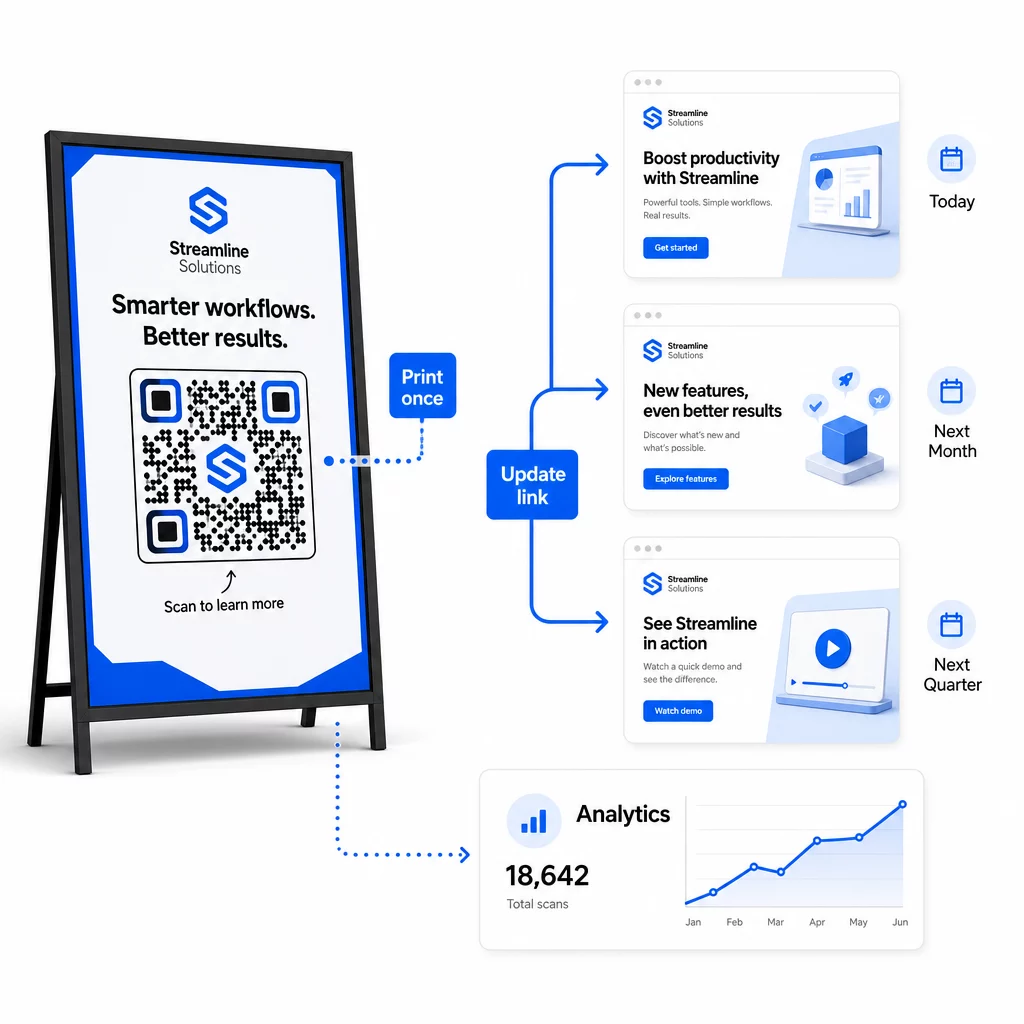
Ena od ključnih operativnih prednosti dinamičnih QR kod je zmožnost urejanja ciljnih URL-jev po tiskanju – brez novih kod, brez novih tiskov, brez prekinitev aktivnih materialov. V velikem obsegu ta zmožnost postane bistvena.
Uvedite nadzor različic za spremembe destinacij
Vsakič, ko posodobite destinacijo dinamične QR kode, zabeležite spremembo z:
- Datum in čas posodobitve
- Prejšnji ciljni URL
- Nov ciljni URL
- Razlog za spremembo
- Kdo jo je odobril
Uporabite shemo različic – v1.0 za začetno predstavitev, v1.1 za manjše prilagoditve, v2.0 za pomembno spremembo destinacije – tako bo vaša ekipa vedno vedela, katera različica je aktivna, in se bo lahko vrnila na prejšnjo, če se kaj pokvari. Za ekipe z več sodelavci dovoljenja na podlagi vlog zagotavljajo, da lahko spremembe aktivnih kod izvajajo samo pooblaščeni uporabniki.
Avtomatizirajte časovno pogojene preusmeritve
Pri kampanjah s predvidljivimi urniki vsebine časovno pogojene preusmeritve odpravljajo potrebo po ročnem posredovanju. Restavracija lahko ponuja menije za zajtrk, kosilo in večerjo z eno samo natisnjeno QR kodo tako, da načrtuje spremembe destinacije ob določenih urah. Trgovec lahko konfigurira kodo tako, da preusmeri na promocijsko stran med obdobjem razprodaje in se samodejno vrne na standardno stran izdelka, ko se promocija konča.
Ta pristop je še posebej dragocen, ko so QR kode natisnjene na materialih z dolgimi dobavnimi roki. Fizično proizvodnjo lahko dokončate precej vnaprej, prepričani, da bo koda prikazala pravo vsebino, ko bo kampanja aktivna.
Samodejno spremljajte povezave
V velikem obsegu ročno preverjanje, ali je vsak ciljni URL aktiven, ni praktično. Nastavite samodejno spremljanje povezav, da opozorite svojo ekipo, ko destinacija vrne napako, tako da lahko preusmerite skeniranja na rezervni URL, preden uporabniki naletijo na pokvarjeno izkušnjo. Dokumentiranje rezervnih URL-jev v vaših metapodatkih – kot je opisano v zgornjem razdelku o konvencijah poimenovanja – pomeni, da ima vaša ekipa vedno pripravljeno nadomestno rešitev.
Zavarujte svoj program QR kod, ko raste
Operativna učinkovitost v velikem obsegu zahteva upravljanje – jasno lastništvo, ustrezne kontrole dostopa in proaktivno spremljanje za zaščito vaših podatkov in vaših uporabnikov.
Nadzor dostopa na podlagi vlog je temelj varnega in dobro vodenega programa QR kod. Dodelite dovoljenja, ki ustrezajo odgovornostim vsakega člana ekipe: pregledovalci analitike lahko vidijo podatke o skeniranju, vendar ne morejo urejati kod; upravitelji kampanj lahko posodabljajo destinacije, vendar ne morejo brisati kod; skrbniki imajo popoln dostop. Ta struktura preprečuje nenamerne ali nepooblaščene spremembe, hkrati pa omogoča sodelovanje v velikih ekipah.
Za podjetja, ki upravljajo QR kode v več oddelkih, Pageloot podpira nadzor dostopa na ravni delovnega prostora in deljenje map ekip, kar omogoča decentraliziranim ekipam, da upravljajo svoje kode brez vpogleda v kampanje drugih skupin.
Poleg nadzora dostopa bodite pozorni na nenormalne vzorce skeniranja – nepričakovane skoke v obsegu, visoke koncentracije skeniranj iz enega samega IP območja ali geografske porazdelitve, ki niso skladne z vašimi umestitvami kampanj. Ti vzorci lahko kažejo na dejavnost botov ali drugo goljufivo skeniranje, ki bi pokvarilo vaše analitične podatke. Avtomatizirano spremljanje, ki zgodaj zazna te vzorce, ščiti tako celovitost vaših podatkov kot tudi vpoglede v uspešnost vaše kampanje.
Vzdržujte revizijski dnevnik vseh sprememb aktivnih kod: kdo je kaj spremenil, kdaj in zakaj. Ko se pojavi težava s kampanjo, je ta zapis najhitrejša pot do diagnoze in rešitve.
Pogosta vprašanja
Dinamične QR kode vam omogočajo posodobitev ciljnega URL-ja ali vsebine, potem ko je bila koda natisnjena, brez generiranja ali ponovnega tiskanja česar koli. V velikem obsegu to pomeni, da lahko popravite pokvarjene povezave, posodobite sezonske promocije ali preusmerite uporabnike na novo vsebino prek tisočev nameščenih kod iz ene same nadzorne plošče – s čimer se odpravijo stroški ponovnega tiskanja in operativni izpadi.
Uporabljajte male črke povsod, naj bodo vrednosti opisne in jedrnate ter standardizirajte strukturo parametrov v skupnem referenčnem dokumentu. Zanesljiv vzorec je: `utmsource` za specifično umestitev (npr. `storedisplay`), `utmmedium=qrcode` dosledno v vseh kodah, `utmcampaign` za ime kampanje z datumom (npr. `summersale2025`) in `utmcontent` za razlikovanje posameznih umestitev znotraj iste kampanje. Izogibajte se notranjim UTM povezavam in izvedite pred-zagonske QA preglede, da potrdite, da se vsi parametri pravilno prenašajo na vašo analitično platformo.
Določite svoje oblikovalske standarde – postavitev logotipa, barve blagovne znamke, velikost tihe cone, minimalne dimenzije tiska in formati datotek – preden ustvarite katero koli serijo, nato jih shranite kot predloge blagovne znamke za večkratno uporabo v vaši platformi za QR kode. Uporabite isto predlogo za vsako kodo v serijskem zagonu. Dinamične QR kode to olajšajo, ker njihovi krajši kodirani podatki ustvarjajo manj goste vzorce, kar pušča več prostora za logotipe in barve po meri, ne da bi ogrozili možnost skeniranja.