Yüzlerce – hatta binlerce – QR kodunu kampanyalar, konumlar ve ürün grupları arasında yönetmek göründüğünden daha zordur. Net bir sistem olmadan, ekipler bozuk bağlantılar, tutarsız marka kimliği ve neyin işe yaradığına dair gerçek bir görünürlük eksikliği ile karşılaşır. Bu kılavuz, büyük ölçekli QR kod dağıtımlarını düzenli, izlenebilir ve kolayca güncellenebilir tutan pratik stratejileri ve araçları kapsar.
Ölçeklemeden Önce Doğru QR Kod Türünü Seçin
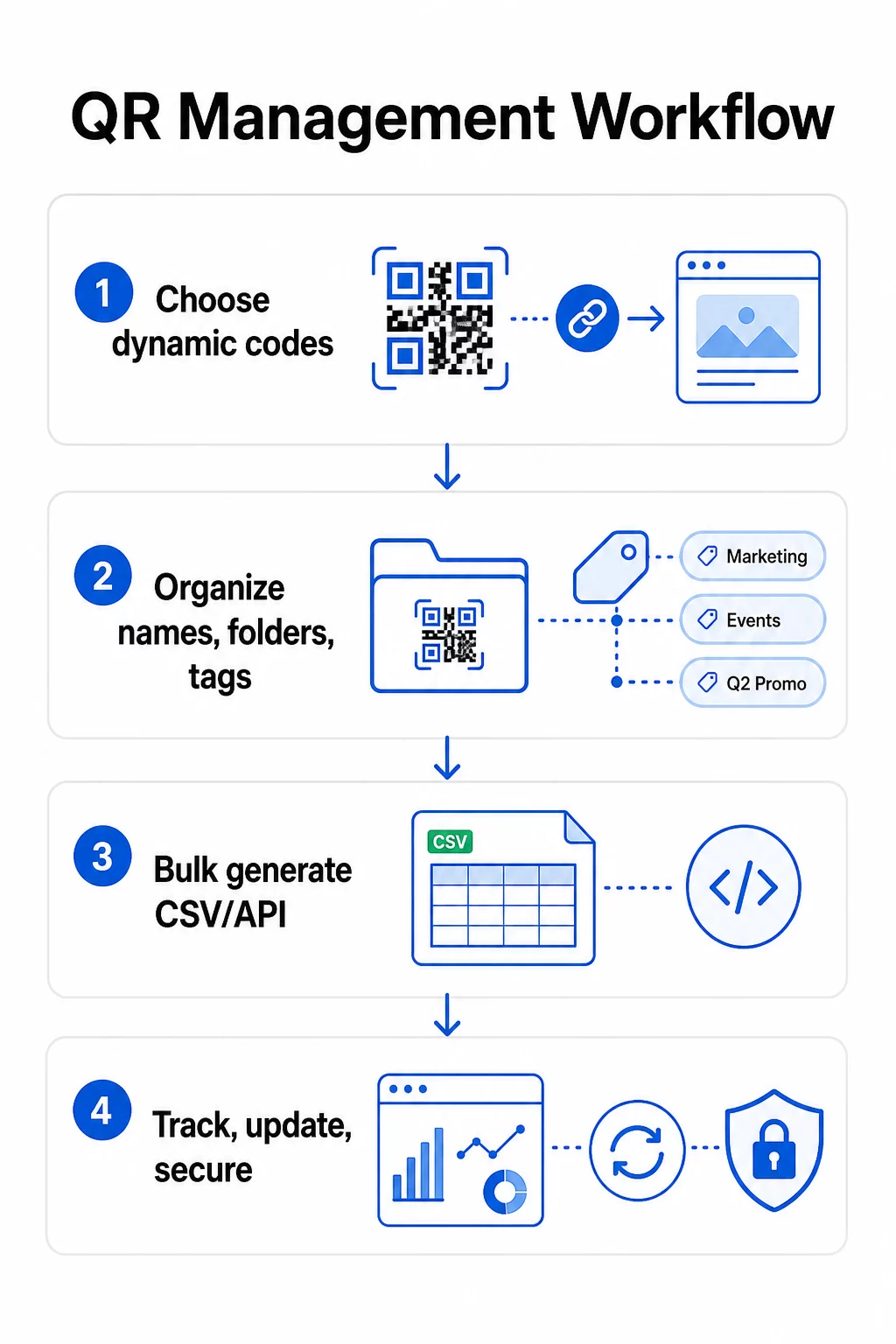
Herhangi bir QR kod programını ölçeklemeden önce vereceğiniz en önemli karar, dinamik ve statik kodlar arasında seçim yapmaktır – çünkü bu seçim, daha sonra neyi değiştirebileceğinizi, izleyebileceğinizi ve otomatikleştirebileceğinizi belirler.
Dinamik QR kodları kontrol ettiğiniz kısa bir yönlendirme URL'si kullanın. Basılı kod yalnızca bu yönlendirmeye işaret ettiğinden, hedefi güncelleyebilir, içeriği değiştirebilir veya izleme parametrelerini herhangi bir şeyi yeniden yazdırmadan istediğiniz zaman değiştirebilirsiniz. Ayrıca şunları da etkinleştirirler: izleme yetenekleri tarama sayıları, zaman damgaları, coğrafi konum, cihaz türü ve işletim sistemi dahil. Bu, onları pazarlama kampanyaları, promosyonlar, restoran menüleri, etkinlik materyalleri ve içeriğin değiştiği veya performans verilerinin önemli olduğu her kullanım durumu için doğru seçim yapar.
Statik QR kodları bir hedefi doğrudan desenin içine kodlayın. Bir kez basıldığında, bu veriler kalıcıdır – yeni bir kod oluşturmadan bağlantıyı güncelleyemez veya taramaları izleyemezsiniz. Gerçekten asla değişmeyen bilgiler için çok uygundurlar: sabit bir Wi-Fi şifresi, kalıcı bir düzenleyici belge veya sabit içeriğe sahip bir müze sergisi.
| ÖZELLİK | Dinamik QR Kodları | Statik QR Kodları |
|---|---|---|
| Yazdırdıktan sonra düzenlenebilir | Evet | ❌ Hayır |
| Tarama takibi | Evet | ❌ Hayır |
| Coğrafi analizler | Evet | ❌ Hayır |
| Gerçek zamanlı analiz | Evet | ❌ Hayır |
| Maliyet | Abonelik gerekli | Bedava |
| En iyisi | Kampanyalar, menüler, promosyonlar | Sabit, kalıcı içerik |
Bu iki seçeneğin nasıl karşılaştırıldığını daha derinlemesine incelemek için, tam statik ve dinamik QR kod karşılaştırmasına bakın.
Dinamik QR Kodlarını Bugün Yönetmeye Başlayın Dahili izleme ve merkezi bir kontrol paneli ile düzenlenebilir kodlara mı ihtiyacınız var? Dinamik QR Kod Oluşturucu tüm kodlarınızı tek bir yerden oluşturmanıza, güncellemenize ve izlemenize olanak tanır.
Ölçeklenebilir Bir Adlandırma ve Organizasyon Sistemi Oluşturun
Düzinelerce kodu yönetirken, gevşek adlandırma kuralları bir rahatsızlıktır. Yüzlerce veya binlerce olduğunda, ciddi bir operasyonel sorun haline gelirler. Tutarlı bir adlandırma yapısı, mantıksal bir klasör hiyerarşisiyle birleştiğinde, ekibinizi uyumlu tutar ve kodlarınızın bir kampanyanın herhangi bir aşamasında bulunabilir olmasını sağlar.
Standartlaştırılmış Bir Adlandırma Kuralı Kullanın
Güvenilir bir adlandırma formatı, bir kodu açmadan tanımlamak için ihtiyacınız olan her şeyi yakalar. Pratik bir yapı:
`Departman-KampanyaKanal-CoğrafyaAmaç-VarlıkTürüSürümDurum`
Örneğin: `Pazarlama-Yaz25OOH-ABDPromosyon-Posterv2AKTİF`
Tarihleri YYYY-AA formatında ayarlayın, yinelemeleri ayırt etmek için sürüm numaralarını (v1, v2) kullanın ve her zaman bir durum göstergesi (AKTİF, DURAKLATILDI, ARŞİVLENDİ) ekleyin. Bu, aynı kampanyanın birden fazla sürümü aynı anda yayında olduğunda karışıklığı önler.
Her Kod İçin Yapılandırılmış Meta Verileri Kaydedin
Adın ötesinde, her QR kodu ekibinizdeki herkesin başvurabileceği yapılandırılmış meta veriler taşımalıdır. Dahil edilecek alanlar:
- Sahip (sorumlu kişi veya ekip)
- İş birimi veya ürün grubu
- Hedef URL ve yedek URL
- Kod türü (dinamik veya statik)
- Başlangıç tarihi ve bitiş tarihi
- Harekete geçirici mesaj metni
- Erişim veya güvenlik düzeyi
Bitiş tarihleri ve yedek URL'ler büyük ölçekte özellikle önemlidir – bir kampanya kapandıktan sonra çıkmaz taramaları önlerler ve bir yedek URL, birincil hedef çökerse kullanıcıların yine de faydalı bir yere ulaşmasını sağlar.
Klasörler ve Etiketlerle Düzenleyin
İki katmanlı bir klasör yapısı çoğu ekip için iyi çalışır: iş birimleri veya ürün grupları için üst düzey klasörler ve bireysel kampanyalar veya konumlar için alt klasörler. Etiketler ikinci bir filtreleme katmanı ekler – kodları bölgeye (ABD, AB), kanala (e-posta, dış mekan, ambalaj), yerleştirme türüne (poster, şişe, ekran) ve duruma (aktif, arşivlenmiş) göre işaretleyin.
Pageloot'un QR kodu klasörleri özelliği rol tabanlı izinlerle ekip tabanlı klasör paylaşımını destekler, böylece yeni ekip üyelerine analitiklere okuma erişimi verebilirken, kodları kimlerin düzenleyebileceğini veya silebileceğini kısıtlayabilirsiniz. Bu, birden fazla müşteriyi yöneten ajanslar veya departmanlar arası kodları kullanan işletmeler için özellikle kullanışlıdır.
Kontrolü Kaybetmeden Toplu Kod Oluşturun
Adlandırma ve klasör yapınız yerleştikten sonra, toplu oluşturma kolaylaşır – yeter ki giriş verileriniz temiz olsun ve süreciniz toplu üretimden önce bir doğrulama adımı içersin.
Toplu Oluşturma için CSV Dosyalarını Kullanın
CSV tabanlı toplu oluşturma, büyük hacimli kodları verimli bir şekilde oluşturmak için en pratik yöntemdir. QR kodu oluşturmak için iyi yapılandırılmış bir CSV dosyası şunları içermelidir:
- `unique_id` – dahili tanımlayıcınız
- `qr_type` – URL, PDF, vCard, form, vb.
- `destination_url` – hedef varış noktası
- `campaign_name` – raporlama ve filtreleme için
- `folder` – kodun kontrol panelinizde bulunması gereken yer
- `template_name` – uygulanacak markalı tasarım
- `utm_parameters` – kaynak, ortam, kampanya, içerik
- `startdate` / `enddate` – kampanya dönemi
- `status` – aktif veya duraklatılmış
- `owner` – sorumlu ekip üyesi
Yüklemeden önce CSV'yi doğrulayın: tüm gerekli alanların doldurulduğunu onaylayın, URL'lerin aktif ve doğru biçimlendirilmiş olduğunu kontrol edin ve hataların tam çalıştırma boyunca yayılmasını önlemek için farklı cihazlarda beş ila on kodluk bir test grubu çalıştırın.
Kurumsal ölçekte otomatik toplu üretim için, API tabanlı QR kod yönetimi parametreleri programlı olarak geçirmenize, kendi sistemlerinizden toplu oluşturmayı tetiklemenize ve PATCH veya PUT isteklerini kullanarak binlerce kodun hedef URL'lerini aynı anda güncellemenize olanak tanır.
UTM Parametrelerini Tutarlı Bir Şekilde Ekleyin
UTM parametreleri, QR kodu taramalarını daha geniş analiz yığınıza bağlayan şeylerdir. Onlar olmadan, birinin bir kodu taradığını görebilirsiniz, ancak bu taramayı Google Analytics'te belirli bir kampanyaya, kanala veya yerleşime kolayca atfedemezsiniz.
Verilerinizi temiz tutmak için bu kurallara uyun:
- Baştan sona küçük harf kullanın – UTM takibi büyük/küçük harfe duyarlıdır ve karışık büyük/küçük harf kullanımı parçalı raporlama oluşturur
- Parametre değerlerini açıklayıcı ancak kısa tutun: `utmsource=storedisplay`, `utmmedium=qrcode`, `utmcampaign=summersale_2025`
- Aynı kampanya içindeki yerleşimleri ayırt etmek için `utmcontent` kullanın (örn., `windowposter` ile `checkout_counter` arasında)
- Her ekip üyesinin aynı kurallara uyması için adlandırma taksonominizi paylaşılan bir referans belgesinde belgeleyin
UTM kurulumu ve Google Analytics 4 raporlamasının tam bir incelemesi için bkz. QR kodları için UTM parametreleri.
QR Taramalarınızı Kampanya Analizlerine Bağlayın Pageloot'un ajans ve ekip platformu otomatik UTM eklemeyi, rol tabanlı erişim kontrolünü ve paylaşılabilir müşteri raporlarını destekler – bu da büyük dağıtımlarda ilişkilendirme takibini önemli ölçüde kolaylaştırır.
Her Kodda Marka Tutarlılığını Koruyun
Büyük ölçekte, görsel tutarlılık iki nedenden dolayı önemlidir: kodlarınızı tarayan kişilerle tanınma ve güven oluşturur ve uyumsuz tasarımların bir yamasının marka kimliğinizi sulandırmasını önler.
Büyük bir parti oluşturmadan önce tasarım standartlarınızı tanımlayın ve kilitleyin:
- Logo yerleşimi ve minimum boyut
- Marka renk paleti (açık arka plan üzerinde koyu ön plan tarama için en güvenilir desen olmaya devam eder)
- Köşe ve modül stili
- Sessiz bölge gereksinimleri (her tarafta en az dört modül boş alan)
- Minimum baskı boyutu (yakın mesafeli tarama için en az 2 × 2 cm; 10:1 kuralını kullanarak ölçeklendirin – kod genişliği beklenen tarama mesafesinin en az onda biri olmalıdır)
- Dosya formatları: Baskı materyalleri için SVG veya PDF (300+ DPI), dijital kullanım için PNG
Dinamik QR kodları burada pratik bir avantaj sunar: uzun bir hedef yerine kısa bir yönlendirme URL'si kodladıkları için, temel desen daha az yoğundur. Bu, taranabilirliği tehlikeye atmadan logo ve özel renkleri dahil etmek için daha fazla alan bırakır.
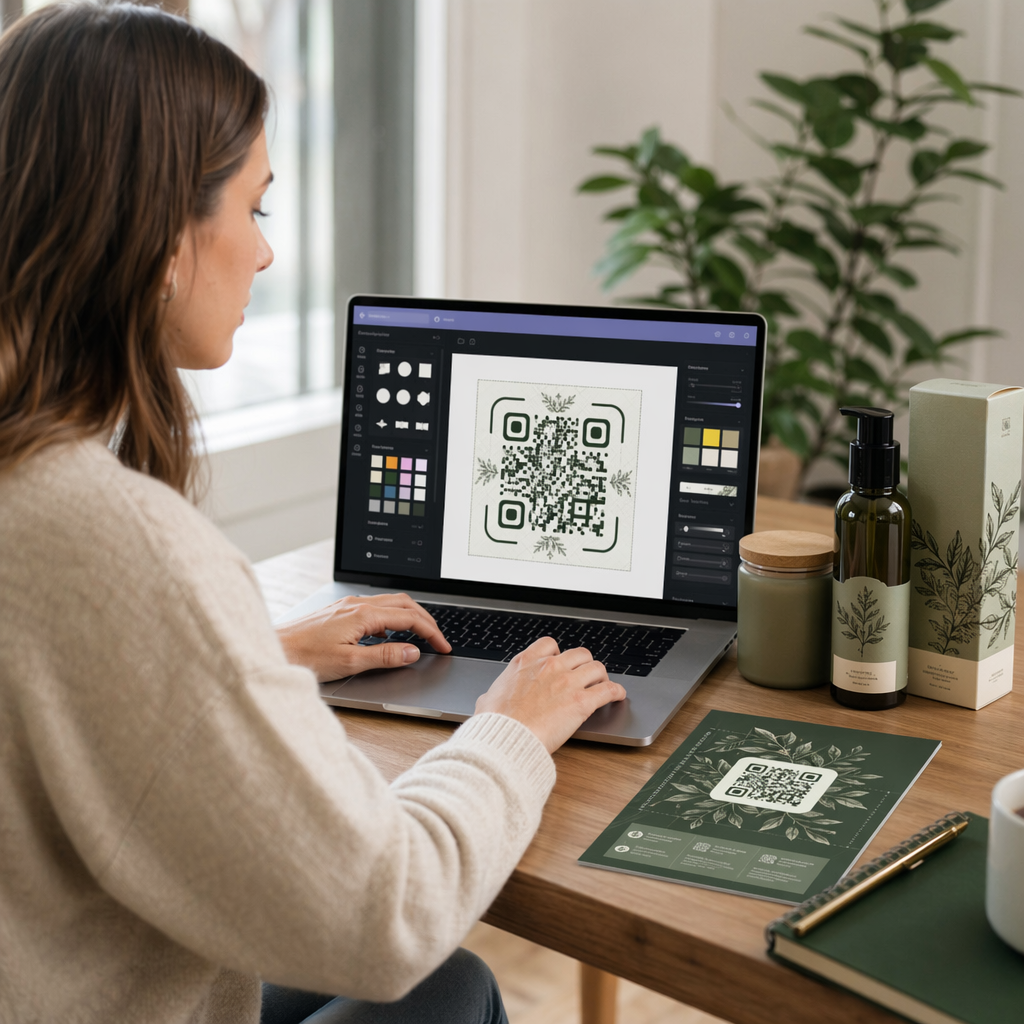
Bu standartları QR kod platformunuzda yeniden kullanılabilir markalı şablonlar olarak kaydedin. Pageloot, farklı bağlamlar için şablonlar oluşturmanıza olanak tanır – kartvizitler için kompakt bir format, büyük formatlı tabelalar için daha cesur bir sürüm – ve bunları her toplu üretim çalışmasında tutarlı bir şekilde uygulamanıza izin verir.
Büyük bir baskı işlemine başlamadan önce, fiziksel baskıların bir örneğini birden fazla cihazda ve aydınlatma koşulunda test edin. Herhangi bir kod güvenilir bir şekilde taranamıyorsa, fiziksel boyutu artırın, renk kontrastını güçlendirin veya sessiz bölgeyi genişletin.
Performansı Doğru Metriklerle Takip Edin
Kodları verimli bir şekilde oluşturmak işin sadece yarısıdır. Nasıl performans gösterdiklerini anlamak – ve bu verilere göre hareket etmek – sürekli iyileşmeyi sağlayan şeydir.
Büyük ölçekli dağıtımlar için izlenmesi gereken temel metrikler şunlardır:
- Toplam tarama ve benzersiz tarama: Toplam taramalar genel etkileşimi gösterirken; benzersiz taramalar gerçek erişiminizi ortaya koyar. Toplam taramaların benzersiz taramalara oranının yüksek olması, güçlü tekrar etkileşimini veya bazı durumlarda, kullanıcıları birden çok kez taramaya yönlendiren kötü optimize edilmiş bir açılış sayfasını gösterebilir.
- Coğrafi dağılım: Pageloot'un analitikleri, yaklaşık olarak şehir düzeyinde doğru, konum tabanlı tarama verileri sağlar. Bunu, hangi bölgelerin veya yerleşimlerin diğerlerinden daha iyi performans gösterdiğini belirlemek ve kaynakları buna göre yeniden tahsis etmek için kullanın.
- Cihaz ve işletim sistemi: Taramalarınızın çoğu belirli bir cihaz türünden geliyorsa, açılış sayfalarınızı o platformda test etmeye öncelik verin. Çoğu QR odaklı kampanya için mobil öncelikli optimizasyon çok önemlidir.
- Zamana dayalı eğilimler: Zaman içindeki tarama verileri, en yoğun etkileşim pencerelerini ortaya koyar. Zamana duyarlı kampanyalar (perakende promosyonları, etkinlikler) için bu veriler, içerik değişikliklerini doğru zamanda planlamanıza yardımcı olur.
- Dönüşüm takibi: Yalnızca tarama hacmi kampanya başarısını göstermez. Açık alt hedefler (form gönderimleri, satın almalar, uygulama indirmeleri) belirleyin ve taramaların istediğiniz eylemlere yol açıp açmadığını ölçmek için UTM verilerini ve analitik platformunuzu kullanın.
Bu metrikler etrafında raporlama görünümleri oluşturmaya yönelik ayrıntılı bir yaklaşım için, şu kılavuza bakın: bir QR kodu analitik panosu kullanma.
Eyleme Geçirilebilir İçgörüler Ortaya Koyan Panolar Oluşturun
Yüzlerce kod üzerindeki ham tarama verileri, yapılandırılmış görünümler olmadan yönetilemez hale gelir. Raporlamanızı şu şekilde düzenleyin:
- Kampanya düzeyinde panolar: Aktif kampanyalar arasındaki performansı, zaman periyoduna göre filtreleyerek karşılaştırın. Tarama başına maliyeti, dönüşüm oranını ve yatırım getirisini kampanya kıyaslamalarına göre takip edin.
- Konum tabanlı görünümler: Yüksek performanslı yerleşimleri belirlemek ve gelecekteki dağıtım kararlarını bilgilendirmek için tarama dağılımını coğrafi olarak haritalandırın.
- Kitle segmentasyonu: Takip içeriğini uyarlamak için kullanıcıları cihaz türüne, tarama sıklığına veya davranış modellerine göre gruplandırın.
Önemli sapmalar için otomatik uyarılar kurun – alışılmadık bir coğrafi kaynaktan gelen taramalardaki ani bir artış, bozuk bir yönlendirmeyi veya dolandırıcılık faaliyetini gösterebilirken, keskin bir düşüş acil dikkat gerektiren bozuk bir bağlantıya işaret edebilir.
Kodları Yeniden Basmadan Güncelleyin ve Sürdürün
Dinamik QR kodlarının temel operasyonel avantajlarından biri, şunları yapabilme yeteneğidir: baskıdan sonra hedef URL'leri düzenlemek – yeni kod yok, yeni baskı yok, aktif materyallerde kesinti yok. Büyük ölçekte, bu yetenek vazgeçilmez hale gelir.
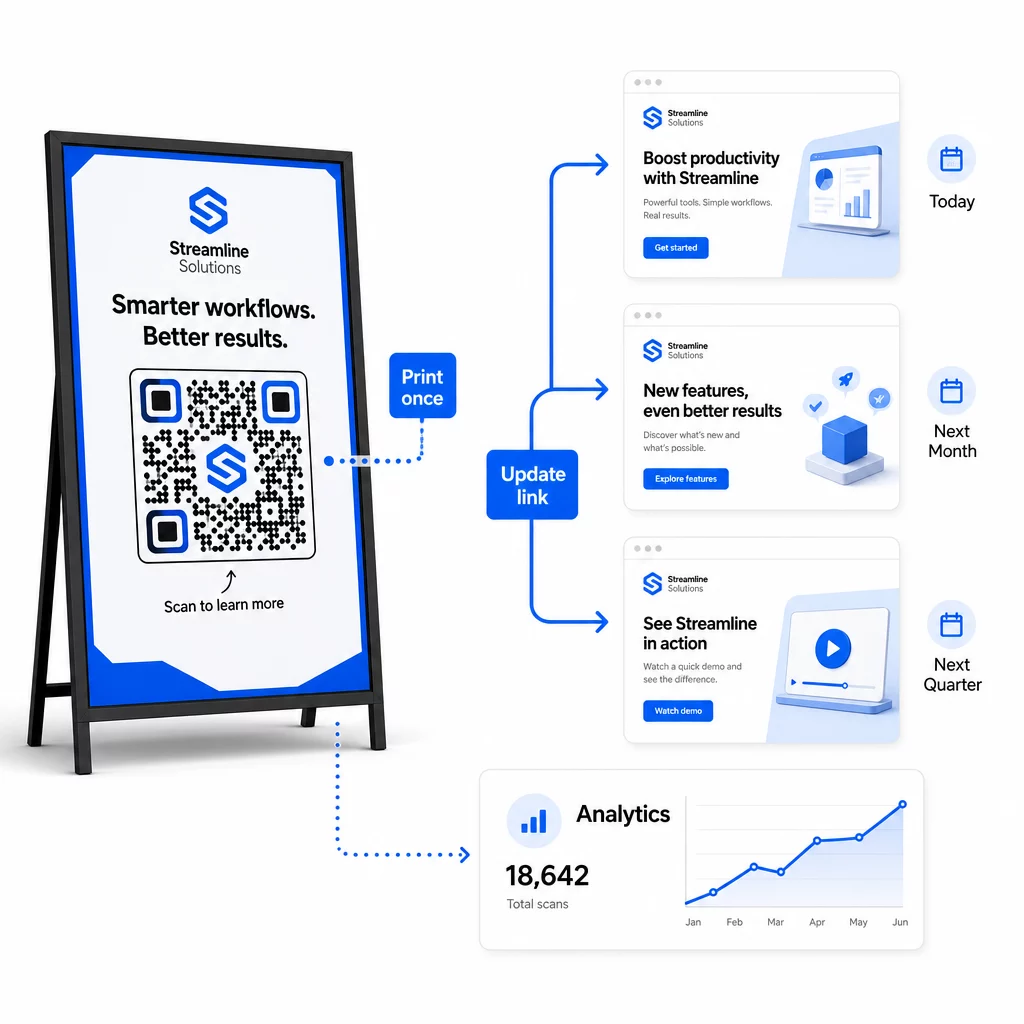
Hedef Değişiklikleri için Sürüm Kontrolü Uygulayın
Dinamik bir QR kodunun hedefini her güncellediğinizde, değişikliği şunlarla kaydedin:
- Güncelleme tarihi ve saati
- Önceki hedef URL
- Yeni hedef URL
- Değişikliğin nedeni
- Kim yetkilendirdi
Bir sürümleme şeması kullanın – ilk lansman için v1.0, küçük ayarlamalar için v1.1, önemli bir hedef değişikliği için v2.0 – böylece ekibiniz her zaman hangi sürümün yayında olduğunu bilir ve bir şeyler bozulursa geri alabilir. Birden fazla katkıda bulunanı olan ekipler için, rol tabanlı izinler yalnızca yetkili kullanıcıların aktif kodlarda değişiklik yapabilmesini sağlar.
Zaman Bazlı Yönlendirmeleri Otomatikleştirin
Öngörülebilir içerik programlarına sahip kampanyalar için, zamanlanmış yönlendirmeler manuel müdahaleye olan ihtiyacı ortadan kaldırır. Bir restoran, belirli zamanlarda hedef değişiklikleri planlayarak tek bir basılı QR kodundan kahvaltı, öğle yemeği ve akşam yemeği menüleri sunabilir. Bir perakendeci, bir indirim penceresi sırasında promosyon sayfasına yönlendirmek ve promosyon sona erdiğinde otomatik olarak standart ürün sayfasına geri dönmek için bir kodu yapılandırabilir.
Bu yaklaşım, QR kodları uzun teslim süreleri olan materyaller üzerine basıldığında özellikle değerlidir. Kampanya başladığında kodun doğru içeriği sunacağından emin olarak fiziksel üretimi çok önceden tamamlayabilirsiniz.
Bağlantıları Otomatik Olarak İzleyin
Büyük ölçekte, her hedef URL'nin canlı olup olmadığını manuel olarak kontrol etmek pratik değildir. Bir hedef hata döndürdüğünde ekibinizi uyarmak için otomatik bağlantı izleme kurun, böylece kullanıcılar bozuk bir deneyimle karşılaşmadan önce taramaları bir yedek URL'ye yönlendirebilirsiniz. Yedek URL'leri meta verilerinizde belgelemek – yukarıdaki adlandırma kuralı bölümünde açıklandığı gibi – ekibinizin her zaman hazır bir yedeği olduğu anlamına gelir.
QR Kod Programınızı Büyüdükçe Güvence Altına Alın
Büyük ölçekte operasyonel verimlilik, verilerinizi ve kullanıcılarınızı korumak için yönetişim – net sahiplik, uygun erişim kontrolleri ve proaktif izleme – gerektirir.
Rol tabanlı erişim kontrolü güvenli, iyi yönetilen bir QR kod programının temelidir. Her ekip üyesinin sorumluluklarına uygun izinler atayın: analiz görüntüleyicileri tarama verilerini görebilir ancak kodları düzenleyemez; kampanya yöneticileri hedefleri güncelleyebilir ancak kodları silemez; yöneticiler tam erişime sahiptir. Bu yapı, büyük ekipler arasında işbirliğini sağlarken kazara veya yetkisiz değişiklikleri önler.
Birden fazla departmanda QR kodlarını yöneten işletmeler için Pageloot, çalışma alanı düzeyinde erişim kontrollerini ve ekip klasörü paylaşımını destekleyerek, merkezi olmayan ekiplerin diğer grupların kampanyalarını görmeden kendi kodlarını yönetmelerine olanak tanır.
Erişim kontrolünün ötesinde, anormal tarama modellerine dikkat edin – beklenmedik hacim artışları, tek bir IP aralığından yüksek tarama yoğunlukları veya kampanya yerleşimlerinizle tutarsız coğrafi dağılımlar. Bu modeller, bot etkinliğini veya analiz verilerinizi bozacak diğer hileli taramaları gösterebilir. Bu modelleri erken uyaran otomatik izleme, hem veri bütünlüğünüzü hem de kampanya performans içgörülerinizi korur.
Aktif kodlarda yapılan tüm değişikliklerin bir denetim günlüğünü tutun: kim neyi, ne zaman ve neden değiştirdi. Bir kampanya sorunu ortaya çıktığında, bu kayıt teşhis ve çözüme giden en hızlı yoldur.
Sıkça sorulan sorular
Dinamik QR kodları, kod basıldıktan sonra hedef URL'yi veya içeriği, hiçbir şey oluşturmadan veya yeniden basmadan güncellemenizi sağlar. Büyük ölçekte bu, tek bir kontrol panelinden binlerce dağıtılmış kod arasında bozuk bağlantıları düzeltebileceğiniz, mevsimlik promosyonları güncelleyebileceğiniz veya kullanıcıları yeni içeriğe yönlendirebileceğiniz anlamına gelir – yeniden basım maliyetlerini ve operasyonel kesinti süresini ortadan kaldırarak.
Tamamen küçük harf kullanın, değerleri açıklayıcı ve özlü tutun ve parametre yapınızı paylaşılan bir referans belgesinde standartlaştırın. Güvenilir bir kalıp şudur: belirli yerleşim için `utmsource` (örn., `storedisplay`), tüm kodlarda tutarlı bir şekilde `utmmedium=qrcode`, tarihli kampanya adı için `utmcampaign` (örn., `summersale2025`) ve aynı kampanya içindeki bireysel yerleşimleri ayırt etmek için `utmcontent`. Dahili UTM bağlantılarından kaçının ve tüm parametrelerin analiz platformunuza doğru şekilde iletildiğini doğrulamak için lansman öncesi QA kontrolleri yapın.
Tasarım standartlarınızı – logo yerleşimi, marka renkleri, sessiz bölge boyutu, minimum baskı boyutları ve dosya formatları – herhangi bir toplu üretim yapmadan önce tanımlayın, ardından bunları QR kod platformunuzda yeniden kullanılabilir markalı şablonlar olarak kaydedin. Toplu üretimdeki her koda aynı şablonu uygulayın. Dinamik QR kodları bunu kolaylaştırır çünkü daha kısa kodlanmış verileri daha az yoğun desenler üretir, taranabilirliği tehlikeye atmadan logolar ve özel renkler için daha fazla alan bırakır.