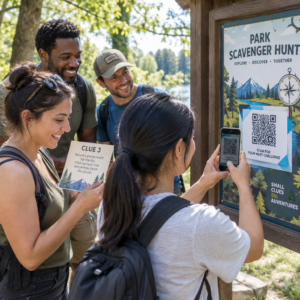
ניהול מאות – או אלפי – קודי QR על פני קמפיינים, מיקומים וקווי מוצרים קשה יותר ממה שזה נראה. ללא מערכת ברורה, צוותים נתקלים בקישורים שבורים, מיתוג לא עקבי, וללא נראות אמיתית לגבי מה עובד. מדריך זה מכסה את האסטרטגיות והכלים הפרקטיים השומרים על פריסות קודי QR בקנה מידה גדול מאורגנות, ניתנות למעקב וקלות לעדכון.
בחר את סוג קוד ה-QR הנכון לפני שאתה מתרחב
ההחלטה החשובה ביותר שתקבל לפני הרחבת כל תוכנית קודי QR היא הבחירה בין קודים דינמיים לסטטיים – מכיוון שבחירה זו קובעת מה תוכל לשנות, לעקוב ולאוטומט בהמשך.
קודי QR דינמיים השתמש בכתובת URL קצרה להפניה מחדש שאתה שולט בה. מכיוון שהקוד המודפס מצביע רק על הפניה זו, תוכל לעדכן את היעד, להחליף תוכן או לשנות פרמטרי מעקב בכל עת מבלי להדפיס מחדש דבר. הם גם פותחים יכולות מעקב כולל ספירת סריקות, חותמות זמן, מיקום גיאוגרפי, סוג מכשיר ומערכת הפעלה. זה הופך אותם לבחירה הנכונה עבור קמפיינים שיווקיים, מבצעים, תפריטי מסעדות, חומרי אירועים, וכל מקרה שימוש שבו תוכן משתנה או נתוני ביצועים חשובים.
קודי QR סטטיים מקודדים יעד ישירות לתוך התבנית עצמה. לאחר ההדפסה, נתונים אלה קבועים – אינך יכול לעדכן את הקישור או לעקוב אחר סריקות מבלי ליצור קוד חדש. הם מתאימים היטב למידע שלעולם אינו משתנה באמת: סיסמת Wi-Fi קבועה, מסמך רגולטורי קבוע, או תערוכת מוזיאון עם תוכן יציב.
| תכונה | קודי QR דינמיים | קודי QR סטטיים |
|---|---|---|
| ניתן לעריכה לאחר ההדפסה | ✅ כן | ❌ לא |
| מעקב סריקה | ✅ כן | ❌ לא |
| אנליטיקה גיאוגרפית | ✅ כן | ❌ לא |
| נתונים בזמן אמת | ✅ כן | ❌ לא |
| עֲלוּת | נדרש מנוי | חינם |
| הטוב ביותר עבור | קמפיינים, תפריטים, מבצעים | תוכן קבוע, בלתי ניתן לשינוי |
למבט מעמיק יותר על השוואת שתי האפשרויות הללו, ראה את הפירוט המלא של קודי QR סטטיים לעומת דינמיים.
התחל לנהל קודי QR דינמיים היום זקוק לקודים ניתנים לעריכה עם מעקב מובנה ולוח מחוונים מרכזי? ה- מחולל QR דינמי מאפשר לך ליצור, לעדכן ולנטר את כל הקודים שלך במקום אחד.
בנה מערכת שמות וארגון שניתנת להרחבה
כשאתה מנהל עשרות קודים, מוסכמות שמות רופפות הן אי-נוחות. במאות או אלפים, הן הופכות לבעיה תפעולית רצינית. מבנה שמות עקבי, בשילוב עם היררכיית תיקיות הגיונית, שומר על הצוות שלך מיושר ועל הקודים שלך ניתנים למציאה בכל שלב של קמפיין.
השתמש במוסכמת שמות סטנדרטית
פורמט שמות אמין לוכד את כל מה שאתה צריך כדי לזהות קוד מבלי לפתוח אותו. מבנה מעשי אחד:
`מחלקה-קמפייןערוץ-גיאומטרה-סוגנכסגִרְסָהסטטוס`
לדוגמה: `MKT-Summer25OOH-USפרומו-פוסטרv2פעיל`
הגדר תאריכים בפורמט YYYY-MM, השתמש במספרי גרסאות (v1, v2) כדי להבחין בין איטרציות, ותמיד כלול מחוון סטטוס (פעיל, מושהה, בארכיון). זה מונע בלבול כאשר מספר גרסאות של אותו קמפיין פעילות בו-זמנית.
רשום מטא-דאטה מובנה עבור כל קוד
מעבר לשם, כל קוד QR צריך לשאת מטא-דאטה מובנה שכל אחד בצוות שלך יכול להתייחס אליו. שדות לכלול:
- בעלים (אדם או צוות אחראי)
- יחידה עסקית או קו מוצרים
- כתובת URL יעד וכתובת URL לגיבוי
- סוג קוד (דינמי או סטטי)
- תאריך התחלה ותאריך סיום
- טקסט קריאה לפעולה
- רמת גישה או אבטחה
תאריכי סיום וכתובות URL לגיבוי חשובים במיוחד בקנה מידה גדול – הם מונעים סריקות ללא מוצא לאחר סיום קמפיין, וכתובת URL לגיבוי מבטיחה שמשתמשים עדיין יגיעו למקום שימושי אם היעד הראשי קורס.
ארגון באמצעות תיקיות ותגיות
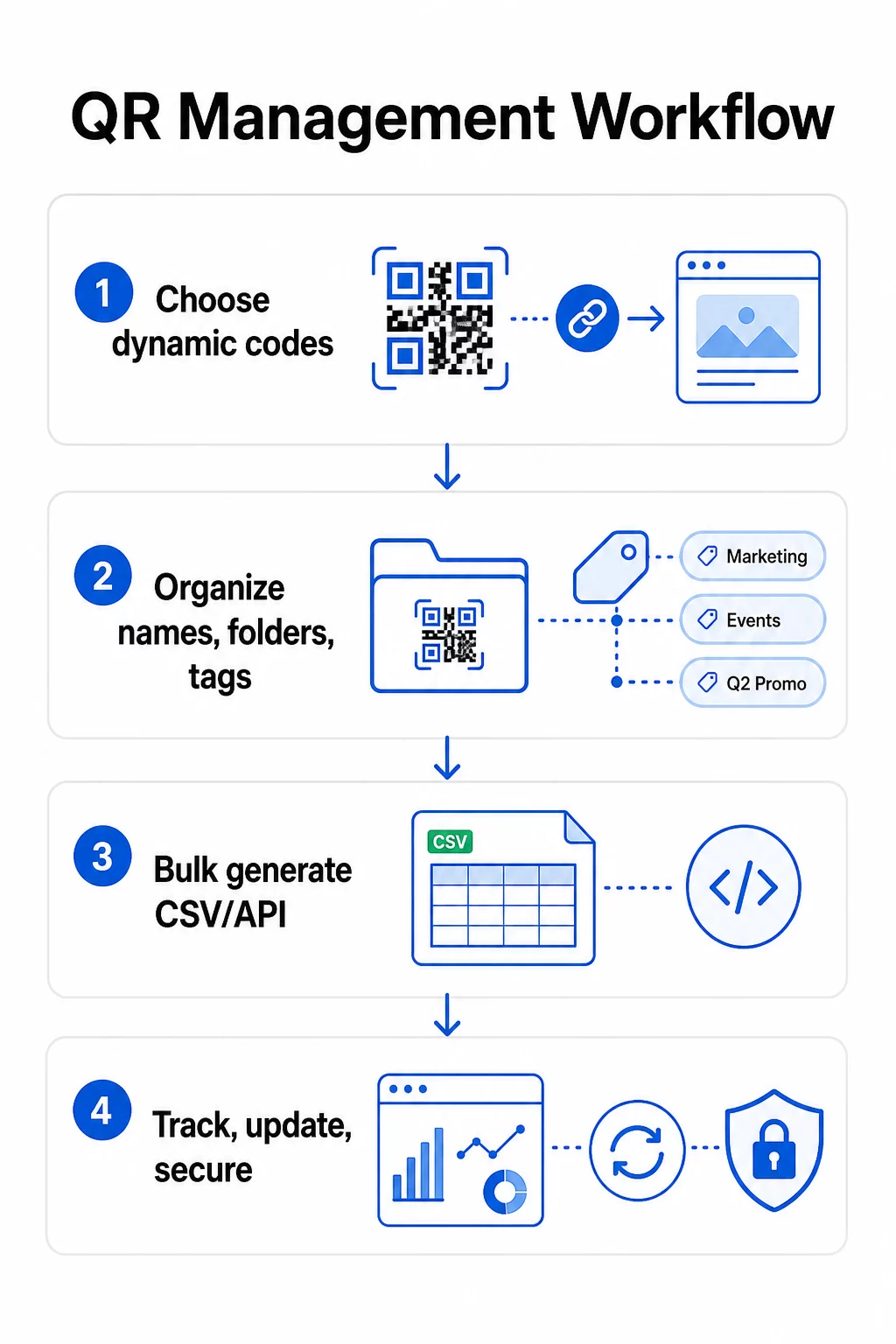
מבנה תיקיות דו-שכבתי עובד היטב עבור רוב הצוותים: תיקיות ברמה העליונה עבור יחידות עסקיות או קווי מוצרים, ותיקיות משנה עבור קמפיינים או מיקומים בודדים. תגיות מוסיפות שכבת סינון שנייה – סמנו קודים לפי אזור (ארה"ב, האיחוד האירופי), ערוץ (אימייל, חוץ-ביתי, אריזה), סוג מיקום (פוסטר, בקבוק, מסך), וסטטוס (פעיל, בארכיון).
של Pageloot תכונת תיקיות קודי QR תומך בשיתוף תיקיות מבוסס צוות עם הרשאות מבוססות תפקידים, כך שתוכלו לתת לחברי צוות חדשים גישת קריאה לניתוחים תוך הגבלת מי שיכול לערוך או למחוק קודים. זה שימושי במיוחד עבור סוכנויות המנהלות מספר לקוחות או ארגונים המפעילים קודים בין מחלקות.
צור קודים בכמות גדולה מבלי לאבד שליטה
ברגע שמבנה השמות והתיקיות שלכם מוגדר, יצירה בכמות גדולה הופכת לפשוטה – בתנאי שנתוני הקלט שלכם נקיים והתהליך שלכם כולל שלב אימות לפני יצירה בנפח גדול.
השתמש בקבצי CSV ליצירה בקבוצות
יצירה בכמות גדולה מבוססת CSV היא השיטה המעשית ביותר ליצירת נפחים גדולים של קודים ביעילות. קובץ CSV מובנה היטב ליצירת קודי QR צריך לכלול:
- `unique_id` – המזהה הפנימי שלכם
- `qr_type` – URL, PDF, vCard, טופס, וכו'.
- `destination_url` – יעד היעד
- `campaign_name` – לדיווח וסינון
- `folder` – היכן שהקוד צריך להיות בלוח המחוונים שלך
- `template_name` – העיצוב הממותג ליישום
- `utm_parameters` – מקור, מדיום, קמפיין, תוכן
- `start``date` / `end``date` – חלון הקמפיין
- `status` – פעיל או מושהה
- `owner` – חבר צוות אחראי
לפני ההעלאה, אמת את קובץ ה-CSV: ודא שכל השדות הנדרשים מאוכלסים, בדוק שכתובות ה-URL פעילות ומעוצבות נכון, והרץ אצווה בדיקה של חמישה עד עשרה קודים על פני מכשירים שונים כדי לתפוס שגיאות לפני שהן מתפשטות לאורך כל ההרצה המלאה.
עבור יצירה אוטומטית בכמות גדולה בקנה מידה ארגוני, ניהול קודי QR מבוסס API מאפשר לך להעביר פרמטרים באופן תכנותי, להפעיל יצירת אצווה מהמערכות שלך, ולעדכן כתובות URL יעד על פני אלפי קודים בו-זמנית באמצעות בקשות PATCH או PUT.
הוסף פרמטרי UTM באופן עקבי
פרמטרי UTM הם מה שמחבר סריקות קוד QR למערך האנליטיקה הרחב יותר שלך. בלעדיהם, אתה יכול לראות שמישהו סרק קוד, אבל אינך יכול לייחס בקלות את הסריקה הזו לקמפיין, ערוץ או מיקום ספציפיים ב-Google Analytics.
פעל לפי מוסכמות אלו כדי לשמור על הנתונים שלך נקיים:
- השתמש באותיות קטנות לכל אורך הדרך – מעקב UTM רגיש לאותיות רישיות/קטנות, ושימוש מעורב באותיות רישיות/קטנות יוצר דיווח מקוטע
- שמור על ערכי פרמטרים תיאוריים אך תמציתיים: `utmsource=storedisplay`, `utmmedium=qrcode`, `utmcampaign=summersale_2025`
- השתמש ב-`utmcontent` כדי להבחין בין מיקומים בתוך אותו קמפיין (לדוגמה, `windowposter` לעומת `checkout_counter`)
- תעד את טקסונומיית השמות שלך במסמך עזר משותף כך שכל חבר צוות יפעל לפי אותם כללים
להדרכה מלאה על הגדרת UTM ודיווח ב-Google Analytics 4, ראה פרמטרי UTM עבור קודי QR.
חבר את סריקות ה-QR שלך לאנליטיקת קמפיינים של Pageloot פלטפורמת סוכנות וצוות תומך בהוספת UTM אוטומטית, בקרת גישה מבוססת תפקידים, ודוחות לקוח ניתנים לשיתוף – מה שהופך את מעקב הייחוס לקל באופן משמעותי על פני פריסות גדולות.
שמור על מיתוג עקבי בכל קוד
בקנה מידה גדול, עקביות ויזואלית חשובה משתי סיבות: היא בונה זיהוי ואמון עם האנשים הסורקים את הקודים שלך, והיא מונעת טלאי של עיצובים לא תואמים מלדלל את זהות המותג שלך.
לפני יצירת אצווה גדולה, הגדר ונעל את תקני העיצוב שלך:
- מיקום לוגו וגודל מינימלי
- פלטת צבעי מותג (חזית כהה על רקע בהיר נשארת התבנית האמינה ביותר לסריקה)
- סגנון פינה ומודול
- דרישות אזור שקט (לפחות ארבעה מודולים של שטח פנוי מכל הצדדים)
- גודל הדפסה מינימלי (לפחות 2 × 2 ס"מ לסריקה מטווח קרוב; הגדל באמצעות כלל 10:1 – רוחב הקוד צריך להיות לפחות עשירית ממרחק הסריקה הצפוי)
- פורמטים של קבצים: SVG או PDF לחומרי הדפסה (300+ DPI), PNG לשימוש דיגיטלי
קודי QR דינמיים מציעים יתרון מעשי כאן: מכיוון שהם מקודדים כתובת URL קצרה להפניה מחדש במקום יעד ארוך, התבנית הבסיסית פחות צפופה. זה משאיר יותר מקום לשלב לוגואים וצבעים מותאמים אישית מבלי לפגוע ביכולת הסריקה.
שמור תקנים אלה כתבניות ממותגות לשימוש חוזר בפלטפורמת קודי ה-QR שלך. Pageloot מאפשרת לך ליצור תבניות להקשרים שונים – פורמט קומפקטי לכרטיסי ביקור, גרסה נועזת יותר לשילוט בפורמט גדול – וליישם אותם באופן עקבי בכל הפעלת יצירה בכמות גדולה.
לפני התחייבות להדפסה גדולה, בדוק דגימה של הדפסות פיזיות על פני מספר מכשירים ותנאי תאורה. אם קודים כלשהם לא נסרקים באופן אמין, הגדל את הגודל הפיזי, חזק את ניגודיות הצבע, או הרחב את האזור השקט.
עקוב אחר ביצועים עם המדדים הנכונים
יצירת קודים ביעילות היא רק חצי מהעבודה. הבנה כיצד הם פועלים – ופעולה על בסיס נתונים אלה – היא מה שמניע שיפור מתמיד.
מדדי המפתח שיש לנטר עבור פריסות בקנה מידה גדול הם:
- סריקות כוללות וסריקות ייחודיות: סריקות כוללות מציגות מעורבות כללית; סריקות ייחודיות חושפות את טווח ההגעה האמיתי שלך. יחס גבוה של סריקות כוללות לסריקות ייחודיות עשוי להעיד על מעורבות חוזרת חזקה, או במקרים מסוימים, על דף נחיתה לא ממוטב המניע משתמשים לסרוק מספר פעמים.
- התפלגות גאוגרפית: הניתוח של Pageloot מספק נתוני סריקה מבוססי מיקום, מדויקים בקירוב לרמת העיר. השתמש בזה כדי לזהות אילו אזורים או מיקומים מתפקדים טוב יותר מאחרים ולהקצות מחדש משאבים בהתאם.
- מכשיר ומערכת הפעלה: אם רוב הסריקות שלך מגיעות מסוג מכשיר ספציפי, תעדף בדיקת דפי הנחיתה שלך בפלטפורמה זו. אופטימיזציה מותאמת למובייל היא חיונית עבור רוב הקמפיינים מבוססי קודי QR.
- מגמות מבוססות זמן: נתוני סריקה לאורך זמן חושפים חלונות שיא של מעורבות. עבור קמפיינים רגישים לזמן – מבצעי קמעונאות, אירועים – נתונים אלה עוזרים לך לתזמן שינויי תוכן ברגע הנכון.
- מעקב המרות: נפח סריקות לבדו אינו מעיד על הצלחת קמפיין. הגדר יעדים ברורים במורד הזרם (שליחת טפסים, רכישות, הורדות אפליקציות) והשתמש בנתוני UTM בתוספת פלטפורמת הניתוח שלך כדי למדוד אם סריקות מובילות לפעולות הרצויות לך.
לגישה מפורטת לבניית תצוגות דיווח סביב מדדים אלה, עיין במדריך ל שימוש בלוח מחוונים לניתוח קודי QR.
בנה לוחות מחוונים החושפים תובנות ניתנות לפעולה
נתוני סריקה גולמיים על פני מאות קודים הופכים למסורבלים ללא תצוגות מובנות. ארגן את הדיווח שלך לתוך:
- לוחות מחוונים ברמת קמפיין: השווה ביצועים בין קמפיינים פעילים, מסוננים לפי תקופת זמן. עקוב אחר עלות לסריקה, שיעור המרה והחזר ROI מול מדדי ביצועים של קמפיין.
- תצוגות מבוססות מיקום: מפו את התפלגות הסריקות גיאוגרפית כדי לזהות מיקומים בעלי ביצועים גבוהים וליידע החלטות פריסה עתידיות.
- פילוח קהל: קבצו משתמשים לפי סוג מכשיר, תדירות סריקה או דפוסי התנהגות כדי להתאים תוכן המשך.
הגדירו התראות אוטומטיות עבור סטיות משמעותיות – עלייה פתאומית בסריקות ממקור גיאוגרפי חריג יכולה להצביע על הפניה שבורה (redirect) או פעילות הונאה, בעוד ירידה חדה עשויה לאותת על קישור שבור הדורש טיפול מיידי.
עדכון ותחזוקת קודים ללא הדפסה מחדש
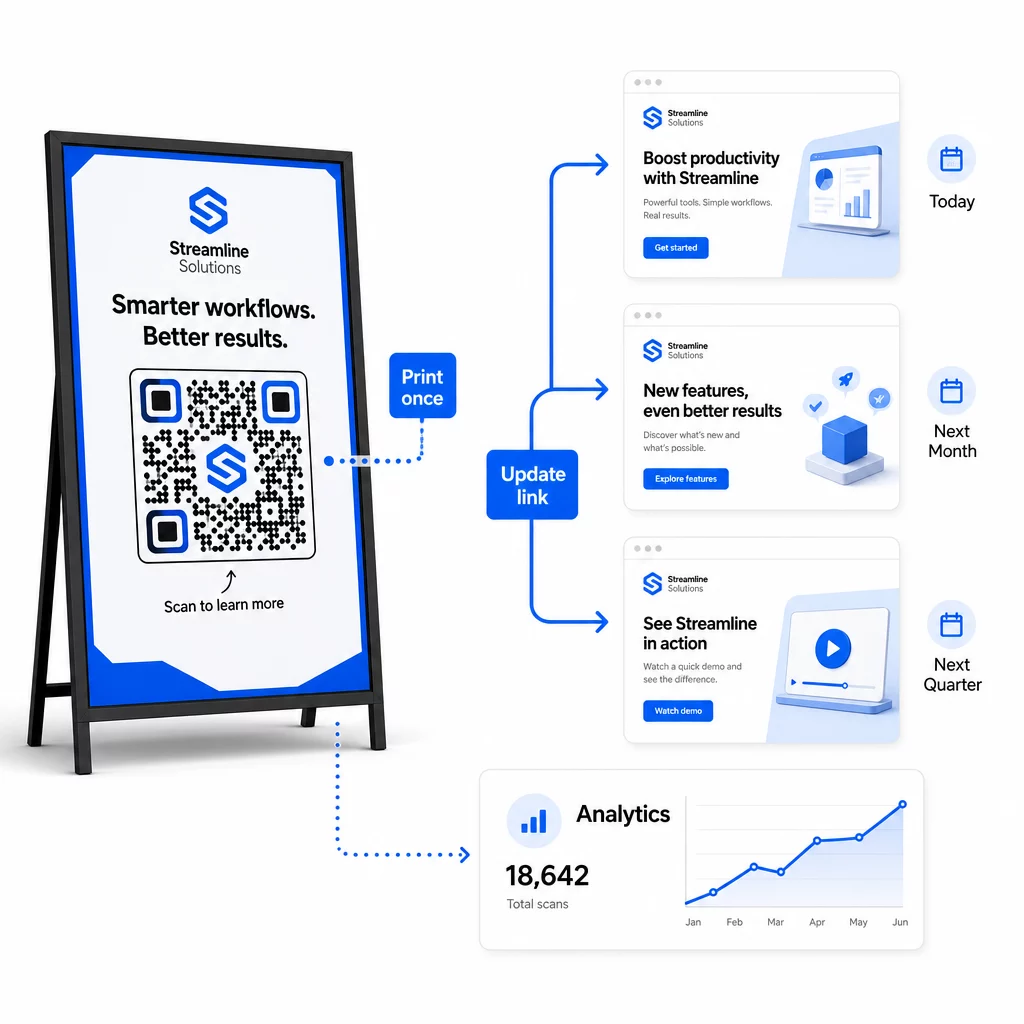
אחד היתרונות התפעוליים המרכזיים של קודי QR דינמיים הוא היכולת ל לערוך כתובות URL יעד לאחר ההדפסה – ללא קודים חדשים, ללא הדפסות חדשות, ללא הפרעה לחומרים פעילים. בקנה מידה גדול, יכולת זו הופכת חיונית.
יישום בקרת גרסאות לשינויי יעד
בכל פעם שאתם מעדכנים יעד של קוד QR דינמי, תיעדו את השינוי עם:
- תאריך ושעת העדכון
- כתובת URL יעד קודמת
- כתובת URL יעד חדשה
- סיבת השינוי
- מי אישר זאת
השתמשו בסכימת גרסאות – v1.0 להשקה ראשונית, v1.1 להתאמות קלות, v2.0 לשינוי יעד משמעותי – כך שהצוות שלכם תמיד יידע איזו גרסה פעילה ויוכל לחזור אחורה אם משהו ישתבש. עבור צוותים עם תורמים מרובים, הרשאות מבוססות תפקידים מבטיחות שרק משתמשים מורשים יוכלו לבצע שינויים בקודים פעילים.
אוטומציה של הפניות מבוססות זמן
עבור קמפיינים עם לוחות זמנים צפויים של תוכן, הפניות מתוזמנות מבטלות את הצורך בהתערבות ידנית. מסעדה יכולה להגיש תפריטי בוקר, צהריים וערב מקוד QR מודפס יחיד על ידי תזמון שינויי יעד בזמנים קבועים. קמעונאי יכול להגדיר קוד שיפנה לדף מבצעים במהלך חלון מכירה ויחזור לדף המוצר הסטנדרטי באופן אוטומטי כשהמבצע יסתיים.
גישה זו יקרת ערך במיוחד כאשר קודי QR מודפסים על חומרים עם זמני אספקה ארוכים. ניתן לסיים את הייצור הפיזי זמן רב מראש, בביטחון שהקוד יציג את התוכן הנכון כשהקמפיין יעלה לאוויר.
ניטור קישורים אוטומטי
בקנה מידה גדול, בדיקה ידנית אם כל כתובת URL יעד פעילה אינה מעשית. הגדירו ניטור קישורים אוטומטי כדי להתריע לצוות שלכם כאשר יעד מחזיר שגיאה, כך שתוכלו להפנות סריקות לכתובת URL חלופית לפני שמשתמשים יתקלו בחוויה שבורה. תיעוד כתובות URL חלופיות במטא-דאטה שלכם – כפי שתואר בסעיף מוסכמות השמות לעיל – פירושו שלצוות שלכם תמיד יש גיבוי מוכן.
אבטחו את תוכנית קודי ה-QR שלכם ככל שהיא גדלה
יעילות תפעולית בקנה מידה גדול דורשת ממשל – בעלות ברורה, בקרות גישה מתאימות וניטור פרואקטיבי כדי להגן על הנתונים ועל המשתמשים שלכם.
בקרת גישה מבוססת תפקידים היא הבסיס לתוכנית קודי QR מאובטחת ומנוהלת היטב. הקצו הרשאות התואמות את תחומי האחריות של כל חבר צוות: צופים באנליטיקה יכולים לראות נתוני סריקה אך לא לערוך קודים; מנהלי קמפיינים יכולים לעדכן יעדים אך לא למחוק קודים; למנהלים יש גישה מלאה. מבנה זה מונע שינויים מקריים או בלתי מורשים תוך מתן אפשרות לשיתוף פעולה בין צוותים גדולים.
עבור ארגונים המנהלים קודי QR על פני מחלקות מרובות, Pageloot תומכת בבקרות גישה ברמת סביבת העבודה ובשיתוף תיקיות צוות, מה שמאפשר לצוותים מבוזרים לנהל את הקודים שלהם ללא נראות לקמפיינים של קבוצות אחרות.
מעבר לבקרת גישה, שימו לב לדפוסי סריקה חריגים – קפיצות נפח בלתי צפויות, ריכוזים גבוהים של סריקות מטווח IP יחיד, או התפלגויות גיאוגרפיות שאינן עולות בקנה אחד עם מיקומי הקמפיין שלכם. דפוסים אלה יכולים להצביע על פעילות בוטים או סריקה הונאתית אחרת שעלולה לשבש את נתוני האנליטיקה שלכם. ניטור אוטומטי שמזהה דפוסים אלה מוקדם מגן הן על שלמות הנתונים שלכם והן על תובנות ביצועי הקמפיין שלכם.
שמרו יומן ביקורת של כל השינויים בקודים פעילים: מי שינה מה, מתי ולמה. כאשר מתעוררת בעיה בקמפיין, תיעוד זה הוא הדרך המהירה ביותר לאבחון ופתרון.
שאלות נפוצות
קודי QR דינמיים מאפשרים לך לעדכן את כתובת ה-URL היעד או התוכן לאחר שהקוד הודפס, מבלי לייצר או להדפיס מחדש דבר. בקנה מידה גדול, זה אומר שאתה יכול לתקן קישורים שבורים, לעדכן מבצעים עונתיים, או להפנות משתמשים לתוכן חדש על פני אלפי קודים פרוסים מלוח מחוונים יחיד – ובכך לבטל עלויות הדפסה מחדש וזמן השבתה תפעולי.
השתמשו באותיות קטנות לכל אורך הדרך, שמרו על ערכים תיאוריים ותמציתיים, ותקננו את מבנה הפרמטרים שלכם במסמך עזר משותף. תבנית אמינה היא: `utmsource` עבור המיקום הספציפי (לדוגמה, `storedisplay`), `utmmedium=qrcode` באופן עקבי בכל הקודים, `utmcampaign` עבור שם הקמפיין עם תאריך (לדוגמה, `summersale2025`), ו-`utmcontent` כדי להבחין בין מיקומים בודדים באותו קמפיין. הימנעו מקישורי UTM פנימיים, ובצעו בדיקות QA לפני ההשקה כדי לוודא שכל הפרמטרים עוברים כהלכה לפלטפורמת האנליטיקה שלכם.
הגדירו את תקני העיצוב שלכם – מיקום לוגו, צבעי מותג, גודל אזור שקט, מידות הדפסה מינימליות ופורמטים של קבצים – לפני יצירת כל אצווה, ולאחר מכן שמרו אותם כתבניות ממותגות לשימוש חוזר בפלטפורמת קודי ה-QR שלכם. יש ליישם את אותה תבנית על כל קוד בהרצת אצווה. קודי QR דינמיים מקלים על כך מכיוון שהנתונים המקודדים הקצרים יותר שלהם מייצרים דפוסים פחות צפופים, ומשאירים יותר מקום ללוגואים וצבעים מותאמים אישית מבלי להתפשר על יכולת הסריקה.