การจัดการ QR โค้ดหลายร้อย – หรือหลายพัน – รายการในแคมเปญ สถานที่ และสายผลิตภัณฑ์ต่างๆ นั้นยากกว่าที่คิด หากไม่มีระบบที่ชัดเจน ทีมงานจะประสบปัญหาลิงก์เสีย แบรนด์ไม่สอดคล้องกัน และมองไม่เห็นว่าอะไรได้ผลจริง คู่มือนี้ครอบคลุมกลยุทธ์และเครื่องมือที่ใช้งานได้จริง ซึ่งช่วยให้การใช้งาน QR โค้ดขนาดใหญ่เป็นระเบียบ ติดตามได้ และอัปเดตง่าย.
เลือกประเภท QR โค้ดที่เหมาะสมก่อนที่คุณจะขยายขนาด
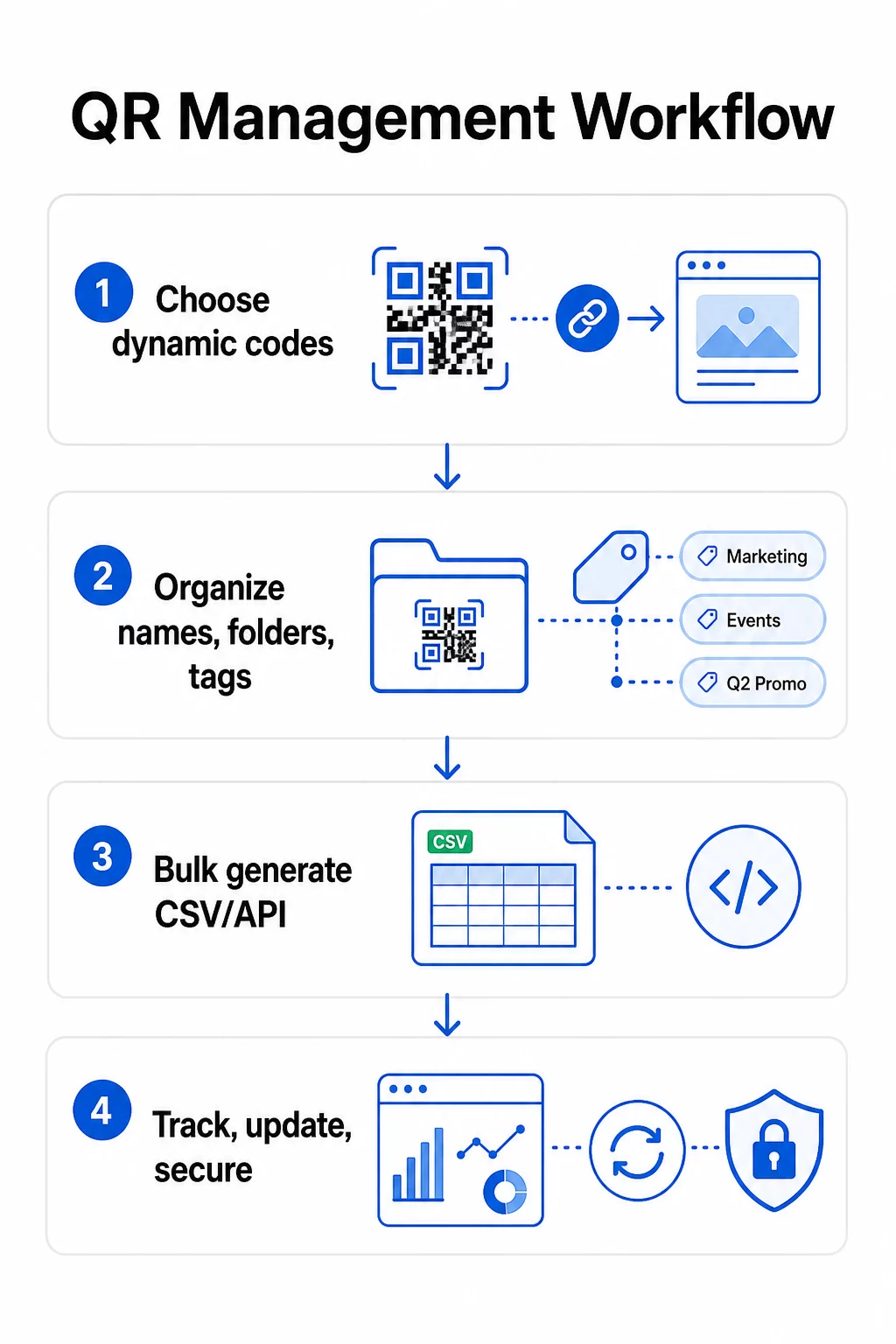
การตัดสินใจที่สำคัญที่สุดที่คุณจะทำก่อนที่จะขยายโปรแกรม QR โค้ดใดๆ คือการเลือกระหว่างโค้ดแบบไดนามิกและแบบคงที่ – เพราะการเลือกนั้นจะเป็นตัวกำหนดสิ่งที่คุณสามารถเปลี่ยนแปลง ติดตาม และทำให้เป็นอัตโนมัติได้ในภายหลัง.
รหัส QR แบบไดนามิก ใช้ URL เปลี่ยนเส้นทางแบบสั้นที่คุณควบคุมได้ เนื่องจากโค้ดที่พิมพ์ออกมาจะชี้ไปยังการเปลี่ยนเส้นทางนั้นเท่านั้น คุณจึงสามารถอัปเดตปลายทาง สลับเนื้อหา หรือเปลี่ยนพารามิเตอร์การติดตามได้ตลอดเวลาโดยไม่ต้องพิมพ์ซ้ำ นอกจากนี้ยังปลดล็อก ความสามารถในการติดตาม รวมถึงจำนวนการสแกน, การประทับเวลา, ตำแหน่งทางภูมิศาสตร์, ประเภทอุปกรณ์ และระบบปฏิบัติการ สิ่งนี้ทำให้เป็นตัวเลือกที่เหมาะสมสำหรับแคมเปญการตลาด, โปรโมชั่น, เมนูร้านอาหาร, วัสดุสำหรับกิจกรรม และกรณีการใช้งานใดๆ ที่เนื้อหามีการเปลี่ยนแปลงหรือข้อมูลประสิทธิภาพมีความสำคัญ.
รหัส QR แบบคงที่ เข้ารหัสปลายทางโดยตรงลงในรูปแบบของโค้ด เมื่อพิมพ์แล้ว ข้อมูลนั้นจะถาวร – คุณไม่สามารถอัปเดตลิงก์หรือติดตามการสแกนได้หากไม่สร้างโค้ดใหม่ เหมาะสำหรับข้อมูลที่ไม่เปลี่ยนแปลงอย่างแท้จริง: รหัสผ่าน Wi-Fi แบบคงที่, เอกสารข้อบังคับถาวร หรือนิทรรศการพิพิธภัณฑ์ที่มีเนื้อหาคงที่.
| ฟีเจอร์ | โค้ด QR แบบไดนามิก | รหัส QR แบบคงที่ |
|---|---|---|
| แก้ไขได้หลังพิมพ์ | ✅ใช่ | ❌ ไม่ |
| การติดตามการสแกน | ✅ใช่ | ❌ ไม่ |
| การวิเคราะห์ทางภูมิศาสตร์ | ✅ใช่ | ❌ ไม่ |
| วิเคราะห์ข้อมูลแบบเรียลไทม์ | ✅ใช่ | ❌ ไม่ |
| ค่าใช้จ่าย | ต้องสมัครสมาชิก | ฟรี |
| เหมาะสำหรับ | แคมเปญ, เมนู, โปรโมชั่น | เนื้อหาคงที่ ถาวร |
สำหรับข้อมูลเชิงลึกเพิ่มเติมเกี่ยวกับความแตกต่างของสองตัวเลือกนี้ โปรดดูฉบับเต็ม การเปรียบเทียบ QR โค้ดแบบคงที่และแบบไดนามิก.
เริ่มจัดการ QR โค้ดแบบไดนามิกวันนี้ ต้องการโค้ดที่แก้ไขได้พร้อมการติดตามในตัวและแดชบอร์ดแบบรวมศูนย์หรือไม่? สร้าง Dynamic QR Code ช่วยให้คุณสร้าง อัปเดต และตรวจสอบโค้ดทั้งหมดของคุณได้ในที่เดียว.
สร้างระบบการตั้งชื่อและการจัดระเบียบที่สามารถขยายขนาดได้
เมื่อคุณจัดการรหัสจำนวนมาก การตั้งชื่อที่ไม่เป็นระเบียบเป็นเรื่องไม่สะดวก เมื่อมีรหัสเป็นร้อยหรือพัน รหัสเหล่านั้นจะกลายเป็นปัญหาการดำเนินงานที่ร้ายแรง โครงสร้างการตั้งชื่อที่สอดคล้องกัน ผสมผสานกับการจัดลำดับชั้นของโฟลเดอร์ที่เป็นเหตุเป็นผล จะช่วยให้ทีมของคุณทำงานร่วมกันได้อย่างราบรื่น และค้นหารหัสของคุณได้ในทุกขั้นตอนของแคมเปญ.
ใช้หลักเกณฑ์การตั้งชื่อที่เป็นมาตรฐาน
รูปแบบการตั้งชื่อที่เชื่อถือได้จะรวบรวมทุกสิ่งที่คุณต้องการเพื่อระบุรหัสโดยไม่ต้องเปิดดู โครงสร้างที่ใช้งานได้จริงอย่างหนึ่งคือ:
`แผนก-แคมเปญช่องทาง-ภูมิภาควัตถุประสงค์-ประเภทสินทรัพย์รุ่นสถานะ`
ตัวอย่าง: `MKT-Summer25OOH-USโปรโมชัน-โปสเตอร์v2ACTIVE`
กำหนดวันที่ในรูปแบบ YYYY-MM ใช้หมายเลขเวอร์ชัน (v1, v2) เพื่อแยกความแตกต่างของเวอร์ชัน และควรรวมตัวบ่งชี้สถานะ (ACTIVE, PAUSED, ARCHIVED) เสมอ สิ่งนี้ช่วยป้องกันความสับสนเมื่อแคมเปญเดียวกันหลายเวอร์ชันทำงานพร้อมกัน.
บันทึกข้อมูลเมตาที่มีโครงสร้างสำหรับทุกรหัส
นอกเหนือจากชื่อแล้ว รหัส QR แต่ละรหัสควรมีข้อมูลเมตาที่มีโครงสร้างซึ่งทุกคนในทีมของคุณสามารถอ้างอิงได้ ฟิลด์ที่ควรรวมถึง:
- เจ้าของ (บุคคลหรือทีมที่รับผิดชอบ)
- หน่วยธุรกิจหรือสายผลิตภัณฑ์
- URL เป้าหมายและ URL สำรอง
- ประเภทโค้ด (ไดนามิกหรือสแตติก)
- วันที่เริ่มต้นและวันที่สิ้นสุด
- ข้อความกระตุ้นการตัดสินใจ (Call-to-action copy)
- ระดับการเข้าถึงหรือความปลอดภัย
วันที่สิ้นสุดและ URL สำรองมีความสำคัญอย่างยิ่งในระดับขนาดใหญ่ – ช่วยป้องกันการสแกนที่ไร้จุดหมายหลังจากแคมเปญสิ้นสุดลง และ URL สำรองช่วยให้ผู้ใช้ยังคงเข้าถึงหน้าที่มีประโยชน์ได้หากปลายทางหลักไม่ทำงาน.
จัดระเบียบด้วยโฟลเดอร์และแท็ก
โครงสร้างโฟลเดอร์สองชั้นทำงานได้ดีสำหรับทีมส่วนใหญ่: โฟลเดอร์ระดับบนสุดสำหรับหน่วยธุรกิจหรือสายผลิตภัณฑ์ และโฟลเดอร์ย่อยสำหรับแคมเปญหรือสถานที่แต่ละแห่ง แท็กเพิ่มชั้นการกรองที่สอง – ทำเครื่องหมายโค้ดตามภูมิภาค (US, EU), ช่องทาง (อีเมล, นอกบ้าน, บรรจุภัณฑ์), ประเภทการจัดวาง (โปสเตอร์, ขวด, หน้าจอ) และสถานะ (ใช้งานอยู่, เก็บถาวร).
ของ Pageloot คุณสมบัติโฟลเดอร์รหัส QR รองรับการแชร์โฟลเดอร์แบบทีมพร้อมสิทธิ์ตามบทบาท เพื่อให้คุณสามารถให้สมาชิกทีมใหม่มีสิทธิ์อ่านข้อมูลวิเคราะห์ในขณะที่จำกัดผู้ที่สามารถแก้ไขหรือลบรหัสได้ สิ่งนี้มีประโยชน์อย่างยิ่งสำหรับเอเจนซี่ที่จัดการลูกค้าหลายรายหรือองค์กรที่ใช้รหัสในแผนกต่างๆ.
สร้างรหัสจำนวนมากโดยไม่สูญเสียการควบคุม
เมื่อโครงสร้างการตั้งชื่อและโฟลเดอร์ของคุณเข้าที่ การสร้างจำนวนมากจะกลายเป็นเรื่องง่าย – โดยมีเงื่อนไขว่าข้อมูลป้อนเข้าของคุณสะอาดและกระบวนการของคุณมีขั้นตอนการตรวจสอบก่อนที่จะสร้างในปริมาณมาก.
ใช้ไฟล์ CSV สำหรับการสร้างเป็นชุด
การสร้างจำนวนมากโดยใช้ CSV เป็นวิธีที่ใช้งานได้จริงที่สุดสำหรับการสร้างรหัสจำนวนมากอย่างมีประสิทธิภาพ ไฟล์ CSV ที่มีโครงสร้างดีสำหรับการสร้างรหัส QR ควรรวมถึง:
- `unique_id` – ตัวระบุภายในของคุณ
- `qr_type` – URL, PDF, vCard, ฟอร์ม ฯลฯ.
- `destination_url` – ปลายทางเป้าหมาย
- `campaign_name` – สำหรับการรายงานและการกรอง
- `folder` – ที่ที่โค้ดควรอยู่ในแดชบอร์ดของคุณ
- `template_name` – การออกแบบแบรนด์ที่จะนำไปใช้
- `utm_parameters` – แหล่งที่มา, สื่อ, แคมเปญ, เนื้อหา
- `startdate` / `enddate` – ช่วงเวลาแคมเปญ
- `status` – ใช้งานอยู่หรือหยุดชั่วคราว
- `owner` – สมาชิกในทีมที่รับผิดชอบ
ก่อนอัปโหลด ให้ตรวจสอบ CSV: ยืนยันว่ากรอกข้อมูลในช่องที่จำเป็นทั้งหมดแล้ว ตรวจสอบว่า URL ใช้งานได้จริงและจัดรูปแบบถูกต้อง และทดลองใช้โค้ดห้าถึงสิบชุดบนอุปกรณ์ต่างๆ เพื่อตรวจจับข้อผิดพลาดก่อนที่จะแพร่กระจายไปทั่วทั้งระบบ.
สำหรับการสร้างจำนวนมากแบบอัตโนมัติในระดับองค์กร, การจัดการรหัส QR ด้วย API ช่วยให้คุณสามารถส่งพารามิเตอร์ด้วยโปรแกรม, เรียกใช้การสร้างเป็นชุดจากระบบของคุณเอง, และอัปเดต URL ปลายทางของโค้ดหลายพันรายการพร้อมกันโดยใช้คำขอ PATCH หรือ PUT.
เพิ่มพารามิเตอร์ UTM อย่างสม่ำเสมอ
พารามิเตอร์ UTM คือสิ่งที่เชื่อมโยงการสแกน QR โค้ดเข้ากับระบบวิเคราะห์ข้อมูลที่กว้างขึ้นของคุณ หากไม่มีพารามิเตอร์เหล่านี้ คุณจะเห็นว่ามีคนสแกนโค้ด แต่คุณไม่สามารถระบุแหล่งที่มาของการสแกนนั้นไปยังแคมเปญ ช่องทาง หรือตำแหน่งที่เฉพาะเจาะจงใน Google Analytics ได้อย่างง่ายดาย.
ปฏิบัติตามหลักเกณฑ์เหล่านี้เพื่อให้ข้อมูลของคุณเป็นระเบียบ:
- ใช้ตัวพิมพ์เล็กทั้งหมด – การติดตาม UTM นั้นคำนึงถึงตัวพิมพ์เล็กและตัวพิมพ์ใหญ่ และการใช้ตัวพิมพ์เล็กและตัวพิมพ์ใหญ่ผสมกันจะทำให้รายงานไม่สมบูรณ์
- กำหนดค่าพารามิเตอร์ให้สื่อความหมายแต่กระชับ: `utmsource=storedisplay`, `utm`medium=qr`code`, `utmแคมเปญ=ฤดูร้อนsale_2025`
- ใช้ `utmcontent` เพื่อแยกความแตกต่างระหว่างตำแหน่งภายในแคมเปญเดียวกัน (เช่น `windowposter` เทียบกับ `checkout_counter`)
- จัดทำเอกสารการตั้งชื่อของคุณในเอกสารอ้างอิงที่ใช้ร่วมกัน เพื่อให้สมาชิกทุกคนในทีมปฏิบัติตามกฎเดียวกัน
สำหรับคำแนะนำฉบับเต็มเกี่ยวกับการตั้งค่า UTM และการรายงานใน Google Analytics 4 โปรดดูที่ พารามิเตอร์ UTM สำหรับคิวอาร์โค้ด.
เชื่อมโยงการสแกน QR ของคุณกับการวิเคราะห์แคมเปญ ของ Pageloot แพลตฟอร์มสำหรับเอเจนซี่และทีม รองรับการเพิ่ม UTM โดยอัตโนมัติ, การควบคุมการเข้าถึงตามบทบาท และรายงานลูกค้าที่สามารถแชร์ได้ – ทำให้การติดตามแหล่งที่มาง่ายขึ้นอย่างมากในการใช้งานขนาดใหญ่.
รักษาความสอดคล้องของแบรนด์ในทุกรหัส
ในระดับใหญ่ ความสอดคล้องทางสายตามีความสำคัญด้วยเหตุผลสองประการ: สร้างการจดจำและความไว้วางใจกับผู้ที่สแกนรหัสของคุณ และป้องกันไม่ให้การออกแบบที่แตกต่างกันไปบั่นทอนเอกลักษณ์ของแบรนด์ของคุณ.
ก่อนสร้างชุดใหญ่ ให้กำหนดและล็อกมาตรฐานการออกแบบของคุณ:
- ตำแหน่งโลโก้และขนาดขั้นต่ำ
- ชุดสีของแบรนด์ (พื้นหน้าสีเข้มบนพื้นหลังสีอ่อนยังคงเป็นรูปแบบที่น่าเชื่อถือที่สุดสำหรับการสแกน)
- สไตล์มุมและโมดูล
- ข้อกำหนดของ Quiet zone (อย่างน้อยสี่โมดูลของพื้นที่ว่างรอบด้าน)
- ขนาดการพิมพ์ขั้นต่ำ (อย่างน้อย 2 × 2 ซม. สำหรับการสแกนระยะใกล้; ขยายขนาดโดยใช้กฎ 10:1 – ความกว้างของรหัสควรมีอย่างน้อยหนึ่งในสิบของระยะการสแกนที่คาดไว้)
- รูปแบบไฟล์: SVG หรือ PDF สำหรับวัสดุสิ่งพิมพ์ (300+ DPI), PNG สำหรับการใช้งานดิจิทัล
รหัส QR แบบไดนามิกมีข้อได้เปรียบในทางปฏิบัติที่นี่: เนื่องจากเข้ารหัส URL เปลี่ยนเส้นทางสั้นๆ แทนที่จะเป็นปลายทางที่ยาว รูปแบบพื้นฐานจึงมีความหนาแน่นน้อยกว่า ทำให้มีพื้นที่มากขึ้นในการรวมโลโก้และสีที่กำหนดเองโดยไม่ลดทอนความสามารถในการสแกน.
บันทึกมาตรฐานเหล่านี้เป็นเทมเพลตแบรนด์ที่นำกลับมาใช้ใหม่ได้ในแพลตฟอร์มรหัส QR ของคุณ Pageloot ช่วยให้คุณสร้างเทมเพลตสำหรับบริบทต่างๆ – รูปแบบกะทัดรัดสำหรับนามบัตร, เวอร์ชันที่โดดเด่นยิ่งขึ้นสำหรับป้ายขนาดใหญ่ – และนำไปใช้อย่างสม่ำเสมอในการสร้างชุดจำนวนมากทุกครั้ง.
ก่อนที่จะดำเนินการพิมพ์จำนวนมาก ให้ทดสอบตัวอย่างสิ่งพิมพ์จริงด้วยอุปกรณ์หลายเครื่องและสภาพแสงต่างๆ หากรหัสใดไม่สามารถสแกนได้อย่างน่าเชื่อถือ ให้เพิ่มขนาดทางกายภาพ เสริมความคมชัดของสี หรือขยาย Quiet zone.
ติดตามประสิทธิภาพด้วยเมตริกที่เหมาะสม
การสร้างรหัสอย่างมีประสิทธิภาพเป็นเพียงครึ่งหนึ่งของงาน การทำความเข้าใจว่ารหัสเหล่านั้นทำงานอย่างไร – และดำเนินการตามข้อมูลนั้น – คือสิ่งที่ขับเคลื่อนการปรับปรุงอย่างต่อเนื่อง.
เมตริกสำคัญที่ต้องติดตามสำหรับการใช้งานขนาดใหญ่คือ:
- จำนวนการสแกนทั้งหมดและการสแกนที่ไม่ซ้ำกัน: การสแกนทั้งหมดแสดงถึงการมีส่วนร่วมโดยรวม; การสแกนที่ไม่ซ้ำกันเผยให้เห็นการเข้าถึงที่แท้จริงของคุณ อัตราส่วนที่สูงของการสแกนทั้งหมดต่อการสแกนที่ไม่ซ้ำกันอาจบ่งชี้ถึงการมีส่วนร่วมซ้ำที่แข็งแกร่ง หรือในบางกรณี หน้า Landing Page ที่ปรับแต่งไม่ดีทำให้ผู้ใช้สแกนหลายครั้ง.
- การกระจายทางภูมิศาสตร์: การวิเคราะห์ของ Pageloot ให้ข้อมูลการสแกนตามตำแหน่งที่ตั้ง ซึ่งแม่นยำถึงระดับเมืองโดยประมาณ ใช้ข้อมูลนี้เพื่อระบุว่าภูมิภาคหรือตำแหน่งใดมีประสิทธิภาพดีกว่าที่อื่น และจัดสรรทรัพยากรใหม่ตามความเหมาะสม.
- อุปกรณ์และระบบปฏิบัติการ: หากการสแกนส่วนใหญ่ของคุณมาจากอุปกรณ์ประเภทใดประเภทหนึ่ง ให้จัดลำดับความสำคัญในการทดสอบหน้า Landing Page ของคุณบนแพลตฟอร์มนั้น การเพิ่มประสิทธิภาพแบบ Mobile-first เป็นสิ่งจำเป็นสำหรับแคมเปญที่ขับเคลื่อนด้วย QR ส่วนใหญ่.
- แนวโน้มตามเวลา: ข้อมูลการสแกนเมื่อเวลาผ่านไปเผยให้เห็นช่วงเวลาที่มีการมีส่วนร่วมสูงสุด สำหรับแคมเปญที่ต้องคำนึงถึงเวลา เช่น โปรโมชั่นค้าปลีก กิจกรรม ข้อมูลนี้ช่วยให้คุณกำหนดเวลาการเปลี่ยนแปลงเนื้อหาได้ในเวลาที่เหมาะสม.
- การติดตามการแปลง: ปริมาณการสแกนเพียงอย่างเดียวไม่ได้บ่งชี้ถึงความสำเร็จของแคมเปญ กำหนดเป้าหมายปลายทางที่ชัดเจน (การส่งแบบฟอร์ม, การซื้อ, การดาวน์โหลดแอป) และใช้ข้อมูล UTM พร้อมกับแพลตฟอร์มการวิเคราะห์ของคุณเพื่อวัดว่าการสแกนนำไปสู่การกระทำที่คุณต้องการหรือไม่.
สำหรับแนวทางโดยละเอียดในการสร้างมุมมองรายงานเกี่ยวกับเมตริกเหล่านี้ โปรดดูคู่มือ การใช้แดชบอร์ดวิเคราะห์รหัส QR.
สร้างแดชบอร์ดที่แสดงข้อมูลเชิงลึกที่นำไปปฏิบัติได้
ข้อมูลการสแกนดิบจากรหัสหลายร้อยรหัสจะจัดการได้ยากหากไม่มีมุมมองที่มีโครงสร้าง จัดระเบียบรายงานของคุณเป็น:
- แดชบอร์ดระดับแคมเปญ: เปรียบเทียบประสิทธิภาพในแคมเปญที่ใช้งานอยู่ โดยกรองตามช่วงเวลา ติดตามต้นทุนต่อการสแกน อัตราการแปลง และ ROI เทียบกับเกณฑ์มาตรฐานของแคมเปญ.
- มุมมองตามตำแหน่งที่ตั้ง: ทำแผนที่การกระจายการสแกนตามภูมิศาสตร์เพื่อระบุตำแหน่งที่ทำงานได้ดีและแจ้งการตัดสินใจในการปรับใช้ในอนาคต.
- การแบ่งกลุ่มเป้าหมาย: จัดกลุ่มผู้ใช้ตามประเภทอุปกรณ์, ความถี่ในการสแกน หรือรูปแบบพฤติกรรม เพื่อปรับแต่งเนื้อหาติดตามผล.
ตั้งค่าการแจ้งเตือนอัตโนมัติสำหรับการเบี่ยงเบนที่สำคัญ – การสแกนที่เพิ่มขึ้นอย่างกะทันหันจากแหล่งภูมิศาสตร์ที่ผิดปกติอาจบ่งชี้ถึงการเปลี่ยนเส้นทางที่เสียหรือกิจกรรมฉ้อโกง ในขณะที่การลดลงอย่างรวดเร็วอาจส่งสัญญาณถึงลิงก์เสียที่ต้องได้รับการแก้ไขทันที.
อัปเดตและดูแลรหัสโดยไม่ต้องพิมพ์ซ้ำ
หนึ่งในข้อได้เปรียบหลักในการดำเนินงานของรหัส QR แบบไดนามิกคือความสามารถในการ แก้ไข URL ปลายทางหลังจากพิมพ์ – ไม่มีรหัสใหม่, ไม่มีการพิมพ์ใหม่, ไม่มีการหยุดชะงักของวัสดุที่ใช้งานอยู่ เมื่อใช้งานในวงกว้าง ความสามารถนี้จะกลายเป็นสิ่งจำเป็น.
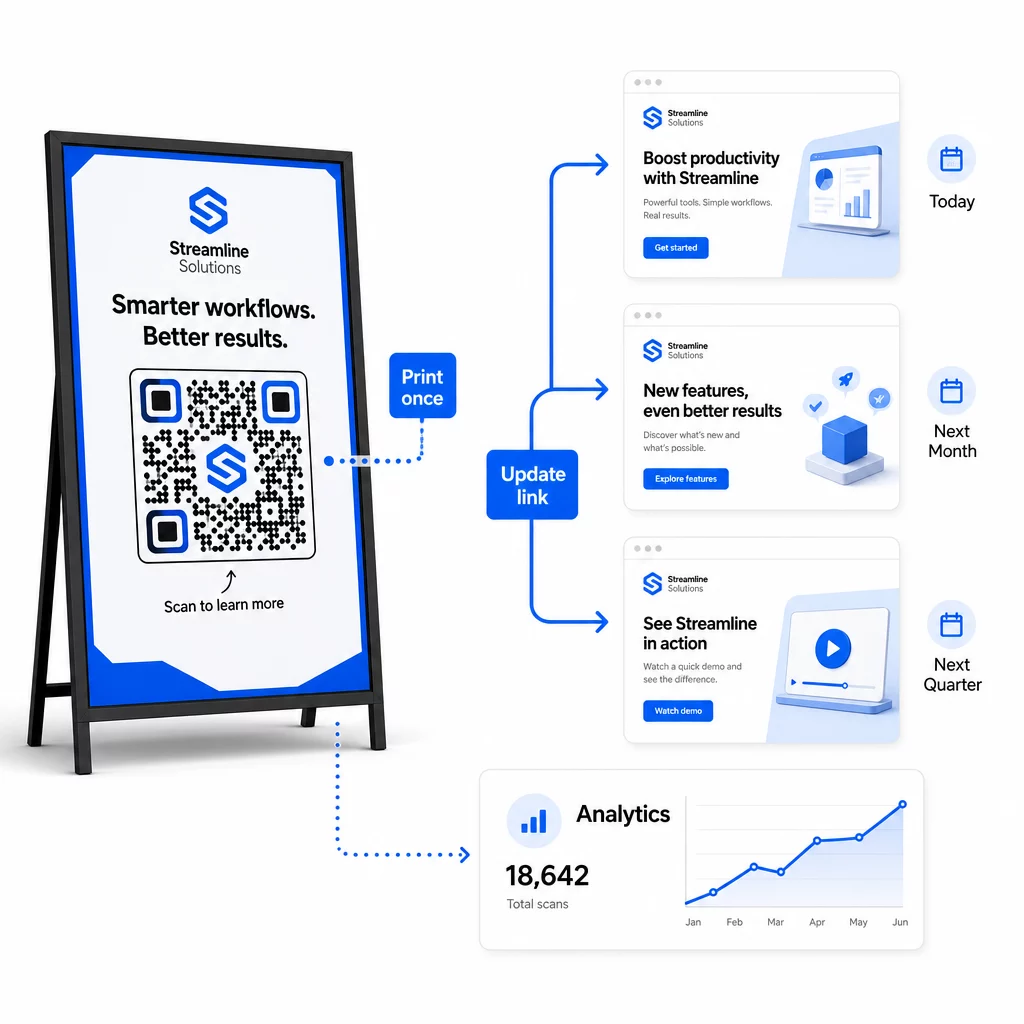
ใช้การควบคุมเวอร์ชันสำหรับการเปลี่ยนแปลงปลายทาง
ทุกครั้งที่คุณอัปเดตปลายทางของรหัส QR แบบไดนามิก ให้บันทึกการเปลี่ยนแปลงด้วย:
- วันที่และเวลาที่อัปเดต
- URL ปลายทางเดิม
- URL ปลายทางใหม่
- เหตุผลในการเปลี่ยนแปลง
- ผู้ที่อนุมัติ
ใช้รูปแบบการกำหนดเวอร์ชัน – v1.0 สำหรับการเปิดตัวครั้งแรก, v1.1 สำหรับการปรับเปลี่ยนเล็กน้อย, v2.0 สำหรับการเปลี่ยนแปลงปลายทางที่สำคัญ – เพื่อให้ทีมของคุณทราบเสมอว่าเวอร์ชันใดกำลังใช้งานอยู่และสามารถย้อนกลับได้หากมีสิ่งผิดปกติเกิดขึ้น สำหรับทีมที่มีผู้ร่วมงานหลายคน การอนุญาตตามบทบาทจะช่วยให้มั่นใจว่าเฉพาะผู้ใช้ที่ได้รับอนุญาตเท่านั้นที่สามารถทำการเปลี่ยนแปลงรหัสที่ใช้งานอยู่ได้.
ทำให้การเปลี่ยนเส้นทางตามเวลาเป็นไปโดยอัตโนมัติ
สำหรับแคมเปญที่มีตารางเนื้อหาที่คาดการณ์ได้ การเปลี่ยนเส้นทางตามเวลาจะช่วยลดความจำเป็นในการแทรกแซงด้วยตนเอง ร้านอาหารสามารถให้บริการเมนูอาหารเช้า กลางวัน และเย็นจากรหัส QR ที่พิมพ์เพียงรหัสเดียว โดยการกำหนดเวลาการเปลี่ยนแปลงปลายทางตามเวลาที่กำหนด ผู้ค้าปลีกสามารถกำหนดค่ารหัสเพื่อเปลี่ยนเส้นทางไปยังหน้าโปรโมชันในช่วงเวลาลดราคา และกลับสู่หน้าผลิตภัณฑ์มาตรฐานโดยอัตโนมัติเมื่อโปรโมชันสิ้นสุดลง.
วิธีการนี้มีประโยชน์อย่างยิ่งเมื่อรหัส QR ถูกพิมพ์ลงบนวัสดุที่ต้องใช้เวลานำนาน คุณสามารถสรุปการผลิตทางกายภาพล่วงหน้าได้เป็นอย่างดี โดยมั่นใจว่ารหัสจะนำเสนอเนื้อหาที่ถูกต้องเมื่อแคมเปญเริ่มใช้งาน.
ตรวจสอบลิงก์โดยอัตโนมัติ
ในระดับใหญ่ การตรวจสอบด้วยตนเองว่า URL ปลายทางทุกรายการใช้งานได้หรือไม่นั้นไม่สามารถทำได้จริง ตั้งค่าการตรวจสอบลิงก์อัตโนมัติเพื่อแจ้งเตือนทีมของคุณเมื่อปลายทางส่งคืนข้อผิดพลาด เพื่อให้คุณสามารถเปลี่ยนเส้นทางการสแกนไปยัง URL สำรองก่อนที่ผู้ใช้จะพบกับประสบการณ์ที่เสียหาย การบันทึก URL สำรองในข้อมูลเมตาของคุณ – ตามที่อธิบายไว้ในส่วนการตั้งชื่อด้านบน – หมายความว่าทีมของคุณมีทางเลือกสำรองพร้อมเสมอ.
รักษาความปลอดภัยโปรแกรมรหัส QR ของคุณเมื่อเติบโตขึ้น
ประสิทธิภาพการดำเนินงานในระดับใหญ่ต้องมีการกำกับดูแล – การเป็นเจ้าของที่ชัดเจน การควบคุมการเข้าถึงที่เหมาะสม และการตรวจสอบเชิงรุกเพื่อปกป้องข้อมูลและผู้ใช้ของคุณ.
การควบคุมการเข้าถึงตามบทบาท เป็นรากฐานของโปรแกรมรหัส QR ที่ปลอดภัยและมีการกำกับดูแลที่ดี กำหนดสิทธิ์ที่ตรงกับความรับผิดชอบของสมาชิกแต่ละคนในทีม: ผู้ดูการวิเคราะห์สามารถดูข้อมูลการสแกนแต่ไม่สามารถแก้ไขรหัสได้; ผู้จัดการแคมเปญสามารถอัปเดตปลายทางแต่ไม่สามารถลบรหัสได้; ผู้ดูแลระบบมีสิทธิ์เข้าถึงเต็มรูปแบบ โครงสร้างนี้ป้องกันการเปลี่ยนแปลงโดยไม่ตั้งใจหรือไม่ได้รับอนุญาต ในขณะเดียวกันก็ช่วยให้เกิดการทำงานร่วมกันในทีมขนาดใหญ่.
สำหรับองค์กรที่จัดการรหัส QR ในหลายแผนก Pageloot รองรับการควบคุมการเข้าถึงระดับพื้นที่ทำงานและการแชร์โฟลเดอร์ทีม ทำให้ทีมที่กระจายตัวสามารถจัดการรหัสของตนเองได้โดยไม่ต้องมองเห็นแคมเปญของกลุ่มอื่น.
นอกเหนือจากการควบคุมการเข้าถึงแล้ว ให้เฝ้าระวังรูปแบบการสแกนที่ผิดปกติ – ปริมาณการสแกนที่เพิ่มขึ้นอย่างไม่คาดคิด การสแกนที่มีความเข้มข้นสูงจากช่วง IP เดียวกัน หรือการกระจายทางภูมิศาสตร์ที่ไม่สอดคล้องกับการจัดวางแคมเปญของคุณ รูปแบบเหล่านี้สามารถบ่งชี้ถึงกิจกรรมของบอทหรือการสแกนที่เป็นการฉ้อโกงอื่น ๆ ที่จะทำให้ข้อมูลการวิเคราะห์ของคุณเสียหาย การตรวจสอบอัตโนมัติที่แจ้งเตือนรูปแบบเหล่านี้ตั้งแต่เนิ่น ๆ จะช่วยปกป้องทั้งความสมบูรณ์ของข้อมูลและข้อมูลเชิงลึกด้านประสิทธิภาพแคมเปญของคุณ.
จัดเก็บบันทึกการตรวจสอบการเปลี่ยนแปลงทั้งหมดที่เกิดขึ้นกับรหัสที่ใช้งานอยู่: ใครเปลี่ยนอะไร เมื่อไหร่ และทำไม เมื่อเกิดปัญหาแคมเปญ บันทึกนี้เป็นเส้นทางที่เร็วที่สุดในการวินิจฉัยและแก้ไขปัญหา.
คำถามที่พบบ่อย
คิวอาร์โค้ดแบบไดนามิกช่วยให้คุณอัปเดต URL ปลายทางหรือเนื้อหาได้หลังจากที่โค้ดถูกพิมพ์ไปแล้ว โดยไม่ต้องสร้างใหม่หรือพิมพ์ซ้ำใดๆ ในระดับใหญ่ ซึ่งหมายความว่าคุณสามารถแก้ไขลิงก์ที่เสีย อัปเดตโปรโมชั่นตามฤดูกาล หรือเปลี่ยนเส้นทางผู้ใช้ไปยังเนื้อหาใหม่ในโค้ดที่ใช้งานอยู่หลายพันโค้ดได้จากแดชบอร์ดเดียว ซึ่งช่วยลดค่าใช้จ่ายในการพิมพ์ซ้ำและเวลาหยุดทำงานในการปฏิบัติงาน.
ใช้ตัวพิมพ์เล็กทั้งหมด, รักษาค่าให้สื่อความหมายและกระชับ, และกำหนดโครงสร้างพารามิเตอร์ของคุณให้เป็นมาตรฐานในเอกสารอ้างอิงที่ใช้ร่วมกัน รูปแบบที่เชื่อถือได้คือ: `utmsource` สำหรับตำแหน่งเฉพาะ (เช่น `storedisplay`), `utmmedium=qrcode` อย่างสม่ำเสมอในทุกรหัส, `utmcampaign` สำหรับชื่อแคมเปญพร้อมวันที่ (เช่น `summersale2025`), และ `utmcontent` เพื่อแยกความแตกต่างของตำแหน่งแต่ละรายการภายในแคมเปญเดียวกัน หลีกเลี่ยงลิงก์ UTM ภายใน, และทำการตรวจสอบ QA ก่อนเปิดตัวเพื่อยืนยันว่าพารามิเตอร์ทั้งหมดส่งผ่านไปยังแพลตฟอร์มการวิเคราะห์ของคุณอย่างถูกต้อง.
กำหนดมาตรฐานการออกแบบของคุณ – ตำแหน่งโลโก้, สีของแบรนด์, ขนาดพื้นที่เงียบ (quiet zone), ขนาดการพิมพ์ขั้นต่ำ และรูปแบบไฟล์ – ก่อนสร้างชุดใดๆ, จากนั้นบันทึกสิ่งเหล่านี้เป็นเทมเพลตแบรนด์ที่นำกลับมาใช้ใหม่ได้ในแพลตฟอร์ม QR โค้ดของคุณ ใช้เทมเพลตเดียวกันกับโค้ดทุกอันในการรันแบบชุด QR โค้ดแบบไดนามิกทำให้สิ่งนี้ง่ายขึ้น เนื่องจากข้อมูลที่เข้ารหัสที่สั้นกว่าจะสร้างรูปแบบที่มีความหนาแน่นน้อยกว่า, ทำให้มีพื้นที่มากขึ้นสำหรับโลโก้และสีที่กำหนดเองโดยไม่ลดทอนความสามารถในการสแกน.