Menguruskan ratusan atau ribuan kod QR satu demi satu bukanlah aliran kerja – ia adalah kesesakan. Apabila kempen merangkumi barisan produk, lokasi, atau seluruh rangkaian pengedaran, penciptaan manual memperkenalkan ralat, kelewatan, dan kos pencetakan semula yang secara senyap menguras sumber. Panduan ini menerangkan cara menggunakan alat kod QR dinamik pukal untuk menjana, mengurus, dan menjejaki sejumlah besar kod dengan cekap di seluruh perusahaan anda.
Mengapa Kod QR Dinamik Adalah Asas yang Tepat
Sebelum menyelami penjanaan pukal, adalah penting untuk memahami mengapa kod QR dinamik amat penting pada skala perusahaan.
A kod QR statik mengekod destinasi tetap secara langsung ke dalam coraknya. Setelah dicetak, destinasi itu tidak boleh diubah. Jika URL berubah, halaman produk berpindah, atau kempen berakhir, setiap kod yang dicetak menjadi usang – dan mencetak semula ribuan label atau bahan adalah mahal.
Kod QR dinamik berfungsi secara berbeza. Ia menunjuk kepada pautan pengalihan pendek yang anda kawal. Apabila seseorang mengimbas kod tersebut, mereka akan dialihkan melalui pengalihan itu ke mana-mana destinasi yang telah anda tetapkan. Anda boleh mengemas kini destinasi pada bila-bila masa – walaupun selepas kod dicetak dan diedarkan – tanpa menjana kod baharu atau menyentuh sehelai pun bahan bercetak. Ia juga menyokong penjejakan imbasan dan analitik, yang tidak dapat disediakan oleh kod statik.
Bagi perusahaan yang mengurus kempen besar, barisan produk, atau aset fizikal, kod dinamik menghapuskan kitaran pencetakan semula dan memberikan anda keterlihatan berterusan tentang prestasi setiap kod.
Mula Mencipta Kod QR Dinamik pada Skala Besar Bersedia untuk menjana kod QR yang boleh diedit dan dijejaki untuk kempen perusahaan anda? Cuba Penjana dynamic QR code percuma selama 14 hari – tiada kad kredit diperlukan.
Cara Penjanaan Kod QR Pukal Berfungsi
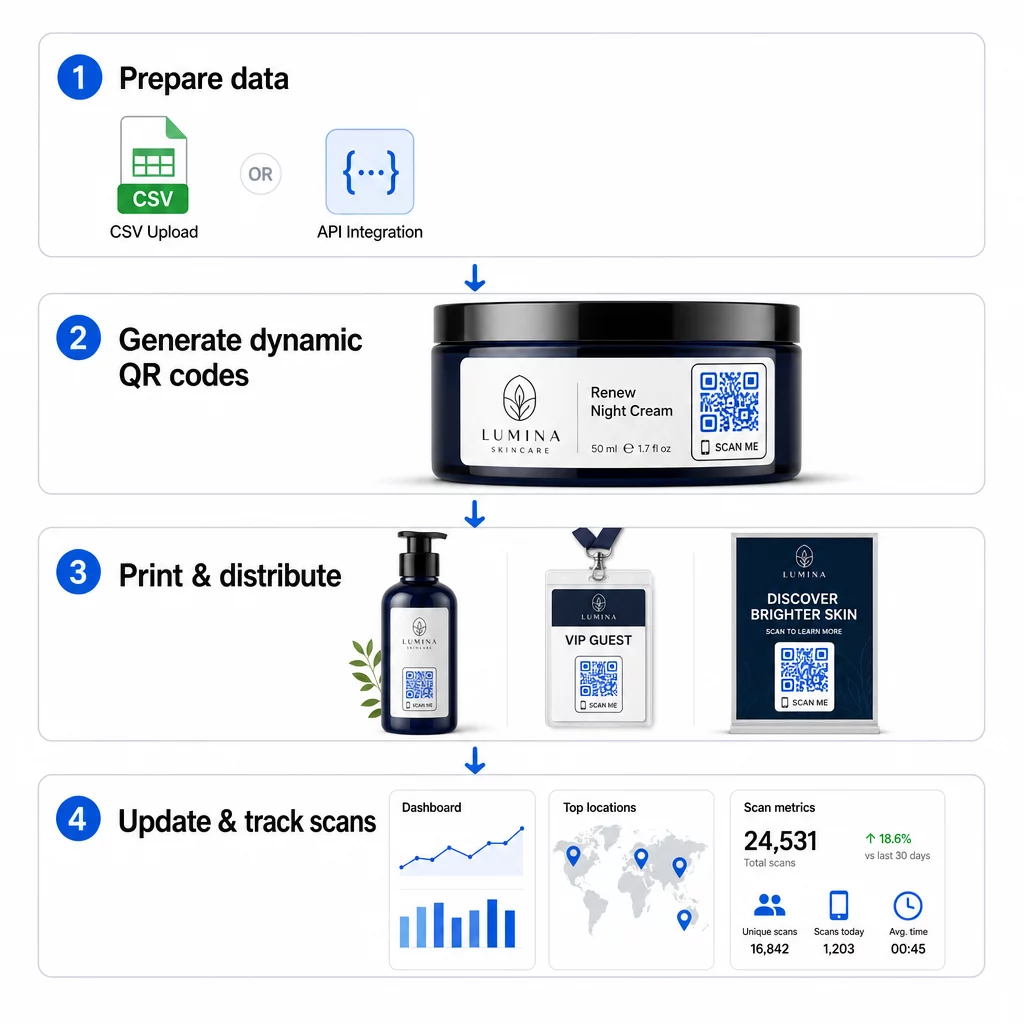
Menjana ribuan kod QR unik tidak semestinya bermakna ribuan langkah manual. Platform QR perusahaan menyokong dua kaedah utama untuk penciptaan pukal: muat naik CSV dan integrasi API.
Muat Naik CSV
Muat naik CSV adalah kaedah penjanaan pukal yang paling mudah diakses. Anda menyediakan hamparan di mana setiap baris mengandungi data untuk satu kod QR – biasanya URL destinasi, label atau pengecam, dan sebarang maklumat berubah seperti SKU produk, nombor kelompok, atau tag kempen. Anda kemudian memuat naik fail tersebut ke platform, dan sistem menjana kod QR yang sepadan untuk setiap baris.
Apabila menyediakan fail CSV anda, ingatlah amalan-amalan ini:
- Simpan fail dalam format CSV UTF-8 untuk mengelakkan ralat pengekodan
- Letakkan lajur pengecam atau folder di hadapan
- Gunakan pemformatan tarikh yang konsisten (yyyy-mm-dd) untuk mana-mana medan tarikh
- Takrifkan lajur yang diperlukan dengan jelas dan sahkan pengepala sebelum memuat naik
Platform seperti Pageloot membenarkan pengguna menjana ratusan kod daripada satu muat naik CSV, menjadikannya praktikal untuk katalog produk, tiket acara, atau kempen khusus lokasi di mana setiap kod memerlukan data unik.
Integrasi API
Untuk pasukan yang memerlukan penjanaan kod QR disematkan terus ke dalam aliran kerja sedia ada mereka, integrasi API adalah pendekatan yang lebih berkuasa. Daripada mengeksport CSV secara manual, sistem anda menghantar parameter terus ke platform QR – mencetuskan penjanaan kod secara automatik apabila produk baharu ditambah, pesanan dibuat, atau kempen dilancarkan.
Penjanaan berasaskan API juga menyokong kemas kini pukal dinamik. Menggunakan permintaan PATCH atau PUT, anda boleh mengemas kini URL destinasi merentasi ribuan kod secara serentak – tanpa sebarang campur tangan manual. Ini amat berguna apabila URL kempen berubah, halaman produk distruktur semula, atau kandungan bermusim perlu ditukar merentasi keseluruhan barisan produk.
Integrasi API menghubungkan penjanaan kod QR kepada alatan yang sudah anda gunakan: sistem pengurusan inventori, platform CRM, bahagian belakang e-dagang, dan alatan automasi pemasaran. Hasilnya adalah saluran data yang lancar di mana kod QR dicipta, dikemas kini, dan dihentikan selaras dengan operasi anda yang lebih luas.
Ciri-ciri Teras untuk Dinilai dalam Platform Perusahaan
Tidak semua platform QR dibina untuk beban kerja perusahaan. Apabila menilai pilihan, utamakan keupayaan ini:
Kapasiti penjanaan pukal – Platform harus mengendalikan volum anda tanpa merosotkan prestasi. Cari sokongan untuk penciptaan kelompok tanpa had atau volum tinggi, bukan hanya kelompok kecil.
Penyuntingan dinamik – Setiap kod dalam pustaka anda harus boleh diedit selepas penciptaan. Ini menghapuskan kos pencetakan semula apabila destinasi berubah dan membolehkan anda menggunakan semula bahan fizikal merentasi pelbagai kempen.
Pengurusan berpusat – Satu papan pemuka tunggal untuk menyusun, mencari, dan mengemas kini keseluruhan portfolio kod QR anda. Bagi perusahaan yang menjalankan berpuluh-puluh kempen serentak, organisasi adalah sama pentingnya dengan kelajuan penjanaan.
Penjenamaan dan penyesuaian – Kod perusahaan harus mencerminkan jenama anda. Cari integrasi logo, skema warna tersuai, dan templat reka bentuk yang boleh digunakan secara konsisten merentasi kelompok besar. Sokongan data berubah-ubah membolehkan anda membenamkan pengecam unik – seperti SKU produk atau kod promosi – dalam reka bentuk atau destinasi setiap kod.
Analitik dan pelaporan - Penjejakan kod QR mengubah setiap imbasan menjadi titik data. Papan pemuka masa nyata harus memaparkan kiraan imbasan, lokasi geografi, jenis peranti, dan cap masa. Pelaporan peringkat kempen harus menunjukkan kadar penukaran dan trend penglibatan supaya anda boleh mengoptimumkan semasa berjalan.
Keselamatan dan pematuhan – Pelaksanaan perusahaan memerlukan kawalan akses berasaskan peranan supaya hanya pengguna yang dibenarkan boleh mencipta, mengedit, atau memadam kod. Penyulitan data melindungi maklumat dalam transit dan semasa rehat. Pematuhan dengan GDPR, HIPAA, atau SOX bergantung pada industri anda dan jenis data yang dikendalikan oleh kod QR anda.
Format eksport – Format vektor resolusi tinggi (SVG, EPS, PDF) memastikan kod dihasilkan semula dengan jelas pada sebarang saiz, daripada label produk hingga sepanduk pameran perdagangan.
Kes Penggunaan Perusahaan untuk Kod QR Dinamik Pukal
Gabungan penjanaan pukal dan keboleheditan dinamik membuka pelbagai aplikasi operasi:
Pelabelan dan pembungkusan produk – Jana kod unik untuk setiap SKU atau kelompok, pautan ke manual digital, halaman pendaftaran waranti, atau pengesahan ketulenan. Jika URL destinasi berubah, kemas kini secara berpusat daripada mencetak semula label.
Tiket acara dan daftar masuk – Cipta satu kod bagi setiap peserta yang mengandungi kebenaran akses sesi dan data pendaftaran. Kod dinamik membolehkan anda mengemas kini maklumat tempat atau jadual sesi selepas tiket diedarkan.
Pembayaran tanpa sentuh dan menu digital – Berikan kod unik kepada setiap meja, kiosk, atau lokasi. Kemas kini kandungan menu atau harga secara berpusat tanpa menggantikan bahan fizikal.
Kempen pemasaran diperibadikan – Pautkan setiap kod ke halaman pendaratan yang disesuaikan untuk segmen khalayak tertentu, wilayah, atau sejarah pembelian. Jejaki versi mana yang mendorong penglibatan tertinggi dan sesuaikan kempen dengan sewajarnya.
Penyebaran perisian dan aplikasi – Edarkan kod unik yang mencetuskan pemasangan atau konfigurasi aplikasi khusus jabatan, mengurangkan kos sokongan IT semasa pelancaran besar-besaran.
Rantaian bekalan dan penjejakan aset – Benamkan nombor kelompok, tarikh pembuatan, dan rekod pemeriksaan ke dalam kod yang dilampirkan pada aset fizikal. Data imbasan menyediakan jejak audit masa nyata merentasi rangkaian pengedaran anda.
Analitik dan Automasi pada Skala Besar
Penjanaan pukal hanyalah separuh daripada persamaan. Untuk mewajarkan pelaburan dan meningkatkan kempen masa depan, anda memerlukan data prestasi yang boleh dipercayai.
A Sistem pengurusan kod QR mengumpul metrik termasuk jumlah imbasan, imbasan unik, cap masa imbasan, lokasi geografi, dan jenis peranti. Papan pemuka masa nyata menjadikan data ini boleh diambil tindakan – anda boleh mengenal pasti kod mana yang berprestasi rendah di pertengahan kempen dan mengemas kini destinasinya untuk menguji kandungan atau tawaran yang berbeza.
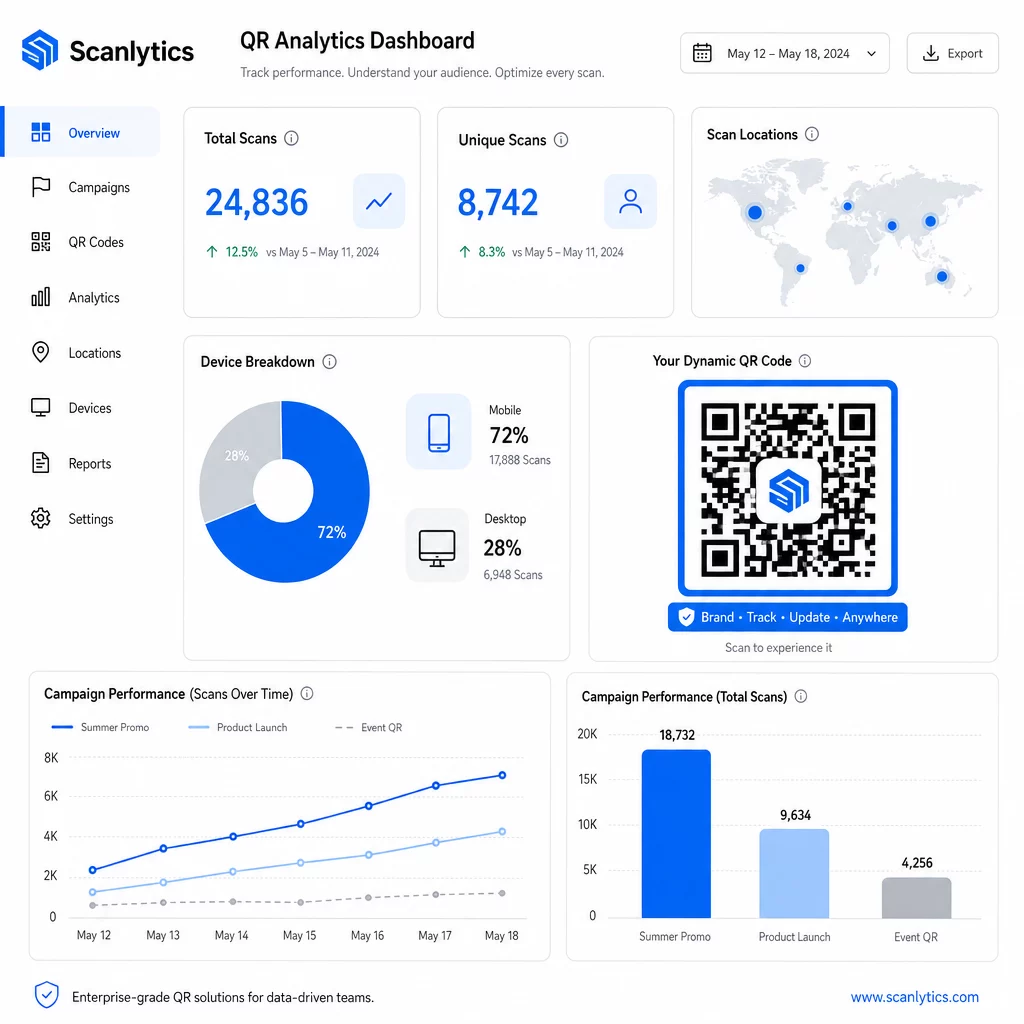
Apabila digandingkan dengan alat automasi pemasaran, peristiwa imbasan boleh mencetuskan urutan susulan secara automatik. Pelanggan yang mengimbas kod produk boleh memasuki khalayak penargetan semula, menerima SMS, atau ditambahkan ke aliran kerja CRM – tanpa sebarang pemindahan data manual.
Penyebaran berjadual menambah satu lagi lapisan kecekapan. Kod boleh dikonfigurasi untuk mengaktifkan secara automatik semasa pelancaran kempen dan menyahaktifkan pada akhir promosi, memastikan kandungan sentiasa terkini tanpa memerlukan pemantauan manual.
Jejaki Setiap Imbasan Merentasi Kempen Anda Yang Platform kod QR Pageloot memberikan pasukan perusahaan papan pemuka berpusat untuk analitik masa nyata, penyuntingan dinamik, dan pengurusan pukal – semuanya di satu tempat.
Membandingkan Platform Kod QR Perusahaan
Apabila menilai platform, pembeza utama adalah kapasiti pukal, penyuntingan dinamik, kedalaman analitik, piawaian keselamatan, dan fleksibiliti integrasi.
| Platform | Penjanaan Pukal | Penyuntingan Dinamik | ANALITIK | Integrasi | Keselamatan |
|---|---|---|---|---|---|
| Pageloot | Penciptaan kelompok tanpa had melalui CSV atau API | Penyuntingan masa nyata tanpa mencetak semula | Kiraan imbasan, lokasi, peranti, papan pemuka masa nyata | CRM, akses API | Mematuhi GDPR, data yang disulitkan |
| Uniqode | Sehingga 2,000 kod setiap kelompok | Kemas kini kandungan dinamik | Lokasi, masa, penjejakan peranti | HubSpot, Salesforce, Zapier (5,000+ alatan) | SOC 2 Jenis II, SSO, akses berasaskan peranan |
| Kumpulan QR | Kumpulan volum tinggi daripada input data | Kemas kini URL masa nyata | Pemantauan masa akses | Terhad | Standard |
| Hovercode | Papan pemuka berpusat untuk volum besar | Kemas kini dinamik | Lokasi imbasan, peranti, cap masa | API, webhooks, CRM | Kebenaran berbilang pengguna |
| Penjana Kod QR Langsung | Ribuan kod melalui API atau Google Sheets | Sokongan QR Dinamik | Analitis geografi | CRM, sistem inventori | Standard |
Sokongan Pageloot untuk lebih 25 jenis kod QR dan penciptaan pukal tanpa had menjadikannya sangat serba boleh untuk perusahaan yang menguruskan pelbagai jenis kempen secara serentak. Untuk pasukan yang memerlukan integrasi pihak ketiga yang mendalam, platform seperti Uniqode menawarkan perpustakaan penyambung yang lebih luas. Pilihan yang tepat bergantung pada jumlah anda, timbunan teknologi sedia ada, dan keperluan pematuhan.
Untuk agensi yang menguruskan kempen QR bagi pihak pelbagai pelanggan, Alat agensi Pageloot menambah laporan pelanggan yang boleh dikongsi, pilihan label putih, dan kebenaran berasaskan peranan yang memastikan data pelanggan dipisahkan dan dipersembahkan secara profesional.
Bermula dengan Kod QR Dinamik Pukal
Laluan paling cekap untuk pengurusan kod QR berskala perusahaan mengikuti corak yang konsisten:
- Audit kes penggunaan kod QR semasa anda dan kenal pasti di mana penjanaan pukal akan menjimatkan masa paling banyak
- Petakan medan data yang diperlukan oleh setiap jenis kod – URL destinasi, pengecam berubah-ubah, tag kempen
- Pilih platform yang menyokong kedua-dua muat naik CSV dan integrasi API supaya anda boleh meningkatkan salah satu pendekatan mengikut keperluan
- Bina struktur penamaan dan folder sebelum muat naik pukal pertama anda untuk memastikan portfolio besar teratur
- Uji kumpulan kecil sebelum penggunaan penuh, mengesahkan bahawa setiap kod mengimbas dengan betul dan menghala ke destinasi yang betul
- Sediakan penjejakan analitik dari hari pertama supaya anda mempunyai data prestasi asas untuk setiap kempen
Kod QR dinamik pukal berfungsi paling baik apabila penjanaan, pengurusan, dan analitik dikendalikan dalam satu platform. Memisahkan fungsi-fungsi ini merentasi pelbagai alat mencipta jurang data dan kerja penyelarasan manual yang menjejaskan peningkatan kecekapan yang anda cuba capai.
Yang Penjana kod QR dinamik Pageloot merangkumi ketiga-tiga fungsi – cipta kod secara pukal, edit destinasi tanpa mencetak semula, dan pantau prestasi dalam masa nyata – dari satu papan pemuka berpusat. Mulakan percubaan percuma 14 hari untuk menjana kumpulan pertama anda dan lihat bagaimana platform ini berskala dengan keperluan kempen anda.
Soalan lazim
Kod QR statik mengekod destinasi tetap yang tidak boleh diubah selepas penjanaan. Jika URL atau kandungan berubah, anda mesti mencetak semula setiap kod. Kod QR dinamik menggunakan pautan pengalihan pendek yang anda kawal, membolehkan anda mengemas kini destinasi pada bila-bila masa tanpa mencetak semula. Bagi perusahaan yang menguruskan sejumlah besar kod merentasi kempen jangka panjang atau bahan fizikal, kod dinamik menghapuskan kos pencetakan semula dan membolehkan penjejakan imbasan berterusan.
Anda menyediakan hamparan kerja di mana setiap baris mengandungi data untuk satu kod QR – biasanya URL destinasi, pengecam unik, dan sebarang medan berubah seperti SKU produk atau tag kempen. Anda menyimpan fail dalam format CSV UTF-8 dan memuat naiknya ke platform. Sistem menjana kod QR unik untuk setiap baris dan membungkusnya untuk dimuat turun, selalunya sebagai fail ZIP. Pendekatan ini berfungsi dengan baik untuk katalog produk, tiket acara, dan kempen khusus lokasi di mana setiap kod memerlukan data yang berbeza.
Platform QR Perusahaan menjejaki metrik termasuk jumlah kiraan imbasan, imbasan unik, cap masa imbasan, lokasi geografi setiap imbasan, dan jenis peranti (termasuk sistem pengendalian). Papan pemuka masa nyata menjadikan data ini tersedia sebaik sahaja imbasan berlaku, supaya pasukan dapat mengenal pasti kod yang berprestasi rendah dan mengemas kini destinasi mereka di pertengahan kempen. Platform yang lebih canggih juga menyokong penjejakan penukaran dan integrasi dengan alat CRM atau automasi pemasaran supaya peristiwa imbasan dapat mencetuskan aliran kerja susulan secara automatik.