Sadade või tuhandete QR-koodide haldamine ükshaaval ei ole töövoog – see on kitsaskoht. Kui kampaaniad hõlmavad tootesarju, asukohti või terveid jaotusvõrke, toob käsitsi loomine kaasa vigu, viivitusi ja ümbertrükkimise kulusid, mis vaikselt ressursse kurnavad. See juhend selgitab, kuidas kasutada dünaamiliste QR-koodide hulgigeneraatori tööriistu, et tõhusalt luua, hallata ja jälgida suuri koodimahtusid kogu teie ettevõttes.
Miks dünaamilised QR-koodid on õige alus
Enne hulgigeneraatorisse sukeldumist tasub mõista, miks dünaamilised QR-koodid on ettevõtte tasandil eriti olulised.
A staatiline QR-kood kodeerib fikseeritud sihtkoha otse oma mustrisse. Pärast printimist ei saa seda sihtkohta muuta. Kui URL muutub, tooteleht liigub või kampaania lõpeb, muutub iga prinditud kood aegunuks – ja tuhandete siltide või materjalide ümbertrükkimine on kallis.
Dünaamilised QR-koodid töötavad teisiti. Need viitavad lühikesele ümbersuunamislingile, mida teie kontrollite. Kui keegi koodi skannib, suunatakse ta selle ümbersuunamise kaudu mis tahes sihtkohta, mille olete praegu määranud. Saate sihtkohta igal ajal värskendada – isegi pärast koodide printimist ja levitamist – ilma uut koodi loomata või ühtegi prinditud materjali puudutamata. Need toetavad ka skannimise jälgimist ja analüüsi, mida staatilised koodid pakkuda ei suuda.
Ettevõtetele, kes haldavad suuri kampaaniaid, tootesarju või füüsilisi varasid, kaotavad dünaamilised koodid ümbertrükkimise tsükli ja annavad teile pideva ülevaate iga koodi toimimisest.
Alustage dünaamiliste QR-koodide loomist suures mahus Kas olete valmis looma oma ettevõtte kampaaniate jaoks muudetavaid ja jälgitavaid QR-koode? Proovige Dünaamilise QR koodi generaator tasuta 14 päeva – krediitkaarti pole vaja.
Kuidas töötab QR-koodide hulgigeneraator
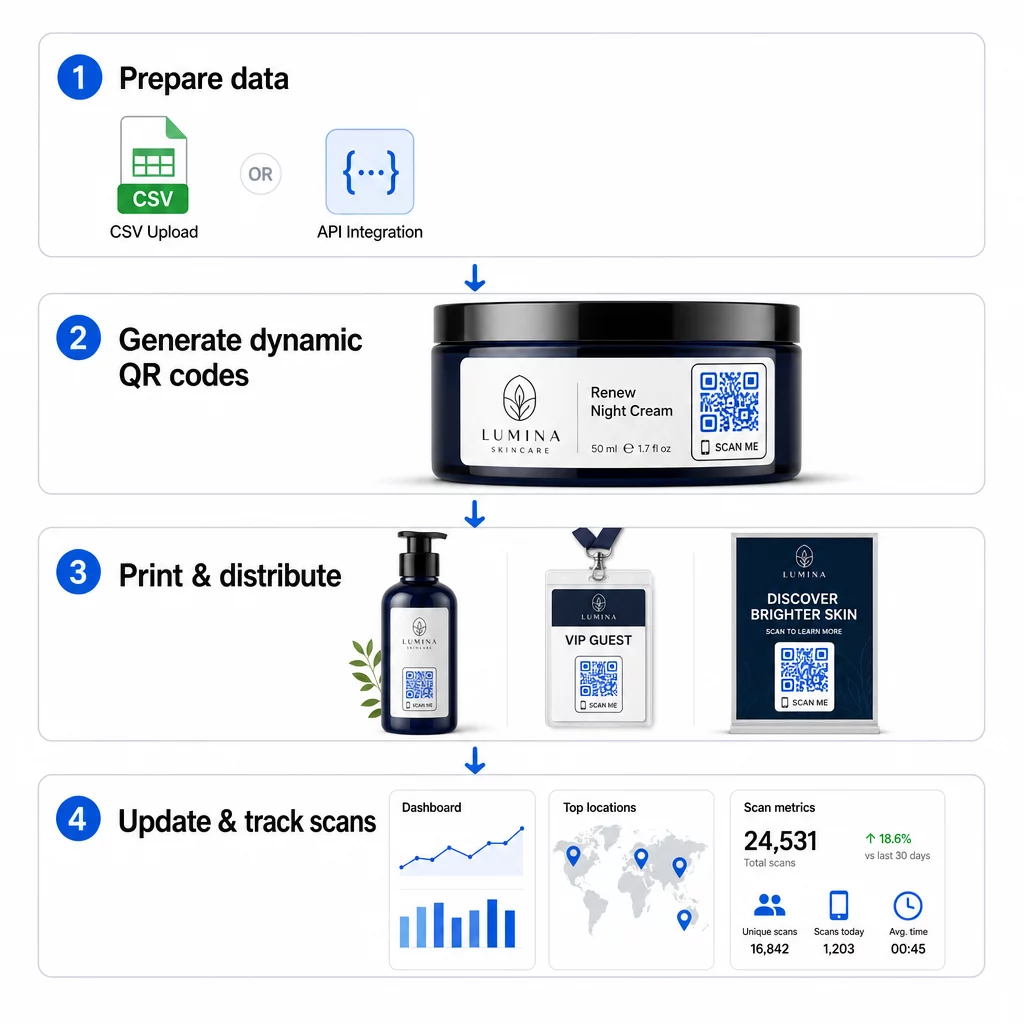
Tuhandete unikaalsete QR-koodide genereerimine ei pea tähendama tuhandeid käsitsi samme. Ettevõtte QR-platvormid toetavad kahte peamist hulgiloomise meetodit: CSV-failide üleslaadimine ja API integreerimine.
CSV üleslaadimine
CSV üleslaadimine on kõige kättesaadavam hulgigeneraatori meetod. Te valmistate ette tabeli, kus iga rida sisaldab andmeid ühe QR-koodi kohta – tavaliselt siht-URL-i, silti või identifikaatorit ning mis tahes muutuvat teavet, nagu toote SKU, partii number või kampaania silt. Seejärel laadite selle faili platvormile ja süsteem genereerib igale reale vastava QR-koodi.
CSV-faili ettevalmistamisel pidage meeles järgmisi tavasid:
- Salvestage fail CSV UTF-8 vormingus, et vältida kodeerimisvigu
- Asetage identifikaatori või kausta veerg esimesena
- Kasutage kuupäevaväljadel ühtset kuupäevavormingut (aaaa-kk-pp)
- Määratlege nõutavad veerud selgelt ja valideerige päised enne üleslaadimist
Platvormid nagu Pageloot võimaldavad kasutajatel genereerida sadu koode ühe CSV-faili üleslaadimisega, muutes selle praktiliseks tootekataloogide, ürituste piletite või asukohapõhiste kampaaniate jaoks, kus iga kood vajab unikaalseid andmeid.
API integreerimine
Meeskondadele, kes vajavad QR-koodide genereerimist otse oma olemasolevatesse töövoogudesse integreerituna, API integreerimine on võimsam lähenemine. CSV-faili käsitsi eksportimise asemel edastavad teie süsteemid parameetrid otse QR-platvormile – käivitades koodide genereerimise automaatselt, kui lisatakse uusi tooteid, esitatakse tellimusi või käivitatakse kampaaniaid.
API-põhine genereerimine toetab ka dünaamilisi hulgivärskendusi. Kasutades PATCH- või PUT-päringuid, saate samaaegselt värskendada siht-URL-e tuhandete koodide puhul – ilma igasuguse käsitsi sekkumiseta. See on eriti kasulik, kui kampaania URL muutub, tooteleht restruktureeritakse või hooajaline sisu tuleb välja vahetada kogu tootesarjas.
API integreerimine ühendab QR-koodide genereerimise tööriistadega, mida te juba kasutate: laohaldussüsteemid, CRM-platvormid, e-kaubanduse taustasüsteemid ja turundusautomaatika tööriistad. Tulemuseks on sujuv andmetorustik, kus QR-koodid luuakse, värskendatakse ja eemaldatakse sünkroonis teie laiemate toimingutega.
Ettevõtte platvormi põhiomadused, mida hinnata
Kõik QR-platvormid ei ole ehitatud ettevõtte töökoormuse jaoks. Valikute hindamisel seadke esikohale järgmised võimalused:
Hulgigeneratsiooni võimekus – Platvorm peaks teie mahtu käitlema ilma jõudlust halvendamata. Otsige tuge piiramatule või suuremahulisele partiide loomisele, mitte ainult väikestele partiidele.
Dünaamiline redigeerimine – Iga kood teie teegis peaks olema pärast loomist muudetav. See välistab ümbertrükkimise kulud sihtkohtade muutumisel ja võimaldab teil füüsilisi materjale mitme kampaania raames taaskasutada.
Tsentraliseeritud haldus – Ühtne juhtpaneel kogu teie QR-koodide portfelli korraldamiseks, otsimiseks ja värskendamiseks. Ettevõtetele, mis juhivad kümneid samaaegseid kampaaniaid, on organiseerimine sama oluline kui genereerimiskiirus.
Branding ja kohandamine – Ettevõtte koodid peaksid peegeldama teie brändi. Otsige logo integreerimist, kohandatud värviskeeme ja disainimalle, mida saab järjepidevalt rakendada suurtele partiidele. Muutuvate andmete tugi võimaldab teil manustada unikaalseid identifikaatoreid – nagu toote SKU-d või sooduskoode – iga koodi kujundusse või sihtkohta.
Analüüs ja aruandlus - QR-koodi jälgimine muudab iga skaneeringu andmepunktiks. Reaalajas juhtpaneelid peaksid kuvama skaneeringute arvu, geograafilisi asukohti, seadmetüüpe ja ajatempleid. Kampaania tasandi aruandlus peaks näitama konversioonimäärasid ja kaasamise trende, et saaksite optimeerida käimasolevaid kampaaniaid.
Turvalisus ja vastavus – Ettevõtte juurutused nõuavad rollipõhiseid juurdepääsukontrolle, et ainult volitatud kasutajad saaksid koode luua, muuta või kustutada. Andmete krüpteerimine kaitseb teavet edastamisel ja puhkeolekus. Vastavus GDPR-ile, HIPAA-le või SOX-ile sõltub teie tööstusharust ja andmetüübist, mida teie QR-koodid käsitlevad.
Ekspordivormingud – Kõrge eraldusvõimega vektorvormingud (SVG, EPS, PDF) tagavad koodide puhta reprodutseerimise igas suuruses, alates tootesiltidest kuni messibänneriteni.
Ettevõtte kasutusjuhud dünaamiliste mass-QR-koodide jaoks
Massgenereerimise ja dünaamilise muudetavuse kombinatsioon avab laia valiku operatiivseid rakendusi:
Tootemärgistus ja pakendamine – Genereerige iga SKU või partii jaoks unikaalsed koodid, mis lingivad digitaalsete juhendite, garantiiregistreerimislehtede või autentsuse kontrollimisega. Kui sihtkoha URL muutub, värskendage seda tsentraalselt, mitte ärge trükkige silte uuesti.
Ürituste piletid ja sisseregistreerimine – Looge iga osaleja kohta üks kood, mis sisaldab seansi juurdepääsuõigusi ja registreerimisandmeid. Dünaamilised koodid võimaldavad teil värskendada toimumiskoha teavet või seansside ajakavasid pärast piletite jagamist.
Kontaktivabad maksed ja digitaalsed menüüd – Määrake igale lauale, kioskile või asukohale unikaalsed koodid. Uuendage menüü sisu või hinnakujundust tsentraalselt, ilma füüsilisi materjale asendamata.
Isikupärastatud turunduskampaaniad – Siduge iga kood sihtlehega, mis on kohandatud konkreetsele sihtrühma segmendile, piirkonnale või ostuajaloole. Jälgige, millised versioonid toovad kaasa suurima kaasatuse, ja kohandage kampaaniaid vastavalt.
Tarkvara ja rakenduste juurutamine – Jagage unikaalseid koode, mis käivitavad osakonnapõhiseid rakenduste installatsioone või konfiguratsioone, vähendades IT-toe üldkulusid suurte juurutamiste ajal.
Tarneahela ja varade jälgimine – Manustage partiinumbrid, tootmiskuupäevad ja ülevaatuse andmed füüsilistele varadele lisatud koodidesse. Skaneerimisandmed pakuvad reaalajas auditeerimisjälge kogu teie jaotusvõrgus.
Analüütika ja automatiseerimine suures ulatuses
Massiline genereerimine on vaid pool võrrandist. Investeeringu õigustamiseks ja tulevaste kampaaniate parandamiseks vajate usaldusväärseid jõudlusandmeid.
A QR-koodide haldussüsteem kogub mõõdikuid, sealhulgas skaneeringute koguarvu, unikaalseid skaneeringuid, skaneerimise ajatempleid, geograafilist asukohta ja seadme tüüpi. Reaalajas armatuurlauad muudavad need andmed rakendatavaks – saate tuvastada, millised koodid kampaania keskel alatoimivad, ja värskendada nende sihtkohti, et testida erinevat sisu või pakkumisi.
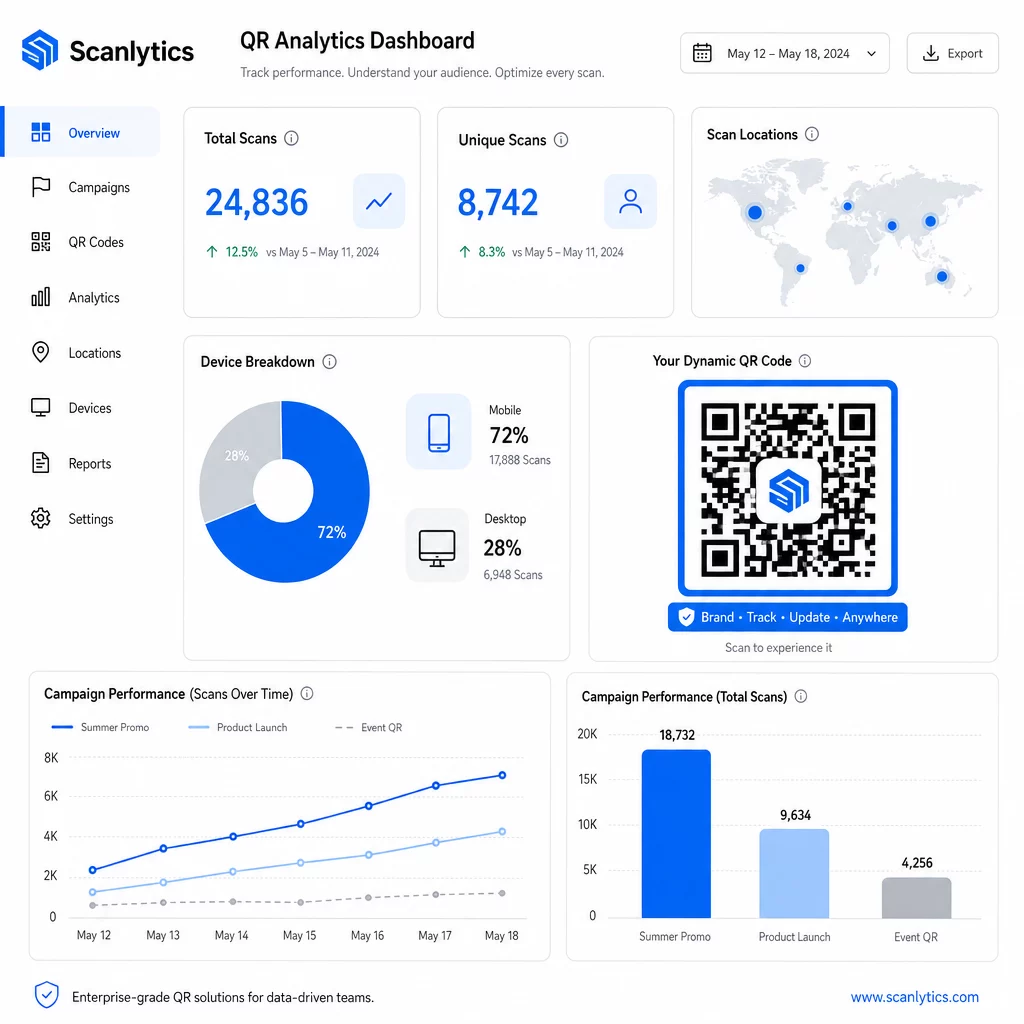
Turundusautomaatika tööriistadega sidumisel saavad skaneerimissündmused automaatselt käivitada järeltegevuste jadasid. Kliendi tootekoodi skaneerimine võib viia ta uuesti sihtimise sihtrühma, ta võib saada SMS-i või ta lisatakse CRM-i töövoogu – ilma igasuguse käsitsi andmeedastuseta.
Planeeritud juurutamised lisavad veel ühe tõhususe kihi. Koode saab konfigureerida automaatselt aktiveeruma kampaania käivitamisel ja deaktiveeruma kampaania lõpus, tagades sisu pideva ajakohasuse ilma käsitsi jälgimiseta.
Jälgige iga skaneeringut oma kampaaniates See Pageloot QR-koodi platvorm annab ettevõtte meeskondadele tsentraliseeritud armatuurlaua reaalajas analüüsi, dünaamilise redigeerimise ja hulgi haldamise jaoks – kõik ühes kohas.
Ettevõtte QR-koodi platvormide võrdlus
Platvorme hinnates on peamised eristajad hulgimaht, dünaamiline redigeerimine, analüüsi sügavus, turvastandardid ja integratsiooni paindlikkus.
| Platvorm | Hulgi genereerimine | Dünaamiline redigeerimine | STATISTIKA | Integratsioonid | Turvalisus |
|---|---|---|---|---|---|
| Pageloot | Piiramatu partii loomine CSV või API kaudu | Reaalajas redigeerimine ilma uuesti printimata | Skaneerimiste arv, asukoht, seade, reaalajas armatuurlaud | CRM, API ligipääs | GDPR-iga kooskõlas, krüpteeritud andmed |
| Uniqode | Kuni 2000 koodi partii kohta | Dünaamilised sisuvärskendused | Asukoha, aja, seadme jälgimine | HubSpot, Salesforce, Zapier (üle 5000 tööriista) | SOC 2 Type II, SSO, rollipõhine ligipääs |
| QR Partii | Suuremahuline partii andmesisestusest | Reaalajas URL-i uuendused | Juurdepääsuaja jälgimine | Piiratud | Standardne |
| Hovercode | Tsentraliseeritud armatuurlaud suurte mahtude jaoks | Dünaamilised uuendused | Skannimise asukoht, seade, ajatemplid | API, veebihaagid, CRM | Mitme kasutaja õigused |
| Reaalajas QR-koodi generaator | Tuhanded koodid API või Google Sheetsi kaudu | Dünaamilise QR-i tugi | Geograafiline analüüs | CRM, laosüsteemid | Standardne |
Pagelooti tugi üle 25 QR-koodi tüübi ja piiramatu hulgi loomine muudab selle eriti mitmekülgseks ettevõtetele, kes haldavad samaaegselt erinevaid kampaaniatüüpe. Meeskondadele, kes vajavad sügavaid kolmanda osapoole integratsioone, pakuvad platvormid nagu Uniqode laiemaid konnektorite teeke. Õige valik sõltub teie mahust, olemasolevast tehnoloogiast ja vastavusnõuetest.
Agentuuridele, mis haldavad QR-kampaaniaid mitme kliendi nimel, Pagelooti agentuuritööriistad lisavad jagatud kliendiaruanded, valge märgistuse valikud ja rollipõhised õigused, mis hoiavad kliendiandmed eraldatuna ja professionaalselt esitatuna.
Alustamine massdünaamiliste QR-koodidega
Kõige tõhusam tee ettevõtte tasandi QR-koodide haldamiseni järgib järjepidevat mustrit:
- Auditige oma praeguseid QR-koodi kasutusjuhtumeid ja tuvastage, kus massgenereerimine säästaks kõige rohkem aega
- Kaardistage andmeväljad, mida iga kooditüüp vajab – siht-URL-id, muutuvad identifikaatorid, kampaania sildid
- Valige platvorm, mis toetab nii CSV-üleslaadimisi kui ka API-integratsiooni, et saaksite vajadusel mõlemat lähenemist skaleerida
- Looge nimetamis- ja kaustastruktuur enne esimest massüleslaadimist, et hoida suuri portfelle korras
- Testige väikest partiid enne täielikku juurutamist, kontrollides, et iga kood skaneerib õigesti ja suunab õigesse sihtkohta
- Seadistage analüütika jälgimine esimesest päevast alates, et teil oleks algandmed jõudluse kohta iga kampaania jaoks
Massdünaamilised QR-koodid toimivad kõige paremini, kui genereerimine, haldamine ja analüütika on käsitletud ühel platvormil. Nende funktsioonide jagamine mitme tööriista vahel tekitab andmelünki ja käsitsi ühitamistööd, mis õõnestab tõhususe kasu, mida proovite saavutada.
See Pagelooti dünaamiline QR-koodi generaator katab kõik kolm funktsiooni – looge koode massiliselt, muutke sihtkohti ilma uuesti printimata ja jälgige jõudlust reaalajas – ühest tsentraliseeritud juhtpaneelist. Alustage tasuta 14-päevast prooviperioodi oma esimese partii genereerimiseks ja vaadake, kuidas platvorm skaleerub vastavalt teie kampaania vajadustele.
Korduma kippuvad küsimused
Staatilised QR-koodid kodeerivad fikseeritud sihtkoha, mida ei saa pärast genereerimist muuta. Kui URL või sisu muutub, peate iga koodi uuesti printima. Dünaamilised QR-koodid kasutavad lühikest ümbersuunamislinki, mida te kontrollite, võimaldades teil sihtkohta igal ajal ilma uuesti printimata värskendada. Ettevõtetele, kes haldavad suuri koodimahtusid pikaajalistel kampaaniatel või füüsilistel materjalidel, kaotavad dünaamilised koodid uuesti printimise kulud ja võimaldavad pidevat skaneerimise jälgimist.
Te valmistate ette tabeli, kus iga rida sisaldab andmeid ühe QR-koodi kohta – tavaliselt siht-URL-i, unikaalset identifikaatorit ja mis tahes muutuvaid välju, nagu toote SKU-d või kampaania sildid. Salvestate faili CSV UTF-8 formaadis ja laadite selle platvormile üles. Süsteem genereerib iga rea jaoks unikaalse QR-koodi ja pakendab need allalaadimiseks, sageli ZIP-failina. See lähenemine sobib hästi tootekataloogide, ürituste piletite ja asukohapõhiste kampaaniate jaoks, kus iga kood vajab eraldi andmeid.
Ettevõtte QR-platvormid jälgivad mõõdikuid, sealhulgas skannimiste koguarvu, unikaalseid skannimisi, skannimise ajatempleid, iga skannimise geograafilist asukohta ja seadme tüüpi (sealhulgas operatsioonisüsteemi). Reaalajas armatuurlauad teevad need andmed kättesaadavaks skannimiste toimumise ajal, et meeskonnad saaksid tuvastada alatoimivaid koode ja kampaania keskel nende sihtkohti uuendada. Täiustatumad platvormid toetavad ka konversioonide jälgimist ja integreerimist CRM-i või turunduse automatiseerimise tööriistadega, et skannimissündmused saaksid automaatselt käivitada järeltegevuse töövooge.