Satojen tai tuhansien QR-koodien hallinta yksi kerrallaan ei ole työnkulku – se on pullonkaula. Kun kampanjat kattavat tuotelinjoja, sijainteja tai kokonaisia jakeluverkostoja, manuaalinen luominen aiheuttaa virheitä, viivästyksiä ja uudelleenpainatuskustannuksia, jotka hiljalleen kuluttavat resursseja. Tämä opas selittää, miten voit käyttää dynaamisten QR-koodien massatyökaluja suurten koodimäärien tehokkaaseen luomiseen, hallintaan ja seurantaan koko yrityksessäsi.
Miksi dynaamiset QR-koodit ovat oikea perusta
Ennen kuin syvennyt massaluomiseen, on syytä ymmärtää, miksi dynaamiset QR-koodit ovat erityisen tärkeitä yritystasolla.
A staattinen QR-koodi koodaa kiinteän kohteen suoraan kuvioonsa. Kun koodi on painettu, kohdetta ei voi muuttaa. Jos URL-osoite muuttuu, tuotesivu siirtyy tai kampanja päättyy, jokainen painettu koodi vanhenee – ja tuhansien etikettien tai materiaalien uudelleenpainatus on kallista.
Dynaamiset QR-koodit toimivat eri tavalla. Ne osoittavat lyhyeen uudelleenohjauslinkkiin, jota hallitset. Kun joku skannaa koodin, hänet ohjataan uudelleenohjauksen kautta siihen kohteeseen, jonka olet kulloinkin asettanut. Voit päivittää kohteen milloin tahansa – jopa sen jälkeen, kun koodit on painettu ja jaettu – luomatta uutta koodia tai koskematta yhteenkään painettuun materiaaliin. Ne tukevat myös skannausten seurantaa ja analytiikkaa, mitä staattiset koodit eivät voi tarjota.
Yrityksille, jotka hallinnoivat suuria kampanjoita, tuotelinjoja tai fyysisiä omaisuuseriä, dynaamiset koodit poistavat uudelleenpainatuskierteen ja antavat jatkuvan näkyvyyden kunkin koodin suorituskykyyn.
Aloita dynaamisten QR-koodien luominen suuressa mittakaavassa Oletko valmis luomaan muokattavia, seurattavia QR-koodeja yrityskampanjoihisi? Kokeile Dynaaminen QR-koodi generaattori ilmaiseksi 14 päivän ajan – luottokorttia ei tarvita.
Miten QR-koodien massaluonti toimii
Tuhansien yksilöllisten QR-koodien luomisen ei tarvitse tarkoittaa tuhansia manuaalisia vaiheita. Yritystason QR-alustat tukevat kahta ensisijaista massaluontimenetelmää: CSV-latauksia ja API-integraatiota.
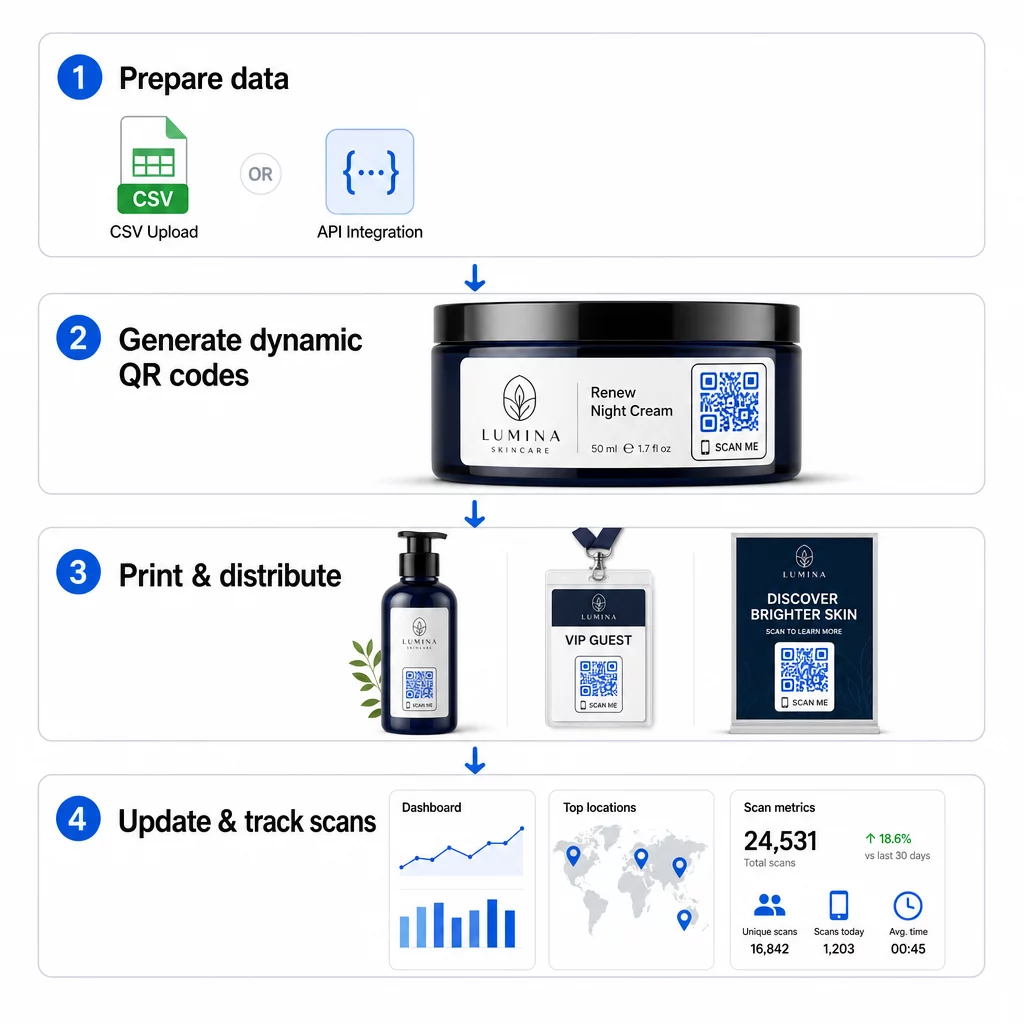
CSV-lataus
CSV-lataus on helpoimmin saatavilla oleva massaluontimenetelmä. Valmistat laskentataulukon, jossa jokainen rivi sisältää yhden QR-koodin tiedot – tyypillisesti kohde-URL-osoitteen, tunnisteen tai tunnuksen sekä kaikki muuttuvat tiedot, kuten tuotteen SKU:n, eränumeron tai kampanjatunnisteen. Lataat sitten tiedoston alustalle, ja järjestelmä luo vastaavan QR-koodin jokaiselle riville.
Kun valmistelet CSV-tiedostoasi, pidä nämä käytännöt mielessä:
- Tallenna tiedosto CSV UTF-8 -muodossa koodausvirheiden välttämiseksi
- Aseta tunniste- tai kansiosarake ensimmäiseksi
- Käytä johdonmukaista päivämäärämuotoilua (vvvv-kk-pp) kaikissa päivämääräkentissä
- Määritä pakolliset sarakkeet selkeästi ja tarkista otsikot ennen lataamista
Pagelootin kaltaiset alustat antavat käyttäjien luoda satoja koodeja yhdellä CSV-latauksella, mikä tekee siitä käytännöllisen tuoteluetteloihin, tapahtumalippuihin tai sijaintikohtaisiin kampanjoihin, joissa jokainen koodi tarvitsee yksilöllistä tietoa.
API-integraatio
Tiimeille, jotka tarvitsevat QR-koodien luonnin upotettuna suoraan olemassa oleviin työnkulkuihinsa, API-integraatio on tehokkaampi lähestymistapa. Sen sijaan, että vietäisit CSV-tiedoston manuaalisesti, järjestelmäsi välittävät parametrit suoraan QR-alustalle – käynnistäen koodin luonnin automaattisesti, kun uusia tuotteita lisätään, tilauksia tehdään tai kampanjoita käynnistetään.
API-pohjainen luonti tukee myös dynaamisia massapäivityksiä. PATCH- tai PUT-pyyntöjen avulla voit päivittää kohde-URL-osoitteita tuhansissa koodeissa samanaikaisesti – ilman manuaalista puuttumista. Tämä on erityisen hyödyllistä, kun kampanjan URL-osoite muuttuu, tuotesivu uudelleenjärjestellään tai kausiluonteinen sisältö on vaihdettava koko tuotelinjalla.
API-integraatio yhdistää QR-koodien luonnin jo käyttämiisi työkaluihin: varastonhallintajärjestelmiin, CRM-alustoihin, verkkokaupan taustajärjestelmiin ja markkinoinnin automaatiotyökaluihin. Tuloksena on saumaton tietoputki, jossa QR-koodit luodaan, päivitetään ja poistetaan synkronoidusti laajemman toimintasi kanssa.
Yritysalustan arvioitavat ydintoiminnot
Kaikkia QR-alustoja ei ole rakennettu yritystason työkuormille. Vaihtoehtoja arvioitaessa priorisoi nämä ominaisuudet:
Massaluontikapasiteetti – Alustan tulisi käsitellä volyymisi heikentämättä suorituskykyä. Etsi tukea rajoittamattomalle tai suurivolyymiselle eräluonnille, ei vain pienille erille.
Dynaaminen muokkaus – Jokaisen kirjastosi koodin tulisi olla muokattavissa luomisen jälkeen. Tämä poistaa uudelleenpainatuskustannukset kohteiden muuttuessa ja mahdollistaa fyysisten materiaalien uudelleenkäytön useissa kampanjoissa.
Keskitetty hallinta – Yksi hallintapaneeli koko QR-koodivalikoimasi järjestämiseen, etsimiseen ja päivittämiseen. Yrityksille, jotka pyörittävät kymmeniä samanaikaisia kampanjoita, organisointi on yhtä tärkeää kuin luomisnopeus.
Brändäys ja räätälöinti – Yrityskoodien tulisi heijastaa brändiäsi. Etsi logon integrointia, mukautettuja värimaailmoja ja suunnittelumalleja, joita voidaan soveltaa johdonmukaisesti suuriin eriin. Muuttuvien tietojen tuki mahdollistaa yksilöllisten tunnisteiden – kuten tuotenumerojen tai kampanjakoodien – upottamisen kunkin koodin suunnitteluun tai kohteeseen.
Analytiikka ja raportointi - QR-koodin seuranta muuttaa jokaisen skannauksen datapisteeksi. Reaaliaikaisten hallintapaneelien tulisi näyttää skannausten määrät, maantieteelliset sijainnit, laitetyypit ja aikaleimat. Kampanjatason raportoinnin tulisi näyttää konversioprosentit ja sitoutumistrendit, jotta voit optimoida kampanjoita lennossa.
Turvallisuus ja vaatimustenmukaisuus – Yrityskäyttöönotot edellyttävät roolipohjaisia pääsynhallintaa, jotta vain valtuutetut käyttäjät voivat luoda, muokata tai poistaa koodeja. Tietojen salaus suojaa tietoja siirron aikana ja levossa. GDPR:n, HIPAA:n tai SOX:n noudattaminen riippuu toimialastasi ja siitä, millaisia tietoja QR-koodisi käsittelevät.
Vientimuodot – Korkearesoluutioiset vektorimuodot (SVG, EPS, PDF) varmistavat, että koodit toistuvat selkeästi missä tahansa koossa, tuotetarroista messubannereihin.
Yritysten käyttötapaukset dynaamisille massatuotetuille QR-koodeille
Massatuotannon ja dynaamisen muokattavuuden yhdistelmä avaa laajan valikoiman operatiivisia sovelluksia:
Tuotemerkintä ja pakkaus – Luo yksilöllisiä koodeja jokaiselle tuotenumeroille tai erälle, linkittäen digitaalisiin käyttöoppaisiin, takuurekisteröintisivuille tai aitouden varmistukseen. Jos kohde-URL muuttuu, päivitä se keskitetysti sen sijaan, että painaisit tarrat uudelleen.
Tapahtumaliput ja sisäänkirjautumiset – Luo yksi koodi per osallistuja, joka sisältää istunnon käyttöoikeudet ja rekisteröintitiedot. Dynaamisten koodien avulla voit päivittää tapahtumapaikan tietoja tai istuntoaikatauluja lippujen jakelun jälkeen.
Kontaktittomat maksut ja digitaaliset menut – Määritä yksilölliset koodit jokaiselle pöydälle, kioskille tai sijainnille. Päivitä menun sisältöä tai hinnoittelua keskitetysti ilman fyysisten materiaalien vaihtamista.
Personoidut markkinointikampanjat – Linkitä jokainen koodi kohdesivulle, joka on räätälöity tietylle yleisösegmentille, alueelle tai ostohistorialle. Seuraa, mitkä versiot tuottavat eniten sitoutumista ja säädä kampanjoita sen mukaisesti.
Ohjelmistojen ja sovellusten käyttöönotto – Jaa yksilöllisiä koodeja, jotka käynnistävät osastokohtaisia sovellusasennuksia tai -määrityksiä, mikä vähentää IT-tuen yleiskustannuksia suurten käyttöönottojen aikana.
Toimitusketjun ja omaisuuden seuranta – Upota eränumerot, valmistuspäivämäärät ja tarkastustiedot fyysisiin omaisuuseriin liitettyihin koodeihin. Skannaustiedot tarjoavat reaaliaikaisen tarkastusketjun jakeluverkostossasi.
Analytiikka ja automaatio mittakaavassa
Massagenerointi on vain puolet yhtälöstä. Investoinnin perustelemiseksi ja tulevien kampanjoiden parantamiseksi tarvitset luotettavaa suorituskykytietoa.
A QR-koodien hallintajärjestelmä kerää mittareita, kuten kokonaisskannaukset, yksilölliset skannaukset, skannauksen aikaleimat, maantieteellisen sijainnin ja laitetyypin. Reaaliaikaiset hallintapaneelit tekevät tästä tiedosta hyödynnettävää – voit tunnistaa, mitkä koodit alisuoriutuvat kampanjan puolivälissä, ja päivittää niiden kohteita testataksesi erilaista sisältöä tai tarjouksia.
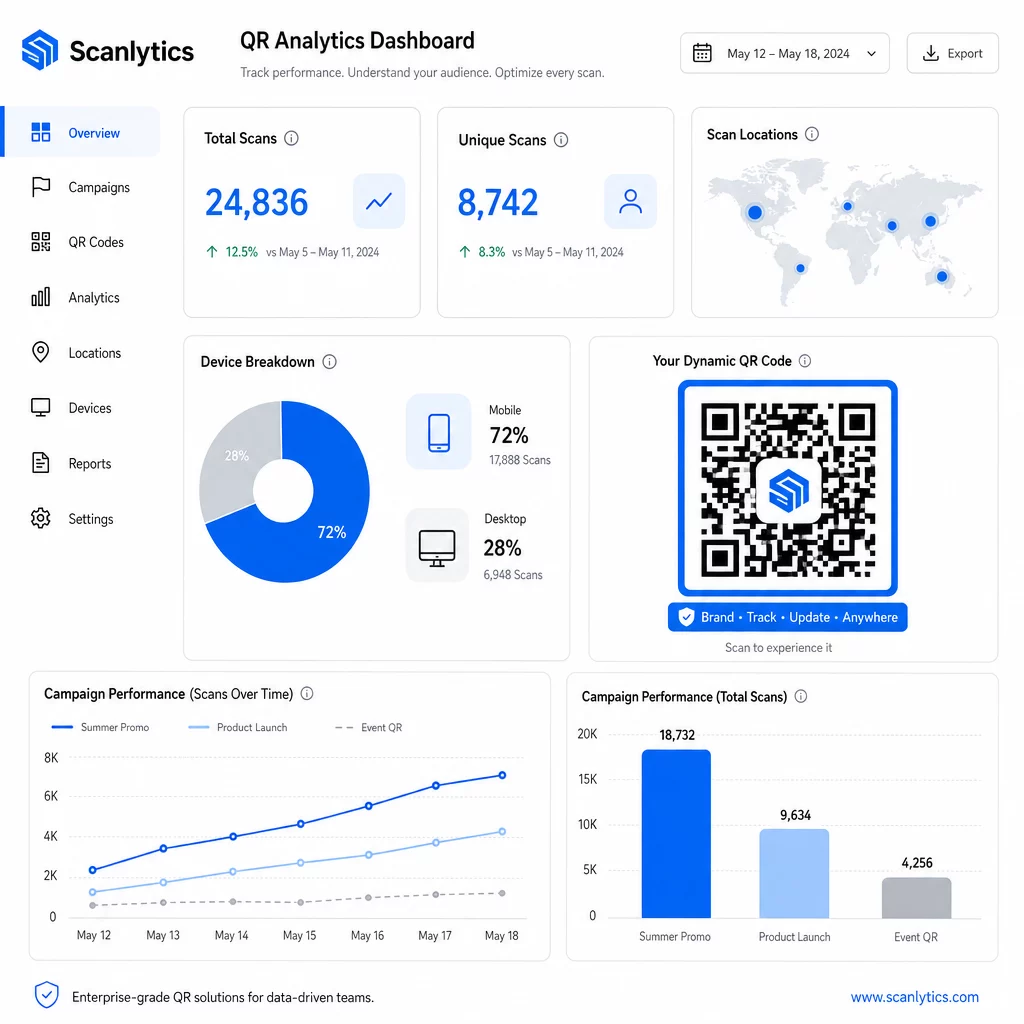
Yhdistettynä markkinoinnin automaatiotyökaluihin skannaustapahtumat voivat käynnistää automaattisesti seurantajaksoja. Tuotekoodin skannaava asiakas voi päätyä uudelleenkohdentamisen yleisöön, vastaanottaa tekstiviestin tai tulla lisätyksi CRM-työnkulkuun – ilman manuaalista tiedonsiirtoa.
Ajastetut käyttöönotot lisäävät tehokkuutta. Koodit voidaan määrittää aktivoitumaan automaattisesti kampanjan alkaessa ja deaktivoitumaan kampanjan päättyessä, mikä varmistaa, että sisältö on aina ajantasaista ilman manuaalista valvontaa.
Seuraa jokaista skannausta kampanjoissasi Se Pageloot QR-koodialusta antaa yritystiimeille keskitetyn hallintapaneelin reaaliaikaisia analyysejä, dynaamista muokkausta ja massahallintaa varten – kaikki yhdessä paikassa.
Yritystason QR-koodialustojen vertailu
Alustoja arvioitaessa tärkeimmät erottavat tekijät ovat massakapasiteetti, dynaaminen muokkaus, analytiikan syvyys, turvallisuusstandardit ja integraation joustavuus.
| Alusta | Massagenerointi | Dynaaminen muokkaus | ANALYTIIKKA | Integraatiot | Turvallisuus |
|---|---|---|---|---|---|
| Pageloot | Rajoittamaton eräluonti CSV:n tai API:n kautta | Reaaliaikainen muokkaus ilman uudelleen tulostamista | Skannausten määrä, sijainti, laite, reaaliaikainen hallintapaneeli | CRM, API-käyttöoikeus | GDPR-yhteensopiva, salattu data |
| Uniqode | Jopa 2 000 koodia erää kohti | Dynaamiset sisältöpäivitykset | Sijainti, aika, laitteen seuranta | HubSpot, Salesforce, Zapier (yli 5 000 työkalua) | SOC 2 Type II, SSO, roolipohjainen pääsy |
| QR Batch | Suurten volyymien erä syötetystä datasta | Reaaliaikaiset URL-päivitykset | Käyttöajan seuranta | Rajoitettu | Standardi |
| Hovercode | Keskitetty hallintapaneeli suurille volyymeille | Dynaamiset päivitykset | Skannauspaikka, laite, aikaleimat | API, webhookit, CRM | Monikäyttäjäoikeudet |
| Live QR-koodigeneraattori | Tuhansia koodeja API:n tai Google Sheetsin kautta | Dynaaminen QR-tuki | Maantieteellinen analytiikka | CRM, varastonhallintajärjestelmät | Standardi |
Pagelootin tuki yli 25 QR-koodityyppiä ja rajoittamaton massaluonti tekee siitä erityisen monipuolisen yrityksille, jotka hallinnoivat samanaikaisesti erilaisia kampanjatyyppejä. Tiimeille, jotka tarvitsevat syvällisiä kolmannen osapuolen integraatioita, Uniqode:n kaltaiset alustat tarjoavat laajemmat liitännäiskirjastot. Oikea valinta riippuu volyymistasi, nykyisestä teknologiapinostasi ja vaatimustenmukaisuusvaatimuksistasi.
Toimistoille, jotka hallinnoivat QR-kampanjoita useiden asiakkaiden puolesta, Pagelootin toimistotyökalut lisäävät jaettavia asiakasraportteja, white label -vaihtoehtoja ja roolipohjaisia käyttöoikeuksia, jotka pitävät asiakastiedot erillään ja ammattimaisesti esitettyinä.
Dynaamisten QR-koodien massatuotannon aloittaminen
Tehokkain tapa yritystason QR-koodien hallintaan noudattaa johdonmukaista kaavaa:
- Tarkasta nykyiset QR-koodien käyttötapauksesi ja tunnista, missä massatuotanto säästäisi eniten aikaa
- Kartoita kunkin koodityypin tarvitsemat tietokentät – kohde-URL-osoitteet, muuttuvat tunnisteet, kampanjatunnisteet
- Valitse alusta, joka tukee sekä CSV-latauksia että API-integraatiota, jotta voit skaalata kumpaa tahansa lähestymistapaa tarpeen mukaan
- Rakenna nimeämis- ja kansiorakenne ennen ensimmäistä massalatausta pitääksesi suuret portfoliot järjestyksessä
- Testaa pieni erä ennen täyttä käyttöönottoa varmistaen, että jokainen koodi skannautuu oikein ja ohjaa oikeaan kohteeseen
- Määritä analytiikkaseuranta heti alusta alkaen, jotta sinulla on perustason suorituskykytiedot jokaisesta kampanjasta
Dynaamiset massatuotetut QR-koodit toimivat parhaiten, kun luonti, hallinta ja analytiikka hoidetaan yhdellä alustalla. Näiden toimintojen jakaminen useisiin työkaluihin luo tietopuutteita ja manuaalista täsmäytystyötä, mikä heikentää tehokkuushyötyjä, joita yrität saavuttaa.
Se Pagelootin dynaaminen QR-koodigeneraattori kattaa kaikki kolme toimintoa – luo koodeja massana, muokkaa kohteita tulostamatta uudelleen ja seuraa suorituskykyä reaaliaikaisesti – yhdestä keskitetystä hallintapaneelista. Aloita ilmainen 14 päivän kokeilujakso luodaksesi ensimmäisen eräsi ja nähdäksesi, miten alusta skaalautuu kampanjatarpeidesi mukaan.
Usein kysytyt kysymykset
Staattiset QR-koodit koodaavat kiinteän kohteen, jota ei voi muuttaa luomisen jälkeen. Jos URL-osoite tai sisältö muuttuu, sinun on tulostettava jokainen koodi uudelleen. Dynaamiset QR-koodit käyttävät lyhyttä ohjauslinkkiä, jota hallitset, ja jonka avulla voit päivittää kohteen milloin tahansa ilman uudelleentulostusta. Yrityksille, jotka hallinnoivat suuria määriä koodeja pitkäkestoisissa kampanjoissa tai fyysisissä materiaaleissa, dynaamiset koodit poistavat uudelleentulostuskustannukset ja mahdollistavat jatkuvan skannausten seurannan.
Valmistat laskentataulukon, jossa jokainen rivi sisältää yhden QR-koodin tiedot – tyypillisesti kohde-URL-osoitteen, yksilöllisen tunnisteen ja mahdolliset muuttuvat kentät, kuten tuotenumeroita (SKU) tai kampanjatunnisteita. Tallenna tiedosto CSV UTF-8 -muodossa ja lataat sen alustalle. Järjestelmä luo yksilöllisen QR-koodin jokaiselle riville ja pakkaa ne ladattavaksi, usein ZIP-tiedostona. Tämä lähestymistapa toimii hyvin tuoteluetteloissa, tapahtumalippujen myynnissä ja paikkakohtaisissa kampanjoissa, joissa jokainen koodi tarvitsee erilliset tiedot.
Yritysten QR-alustat seuraavat mittareita, mukaan lukien skannausten kokonaismäärät, yksilölliset skannaukset, skannausten aikaleimat, kunkin skannauksen maantieteellinen sijainti ja laitetyyppi (mukaan lukien käyttöjärjestelmä). Reaaliaikaiset hallintapaneelit tekevät nämä tiedot saataville skannausten tapahtuessa, jotta tiimit voivat tunnistaa alisuoriutuvat koodit ja päivittää niiden kohteita kampanjan puolivälissä. Kehittyneemmät alustat tukevat myös konversioseurantaa ja integrointia CRM- tai markkinoinnin automaatiotyökaluihin, jotta skannaustapahtumat voivat käynnistää seurantatyönkulkuja automaattisesti.