Több száz vagy több ezer QR-kód egyenkénti kezelése nem munkafolyamat – hanem szűk keresztmetszet. Amikor a kampányok termékvonalakat, helyszíneket vagy teljes disztribúciós hálózatokat ölelnek fel, a manuális létrehozás hibákat, késedelmeket és újranyomtatási költségeket okoz, amelyek csendesen lemerítik az erőforrásokat. Ez az útmutató elmagyarázza, hogyan használhatók a tömeges dinamikus QR-kód eszközök nagy mennyiségű kód hatékony generálására, kezelésére és nyomon követésére a vállalat egész területén.
Miért a dinamikus QR-kódok a megfelelő alap
Mielőtt belemerülnénk a tömeges generálásba, érdemes megérteni, miért dinamikus QR kódok különösen fontosak vállalati szinten.
A statikus QR-kód egy rögzített célállomást kódol közvetlenül a mintájába. Kinyomtatás után ez a célállomás nem módosítható. Ha egy URL megváltozik, egy termékoldal áthelyeződik, vagy egy kampány véget ér, minden kinyomtatott kód elavulttá válik – és több ezer címke vagy anyag újranyomtatása költséges.
A dinamikus QR-kódok másképp működnek. Egy rövid átirányítási linkre mutatnak, amelyet Ön irányít. Amikor valaki beolvassa a kódot, az átirányításon keresztül arra a célállomásra kerül, amelyet Ön éppen beállított. Ön képes bármikor frissítheti a célhelyet – még a kódok kinyomtatása és terjesztése után is – anélkül, hogy új kódot generálna, vagy egyetlen nyomtatott anyaghoz is hozzáérne. Támogatják a beolvasás nyomon követését és az analitikát is, amit a statikus kódok nem tudnak biztosítani.
A nagy kampányokat, termékvonalakat vagy fizikai eszközöket kezelő vállalatok számára a dinamikus kódok kiküszöbölik az újranyomtatási ciklust, és folyamatos betekintést nyújtanak abba, hogyan teljesít az egyes kódok.
Kezdje el dinamikus QR-kódok létrehozását nagy méretekben Készen áll arra, hogy szerkeszthető, nyomon követhető QR-kódokat generáljon vállalati kampányaihoz? Próbálja ki a Dinamikus QR-kód generátor ingyenesen 14 napig – hitelkártya nem szükséges.
Hogyan működik a tömeges QR-kód generálás
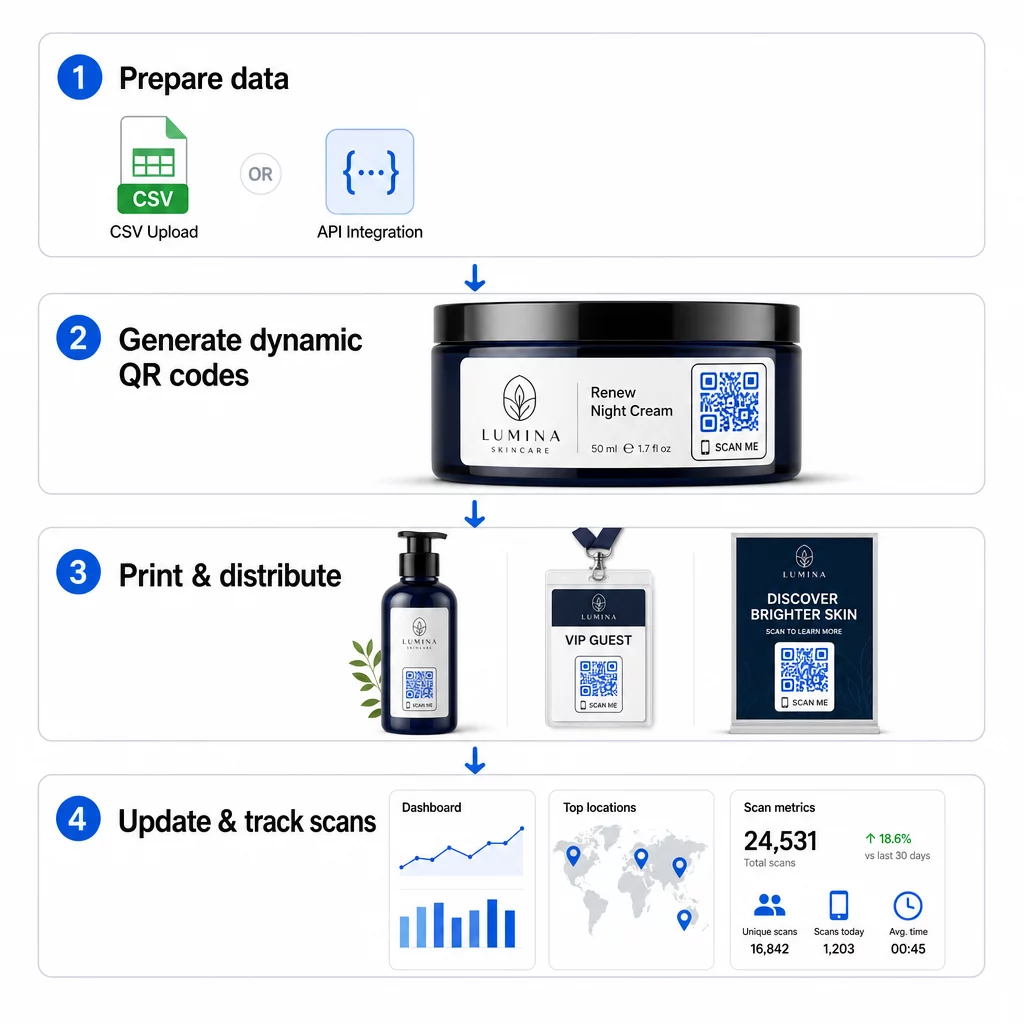
Több ezer egyedi QR-kód generálása nem feltétlenül jelent több ezer manuális lépést. A vállalati QR-platformok két elsődleges módszert támogatnak a tömeges létrehozáshoz: CSV feltöltések és API integráció.
CSV feltöltés
A CSV feltöltés a leginkább hozzáférhető tömeges generálási módszer. Készít egy táblázatot, ahol minden sor egy QR-kód adatait tartalmazza – jellemzően egy cél URL-t, egy címkét vagy azonosítót, és bármilyen változó információt, például termék SKU-t, tételszámot vagy kampánycímkét. Ezután feltölti ezt a fájlt a platformra, és a rendszer minden sorhoz generál egy megfelelő QR-kódot.
A CSV fájl előkészítésekor tartsa szem előtt ezeket a gyakorlatokat:
- Mentse a fájlt CSV UTF-8 formátumban a kódolási hibák elkerülése érdekében
- Helyezze az azonosító vagy mappa oszlopot elsőnek
- Használjon egységes dátumformátumot (yyyy-mm-dd) bármely dátummezőhöz
- Határozza meg egyértelműen a kötelező oszlopokat, és ellenőrizze a fejléceket feltöltés előtt
Az olyan platformok, mint a Pageloot, lehetővé teszik a felhasználók számára, hogy több száz kódot generáljanak egyetlen CSV feltöltésből, így praktikus termékkatalógusokhoz, eseményjegyekhez vagy helyspecifikus kampányokhoz, ahol minden kód egyedi adatokat igényel.
API integráció
Azoknak a csapatoknak, amelyeknek QR-kód generálásra van szükségük közvetlenül a meglévő munkafolyamataikba ágyazva, az API integráció a hatékonyabb megközelítés. Ahelyett, hogy manuálisan exportálnának egy CSV-t, a rendszereik közvetlenül továbbítják a paramétereket a QR platformnak – automatikusan elindítva a kódgenerálást, amint új termékek kerülnek hozzáadásra, megrendelések érkeznek, vagy kampányok indulnak.
Az API-alapú generálás támogatja a dinamikus tömeges frissítéseket is. PATCH vagy PUT kérések használatával egyszerre több ezer kód cél URL-jét frissítheti – manuális beavatkozás nélkül. Ez különösen hasznos, ha egy kampány URL-je megváltozik, egy termékoldal átalakításra kerül, vagy szezonális tartalmat kell cserélni egy teljes termékcsaládon belül.
Az API integráció összeköti a QR-kód generálást azokkal az eszközökkel, amelyeket már használ: készletkezelő rendszerekkel, CRM platformokkal, e-kereskedelmi háttérrendszerekkel és marketing automatizálási eszközökkel. Az eredmény egy zökkenőmentes adatfolyam, ahol a QR-kódok létrehozásra, frissítésre és visszavonásra kerülnek szinkronban a szélesebb körű műveleteivel.
Főbb funkciók egy vállalati platform értékeléséhez
Nem minden QR platform készült vállalati munkaterhelésekre. Az opciók értékelésekor priorizálja ezeket a képességeket:
Tömeges generálási kapacitás – A platformnak kezelnie kell a mennyiséget a teljesítmény romlása nélkül. Keressen támogatást korlátlan vagy nagy volumenű kötegelt létrehozáshoz, nem csak kis kötegekhez.
Dinamikus szerkesztés – A könyvtárában lévő minden kódnak szerkeszthetőnek kell lennie a létrehozás után. Ez kiküszöböli az újranyomtatási költségeket, amikor a célállomások megváltoznak, és lehetővé teszi a fizikai anyagok újrafelhasználását több kampányban is.
Központosított kezelés – Egyetlen irányítópult a teljes QR-kód portfólió rendszerezéséhez, kereséséhez és frissítéséhez. Az egyidejűleg több tucat kampányt futtató vállalatok számára a szervezettség ugyanolyan fontos, mint a generálási sebesség.
Márkaépítés és testreszabás – A vállalati kódoknak tükrözniük kell a márkáját. Keressen logóintegrációt, egyedi színsémákat és tervezési sablonokat, amelyek következetesen alkalmazhatók nagy tételekben. A változó adat támogatás lehetővé teszi egyedi azonosítók – például termék SKU-k vagy promóciós kódok – beágyazását az egyes kódok tervezésébe vagy célállomásába.
Analitika és jelentéskészítés - QR-kód követés minden szkennelést adatponttá alakít. A valós idejű irányítópultoknak meg kell jeleníteniük a szkennelések számát, a földrajzi helyeket, az eszköz típusait és az időbélyegeket. A kampányszintű jelentéseknek meg kell mutatniuk a konverziós arányokat és az elkötelezettségi trendeket, hogy optimalizálni tudja a folyamatban lévő kampányokat.
Biztonság és megfelelőség – A vállalati telepítések szerepalapú hozzáférés-vezérlést igényelnek, így csak az arra jogosult felhasználók hozhatnak létre, szerkeszthetnek vagy törölhetnek kódokat. Az adattitkosítás védi az adatokat szállítás közben és nyugalmi állapotban is. A GDPR, HIPAA vagy SOX megfelelőség az iparágától és a QR-kódok által kezelt adatok típusától függ.
Exportálási formátumok – A nagy felbontású vektoros formátumok (SVG, EPS, PDF) biztosítják, hogy a kódok bármilyen méretben tisztán reprodukálhatók legyenek, a termékcímkéktől a kiállítási bannerekig.
Vállalati felhasználási esetek tömeges dinamikus QR-kódokhoz
A tömeges generálás és a dinamikus szerkeszthetőség kombinációja számos operatív alkalmazást tesz lehetővé:
Termékcímkézés és csomagolás – Generáljon egyedi kódokat minden SKU-hoz vagy tételhez, digitális kézikönyvekre, garanciaregisztrációs oldalakra vagy hitelesség-ellenőrzésre hivatkozva. Ha a cél URL megváltozik, frissítse azt központilag a címkék újranyomtatása helyett.
Rendezvényjegyek és bejelentkezések – Hozzon létre egy kódot minden résztvevő számára, amely tartalmazza a munkamenet-hozzáférési engedélyeket és a regisztrációs adatokat. A dinamikus kódok lehetővé teszik a helyszíninformációk vagy a munkamenet-ütemezések frissítését a jegyek kiosztása után.
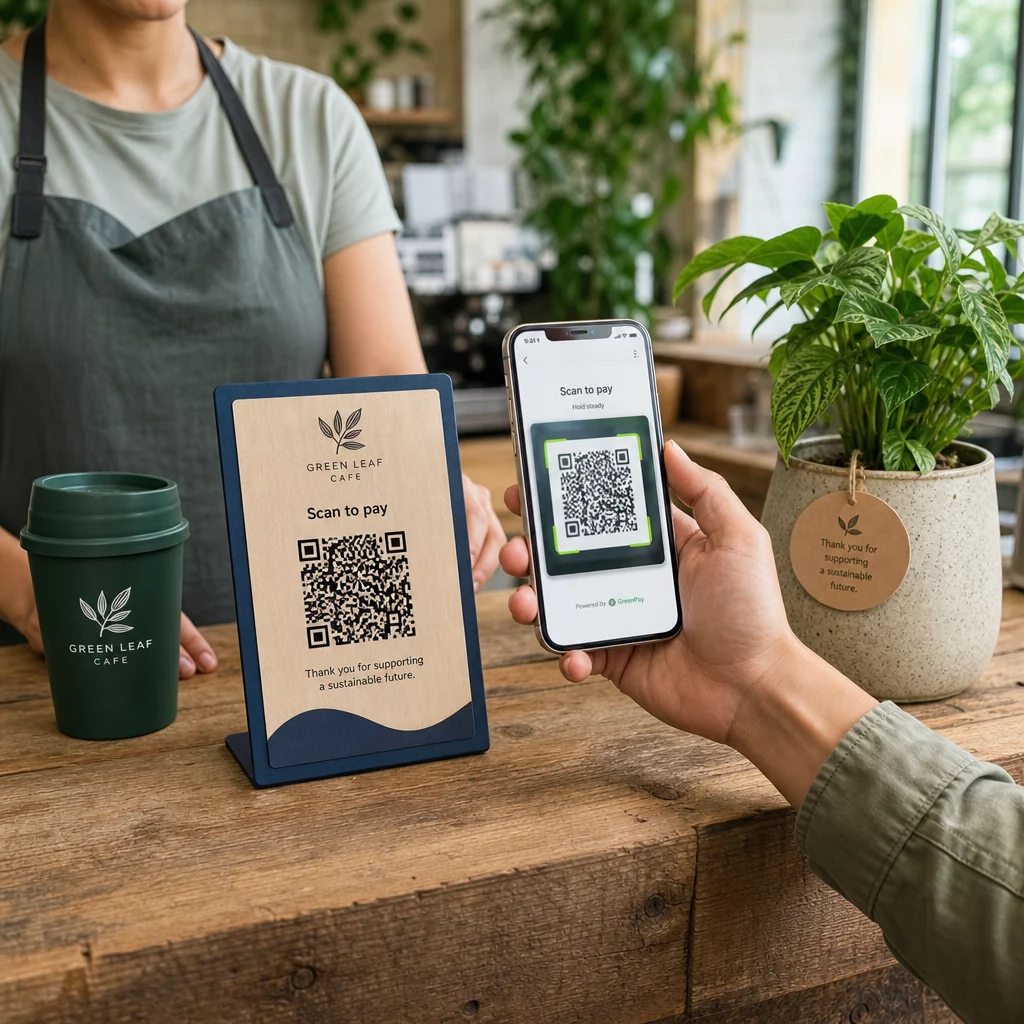
Érintés nélküli fizetések és digitális menük – Rendeljen egyedi kódokat minden asztalhoz, kioszkhoz vagy helyszínhez. Frissítse a menü tartalmát vagy az árakat központilag anélkül, hogy fizikai anyagokat kellene cserélnie.
Személyre szabott marketingkampányok – Kapcsoljon minden kódot egy olyan céloldalhoz, amely egy adott közönségszegmenshez, régióhoz vagy vásárlási előzményekhez igazodik. Kövesse nyomon, mely verziók generálják a legnagyobb elkötelezettséget, és ennek megfelelően módosítsa a kampányokat.
Szoftver- és alkalmazástelepítés – Osszon ki egyedi kódokat, amelyek részlegspecifikus alkalmazástelepítéseket vagy konfigurációkat indítanak el, csökkentve az IT támogatási költségeket a nagyszabású bevezetések során.
Ellátási lánc és eszköznyomon követés – Ágyazza be a tételszámokat, gyártási dátumokat és ellenőrzési nyilvántartásokat a fizikai eszközökhöz csatolt kódokba. A szkennelési adatok valós idejű ellenőrzési nyomvonalat biztosítanak az elosztóhálózatban.
Analitika és automatizálás nagy léptékben
A tömeges generálás csak a fél siker. A befektetés igazolásához és a jövőbeli kampányok javításához megbízható teljesítményadatokra van szüksége.
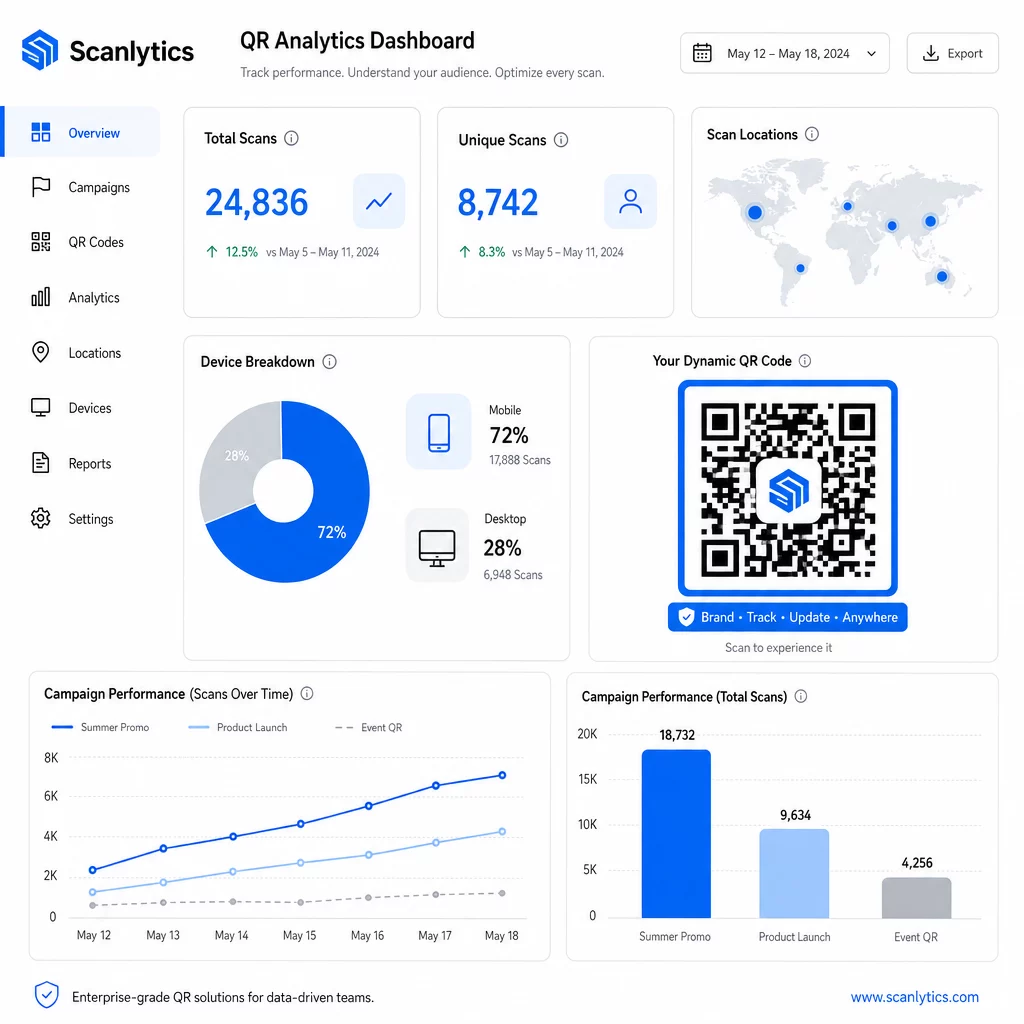
A QR kód kezelő rendszer metrikákat gyűjt, beleértve az összes szkennelést, egyedi szkenneléseket, szkennelési időbélyegeket, földrajzi helyet és eszköz típust. A valós idejű irányítópultok cselekvőképesekké teszik ezeket az adatokat – azonosíthatja, mely kódok teljesítenek alul a kampány közepén, és frissítheti célállomásaikat különböző tartalmak vagy ajánlatok teszteléséhez.
Marketing automatizálási eszközökkel párosítva a szkennelési események automatikusan indíthatnak nyomon követési sorozatokat. Egy termékkódot szkennelő ügyfél bekerülhet egy remarketing célközönségbe, SMS-t kaphat, vagy hozzáadható egy CRM munkafolyamathoz – manuális adatátvitel nélkül.
Az ütemezett telepítések további hatékonysági réteget adnak. A kódok konfigurálhatók úgy, hogy automatikusan aktiválódjanak a kampány indításakor és deaktiválódjanak a promóció végén, biztosítva, hogy a tartalom mindig aktuális legyen, manuális felügyelet nélkül.
Kövesse nyomon minden szkennelést a kampányai során A Pageloot QR kód platform vállalati csapatoknak biztosít egy központosított irányítópultot valós idejű elemzésekhez, dinamikus szerkesztéshez és tömeges kezeléshez – mindezt egy helyen.
Vállalati QR-kód platformok összehasonlítása
Platformok értékelésekor a legfontosabb megkülönböztető tényezők a tömeges kapacitás, a dinamikus szerkesztés, az elemzési mélység, a biztonsági szabványok és az integrációs rugalmasság.
| Platform | Tömeges generálás | Dinamikus szerkesztés | ELEMZÉS | Integrációk | Biztonság |
|---|---|---|---|---|---|
| Pageloot | Korlátlan kötegelt létrehozás CSV-n vagy API-n keresztül | Valós idejű szerkesztés újra nyomtatás nélkül | Szkennelések száma, helyszín, eszköz, valós idejű irányítópult | CRM, API hozzáférés | GDPR-kompatibilis, titkosított adatok |
| Uniqode | Akár 2000 kód kötegenként | Dinamikus tartalomfrissítések | Helyszín, idő, eszközkövetés | HubSpot, Salesforce, Zapier (5000+ eszköz) | SOC 2 Type II, SSO, szerepköralapú hozzáférés |
| QR Batch | Nagy volumenű kötegelt feldolgozás adatbevitelből | Valós idejű URL frissítések | Hozzáférési idő monitorozása | Korlátozott | Standard |
| Hovercode | Központosított irányítópult nagy volumenekhez | Dinamikus frissítések | Szkennelés helye, eszköz, időbélyegek | API, webhookok, CRM | Többfelhasználós engedélyek |
| Élő QR-kód generátor | Kódok ezrei API-n vagy Google Sheets-en keresztül | Dinamikus QR támogatás | Földrajzi analitika | CRM, készletkezelő rendszerek | Standard |
A Pageloot támogatása a következőkhöz: több mint 25 QR-kód típus és a korlátlan tömeges létrehozás különösen sokoldalúvá teszi a különböző kampánytípusokat egyidejűleg kezelő vállalatok számára. Azoknak a csapatoknak, amelyek mély harmadik féltől származó integrációkat igényelnek, az Uniqode-hez hasonló platformok szélesebb csatlakozókönyvtárakat kínálnak. A helyes választás a mennyiségtől, a meglévő technológiai veremtől és a megfelelőségi követelményektől függ.
Azoknak az ügynökségeknek, amelyek QR-kampányokat kezelnek több ügyfél nevében, A Pageloot ügynökségi eszközei megosztható ügyféljelentéseket, fehér címkés opciókat és szerepköralapú engedélyeket adnak hozzá, amelyek elkülönítve és professzionálisan prezentálva tartják az ügyféladatokat.
Bevezetés a Tömeges Dinamikus QR-kódokba
A vállalati szintű QR-kód kezelés leghatékonyabb útja következetes mintát követ:
- Vizsgálja felül jelenlegi QR-kód felhasználási eseteit és azonosítsa, hol takarítana meg a legtöbb időt a tömeges generálás
- Térképezze fel az egyes kódtípusokhoz szükséges adatmezőket – cél URL-ek, változó azonosítók, kampánycímkék
- Válasszon olyan platformot, amely támogatja a CSV feltöltéseket és az API integrációt is, így szükség szerint skálázhatja bármelyik megközelítést
- Építsen ki egy elnevezési és mappastruktúrát az első tömeges feltöltés előtt a nagy portfóliók rendszerezéséhez
- Teszteljen egy kis tételt a teljes bevezetés előtt, ellenőrizve, hogy minden kód helyesen szkennel-e és a megfelelő célhelyre irányít-e
- Állítson be analitikai követést az első naptól kezdve, hogy alapvető teljesítményadatokkal rendelkezzen minden kampányhoz
A tömeges dinamikus QR-kódok akkor működnek a legjobban, ha a generálás, kezelés és analitika egyetlen platformon történik. Ezen funkciók több eszköz közötti megosztása adatrėseket és manuális egyeztetési munkát hoz létre, amely aláássa az elérni kívánt hatékonyságnövekedést.
A Pageloot dinamikus QR-kód generátor mindhárom funkciót lefedi – kódok tömeges létrehozása, célhelyek szerkesztése újranyomtatás nélkül, és a teljesítmény valós idejű nyomon követése – egyetlen központosított irányítópultról. Indítson egy ingyenes 14 napos próbaverziót, hogy generálja az első tételt, és nézze meg, hogyan skálázódik a platform a kampányigényeivel.
Gyakori kérdések
Statikus QR kódok rögzített célt kódolnak, amely a generálás után nem módosítható. Ha az URL vagy a tartalom megváltozik, minden kódot újra kell nyomtatnia. Dinamikus QR kódok egy rövid, Ön által vezérelt átirányítási linket használnak, lehetővé téve a cél bármikori frissítését újranyomtatás nélkül. Nagy mennyiségű kódot kezelő vállalatok számára, hosszú távú kampányokban vagy fizikai anyagokon, a dinamikus kódok kiküszöbölik az újranyomtatási költségeket és lehetővé teszik a folyamatos szkennelési nyomon követést.
Készít egy táblázatot, ahol minden sor egy QR-kód adatait tartalmazza – jellemzően egy cél URL-t, egy egyedi azonosítót, és bármilyen változó mezőt, mint például termék SKU-kat vagy kampánycímkéket. A fájlt CSV UTF-8 formátumban menti és feltölti a platformra. A rendszer minden sorhoz egyedi QR-kódot generál és letöltésre csomagolja őket, gyakran ZIP fájlként. Ez a megközelítés jól működik termékkatalógusok, eseményjegyek és helyspecifikus kampányok esetén, ahol minden kódnak különálló adatokra van szüksége.
Vállalati QR platformok mérőszámokat követnek, beleértve az összes szkennelés számát, az egyedi szkenneléseket, a szkennelések időbélyegzőit, az egyes szkennelések földrajzi helyét és az eszköz típusát (beleértve az operációs rendszert). Valós idejű műszerfalak elérhetővé teszik ezeket az adatokat, amint a szkennelések megtörténnek, így a csapatok azonosíthatják az alulteljesítő kódokat, és frissíthetik a célhelyeiket a kampány közepén. Fejlettebb platformok támogatják a konverziókövetést és az integrációt CRM vagy marketing automatizálási eszközökkel is, így a szkennelési események automatikusan elindíthatnak nyomon követési munkafolyamatokat.