Upravljanje stotinama ili tisućama QR kodova jedan po jedan nije radni proces – to je usko grlo. Kada se kampanje protežu kroz linije proizvoda, lokacije ili cijele distribucijske mreže, ručno stvaranje uvodi pogreške, kašnjenja i troškove ponovnog ispisa koji tiho iscrpljuju resurse. Ovaj vodič objašnjava kako koristiti alate za masovno generiranje dinamičkih QR kodova za učinkovito generiranje, upravljanje i praćenje velikih količina kodova u cijelom vašem poduzeću.
Zašto su dinamički QR kodovi pravi temelj
Prije nego što zaronite u masovno generiranje, vrijedi razumjeti zašto dinamični QR kodovi posebno su važni na razini poduzeća.
A statički QR kod kodira fiksno odredište izravno u svoj uzorak. Jednom ispisano, to se odredište ne može promijeniti. Ako se URL promijeni, stranica proizvoda premjesti ili kampanja završi, svaki ispisani kod postaje zastario – a ponovno ispisivanje tisuća naljepnica ili materijala je skupo.
Dinamički QR kodovi rade drugačije. Oni upućuju na kratku vezu za preusmjeravanje koju vi kontrolirate. Kada netko skenira kod, preusmjerava se putem te veze na odredište koje ste trenutno postavili. Možete ažurirati odredište u bilo kojem trenutku – čak i nakon što su kodovi ispisani i distribuirani – bez generiranja novog koda ili dodirivanja ijednog komada tiskanog materijala. Također podržavaju praćenje skeniranja i analitiku, što statički kodovi ne mogu pružiti.
Za poduzeća koja upravljaju velikim kampanjama, linijama proizvoda ili fizičkom imovinom, dinamički kodovi eliminiraju ciklus ponovnog ispisa i daju vam stalni uvid u to kako svaki kod funkcionira.
Počnite stvarati dinamičke QR kodove u velikom opsegu Jeste li spremni generirati QR kodove koji se mogu uređivati i pratiti za vaše poslovne kampanje? Isprobajte Dinamični QR kod generator besplatno 14 dana – kreditna kartica nije potrebna.
Kako funkcionira masovno generiranje QR kodova
Generiranje tisuća jedinstvenih QR kodova ne mora značiti tisuće ručnih koraka. Poslovne QR platforme podržavaju dvije primarne metode za masovno stvaranje: CSV učitavanja i API integraciju.
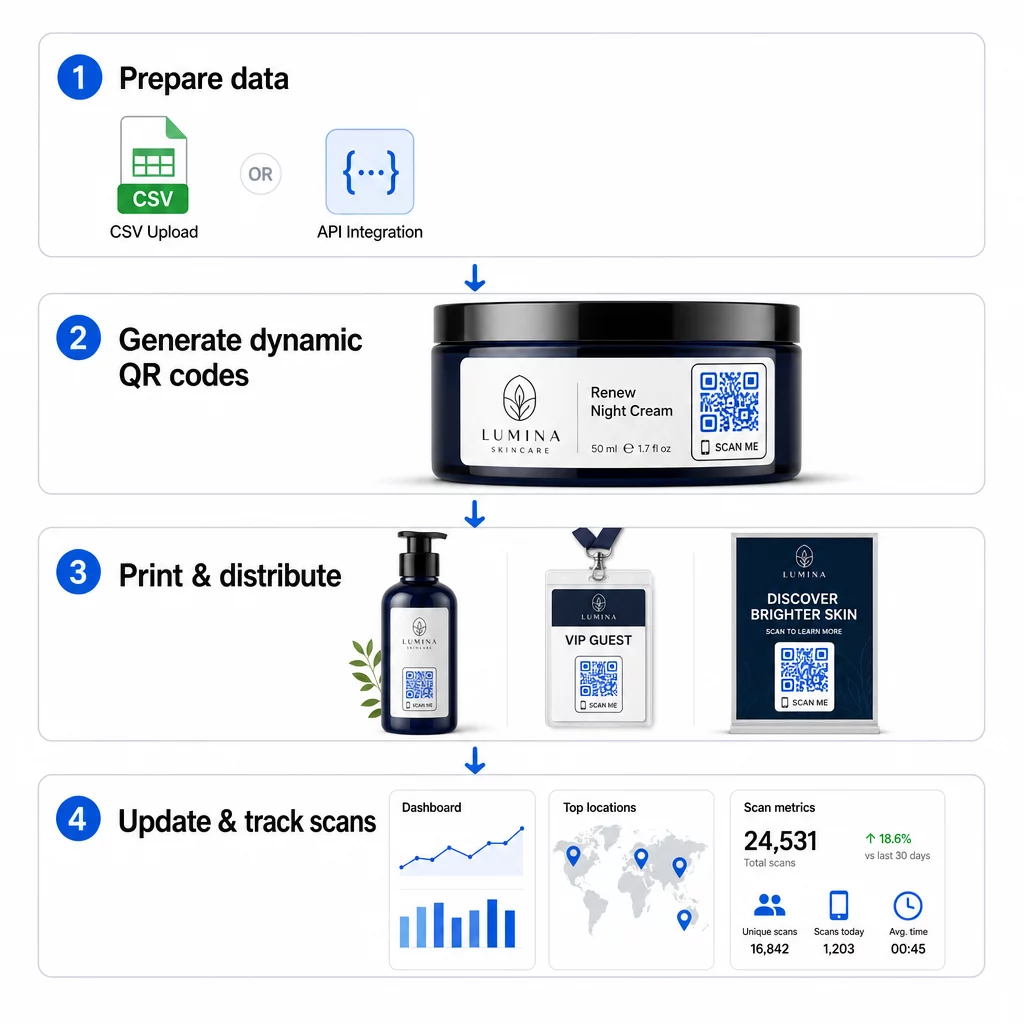
CSV učitavanje
CSV učitavanje je najpristupačnija metoda masovnog generiranja. Pripremate proračunsku tablicu gdje svaki redak sadrži podatke za jedan QR kod – obično odredišni URL, oznaku ili identifikator, te sve varijabilne informacije poput SKU-a proizvoda, broja serije ili oznake kampanje. Zatim tu datoteku učitate na platformu, a sustav generira odgovarajući QR kod za svaki redak.
Prilikom pripreme CSV datoteke, imajte na umu ove prakse:
- Spremite datoteku u CSV UTF-8 formatu kako biste izbjegli pogreške kodiranja
- Stupac s identifikatorom ili mapom postavite prvi
- Koristite dosljedno formatiranje datuma (gggg-mm-dd) za sva polja datuma
- Jasno definirajte potrebne stupce i provjerite zaglavlja prije prijenosa
Platforme poput Pageloota omogućuju korisnicima generiranje stotina kodova iz jednog CSV prijenosa, što ga čini praktičnim za kataloge proizvoda, ulaznice za događaje ili kampanje specifične za lokaciju gdje svaki kod treba jedinstvene podatke.
API integracija
Za timove koji trebaju generiranje QR kodova ugrađeno izravno u njihove postojeće radne procese, API integracija je snažniji pristup. Umjesto ručnog izvoza CSV-a, vaši sustavi prosljeđuju parametre izravno QR platformi – automatski pokrećući generiranje koda kako se dodaju novi proizvodi, postavljaju narudžbe ili pokreću kampanje.
Generiranje temeljeno na API-ju također podržava dinamička skupna ažuriranja. Koristeći PATCH ili PUT zahtjeve, možete istovremeno ažurirati odredišne URL-ove na tisućama kodova – bez ikakve ručne intervencije. Ovo je posebno korisno kada se URL kampanje promijeni, stranica proizvoda restrukturira ili sezonski sadržaj treba zamijeniti u cijeloj liniji proizvoda.
API integracija povezuje generiranje QR kodova s alatima koje već koristite: sustavima za upravljanje zalihama, CRM platformama, e-commerce pozadinama i alatima za automatizaciju marketinga. Rezultat je besprijekoran podatkovni cjevovod gdje se QR kodovi stvaraju, ažuriraju i povlače u sinkronizaciji s vašim širim operacijama.
Ključne značajke za procjenu u poslovnoj platformi
Nisu sve QR platforme izgrađene za poslovna opterećenja. Prilikom procjene opcija, dajte prednost ovim mogućnostima:
Kapacitet skupnog generiranja – Platforma bi trebala obrađivati vaš volumen bez smanjenja performansi. Potražite podršku za neograničeno ili visokovolumensko skupno stvaranje, a ne samo male serije.
Dinamičko uređivanje – Svaki kod u vašoj biblioteci trebao bi biti urediv nakon izrade. To eliminira troškove ponovnog ispisa kada se odredišta promijene i omogućuje vam ponovnu upotrebu fizičkih materijala u više kampanja.
Centralizirano upravljanje – Jedna nadzorna ploča za organiziranje, pretraživanje i ažuriranje cijelog vašeg portfelja QR kodova. Za poduzeća koja provode desetke istodobnih kampanja, organizacija je jednako važna kao i brzina generiranja.
Brendiranje i prilagodba – Korporativni kodovi trebali bi odražavati vašu marku. Potražite integraciju logotipa, prilagođene sheme boja i predloške dizajna koji se mogu dosljedno primijeniti na velike serije. Podrška za varijabilne podatke omogućuje vam ugradnju jedinstvenih identifikatora – kao što su SKU-ovi proizvoda ili promotivni kodovi – unutar dizajna ili odredišta svakog koda.
Analitika i izvještavanje - Praćenje QR koda pretvara svako skeniranje u podatkovnu točku. Nadzorne ploče u stvarnom vremenu trebale bi prikazivati broj skeniranja, geografske lokacije, vrste uređaja i vremenske oznake. Izvještavanje na razini kampanje trebalo bi prikazivati stope konverzije i trendove angažmana kako biste mogli optimizirati u hodu.
Sigurnost i usklađenost – Korporativna implementacija zahtijeva kontrole pristupa temeljene na ulogama tako da samo ovlašteni korisnici mogu stvarati, uređivati ili brisati kodove. Enkripcija podataka štiti informacije u prijenosu i u mirovanju. Usklađenost s GDPR-om, HIPAA-om ili SOX-om ovisi o vašoj industriji i vrsti podataka koje vaši QR kodovi obrađuju.
Formati izvoza – Vektorski formati visoke rezolucije (SVG, EPS, PDF) osiguravaju čistu reprodukciju kodova u bilo kojoj veličini, od naljepnica proizvoda do sajamskih bannera.
Korporativni slučajevi upotrebe za masovne dinamičke QR kodove
Kombinacija masovnog generiranja i dinamičke mogućnosti uređivanja otvara širok raspon operativnih primjena:
Označavanje i pakiranje proizvoda – Generirajte jedinstvene kodove za svaki SKU ili seriju, povezujući ih s digitalnim priručnicima, stranicama za registraciju jamstva ili provjeru autentičnosti. Ako se odredišni URL promijeni, ažurirajte ga centralno umjesto ponovnog ispisa naljepnica.
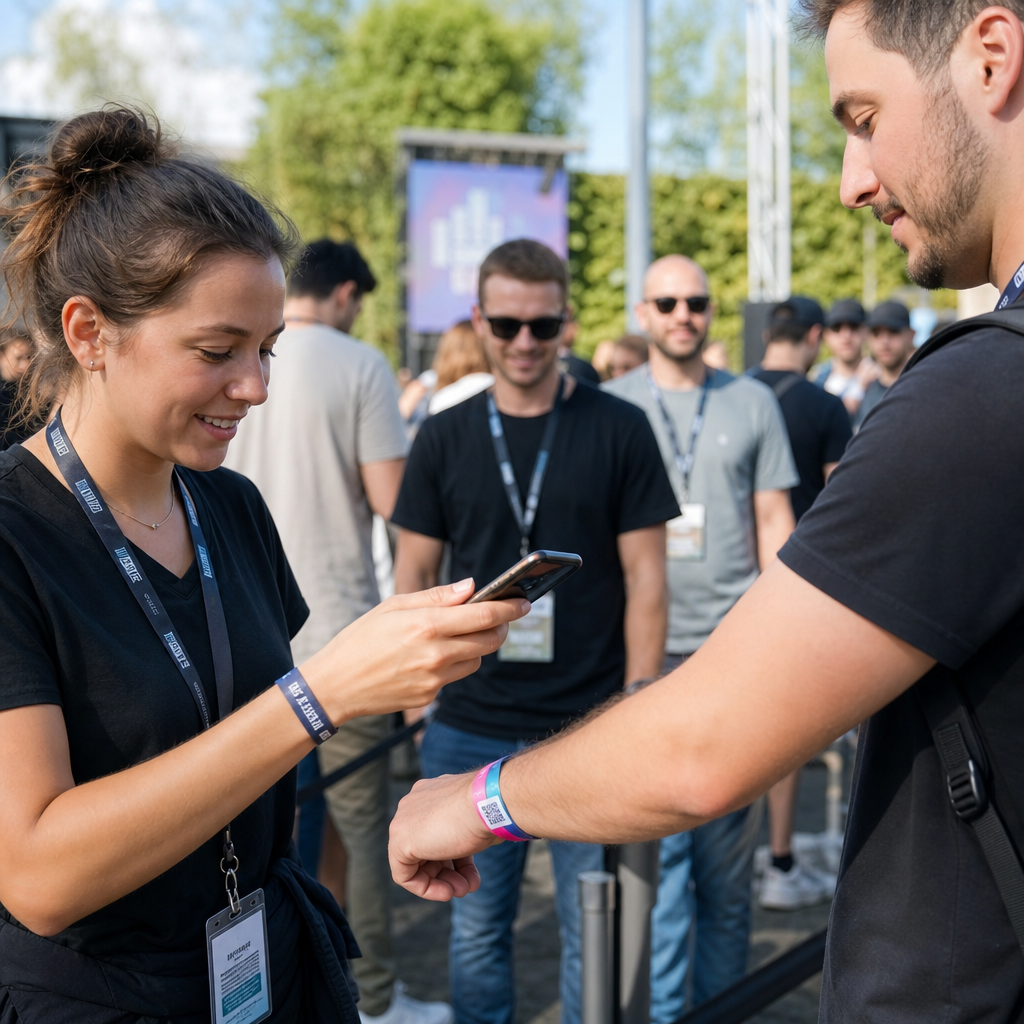
Ulaznice za događaje i prijave – Izradite jedan kod po sudioniku koji sadrži dozvole za pristup sesiji i podatke o registraciji. Dinamički kodovi omogućuju vam ažuriranje informacija o mjestu događaja ili rasporedu sesija nakon što su ulaznice distribuirane.
Beskontaktna plaćanja i digitalni jelovnici – Dodijelite jedinstvene kodove svakom stolu, kiosku ili lokaciji. Ažurirajte sadržaj jelovnika ili cijene centralno bez zamjene fizičkih materijala.
Personalizirane marketinške kampanje – Povežite svaki kod s odredišnom stranicom prilagođenom određenom segmentu publike, regiji ili povijesti kupnje. Pratite koje verzije ostvaruju najveći angažman i prilagodite kampanje u skladu s tim.
Implementacija softvera i aplikacija – Distribuirajte jedinstvene kodove koji pokreću instalacije ili konfiguracije aplikacija specifičnih za odjel, smanjujući troškove IT podrške tijekom velikih implementacija.
Praćenje lanca opskrbe i imovine – Ugradite brojeve serija, datume proizvodnje i zapise o inspekciji u kodove pričvršćene na fizičku imovinu. Podaci skeniranja pružaju revizijski trag u stvarnom vremenu kroz vašu distribucijsku mrežu.
Analitika i automatizacija u velikom opsegu
Masovno generiranje je samo pola jednadžbe. Kako biste opravdali ulaganje i poboljšali buduće kampanje, potrebni su vam pouzdani podaci o izvedbi.
A Sustav za upravljanje QR kodovima prikuplja metrike uključujući ukupan broj skeniranja, jedinstvena skeniranja, vremenske oznake skeniranja, geografsku lokaciju i vrstu uređaja. Nadzorne ploče u stvarnom vremenu čine ove podatke djelotvornima – možete identificirati koji kodovi ne ostvaruju očekivane rezultate usred kampanje i ažurirati njihova odredišta kako biste testirali različite sadržaje ili ponude.
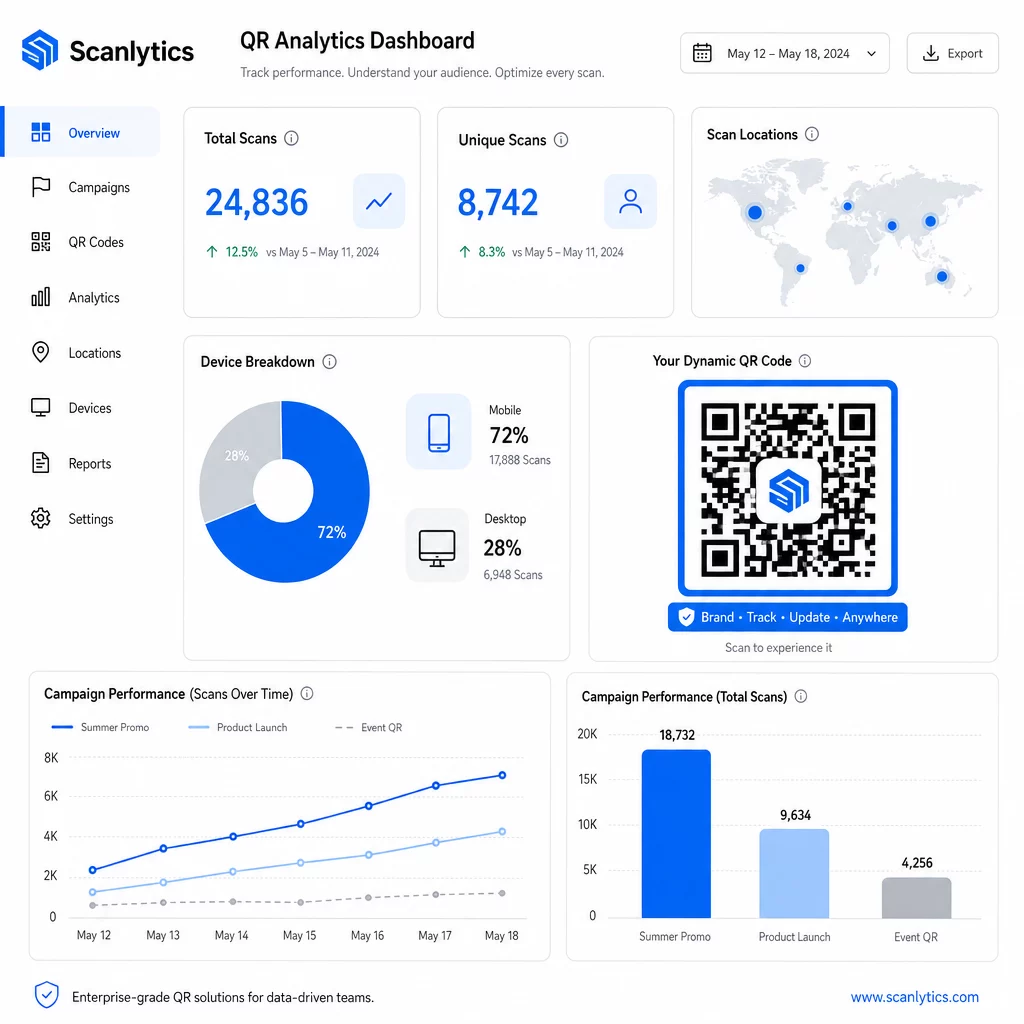
Kada se upare s alatima za automatizaciju marketinga, događaji skeniranja mogu automatski pokrenuti slijedove praćenja. Kupac koji skenira kod proizvoda može ući u publiku za ponovno ciljanje, primiti SMS ili biti dodan u CRM radni tijek – bez ikakvog ručnog prijenosa podataka.
Planirane implementacije dodaju još jedan sloj učinkovitosti. Kodovi se mogu konfigurirati da se automatski aktiviraju pri pokretanju kampanje i deaktiviraju na kraju promocije, osiguravajući da je sadržaj uvijek ažuran bez potrebe za ručnim nadzorom.
Pratite svako skeniranje kroz vaše kampanje The Pageloot platforma za QR kodove pruža timovima poduzeća centraliziranu nadzornu ploču za analitiku u stvarnom vremenu, dinamičko uređivanje i skupno upravljanje – sve na jednom mjestu.
Usporedba platformi za QR kodove za poduzeća
Prilikom procjene platformi, ključni razlikovni čimbenici su kapacitet skupnog rada, dinamičko uređivanje, dubina analitike, sigurnosni standardi i fleksibilnost integracije.
| Platforma | Skupno generiranje | Dinamičko uređivanje | ANALITIKA | Integracije | Sigurnost |
|---|---|---|---|---|---|
| Pageloot | Neograničeno stvaranje serija putem CSV-a ili API-ja | Uređivanje u stvarnom vremenu bez ponovnog ispisa | Broj skeniranja, lokacija, uređaj, nadzorna ploča u stvarnom vremenu | CRM, API pristup | Usklađeno s GDPR-om, šifrirani podaci |
| Uniqode | Do 2.000 kodova po seriji | Dinamičke nadopune sadržaja | Lokacija, vrijeme, praćenje uređaja | HubSpot, Salesforce, Zapier (5.000+ alata) | SOC 2 Tip II, SSO, pristup temeljen na ulogama |
| QR Batch | Skupna obrada velikog volumena iz unosa podataka | Ažuriranja URL-ova u stvarnom vremenu | Praćenje vremena pristupa | ograničeno | Standardno |
| Hovercode | Centralizirana nadzorna ploča za velike količine | Dinamička ažuriranja | Lokacija skeniranja, uređaj, vremenske oznake | API, web-kuke, CRM | Dozvole za više korisnika |
| Generator QR kodova uživo | Tisuće kodova putem API-ja ili Google tablica | Podrška za dinamičke QR kodove | Geografska analitika | CRM, sustavi za upravljanje zalihama | Standardno |
Pagelootova podrška za preko 25 vrsta QR kodova i neograničeno skupno stvaranje čini ga posebno svestranim za poduzeća koja istovremeno upravljaju različitim vrstama kampanja. Za timove kojima su potrebne duboke integracije trećih strana, platforme poput Uniqode nude šire biblioteke konektora. Pravi izbor ovisi o vašem volumenu, postojećem tehnološkom skupu i zahtjevima usklađenosti.
Za agencije koje upravljaju QR kampanjama u ime više klijenata, Pagelootovi alati za agencije dodaju izvješća o klijentima koja se mogu dijeliti, opcije bijele etikete i dozvole temeljene na ulogama koje čuvaju podatke klijenata odvojenima i profesionalno predstavljenima.
Početak rada s masovnim dinamičkim QR kodovima
Najučinkovitiji put do upravljanja QR kodovima na razini poduzeća slijedi dosljedan obrazac:
- Pregledajte svoje trenutne slučajeve upotrebe QR kodova i identificirajte gdje bi masovno generiranje uštedjelo najviše vremena
- Odredite podatkovna polja koja su potrebna svakoj vrsti koda – odredišne URL-ove, varijabilne identifikatore, oznake kampanje
- Odaberite platformu koja podržava i CSV učitavanja i API integraciju kako biste mogli skalirati bilo koji pristup prema potrebi
- Izgradite strukturu imenovanja i mapa prije prvog masovnog učitavanja kako biste održali velike portfelje organiziranima
- Testirajte malu seriju prije potpune implementacije, provjeravajući da se svaki kod ispravno skenira i usmjerava na pravo odredište
- Postavite analitičko praćenje od prvog dana kako biste imali osnovne podatke o izvedbi za svaku kampanju
Masovni dinamički QR kodovi najbolje funkcioniraju kada se generiranje, upravljanje i analitika obrađuju na jednoj platformi. Podjela ovih funkcija na više alata stvara praznine u podacima i ručni rad usklađivanja koji potkopava dobitke u učinkovitosti koje pokušavate postići.
The Pageloot generator dinamičkih QR kodova pokriva sve tri funkcije – stvaranje kodova u rasutom stanju, uređivanje odredišta bez ponovnog ispisa i praćenje performansi u stvarnom vremenu – s jedne centralizirane nadzorne ploče. Započnite besplatno 14-dnevno probno razdoblje kako biste generirali svoju prvu seriju i vidjeli kako se platforma prilagođava vašim potrebama kampanje.
Često postavljana pitanja
Statični QR kodovi kodiraju fiksno odredište koje se ne može promijeniti nakon generiranja. Ako se URL ili sadržaj promijeni, morate ponovno ispisati svaki kod. Dinamični QR kodovi koriste kratku preusmjeravajuću vezu koju kontrolirate, omogućujući vam da ažurirate odredište u bilo kojem trenutku bez ponovnog ispisa. Za poduzeća koja upravljaju velikim brojem kodova u dugotrajnim kampanjama ili na fizičkim materijalima, dinamični kodovi eliminiraju troškove ponovnog ispisa i omogućuju stalno praćenje skeniranja.
Pripremite proračunsku tablicu gdje svaki redak sadrži podatke za jedan QR kod – obično odredišni URL, jedinstveni identifikator i sva varijabilna polja poput SKU-ova proizvoda ili oznaka kampanje. Datoteku spremite u CSV UTF-8 formatu i prenesete je na platformu. Sustav generira jedinstveni QR kod za svaki redak i pakira ih za preuzimanje, često kao ZIP datoteku. Ovaj pristup dobro funkcionira za kataloge proizvoda, prodaju ulaznica za događaje i kampanje specifične za lokaciju gdje svaki kod treba različite podatke.
Poslovne QR platforme prate metrike uključujući ukupan broj skeniranja, jedinstvena skeniranja, vremenske oznake skeniranja, geografsku lokaciju svakog skeniranja i vrstu uređaja (uključujući operativni sustav). Nadzorne ploče u stvarnom vremenu čine ove podatke dostupnima čim se skeniranja dogode, tako da timovi mogu identificirati kodove s lošim performansama i ažurirati njihova odredišta usred kampanje. Naprednije platforme također podržavaju praćenje konverzija i integraciju s CRM-om ili alatima za automatizaciju marketinga, tako da događaji skeniranja mogu automatski pokrenuti naknadne radne procese.