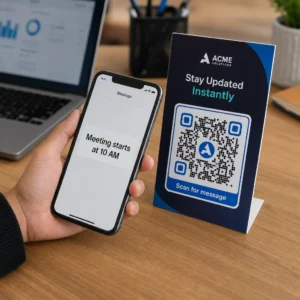
Управление сотнями или тысячами QR-кодов по одному — это не рабочий процесс, а узкое место. Когда кампании охватывают продуктовые линейки, локации или целые дистрибьюторские сети, ручное создание приводит к ошибкам, задержкам и затратам на перепечатку, которые незаметно истощают ресурсы. Это руководство объясняет, как использовать инструменты для массового создания динамических QR-кодов для эффективной генерации, управления и отслеживания больших объемов кодов по всему вашему предприятию.
Почему динамические QR-коды — это правильная основа
Прежде чем углубляться в массовую генерацию, стоит понять, почему динамические QR-коды особенно важны в масштабах предприятия.
A статический QR-код кодирует фиксированное назначение непосредственно в свой шаблон. После печати это назначение не может быть изменено. Если URL-адрес меняется, страница продукта перемещается или кампания заканчивается, каждый напечатанный код становится устаревшим – а перепечатка тысяч этикеток или материалов обходится дорого.
Динамические QR-коды работают иначе. Они указывают на короткую ссылку перенаправления, которую вы контролируете. Когда кто-то сканирует код, он перенаправляется через эту ссылку на любое назначение, которое вы установили в данный момент. Вы можете обновлять пункт назначения в любое время – даже после того, как коды напечатаны и распространены – без создания нового кода или прикосновения к единому печатному материалу. Они также поддерживают отслеживание сканирований и аналитику, чего статические коды предоставить не могут.
Для предприятий, управляющих крупными кампаниями, продуктовыми линейками или физическими активами, динамические коды устраняют цикл перепечатки и дают вам постоянную видимость того, как работает каждый код.
Начните создавать динамические QR-коды в масштабе Готовы генерировать редактируемые, отслеживаемые QR-коды для ваших корпоративных кампаний? Попробуйте Динамический QR код: генератор бесплатно в течение 14 дней – кредитная карта не требуется.
Как работает массовая генерация QR-кодов
Генерация тысяч уникальных QR-кодов не обязательно должна означать тысячи ручных шагов. Корпоративные QR-платформы поддерживают два основных метода массового создания: загрузка CSV-файлов и интеграция API.
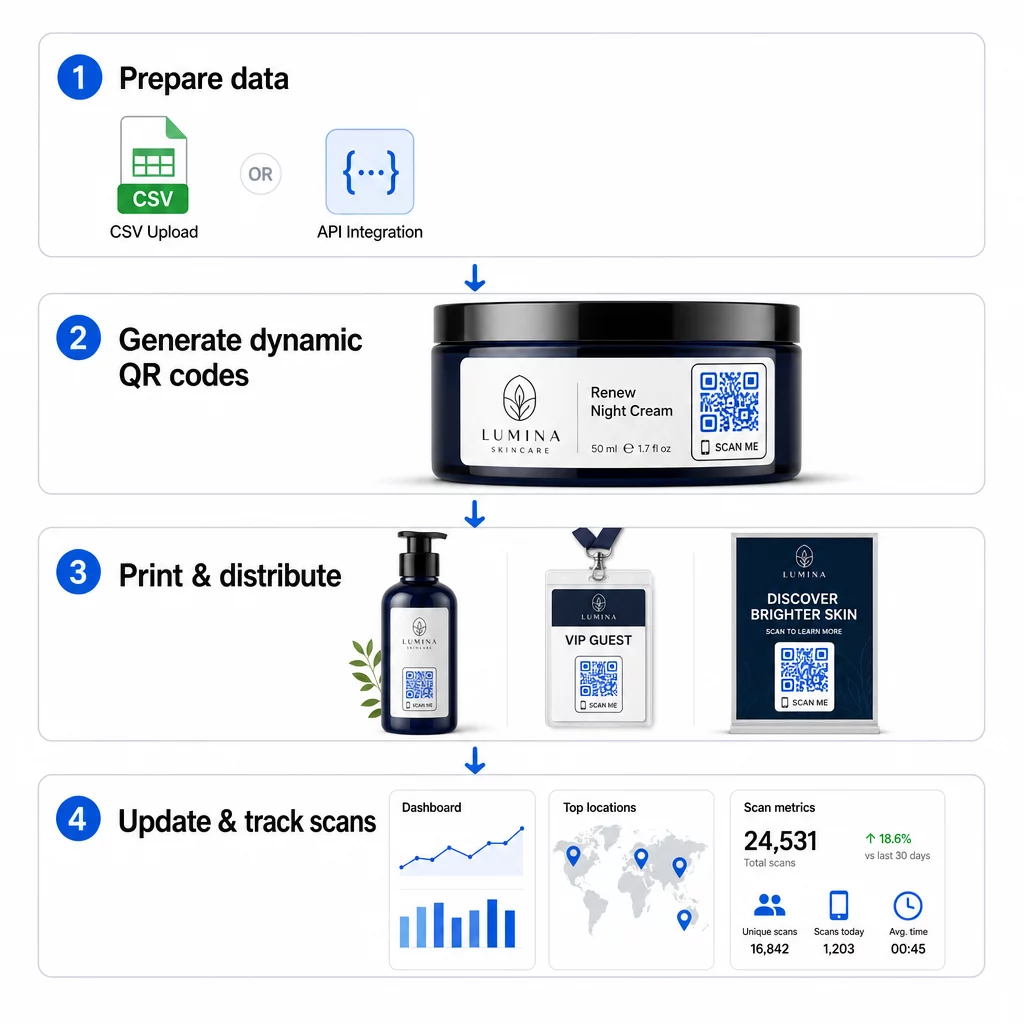
Загрузка CSV
Загрузка CSV — это самый доступный метод массовой генерации. Вы подготавливаете электронную таблицу, где каждая строка содержит данные для одного QR-кода – обычно это URL назначения, метка или идентификатор, а также любая переменная информация, такая как SKU продукта, номер партии или тег кампании. Затем вы загружаете этот файл на платформу, и система генерирует соответствующий QR-код для каждой строки.
При подготовке CSV-файла имейте в виду следующие рекомендации:
- Сохраните файл в формате CSV UTF-8, чтобы избежать ошибок кодировки
- Разместите столбец идентификатора или папки первым
- Используйте единообразный формат даты (гггг-мм-дд) для всех полей даты
- Четко определите обязательные столбцы и проверьте заголовки перед загрузкой
Платформы, такие как Pageloot, позволяют пользователям генерировать сотни кодов из одной загрузки CSV, что делает их практичными для каталогов продукции, продажи билетов на мероприятия или кампаний, привязанных к местоположению, где каждый код требует уникальных данных.
Интеграция API
Для команд, которым требуется генерация QR-кодов, встроенная непосредственно в их существующие рабочие процессы, интеграция API является более мощным подходом. Вместо ручного экспорта CSV ваши системы передают параметры непосредственно на платформу QR – автоматически запуская генерацию кода при добавлении новых продуктов, размещении заказов или запуске кампаний.
Генерация на основе API также поддерживает динамические массовые обновления. Используя запросы PATCH или PUT, вы можете одновременно обновлять целевые URL-адреса для тысяч кодов – без какого-либо ручного вмешательства. Это особенно полезно, когда меняется URL кампании, реструктурируется страница продукта или требуется заменить сезонный контент для всей линейки продуктов.
Интеграция API связывает генерацию QR-кодов с инструментами, которые вы уже используете: системами управления запасами, CRM-платформами, бэкэндами электронной коммерции и инструментами автоматизации маркетинга. Результатом является бесперебойный конвейер данных, где QR-коды создаются, обновляются и выводятся из эксплуатации синхронно с вашими общими операциями.
Основные функции для оценки в корпоративной платформе
Не все QR-платформы созданы для корпоративных нагрузок. При оценке вариантов отдавайте приоритет следующим возможностям:
Мощность массовой генерации – Платформа должна справляться с вашим объемом без снижения производительности. Ищите поддержку неограниченного или крупномасштабного пакетного создания, а не только небольших партий.
Динамическое редактирование – Каждый код в вашей библиотеке должен быть редактируемым после создания. Это исключает затраты на перепечатку при изменении назначений и позволяет повторно использовать физические материалы в нескольких кампаниях.
Централизованное управление – Единая панель управления для организации, поиска и обновления всего вашего портфолио QR-кодов. Для предприятий, проводящих десятки одновременных кампаний, организация так же важна, как и скорость генерации.
Брендинг и кастомизация – Корпоративные коды должны отражать ваш бренд. Ищите интеграцию логотипа, настраиваемые цветовые схемы и шаблоны дизайна, которые могут быть последовательно применены к большим партиям. Поддержка переменных данных позволяет встраивать уникальные идентификаторы – такие как артикулы продуктов или промокоды – в дизайн или назначение каждого кода.
Аналитика и отчетность – отслеживание QR-кода превращает каждое сканирование в точку данных. Панели мониторинга в реальном времени должны отображать количество сканирований, географическое положение, типы устройств и временные метки. Отчетность на уровне кампании должна показывать коэффициенты конверсии и тенденции вовлеченности, чтобы вы могли оптимизировать кампанию в процессе ее выполнения.
Безопасность и соответствие требованиям – Корпоративные развертывания требуют контроля доступа на основе ролей, чтобы только авторизованные пользователи могли создавать, редактировать или удалять коды. Шифрование данных защищает информацию при передаче и хранении. Соответствие GDPR, HIPAA или SOX зависит от вашей отрасли и типа данных, которые обрабатывают ваши QR-коды.
Форматы экспорта – Векторные форматы высокого разрешения (SVG, EPS, PDF) гарантируют чистое воспроизведение кодов любого размера, от этикеток продуктов до баннеров для выставок.
Корпоративные варианты использования динамических QR-кодов для массовой генерации
Сочетание массовой генерации и динамической редактируемости открывает широкий спектр операционных применений:
Маркировка и упаковка продукции – Генерируйте уникальные коды для каждого артикула или партии, ссылаясь на цифровые руководства, страницы регистрации гарантии или проверку подлинности. Если URL назначения меняется, обновите его централизованно, а не перепечатывайте этикетки.
Билеты на мероприятия и регистрация – Создавайте один код на каждого посетителя, содержащий разрешения на доступ к сессии и данные регистрации. Динамические коды позволяют обновлять информацию о месте проведения или расписание сессий после распространения билетов.
Бесконтактные платежи и цифровые меню – Присваивайте уникальные коды каждому столу, киоску или местоположению. Обновляйте содержимое меню или цены централизованно, не заменяя физические материалы.
Персонализированные маркетинговые кампании – Привязывайте каждый код к целевой странице, адаптированной для определенного сегмента аудитории, региона или истории покупок. Отслеживайте, какие версии обеспечивают наибольшую вовлеченность, и соответствующим образом корректируйте кампании.
Развертывание программного обеспечения и приложений – Распространяйте уникальные коды, которые запускают установку или настройку приложений для конкретных отделов, сокращая накладные расходы на ИТ-поддержку во время масштабных развертываний.
Отслеживание цепочки поставок и активов – Встраивайте номера партий, даты изготовления и записи проверок в коды, прикрепленные к физическим активам. Данные сканирования обеспечивают аудиторский след в реальном времени по всей вашей дистрибьюторской сети.
Аналитика и автоматизация в масштабе
Массовая генерация — это только половина уравнения. Чтобы оправдать инвестиции и улучшить будущие кампании, вам нужны надежные данные о производительности.
A Система управления QR-кодами собирает метрики, включая общее количество сканирований, уникальные сканирования, временные метки сканирования, географическое местоположение и тип устройства. Панели мониторинга в реальном времени делают эти данные пригодными для использования – вы можете определить, какие коды работают неэффективно в середине кампании, и обновить их назначения для тестирования различного контента или предложений.
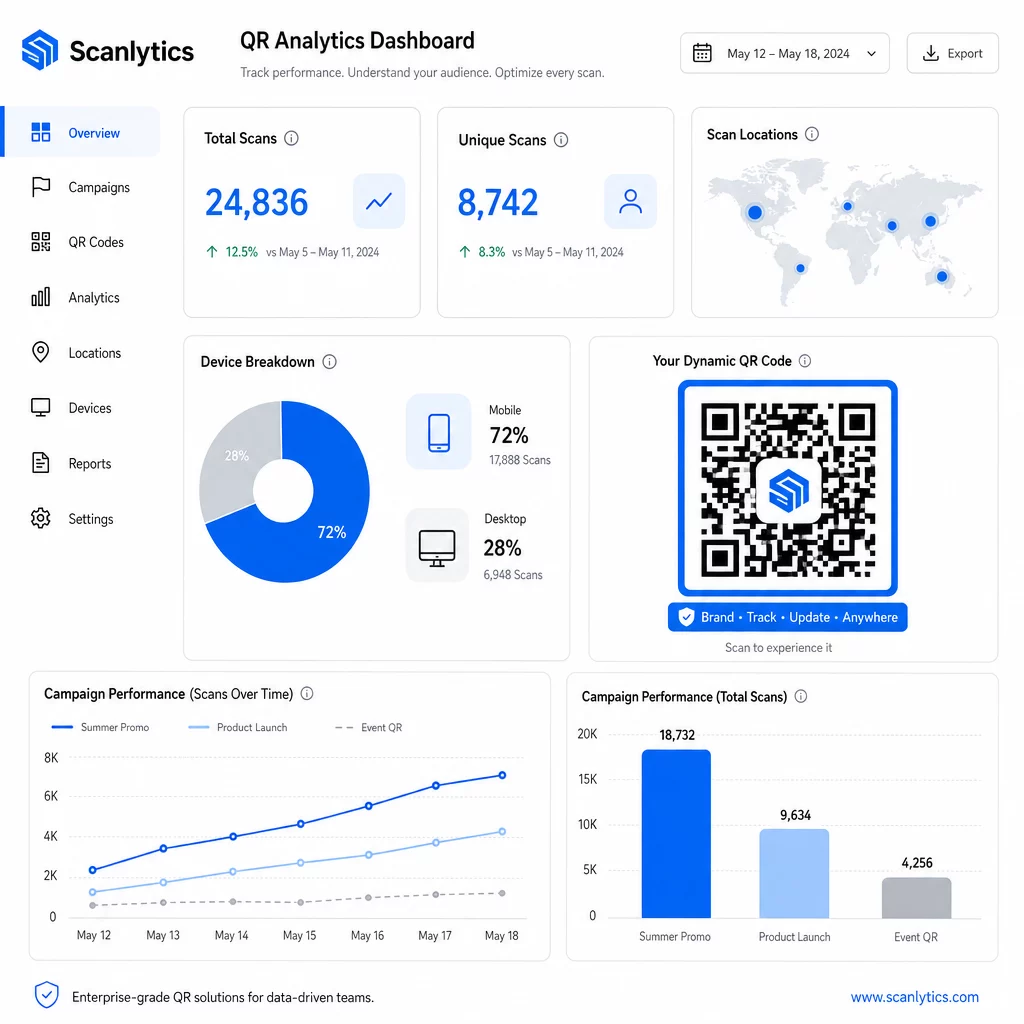
В сочетании с инструментами автоматизации маркетинга события сканирования могут автоматически запускать последующие последовательности. Клиент, сканирующий код продукта, может попасть в аудиторию ретаргетинга, получить SMS или быть добавлен в рабочий процесс CRM – без какой-либо ручной передачи данных.
Запланированные развертывания добавляют еще один уровень эффективности. Коды могут быть настроены на автоматическую активацию при запуске кампании и деактивацию по окончании акции, гарантируя, что контент всегда актуален без необходимости ручного мониторинга.
Отслеживайте каждое сканирование в ваших кампаниях В Платформа QR-кодов Pageloot предоставляет корпоративным командам централизованную панель управления для аналитики в реальном времени, динамического редактирования и массового управления – все в одном месте.
Сравнение корпоративных платформ QR-кодов
При оценке платформ ключевыми отличиями являются возможность массовой обработки, динамическое редактирование, глубина аналитики, стандарты безопасности и гибкость интеграции.
| Платформа | Массовая генерация | Динамическое редактирование | АНАЛИТИКА | Интеграции | Безопасность |
|---|---|---|---|---|---|
| Пейджлут | Неограниченное создание партий через CSV или API | Редактирование в реальном времени без перепечатки | Количество сканирований, местоположение, устройство, панель управления в реальном времени | CRM, доступ к API | Соответствие GDPR, зашифрованные данные |
| Uniqode | До 2000 кодов за партию | Динамические обновления контента | Отслеживание местоположения, времени, устройства | HubSpot, Salesforce, Zapier (5000+ инструментов) | SOC 2 Type II, SSO, доступ на основе ролей |
| QR Batch | Массовая пакетная обработка из ввода данных | Обновления URL в реальном времени | Мониторинг времени доступа | Ограниченный | Стандартный |
| Ховеркод | Централизованная панель управления для больших объемов | Динамические обновления | Сканирование местоположения, устройства, временных меток | API, веб-хуки, CRM | Многопользовательские разрешения |
| Генератор QR-кодов в реальном времени | Тысячи кодов через API или Google Таблицы | Поддержка динамических QR-кодов | Географическая аналитика | CRM, системы управления запасами | Стандартный |
Поддержка Pageloot для более 25 типов QR-кодов и неограниченное массовое создание делает его особенно универсальным для предприятий, управляющих различными типами кампаний одновременно. Для команд, которым требуются глубокие сторонние интеграции, платформы, такие как Uniqode, предлагают более широкие библиотеки коннекторов. Правильный выбор зависит от вашего объема, существующего технологического стека и требований соответствия.
Для агентств, управляющих QR-кампаниями от имени нескольких клиентов, Инструменты Pageloot для агентств добавляют общие клиентские отчеты, опции белой маркировки и разрешения на основе ролей, которые обеспечивают разделение и профессиональное представление клиентских данных.
Начало работы с массовыми динамическими QR-кодами
Наиболее эффективный путь к управлению QR-кодами в масштабах предприятия следует последовательной схеме:
- Проанализируйте текущие сценарии использования QR-кодов и определите, где массовая генерация сэкономит больше всего времени
- Составьте карту полей данных, необходимых для каждого типа кода – целевые URL-адреса, переменные идентификаторы, теги кампаний
- Выберите платформу, которая поддерживает как загрузку CSV, так и интеграцию API, чтобы вы могли масштабировать любой подход по мере необходимости
- Создайте структуру именования и папок перед первой массовой загрузкой, чтобы поддерживать порядок в больших портфолио
- Протестируйте небольшую партию перед полным развертыванием, убедившись, что каждый код сканируется правильно и ведет к нужному месту назначения
- Настройте отслеживание аналитики с первого дня, чтобы у вас были базовые данные о производительности для каждой кампании
Массовые динамические QR-коды работают лучше всего, когда генерация, управление и аналитика обрабатываются на одной платформе. Разделение этих функций между несколькими инструментами создает пробелы в данных и ручную работу по сверке, что подрывает прирост эффективности, которого вы пытаетесь достичь.
В Генератор динамических QR-кодов Pageloot охватывает все три функции – создание кодов массово, редактирование мест назначения без перепечатки и мониторинг производительности в реальном времени – с одной централизованной панели управления. Начните бесплатную 14-дневную пробную версию, чтобы сгенерировать свою первую партию и увидеть, как платформа масштабируется в соответствии с вашими потребностями кампании.
Часто задаваемые вопросы
Статические QR-коды кодируют фиксированное назначение, которое нельзя изменить после создания. Если URL-адрес или содержимое меняется, вам придется перепечатать каждый код. Динамические QR-коды используют короткую ссылку-перенаправление, которую вы контролируете, что позволяет вам обновлять назначение в любое время без перепечатки. Для предприятий, управляющих большими объемами кодов в рамках долгосрочных кампаний или на физических носителях, динамические коды устраняют затраты на перепечатку и обеспечивают постоянное отслеживание сканирований.
Вы подготавливаете электронную таблицу, где каждая строка содержит данные для одного QR-кода – обычно целевой URL-адрес, уникальный идентификатор и любые переменные поля, такие как артикулы продуктов или теги кампаний. Вы сохраняете файл в формате CSV UTF-8 и загружаете его на платформу. Система генерирует уникальный QR-код для каждой строки и упаковывает их для скачивания, часто в виде ZIP-файла. Этот подход хорошо подходит для каталогов продуктов, продажи билетов на мероприятия и кампаний, привязанных к местоположению, где каждый код требует отдельных данных.
Корпоративные QR-платформы отслеживают метрики, включая общее количество сканирований, уникальные сканирования, временные метки сканирований, географическое местоположение каждого сканирования и тип устройства (включая операционную систему). Панели мониторинга в реальном времени делают эти данные доступными по мере выполнения сканирований, чтобы команды могли выявлять неэффективные коды и обновлять их назначения в середине кампании. Более продвинутые платформы также поддерживают отслеживание конверсий и интеграцию с CRM или инструментами автоматизации маркетинга, чтобы события сканирования могли автоматически запускать последующие рабочие процессы.