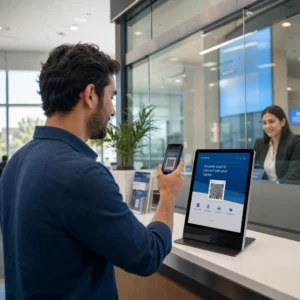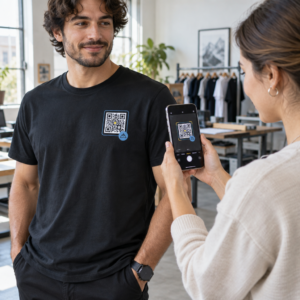
Gestionarea a sute sau mii de coduri QR unul câte unul nu este un flux de lucru – este un blocaj. Atunci când campaniile se extind pe linii de produse, locații sau rețele întregi de distribuție, crearea manuală introduce erori, întârzieri și costuri de retipărire care epuizează în liniște resursele. Acest ghid explică cum să utilizați instrumente de coduri QR dinamice în masă pentru a genera, gestiona și urmări volume mari de coduri eficient în întreaga dumneavoastră întreprindere.
De ce codurile QR dinamice sunt fundația potrivită
Înainte de a ne scufunda în generarea în masă, merită să înțelegem de ce codurile QR dinamice contează în mod specific la scară de întreprindere.
A cod QR static codifică o destinație fixă direct în modelul său. Odată tipărită, acea destinație nu poate fi modificată. Dacă o adresă URL se schimbă, o pagină de produs se mută sau o campanie se încheie, fiecare cod tipărit devine învechit – iar retipărirea a mii de etichete sau materiale este costisitoare.
Codurile QR dinamice funcționează diferit. Ele indică un link scurt de redirecționare pe care îl controlați. Când cineva scanează codul, este direcționat prin acea redirecționare către orice destinație ați setat în prezent. Puteți actualiza destinația în orice moment – chiar și după ce codurile sunt tipărite și distribuite – fără a genera un cod nou sau a atinge o singură bucată de material tipărit. De asemenea, ele suportă urmărirea scanărilor și analize, pe care codurile statice nu le pot oferi.
Pentru întreprinderile care gestionează campanii mari, linii de produse sau active fizice, codurile dinamice elimină ciclul de retipărire și vă oferă vizibilitate continuă asupra modului în care performează fiecare cod.
Începeți să creați coduri QR dinamice la scară Sunteți gata să generați coduri QR editabile, urmăribile pentru campaniile dumneavoastră de întreprindere? Încercați Generator cod QR dinamic gratuit timp de 14 zile – nu este necesar un card de credit.
Cum funcționează generarea în masă de coduri QR
Generarea a mii de coduri QR unice nu trebuie să însemne mii de pași manuali. Platformele QR pentru întreprinderi suportă două metode principale pentru crearea în masă: încărcări CSV și integrare API.
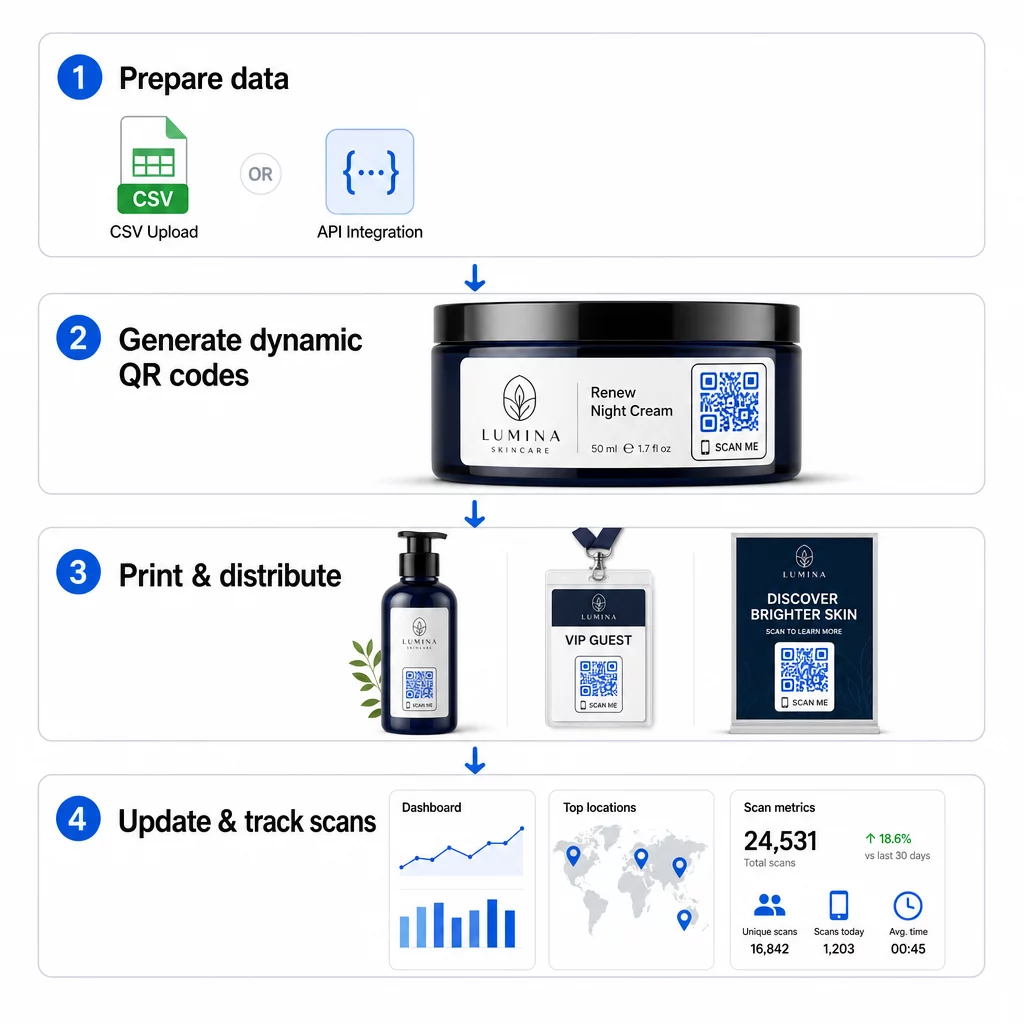
Încărcare CSV
Încărcarea CSV este cea mai accesibilă metodă de generare în masă. Pregătiți o foaie de calcul în care fiecare rând conține datele pentru un cod QR – de obicei o adresă URL de destinație, o etichetă sau un identificator și orice informații variabile, cum ar fi un SKU de produs, un număr de lot sau o etichetă de campanie. Apoi încărcați acel fișier pe platformă, iar sistemul generează un cod QR corespunzător pentru fiecare rând.
Când pregătiți fișierul CSV, țineți cont de aceste practici:
- Salvați fișierul în format CSV UTF-8 pentru a evita erorile de codificare
- Plasați coloana de identificator sau de dosar prima
- Utilizați un format de dată consecvent (aaaa-ll-zz) pentru orice câmpuri de dată
- Definiți clar coloanele necesare și validați anteturile înainte de a încărca
Platforme precum Pageloot permit utilizatorilor să genereze sute de coduri dintr-o singură încărcare CSV, făcându-l practic pentru cataloage de produse, bilete la evenimente sau campanii specifice locației unde fiecare cod necesită date unice.
Integrare API
Pentru echipele care au nevoie de generarea de coduri QR încorporată direct în fluxurile lor de lucru existente, integrarea API este abordarea mai puternică. În loc să exportați un CSV manual, sistemele dumneavoastră transmit parametri direct platformei QR – declanșând generarea de coduri automat pe măsură ce sunt adăugate produse noi, sunt plasate comenzi sau sunt lansate campanii.
Generarea bazată pe API suportă, de asemenea, actualizări dinamice în masă. Folosind cereri PATCH sau PUT, puteți actualiza URL-urile de destinație pentru mii de coduri simultan – fără nicio intervenție manuală. Acest lucru este util în special atunci când o adresă URL a unei campanii se modifică, o pagină de produs este restructurată sau conținutul sezonier trebuie înlocuit pe întreaga linie de produse.
Integrarea API conectează generarea de coduri QR la instrumentele pe care le utilizați deja: sisteme de gestionare a stocurilor, platforme CRM, back-end-uri de comerț electronic și instrumente de automatizare a marketingului. Rezultatul este o conductă de date fără întreruperi, unde codurile QR sunt create, actualizate și retrase în sincronizare cu operațiunile dumneavoastră mai ample.
Funcționalități Cheie de Evaluat într-o Platformă Enterprise
Nu toate platformele QR sunt construite pentru sarcini de lucru enterprise. Atunci când evaluați opțiunile, prioritizați aceste capacități:
Capacitate de generare în masă – Platforma ar trebui să gestioneze volumul dumneavoastră fără a degrada performanța. Căutați suport pentru crearea de loturi nelimitate sau de volum mare, nu doar loturi mici.
Editare dinamică – Fiecare cod din biblioteca dumneavoastră ar trebui să fie editabil după creare. Acest lucru elimină costurile de retipărire atunci când destinațiile se schimbă și vă permite să reutilizați materialele fizice în mai multe campanii.
Management centralizat – Un singur tablou de bord pentru a organiza, căuta și actualiza întregul portofoliu de coduri QR. Pentru întreprinderile care derulează zeci de campanii concurente, organizarea este la fel de importantă ca viteza de generare.
Branding și personalizare – Codurile pentru întreprinderi ar trebui să reflecte brandul dumneavoastră. Căutați integrarea logo-ului, scheme de culori personalizate și șabloane de design care pot fi aplicate în mod consecvent pe loturi mari. Suportul pentru date variabile vă permite să încorporați identificatori unici – cum ar fi SKU-uri de produse sau coduri promoționale – în designul sau destinația fiecărui cod.
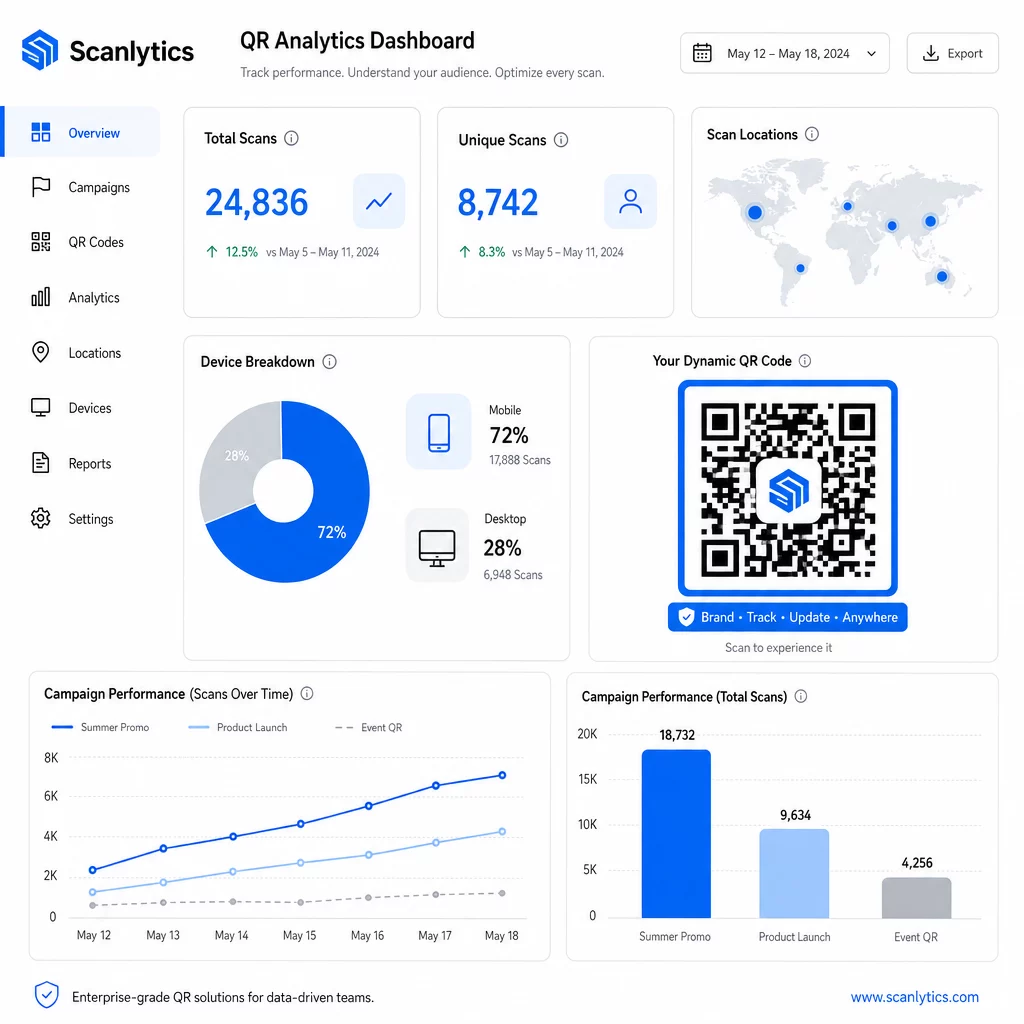
Analiză și raportare - Urmărirea codului QR transformă fiecare scanare într-un punct de date. Tablourile de bord în timp real ar trebui să afișeze numărul de scanări, locațiile geografice, tipurile de dispozitive și marcajele temporale. Raportarea la nivel de campanie ar trebui să arate ratele de conversie și tendințele de implicare, astfel încât să puteți optimiza în timpul desfășurării.
Securitate și conformitate – Implementările la nivel de întreprindere necesită controale de acces bazate pe roluri, astfel încât numai utilizatorii autorizați să poată crea, edita sau șterge coduri. Criptarea datelor protejează informațiile în tranzit și în repaus. Conformitatea cu GDPR, HIPAA sau SOX depinde de industria dumneavoastră și de tipul de date pe care le gestionează codurile QR.
Formate de export – Formatele vectoriale de înaltă rezoluție (SVG, EPS, PDF) asigură reproducerea clară a codurilor la orice dimensiune, de la etichete de produse la bannere de expoziție.
Cazuri de utilizare pentru întreprinderi pentru coduri QR dinamice în masă
Combinația dintre generarea în masă și editabilitatea dinamică deschide o gamă largă de aplicații operaționale:
Etichetarea și ambalarea produselor – Generați coduri unice pentru fiecare SKU sau lot, legând la manuale digitale, pagini de înregistrare a garanției sau verificare a autenticității. Dacă URL-ul destinației se schimbă, actualizați-l centralizat în loc să retipăriți etichetele.
Bilete la evenimente și înregistrări – Creați un cod per participant care să conțină permisiuni de acces la sesiune și date de înregistrare. Codurile dinamice vă permit să actualizați informațiile despre locație sau programul sesiunilor după ce biletele au fost distribuite.
Plăți contactless și meniuri digitale – Atribuiți coduri unice fiecărei mese, chioșc sau locații. Actualizați conținutul meniului sau prețurile centralizat, fără a înlocui materialele fizice.
Campanii de marketing personalizate – Asociați fiecare cod unei pagini de destinație adaptate unui segment de public specific, unei regiuni sau istoricului de achiziții. Urmăriți ce versiuni generează cel mai mare angajament și ajustați campaniile în consecință.
Implementare software și aplicații – Distribuiți coduri unice care declanșează instalări sau configurări de aplicații specifice departamentului, reducând costurile de suport IT în timpul implementărilor la scară largă.
Urmărirea lanțului de aprovizionare și a activelor – Încorporați numere de lot, date de fabricație și înregistrări de inspecție în codurile atașate activelor fizice. Datele scanate oferă o pistă de audit în timp real în întreaga rețea de distribuție.
Analiză și Automatizare la Scară
Generarea în masă este doar jumătate din ecuație. Pentru a justifica investiția și a îmbunătăți campaniile viitoare, aveți nevoie de date de performanță fiabile.
A Sistem de gestionare a codurilor QR colectează metrici precum numărul total de scanări, scanări unice, marcaje temporale ale scanărilor, locația geografică și tipul dispozitivului. Tablourile de bord în timp real fac aceste date acționabile – puteți identifica ce coduri subperformează în timpul campaniei și le puteți actualiza destinațiile pentru a testa conținut sau oferte diferite.
Atunci când sunt asociate cu instrumente de automatizare a marketingului, evenimentele de scanare pot declanșa automat secvențe de follow-up. Un client care scanează un cod de produs poate intra într-un public de retargeting, poate primi un SMS sau poate fi adăugat la un flux de lucru CRM – fără niciun transfer manual de date.
Implementările programate adaugă un alt nivel de eficiență. Codurile pot fi configurate să se activeze automat la lansarea campaniei și să se dezactiveze la sfârșitul unei promoții, asigurând că conținutul este întotdeauna actual, fără a necesita monitorizare manuală.
Urmăriți Fiecare Scanare în Campaniile Dumneavoastră Cel Platforma de coduri QR Pageloot oferă echipelor de întreprindere un tablou de bord centralizat pentru analize în timp real, editare dinamică și gestionare în masă – totul într-un singur loc.
Compararea Platformelor de Coduri QR pentru Întreprinderi
La evaluarea platformelor, diferențiatorii cheie sunt capacitatea de generare în masă, editarea dinamică, profunzimea analizelor, standardele de securitate și flexibilitatea integrării.
| Platformă | Generare în Masă | Editare Dinamică | STATISTICI | Integrări | Securitate |
|---|---|---|---|---|---|
| Pageloot | Creare nelimitată de loturi prin CSV sau API | Editare în timp real fără a retipări | Număr de scanări, locație, dispozitiv, tablou de bord în timp real | CRM, acces API | Conform GDPR, date criptate |
| Uniqode | Până la 2.000 de coduri pe lot | Actualizări dinamice de conținut | Urmărire locație, timp, dispozitiv | HubSpot, Salesforce, Zapier (peste 5.000 de instrumente) | SOC 2 Tip II, SSO, acces bazat pe roluri |
| QR Batch | Loturi de volum mare din introducerea datelor | Actualizări URL în timp real | Monitorizarea timpului de acces | limitată | Standard |
| Hovercode | Tablou de bord centralizat pentru volume mari | Actualizări dinamice | Locație scanare, dispozitiv, marcaje temporale | API, webhooks, CRM | Permisiuni multi-utilizator |
| Generator de coduri QR live | Mii de coduri prin API sau Google Sheets | Suport QR dinamic | Analize geografice | CRM, sisteme de inventar | Standard |
Suportul Pageloot pentru peste 25 de tipuri de coduri QR și crearea în masă nelimitată îl face deosebit de versatil pentru întreprinderile care gestionează simultan diverse tipuri de campanii. Pentru echipele care necesită integrări profunde cu terțe părți, platforme precum Uniqode oferă biblioteci de conectori mai extinse. Alegerea corectă depinde de volumul dvs., de stiva tehnologică existentă și de cerințele de conformitate.
Pentru agențiile care gestionează campanii QR în numele mai multor clienți, Instrumentele pentru agenții de la Pageloot adaugă rapoarte de client partajabile, opțiuni white-label și permisiuni bazate pe roluri care mențin datele clienților separate și prezentate profesional.
Noțiuni introductive despre codurile QR dinamice în masă
Cea mai eficientă cale către gestionarea codurilor QR la scară de întreprindere urmează un model consecvent:
- Auditați cazurile de utilizare actuale ale codurilor QR și identificați unde generarea în masă ar economisi cel mai mult timp
- Cartografiați câmpurile de date de care are nevoie fiecare tip de cod – URL-uri de destinație, identificatori variabili, etichete de campanie
- Alegeți o platformă care acceptă atât încărcări CSV, cât și integrare API, astfel încât să puteți scala oricare dintre abordări după cum este necesar
- Construiți o structură de denumire și de foldere înainte de prima încărcare în masă pentru a menține portofoliile mari organizate
- Testați un lot mic înainte de implementarea completă, verificând că fiecare cod scanează corect și direcționează către destinația corectă
- Configurați urmărirea analitică din prima zi, astfel încât să aveți date de performanță de bază pentru fiecare campanie
Codurile QR dinamice în masă funcționează cel mai bine atunci când generarea, gestionarea și analiza sunt gestionate într-o singură platformă. Împărțirea acestor funcții între mai multe instrumente creează lacune de date și muncă manuală de reconciliere care subminează câștigurile de eficiență pe care încercați să le obțineți.
Cel Generatorul de coduri QR dinamice Pageloot acoperă toate cele trei funcții – creați coduri în masă, editați destinațiile fără a retipări și monitorizați performanța în timp real – dintr-un singur tablou de bord centralizat. Începeți o perioadă de încercare gratuită de 14 zile pentru a genera primul lot și a vedea cum platforma se adaptează nevoilor campaniei dumneavoastră.
Întrebări frecvente
Codurile QR statice codifică o destinație fixă care nu poate fi schimbată după generare. Dacă URL-ul sau conținutul se modifică, trebuie să reimprimați fiecare cod. Codurile QR dinamice utilizează un link scurt de redirecționare pe care îl controlați, permițându-vă să actualizați destinația oricând, fără a reimprima. Pentru întreprinderile care gestionează volume mari de coduri în cadrul campaniilor de lungă durată sau pe materiale fizice, codurile dinamice elimină costurile de reimprimare și permit urmărirea continuă a scanărilor.
Pregătiți o foaie de calcul în care fiecare rând conține datele pentru un cod QR – de obicei o adresă URL de destinație, un identificator unic și orice câmpuri variabile precum SKU-uri de produs sau etichete de campanie. Salvați fișierul în format CSV UTF-8 și îl încărcați pe platformă. Sistemul generează un cod QR unic pentru fiecare rând și le ambalează pentru descărcare, adesea ca fișier ZIP. Această abordare funcționează bine pentru cataloage de produse, bilete la evenimente și campanii specifice locației unde fiecare cod necesită date distincte.
Platformele QR pentru întreprinderi urmăresc indicatori, inclusiv numărul total de scanări, scanări unice, marcaje temporale ale scanărilor, locația geografică a fiecărei scanări și tipul dispozitivului (inclusiv sistemul de operare). Tablourile de bord în timp real pun aceste date la dispoziție pe măsură ce scanările au loc, astfel încât echipele pot identifica codurile cu performanțe slabe și pot actualiza destinațiile acestora în timpul campaniei. Platformele mai avansate acceptă, de asemenea, urmărirea conversiilor și integrarea cu instrumente CRM sau de automatizare a marketingului, astfel încât evenimentele de scanare pot declanșa automat fluxuri de lucru de urmărire.