Gestire centinaia o migliaia di codici QR uno alla volta non è un flusso di lavoro, è un collo di bottiglia. Quando le campagne si estendono su linee di prodotti, sedi o intere reti di distribuzione, la creazione manuale introduce errori, ritardi e costi di ristampa che prosciugano silenziosamente le risorse. Questa guida spiega come utilizzare gli strumenti di codici QR dinamici in blocco per generare, gestire e tracciare grandi volumi di codici in modo efficiente in tutta l'azienda.
Perché i codici QR dinamici sono la base giusta
Prima di addentrarsi nella generazione in blocco, vale la pena capire perché i codici QR dinamici sono particolarmente importanti a livello aziendale.
UN codice QR statico codifica una destinazione fissa direttamente nel suo modello. Una volta stampata, quella destinazione non può essere modificata. Se un URL cambia, una pagina di prodotto si sposta o una campagna termina, ogni codice stampato diventa obsoleto – e ristampare migliaia di etichette o materiali è costoso.
I codici QR dinamici funzionano in modo diverso. Puntano a un breve link di reindirizzamento che controlli tu. Quando qualcuno scansiona il codice, viene reindirizzato attraverso quel link alla destinazione che hai impostato. Puoi aggiornare la destinazione in qualsiasi momento – anche dopo che i codici sono stati stampati e distribuiti – senza generare un nuovo codice o toccare un singolo pezzo di materiale stampato. Supportano anche il tracciamento delle scansioni e l'analisi, cosa che i codici statici non possono fornire.
Per le aziende che gestiscono grandi campagne, linee di prodotti o beni fisici, i codici dinamici eliminano il ciclo di ristampa e offrono una visibilità continua su come ogni codice si comporta.
Inizia a creare codici QR dinamici su larga scala Pronto a generare codici QR modificabili e tracciabili per le tue campagne aziendali? Prova il Generatore di QR code dinamici gratuitamente per 14 giorni – nessuna carta di credito richiesta.
Come funziona la generazione di codici QR in blocco
Generare migliaia di codici QR unici non deve significare migliaia di passaggi manuali. Le piattaforme QR aziendali supportano due metodi principali per la creazione in blocco: caricamenti CSV e integrazione API.
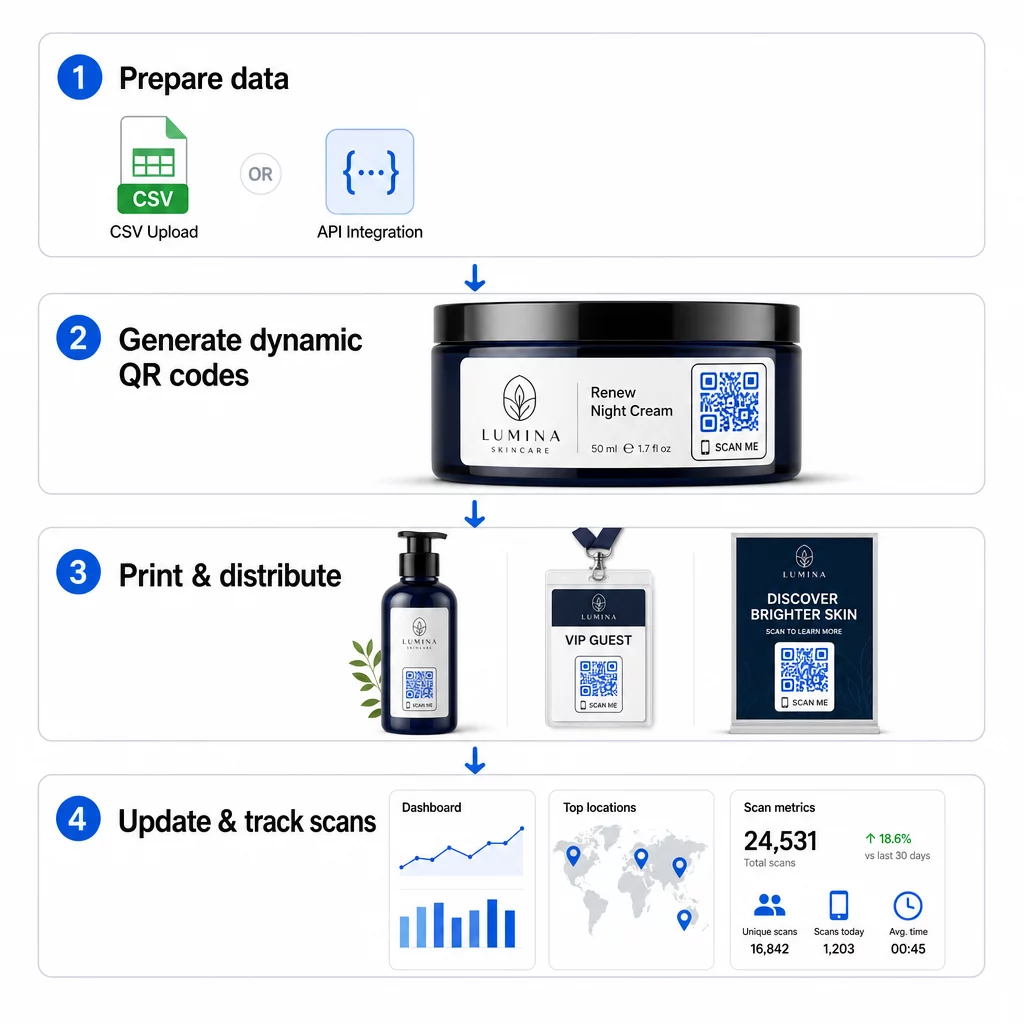
Caricamento CSV
Il caricamento CSV è il metodo di generazione in blocco più accessibile. Si prepara un foglio di calcolo in cui ogni riga contiene i dati per un codice QR – tipicamente un URL di destinazione, un'etichetta o un identificatore, e qualsiasi informazione variabile come uno SKU del prodotto, un numero di lotto o un tag di campagna. Si carica quindi quel file sulla piattaforma e il sistema genera un codice QR corrispondente per ogni riga.
Quando prepari il tuo file CSV, tieni a mente queste pratiche:
- Salva il file in formato CSV UTF-8 per evitare errori di codifica
- Posiziona la colonna dell'identificatore o della cartella per prima
- Utilizza una formattazione della data coerente (aaaa-mm-gg) per tutti i campi data
- Definisci chiaramente le colonne richieste e convalida le intestazioni prima del caricamento
Piattaforme come Pageloot consentono agli utenti di generare centinaia di codici da un singolo caricamento CSV, rendendolo pratico per cataloghi di prodotti, biglietteria per eventi o campagne specifiche per località in cui ogni codice necessita di dati unici.
Integrazione API
Per i team che necessitano della generazione di codici QR integrata direttamente nei loro flussi di lavoro esistenti, l'integrazione API è l'approccio più potente. Invece di esportare manualmente un CSV, i tuoi sistemi passano i parametri direttamente alla piattaforma QR, attivando la generazione del codice automaticamente man mano che vengono aggiunti nuovi prodotti, vengono effettuati ordini o vengono lanciate campagne.
La generazione basata su API supporta anche aggiornamenti di massa dinamici. Utilizzando richieste PATCH o PUT, puoi aggiornare gli URL di destinazione su migliaia di codici contemporaneamente, senza alcun intervento manuale. Ciò è particolarmente utile quando un URL di campagna cambia, una pagina di prodotto viene ristrutturata o il contenuto stagionale deve essere sostituito su un'intera linea di prodotti.
L'integrazione API collega la generazione di codici QR agli strumenti che già utilizzi: sistemi di gestione dell'inventario, piattaforme CRM, backend di e-commerce e strumenti di automazione del marketing. Il risultato è una pipeline di dati senza soluzione di continuità in cui i codici QR vengono creati, aggiornati e ritirati in sincronia con le tue operazioni più ampie.
Funzionalità principali da valutare in una piattaforma aziendale
Non tutte le piattaforme QR sono costruite per carichi di lavoro aziendali. Quando valuti le opzioni, dai priorità a queste capacità:
Capacità di generazione in massa – La piattaforma dovrebbe gestire il tuo volume senza degradare le prestazioni. Cerca il supporto per la creazione di lotti illimitati o ad alto volume, non solo piccoli lotti.
Modifica dinamica – Ogni codice nella tua libreria dovrebbe essere modificabile dopo la creazione. Questo elimina i costi di ristampa quando le destinazioni cambiano e ti permette di riutilizzare materiali fisici in più campagne.
Gestione centralizzata – Un'unica dashboard per organizzare, cercare e aggiornare l'intero portfolio di codici QR. Per le aziende che gestiscono decine di campagne contemporanee, l'organizzazione è tanto importante quanto la velocità di generazione.
Branding e personalizzazione – I codici aziendali dovrebbero riflettere il tuo brand. Cerca l'integrazione del logo, schemi di colori personalizzati e modelli di design che possono essere applicati in modo coerente su grandi lotti. Il supporto per dati variabili ti permette di incorporare identificatori unici – come SKU di prodotti o codici promozionali – all'interno del design o della destinazione di ogni codice.
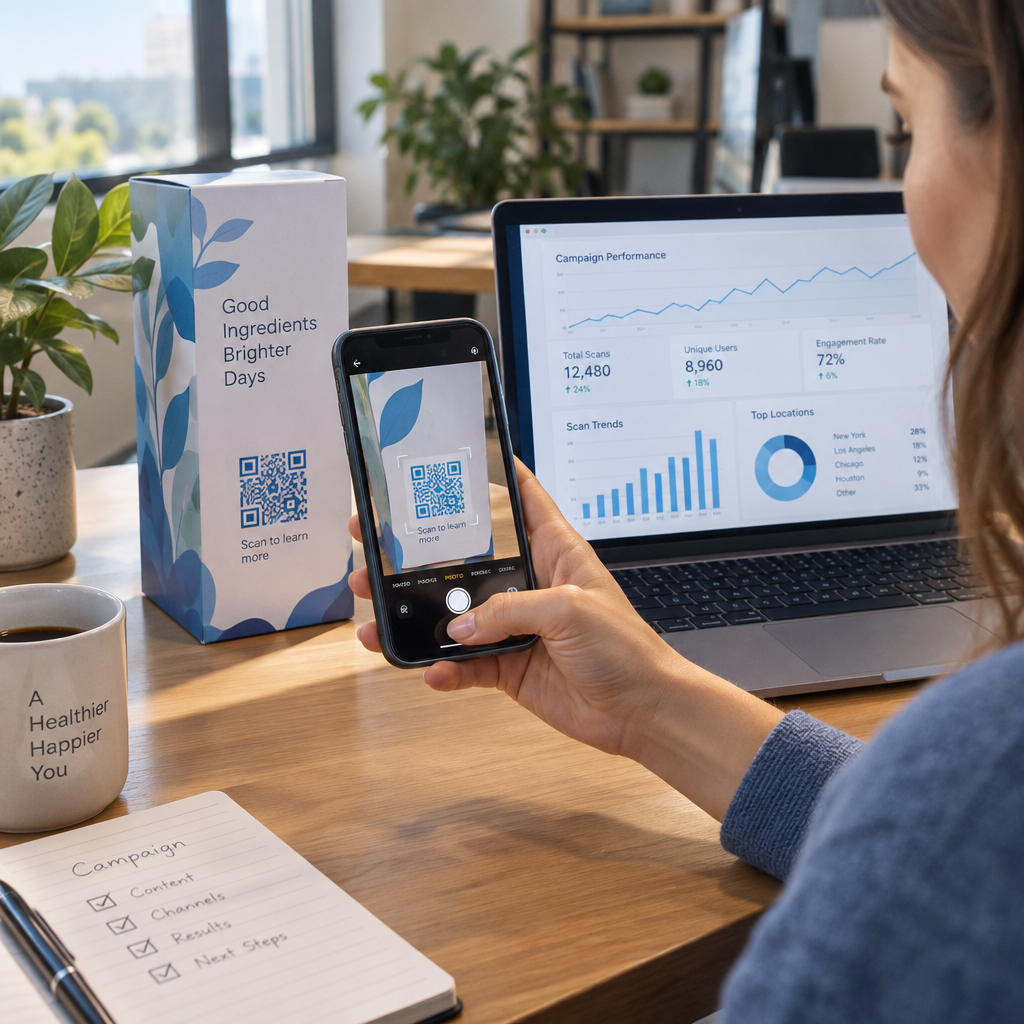
Analisi e reporting – Tracciamento del codice QR trasforma ogni scansione in un punto dati. Le dashboard in tempo reale dovrebbero mostrare il numero di scansioni, le posizioni geografiche, i tipi di dispositivo e i timestamp. Il reporting a livello di campagna dovrebbe mostrare i tassi di conversione e le tendenze di coinvolgimento in modo da poter ottimizzare in corso d'opera.
Sicurezza e conformità – Le implementazioni aziendali richiedono controlli di accesso basati sui ruoli in modo che solo gli utenti autorizzati possano creare, modificare o eliminare i codici. La crittografia dei dati protegge le informazioni in transito e a riposo. La conformità con GDPR, HIPAA o SOX dipende dal tuo settore e dal tipo di dati gestiti dai tuoi codici QR.
Formati di esportazione – I formati vettoriali ad alta risoluzione (SVG, EPS, PDF) assicurano che i codici si riproducano in modo pulito a qualsiasi dimensione, dalle etichette dei prodotti agli striscioni fieristici.
Casi d'uso aziendali per codici QR dinamici in blocco
La combinazione di generazione in blocco e modificabilità dinamica apre un'ampia gamma di applicazioni operative:
Etichettatura e imballaggio dei prodotti – Genera codici unici per ogni SKU o lotto, collegandoli a manuali digitali, pagine di registrazione della garanzia o verifica dell'autenticità. Se l'URL di destinazione cambia, aggiornalo centralmente invece di ristampare le etichette.
Biglietteria e check-in per eventi – Crea un codice per partecipante contenente i permessi di accesso alla sessione e i dati di registrazione. I codici dinamici ti permettono di aggiornare le informazioni sulla sede o gli orari delle sessioni dopo che i biglietti sono stati distribuiti.
Pagamenti contactless e menu digitali – Assegna codici unici a ogni tavolo, chiosco o posizione. Aggiorna il contenuto del menu o i prezzi centralmente senza sostituire i materiali fisici.
Campagne di marketing personalizzate – Collega ogni codice a una landing page personalizzata per un segmento di pubblico specifico, una regione o la cronologia degli acquisti. Tieni traccia di quali versioni generano il maggiore coinvolgimento e adatta le campagne di conseguenza.
Distribuzione di software e app – Distribuisci codici unici che attivano installazioni o configurazioni di app specifiche per reparto, riducendo il sovraccarico del supporto IT durante i grandi rollout.
Catena di approvvigionamento e tracciamento degli asset – Incorpora numeri di lotto, date di produzione e registri di ispezione nei codici allegati agli asset fisici. I dati di scansione forniscono una traccia di controllo in tempo reale attraverso la tua rete di distribuzione.
Analisi e automazione su larga scala
La generazione in massa è solo metà dell'equazione. Per giustificare l'investimento e migliorare le campagne future, hai bisogno di dati di performance affidabili.
UN Sistema di gestione dei codici QR raccoglie metriche tra cui scansioni totali, scansioni uniche, timestamp delle scansioni, posizione geografica e tipo di dispositivo. I dashboard in tempo reale rendono questi dati utilizzabili – puoi identificare quali codici stanno sottoperformando a metà campagna e aggiornare le loro destinazioni per testare contenuti o offerte diverse.
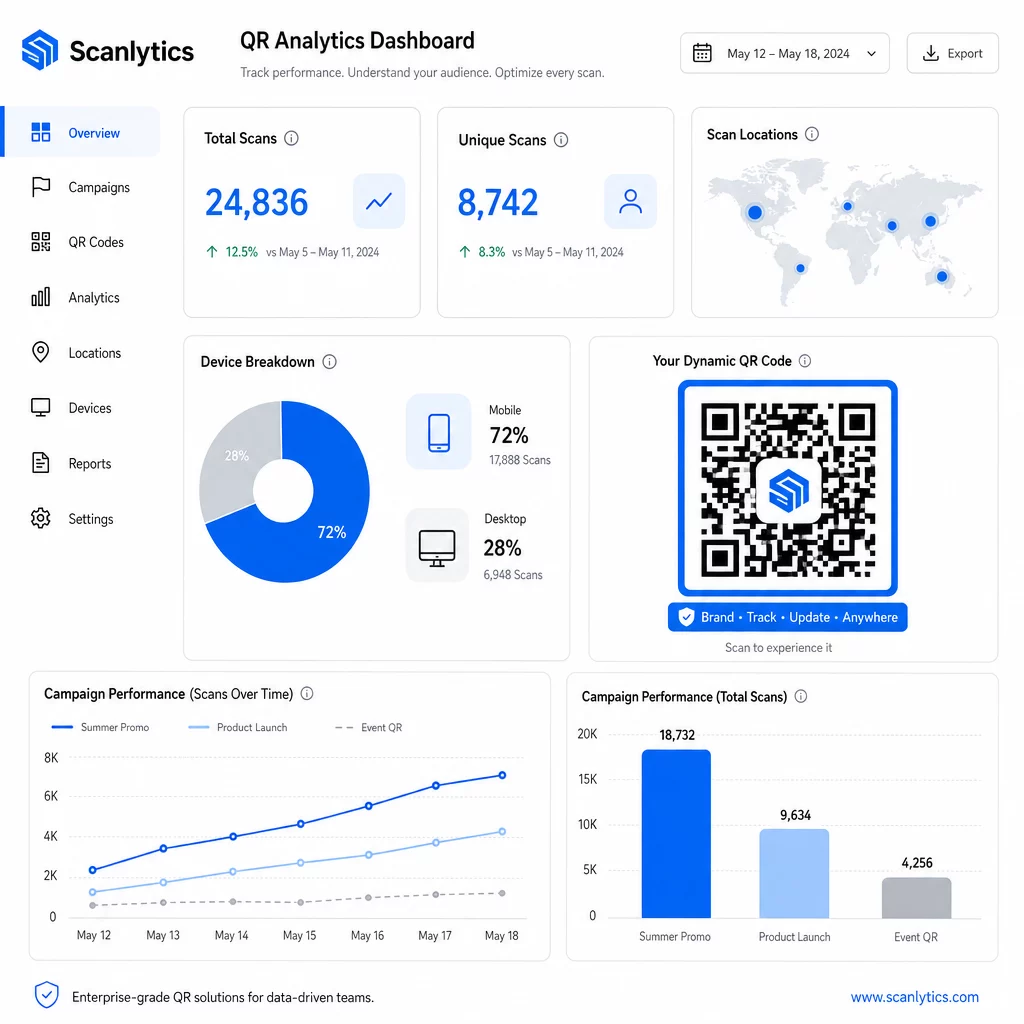
Se abbinati a strumenti di automazione del marketing, gli eventi di scansione possono attivare automaticamente sequenze di follow-up. Un cliente che scansiona un codice prodotto può entrare in un pubblico di retargeting, ricevere un SMS o essere aggiunto a un flusso di lavoro CRM – senza alcun trasferimento manuale di dati.
Le distribuzioni programmate aggiungono un ulteriore livello di efficienza. I codici possono essere configurati per attivarsi automaticamente all'avvio della campagna e disattivarsi alla fine di una promozione, garantendo che il contenuto sia sempre aggiornato senza richiedere monitoraggio manuale.
Traccia ogni scansione attraverso le tue campagne Il sito Piattaforma di codici QR Pageloot offre ai team aziendali una dashboard centralizzata per analisi in tempo reale, modifica dinamica e gestione in blocco – tutto in un unico posto.
Confronto tra Piattaforme di codici QR aziendali
Quando si valutano le piattaforme, i principali fattori di differenziazione sono la capacità di gestione in blocco, la modifica dinamica, la profondità delle analisi, gli standard di sicurezza e la flessibilità di integrazione.
| Piattaforma | Generazione in blocco | Modifica dinamica | STATISTICHE | Integrazioni | Sicurezza |
|---|---|---|---|---|---|
| Pageloot | Creazione illimitata di lotti tramite CSV o API | Modifica in tempo reale senza ristampa | Conteggio scansioni, posizione, dispositivo, dashboard in tempo reale | CRM, Accesso API | Conforme al GDPR, dati crittografati |
| Unicode | Fino a 2.000 codici per lotto | Aggiornamenti dinamici dei contenuti | Tracciamento di posizione, ora, dispositivo | HubSpot, Salesforce, Zapier (oltre 5.000 strumenti) | SOC 2 Tipo II, SSO, accesso basato sui ruoli |
| QR Batch | Elaborazione batch ad alto volume da input di dati | Aggiornamenti URL in tempo reale | Monitoraggio del tempo di accesso | Limitato | Standard |
| Hovercode | Dashboard centralizzata per grandi volumi | Aggiornamenti dinamici | Posizione di scansione, dispositivo, timestamp | API, webhook, CRM | Permessi multi-utente |
| Generatore di codici QR in tempo reale | Migliaia di codici tramite API o Fogli Google | Supporto QR dinamico | Analisi geografiche | CRM, sistemi di inventario | Standard |
Il supporto di Pageloot per oltre 25 tipi di codici QR e la creazione di massa illimitata lo rende particolarmente versatile per le aziende che gestiscono contemporaneamente diversi tipi di campagne. Per i team che necessitano di integrazioni approfondite con terze parti, piattaforme come Uniqode offrono librerie di connettori più ampie. La scelta giusta dipende dal volume, dallo stack tecnologico esistente e dai requisiti di conformità.
Per le agenzie che gestiscono campagne QR per conto di più clienti, gli strumenti per agenzie di Pageloot aggiungono report condivisibili per i clienti, opzioni white-label e permessi basati sui ruoli che mantengono i dati dei clienti separati e presentati professionalmente.
Iniziare con i Codici QR Dinamici in Blocco
Il percorso più efficiente per la gestione di codici QR su scala aziendale segue un modello coerente:
- Verifica i tuoi attuali casi d'uso dei codici QR e identifica dove la generazione in blocco farebbe risparmiare più tempo
- Mappa i campi dati di cui ogni tipo di codice ha bisogno – URL di destinazione, identificatori variabili, tag di campagna
- Scegli una piattaforma che supporti sia i caricamenti CSV che l'integrazione API in modo da poter scalare entrambi gli approcci secondo necessità
- Crea una struttura di denominazione e cartelle prima del tuo primo caricamento in blocco per mantenere organizzati grandi portfolio
- Testa un piccolo lotto prima del lancio completo, verificando che ogni codice scansioni correttamente e indirizzi alla destinazione corretta
- Imposta il tracciamento delle analisi dal primo giorno in modo da avere dati di performance di base per ogni campagna
I codici QR dinamici in blocco funzionano meglio quando generazione, gestione e analisi sono gestite in un'unica piattaforma. Dividere queste funzioni tra più strumenti crea lacune nei dati e lavoro di riconciliazione manuale che mina i guadagni di efficienza che stai cercando di ottenere.
Il sito Generatore di codici QR dinamici Pageloot copre tutte e tre le funzioni – creare codici in blocco, modificare le destinazioni senza ristampare e monitorare le prestazioni in tempo reale – da un'unica dashboard centralizzata. Inizia una prova gratuita di 14 giorni per generare il tuo primo lotto e vedere come la piattaforma si adatta alle tue esigenze di campagna.
Domande frequenti
I codici QR statici codificano una destinazione fissa che non può essere modificata dopo la generazione. Se l'URL o il contenuto cambiano, è necessario ristampare ogni codice. I codici QR dinamici utilizzano un breve link di reindirizzamento che controlli, permettendoti di aggiornare la destinazione in qualsiasi momento senza ristampare. Per le aziende che gestiscono grandi volumi di codici in campagne a lungo termine o su materiali fisici, i codici dinamici eliminano i costi di ristampa e consentono il monitoraggio continuo delle scansioni.
Si prepara un foglio di calcolo in cui ogni riga contiene i dati per un codice QR – tipicamente un URL di destinazione, un identificatore unico e qualsiasi campo variabile come SKU di prodotto o tag di campagna. Si salva il file in formato CSV UTF-8 e lo si carica sulla piattaforma. Il sistema genera un codice QR unico per ogni riga e li impacchetta per il download, spesso come file ZIP. Questo approccio funziona bene per cataloghi di prodotti, biglietteria per eventi e campagne specifiche per località in cui ogni codice necessita di dati distinti.
Le piattaforme QR aziendali tracciano metriche tra cui il numero totale di scansioni, le scansioni uniche, i timestamp delle scansioni, la posizione geografica di ogni scansione e il tipo di dispositivo (incluso il sistema operativo). Le dashboard in tempo reale rendono questi dati disponibili man mano che le scansioni avvengono, in modo che i team possano identificare i codici con prestazioni insufficienti e aggiornare le loro destinazioni a metà campagna. Le piattaforme più avanzate supportano anche il tracciamento delle conversioni e l'integrazione con strumenti CRM o di automazione del marketing, in modo che gli eventi di scansione possano attivare automaticamente flussi di lavoro di follow-up.