Yüzlerce veya binlerce QR kodunu tek tek yönetmek bir iş akışı değil, bir darboğazdır. Kampanyalar ürün gruplarını, konumları veya tüm dağıtım ağlarını kapsadığında, manuel oluşturma hatalara, gecikmelere ve kaynakları sessizce tüketen yeniden basım maliyetlerine yol açar. Bu kılavuz, işletmenizde büyük hacimli kodları verimli bir şekilde oluşturmak, yönetmek ve izlemek için toplu dinamik QR kodu araçlarını nasıl kullanacağınızı açıklar.
Dinamik QR Kodları Neden Doğru Temeldir?
Toplu oluşturmaya dalmadan önce, nedenini anlamakta fayda var dinamik QR kodları kurumsal ölçekte özellikle önemlidir.
Bir Statik QR kodu sabit bir hedefi doğrudan desenine kodlar. Bir kez basıldıktan sonra, bu hedef değiştirilemez. Bir URL değişirse, bir ürün sayfası taşınırsa veya bir kampanya sona ererse, basılan her kod eskimiş hale gelir – ve binlerce etiketi veya materyali yeniden basmak pahalıdır.
Dinamik QR kodları farklı çalışır. Kontrol ettiğiniz kısa bir yönlendirme bağlantısına işaret ederler. Biri kodu taradığında, o yönlendirme aracılığıyla şu anda ayarladığınız hedefe yönlendirilirler. Şunları yapabilirsiniz hedefi istediğiniz zaman güncelleyebileceğiniz anlamına gelir. – kodlar basılıp dağıtıldıktan sonra bile – yeni bir kod oluşturmadan veya tek bir basılı materyale dokunmadan. Ayrıca, statik kodların sağlayamadığı tarama takibi ve analitik desteği de sunarlar.
Büyük kampanyaları, ürün gruplarını veya fiziksel varlıkları yöneten işletmeler için dinamik kodlar, yeniden basım döngüsünü ortadan kaldırır ve her kodun nasıl performans gösterdiğine dair sürekli görünürlük sağlar.
Ölçekli Dinamik QR Kodları Oluşturmaya Başlayın Kurumsal kampanyalarınız için düzenlenebilir, izlenebilir QR kodları oluşturmaya hazır mısınız? Şunu deneyin: Dinamik QR Kod Oluşturucu 14 gün boyunca ücretsiz – kredi kartı gerekmez.
Toplu QR Kodu Oluşturma Nasıl Çalışır?
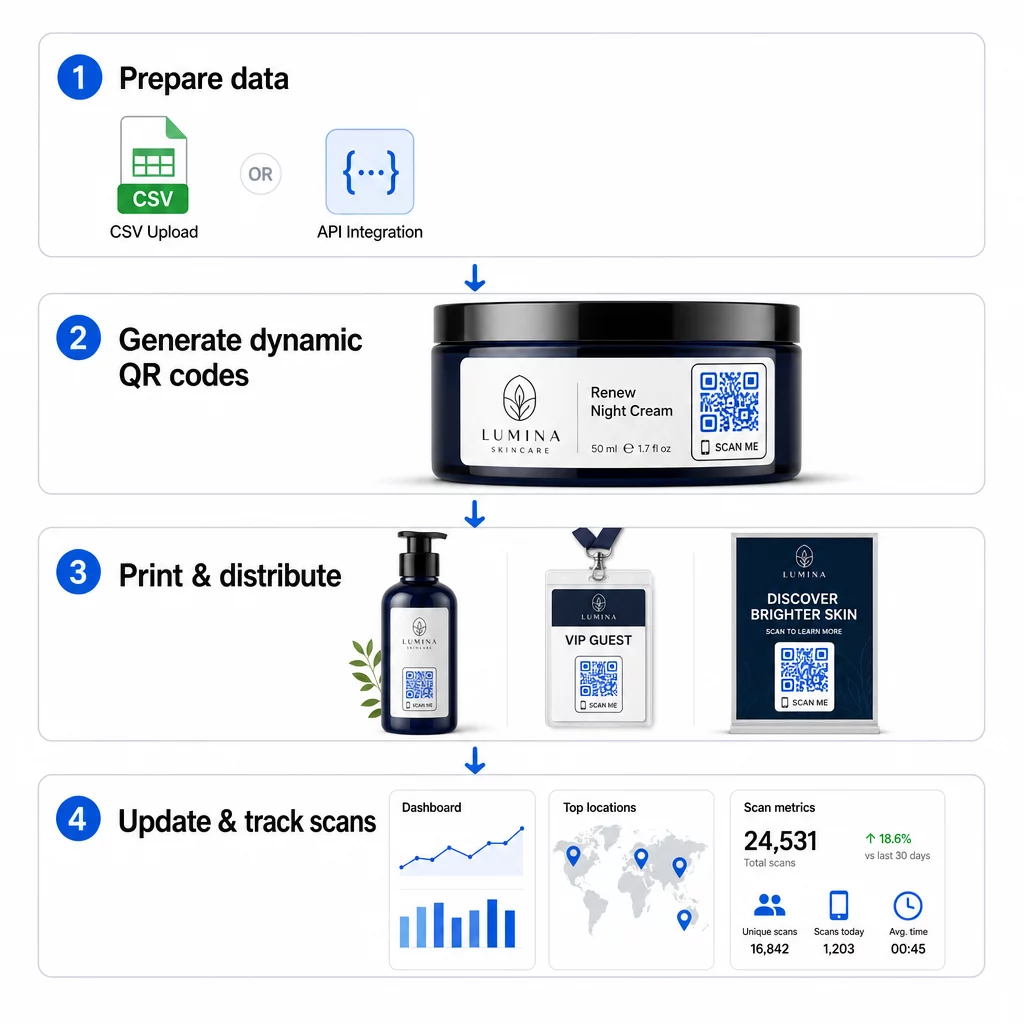
Binlerce benzersiz QR kodu oluşturmak, binlerce manuel adım anlamına gelmek zorunda değildir. Kurumsal QR platformları, toplu oluşturma için iki ana yöntemi destekler: CSV yüklemeleri ve API entegrasyonu.
CSV Yükleme
CSV yükleme, en erişilebilir toplu oluşturma yöntemidir. Her satırın bir QR kodu için verileri (genellikle bir hedef URL, bir etiket veya tanımlayıcı ve bir ürün SKU'su, parti numarası veya kampanya etiketi gibi herhangi bir değişken bilgi) içerdiği bir elektronik tablo hazırlarsınız. Ardından bu dosyayı platforma yüklersiniz ve sistem her satır için karşılık gelen bir QR kodu oluşturur.
CSV dosyanızı hazırlarken şu uygulamaları aklınızda bulundurun:
- Dosyayı kodlama hatalarını önlemek için CSV UTF-8 formatında kaydedin
- Tanımlayıcı veya klasör sütununu ilk sıraya yerleştirin
- Tarih alanları için tutarlı tarih formatı (yyyy-aa-gg) kullanın
- Gerekli sütunları net bir şekilde tanımlayın ve yüklemeden önce başlıkları doğrulayın
Pageloot gibi platformlar, kullanıcıların tek bir CSV yüklemesinden yüzlerce kod oluşturmasına olanak tanır, bu da her kodun benzersiz verilere ihtiyaç duyduğu ürün katalogları, etkinlik biletleme veya konuma özel kampanyalar için pratik hale getirir.
API Entegrasyonu
QR kod oluşturmayı mevcut iş akışlarına doğrudan entegre etmesi gereken ekipler için, API entegrasyonu daha güçlü bir yaklaşımdır. CSV'yi manuel olarak dışa aktarmak yerine, sistemleriniz parametreleri doğrudan QR platformuna iletir – yeni ürünler eklendiğinde, siparişler verildiğinde veya kampanyalar başlatıldığında kod oluşturmayı otomatik olarak tetikler.
API tabanlı oluşturma, dinamik toplu güncellemeleri de destekler. PATCH veya PUT isteklerini kullanarak, binlerce kodun hedef URL'lerini eş zamanlı olarak – herhangi bir manuel müdahale olmadan – güncelleyebilirsiniz. Bu, bir kampanya URL'si değiştiğinde, bir ürün sayfası yeniden yapılandırıldığında veya mevsimlik içeriğin tüm bir ürün serisinde değiştirilmesi gerektiğinde özellikle kullanışlıdır.
API entegrasyonu, QR kod oluşturmayı zaten kullandığınız araçlara bağlar: envanter yönetim sistemleri, CRM platformları, e-ticaret arka uçları ve pazarlama otomasyon araçları. Sonuç, QR kodlarının daha geniş operasyonlarınızla senkronize olarak oluşturulduğu, güncellendiği ve kullanımdan kaldırıldığı sorunsuz bir veri hattıdır.
Bir Kurumsal Platformda Değerlendirilecek Temel Özellikler
Tüm QR platformları kurumsal iş yükleri için tasarlanmamıştır. Seçenekleri değerlendirirken şu yeteneklere öncelik verin:
Toplu oluşturma kapasitesi – Platform, performansı düşürmeden hacminizi yönetebilmelidir. Sadece küçük partiler için değil, sınırsız veya yüksek hacimli toplu oluşturma desteği arayın.
Dinamik düzenleme – Kütüphanenizdeki her kod oluşturulduktan sonra düzenlenebilir olmalıdır. Bu, hedefler değiştiğinde yeniden basım maliyetlerini ortadan kaldırır ve fiziksel materyalleri birden fazla kampanyada yeniden kullanmanıza olanak tanır.
Merkezi yönetim – Tüm QR kod portföyünüzü düzenlemek, aramak ve güncellemek için tek bir kontrol paneli. Düzinelerce eş zamanlı kampanya yürüten işletmeler için organizasyon, oluşturma hızı kadar önemlidir.
Markalaşma ve özelleştirme – Kurumsal kodlar markanızı yansıtmalıdır. Logo entegrasyonu, özel renk şemaları ve büyük partilerde tutarlı bir şekilde uygulanabilecek tasarım şablonları arayın. Değişken veri desteği, her kodun tasarımına veya hedefine ürün SKU'ları veya promosyon kodları gibi benzersiz tanımlayıcılar yerleştirmenize olanak tanır.
Analiz ve raporlama - QR kodu izleme her taramayı bir veri noktasına dönüştürür. Gerçek zamanlı kontrol panelleri tarama sayılarını, coğrafi konumları, cihaz türlerini ve zaman damgalarını göstermelidir. Kampanya düzeyinde raporlama, dönüşüm oranlarını ve etkileşim eğilimlerini göstermeli, böylece devam eden kampanyaları optimize edebilirsiniz.
Güvenlik ve uyumluluk – Kurumsal dağıtımlar, yalnızca yetkili kullanıcıların kod oluşturabilmesi, düzenleyebilmesi veya silebilmesi için rol tabanlı erişim kontrolleri gerektirir. Veri şifrelemesi, aktarım halindeki ve beklemedeki bilgileri korur. GDPR, HIPAA veya SOX ile uyumluluk, sektörünüze ve QR kodlarınızın işlediği veri türüne bağlıdır.
Dışa aktarma biçimleri – Yüksek çözünürlüklü vektör formatları (SVG, EPS, PDF), ürün etiketlerinden fuar afişlerine kadar her boyutta kodların net bir şekilde çoğaltılmasını sağlar.
Toplu Dinamik QR Kodları için Kurumsal Kullanım Durumları
Toplu oluşturma ve dinamik düzenlenebilirlik kombinasyonu, geniş bir operasyonel uygulama yelpazesi sunar:
Ürün etiketleme ve ambalajlama – Her SKU veya parti için dijital kılavuzlara, garanti kayıt sayfalarına veya orijinallik doğrulamasına bağlanan benzersiz kodlar oluşturun. Hedef URL değişirse, etiketleri yeniden basmak yerine merkezi olarak güncelleyin.
Etkinlik biletleme ve girişler – Oturum erişim izinleri ve kayıt verilerini içeren katılımcı başına bir kod oluşturun. Dinamik kodlar, biletler dağıtıldıktan sonra mekan bilgilerini veya oturum programlarını güncellemenize olanak tanır.
Temassız ödemeler ve dijital menüler – Her masaya, kioska veya konuma benzersiz kodlar atayın. Fiziksel materyalleri değiştirmeden menü içeriğini veya fiyatlandırmayı merkezi olarak güncelleyin.
Kişiselleştirilmiş pazarlama kampanyaları – Her kodu belirli bir hedef kitle segmentine, bölgeye veya satın alma geçmişine göre uyarlanmış bir açılış sayfasına bağlayın. Hangi versiyonların en yüksek etkileşimi sağladığını takip edin ve kampanyaları buna göre ayarlayın.
Yazılım ve uygulama dağıtımı – Büyük dağıtımlar sırasında BT desteği maliyetini azaltarak, departmana özel uygulama kurulumlarını veya yapılandırmalarını tetikleyen benzersiz kodlar dağıtın.
Tedarik zinciri ve varlık takibi – Parti numaralarını, üretim tarihlerini ve denetim kayıtlarını fiziksel varlıklara ekli kodlara gömün. Tarama verileri, dağıtım ağınızda gerçek zamanlı bir denetim izi sağlar.
Ölçekte Analiz ve Otomasyon
Toplu üretim denklemin sadece yarısıdır. Yatırımı haklı çıkarmak ve gelecekteki kampanyaları iyileştirmek için güvenilir performans verilerine ihtiyacınız var.
Bir QR kod yönetim sistemi toplam tarama, benzersiz tarama, tarama zaman damgaları, coğrafi konum ve cihaz türü dahil olmak üzere metrikleri toplar. Gerçek zamanlı panolar bu verileri eyleme geçirilebilir hale getirir – kampanya ortasında hangi kodların düşük performans gösterdiğini belirleyebilir ve farklı içerik veya teklifleri test etmek için hedeflerini güncelleyebilirsiniz.
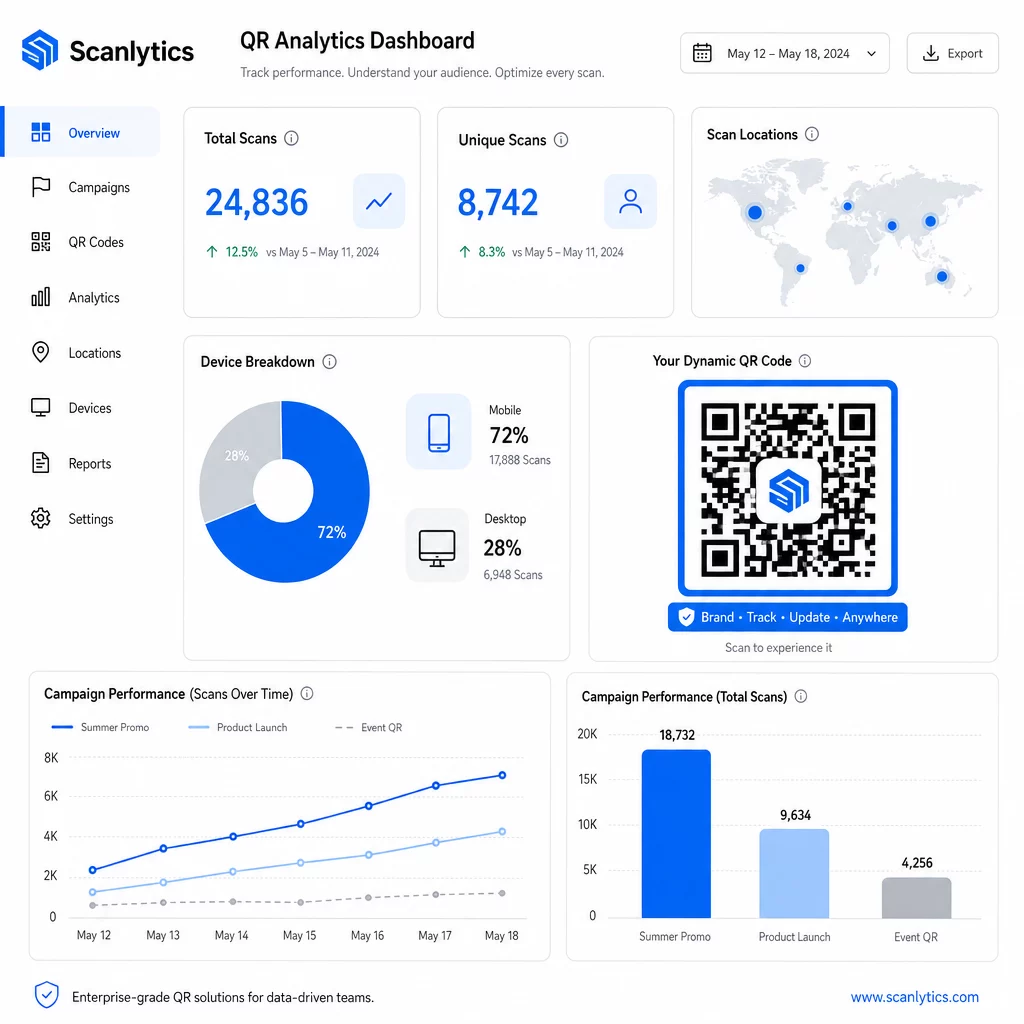
Pazarlama otomasyon araçlarıyla eşleştirildiğinde, tarama olayları otomatik olarak takip dizilerini tetikleyebilir. Bir ürün kodunu tarayan bir müşteri, yeniden hedefleme kitlesine girebilir, bir SMS alabilir veya herhangi bir manuel veri aktarımı olmaksızın bir CRM iş akışına eklenebilir.
Planlanmış dağıtımlar başka bir verimlilik katmanı ekler. Kodlar, kampanya başlangıcında otomatik olarak etkinleşecek ve bir promosyonun sonunda devre dışı kalacak şekilde yapılandırılabilir, bu da manuel izleme gerektirmeden içeriğin her zaman güncel olmasını sağlar.
Kampanyalarınız Boyunca Her Taramayı Takip Edin Bu Pageloot QR kod platformu kurumsal ekiplere gerçek zamanlı analizler, dinamik düzenleme ve toplu yönetim için merkezi bir kontrol paneli sunar – hepsi tek bir yerde.
Kurumsal QR Kod Platformlarını Karşılaştırma
Platformları değerlendirirken, temel farklılaştırıcılar toplu kapasite, dinamik düzenleme, analiz derinliği, güvenlik standartları ve entegrasyon esnekliğidir.
| Platform | Toplu Oluşturma | Dinamik Düzenleme | ANALİZ | Entegrasyonlar | Güvenlik |
|---|---|---|---|---|---|
| Pageloot | CSV veya API aracılığıyla sınırsız toplu oluşturma | Yeniden yazdırmadan gerçek zamanlı düzenleme | Tarama sayıları, konum, cihaz, gerçek zamanlı kontrol paneli | CRM, API erişimi | GDPR uyumlu, şifreli veri |
| Uniqode | Parti başına 2.000 koda kadar | Dinamik içerik güncellemeleri | Konum, zaman, cihaz takibi | HubSpot, Salesforce, Zapier (5.000'den fazla araç) | SOC 2 Tip II, SSO, rol tabanlı erişim |
| QR Batch | Veri girişinden yüksek hacimli toplu işlem | Gerçek zamanlı URL güncellemeleri | Erişim süresi izleme | Sınırlı | Standart |
| Hovercode | Büyük hacimler için merkezi kontrol paneli | Dinamik güncellemeler | Tarama konumu, cihaz, zaman damgaları | API, web kancaları, CRM | Çok kullanıcılı izinler |
| Canlı QR Kod Oluşturucu | API veya Google E-Tablolar aracılığıyla binlerce kod | Dinamik QR desteği | Coğrafi analizler | CRM, envanter sistemleri | Standart |
Pageloot'un desteği 25'ten fazla QR kod türü ve sınırsız toplu oluşturma, aynı anda çeşitli kampanya türlerini yöneten işletmeler için onu özellikle çok yönlü kılar. Derin üçüncü taraf entegrasyonlarına ihtiyaç duyan ekipler için, Uniqode gibi platformlar daha geniş bağlayıcı kütüphaneleri sunar. Doğru seçim hacminize, mevcut teknoloji yığınına ve uyumluluk gereksinimlerinize bağlıdır.
Birden fazla müşteri adına QR kampanyalarını yöneten ajanslar için, Pageloot'un ajans araçları paylaşılabilir müşteri raporları, beyaz etiket seçenekleri ve müşteri verilerini ayrı tutan ve profesyonelce sunan rol tabanlı izinler ekler.
Toplu Dinamik QR Kodlarına Başlarken
Kurumsal ölçekte QR kod yönetimine giden en verimli yol tutarlı bir düzeni takip eder:
- Mevcut QR kod kullanım durumlarınızı denetleyin ve toplu oluşturmanın en çok zaman kazandıracağı yerleri belirleyin
- Her kod türünün ihtiyaç duyduğu veri alanlarını belirleyin – hedef URL'ler, değişken tanımlayıcılar, kampanya etiketleri
- Hem CSV yüklemelerini hem de API entegrasyonunu destekleyen bir platform seçin, böylece gerektiğinde her iki yaklaşımı da ölçeklendirebilirsiniz
- Büyük portföyleri düzenli tutmak için ilk toplu yüklemenizden önce bir adlandırma ve klasör yapısı oluşturun
- Tam dağıtımdan önce küçük bir partiyi test edin, her kodun doğru tarandığını ve doğru hedefe yönlendirildiğini doğrulayın
- İlk günden itibaren analitik takibini kurun, böylece her kampanya için temel performans verilerine sahip olursunuz
Toplu dinamik QR kodları, oluşturma, yönetim ve analitik tek bir platformda ele alındığında en iyi şekilde çalışır. Bu işlevleri birden fazla araca bölmek, elde etmeye çalıştığınız verimlilik kazanımlarını baltalayan veri boşlukları ve manuel mutabakat çalışmaları yaratır.
Bu Pageloot dinamik QR kod oluşturucu üç işlevi de kapsar – toplu kod oluşturma, yeniden yazdırmadan hedefleri düzenleme ve performansı gerçek zamanlı izleme – tek bir merkezi panodan. İlk partinizi oluşturmak ve platformun kampanya ihtiyaçlarınıza göre nasıl ölçeklendiğini görmek için ücretsiz 14 günlük deneme sürümünü başlatın.
Sıkça sorulan sorular
Statik QR kodları, oluşturulduktan sonra değiştirilemeyen sabit bir hedefi kodlar. URL veya içerik değişirse, her kodu yeniden basmanız gerekir. Dinamik QR kodları, kontrol ettiğiniz kısa bir yönlendirme bağlantısı kullanır ve yeniden basmadan hedefi istediğiniz zaman güncellemenize olanak tanır. Uzun süreli kampanyalarda veya fiziksel materyallerde büyük hacimli kodları yöneten işletmeler için dinamik kodlar, yeniden basım maliyetlerini ortadan kaldırır ve sürekli tarama takibini sağlar.
Bir elektronik tablo hazırlarsınız, burada her satır bir QR kodu için verileri içerir – tipik olarak bir hedef URL, benzersiz bir tanımlayıcı ve ürün SKU'ları veya kampanya etiketleri gibi herhangi bir değişken alan. Dosyayı CSV UTF-8 formatında kaydedersiniz ve platforma yüklersiniz. Sistem her satır için benzersiz bir QR kodu oluşturur ve bunları indirilmek üzere paketler, genellikle bir ZIP dosyası olarak. Bu yaklaşım, ürün katalogları, etkinlik biletleme ve her kodun farklı verilere ihtiyaç duyduğu konuma özel kampanyalar için iyi çalışır.
Kurumsal QR platformları, toplam tarama sayıları, benzersiz taramalar, tarama zaman damgaları, her taramanın coğrafi konumu ve cihaz türü (işletim sistemi dahil) gibi metrikleri izler. Gerçek zamanlı panolar, taramalar gerçekleştiği anda bu verileri kullanılabilir hale getirir, böylece ekipler düşük performans gösteren kodları belirleyebilir ve kampanya ortasında hedeflerini güncelleyebilir. Daha gelişmiş platformlar ayrıca dönüşüm takibini ve CRM veya pazarlama otomasyonu araçlarıyla entegrasyonu destekler, böylece tarama olayları otomatik olarak takip iş akışlarını tetikleyebilir.