Upravljanje stotin ali tisočev QR kod eno za drugo ni delovni proces – je ozko grlo. Ko se kampanje raztezajo čez linije izdelkov, lokacije ali celotna distribucijska omrežja, ročno ustvarjanje povzroča napake, zamude in stroške ponovnega tiskanja, ki tiho izčrpavajo vire. Ta vodnik pojasnjuje, kako uporabiti orodja za množično dinamično QR kodo za učinkovito generiranje, upravljanje in sledenje velikim količinam kod v vašem podjetju.
Zakaj so dinamične QR kode prava osnova
Preden se poglobite v množično generiranje, je vredno razumeti, zakaj dinamične QR kode so posebej pomembne na ravni podjetja.
A statična koda QR kodira fiksno destinacijo neposredno v svoj vzorec. Ko je enkrat natisnjena, te destinacije ni mogoče spremeniti. Če se URL spremeni, se stran izdelka premakne ali se kampanja konča, vsaka natisnjena koda postane zastarela – in ponovno tiskanje tisočev nalepk ali materialov je drago.
Dinamične QR kode delujejo drugače. Kažejo na kratko preusmeritveno povezavo, ki jo nadzirate. Ko nekdo skenira kodo, je preusmerjen prek te preusmeritve na katero koli destinacijo, ki ste jo trenutno nastavili. Lahko posodobite destinacijo kadar koli – tudi po tem, ko so kode natisnjene in razdeljene – ne da bi ustvarili novo kodo ali se dotaknili enega samega kosa natisnjenega materiala. Podpirajo tudi sledenje skeniranj in analitiko, česar statične kode ne morejo zagotoviti.
Za podjetja, ki upravljajo velike kampanje, linije izdelkov ali fizična sredstva, dinamične kode odpravijo cikel ponovnega tiskanja in vam omogočajo stalen vpogled v delovanje vsake kode.
Začnite ustvarjati dinamične QR kode v velikem obsegu Ste pripravljeni ustvariti urejevalne, sledljive QR kode za vaše podjetniške kampanje? Preizkusite QR generator za dinamične QR kode brezplačno 14 dni – kreditna kartica ni potrebna.
Kako deluje množično generiranje QR kod
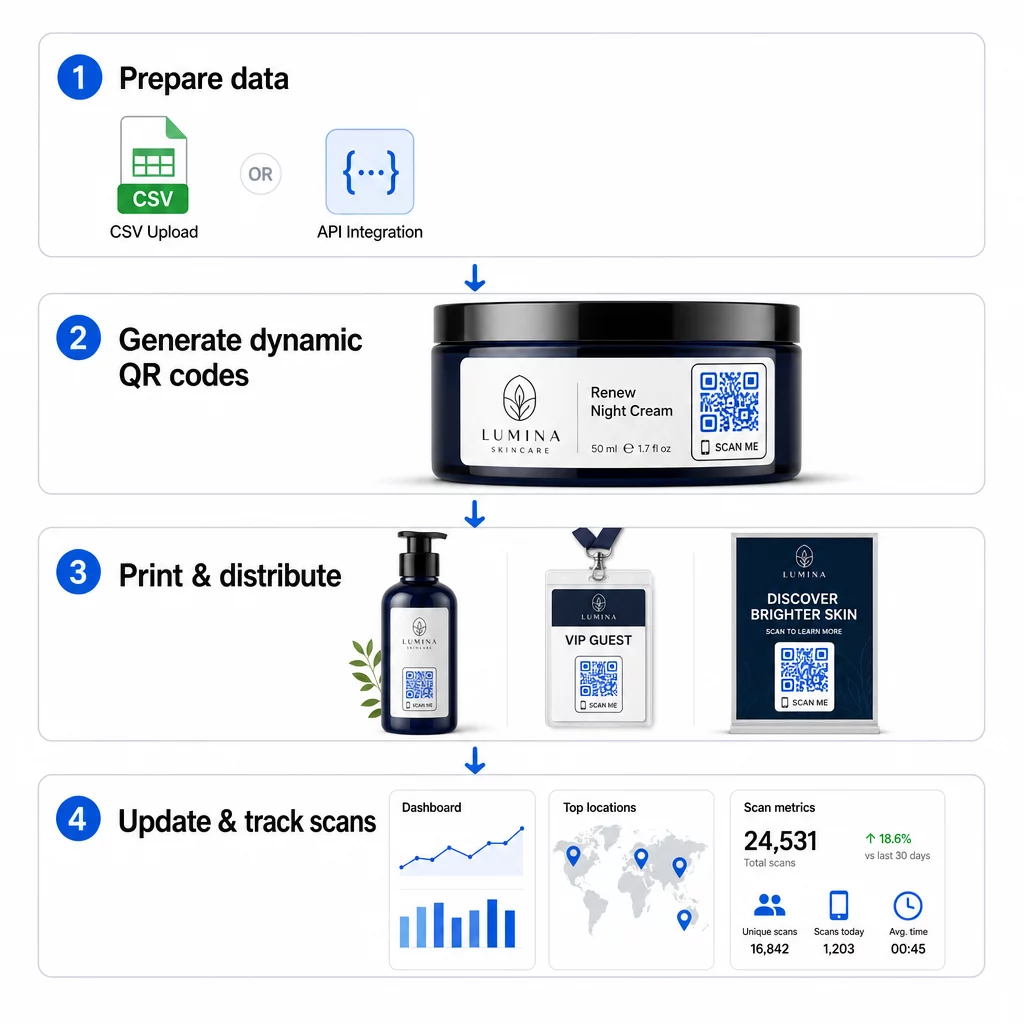
Generiranje tisočev edinstvenih QR kod ne pomeni nujno tisočev ročnih korakov. Podjetniške QR platforme podpirajo dve glavni metodi za množično ustvarjanje: nalaganje CSV datotek in integracijo API-ja.
Nalaganje CSV datotek
Nalaganje CSV datotek je najbolj dostopna metoda za množično generiranje. Pripravite preglednico, kjer vsaka vrstica vsebuje podatke za eno QR kodo – običajno ciljni URL, oznako ali identifikator ter morebitne spremenljive informacije, kot so SKU izdelka, številka serije ali oznaka kampanje. Nato to datoteko naložite na platformo in sistem bo za vsako vrstico generiral ustrezno QR kodo.
Pri pripravi datoteke CSV upoštevajte naslednje prakse:
- Shranite datoteko v formatu CSV UTF-8, da se izognete napakam pri kodiranju
- Stolpec z identifikatorjem ali mapo postavite na prvo mesto
- Uporabite dosledno oblikovanje datuma (llll-mm-dd) za vsa polja z datumom
- Jasno določite zahtevane stolpce in preverite glave pred nalaganjem
Platforme, kot je Pageloot, uporabnikom omogočajo generiranje na stotine kod z enim samim nalaganjem CSV, kar je praktično za kataloge izdelkov, vstopnice za dogodke ali kampanje, specifične za lokacijo, kjer vsaka koda potrebuje edinstvene podatke.
Integracija API-ja
Za ekipe, ki potrebujejo generiranje QR kod, vgrajeno neposredno v njihove obstoječe delovne procese, integracija API-ja je močnejši pristop. Namesto ročnega izvažanja CSV datoteke, vaši sistemi posredujejo parametre neposredno platformi za QR kode – s tem se samodejno sproži generiranje kod, ko so dodani novi izdelki, oddana naročila ali zagnane kampanje.
Generiranje na osnovi API-ja podpira tudi dinamične množične posodobitve. Z uporabo zahtevkov PATCH ali PUT lahko posodobite ciljne URL-je na tisočih kodah hkrati – brez kakršnega koli ročnega posredovanja. To je še posebej uporabno, ko se spremeni URL kampanje, preoblikuje stran izdelka ali je treba zamenjati sezonsko vsebino v celotni liniji izdelkov.
Integracija API-ja povezuje generiranje QR kod z orodji, ki jih že uporabljate: sistemi za upravljanje zalog, platforme CRM, zaledja e-trgovine in orodja za avtomatizacijo trženja. Rezultat je brezhiben podatkovni cevovod, kjer so QR kode ustvarjene, posodobljene in umaknjene v sinhronizaciji z vašimi širšimi operacijami.
Ključne funkcije za oceno v poslovni platformi
Niso vse platforme za QR kode zgrajene za poslovne obremenitve. Pri ocenjevanju možnosti dajte prednost tem zmožnostim:
Zmogljivost množičnega generiranja – Platforma bi morala obvladati vašo količino brez poslabšanja zmogljivosti. Poiščite podporo za neomejeno ali visoko-volumensko serijsko ustvarjanje, ne le za majhne serije.
Dinamično urejanje – Vsaka koda v vaši knjižnici bi morala biti po ustvarjanju urejevalna. To odpravlja stroške ponovnega tiskanja, ko se destinacije spremenijo, in vam omogoča ponovno uporabo fizičnih materialov v več kampanjah.
Centralizirano upravljanje – Enotna nadzorna plošča za organiziranje, iskanje in posodabljanje celotnega portfelja QR kod. Za podjetja, ki izvajajo na desetine sočasnih kampanj, je organizacija enako pomembna kot hitrost generiranja.
Blagovna znamka in prilagajanje – Kode za podjetja bi morale odražati vašo blagovno znamko. Poiščite integracijo logotipa, prilagojene barvne sheme in oblikovne predloge, ki jih je mogoče dosledno uporabiti v velikih serijah. Podpora za spremenljive podatke vam omogoča vdelavo edinstvenih identifikatorjev – kot so SKU-ji izdelkov ali promocijske kode – v zasnovo ali destinacijo vsake kode.
Analitika in poročanje - Sledenje QR kode vsako skeniranje pretvori v podatkovno točko. Nadzorne plošče v realnem času bi morale prikazovati število skeniranj, geografske lokacije, vrste naprav in časovne žige. Poročanje na ravni kampanje bi moralo prikazovati stopnje konverzije in trende angažiranosti, da lahko optimizirate med izvajanjem.
Varnost in skladnost – Uvedbe v podjetjih zahtevajo nadzor dostopa na podlagi vlog, tako da lahko samo pooblaščeni uporabniki ustvarjajo, urejajo ali brišejo kode. Šifriranje podatkov ščiti informacije med prenosom in v mirovanju. Skladnost z GDPR, HIPAA ali SOX je odvisna od vaše industrije in vrste podatkov, ki jih obravnavajo vaše QR kode.
Formati izvoza – Vektorski formati visoke ločljivosti (SVG, EPS, PDF) zagotavljajo, da se kode čisto reproducirajo v kateri koli velikosti, od etiket izdelkov do sejemskih transparentov.
Primeri uporabe dinamičnih QR kod v velikih količinah za podjetja
Kombinacija množičnega generiranja in dinamične urejevalnosti odpira širok spekter operativnih aplikacij:
Označevanje in pakiranje izdelkov – Generirajte edinstvene kode za vsak SKU ali serijo, ki se povezujejo z digitalnimi priročniki, stranmi za registracijo garancije ali preverjanjem pristnosti. Če se ciljni URL spremeni, ga posodobite centralno namesto ponovnega tiskanja etiket.
Vstopnice za dogodke in prijave – Ustvarite eno kodo na udeleženca, ki vsebuje dovoljenja za dostop do seje in podatke o registraciji. Dinamične kode vam omogočajo posodabljanje informacij o prizorišču ali urnikih sej po razdelitvi vstopnic.
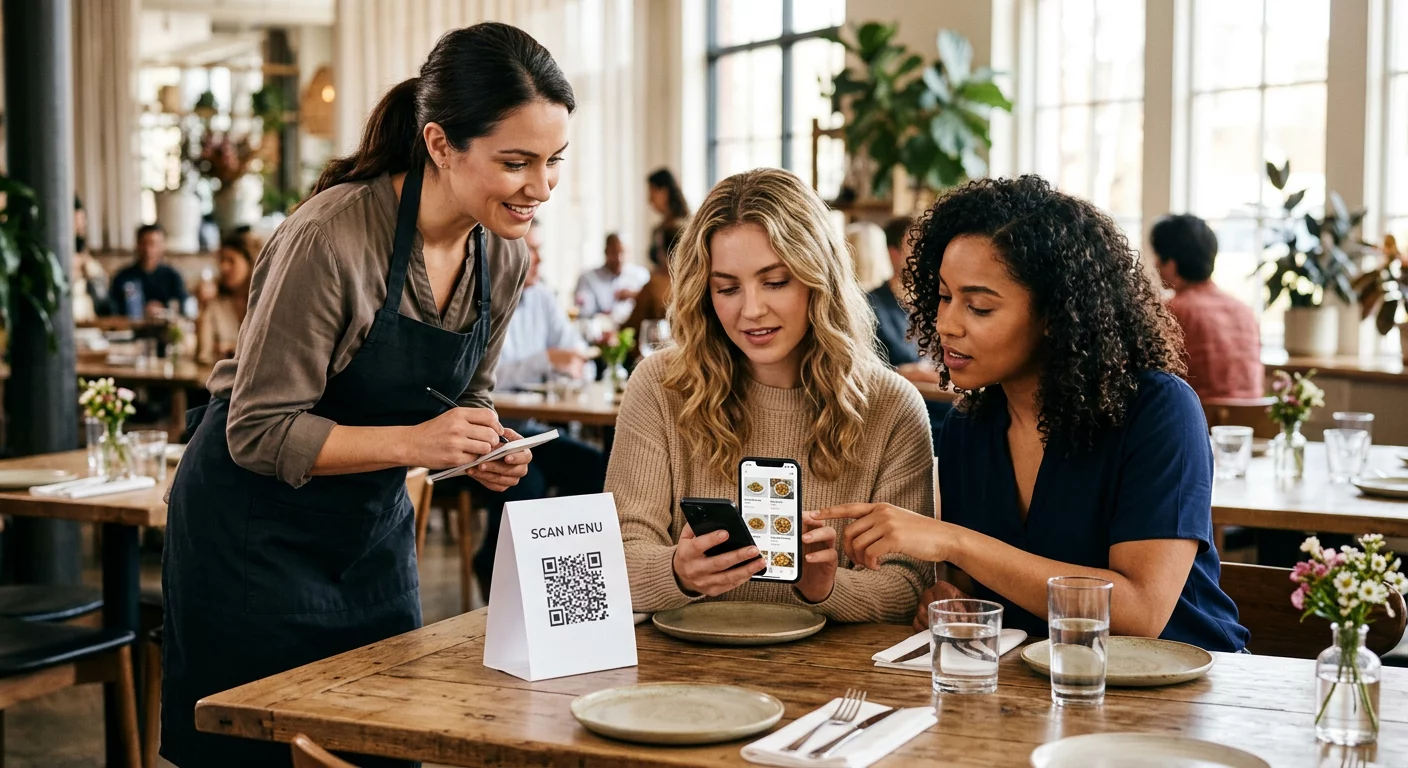
Brezstično plačevanje in digitalni meniji – Vsaki mizi, kiosku ali lokaciji dodelite edinstvene kode. Vsebino menija ali cene posodobite centralno, ne da bi zamenjali fizične materiale.
Personalizirane marketinške kampanje – Vsako kodo povežite s pristajalno stranjo, prilagojeno določenemu segmentu občinstva, regiji ali zgodovini nakupov. Spremljajte, katere različice dosegajo največjo angažiranost, in temu primerno prilagodite kampanje.
Razmestitev programske opreme in aplikacij – Razdelite edinstvene kode, ki sprožijo namestitve ali konfiguracije aplikacij, specifičnih za posamezne oddelke, s čimer zmanjšate stroške IT podpore med velikimi uvedbami.
Sledenje dobavni verigi in sredstvom – V kode, pritrjene na fizična sredstva, vdelajte serijske številke, datume izdelave in zapise o pregledih. Podatki skeniranja zagotavljajo revizijsko sled v realnem času po celotni distribucijski mreži.
Analitika in avtomatizacija v velikem obsegu
Množično generiranje je le polovica enačbe. Za upravičenje naložbe in izboljšanje prihodnjih kampanj potrebujete zanesljive podatke o uspešnosti.
A Sistem za upravljanje QR kod zbira meritve, vključno s skupnim številom skeniranj, edinstvenimi skeniranji, časovnimi žigi skeniranj, geografsko lokacijo in vrsto naprave. Nadzorne plošče v realnem času omogočajo, da so ti podatki uporabni – lahko prepoznate, katere kode med kampanjo ne dosegajo pričakovanih rezultatov, in posodobite njihove destinacije za testiranje različnih vsebin ali ponudb.
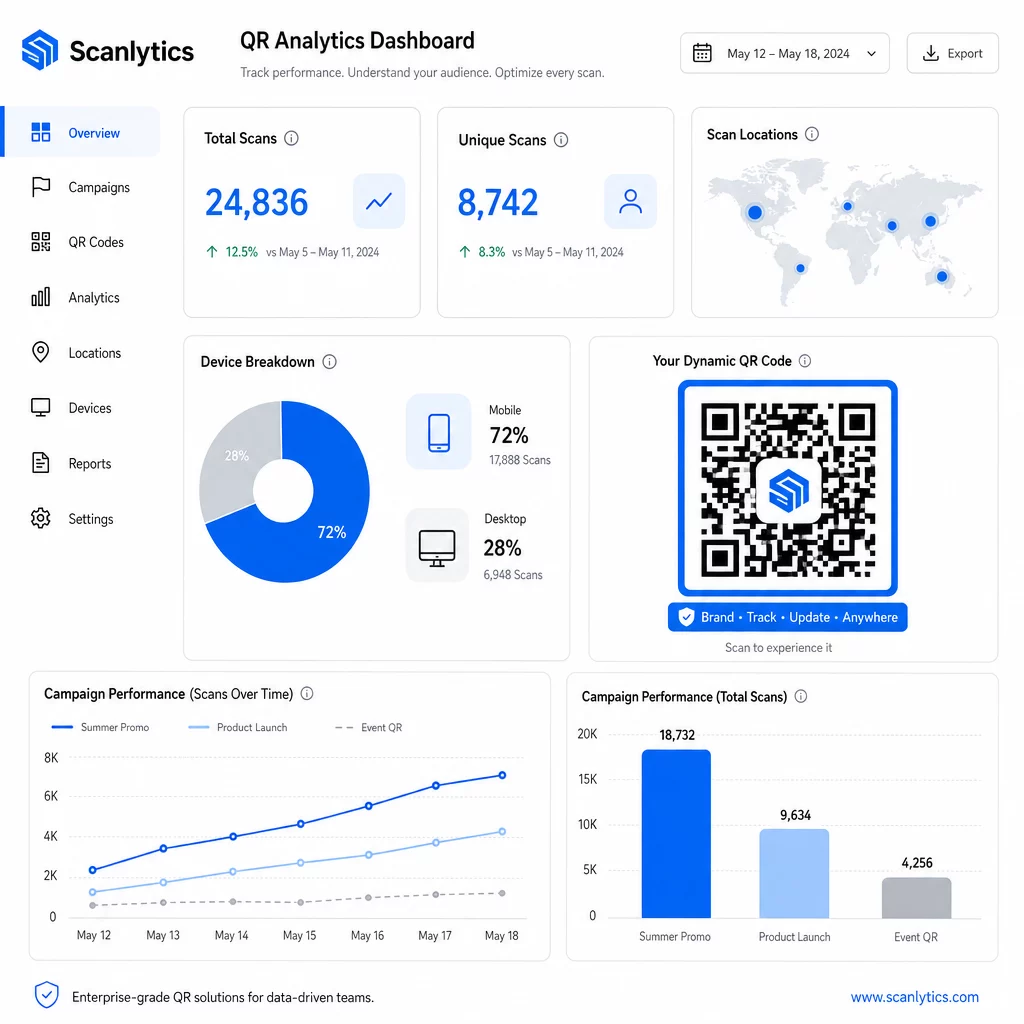
V kombinaciji z orodji za avtomatizacijo trženja lahko dogodki skeniranja samodejno sprožijo nadaljnje sekvence. Stranka, ki skenira kodo izdelka, lahko vstopi v ciljno skupino za ponovno ciljanje, prejme SMS ali se doda v potek dela CRM – brez ročnega prenosa podatkov.
Načrtovane uvedbe dodajo še eno raven učinkovitosti. Kode je mogoče konfigurirati tako, da se samodejno aktivirajo ob začetku kampanje in deaktivirajo ob koncu promocije, kar zagotavlja, da je vsebina vedno aktualna, ne da bi bilo potrebno ročno spremljanje.
Spremljajte vsako skeniranje v vseh svojih kampanjah Vprašanje Platforma za QR kode Pageloot daje podjetniškim ekipam centralizirano nadzorno ploščo za analitiko v realnem času, dinamično urejanje in množično upravljanje – vse na enem mestu.
Primerjava platform za QR kode za podjetja
Pri ocenjevanju platform so ključni dejavniki razlikovanja zmogljivost množičnega ustvarjanja, dinamično urejanje, poglobljena analitika, varnostni standardi in prilagodljivost integracije.
| Platforma | Množično ustvarjanje | Dinamično urejanje | ANALITIKA | Integracije | Varnost |
|---|---|---|---|---|---|
| Pageloot | Neomejeno ustvarjanje serij prek CSV ali API-ja | Urejanje v realnem času brez ponovnega tiskanja | Število skeniranj, lokacija, naprava, nadzorna plošča v realnem času | CRM, dostop do API-ja | Skladno z GDPR, šifrirani podatki |
| Uniqode | Do 2.000 kod na serijo | Dinamične posodobitve vsebine | Sledenje lokaciji, času, napravi | HubSpot, Salesforce, Zapier (5.000+ orodij) | SOC 2 Type II, SSO, dostop na podlagi vlog |
| QR Batch | Visokozmogljiva serija iz vnosa podatkov | Posodobitve URL-jev v realnem času | Spremljanje časa dostopa | Omejeno | Standardno |
| Hovercode | Centralizirana nadzorna plošča za velike količine | Dinamične posodobitve | Lokacija skeniranja, naprava, časovni žigi | API, spletni kaveljci, CRM | Dovoljenja za več uporabnikov |
| Generator QR kod v živo | Na tisoče kod prek API-ja ali Google Preglednic | Podpora za dinamične QR kode | Geografska analitika | CRM, sistemi za upravljanje zalog | Standardno |
Podpora Pageloota za več kot 25 vrst QR kod in neomejeno množično ustvarjanje ga dela še posebej vsestranskega za podjetja, ki hkrati upravljajo različne vrste kampanj. Za ekipe, ki potrebujejo poglobljene integracije tretjih oseb, platforme, kot je Uniqode, ponujajo širše knjižnice povezovalnikov. Prava izbira je odvisna od vašega obsega, obstoječe tehnološke opreme in zahtev glede skladnosti.
Za agencije, ki upravljajo QR kampanje v imenu več strank, Pagelootova orodja za agencije dodajajo poročila za stranke, ki jih je mogoče deliti, možnosti bele etikete in dovoljenja na podlagi vlog, ki ohranjajo podatke strank ločene in profesionalno predstavljene.
Začetek z množičnimi dinamičnimi QR kodami
Najbolj učinkovita pot do upravljanja QR kod v podjetniškem merilu sledi doslednemu vzorcu:
- Preglejte svoje trenutne primere uporabe QR kod in ugotovite, kje bi množično generiranje prihranilo največ časa
- Opredelite podatkovna polja, ki jih potrebuje vsak tip kode – ciljne URL-je, spremenljive identifikatorje, oznake kampanj
- Izberite platformo, ki podpira tako nalaganje CSV datotek kot tudi integracijo API-ja, da lahko po potrebi razširite kateri koli pristop
- Pred prvo množično naložitvijo vzpostavite strukturo poimenovanja in map, da bodo veliki portfelji ostali organizirani
- Preizkusite majhno serijo pred polno uvedbo, preverite, ali se vsaka koda pravilno skenira in usmerja na pravo destinacijo
- Nastavite sledenje analitike od prvega dne, da imate osnovne podatke o uspešnosti za vsako kampanjo
Množične dinamične QR kode delujejo najbolje, ko so generiranje, upravljanje in analitika obravnavani na eni platformi. Razdelitev teh funkcij med več orodij ustvarja vrzeli v podatkih in ročno usklajevanje, ki spodkopava povečanje učinkovitosti, ki ga poskušate doseči.
Vprašanje Pagelootov generator dinamičnih QR kod pokriva vse tri funkcije – ustvarjanje kod v velikih količinah, urejanje destinacij brez ponovnega tiskanja in spremljanje uspešnosti v realnem času – z ene centralizirane nadzorne plošče. Začnite brezplačno 14-dnevno preizkusno obdobje za generiranje vaše prve serije in preverite, kako se platforma prilagaja vašim potrebam kampanje.
Pogosta vprašanja
Statične QR kode kodirajo fiksno destinacijo, ki je ni mogoče spremeniti po generiranju. Če se URL ali vsebina spremeni, morate ponatisniti vsako kodo. Dinamične QR kode uporabljajo kratko preusmeritveno povezavo, ki jo nadzorujete, kar vam omogoča posodobitev destinacije kadar koli brez ponatisa. Za podjetja, ki upravljajo velike količine kod v dolgotrajnih kampanjah ali na fizičnih materialih, dinamične kode odpravljajo stroške ponatisa in omogočajo stalno sledenje skeniranj.
Pripravite preglednico, kjer vsaka vrstica vsebuje podatke za eno QR kodo – običajno ciljni URL, edinstven identifikator in morebitna spremenljiva polja, kot so SKU-ji izdelkov ali oznake kampanj. Datoteko shranite v formatu CSV UTF-8 in jo naložite na platformo. Sistem generira edinstveno QR kodo za vsako vrstico in jih zapakira za prenos, pogosto kot datoteko ZIP. Ta pristop je primeren za kataloge izdelkov, vstopnice za dogodke in lokacijsko specifične kampanje, kjer vsaka koda potrebuje različne podatke.
Platforme QR za podjetja spremljajo meritve, vključno s skupnim številom skeniranj, edinstvenimi skeniranji, časovnimi žigi skeniranj, geografsko lokacijo vsakega skeniranja in vrsto naprave (vključno z operacijskim sistemom). Nadzorne plošče v realnem času omogočajo dostop do teh podatkov, ko se skeniranja zgodijo, tako da lahko ekipe prepoznajo slabo delujoče kode in posodobijo njihove destinacije sredi kampanje. Naprednejše platforme podpirajo tudi sledenje konverzijam in integracijo z orodji CRM ali za avtomatizacijo trženja, tako da lahko dogodki skeniranja samodejno sprožijo nadaljnje delovne tokove.