Vai vēlaties, lai katrs skeneris nonāktu pie satura, kas ir atbilstošs viņu atrašanās vietai? Kad viens QR kods nosūta visus uz vienu un to pašu lapu neatkarīgi no ģeogrāfiskās atrašanās vietas, jūs zaudējat iespēju uzrunāt vietējo auditoriju ar mērķētiem piedāvājumiem, valodu un kontekstu. Šis ceļvedis izskaidro, kā darbojas uz atrašanās vietu balstīta QR kodu novirzīšana, kā to iestatīt un kam pievērst uzmanību.
Kāpēc uz atrašanās vietu balstītai novirzīšanai ir nepieciešami dinamiskie QR kodi
Standarta statiskais QR kods tieši savā modelī iekodē fiksētu URL. Šis galamērķis nekad nevar mainīties – jums katru reizi būtu jāizdrukā jauns kods. Dinamiskie QR kodi darbojas atšķirīgi: pats kods iekodē īsu novirzīšanas URL, un faktiskais galamērķis tiek kontrolēts serverī. Tas nozīmē, ka jūs varat jebkurā laikā atjaunināt, uz kurieni kods norāda, nepieskaroties drukātajam materiālam.
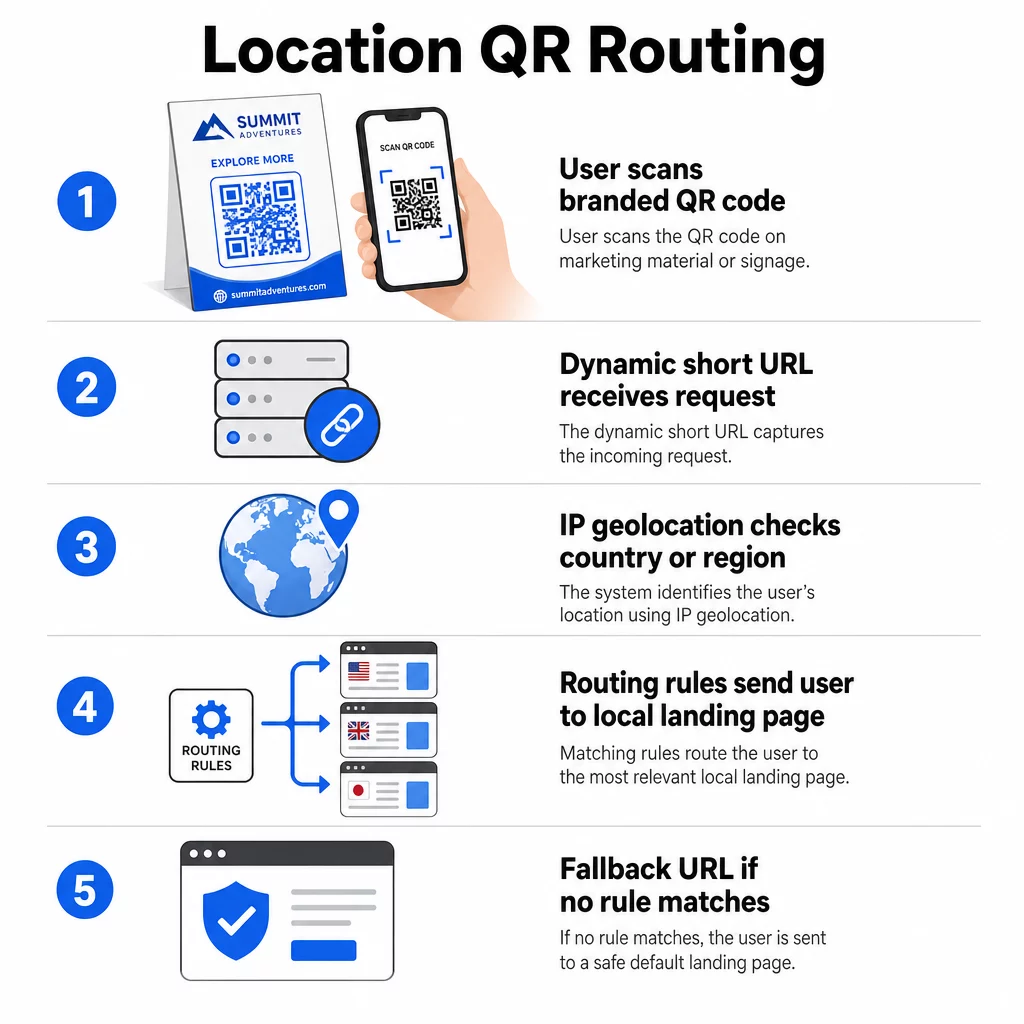
Uz atrašanās vietu balstīta novirzīšana balstās uz šo pamatu. Kad kāds skenē dinamisku kodu, novirzīšanas slānis pārbauda skenera ģeogrāfisko atrašanās vietu – parasti iegūtu no ierīces IP adreses – un piemēro jūsu konfigurētos noteikumus, lai nodrošinātu valstij vai reģionam specifisku URL. Ja neviens noteikums neatbilst, sistēma atgriežas pie jūsu iestatītā noklusējuma URL.
Izpratne par atšķirība starp statiskajiem un dinamiskajiem QR kodiem ir vissvarīgākais pirmais solis pirms jebkuras uz atrašanās vietu balstītas kampaņas veidošanas.
Izveidojiet uz atrašanās vietu balstītus QR kodus Gatavs nosūtīt skenerus uz pareizo galamērķi, pamatojoties uz to atrašanās vietu? Izmantojiet Dinamisks QR kodu ģenerators lai izveidotu rediģējamus, izsekojamus kodus ar iebūvētiem atrašanās vietas noteikumiem.
Kā patiesībā darbojas atrašanās vietas noteikšana
Lielākā daļa platformu izmanto uz IP balstītu ģeogrāfisko atrašanās vietu: kad ierīce skenē QR kodu un atver īso novirzīšanas URL, pieprasījums satur IP adresi. Platforma meklē šo IP adresi ģeogrāfiskās atrašanās vietas datubāzē, lai noteiktu skenera valsti vai reģionu, un pēc tam novirza uz atbilstošo galamērķa URL.
Šī pieeja ir uzticama valsts līmenī – valsts noteikšanas precizitāte parasti tiek ziņota 90–99% diapazonā – bet ievērojami samazinās mazākām ģeogrāfiskām teritorijām. Reģionālā vai štata līmeņa noteikšana ir aptuveni 55–80% precizitāte, un pilsētas līmeņa precizitāte samazinās līdz 50–75%. Vairāki faktori vēl vairāk samazina uzticamību:
- VPN vai starpniekservera izmantošana, kur šķietamā IP atrašanās vieta atšķiras no lietotāja fiziskās atrašanās vietas
- Mobilā operatora līmeņa NAT, kas var piešķirt IP adreses, kas reģistrētas tālu no faktiskās ierīces
- Korporatīvie tīkli, kur datplūsma tiek novirzīta caur centrālā biroja IP
- Novecojušas ģeogrāfiskās atrašanās vietas datubāzes, kas nav atjauninātas ar IP pārdalījumiem
Kampaņām, kurās pietiek ar mērķauditorijas atlasi valsts līmenī – dažādas valodu versijas, reģionālās akcijas, valstij specifiskas veikalu fasādes – IP balstīta noteikšana darbojas labi. Hiperlokālai mērķauditorijas atlasei apkaimes vai pasākuma vietas līmenī GPS balstīta atrašanās vieta (ja lietotājs piešķir atļauju) nodrošina lielāku precizitāti, lai gan tai ir nepieciešams skaidrs piekrišanas uzaicinājums.
Vienmēr konfigurējiet noklusējuma rezerves URL skeneriem, kuru atrašanās vietu nevar noteikt vai kuri neatbilst jūsu definētajiem noteikumiem. Tas novērš to, ka kāds nonāk strupceļā.
Kas jums nepieciešams pirms darba uzsākšanas
Pirms atrašanās vietas noteikumu iestatīšanas sagatavojiet šīs trīs lietas:
- Dinamiska QR koda platforma kas atbalsta ģeogrāfisko maršrutēšanu. Meklējiet tādu, kas ļauj definēt galamērķa URL katrai valstij vai reģionam, atjaunināt noteikumus bez atkārtotas drukāšanas un izsekot skenēšanas datus pēc atrašanās vietas. Pageloot funkcijas ietver visu to vienā informācijas panelī.
- Galamērķa URL katrai mērķa ģeogrāfiskajai atrašanās vietai. Tiem jābūt pilnībā izveidotiem un mobilajām ierīcēm optimizētiem pirms palaišanas. Katrai reģionālajai lapai jāatspoguļo vietējā valoda, valūta, piedāvājumi vai veikala informācija, kā tas ir piemērots.
- Rezerves URL kas darbojas jebkuram skenerim, kas neatbilst konkrētam noteikumam – parasti jūsu galvenā vietne vai neitrāla galvenā lapa, kurā lietotāji var paši izvēlēties savu reģionu.
Kā iestatīt uz atrašanās vietu balstītu novirzīšanu
1. solis: Izveidojiet dinamisku QR kodu
Reģistrējieties dinamiskā QR koda plānam un izveidojiet jaunu kodu, izmantojot Dinamisks QR kodu ģenerators. Šajā posmā ievadiet viettura galamērķa URL – nākamajā solī konfigurēsiet atrašanās vietas noteikumus. Pielāgojiet koda izskatu ar savas zīmola krāsām un logotipu, lai veidotu uzticību un veicinātu skenēšanu.
2. solis: Konfigurējiet ģeogrāfiskās maršrutēšanas noteikumus
Jūsu QR kodu pārvaldības panelī atrodiet tikko izveidotā koda novirzīšanas vai maršrutēšanas iestatījumus. Pievienojiet noteikumus pēc valsts (vai reģiona, ja tiek atbalstīts):
- Izvēlieties mērķa ģeogrāfiju (piemēram, Vācija)
- Ievadiet galamērķa URL šai ģeogrāfijai (piemēram, jūsu vācu valodas produkta lapa)
- Atkārtojiet katrai valstij vai reģionam, kuru vēlaties mērķēt
- Iestatiet noklusējuma rezerves URL visām citām atrašanās vietām
Sistēma izmanto 302 pagaidu HTTP novirzīšanas, kas nozīmē, ka īsais URL vienmēr paliek nemainīgs, kamēr galamērķi var atjaunināt jebkurā laikā, neietekmējot izdrukāto kodu.
3. solis: Pievienojiet zīmolu QR kodam
Zīmolots QR kods – ar jūsu logotipu, kas centrēts rakstā, un krāsām, kas atbilst jūsu identitātei – mudina lietotājus to skenēt, nevis ignorēt. Lielākā daļa platformu ļauj kontrolēt logotipa izmēru, krāsu paleti un malu stilu. Pārliecinieties, ka kontrasts starp koda priekšplānu un fonu ir pietiekami augsts uzticamai skenēšanai, īpaši, ja kods parādīsies uz dažādām virsmām vai dažādos apgaismojuma apstākļos.
Lai dziļāk aplūkotu ģeožogošanas un izvietošanas labāko praksi, ieskaitot 10:1 izmēru noteikumu drukas materiāliem, šis ceļvedis aptver pilnu dizaina un ieviešanas kontrolsarakstu.
Solis 4: Testēšana pirms izvietošanas
Testēšana nav apspriežama. Pirms kaut ko drukājat vai publicējat, pārbaudiet, vai katrs ģeogrāfiskais noteikums novirza pareizi. Izmantojiet VPN, kas iestatīts uz katru mērķa valsti, lai simulētu skenēšanu no šīm atrašanās vietām, un katru reizi pārliecinieties, ka nonākat pie paredzētā galamērķa URL. Pārbaudiet arī rezerves URL ar atrašanās vietu ārpus jūsu definētajiem noteikumiem.
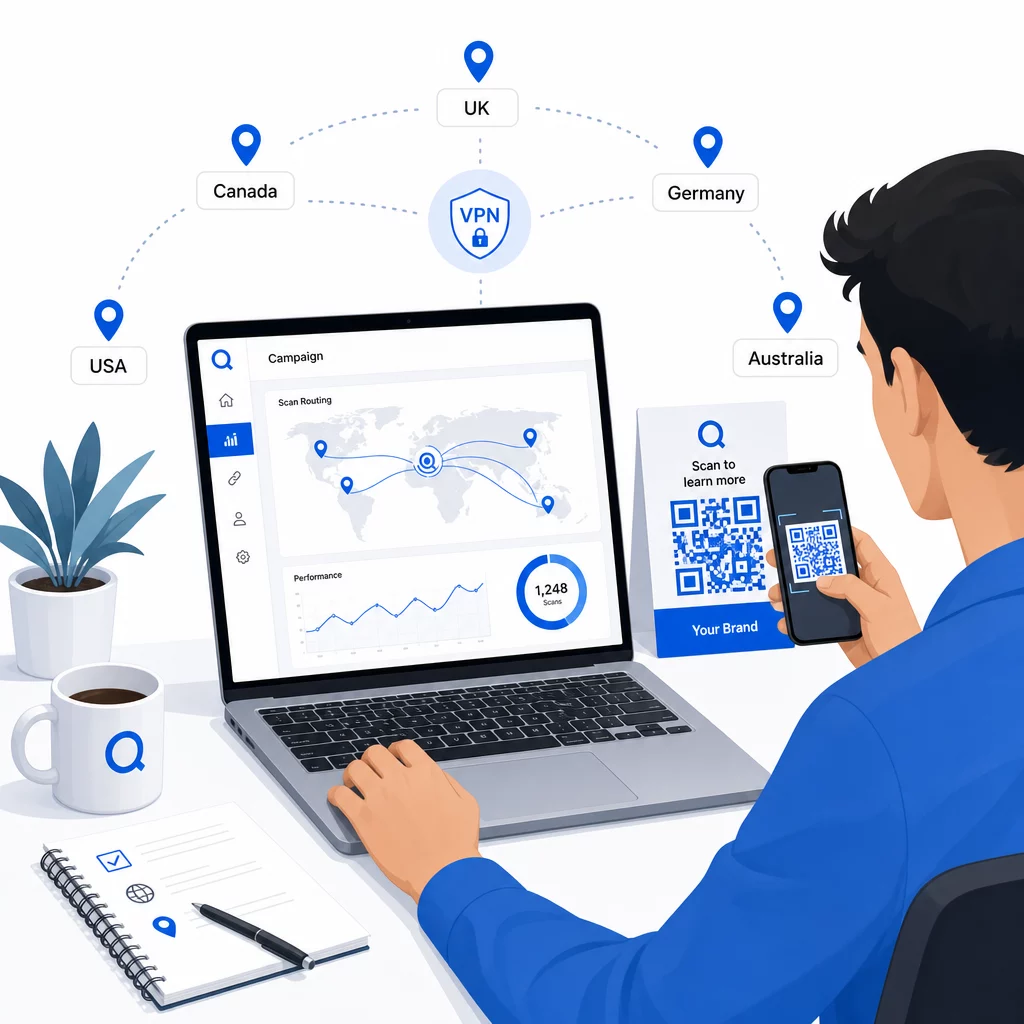
Testējiet dažādos ierīču tipos (iOS un Android), gan Wi-Fi, gan mobilo datu savienojumos, kā arī dažādos apgaismojuma apstākļos, lai apstiprinātu skenējamību. Dokumentējiet visas problēmas un atrisiniet tās pirms palaišanas. Ja vēlāk nepieciešams veikt izmaiņas, tad dinamiskā QR koda galamērķa rediģēšanas process ir vienkāršs un neprasa neko pārprintēt.
Reģionāla satura veidošana, kas piesaista skenēšanu
Atrašanās vietas noteikums, kas novirza skeneri uz vispārīgu lapu, zaudē savu jēgu. Galamērķa saturam jāatspoguļo tas, kas katru ģeogrāfisko apgabalu padara atšķirīgu:
- Valoda: Pat angliski runājošos tirgos atšķiras frāzējums, pareizrakstība un tonis. Neangliski runājošos tirgos tiek sagaidīta pilnībā tulkota lapa.
- Vietējie piedāvājumi un cenas: Valūta, akciju laiks un produktu pieejamība atšķiras atkarībā no reģiona. Parādiet to, kas patiešām ir aktuāls un iegādājams attiecīgajā vietā.
- Veikala vai kontaktinformācija: Ja jums ir fiziskas atrašanās vietas, parādiet tuvāko, pamatojoties uz skenera atrašanās vietu.
- Regulatīvās vai atbilstības detaļas: Dažās nozarēs – pārtikas un dzērienu, veselības aprūpes, finanšu pakalpojumu – ir reģionam specifiskas atklāšanas prasības. Nodrošiniet, lai katra lapa atbilstu vietējiem standartiem.
Pētījumi liecina, ka 39% klientu aktīvi meklē personalizētu QR koda saturu. Reģionam specifiska lapa nav jauks papildinājums – tā arvien vairāk kļūst par pamata prasību. Lai iegūtu plašāku ieskatu par sasniegt vietējo auditoriju ar ģeogrāfiski mērķētiem QR kodiem, tostarp reālus zīmolu piemērus, šis ceļvedis iedziļinās lokalizācijas stratēģijā.
Veiktspējas mērīšana un uzlabošana
Dinamiskie QR kodi automātiski ģenerē skenēšanas datus. Izmantojiet savas platformas analītikas informācijas paneli, lai uzraudzītu:
- Skenēšanas apjoms pa valstīm vai reģioniem, lai noteiktu, kur iesaiste ir visspēcīgākā
- Skenēšanas laiks, lai saprastu, kad lietotāji ir visaktīvākie katrā tirgū
- Ierīču veidi, lai nodrošinātu, ka jūsu reģionālās lapas tiek pareizi attēlotas dominējošajai ierīcei katrā ģeogrāfiskajā apgabalā
- Konversijas uzvedība, ja esat savienojis UTM parametrus ar saviem galamērķa URL un integrējis ar rīku, piemēram, Google Analytics
Lai iegūtu pilnīgu pārskatu par to, kas ir izsekojams un kā interpretēt datus, ceļvedis par QR kodu skenēšanas un analītikas izsekošana aptver visu ar dinamiskajiem kodiem pieejamo rādītāju klāstu.
Izmantojiet šos datus, lai veiktu A/B testus reģionālajās galvenajās lapās, pielāgotu fizisko QR kodu izvietojumu vietās ar lielāku datplūsmu un novirzītu budžetu uz tirgiem, kas dod labākos rezultātus. Pārskatiet veiktspēju katru mēnesi un atjauniniet galamērķa URL, mainoties kampaņām, piedāvājumiem vai saturam – neizdrukājot nevienu jaunu kodu.
Izsekojiet katru skenēšanu pēc atrašanās vietas Skatiet, kuri reģioni nodrošina vislielāko iesaisti, un pielāgojiet savas kampaņas reāllaikā. Sāciet ar Dinamisks QR kodu ģenerators un saņemt pilnu analītikas informācijas paneli no pirmās dienas.
Privātuma un datu atbilstības nodrošināšana
Atrašanās vietas datu vākšana – pat uz IP balstīta – rada atbildību par atbilstību. Noteikumi atšķiras atkarībā no reģiona:
- VDAR (Eiropas Savienība): Jums ir nepieciešams tiesisks pamats atrašanās vietas datu apstrādei. Mārketinga nolūkos parasti ir nepieciešama nepārprotama piekrišana. Esiet caurspīdīgi par to, kādus datus vācat un kāpēc, pirms skenēšana notiek.
- CCPA (Kalifornija): Lietotājiem ir tiesības zināt, kādus personas datus jūs glabājat, un pieprasīt to dzēšanu. Jūsu platformai un procesiem ir jāatbalsta šie pieprasījumi.
- HIPAA (Amerikas Savienotās Valstis): Veselības aprūpes kontekstā ir nepieciešami papildu drošības pasākumi attiecībā uz visiem ar pacientu saistītiem datiem, tostarp atrašanās vietas signāliem, kas saistīti ar veselību saistītiem QR kodiem.
Praktiski soļi, lai nodrošinātu atbilstību:
- Vāciet atrašanās vietas datus tikai tad, ja tie uzlabo lietotāja pieredzi konkrētā, skaidri izsakāmā veidā
- Skaidri paziņojiet lietotājiem – pirms viņi skenē – kādi dati tiek vākti un kā tie tiek izmantoti
- Nodrošiniet alternatīvu ceļu lietotājiem, kuri atsakās no atrašanās vietas koplietošanas (piemēram, lapu, kurā viņi var manuāli izvēlēties savu reģionu)
- Visur izmantojiet HTTPS un šifrētu datu glabāšanu
- Strādājiet ar platformu, kas atbilst atzītiem drošības standartiem un ļauj jums pārvaldīt datu saglabāšanu
Saglabājiet savu paziņojumu par privātumu īsu, vienkāršā valodā un viegli atrodamu – tostarp uz jebkura drukāta materiāla, kas satur QR kodu.
Ierobežojumi, kas jāpatur prātā
Uz IP balstīta ģeogrāfiskā atrašanās vietas noteikšana nav perfekta, un daži lietotāji neizbēgami tiks novirzīti uz nepareizu reģionālo galamērķi – īpaši tie, kas izmanto VPN, ceļo starptautiski vai pieslēdzas, izmantojot korporatīvo tīklu. Daži veidi, kā samazināt ietekmi:
- Vienmēr nodrošiniet redzamu valodas vai reģiona atlasītāju katrā galvenajā lapā, lai nepareizi novirzīti lietotāji paši varētu labot savu pieredzi
- Izvairieties no satura stingras bloķēšanas pēc ģeogrāfiskās atrašanās vietas veidos, kas frustrē lietotājus, kuri zina, ka vēlas cita reģiona saturu
- Pārraugiet savu analītiku, lai atklātu anomālijas, piemēram, negaidīti lielu datplūsmu no valsts, kas neatbilst jūsu mērķauditorijai, kas var norādīt uz maršrutēšanas kļūdām
Biežāk uzdotie jautājumi
Nē. Jo dinamiskie QR kodi izmanto īsu novirzīšanas URL, kas tiek kontrolēts servera līmenī, jūs varat atjaunināt galamērķa URL jebkuram ģeogrāfiskajam noteikumam jebkurā laikā, nemainot vai nepārprintējot pašu kodu. Izdrukātais kods paliek nemainīgs; mainās tikai maršrutēšanas loģika.
Valsts līmeņa precizitāte parasti ir augsta – ap 90–99% vairumā gadījumu – padarot to uzticamu lietotāju novirzīšanai uz valstij specifiskām lapām vai valodu versijām. Precizitāte ievērojami samazinās reģionālā, pilsētas vai apkaimes līmenī, un vēl vairāk samazinās lietotājiem, kas izmanto VPN, mobilo sakaru operatoriem ar centralizētu IP maršrutēšanu, vai korporatīvajos tīklos. Ja nepieciešama precīzāka lokālā mērķauditorijas atlase, meklējiet platformas, kas atbalsta uz GPS balstītu atrašanās vietas noteikšanu ar lietotāja piekrišanu.
Sistēma novirza skeneri uz noklusējuma rezerves URL, ko konfigurējat, iestatot kodu. Tāpēc uzticama rezerves galamērķa definēšana – parasti jūsu galvenā vietne vai neitrāla galvenā lapa ar manuālu reģiona atlasītāju – ir būtiska jebkuras uz atrašanās vietu balstītas QR iestatīšanas sastāvdaļa.