Möchten Sie, dass jeder Scanner auf Inhalte gelangt, die für seinen Standort relevant sind? Wenn ein einziger QR-Code alle auf dieselbe Seite leitet, unabhängig von der Geografie, verlieren Sie die Möglichkeit, lokale Zielgruppen mit gezielten Angeboten, Sprache und Kontext anzusprechen. Dieser Leitfaden erklärt, wie die standortbasierte QR-Code-Weiterleitung funktioniert, wie man sie einrichtet und worauf man achten sollte.
Warum standortbasierte Weiterleitung dynamische QR-Codes erfordert
Ein standardmäßiger statischer QR-Code kodiert eine feste URL direkt in sein Muster. Dieses Ziel kann sich niemals ändern – Sie müssten jedes Mal einen neuen Code drucken. Dynamische QR-Codes funktionieren anders: Der Code selbst kodiert eine kurze Weiterleitungs-URL, und das tatsächliche Ziel wird auf einem Server gesteuert. Das bedeutet, dass Sie jederzeit aktualisieren können, wohin der Code zeigt, ohne das gedruckte Material zu berühren.
Die standortbasierte Weiterleitung baut auf diesem Fundament auf. Wenn jemand einen dynamischen Code scannt, überprüft die Weiterleitungsschicht den geografischen Standort des Scanners – typischerweise abgeleitet von der IP-Adresse des Geräts – und wendet von Ihnen konfigurierte Regeln an, um eine länderspezifische oder regionsspezifische URL bereitzustellen. Wenn keine Regel übereinstimmt, greift das System auf eine von Ihnen festgelegte Standard-URL zurück.
Das Verständnis der Unterschied zwischen statischen und dynamischen QR-Codes ist der wichtigste erste Schritt, bevor Sie eine standortbezogene Kampagne erstellen.
Standortbezogene QR-Codes erstellen Bereit, Scanner je nach Standort an das richtige Ziel zu senden? Verwenden Sie die Dynamischer QR-Code Generator um bearbeitbare, verfolgbare Codes mit integrierten Standortregeln zu erstellen.
Wie die Standorterkennung tatsächlich funktioniert
Die meisten Plattformen verwenden IP-basierte Geolokalisierung: Wenn ein Gerät den QR-Code scannt und die kurze Weiterleitungs-URL öffnet, enthält die Anfrage eine IP-Adresse. Die Plattform gleicht diese IP mit einer Geolokalisierungsdatenbank ab, um das Land oder die Region des Scanners zu bestimmen, und leitet dann zur passenden Ziel-URL weiter.
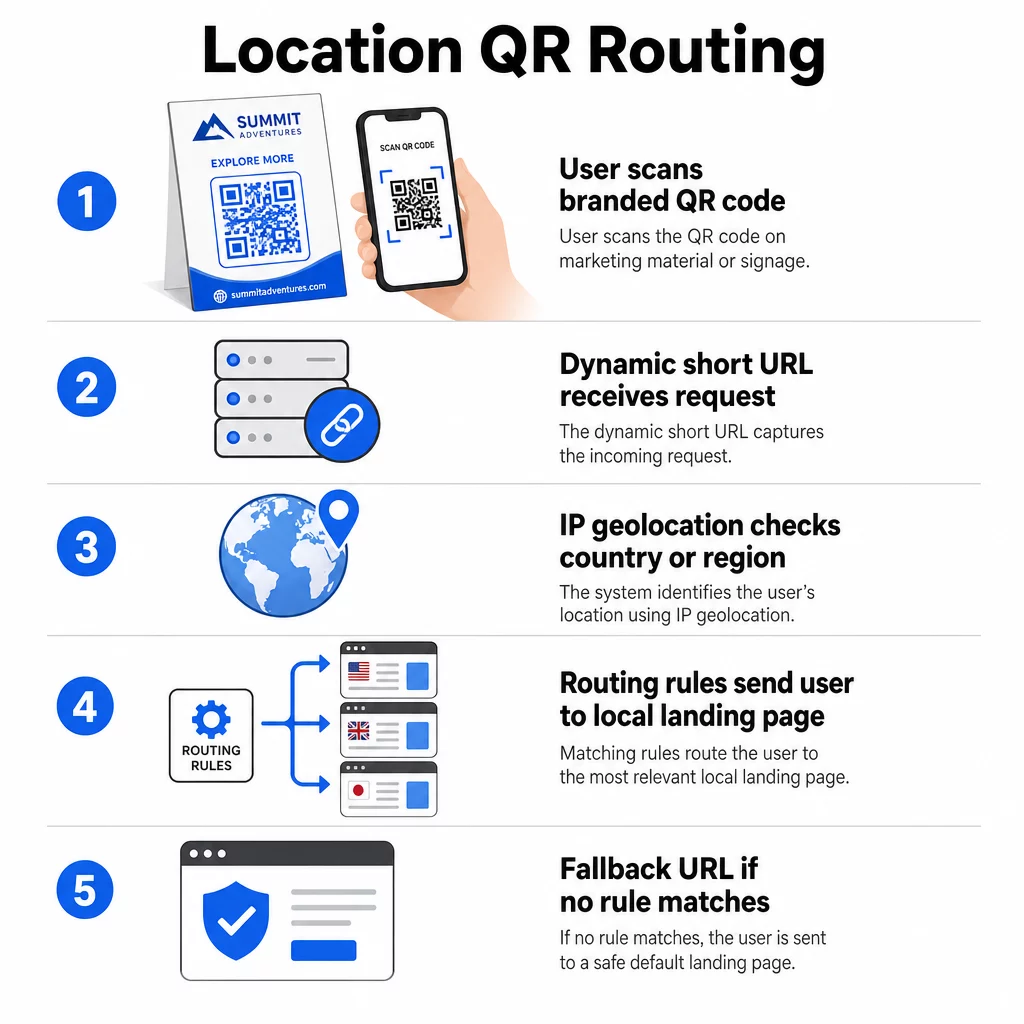
Dieser Ansatz ist auf Länderebene zuverlässig – die Genauigkeit wird für die Landerkennung im Allgemeinen im Bereich von 90–99 % angegeben – nimmt jedoch für kleinere geografische Gebiete erheblich ab. Die Erkennung auf regionaler oder Bundesstaatsebene liegt bei etwa 55–80 % Genauigkeit, und die Genauigkeit auf Stadtebene sinkt auf 50–75 %. Mehrere Faktoren verringern die Zuverlässigkeit zusätzlich:
- VPN- oder Proxy-Nutzung, bei der der scheinbare IP-Standort vom physischen Standort des Benutzers abweicht
- Mobile Carrier-Grade NAT, das IPs zuweisen kann, die weit vom tatsächlichen Gerät entfernt registriert sind
- Unternehmensnetzwerke, bei denen der Datenverkehr über eine zentrale Büro-IP geleitet wird
- Veraltete Geolocation-Datenbanken, die IP-Neuzuordnungen nicht berücksichtigt haben
Für Kampagnen, bei denen eine länderspezifische Ausrichtung ausreicht – verschiedene Sprachversionen, regionale Werbeaktionen, länderspezifische Storefronts – funktioniert die IP-basierte Erkennung gut. Für eine hyperlokale Ausrichtung auf Stadtteil- oder Veranstaltungsortebene bietet die GPS-basierte Ortung (sofern der Benutzer die Erlaubnis erteilt) eine höhere Präzision, erfordert jedoch eine explizite Zustimmungsaufforderung.
Konfigurieren Sie immer eine Standard-Fallback-URL für Scanner, deren Standort nicht bestimmt werden kann oder die außerhalb Ihrer definierten Regeln liegen. Dies verhindert, dass jemand in einer Sackgasse landet.
Was Sie vor dem Start benötigen
Bevor Sie Standortregeln einrichten, halten Sie diese drei Dinge bereit:
- Eine dynamische QR-Code-Plattform die geografisches Routing unterstützt. Suchen Sie nach einer, mit der Sie Ziel-URLs pro Land oder Region definieren, Regeln ohne Neudruck aktualisieren und Scandaten nach Standort verfolgen können. Die Funktionen von Pageloot umfassen all dies in einem Dashboard.
- Ziel-URLs für jede Zielregion. Diese sollten vor dem Start vollständig erstellt und mobil optimiert sein. Jede regionale Seite sollte die lokale Sprache, Währung, Angebote oder Geschäftsinformationen entsprechend widerspiegeln.
- Eine Fallback-URL die für jeden Scanner funktioniert, der keiner spezifischen Regel zugeordnet ist – typischerweise Ihre Hauptwebsite oder eine neutrale Landingpage, auf der Benutzer ihre Region selbst auswählen können.
So richten Sie eine standortbasierte Weiterleitung ein
Schritt 1: Erstellen Sie einen dynamischen QR-Code
Melden Sie sich für einen dynamischen QR-Code-Plan an und erstellen Sie einen neuen Code mit dem Dynamischer QR-Code Generator. Geben Sie in diesem Schritt eine Platzhalter-Ziel-URL ein – die Standortregeln konfigurieren Sie als Nächstes. Passen Sie das Erscheinungsbild des Codes mit Ihren Markenfarben und Ihrem Logo an, um Vertrauen aufzubauen und zum Scannen anzuregen.
Schritt 2: Geografische Weiterleitungsregeln konfigurieren
Suchen Sie in Ihrem QR-Code-Verwaltungs-Dashboard die Weiterleitungs- oder Routing-Einstellungen für den gerade erstellten Code. Fügen Sie Regeln nach Land (oder Region, falls unterstützt) hinzu:
- Wählen Sie ein Zielgebiet aus (zum Beispiel Deutschland)
- Geben Sie die Ziel-URL für dieses Gebiet ein (zum Beispiel Ihre deutschsprachige Produktseite)
- Wiederholen Sie dies für jedes Land oder jede Region, die Sie ansprechen möchten
- Legen Sie Ihre Standard-Fallback-URL für alle anderen Standorte fest
Das System verwendet temporäre HTTP-302-Weiterleitungen, was bedeutet, dass die Kurz-URL immer gleich bleibt, während das Ziel jederzeit aktualisiert werden kann, ohne den gedruckten Code zu beeinflussen.
Schritt 3: Branding zum QR-Code hinzufügen
Ein gebrandeter QR-Code – mit Ihrem Logo mittig im Muster und Farben, die Ihrer Identität entsprechen – ermutigt Benutzer, ihn zu scannen, anstatt ihn zu ignorieren. Die meisten Plattformen ermöglichen es Ihnen, Logogröße, Farbpalette und Kantenstil zu steuern. Stellen Sie sicher, dass der Kontrast zwischen Vordergrund und Hintergrund des Codes hoch genug für ein zuverlässiges Scannen bleibt, insbesondere wenn der Code auf verschiedenen Oberflächen oder unter unterschiedlichen Lichtverhältnissen erscheint.
Für einen tieferen Einblick in Geofencing und Best Practices für die Platzierung, einschließlich der 10:1 Größenregel für Druckmaterialien, deckt dieser Leitfaden die vollständige Checkliste für Design und Bereitstellung ab.
Schritt 4: Testen vor der Bereitstellung
Testen ist nicht verhandelbar. Bevor Sie etwas drucken oder veröffentlichen, überprüfen Sie, ob jede geografische Regel korrekt weiterleitet. Verwenden Sie ein VPN, das auf jedes Zielland eingestellt ist, um Scans von diesen Standorten zu simulieren, und bestätigen Sie, dass Sie jedes Mal die erwartete Ziel-URL erreichen. Testen Sie auch die Fallback-URL mit einem Standort außerhalb Ihrer definierten Regeln.
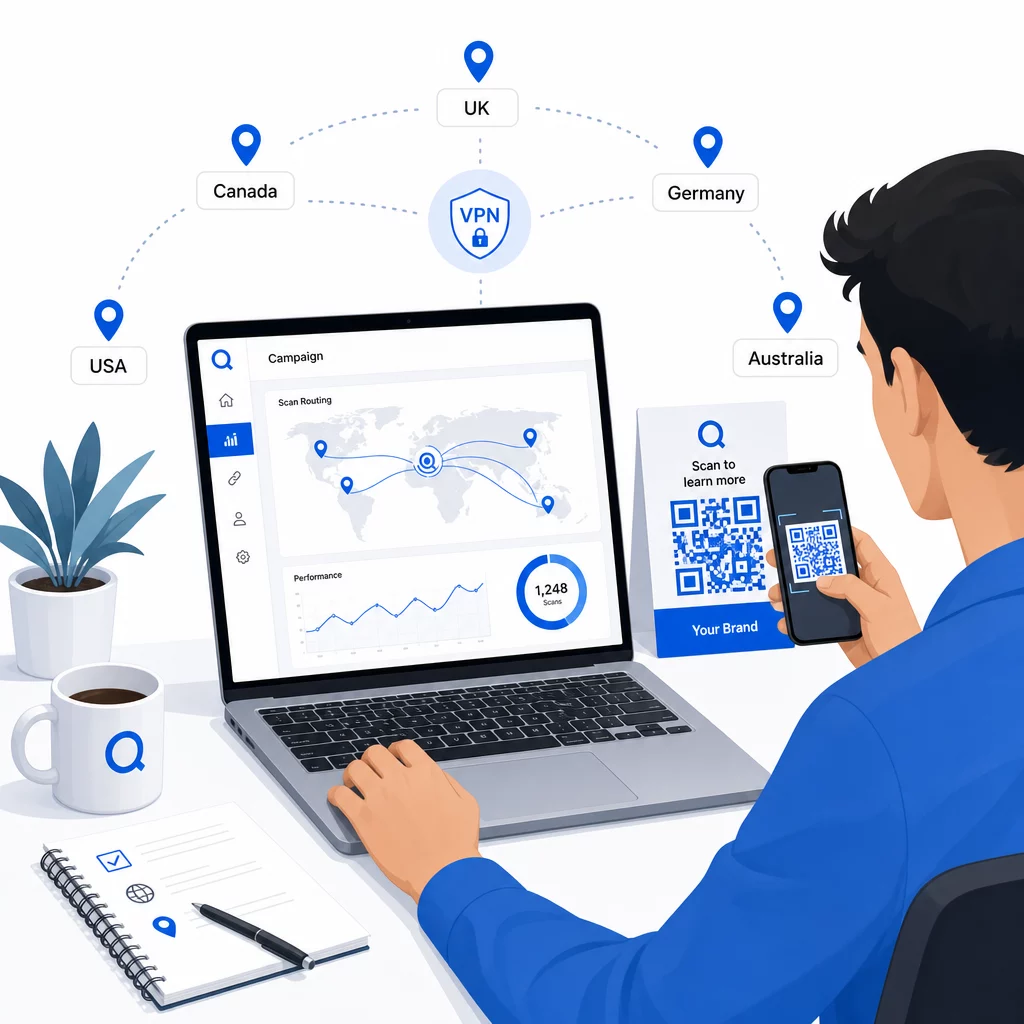
Testen Sie auf verschiedenen Gerätetypen (iOS und Android), sowohl über Wi-Fi- als auch über mobile Datenverbindungen und unter verschiedenen Lichtverhältnissen, um die Scannbarkeit zu bestätigen. Dokumentieren Sie alle Probleme und beheben Sie diese, bevor Sie live gehen. Wenn Sie später Änderungen vornehmen müssen, ist der Prozess zum Bearbeiten des Ziels eines dynamischen QR-Codes unkompliziert und erfordert kein erneutes Drucken.
Regionale Inhalte erstellen, die zum Scan anregen
Eine Standortregel, die einen Scanner auf eine generische Seite leitet, verfehlt den Zweck. Der Zielinhalt sollte widerspiegeln, was jede Geografie einzigartig macht:
- Sprache: Selbst innerhalb englischsprachiger Märkte unterscheiden sich Formulierungen, Rechtschreibung und Ton. Für nicht-englischsprachige Märkte wird eine vollständig übersetzte Seite erwartet.
- Lokale Angebote und Preise: Währung, Aktionszeitpunkte und Produktverfügbarkeit variieren je nach Region. Zeigen Sie, was an diesem Standort tatsächlich relevant und kaufbar ist.
- Filial- oder Kontaktinformationen: Wenn Sie physische Standorte haben, zeigen Sie den nächstgelegenen an, basierend auf dem Standort des Scanners.
- Regulatorische oder Compliance-Details: Einige Branchen – Lebensmittel und Getränke, Gesundheitswesen, Finanzdienstleistungen – haben regionsspezifische Offenlegungspflichten. Stellen Sie sicher, dass jede Seite den lokalen Standards entspricht.
Untersuchungen zeigen, dass 39 % der Kunden aktiv nach personalisierten QR-Code-Inhalten suchen. Eine regionsspezifische Seite ist keine nette Ergänzung – sie wird zunehmend zur Basiserwartung. Für einen umfassenderen Blick auf lokale Zielgruppen mit geotargeted QR-Codes erreichen, einschließlich realer Markenbeispiele, geht dieser Leitfaden tiefer in die Lokalisierungsstrategie ein.
Leistung messen und verbessern
Dynamische QR-Codes generieren automatisch Scandaten. Verwenden Sie das Analyse-Dashboard Ihrer Plattform, um Folgendes zu überwachen:
- Scanvolumen nach Land oder Region, um zu identifizieren, wo das Engagement am stärksten ist
- Scan-Zeitpunkt, um zu verstehen, wann Benutzer in jedem Markt am aktivsten sind
- Gerätetypen, um sicherzustellen, dass Ihre regionalen Seiten für das dominierende Gerät in jeder Region korrekt dargestellt werden
- Konversionsverhalten, wenn Sie UTM-Parameter mit Ihren Ziel-URLs verbunden und mit einem Tool wie Google Analytics integriert haben
Für eine vollständige Anleitung, was verfolgbar ist und wie die Daten zu interpretieren sind, bietet der Leitfaden zu Verfolgung von QR-Code-Scans und Analysen deckt die gesamte Palette der mit dynamischen Codes verfügbaren Metriken ab.
Nutzen Sie diese Daten, um A/B-Tests auf regionalen Landing Pages durchzuführen, die Platzierung physischer QR-Codes an Orten mit höherem Verkehrsaufkommen anzupassen und das Budget auf die Märkte zu verlagern, die die besten Ergebnisse erzielen. Überprüfen Sie die Leistung monatlich und aktualisieren Sie die Ziel-URLs, wenn sich Kampagnen, Angebote oder Inhalte ändern – ohne einen einzigen neuen Code zu drucken.
Jeden Scan nach Standort verfolgen Sehen Sie, welche Regionen das meiste Engagement erzielen, und passen Sie Ihre Kampagnen in Echtzeit an. Beginnen Sie mit dem Dynamischer QR-Code Generator und erhalten Sie vom ersten Tag an ein vollständiges Analyse-Dashboard.
Umgang mit Datenschutz und Datenkonformität
Das Sammeln von Standortdaten – selbst IP-basierter – schafft Compliance-Verpflichtungen. Die Regeln variieren je nach Region:
- DSGVO (Europäische Union): Sie benötigen eine rechtmäßige Grundlage für die Verarbeitung von Standortdaten. Für Marketingzwecke ist in der Regel eine ausdrückliche Einwilligung erforderlich. Seien Sie transparent darüber, welche Daten Sie sammeln und warum, bevor der Scan erfolgt.
- CCPA (Kalifornien): Nutzer haben das Recht zu erfahren, welche personenbezogenen Daten Sie speichern, und die Löschung zu beantragen. Ihre Plattform und Prozesse müssen diese Anfragen unterstützen.
- HIPAA (Vereinigte Staaten): Im Gesundheitswesen sind zusätzliche Schutzmaßnahmen für alle patientennahen Daten erforderlich, einschließlich Standortsignale, die mit gesundheitsbezogenen QR-Codes verknüpft sind.
Praktische Schritte zur Einhaltung der Vorschriften:
- Sammeln Sie Standortdaten nur, wenn dies die Benutzererfahrung auf eine spezifische, nachvollziehbare Weise verbessert
- Informieren Sie Nutzer klar – bevor sie scannen – welche Daten gesammelt und wie sie verwendet werden
- Bieten Sie einen alternativen Weg für Nutzer an, die die Standortfreigabe ablehnen (z. B. eine Seite, auf der sie ihre Region manuell auswählen können)
- Verwenden Sie durchgängig HTTPS und verschlüsselte Datenspeicherung
- Arbeiten Sie mit einer Plattform, die anerkannte Sicherheitsstandards erfüllt und Ihnen die Verwaltung der Datenaufbewahrung ermöglicht
Halten Sie Ihre Datenschutzerklärung kurz, in einfacher Sprache und leicht auffindbar – auch auf jedem gedruckten Material, das den QR-Code enthält.
Einschränkungen, die zu beachten sind
IP-basierte Geolokalisierung ist nicht perfekt, und einige Benutzer werden unweigerlich an das falsche regionale Ziel weitergeleitet – insbesondere diejenigen, die VPNs verwenden, international reisen oder sich über ein Unternehmensnetzwerk verbinden. Ein paar Möglichkeiten, die Auswirkungen zu reduzieren:
- Stellen Sie auf jeder Landingpage immer einen sichtbaren Sprach- oder Regionswähler bereit, damit fehlgeleitete Benutzer ihre Erfahrung selbst korrigieren können
- Vermeiden Sie es, Inhalte geografisch so zu sperren, dass Benutzer frustriert werden, die wissen, dass sie Inhalte einer anderen Region wünschen
- Überwachen Sie Ihre Analysen auf Anomalien, wie z. B. unerwartet hohen Traffic aus einem Land, das nicht Ihrem Targeting entspricht, was auf Routing-Fehler hinweisen kann
Häufig gestellte Fragen
Nein. Da dynamische QR-Codes eine kurze Weiterleitungs-URL verwenden, die auf Serverebene gesteuert wird, können Sie Ziel-URLs für jede geografische Regel jederzeit aktualisieren, ohne den Code selbst zu ändern oder neu zu drucken. Der gedruckte Code bleibt derselbe; nur die Routing-Logik ändert sich.
Die Genauigkeit auf Länderebene ist im Allgemeinen hoch – in den meisten Fällen etwa 90–99 % – was sie zuverlässig macht, um Benutzer auf länderspezifische Seiten oder Sprachversionen weiterzuleiten. Die Genauigkeit sinkt erheblich auf regionaler, Stadt- oder Nachbarschaftsebene und ist für Benutzer mit VPNs, Mobilfunkanbietern mit zentralisiertem IP-Routing oder Unternehmensnetzwerken weiter reduziert. Wenn Sie eine präzisere lokale Ausrichtung benötigen, suchen Sie nach Plattformen, die GPS-basierte Standortbestimmung mit Zustimmung des Benutzers unterstützen.
Das System leitet den Scanner zur standardmäßigen Fallback-URL weiter, die Sie beim Einrichten des Codes konfigurieren. Deshalb ist die Definition eines zuverlässigen Fallback-Ziels – typischerweise Ihre Hauptwebsite oder eine neutrale Landingpage mit einem manuellen Regionswähler – ein wesentlicher Bestandteil jeder standortbasierten QR-Einrichtung.