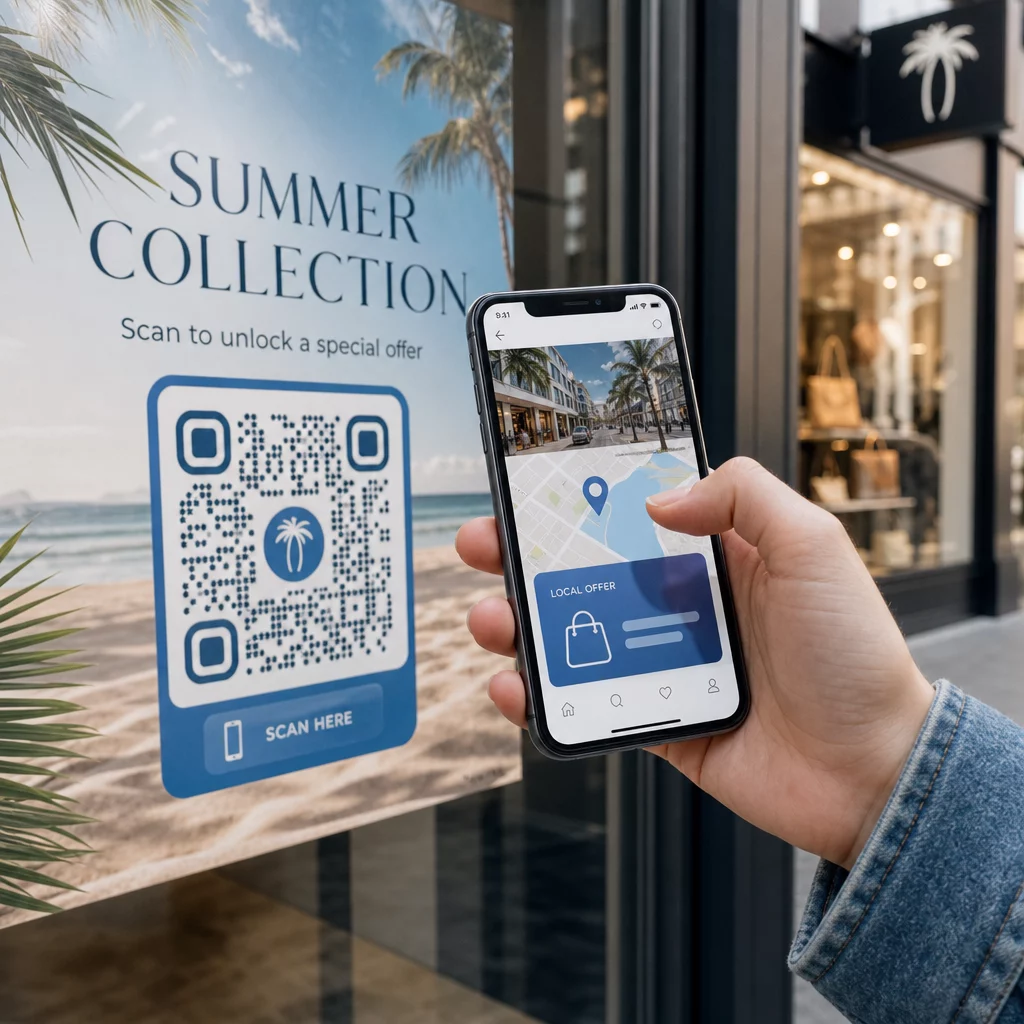
Želite, da vsak skener pristane na vsebini, ki je relevantna za njegovo lokacijo? Ko ena sama QR koda pošlje vse na isto stran ne glede na geografsko lokacijo, izgubite priložnost, da nagovorite lokalno občinstvo s ciljanimi ponudbami, jezikom in kontekstom. Ta vodnik pojasnjuje, kako deluje preusmeritev QR kode na podlagi lokacije, kako jo nastaviti in na kaj morate biti pozorni.
Zakaj preusmeritev na podlagi lokacije zahteva dinamične QR kode
Standardna statična QR koda kodira fiksni URL neposredno v svoj vzorec. Ta destinacija se nikoli ne more spremeniti – vsakič bi morali natisniti novo kodo. Dinamične kode QR delujejo drugače: sama koda kodira kratek preusmeritveni URL, dejanska destinacija pa je nadzorovana na strežniku. To pomeni, da lahko kadar koli posodobite, kam koda kaže, ne da bi se dotaknili natisnjenega materiala.
Preusmeritev na podlagi lokacije temelji na tem. Ko nekdo skenira dinamično kodo, plast za preusmeritev preveri geografsko lokacijo skenerja – običajno izpeljano iz IP naslova naprave – in uporabi pravila, ki ste jih konfigurirali za prikaz URL-ja, specifičnega za državo ali regijo. Če se nobeno pravilo ne ujema, se sistem vrne na privzeti URL, ki ste ga nastavili.
Razumevanje razliko med statičnimi in dinamičnimi QR kodami je najpomembnejši prvi korak pred izgradnjo katere koli lokacijsko ozaveščene kampanje.
Ustvarite lokacijsko ozaveščene QR kode Ste pripravljeni poslati skenerje na pravo destinacijo glede na njihovo lokacijo? Uporabite QR generator za dinamične QR kode za izdelavo urejevalnih kod, ki jih je mogoče slediti, z vgrajenimi lokacijskimi pravili.
Kako dejansko deluje zaznavanje lokacije
Večina platform uporablja geolokacijo na podlagi IP-ja: ko naprava skenira QR kodo in odpre kratek preusmeritveni URL, zahteva vsebuje IP naslov. Platforma poišče ta IP v geolokacijski bazi podatkov, da določi državo ali regijo skenerja, nato pa preusmeri na ujemajoči se ciljni URL.
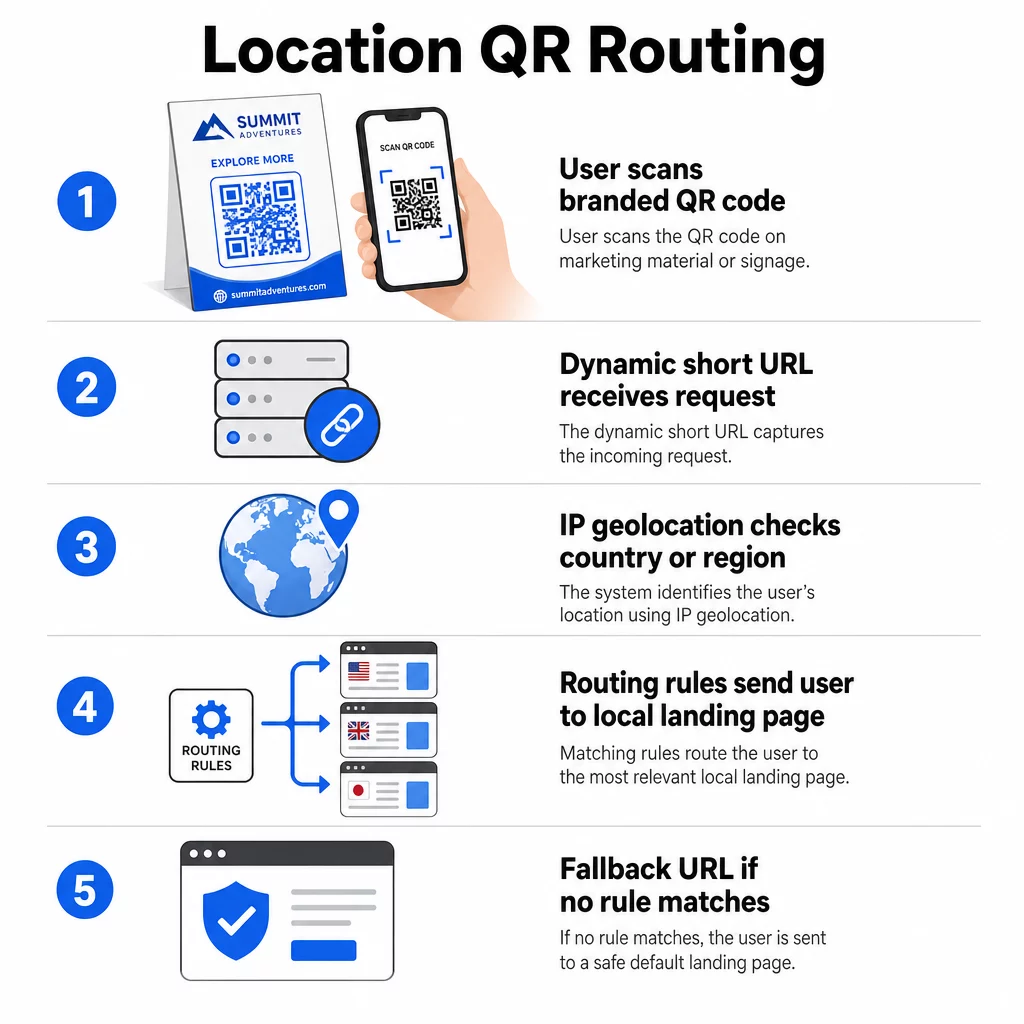
Ta pristop je zanesljiv na ravni države – natančnost je običajno poročana v razponu 90–99 % za zaznavanje države – vendar se znatno zmanjša za manjše geografske lokacije. Zaznavanje na regionalni ali državni ravni se giblje okoli 55–80 % natančnosti, natančnost na ravni mesta pa pade na 50–75 %. Zanesljivost dodatno zmanjšuje več dejavnikov:
- Uporaba VPN-ja ali proxyja, kjer se navidezna lokacija IP-ja razlikuje od fizične lokacije uporabnika
- Mobilni NAT operaterja, ki lahko dodeli IP-je, registrirane daleč od dejanske naprave
- Korporativna omrežja, kjer promet poteka preko centralnega IP-ja pisarne
- Zastarele geolokacijske baze podatkov, ki niso posodobljene z dodelitvami IP-jev
Za kampanje, kjer je ciljanje na ravni države zadostno – različne jezikovne različice, regionalne promocije, spletne trgovine za posamezne države – IP-temeljno zaznavanje deluje dobro. Za hiper-lokalno ciljanje na ravni soseske ali lokacije, GPS-temeljna lokacija (kjer uporabnik podeli dovoljenje) zagotavlja večjo natančnost, čeprav zahteva izrecno poziv za soglasje.
Vedno konfigurirajte privzeti nadomestni URL za skenerje, katerih lokacije ni mogoče določiti ali ki ne spadajo v vaša določena pravila. To preprečuje, da bi kdo naletel na slepo ulico.
Kaj potrebujete, preden začnete
Preden nastavite pravila lokacije, imejte pripravljene te tri stvari:
- Platforma za dinamične QR kode ki podpira geografsko usmerjanje. Poiščite takšno, ki vam omogoča določanje ciljnih URL-jev po državi ali regiji, posodabljanje pravil brez ponovnega tiskanja in sledenje podatkov o skeniranju po lokaciji. Funkcije Pageloota vključujejo vse to na eni nadzorni plošči.
- Ciljni URL-ji za vsako ciljno geografsko območje. Ti morajo biti v celoti izdelani in optimizirani za mobilne naprave, preden jih zaženete. Vsaka regionalna stran naj odraža lokalni jezik, valuto, ponudbe ali informacije o trgovini, kot je primerno.
- Nadomestni URL ki deluje za vsakega skenerja, ki se ne ujema z določenim pravilom – običajno vaša glavna spletna stran ali nevtralna pristajalna stran, kjer lahko uporabniki sami izberejo svojo regijo.
Kako nastaviti preusmeritev na podlagi lokacije
1. korak: Ustvarite dinamično QR kodo
Prijavite se za načrt dinamičnih QR kod in ustvarite novo kodo z uporabo QR generator za dinamične QR kode. Na tej stopnji vnesite nadomestni ciljni URL – pravila lokacije boste konfigurirali v naslednjem koraku. Prilagodite videz kode z barvami in logotipom vaše blagovne znamke, da zgradite zaupanje in spodbudite skeniranje.
2. korak: Konfigurirajte pravila geografskega usmerjanja
Znotraj nadzorne plošče za upravljanje QR kod poiščite nastavitve preusmeritve ali usmerjanja za kodo, ki ste jo pravkar ustvarili. Dodajte pravila po državi (ali regiji, če je podprto):
- Izberite ciljno geografsko območje (na primer, Nemčija)
- Vnesite ciljni URL za to geografsko območje (na primer, vaša stran izdelka v nemškem jeziku)
- Ponovite za vsako državo ali regijo, ki jo želite ciljati
- Nastavite privzeti nadomestni URL za vse druge lokacije
Sistem uporablja začasne preusmeritve HTTP 302, kar pomeni, da kratki URL vedno ostane enak, medtem ko se cilj lahko kadar koli posodobi, ne da bi to vplivalo na natisnjeno kodo.
3. korak: Dodajte blagovno znamko QR kodi
QR koda z blagovno znamko – z vašim logotipom, centriranim v vzorcu, in barvami, ki se ujemajo z vašo identiteto – spodbuja uporabnike k skeniranju, namesto da bi jo ignorirali. Večina platform vam omogoča nadzor nad velikostjo logotipa, barvno paleto in slogom robov. Poskrbite, da bo kontrast med ospredjem in ozadjem kode dovolj visok za zanesljivo skeniranje, še posebej, če se bo koda pojavila na različnih površinah ali v različnih svetlobnih pogojih.
Za podrobnejši vpogled v geofencing in najboljše prakse umestitve, vključno s pravilom velikosti 10:1 za tiskane materiale, ta vodnik zajema celoten kontrolni seznam za načrtovanje in uvedbo.
Korak 4: Testiranje pred uvedbo
Testiranje je nujno. Preden karkoli natisnete ali objavite, preverite, ali se vsako geografsko pravilo pravilno usmerja. Uporabite VPN, nastavljen na vsako ciljno državo, da simulirate skeniranje s teh lokacij, in potrdite, da vsakič prispete na pričakovani ciljni URL. Preizkusite tudi nadomestni URL z lokacijo zunaj katerega koli od vaših določenih pravil.
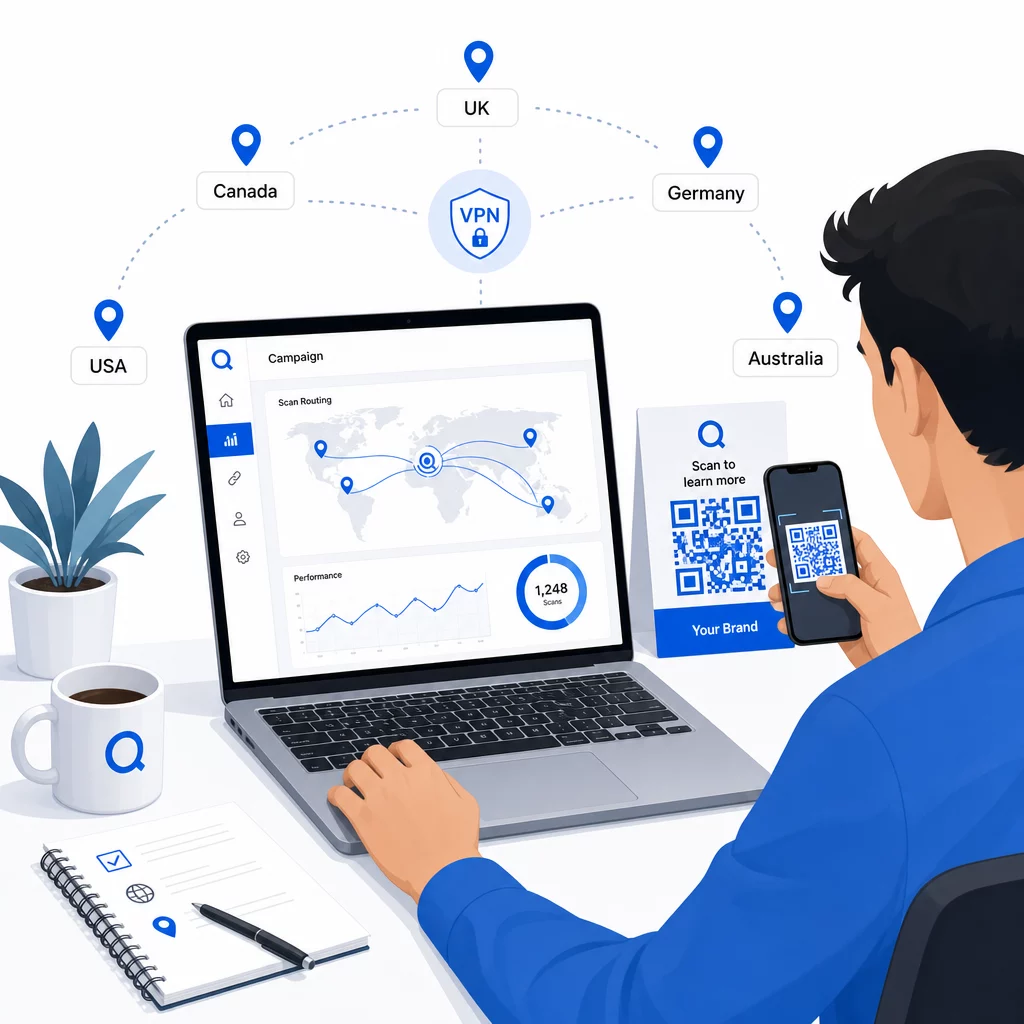
Testirajte na več vrstah naprav (iOS in Android), tako na Wi-Fi kot na mobilnih podatkovnih povezavah, in v različnih svetlobnih pogojih, da potrdite možnost skeniranja. Dokumentirajte morebitne težave in jih odpravite pred zagonom. Če boste morali pozneje narediti spremembe, je postopek za urejanje cilja dinamične kode QR preprost in ne zahteva ponovnega tiskanja.
Ustvarjanje regionalne vsebine, ki pritegne skeniranje
Pravilo lokacije, ki skener preusmeri na generično stran, izniči namen. Ciljna vsebina mora odražati, kaj dela vsako geografsko območje edinstveno:
- Jezik: Tudi znotraj angleško govorečih trgov se besedilo, črkovanje in ton razlikujejo. Za neangleške trge se pričakuje popolnoma prevedena stran.
- Lokalne ponudbe in cene: Valuta, čas promocij in razpoložljivost izdelkov se razlikujejo glede na regijo. Pokažite, kaj je dejansko relevantno in kupno na tej lokaciji.
- Informacije o trgovini ali kontaktu: Če imate fizične lokacije, prikažite najbližjo glede na to, kje se nahaja skener.
- Regulativne podrobnosti ali podrobnosti o skladnosti: Nekatere industrije – hrana in pijača, zdravstvo, finančne storitve – imajo regijsko specifične zahteve glede razkritja. Zagotovite, da vsaka stran ustreza lokalnim standardom.
Raziskave kažejo, da 39 % strank aktivno išče personalizirano vsebino kode QR. Regijsko specifična stran ni le lep dodatek – vse bolj je osnovno pričakovanje. Za širši pogled na Doseganje lokalnega občinstva z geografsko ciljanimi QR kodami, vključno z resničnimi primeri blagovnih znamk, ta vodnik podrobneje obravnava strategijo lokalizacije.
Merjenje in izboljšanje uspešnosti
Dinamične QR kode samodejno generirajo podatke o skeniranju. Uporabite nadzorno ploščo za analitiko vaše platforme za spremljanje:
- Obseg skeniranj po državi ali regiji, da ugotovite, kje je angažiranost najmočnejša
- Čas skeniranja, da razumete, kdaj so uporabniki najbolj aktivni na posameznem trgu
- Vrste naprav, da zagotovite, da se vaše regionalne strani pravilno prikazujejo za prevladujočo napravo v vsaki geografski regiji
- Vedenje pri konverziji, če ste parametre UTM povezali s svojimi ciljnimi URL-ji in se integrirali z orodjem, kot je Google Analytics
Za popoln pregled, kaj je mogoče slediti in kako interpretirati podatke, vodnik o sledenje skeniranj QR kod in analitiko zajema celoten nabor metrik, ki so na voljo z dinamičnimi kodami.
Uporabite te podatke za izvajanje A/B testov na regionalnih pristajalnih straneh, prilagodite postavitev fizičnih QR kod na lokacije z večjim prometom in preusmerite proračun na trge, ki prinašajo najboljše rezultate. Mesečno pregledujte uspešnost in posodabljajte ciljne URL-je, ko se spreminjajo kampanje, ponudbe ali vsebina – ne da bi natisnili eno samo novo kodo.
Sledite vsakemu skeniranju po lokaciji Oglejte si, katere regije ustvarjajo največjo angažiranost, in prilagodite svoje kampanje v realnem času. Začnite z QR generator za dinamične QR kode in pridobite celotno analitično nadzorno ploščo od prvega dne.
Obravnavanje zasebnosti in skladnosti s podatki
Zbiranje podatkov o lokaciji – tudi na podlagi IP-ja – ustvarja odgovornosti glede skladnosti. Pravila se razlikujejo glede na regijo:
- GDPR (Evropska unija): Potrebujete zakonito podlago za obdelavo podatkov o lokaciji. Za tržne namene je običajno potrebno izrecno soglasje. Bodite transparentni glede tega, katere podatke zbirate in zakaj, preden pride do skeniranja.
- CCPA (Kalifornija): Uporabniki imajo pravico vedeti, katere osebne podatke hranite, in zahtevati izbris. Vaša platforma in procesi morajo podpirati te zahteve.
- HIPAA (Združene države): Zdravstveni konteksti zahtevajo dodatne zaščitne ukrepe za vse podatke, povezane s pacienti, vključno z lokacijskimi signali, vezanimi na QR kode, povezane z zdravjem.
Praktični koraki za ohranjanje skladnosti:
- Podatke o lokaciji zbirajte le, če na specifičen, izrazit način izboljšujejo uporabniško izkušnjo
- Uporabnikom jasno povejte – preden skenirajo – katere podatke zbirate in kako se uporabljajo
- Zagotovite nadomestno pot za uporabnike, ki zavrnejo deljenje lokacije (na primer stran, kjer lahko ročno izberejo svojo regijo)
- Vseskozi uporabljajte HTTPS in šifrirano shranjevanje podatkov
- Sodelujte s platformo, ki izpolnjuje priznane varnostne standarde in vam omogoča upravljanje hrambe podatkov
Vaše obvestilo o zasebnosti naj bo kratko, v preprostem jeziku in enostavno za iskanje – vključno z vsemi tiskanimi materiali, ki vsebujejo QR kodo.
Omejitve, ki jih je treba upoštevati
Geolokacija na podlagi IP-ja ni popolna in nekateri uporabniki bodo neizogibno preusmerjeni na napačno regionalno destinacijo – zlasti tisti, ki uporabljajo VPN-je, potujejo mednarodno ali se povezujejo prek korporativnega omrežja. Nekaj načinov za zmanjšanje vpliva:
- Vedno zagotovite viden izbirnik jezika ali regije na vsaki pristajalni strani, da lahko napačno usmerjeni uporabniki sami popravijo svojo izkušnjo
- Izogibajte se trdemu zaklepanju vsebine po geografiji na načine, ki frustrirajo uporabnike, ki vedo, da želijo vsebino druge regije
- Spremljajte svojo analitiko za anomalije, kot je nepričakovano visok promet iz države, ki se ne ujema z vašim ciljanjem, kar lahko kaže na napake pri usmerjanju
Pogosta vprašanja
Ne. Ker dinamične QR kode uporabljajo kratek preusmeritveni URL, nadzorovan na ravni strežnika, lahko kadar koli posodobite ciljne URL-je za katero koli geografsko pravilo, ne da bi spremenili ali ponovno natisnili samo kodo. Natisnjena koda ostane enaka; spremeni se le logika usmerjanja.
Natančnost na ravni države je na splošno visoka – okoli 90–99 % v večini primerov – zaradi česar je zanesljiva za usmerjanje uporabnikov na strani, specifične za državo, ali jezikovne različice. Natančnost se znatno zmanjša na regionalni, mestni ali soseski ravni in se še dodatno zmanjša za uporabnike na VPN-jih, mobilnih operaterjih s centraliziranim usmerjanjem IP-ja ali podjetniških omrežjih. Če potrebujete natančnejše lokalno ciljanje, poiščite platforme, ki podpirajo lokacijo na podlagi GPS-a s soglasjem uporabnika.
Sistem preusmeri skener na privzeti nadomestni URL, ki ga konfigurirate ob nastavitvi kode. Zato je opredelitev zanesljive nadomestne destinacije – običajno vaše glavno spletno mesto ali nevtralna pristajalna stran z ročnim izbirnikom regije – bistveni del vsake nastavitve QR kode, ki temelji na lokaciji.