Quer que cada scanner chegue a conteúdo relevante para onde está? Quando um único código QR envia todos para a mesma página, independentemente da geografia, você perde a chance de falar com públicos locais com ofertas, idioma e contexto direcionados. Este guia explica como funciona o redirecionamento de código QR baseado em localização, como configurá-lo e o que observar.
Por que o Redirecionamento Baseado em Localização Requer Códigos QR Dinâmicos
Um código QR estático padrão codifica um URL fixo diretamente em seu padrão. Esse destino nunca pode mudar – você teria que imprimir um novo código a cada vez. Códigos QR dinâmicos funcionam de forma diferente: o próprio código codifica um URL de redirecionamento curto, e o destino real é controlado em um servidor. Isso significa que você pode atualizar para onde o código aponta a qualquer momento, sem tocar no material impresso.
O redirecionamento baseado em localização baseia-se nesta fundação. Quando alguém escaneia um código dinâmico, a camada de redirecionamento verifica a localização geográfica do scanner – tipicamente derivada do endereço IP do dispositivo – e aplica regras que você configurou para servir um URL específico do país ou da região. Se nenhuma regra corresponder, o sistema retorna a um URL padrão que você definiu.
Compreender as diferença entre códigos QR estáticos e dinâmicos é o primeiro passo mais importante antes de construir qualquer campanha com reconhecimento de localização.
Criar Códigos QR com Reconhecimento de Localização Pronto para enviar scanners para o destino certo com base em onde estão? Use o Gerador de QR Code Dinâmico para construir códigos editáveis e rastreáveis com regras de localização incorporadas.
Como a Detecção de Localização Realmente Funciona
A maioria das plataformas usa geolocalização baseada em IP: quando um dispositivo escaneia o código QR e abre o URL de redirecionamento curto, a solicitação carrega um endereço IP. A plataforma consulta esse IP em um banco de dados de geolocalização para determinar o país ou região do scanner, e então roteia para o URL de destino correspondente.
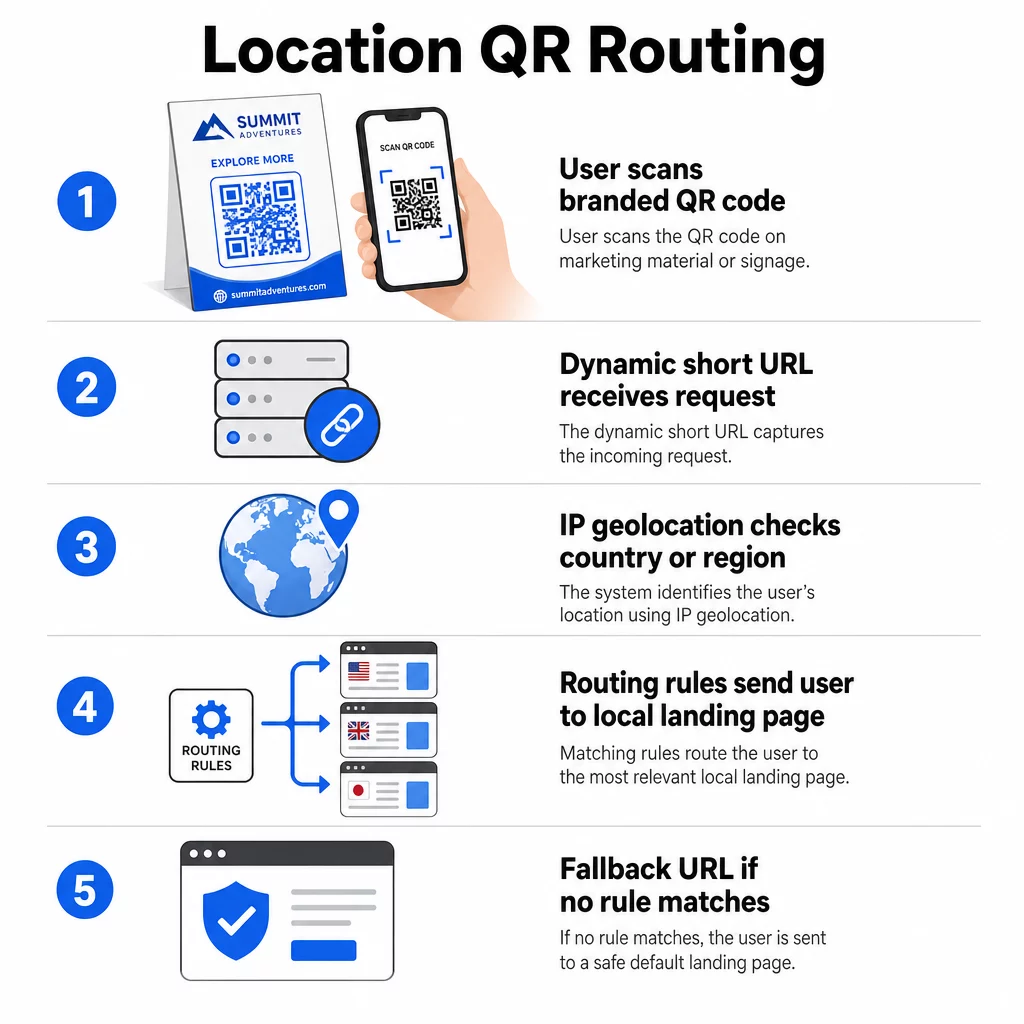
Esta abordagem é confiável a nível de país – a precisão é geralmente relatada na faixa de 90–99% para detecção de país – mas cai consideravelmente para geografias menores. A detecção a nível regional ou estadual gira em torno de 55–80% de precisão, e a precisão a nível de cidade cai para 50–75%. Vários fatores reduzem ainda mais a confiabilidade:
- Uso de VPN ou proxy, onde a localização aparente do IP difere da localização física do usuário
- NAT de nível de operadora móvel, que pode atribuir IPs registrados longe do dispositivo real
- Redes corporativas, onde o tráfego é roteado através de um IP de escritório central
- Bancos de dados de geolocalização desatualizados que não acompanharam as reatribuições de IP
Para campanhas onde o direcionamento em nível de país é suficiente – diferentes versões de idioma, promoções regionais, lojas específicas de cada país – a detecção baseada em IP funciona bem. Para direcionamento hiperlocal em nível de bairro ou local, a localização baseada em GPS (onde o usuário concede permissão) oferece maior precisão, embora exija um prompt de consentimento explícito.
Sempre configure uma URL de fallback padrão para scanners cuja localização não pode ser determinada ou que estão fora das suas regras definidas. Isso evita que qualquer pessoa chegue a um beco sem saída.
O Que Você Precisa Antes de Começar
Antes de configurar as regras de localização, tenha estas três coisas prontas:
- Uma plataforma de código QR dinâmico que suporte roteamento geográfico. Procure uma que permita definir URLs de destino por país ou região, atualizar regras sem reimprimir e rastrear dados de leitura por localização. Os recursos do Pageloot incluem tudo isso em um único painel.
- URLs de destino para cada geografia alvo. Estas devem estar totalmente construídas e otimizadas para dispositivos móveis antes do lançamento. Cada página regional deve refletir o idioma local, moeda, ofertas ou informações da loja, conforme apropriado.
- Uma URL de fallback que funcione para qualquer scanner não correspondido por uma regra específica – tipicamente seu site principal ou uma página de destino neutra onde os usuários podem selecionar sua região.
Como Configurar o Redirecionamento Baseado em Localização
Passo 1: Criar um Código QR Dinâmico
Inscreva-se em um plano de código QR dinâmico e crie um novo código usando o Gerador de QR Code Dinâmico. Nesta fase, insira um URL de destino provisório – você configurará as regras de localização a seguir. Personalize a aparência do código com as cores e o logotipo da sua marca para construir confiança e incentivar a leitura.
Passo 2: Configurar Regras de Roteamento Geográfico
Dentro do seu painel de gerenciamento de código QR, localize as configurações de redirecionamento ou roteamento para o código que você acabou de criar. Adicione regras por país (ou região, se suportado):
- Selecione uma geografia alvo (por exemplo, Alemanha)
- Insira o URL de destino para essa geografia (por exemplo, sua página de produto em alemão)
- Repita para cada país ou região que você deseja segmentar
- Defina seu URL de fallback padrão para todas as outras localizações
O sistema usa redirecionamentos HTTP temporários 302, o que significa que o URL curto permanece sempre o mesmo, enquanto o destino pode ser atualizado a qualquer momento sem afetar o código impresso.
Passo 3: Adicionar Branding ao Código QR
Um código QR com a sua marca – com o seu logotipo centralizado no padrão e cores que combinam com a sua identidade – incentiva os usuários a digitalizar em vez de ignorá-lo. A maioria das plataformas permite controlar o tamanho do logotipo, a paleta de cores e o estilo das bordas. Certifique-se de que o contraste entre o primeiro plano e o fundo do código permaneça alto o suficiente para uma leitura confiável, especialmente se o código aparecer em superfícies variadas ou em diferentes condições de iluminação.
Para uma análise mais aprofundada sobre geofencing e melhores práticas de posicionamento, incluindo a regra de dimensionamento 10:1 para materiais impressos, esse guia abrange a lista de verificação completa de design e implantação.
Passo 4: Testar Antes de Implementar
Testar é inegociável. Antes de imprimir ou publicar qualquer coisa, verifique se cada regra geográfica direciona corretamente. Use uma VPN configurada para cada país de destino para simular leituras dessas localizações e confirme que você chega ao URL de destino esperado todas as vezes. Teste também o URL de fallback com uma localização fora de qualquer uma das suas regras definidas.
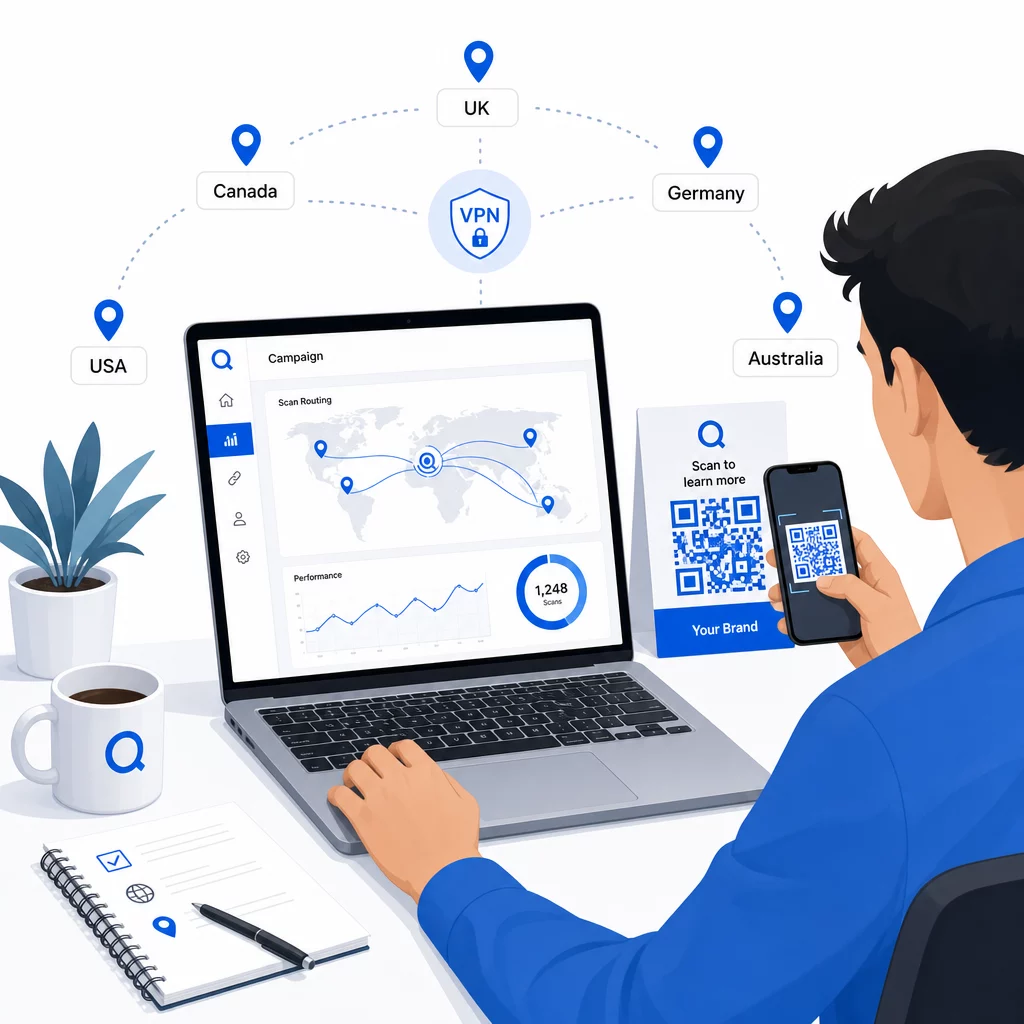
Teste em vários tipos de dispositivos (iOS e Android), em conexões Wi-Fi e de dados móveis, e em diferentes condições de iluminação para confirmar a capacidade de leitura. Documente quaisquer problemas e resolva-os antes de entrar em operação. Se precisar fazer alterações posteriormente, o processo para editar o destino de um código QR dinâmico é simples e não exige reimprimir nada.
Criando Conteúdo Regional Que Conquista a Leitura
Uma regra de localização que direciona um leitor para uma página genérica anula o propósito. O conteúdo de destino deve refletir o que torna cada geografia distinta:
- Idioma: Mesmo dentro dos mercados de língua inglesa, a fraseologia, a ortografia e o tom diferem. Para mercados não-ingleses, espera-se uma página totalmente traduzida.
- Ofertas e preços locais: Moeda, tempo promocional e disponibilidade de produtos variam por região. Mostre o que é realmente relevante e comprável nessa localização.
- Informações de loja ou contato: Se você tem localizações físicas, mostre a mais próxima com base na localização do leitor.
- Detalhes regulatórios ou de conformidade: Algumas indústrias – alimentos e bebidas, saúde, serviços financeiros – têm requisitos de divulgação específicos da região. Garanta que cada página atenda aos padrões locais.
Pesquisas mostram que 39% dos clientes procuram ativamente conteúdo de código QR personalizado. Uma página específica da região não é uma boa adição – é cada vez mais a expectativa básica. Para uma visão mais ampla sobre alcançando públicos locais com códigos QR geodirecionados, incluindo exemplos de marcas do mundo real, esse guia aprofunda-se na estratégia de localização.
Medindo e Melhorando o Desempenho
Códigos QR dinâmicos geram dados de leitura automaticamente. Use o painel de análise da sua plataforma para monitorar:
- Volume de leitura por país ou região, para identificar onde o engajamento é mais forte
- Horário da leitura, para entender quando os usuários estão mais ativos em cada mercado
- Tipos de dispositivo, para garantir que suas páginas regionais sejam renderizadas corretamente para o dispositivo dominante em cada geografia
- Comportamento de conversão, se você conectou parâmetros UTM às suas URLs de destino e integrou com uma ferramenta como o Google Analytics
Para um guia completo do que é rastreável e como interpretar os dados, o guia sobre 10. rastreamento de scans de código QR e análises cobre toda a gama de métricas disponíveis com códigos dinâmicos.
Use esses dados para executar testes A/B em páginas de destino regionais, ajustar o posicionamento de códigos QR físicos para locais de maior tráfego e direcionar o orçamento para os mercados que produzem os melhores resultados. Revise o desempenho mensalmente e atualize as URLs de destino conforme campanhas, ofertas ou conteúdo mudam – sem imprimir um único novo código.
Rastreie Cada Leitura por Localização Veja quais regiões geram o maior engajamento e ajuste suas campanhas em tempo real. Comece com o Gerador de QR Code Dinâmico e obtenha um painel de análise completo desde o primeiro dia.
Lidando com Privacidade e Conformidade de Dados
A coleta de dados de localização – mesmo baseados em IP – cria responsabilidades de conformidade. As regras variam por região:
- RGPD (União Europeia): Você precisa de uma base legal para o processamento de dados de localização. Para fins de marketing, o consentimento explícito é geralmente exigido. Seja transparente sobre quais dados você coleta e por que antes que a leitura ocorra.
- CCPA (Califórnia): Os usuários têm o direito de saber quais dados pessoais você possui e de solicitar a exclusão. Sua plataforma e processos precisam suportar essas solicitações.
- HIPAA (Estados Unidos): Contextos de saúde exigem salvaguardas adicionais em torno de quaisquer dados adjacentes ao paciente, incluindo sinais de localização vinculados a códigos QR relacionados à saúde.
Passos práticos para manter a conformidade:
- Colete dados de localização apenas se isso melhorar a experiência do usuário de uma forma específica e articulável
- Informe os usuários claramente – antes de digitalizarem – quais dados são coletados e como são usados
- Ofereça um caminho alternativo para usuários que recusam o compartilhamento de localização (como uma página onde eles podem selecionar sua região manualmente)
- Use HTTPS e armazenamento de dados criptografado em todo o processo
- Trabalhe com uma plataforma que atenda a padrões de segurança reconhecidos e permita gerenciar a retenção de dados
Mantenha seu aviso de privacidade breve, em linguagem simples e fácil de encontrar – inclusive em qualquer material impresso que contenha o código QR.
Limitações a Ter em Mente
A geolocalização baseada em IP não é perfeita, e alguns utilizadores serão inevitavelmente encaminhados para o destino regional errado – particularmente aqueles que usam VPNs, viajam internacionalmente ou se conectam através de uma rede corporativa. Algumas formas de reduzir o impacto:
- Sempre forneça um seletor de idioma ou região visível em cada página de destino para que os utilizadores mal direcionados possam corrigir a sua experiência por si mesmos
- Evite bloquear rigidamente o conteúdo por geografia de formas que frustrem os utilizadores que sabem que querem o conteúdo de uma região diferente
- Monitorize os seus dados analíticos para anomalias, como tráfego inesperadamente alto de um país que não corresponde ao seu direcionamento, o que pode indicar erros de encaminhamento
Perguntas frequentes
Não. Porque os códigos QR dinâmicos usam um URL de redirecionamento curto controlado ao nível do servidor, pode atualizar os URLs de destino para qualquer regra geográfica a qualquer momento sem alterar ou reimprimir o próprio código. O código impresso permanece o mesmo; apenas a lógica de roteamento muda.
A precisão ao nível do país é geralmente alta – cerca de 90–99% na maioria dos casos – tornando-a fiável para direcionar os utilizadores para páginas específicas do país ou versões de idioma. A precisão diminui significativamente ao nível regional, da cidade ou do bairro, e é ainda mais reduzida para utilizadores em VPNs, operadoras móveis com encaminhamento IP centralizado ou redes corporativas. Se precisar de uma segmentação local mais precisa, procure plataformas que suportem localização baseada em GPS com o consentimento do utilizador.
O sistema direciona o leitor para o URL de fallback padrão que você configura ao configurar o código. É por isso que definir um destino de fallback confiável – tipicamente o seu website principal ou uma página de destino neutra com um seletor de região manual – é uma parte essencial de qualquer configuração de QR baseada em localização.