Chcete, aby každý skener pristál na obsahu, ktorý je relevantný pre jeho polohu? Keď jeden QR kód pošle všetkých na rovnakú stránku bez ohľadu na geografiu, strácate šancu osloviť miestne publikum cielenými ponukami, jazykom a kontextom. Táto príručka vysvetľuje, ako funguje presmerovanie QR kódu na základe polohy, ako ho nastaviť a na čo si dať pozor.
Prečo presmerovanie na základe polohy vyžaduje dynamické QR kódy
Štandardný statický QR kód kóduje pevnú URL adresu priamo do svojho vzoru. Táto destinácia sa nikdy nemôže zmeniť – zakaždým by ste museli vytlačiť nový kód. Dynamické kódy QR fungujú inak: samotný kód kóduje krátku presmerovaciu URL adresu a skutočná destinácia je riadená na serveri. To znamená, že môžete kedykoľvek aktualizovať, kam kód smeruje, bez toho, aby ste sa dotkli tlačeného materiálu.
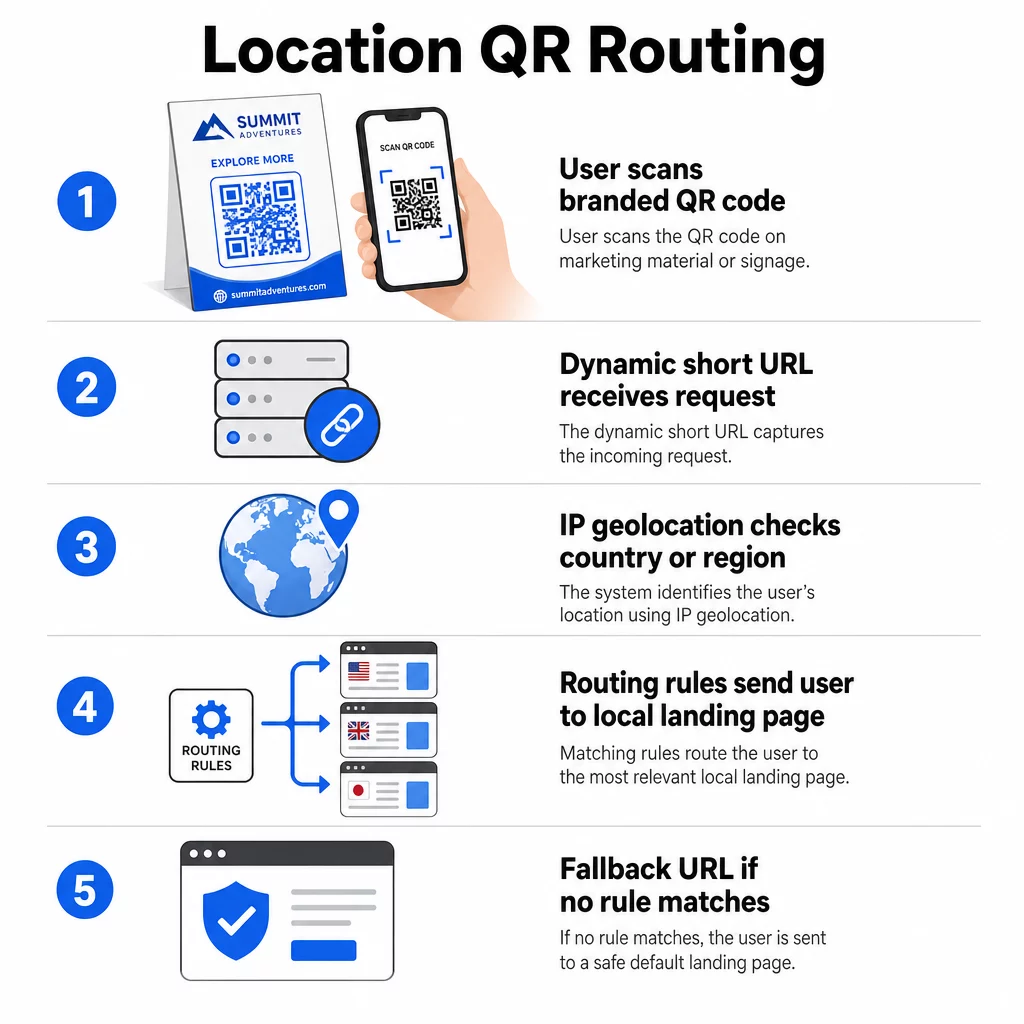
Presmerovanie na základe polohy stavia na tomto základe. Keď niekto naskenuje dynamický kód, presmerovacia vrstva skontroluje geografickú polohu skenera – typicky odvodenú z IP adresy zariadenia – a aplikuje pravidlá, ktoré ste nakonfigurovali na poskytnutie URL adresy špecifickej pre krajinu alebo región. Ak sa žiadne pravidlo nezhoduje, systém sa vráti k predvolenej URL adrese, ktorú ste nastavili.
Pochopenie rozdiel medzi statickými a dynamickými QR kódmi je najdôležitejším prvým krokom pred vytvorením akejkoľvek kampane citlivej na polohu.
Vytvorte QR kódy citlivé na polohu Ste pripravení poslať skenery na správne miesto na základe ich polohy? Použite Dynamický QR kód generátor na vytvorenie upraviteľných, sledovateľných kódov so zabudovanými pravidlami polohy.
Ako skutočne funguje detekcia polohy
Väčšina platforiem používa geolokáciu na základe IP adresy: keď zariadenie naskenuje QR kód a otvorí krátku presmerovaciu URL adresu, požiadavka nesie IP adresu. Platforma vyhľadá túto IP adresu v geolokačnej databáze, aby určila krajinu alebo región skenera, a potom presmeruje na zodpovedajúcu cieľovú URL adresu.
Tento prístup je spoľahlivý na úrovni krajiny – presnosť sa vo všeobecnosti uvádza v rozsahu 90–99 % pre detekciu krajiny – ale výrazne klesá pre menšie geografické oblasti. Regionálna alebo štátna detekcia sa pohybuje okolo 55–80 % presnosti a presnosť na úrovni mesta klesá na 50–75 %. Spoľahlivosť ďalej znižuje niekoľko faktorov:
- Používanie VPN alebo proxy, kde sa zdanlivá poloha IP adresy líši od fyzickej polohy používateľa
- NAT na úrovni mobilného operátora, ktorý môže priradiť IP adresy registrované ďaleko od skutočného zariadenia
- Firemné siete, kde prevádzka smeruje cez centrálnu IP adresu kancelárie
- Zastarané geolokačné databázy, ktoré nezachytili priradenia IP adries
Pre kampane, kde je dostatočné cielenie na úrovni krajiny – rôzne jazykové verzie, regionálne akcie, e-shopy špecifické pre danú krajinu – detekcia založená na IP adrese funguje dobre. Pre hyperlokálne cielenie na úrovni štvrte alebo miesta, lokalizácia založená na GPS (kde používateľ udelí povolenie) poskytuje väčšiu presnosť, hoci si vyžaduje výzvu na výslovný súhlas.
Vždy nakonfigurujte predvolenú záložnú URL adresu pre skenery, ktorých polohu nemožno určiť alebo ktoré spadajú mimo vašich definovaných pravidiel. Tým sa zabráni tomu, aby sa niekto dostal do slepej uličky.
Čo potrebujete, než začnete
Pred nastavením pravidiel pre polohu majte pripravené tieto tri veci:
- Platforma pre dynamické QR kódy ktorá podporuje geografické smerovanie. Hľadajte takú, ktorá vám umožní definovať cieľové URL adresy pre jednotlivé krajiny alebo regióny, aktualizovať pravidlá bez opätovnej tlače a sledovať údaje o skenovaní podľa polohy. Funkcie Pageloot zahŕňajú všetky tieto funkcie v jednom prehľade.
- Cieľové URL adresy pre každú cieľovú geografickú oblasť. Tieto by mali byť plne vytvorené a optimalizované pre mobilné zariadenia pred spustením. Každá regionálna stránka by mala podľa potreby odrážať miestny jazyk, menu, ponuky alebo informácie o obchode.
- Záložná URL adresa ktorá funguje pre akýkoľvek skener, ktorý nie je priradený k špecifickému pravidlu – zvyčajne vaša hlavná webová stránka alebo neutrálna vstupná stránka, kde si používatelia môžu sami vybrať svoj región.
Ako nastaviť presmerovanie na základe polohy
Krok 1: Vytvorte dynamický QR kód
Zaregistrujte sa pre plán dynamického QR kódu a vytvorte nový kód pomocou Dynamický QR kód generátor. V tejto fáze zadajte zástupnú cieľovú URL adresu – pravidlá polohy nakonfigurujete ďalej. Prispôsobte vzhľad kódu farbami a logom vašej značky, aby ste vybudovali dôveru a podporili skenovanie.
Krok 2: Nakonfigurujte pravidlá geografického smerovania
Vo svojom paneli správy QR kódov nájdite nastavenia presmerovania alebo smerovania pre kód, ktorý ste práve vytvorili. Pridajte pravidlá podľa krajiny (alebo regiónu, ak je podporované):
- Vyberte cieľovú geografickú oblasť (napríklad Nemecko)
- Zadajte cieľovú URL adresu pre túto geografickú oblasť (napríklad vašu produktovú stránku v nemeckom jazyku)
- Opakujte pre každú krajinu alebo región, na ktorý sa chcete zamerať
- Nastavte svoju predvolenú záložnú URL adresu pre všetky ostatné miesta
Systém používa dočasné presmerovania HTTP 302, čo znamená, že krátka URL adresa zostáva vždy rovnaká, zatiaľ čo cieľ je možné kedykoľvek aktualizovať bez ovplyvnenia vytlačeného kódu.
Krok 3: Pridajte branding do QR kódu
Značkový QR kód – s vaším logom umiestneným v strede vzoru a farbami, ktoré zodpovedajú vašej identite – povzbudzuje používateľov k skenovaniu, namiesto aby ho ignorovali. Väčšina platforiem vám umožňuje ovládať veľkosť loga, farebnú paletu a štýl okrajov. Uistite sa, že kontrast medzi popredím a pozadím kódu zostáva dostatočne vysoký pre spoľahlivé skenovanie, najmä ak sa kód objaví na rôznych povrchoch alebo v rôznych svetelných podmienkach.
Pre hlbší pohľad na geofencing a osvedčené postupy umiestnenia, vrátane pravidla veľkosti 10:1 pre tlačové materiály, táto príručka pokrýva kompletný kontrolný zoznam návrhu a nasadenia.
Krok 4: Testujte pred nasadením
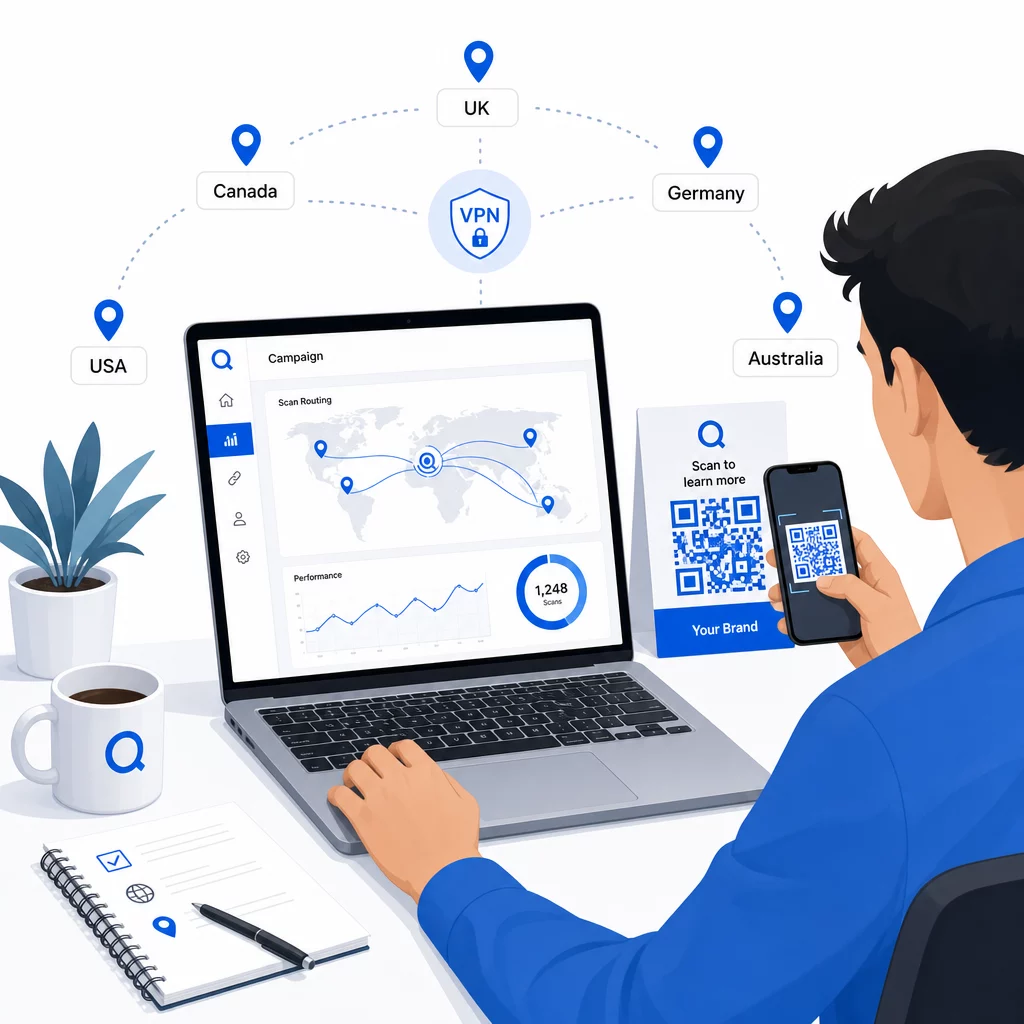
Testovanie je nevyhnutné. Pred tlačou alebo publikovaním čohokoľvek overte, či každé geografické pravidlo smeruje správne. Použite VPN nastavenú na každú cieľovú krajinu na simuláciu skenov z týchto miest a potvrďte, že vždy prídete na očakávanú cieľovú URL adresu. Otestujte aj záložnú URL adresu s miestom mimo akýchkoľvek definovaných pravidiel.
Testujte na viacerých typoch zariadení (iOS a Android), na pripojeniach Wi-Fi aj mobilných dátach a v rôznych svetelných podmienkach, aby ste potvrdili skenovateľnosť. Zdokumentujte všetky problémy a vyriešte ich pred spustením. Ak budete potrebovať vykonať zmeny neskôr, proces úpravy cieľa dynamického QR kódu je jednoduchý a nevyžaduje opätovnú tlač ničoho.
Tvorba regionálneho obsahu, ktorý si zaslúži sken
Pravidlo o polohe, ktoré smeruje skener na všeobecnú stránku, stráca zmysel. Obsah cieľa by mal odrážať to, čo robí každú geografickú oblasť odlišnou:
- Jazyk: Aj na anglicky hovoriacich trhoch sa líši formulácia, pravopis a tón. Pre neanglicky hovoriace trhy sa očakáva plne preložená stránka.
- Miestne ponuky a ceny: Mena, načasovanie akcií a dostupnosť produktov sa líšia podľa regiónu. Ukážte, čo je skutočne relevantné a kúpyschopné v danej lokalite.
- Informácie o obchode alebo kontakte: Ak máte fyzické pobočky, zobrazte tú najbližšiu na základe polohy skenera.
- Regulačné alebo súladné detaily: Niektoré odvetvia – potravinárstvo a nápoje, zdravotníctvo, finančné služby – majú regionálne špecifické požiadavky na zverejňovanie informácií. Zabezpečte, aby každá stránka spĺňala miestne normy.
Výskum ukazuje, že 39 % zákazníkov aktívne hľadá personalizovaný obsah QR kódu. Stránka špecifická pre región nie je len pekným doplnkom – čoraz viac je to základné očakávanie. Pre širší pohľad na oslovenie lokálneho publika pomocou geocielených QR kódov, vrátane príkladov značiek z reálneho sveta, táto príručka sa podrobnejšie zaoberá stratégiou lokalizácie.
Meranie a zlepšovanie výkonu
Dynamické QR kódy automaticky generujú údaje o skenovaní. Použite analytický panel vašej platformy na monitorovanie:
- Objem skenov podľa krajiny alebo regiónu, aby ste zistili, kde je angažovanosť najsilnejšia
- Časovanie skenovania, aby ste pochopili, kedy sú používatelia najaktívnejší na každom trhu
- Typy zariadení, aby ste zabezpečili správne zobrazenie vašich regionálnych stránok pre dominantné zariadenie v každej geografickej oblasti
- Konverzné správanie, ak ste pripojili parametre UTM k vašim cieľovým URL adresám a integrovali sa s nástrojom ako Google Analytics
Pre kompletný prehľad toho, čo je sledovateľné a ako interpretovať údaje, príručka o sledovaniu skenov QR kódov a analýze pokrýva celý rozsah metrík dostupných s dynamickými kódmi.
Použite tieto údaje na spustenie A/B testov na regionálnych vstupných stránkach, upravte umiestnenie fyzických QR kódov na miesta s vyššou návštevnosťou a presuňte rozpočet na trhy, ktoré prinášajú najlepšie výsledky. Výkon kontrolujte mesačne a aktualizujte cieľové URL adresy, keď sa zmenia kampane, ponuky alebo obsah – bez vytlačenia jediného nového kódu.
Sledujte každé skenovanie podľa lokality Zistite, ktoré regióny generujú najväčšiu angažovanosť a upravte svoje kampane v reálnom čase. Začnite s Dynamický QR kód generátor a získajte kompletný analytický panel od prvého dňa.
Správa súkromia a súladu s údajmi
Zhromažďovanie údajov o polohe – dokonca aj na základe IP adresy – vytvára povinnosti v oblasti súladu. Pravidlá sa líšia podľa regiónu:
- GDPR (Európska únia): Potrebujete právny základ na spracovanie údajov o polohe. Na marketingové účely sa zvyčajne vyžaduje výslovný súhlas. Buďte transparentní, pokiaľ ide o to, aké údaje zhromažďujete a prečo pred uskutočnením skenovania.
- CCPA (Kalifornia): Používatelia majú právo vedieť, aké osobné údaje uchovávate a požiadať o ich vymazanie. Vaša platforma a procesy musia podporovať tieto požiadavky.
- HIPAA (Spojené štáty): Zdravotnícke kontexty vyžadujú dodatočné záruky okolo akýchkoľvek údajov súvisiacich s pacientom, vrátane signálov o polohe spojených s QR kódmi súvisiacimi so zdravím.
Praktické kroky na zachovanie súladu:
- Zhromažďujte údaje o polohe iba vtedy, ak to zlepšuje používateľský zážitok špecifickým, vyjadriteľným spôsobom
- Jasne informujte používateľov – predtým, ako naskenujú – aké údaje sa zhromažďujú a ako sa používajú
- Poskytnite alternatívnu cestu pre používateľov, ktorí odmietnu zdieľanie polohy (napríklad stránku, kde si môžu manuálne vybrať svoj región)
- Používajte HTTPS a šifrované úložisko dát všade
- Pracujte s platformou, ktorá spĺňa uznávané bezpečnostné štandardy a umožňuje vám spravovať uchovávanie údajov
Udržujte svoje oznámenie o ochrane osobných údajov stručné, v jednoduchom jazyku a ľahko nájditeľné – vrátane akéhokoľvek tlačeného materiálu, ktorý obsahuje QR kód.
Obmedzenia, ktoré treba mať na pamäti
Geografická lokalizácia na základe IP adresy nie je dokonalá a niektorí používatelia budú nevyhnutne presmerovaní na nesprávnu regionálnu destináciu – najmä tí, ktorí používajú VPN, cestujú do zahraničia alebo sa pripájajú cez firemnú sieť. Niekoľko spôsobov, ako znížiť dopad:
- Vždy poskytnite viditeľný výber jazyka alebo regiónu na každej vstupnej stránke, aby si nesprávne nasmerovaní používatelia mohli sami opraviť svoje skúsenosti
- Vyhnite sa pevnému uzamykaniu obsahu podľa geografie spôsobmi, ktoré frustrujú používateľov, ktorí vedia, že chcú obsah z iného regiónu
- Monitorujte svoje analýzy pre anomálie, ako je neočakávane vysoká návštevnosť z krajiny, ktorá nezodpovedá vášmu cieľovaniu, čo môže naznačovať chyby smerovania
Často kladené otázky
Nie. Pretože dynamické QR kódy používajú krátku presmerovaciu URL adresu kontrolovanú na úrovni servera, môžete kedykoľvek aktualizovať cieľové URL adresy pre akékoľvek geografické pravidlo bez zmeny alebo opätovnej tlače samotného kódu. Vytlačený kód zostáva rovnaký; mení sa iba logika smerovania.
Presnosť na úrovni krajiny je vo všeobecnosti vysoká – približne 90–99 % vo väčšine prípadov – čo ju robí spoľahlivou na smerovanie používateľov na stránky špecifické pre danú krajinu alebo jazykové verzie. Presnosť výrazne klesá na regionálnej, mestskej alebo susedskej úrovni a ďalej sa znižuje pre používateľov na VPN, mobilných operátorov s centralizovaným smerovaním IP alebo firemných sietí. Ak potrebujete presnejšie lokálne cielenie, hľadajte platformy, ktoré podporujú určovanie polohy na základe GPS so súhlasom používateľa.
Systém presmeruje skener na predvolenú záložnú URL adresu, ktorú nakonfigurujete pri nastavovaní kódu. Preto je definovanie spoľahlivej záložnej destinácie – zvyčajne vašej hlavnej webovej stránky alebo neutrálnej vstupnej stránky s manuálnym výberom regiónu – nevyhnutnou súčasťou akéhokoľvek nastavenia QR kódu založeného na polohe.