ホーム > ブログ > QRコードが候補者追跡をどのように改善するか
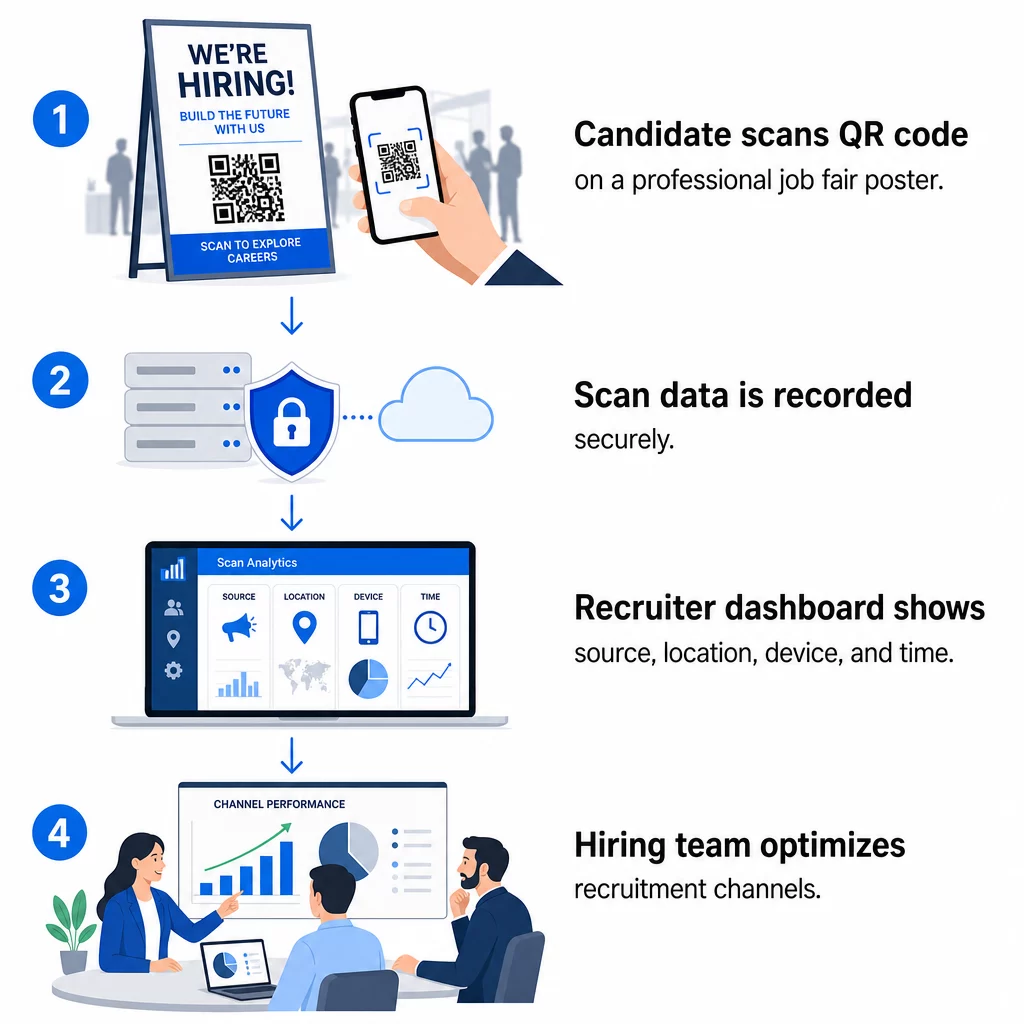
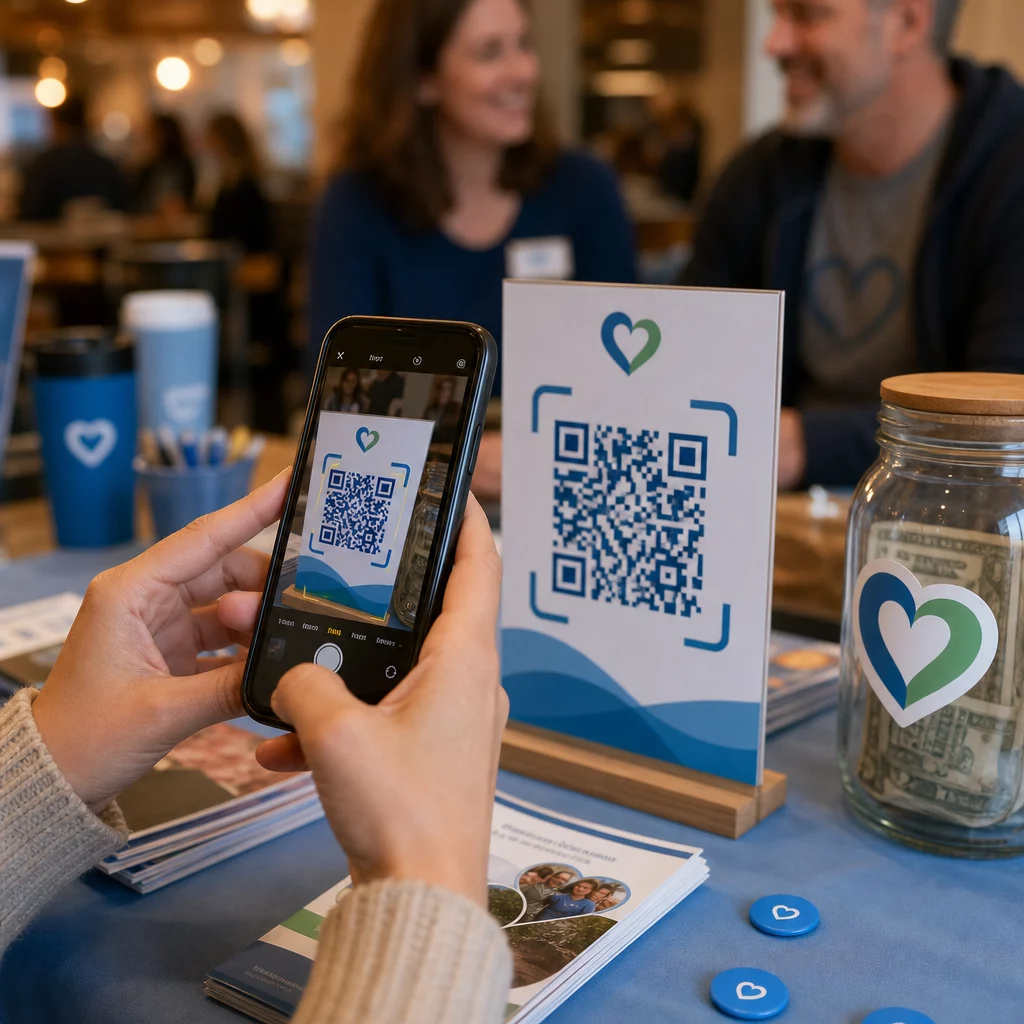
Candidate scans QR code

QRコードが候補者追跡をどのように改善するか

Use QR codes for candidate tracking to reduce application friction. Track scan data, manage dynamic links, and capture more talent at recruitment events.
Updated on 6月 10, 2026
目次

Are you losing qualified applicants because your hiring process creates too much friction? Outdated application workflows, manual data entry, and poor visibility into candidate engagement cost staffing firms time and top talent. This guide explains how QR codes solve those problems – and how to implement them in your recruitment process.

Why Candidate Tracking Falls Short Without QR Codes

Most staffing firms still rely on a patchwork of manual steps: candidates type in long URLs, fill out forms on desktop, or pick up a flyer at a job fair and never follow through. Each handoff is an opportunity for a qualified applicant to drop off.

The numbers reflect how candidates actually behave. Research from Pew Research Center found that 50% of smartphone job seekers used their phones to fill out an online job application, and around two-thirds of job applications are now submitted from mobile devices. When your application process isn’t built for mobile, you’re working against your own pipeline.

QR codes close that gap. A single scan takes a candidate from a physical touchpoint – a poster, a business card, a job fair booth – directly to an application form, job description, or scheduling link. No typing, no searching, no friction.

Where QR Codes Fit in Your Recruiting Workflow

QR codes aren’t a single-use tool. They can improve candidate interactions at every stage of the hiring funnel.

At job fairs and events. Place a QR code at your booth to direct visitors to specific job listings or collect contact information through a グーグルフォームQRコード. Every scan creates a digital record of the interaction – no business cards to lose, no spreadsheets to reconcile later. You can also simplify event check-ins using a QR code attendance system that logs arrivals automatically.

On printed materials. Flyers, posters, and brochures can reach candidates who aren’t actively job hunting. A ポスターのQRコード linking to a short video about your company culture or a current opening gives passive candidates a frictionless way to explore without committing to a full application immediately.

On business cards. Recruiters can include a リンクトインQRコード or a link to their current job listings so in-person conversations translate into actionable connections. Pageloot’s LinkedIn QRコードジェネレーター makes it easy to create a scannable code that links directly to your profile or company page.

In digital campaigns. Email newsletters, job boards, and social media posts can all feature QR codes that send candidates to a dedicated landing page. Using ダイナミックQRコード here lets you track which digital channels produce the most qualified applications.

For resume submissions. Linking a QR code to a Google Form or application portal lets candidates upload their information immediately, capturing intent when engagement is highest.

Streamline Event Recruiting Need to track attendee check-ins and capture candidate data in one step? The QR Code Attendance Tracker connects directly to Google Forms so every scan is automatically logged.

How QR Code Tracking Works for Recruiters

A QR code on its own is just a shortcut. The real value comes from the data it generates. ダイナミックQRコード record every scan with metrics including:

QR tracking workflow
  • Scan count – total and unique scans over time
  • Timestamp – when candidates are most likely to engage
  • Location data – which cities or regions your applications are coming from
  • Device type and operating system – confirming whether your mobile application flow is actually working

This data helps you answer practical questions: Are your job fair materials generating follow-ups? Is the QR code on your poster outperforming the one in your email? Which posting locations attract candidates who complete the full application?

You can learn more about reading and acting on this data in Pageloot’s guide to tracking QR code scans and analytics.

Adding UTM Parameters for Deeper Attribution

If your team uses Google Analytics, you can append UTM parameters to the URL your QR code points to. This lets you track QR-driven traffic alongside your other channels without any manual reconciliation. A code placed at a university career fair might use `utmsource=careerfair` and `utm媒体=qrcode`, making it easy to compare that channel against LinkedIn ads or job board traffic in GA4.

Pagelootのガイド QRコード用のUTMパラメータ walks through naming conventions and reporting setup in detail.

Track Every Recruitment Channel を使用しています。 ダイナミックQRコードジェネレーター to create trackable, UTM-tagged codes for each recruitment touchpoint and see exactly which channels are driving qualified candidates.

Static vs. Dynamic QR Codes in Recruitment

Not every QR code needs to be dynamic, but most recruitment applications benefit from it. Here’s a practical comparison:

機能 静的QRコード ダイナミックQRコード
Destination editable after printing いいえ はい
スキャン分析 いいえ はい
Works after job posting closes No (if URL breaks) Yes (redirect to new listing)
Requires subscription いいえ はい
最適 Permanent reference materials Active campaigns, job fairs, printed ads

The main advantage of dynamic codes in recruiting is flexibility. If a position is filled before your printed materials are retired, you can redirect that QR code to a similar open role or a general application page – no reprinting required. For a detailed breakdown, see Pageloot’s comparison of 静的QRコードと動的QRコードを比較すると、.

Building Branded QR Codes That Candidates Trust

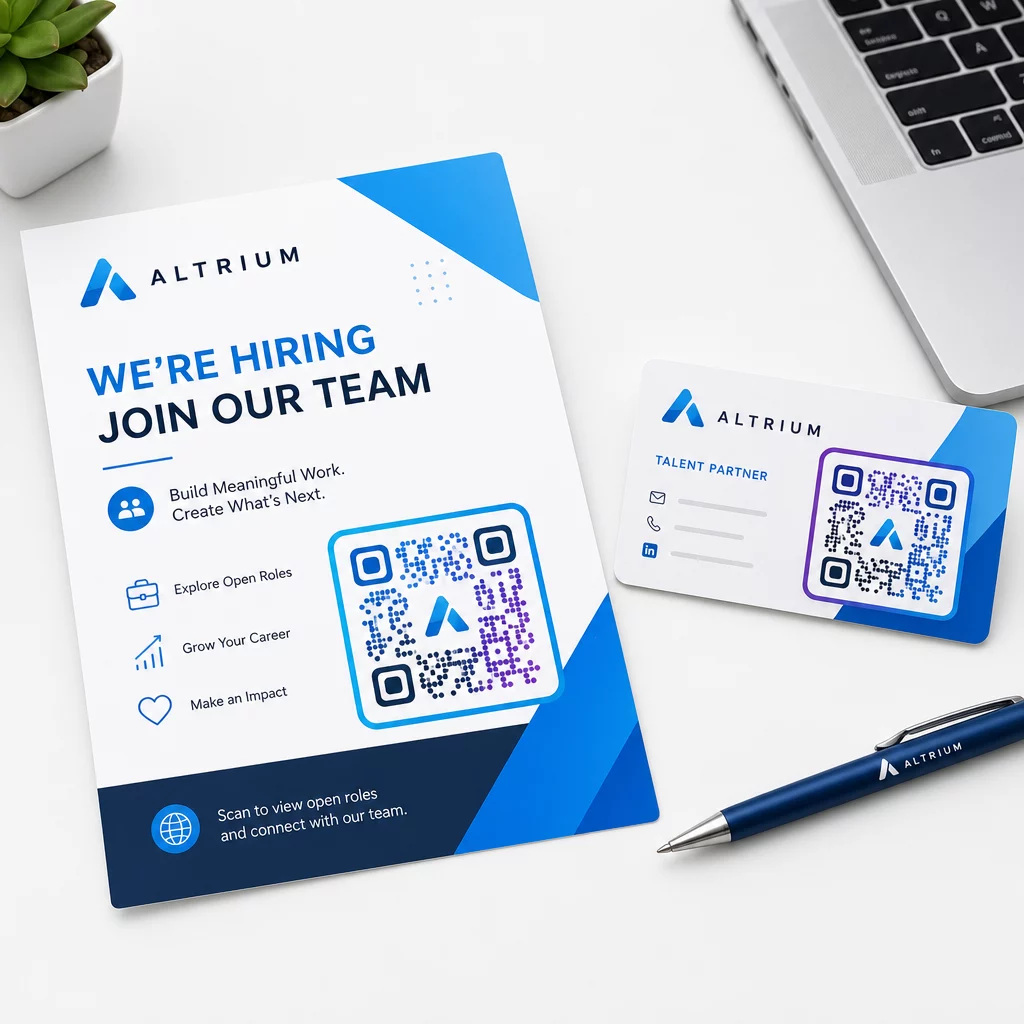
Generic black-and-white QR codes get scanned, but branded ones perform better and reinforce your employer identity. Pageloot’s QRコードジェネレーター lets you embed your company logo, apply brand colors, and choose from design templates so every code looks like a deliberate part of your materials rather than an afterthought.

Branded recruitment QR

A few practical guidelines for printed recruitment materials:

  • For business cards, use a minimum QR code size of 0.8 × 0.8 inches to ensure reliable scannability.
  • For posters and flyers, aim for at least 1.2 × 1.2 inches, with clear white space around the code.
  • Maintain a contrast ratio of at least 4:1 between the dark modules and the background.
  • Print at 300 DPI to ensure the code stays sharp and scannable.

Branded, well-sized QR codes signal professionalism and encourage candidates to follow through. For more on mobile-friendly destinations after the scan, see Pageloot’s guide to モバイルQRコードランディングページのベストプラクティス.

Compliance Considerations for Candidate Data

QR codes collect data, and that data comes with responsibilities. Staffing firms in the US should be aware of a few baseline requirements when building QR-based recruiting workflows:

  • EEOC recordkeeping: Federal law requires employers to retain all application records – including those submitted via QR-linked forms – for at least one year from the date the record was made. Federal contractors with 150 or more employees and contracts of at least $150,000 must retain records for two years.
  • Voluntary self-identification: If your QR-linked forms collect demographic information for EEO reporting, that participation must be voluntary, kept separate from application materials, and never used in hiring decisions.
  • Privacy obligations: If your platform makes privacy promises to candidates – explicitly or implicitly – you are required to honor them. Ensure any QR-linked forms and landing pages include a clear privacy notice and that candidate data is stored securely.
  • ADA and algorithmic tools: If your QR workflow connects to any automated screening tools, EEOC guidance requires those tools to be evaluated for potential disparate impact on protected groups, including candidates with disabilities.

These requirements don’t complicate QR code adoption – they shape how you design the data collection on the other end of the scan.

How Pageloot Supports Recruitment Teams

Pageloot’s platform gives staffing firms the tools to create, manage, and analyze QR codes across every stage of recruiting. Trusted by more than 20,000 companies in 110 countries, the platform includes:

A 14-day free trial gives you access to dynamic codes, analytics, and branded customization before committing to a paid plan.

Get Started with Recruitment QR Codes Create branded, trackable codes for your next job fair, email campaign, or printed posting with the Pageloot QRコードジェネレータ – free to try for 14 days, no credit card required.

Turning QR Data Into Smarter Hiring Decisions

The scan data your QR codes generate isn’t just a vanity metric – it’s a feedback loop for your recruitment strategy. If your event QR codes generate high scan volume but low application completions, the problem is likely the mobile experience on the other end of the scan. If your poster placements in one city outperform another, that informs where you focus your next print run.

Over time, combining QR scan analytics with your applicant tracking system data lets you build a clearer picture of which touchpoints actually convert into hires – and which are wasting budget. That’s the shift from reactive recruiting to data-driven hiring.

よくある質問

Do candidates need a special app to scan a recruitment QR code?

No. Any modern smartphone with a built-in camera app can scan a QR code without downloading additional software. This removes a significant barrier to engagement, particularly at in-person events where candidates may be hesitant to install new apps.

Can I update a QR code after it’s already been printed on materials?

Yes, but only if you use a dynamic QR code. Dynamic codes encode a short redirect URL that you can point to a new destination at any time from your Pageloot dashboard. If a job closes or a form link changes, you can redirect the code without reprinting a single flyer or poster.

What data does a QR code collect about candidates who scan it?

The QR code itself collects scan-level data – timestamp, device type, operating system, and geographic location of the scan. It does not collect personal identity information unless the candidate actively submits a form after scanning. Any personal data collected through linked forms is governed by your privacy policy and applicable employment law, including EEOC recordkeeping requirements.

著者について

Siim KostabiはPagelootのコンテンツリードです。Pagelootの革新的なQRコード生成サービスについて執筆しています。5年以上にわたるQRコードに関する深い専門知識を持つSiimは、この分野の専門家です。QRテクノロジーを活用してデジタルインタラクションを簡素化・拡張する上で、大きな進歩を遂げています。.

カテゴリー
について詳しくはこちら
✅ QRコードの#1ソリューション

オンラインでQRコードを作成する必要がある場合は QRコードを作る ここで無料で
ページルートは #1のGo-Toソリューション でQRコードを作成してスキャンすることができます。

BL-0058

売上、レビュー、フォロワーを増やすために 20,000 を超えるブランドから信頼されています。

クライアントのロゴ
トップブランドから信頼される
5 のうち 4.8 と評価しました

4.86 / 5つ星評価

ユーゴ・ローラン
ユーゴ・ローラン
レストランオーナー
最も簡単で信頼性の高いQRコードジェネレータです。PDFファイルを即座にアップロードできます。レストランのメニューがデジタル化されました。
ルーカス・ジャンセン
ルーカス・ジャンセン
不動産開発業者
これは優れたツールで、QRコードでちょうど欲しいところに連れて行ってくれます。私たちは位置情報のQRコードしか使っていませんが、とても便利な機能がたくさんあります。
エマ・モレッティ
エマ・モレッティ
小売製品
使いやすいし、早い。素晴らしい機能で、完璧な画像を作成してくれるので、社員は私のvCardをダウンロードすることができます。
ユーゴ・ローラン
ユーゴ・ローラン
レストランオーナー
最も簡単で信頼性の高いQRコードジェネレータです。PDFファイルを即座にアップロードできます。レストランのメニューがデジタル化されました。
ルーカス・ジャンセン
ルーカス・ジャンセン
不動産開発業者
これは優れたツールで、QRコードでちょうど欲しいところに連れて行ってくれます。私たちは位置情報のQRコードしか使っていませんが、とても便利な機能がたくさんあります。
エマ・モレッティ
エマ・モレッティ
小売製品
使いやすいし、早い。素晴らしい機能で、完璧な画像を作成してくれるので、社員は私のvCardをダウンロードすることができます。
QRコードをもっと見る
SamsungがQRコードをスキャン
QRコードをスキャンして 三星ギャラクシー
パッケージ商品のQRコード
のQRコード パッケージ製品
QRシャツのスキャン
QRコードの 衣料品
あらゆるものをデジタル体験に変えよう 3分以内に。

14日間の無料トライアル。

クレジットカードは必要ありません。

初回購入で30%オフ

次のコードを使用してください:

MP3ファイルを共有

PDF QRコードを作成するにはサインアップしてください

必要なものをすべてアップロードして表示する。

  • オーディオファイル
  • ポッドキャスト
  • 音楽

サインアップで14日間無料トライアル。.
トライアル終了後、QRコードは期限切れになります。.

オーディオmp3 QRコードを作成するにはサインアップしてください

フレームでより多くのスキャンを獲得

QRコードにフレームを追加するにはサインアップしてください

コールトゥアクションフレームは、お客様が簡単にQRコードと対話できるようにします。ぜひお試しください。

サインアップで14日間無料トライアル。.
トライアル終了後、QRコードは期限切れになります。.

QRコードにフレームを追加するにはサインアップしてください

シェイプでスタイルを追加

より多くの図形を作成するにはサインアップしてください

QRコードは四角いものである必要はありません。あなたのブランドのイメージに合わせて変えてみてください。

サインアップで14日間無料トライアル。.
トライアル終了後、QRコードは期限切れになります。.

より多くの図形を作成するにはサインアップしてください

QRコードにロゴを追加

QRコードにロゴを追加するにはサインアップしてください

QRコードにロゴやブランドを入れることで、目立たせることができます。

サインアップで14日間無料トライアル。.
トライアル終了後、QRコードは期限切れになります。.

QRコードにロゴを追加するにはサインアップしてください

スマートなApp Storeリダイレクト

アプリストアのQRコードを作成するにはサインアップしてください

スマートなApp StoreのQRコードに、あなたのアプリのリンクを追加します。ユーザーは、デバイスに応じてリダイレクトされます。

サインアップで14日間無料トライアル。.
トライアル終了後、QRコードは期限切れになります。.

アプリストアのQRコードを作成するにはサインアップしてください

QRコードに画像をアップロード

画像QRコードを作成するにはサインアップしてください

画像を簡単に共有できます。どんな画像も、数秒でダイナミックに変化します。

サインアップで14日間無料トライアル。.
トライアル終了後、QRコードは期限切れになります。.

画像QRコードを作成するにはサインアップしてください

PDFファイルを共有

PDF QRコードを作成するにはサインアップしてください

必要なものをすべてアップロードして表示する。

  • メニュー&プライスリスト
  • 指示
  • 任意の書類

サインアップで14日間無料トライアル。.
トライアル終了後、QRコードは期限切れになります。.

PDF QRコードを作成するにはサインアップしてください

印刷せずに後で編集

再度印刷せずにQRコードを編集するにはサインアップしてください

ダイナミックQRコードは、新たにQRコードを印刷することなく、QRコードの内容を変更することができます。

サインアップで14日間無料トライアル。.
トライアル終了後、QRコードは期限切れになります。.

再度印刷せずにQRコードを編集するにはサインアップしてください

いつ?どこで?QRコードのスキャンを追跡

QRコードを追跡するにはサインアップしてください

どのQRコードが最も多くスキャンされ、何が最も顧客を喜ばせているのかを知ることができます。

サインアップで14日間無料トライアル。.
トライアル終了後、QRコードは期限切れになります。.

QRコードを追跡するにはサインアップしてください

印刷可能なファイルが利用可能

PDFやSVGのようなベクターQRコードを作成するにはサインアップしてください

.eps、.pdf、.svg

QRコードをHD解像度でダウンロードしたいですか?すぐに印刷できるベクターまたはピクセル形式を入手しましょう。

サインアップで14日間無料トライアル。.
トライアル終了後、QRコードは期限切れになります。.

PDFやSVGのようなベクターQRコードを作成するにはサインアップしてください

しばらくお待ちください。あなたのQRコードは ロード... ロード...

あなただけのものに

サインアップしてQRコードを後で保存してください

異なる色、ロゴ、コールトゥアクションフレームで素晴らしいQRコードを作成することで、より多くのスキャンを得ることができます。

サインアップで14日間無料トライアル。.
トライアル終了後、QRコードは期限切れになります。.

サインアップしてQRコードを後で保存してください