Чи втрачаєте ви кваліфікованих кандидатів через те, що ваш процес найму створює занадто багато перешкод? Застарілі робочі процеси подачі заявок, ручне введення даних та низька видимість залученості кандидатів коштують кадровим агентствам часу та найкращих талантів. Цей посібник пояснює, як QR-коди вирішують ці проблеми – і як їх впровадити у ваш процес найму.
Чому відстеження кандидатів є неефективним без QR-кодів
Більшість кадрових агентств все ще покладаються на сукупність ручних кроків: кандидати вводять довгі URL-адреси, заповнюють форми на комп'ютері або беруть листівку на ярмарку вакансій і ніколи не доводять справу до кінця. Кожна передача є можливістю для кваліфікованого кандидата відмовитися.
Цифри відображають, як насправді поводяться кандидати. Дослідження Pew Research Center показало, що 50% шукачів роботи зі смартфонів використовували свої телефони для заповнення онлайн-заявки на роботу, і близько двох третин заявок на роботу зараз подаються з мобільних пристроїв. Коли ваш процес подачі заявок не розроблений для мобільних пристроїв, ви працюєте проти власного потоку кандидатів.
QR-коди заповнюють цю прогалину. Одне сканування переводить кандидата з фізичної точки контакту – плаката, візитної картки, стенду на ярмарку вакансій – безпосередньо до форми заявки, опису вакансії або посилання для планування. Без набору тексту, без пошуку, без перешкод.
Де QR-коди вписуються у ваш робочий процес найму
QR-коди – це не одноразовий інструмент. Вони можуть покращити взаємодію з кандидатами на кожному етапі воронки найму.
На ярмарках вакансій та заходах. Розмістіть QR-код на своєму стенді, щоб направляти відвідувачів до конкретних вакансій або збирати контактну інформацію через QR-код Google Form. Кожне сканування створює цифровий запис взаємодії – жодних візитних карток, які можна загубити, жодних електронних таблиць, які потрібно пізніше звіряти. Ви також можете спростити реєстрацію на заходи за допомогою системи відвідуваності за QR-кодом яка автоматично реєструє прибуття.
На друкованих матеріалах. А QR-код на плакаті посилання на коротке відео про культуру вашої компанії або поточну вакансію дає пасивним кандидатам безперешкодний спосіб досліджувати, не зобов'язуючись негайно подавати повну заявку.
На візитних картках. Рекрутери можуть включити QR-код LinkedIn або посилання на свої поточні вакансії, щоб особисті розмови перетворювалися на дієві зв'язки. Pageloot’s Генератор QR-кодів LinkedIn дозволяє легко створити сканований код, який посилається безпосередньо на ваш профіль або сторінку компанії.
У цифрових кампаніях. Електронні розсилки, дошки оголошень про вакансії та дописи в соціальних мережах можуть містити QR-коди, які направляють кандидатів на спеціальну цільову сторінку. Використання динамічні QR-коди тут дозволяє відстежувати, які цифрові канали генерують найбільше кваліфікованих заявок.
Для подачі резюме. Прив'язка QR-коду до Google Форми або порталу для подачі заявок дозволяє кандидатам негайно завантажувати свою інформацію, фіксуючи намір, коли залученість найвища.
Оптимізуйте рекрутинг на заходах Потрібно відстежувати реєстрації відвідувачів та збирати дані кандидатів за один крок? The Трекер відвідуваності за QR-кодом підключається безпосередньо до Google Форм, тому кожне сканування автоматично реєструється.
Як працює відстеження QR-кодів для рекрутерів
QR-код сам по собі є лише ярликом. Справжня цінність походить від даних, які він генерує. Динамічні QR-коди записують кожне сканування з такими показниками, як:
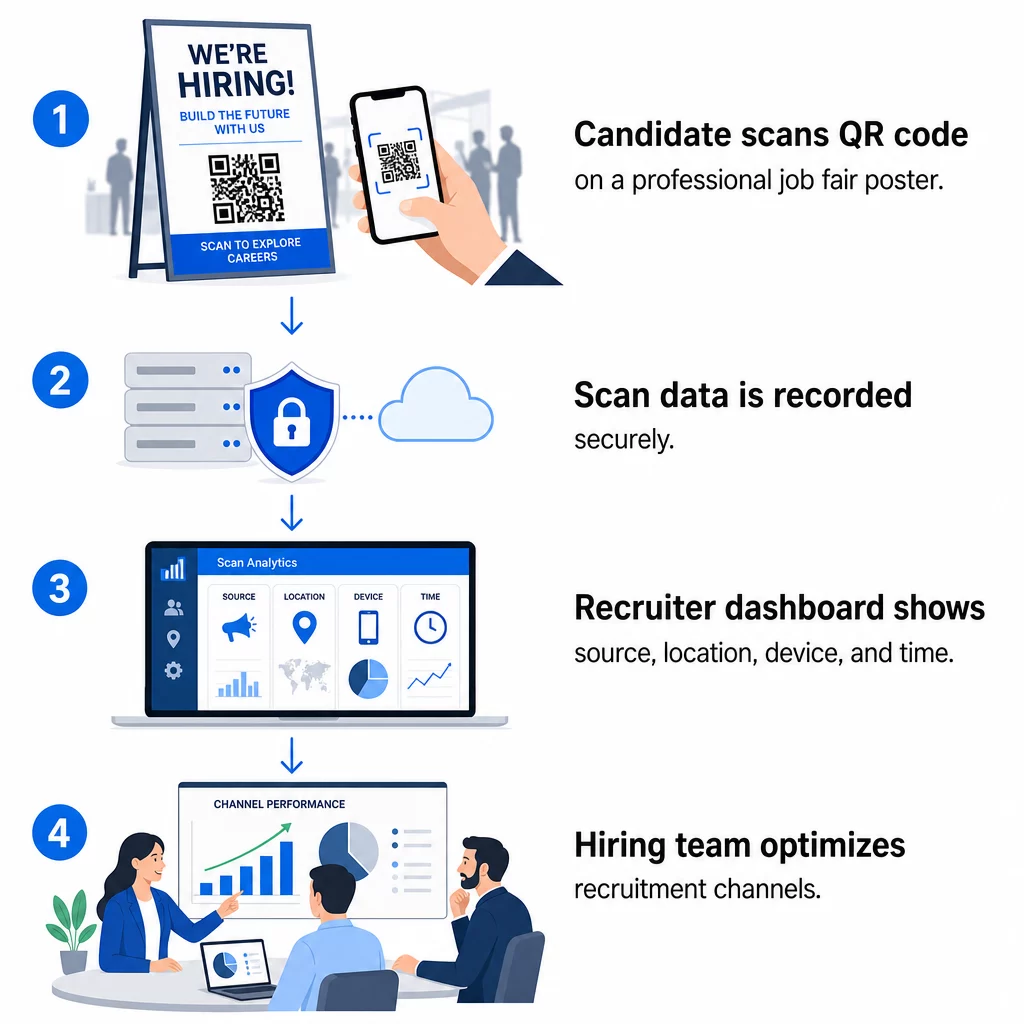
- Кількість сканувань 1. – загальна та унікальна кількість сканувань з часом
- 2. Мітка часу 3. – коли кандидати найімовірніше взаємодіятимуть
- 4. Дані про місцезнаходження 5. – з яких міст чи регіонів надходять ваші заявки
- 6. Тип пристрою та операційна система 7. – підтвердження того, чи справді працює ваш мобільний потік заявок
8. Ці дані допомагають відповісти на практичні питання: Чи матеріали вашого ярмарку вакансій генерують подальші дії? Чи QR-код на вашому плакаті перевершує той, що у вашому електронному листі? Які місця розміщення оголошень приваблюють кандидатів, які заповнюють повну заявку?
9. Ви можете дізнатися більше про читання та використання цих даних у посібнику Pageloot щодо 10. відстеження сканувань QR-кодів та аналітики.
11. Додавання UTM-параметрів для глибшої атрибуції
12. Якщо ваша команда використовує Google Analytics, ви можете додати UTM-параметри до URL-адреси, на яку вказує ваш QR-код. Це дозволяє відстежувати трафік, що надходить через QR-коди, поряд з іншими вашими каналами без будь-якого ручного узгодження. Код, розміщений на університетському ярмарку вакансій, може використовувати `utmsource=careerfair` та `utmmedium=qrcode`, що полегшує порівняння цього каналу з рекламою LinkedIn або трафіком з дошок оголошень у GA4.
Посібник Pageloot щодо UTM-параметри для QR-кодів детально розглядає угоди про іменування та налаштування звітності.
Відстежуйте кожен канал найму Використовувати Динамічний QR код: генератор щоб створити відстежувані коди з UTM-мітками для кожної точки контакту з кандидатом і точно бачити, які канали приводять кваліфікованих кандидатів.
Статичні проти динамічних QR-кодів у рекрутингу
Не кожен QR-код має бути динамічним, але більшість рекрутингових застосувань виграють від цього. Ось практичне порівняння:
| ФУНКЦІЯ | Статичний QR-код | Динамічний QR-код |
|---|---|---|
| Призначення можна редагувати після друку | Ні. | Так. |
| Аналітика сканувань | Ні. | Так. |
| Працює після закриття вакансії | Ні (якщо URL-адреса не працює) | Так (перенаправлення на нову вакансію) |
| Потребує підписки | Ні. | Так. |
| Найкраще для | Постійні довідкові матеріали | Активні кампанії, ярмарки вакансій, друкована реклама |
Головна перевага динамічних кодів у рекрутингу – це гнучкість. Якщо вакансія заповнена до того, як ваші друковані матеріали будуть виведені з обігу, ви можете перенаправити цей QR-код на схожу відкриту вакансію або на загальну сторінку подачі заявок – передруковувати не потрібно. Для детального аналізу дивіться порівняння від Pageloot статичних та динамічних QR-кодів.
Створення брендованих QR-кодів, яким довіряють кандидати
Загальні чорно-білі QR-коди скануються, але брендовані працюють краще та підсилюють вашу ідентичність роботодавця. Pageloot генератор QR-кодів дозволяє вбудовувати логотип вашої компанії, застосовувати фірмові кольори та вибирати з шаблонів дизайну, щоб кожен код виглядав як продумана частина ваших матеріалів, а не як щось додане пізніше.
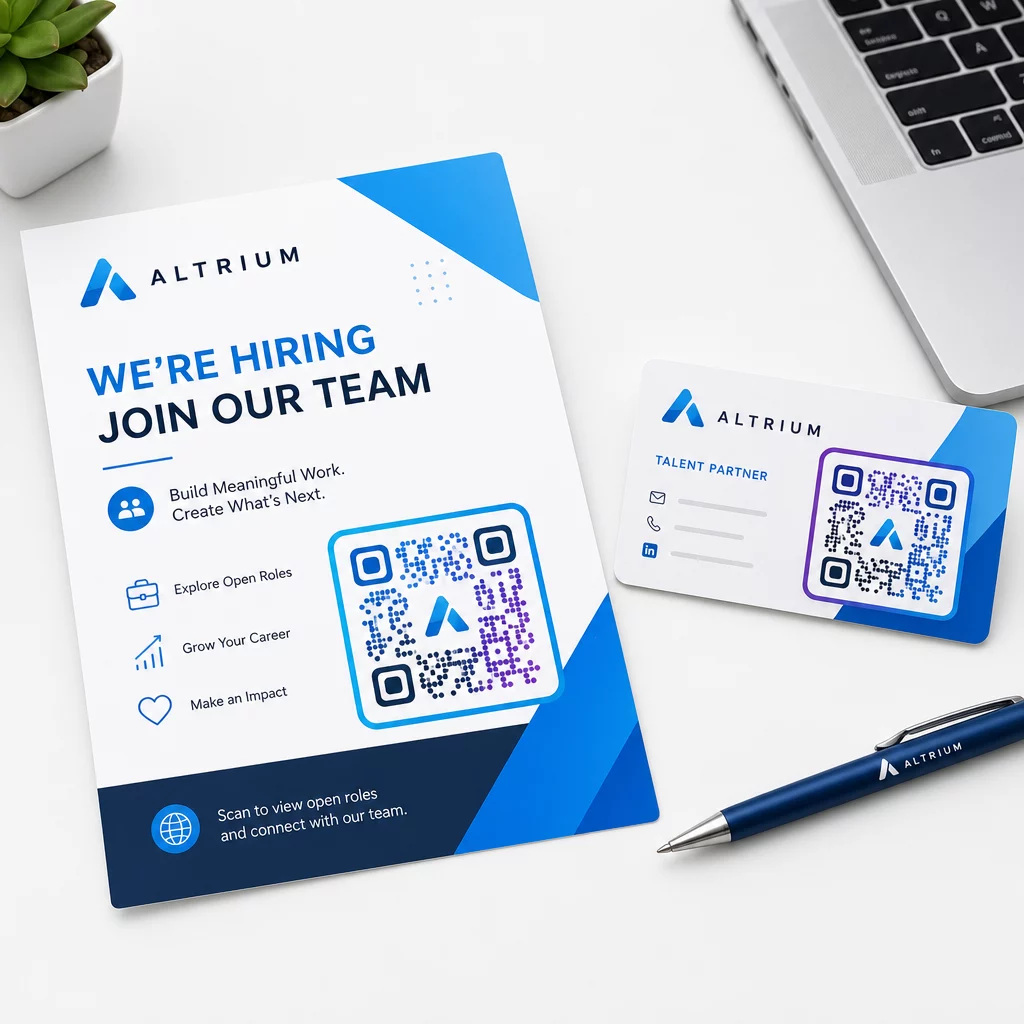
Кілька практичних рекомендацій для друкованих рекрутингових матеріалів:
- Для візитівок використовуйте мінімальний розмір QR-коду 0.8 × 0.8 дюймів для забезпечення надійного сканування.
- Для плакатів та флаєрів прагніть до щонайменше 1.2 × 1.2 дюймів, з чітким білим простором навколо коду.
- Підтримуйте коефіцієнт контрастності щонайменше 4:1 між темними модулями та фоном.
- Друкуйте з роздільною здатністю 300 DPI щоб код залишався чітким і придатним для сканування.
Брендовані, правильно розміщені QR-коди свідчать про професіоналізм та заохочують кандидатів до подальших дій. Щоб дізнатися більше про мобільні призначення після сканування, дивіться посібник Pageloot щодо найкращих практик для мобільних цільових сторінок QR-кодів.
Міркування щодо відповідності для даних кандидатів
QR-коди збирають дані, і ці дані несуть відповідальність. Кадрові агентства в США повинні знати кілька базових вимог при створенні рекрутингових робочих процесів на основі QR-кодів:
- Ведення обліку EEOC: Федеральний закон вимагає від роботодавців зберігати всі записи про заявки – включно з тими, що подані через форми, пов'язані з QR-кодами – щонайменше один рік з дати створення запису. Федеральні підрядники зі 150 або більше працівниками та контрактами на суму щонайменше $150 000 повинні зберігати записи протягом двох років.
- Добровільна самоідентифікація: Якщо ваші форми, пов'язані з QR-кодами, збирають демографічну інформацію для звітності EEO, ця участь має бути добровільною, зберігатися окремо від матеріалів заявки та ніколи не використовуватися при прийнятті рішень про найм.
- Зобов'язання щодо конфіденційності: Якщо ваша платформа дає обіцянки щодо конфіденційності кандидатам – явно чи неявно – ви зобов'язані їх дотримуватися. Переконайтеся, що будь-які форми, пов'язані з QR-кодами, та цільові сторінки містять чітке повідомлення про конфіденційність, а дані кандидатів зберігаються безпечно.
- ADA та алгоритмічні інструменти: Якщо ваш робочий процес QR-кодів підключається до будь-яких автоматизованих інструментів скринінгу, рекомендації EEOC вимагають оцінювати ці інструменти на предмет потенційного несприятливого впливу на захищені групи, включаючи кандидатів з інвалідністю.
Ці вимоги не ускладнюють впровадження QR-кодів – вони формують те, як ви розробляєте збір даних на іншому кінці сканування.
Як Pageloot підтримує команди з підбору персоналу
Платформа Pageloot надає кадровим агентствам інструменти для створення, керування та аналізу QR-кодів на кожному етапі підбору персоналу. Платформа, якій довіряють понад 20 000 компаній у 110 країнах, включає:
- A Динамічний QR код: генератор для редагованих кодів, що відстежуються
- A Google Form QR: генератор для Google Форм для миттєвих посилань на форми заявки та скринінгу
- A генератор QR-кодів посилань для направлення кандидатів на будь-яку вакансію або цільову сторінку
- Ан інструмент QR-коду для відвідування для реєстрації на заходи та обліку кандидатів
- Панель аналітики в реальному часі, що відстежує кількість сканувань, місцезнаходження, пристрій та час
- Повний контроль над брендингом, включаючи логотипи, кольори та шаблони дизайну
- Підтримка понад 25 типів QR-кодів для друкованих та цифрових форматів
14-денна безкоштовна пробна версія надає вам доступ до динамічних кодів, аналітики та брендованого налаштування, перш ніж перейти на платний план.
Почніть роботу з рекрутинговими QR-кодами Створюйте брендовані, відстежувані коди для вашого наступного ярмарку вакансій, електронної кампанії або друкованого оголошення за допомогою Генератор QR-кодів Pageloot – безкоштовно протягом 14 днів, кредитна картка не потрібна.
Перетворення даних QR на розумніші рішення щодо найму
Дані сканування, які генерують ваші QR-коди, — це не просто показник марнославства, це зворотний зв'язок для вашої стратегії найму. Якщо ваші QR-коди для подій генерують велику кількість сканувань, але низьку кількість заповнених заявок, проблема, ймовірно, полягає в мобільному досвіді на іншому кінці сканування. Якщо розміщення ваших плакатів в одному місті перевершує інше, це підказує, куди зосередити наступний тираж.
З часом, поєднання аналітики сканувань QR-кодів з даними вашої системи відстеження кандидатів дозволяє вам створити чіткішу картину того, які точки контакту насправді перетворюються на найм – і які марнують бюджет. Це перехід від реактивного рекрутингу до найму, керованого даними.
Поширені запитання
Ні. Будь-який сучасний смартфон із вбудованим додатком камери може сканувати QR-код без завантаження додаткового програмного забезпечення. Це усуває значний бар'єр для залучення, особливо на особистих заходах, де кандидати можуть вагаються встановлювати нові додатки.
Так, але лише якщо ви використовуєте динамічний QR-код. Динамічні коди кодують коротку URL-адресу перенаправлення, яку ви можете спрямувати на нове призначення в будь-який час зі своєї панелі керування Pageloot. Якщо вакансія закривається або посилання на форму змінюється, ви можете перенаправити код без повторного друку жодного флаєра чи плаката.
Сам QR-код збирає дані на рівні сканування – мітку часу, тип пристрою, операційну систему та географічне розташування сканування. Він не збирає інформацію, що ідентифікує особу, якщо кандидат активно не подає форму після сканування. Будь-які персональні дані, зібрані через пов'язані форми, регулюються вашою політикою конфіденційності та чинним трудовим законодавством, включаючи вимоги EEOC щодо ведення обліку.