Bạn có đang mất đi các ứng viên đủ tiêu chuẩn vì quy trình tuyển dụng của bạn tạo ra quá nhiều rào cản? Quy trình ứng tuyển lỗi thời, nhập liệu thủ công và khả năng hiển thị kém về mức độ tương tác của ứng viên khiến các công ty tuyển dụng mất thời gian và nhân tài hàng đầu. Hướng dẫn này giải thích cách mã QR giải quyết những vấn đề đó – và cách triển khai chúng trong quy trình tuyển dụng của bạn.
Tại sao việc theo dõi ứng viên không hiệu quả nếu không có mã QR
Hầu hết các công ty tuyển dụng vẫn dựa vào một loạt các bước thủ công: ứng viên nhập các URL dài, điền biểu mẫu trên máy tính để bàn hoặc lấy tờ rơi tại hội chợ việc làm và không bao giờ theo dõi. Mỗi lần chuyển giao là một cơ hội để một ứng viên đủ tiêu chuẩn bỏ cuộc.
Các con số phản ánh cách ứng viên thực sự hành xử. Nghiên cứu từ Trung tâm Nghiên cứu Pew cho thấy 50% người tìm việc bằng điện thoại thông minh đã sử dụng điện thoại của họ để điền đơn xin việc trực tuyến, và khoảng hai phần ba số đơn xin việc hiện được gửi từ thiết bị di động. Khi quy trình ứng tuyển của bạn không được xây dựng cho thiết bị di động, bạn đang làm việc chống lại chính nguồn ứng viên của mình.
Mã QR thu hẹp khoảng cách đó. Một lần quét duy nhất đưa ứng viên từ một điểm tiếp xúc vật lý – một áp phích, một danh thiếp, một gian hàng hội chợ việc làm – trực tiếp đến một biểu mẫu ứng tuyển, mô tả công việc hoặc liên kết đặt lịch. Không cần gõ, không cần tìm kiếm, không có rào cản.
Mã QR phù hợp ở đâu trong quy trình tuyển dụng của bạn
Mã QR không phải là một công cụ dùng một lần. Chúng có thể cải thiện tương tác của ứng viên ở mọi giai đoạn của phễu tuyển dụng.
Tại các hội chợ việc làm và sự kiện. Đặt mã QR tại gian hàng của bạn để hướng khách truy cập đến các danh sách việc làm cụ thể hoặc thu thập thông tin liên hệ thông qua một Mã QR của Google Form. Mỗi lần quét tạo ra một bản ghi kỹ thuật số về tương tác – không có danh thiếp nào bị mất, không có bảng tính nào phải đối chiếu sau này. Bạn cũng có thể đơn giản hóa việc đăng ký sự kiện bằng cách sử dụng một hệ thống điểm danh bằng mã QR tự động ghi lại lượt đến.
Trên các tài liệu in ấn. Tờ rơi, áp phích và tài liệu quảng cáo có thể tiếp cận các ứng viên không tích cực tìm việc. Một Mã QR trên poster liên kết đến một video ngắn về văn hóa công ty của bạn hoặc một vị trí đang tuyển dụng mang đến cho các ứng viên thụ động một cách dễ dàng để khám phá mà không cần cam kết nộp đơn đầy đủ ngay lập tức.
Trên danh thiếp. Người tuyển dụng có thể bao gồm một Mã QR LinkedIn hoặc một liên kết đến danh sách việc làm hiện tại của họ để các cuộc trò chuyện trực tiếp chuyển thành các kết nối có thể hành động. Của Pageloot QR code LinkedIn giúp dễ dàng tạo một mã có thể quét được liên kết trực tiếp đến hồ sơ hoặc trang công ty của bạn.
Trong các chiến dịch kỹ thuật số. Bản tin email, bảng việc làm và bài đăng trên mạng xã hội đều có thể có mã QR gửi ứng viên đến một trang đích chuyên dụng. Sử dụng mã QR động ở đây cho phép bạn theo dõi kênh kỹ thuật số nào tạo ra các ứng dụng đủ điều kiện nhất.
Để nộp hồ sơ. Liên kết mã QR với Google Form hoặc cổng ứng dụng cho phép ứng viên tải lên thông tin của họ ngay lập tức, nắm bắt ý định khi mức độ tương tác cao nhất.
Hợp lý hóa tuyển dụng sự kiện Cần theo dõi việc đăng ký của người tham dự và thu thập dữ liệu ứng viên trong một bước? Cái Trình theo dõi điểm danh bằng mã QR kết nối trực tiếp với Google Forms để mỗi lần quét được tự động ghi lại.
Cách theo dõi mã QR hoạt động cho nhà tuyển dụng
Bản thân mã QR chỉ là một lối tắt. Giá trị thực sự đến từ dữ liệu mà nó tạo ra. Mã QR động ghi lại mọi lần quét với các chỉ số bao gồm:
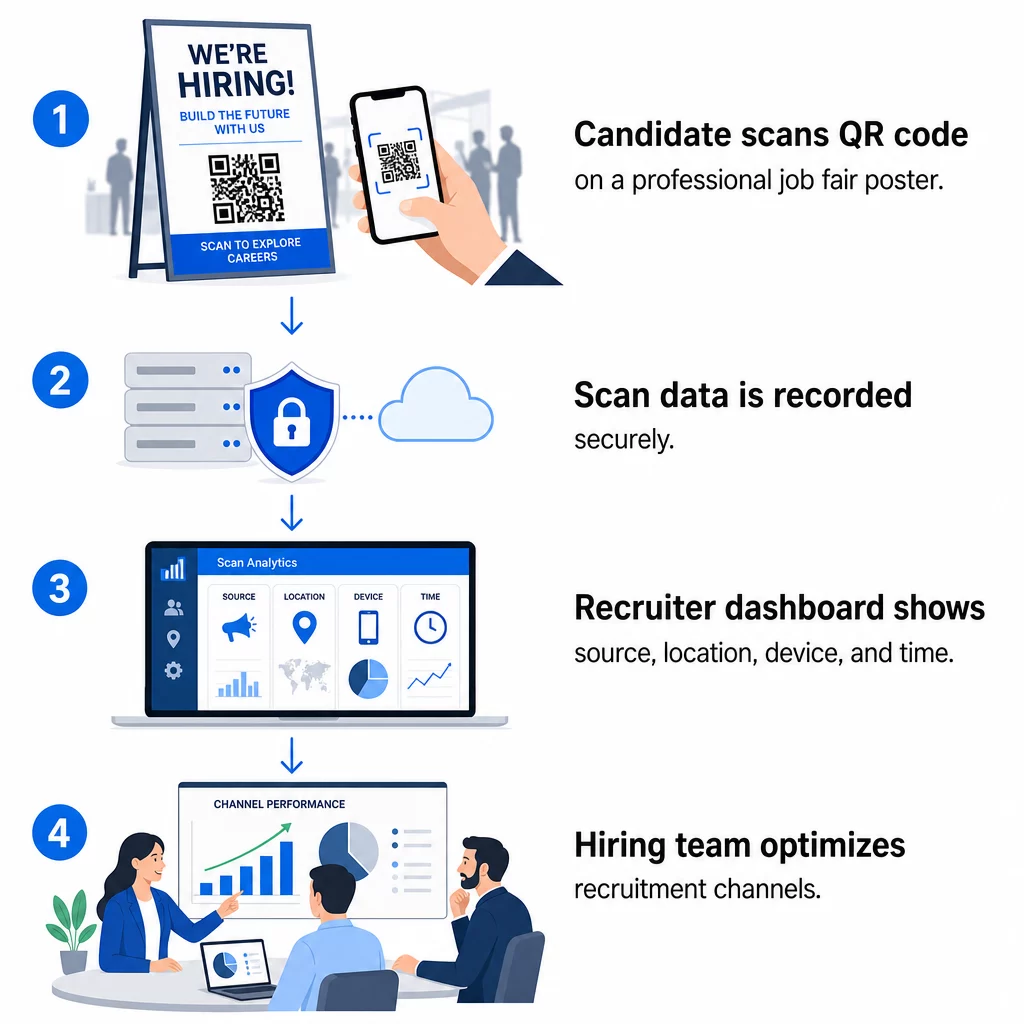
- Số lượt quét – tổng số và số lượt quét duy nhất theo thời gian
- Dấu thời gian – khi ứng viên có nhiều khả năng tương tác nhất
- Dữ liệu vị trí – các thành phố hoặc khu vực mà hồ sơ ứng tuyển của bạn đến từ đâu
- Loại thiết bị và hệ điều hành – xác nhận liệu quy trình ứng tuyển trên thiết bị di động của bạn có thực sự hoạt động hay không
Dữ liệu này giúp bạn trả lời các câu hỏi thực tế: Tài liệu hội chợ việc làm của bạn có tạo ra các lượt theo dõi không? Mã QR trên áp phích của bạn có hiệu quả hơn mã trong email của bạn không? Những địa điểm đăng tuyển nào thu hút ứng viên hoàn thành toàn bộ hồ sơ ứng tuyển?
Bạn có thể tìm hiểu thêm về cách đọc và hành động dựa trên dữ liệu này trong hướng dẫn của Pageloot về theo dõi lượt quét mã QR và phân tích.
Thêm tham số UTM để phân bổ sâu hơn
Nếu nhóm của bạn sử dụng Google Analytics, bạn có thể thêm các tham số UTM vào URL mà mã QR của bạn trỏ đến. Điều này cho phép bạn theo dõi lưu lượng truy cập từ mã QR cùng với các kênh khác mà không cần đối chiếu thủ công. Một mã được đặt tại hội chợ việc làm của trường đại học có thể sử dụng `utm`source=careerfair` và `utm`phương tiện=qrcode`, giúp dễ dàng so sánh kênh đó với quảng cáo LinkedIn hoặc lưu lượng truy cập từ các trang web tuyển dụng trong GA4.
Hướng dẫn của Pageloot về các thông số UTM cho mã QR trình bày chi tiết các quy ước đặt tên và thiết lập báo cáo.
Theo dõi mọi kênh tuyển dụng Sử dụng Tạo mã QR động để tạo mã có thể theo dõi, gắn thẻ UTM cho từng điểm tiếp xúc tuyển dụng và xem chính xác kênh nào đang thu hút ứng viên đủ tiêu chuẩn.
Mã QR tĩnh so với mã QR động trong tuyển dụng
Không phải mọi mã QR đều cần động, nhưng hầu hết các ứng dụng tuyển dụng đều hưởng lợi từ nó. Dưới đây là một so sánh thực tế:
| TÍNH NĂNG | Mã QR tĩnh | Mã QR động |
|---|---|---|
| Điểm đến có thể chỉnh sửa sau khi in | KHÔNG | Đúng |
| Phân tích lượt quét | KHÔNG | Đúng |
| Hoạt động sau khi tin tuyển dụng đóng | Không (nếu URL bị hỏng) | Có (chuyển hướng đến danh sách mới) |
| Yêu cầu đăng ký | KHÔNG | Đúng |
| Tốt nhất cho | Tài liệu tham khảo vĩnh viễn | Các chiến dịch đang hoạt động, hội chợ việc làm, quảng cáo in ấn |
Ưu điểm chính của mã động trong tuyển dụng là tính linh hoạt. Nếu một vị trí được lấp đầy trước khi tài liệu in của bạn bị loại bỏ, bạn có thể chuyển hướng mã QR đó đến một vai trò mở tương tự hoặc một trang ứng tuyển chung – không cần in lại. Để biết phân tích chi tiết, hãy xem so sánh của Pageloot về mã QR tĩnh và mã QR động.
Xây dựng mã QR có thương hiệu mà ứng viên tin tưởng
Mã QR đen trắng chung chung vẫn được quét, nhưng mã có thương hiệu hoạt động tốt hơn và củng cố nhận diện nhà tuyển dụng của bạn. Của Pageloot trình tạo mã QR cho phép bạn nhúng logo công ty, áp dụng màu sắc thương hiệu và chọn từ các mẫu thiết kế để mọi mã trông giống như một phần có chủ ý trong tài liệu của bạn chứ không phải là một ý tưởng sau đó.

Một vài hướng dẫn thực tế cho tài liệu tuyển dụng in ấn:
- Đối với danh thiếp, hãy sử dụng kích thước mã QR tối thiểu là 0,8 × 0,8 inch để đảm bảo khả năng quét đáng tin cậy.
- Đối với áp phích và tờ rơi, hãy đặt mục tiêu ít nhất 1,2 × 1,2 inch, với khoảng trắng rõ ràng xung quanh mã.
- Duy trì tỷ lệ tương phản ít nhất 4:1 giữa các mô-đun tối và nền.
- In ở 300 DPI để đảm bảo mã vẫn sắc nét và có thể quét được.
Mã QR có thương hiệu, kích thước phù hợp thể hiện sự chuyên nghiệp và khuyến khích ứng viên tiếp tục thực hiện. Để biết thêm về các điểm đến thân thiện với thiết bị di động sau khi quét, hãy xem hướng dẫn của Pageloot về thực hành tốt nhất cho trang đích mã QR di động.
Những cân nhắc về tuân thủ đối với dữ liệu ứng viên
Mã QR thu thập dữ liệu và dữ liệu đó đi kèm với các trách nhiệm. Các công ty tuyển dụng ở Hoa Kỳ nên biết một vài yêu cầu cơ bản khi xây dựng quy trình tuyển dụng dựa trên QR:
- Lưu giữ hồ sơ EEOC: Luật liên bang yêu cầu người sử dụng lao động phải lưu giữ tất cả hồ sơ ứng tuyển – bao gồm cả những hồ sơ được gửi qua các biểu mẫu liên kết QR – trong ít nhất một năm kể từ ngày hồ sơ được tạo. Các nhà thầu liên bang có từ 150 nhân viên trở lên và hợp đồng trị giá ít nhất 150.000 đô la phải lưu giữ hồ sơ trong hai năm.
- Tự nguyện tự nhận dạng: Nếu các biểu mẫu liên kết QR của bạn thu thập thông tin nhân khẩu học để báo cáo EEO, việc tham gia đó phải là tự nguyện, được giữ riêng biệt với tài liệu ứng tuyển và không bao giờ được sử dụng trong các quyết định tuyển dụng.
- Nghĩa vụ bảo mật quyền riêng tư: Nếu nền tảng của bạn đưa ra các cam kết về quyền riêng tư cho ứng viên – dù rõ ràng hay ngụ ý – bạn có nghĩa vụ phải tôn trọng chúng. Đảm bảo mọi biểu mẫu liên kết QR và trang đích đều bao gồm thông báo quyền riêng tư rõ ràng và dữ liệu ứng viên được lưu trữ an toàn.
- ADA và các công cụ thuật toán: Nếu quy trình làm việc QR của bạn kết nối với bất kỳ công cụ sàng lọc tự động nào, hướng dẫn của EEOC yêu cầu các công cụ đó phải được đánh giá về tác động khác biệt tiềm ẩn đối với các nhóm được bảo vệ, bao gồm cả ứng viên khuyết tật.
Những yêu cầu này không làm phức tạp việc áp dụng mã QR – chúng định hình cách bạn thiết kế việc thu thập dữ liệu ở phía bên kia của lần quét.
Pageloot Hỗ trợ Các Đội Tuyển Dụng Như Thế Nào
Nền tảng của Pageloot cung cấp cho các công ty tuyển dụng các công cụ để tạo, quản lý và phân tích mã QR trong mọi giai đoạn tuyển dụng. Được hơn 20.000 công ty tại 110 quốc gia tin dùng, nền tảng này bao gồm:
- A Tạo mã QR động cho các mã có thể chỉnh sửa, theo dõi
- A Tạo mã QR cho Google Form cho các liên kết biểu mẫu ứng tuyển và sàng lọc tức thì
- A trình tạo mã QR liên kết để hướng ứng viên đến bất kỳ tin tuyển dụng hoặc trang đích nào
- Một công cụ mã QR điểm danh để đăng ký sự kiện và ghi lại thông tin ứng viên
- Bảng điều khiển phân tích thời gian thực theo dõi số lượt quét, vị trí, thiết bị và thời gian
- Kiểm soát thương hiệu đầy đủ bao gồm logo, màu sắc và mẫu thiết kế
- Hỗ trợ hơn 25 loại mã QR trên các định dạng in và kỹ thuật số
Bản dùng thử miễn phí 14 ngày cho phép bạn truy cập vào các mã động, phân tích và tùy chỉnh thương hiệu trước khi cam kết với gói trả phí.
Bắt đầu với Mã QR Tuyển dụng Tạo mã có thương hiệu, có thể theo dõi cho hội chợ việc làm, chiến dịch email hoặc bài đăng in ấn tiếp theo của bạn với Trình tạo mã QR Pageloot – miễn phí dùng thử 14 ngày, không yêu cầu thẻ tín dụng.
Biến Dữ liệu QR thành Quyết định Tuyển dụng Thông minh hơn
Dữ liệu quét mà mã QR của bạn tạo ra không chỉ là một chỉ số phù phiếm – đó là một vòng phản hồi cho chiến lược tuyển dụng của bạn. Nếu mã QR sự kiện của bạn tạo ra lượng quét cao nhưng tỷ lệ hoàn thành hồ sơ thấp, vấn đề có thể nằm ở trải nghiệm di động ở phía bên kia của lượt quét. Nếu vị trí đặt áp phích của bạn ở một thành phố hoạt động tốt hơn thành phố khác, điều đó sẽ cho bạn biết nơi bạn nên tập trung vào lần in tiếp theo.
Theo thời gian, việc kết hợp phân tích quét QR với dữ liệu hệ thống theo dõi ứng viên của bạn cho phép bạn xây dựng một bức tranh rõ ràng hơn về những điểm tiếp xúc nào thực sự chuyển đổi thành nhân viên được tuyển dụng – và những điểm nào đang lãng phí ngân sách. Đó là sự chuyển đổi từ tuyển dụng phản ứng sang tuyển dụng dựa trên dữ liệu.
Câu hỏi thường gặp
Không. Bất kỳ điện thoại thông minh hiện đại nào có ứng dụng camera tích hợp sẵn đều có thể quét mã QR mà không cần tải xuống phần mềm bổ sung. Điều này loại bỏ một rào cản đáng kể đối với sự tương tác, đặc biệt là tại các sự kiện trực tiếp nơi các ứng viên có thể ngần ngại cài đặt ứng dụng mới.
Vâng, nhưng chỉ khi bạn sử dụng mã QR động. Mã động mã hóa một URL chuyển hướng ngắn mà bạn có thể trỏ đến một đích mới bất cứ lúc nào từ bảng điều khiển Pageloot của mình. Nếu một công việc kết thúc hoặc một liên kết biểu mẫu thay đổi, bạn có thể chuyển hướng mã mà không cần in lại một tờ rơi hay áp phích nào.
Mã QR tự nó thu thập dữ liệu cấp độ quét – dấu thời gian, loại thiết bị, hệ điều hành và vị trí địa lý của lần quét. Nó không thu thập thông tin nhận dạng cá nhân trừ khi ứng viên chủ động gửi biểu mẫu sau khi quét. Mọi dữ liệu cá nhân được thu thập thông qua các biểu mẫu liên kết được điều chỉnh bởi chính sách quyền riêng tư của bạn và luật lao động hiện hành, bao gồm các yêu cầu lưu giữ hồ sơ của EEOC.