¿Está perdiendo candidatos cualificados porque su proceso de contratación crea demasiada fricción? Los flujos de trabajo de solicitud obsoletos, la entrada manual de datos y la poca visibilidad del compromiso de los candidatos cuestan tiempo y talento a las empresas de personal. Esta guía explica cómo los códigos QR resuelven esos problemas y cómo implementarlos en su proceso de reclutamiento.
Por qué el seguimiento de candidatos se queda corto sin códigos QR
La mayoría de las empresas de personal todavía dependen de un mosaico de pasos manuales: los candidatos escriben URL largas, rellenan formularios en el escritorio o recogen un folleto en una feria de empleo y nunca lo siguen. Cada traspaso es una oportunidad para que un solicitante cualificado abandone el proceso.
Los números reflejan cómo se comportan realmente los candidatos. Una investigación del Pew Research Center encontró que el 50% de los buscadores de empleo con smartphone usaron sus teléfonos para rellenar una solicitud de empleo en línea, y alrededor de dos tercios de las solicitudes de empleo se envían ahora desde dispositivos móviles. Cuando su proceso de solicitud no está diseñado para dispositivos móviles, está trabajando en contra de su propio flujo de candidatos.
Los códigos QR cierran esa brecha. Un solo escaneo lleva a un candidato desde un punto de contacto físico –un póster, una tarjeta de presentación, un stand de feria de empleo– directamente a un formulario de solicitud, una descripción de puesto o un enlace de programación. Sin escribir, sin buscar, sin fricción.
Dónde encajan los códigos QR en su flujo de trabajo de reclutamiento
Los códigos QR no son una herramienta de un solo uso. Pueden mejorar las interacciones con los candidatos en cada etapa del embudo de contratación.
En ferias de empleo y eventos. Coloque un código QR en su stand para dirigir a los visitantes a ofertas de empleo específicas o recopilar información de contacto a través de un Formulario de Google Código QR. Cada escaneo crea un registro digital de la interacción –sin tarjetas de presentación que perder, sin hojas de cálculo que conciliar más tarde. También puede simplificar los registros de eventos utilizando un sistema de asistencia con código QR que registra las llegadas automáticamente.
En materiales impresos. Los folletos, carteles y prospectos pueden llegar a candidatos que no están buscando empleo activamente. Un Código QR en un cartel que enlace a un breve video sobre la cultura de su empresa o una vacante actual ofrece a los candidatos pasivos una forma sin fricciones de explorar sin comprometerse a una solicitud completa de inmediato.
En tarjetas de presentación. Los reclutadores pueden incluir un Código QR de LinkedIn o un enlace a sus ofertas de empleo actuales para que las conversaciones en persona se traduzcan en conexiones accionables. El de Pageloot Generador de código QR de LinkedIn facilita la creación de un código escaneable que enlaza directamente a tu perfil o página de empresa.
En campañas digitales. Los boletines por correo electrónico, los portales de empleo y las publicaciones en redes sociales pueden incluir códigos QR que envían a los candidatos a una página de destino dedicada. Usar códigos QR dinámicos aquí te permite rastrear qué canales digitales producen las solicitudes más cualificadas.
Para el envío de currículums. Vincular un código QR a un formulario de Google o a un portal de solicitudes permite a los candidatos subir su información de inmediato, capturando la intención cuando el compromiso es más alto.
Optimizar la contratación en eventos ¿Necesitas rastrear los registros de asistentes y capturar datos de candidatos en un solo paso? El Rastreador de Asistencia con Código QR se conecta directamente a Google Forms para que cada escaneo se registre automáticamente.
Cómo funciona el seguimiento de códigos QR para reclutadores
Un código QR por sí solo es solo un atajo. El valor real proviene de los datos que genera. Códigos QR dinámicos registra cada escaneo con métricas que incluyen:
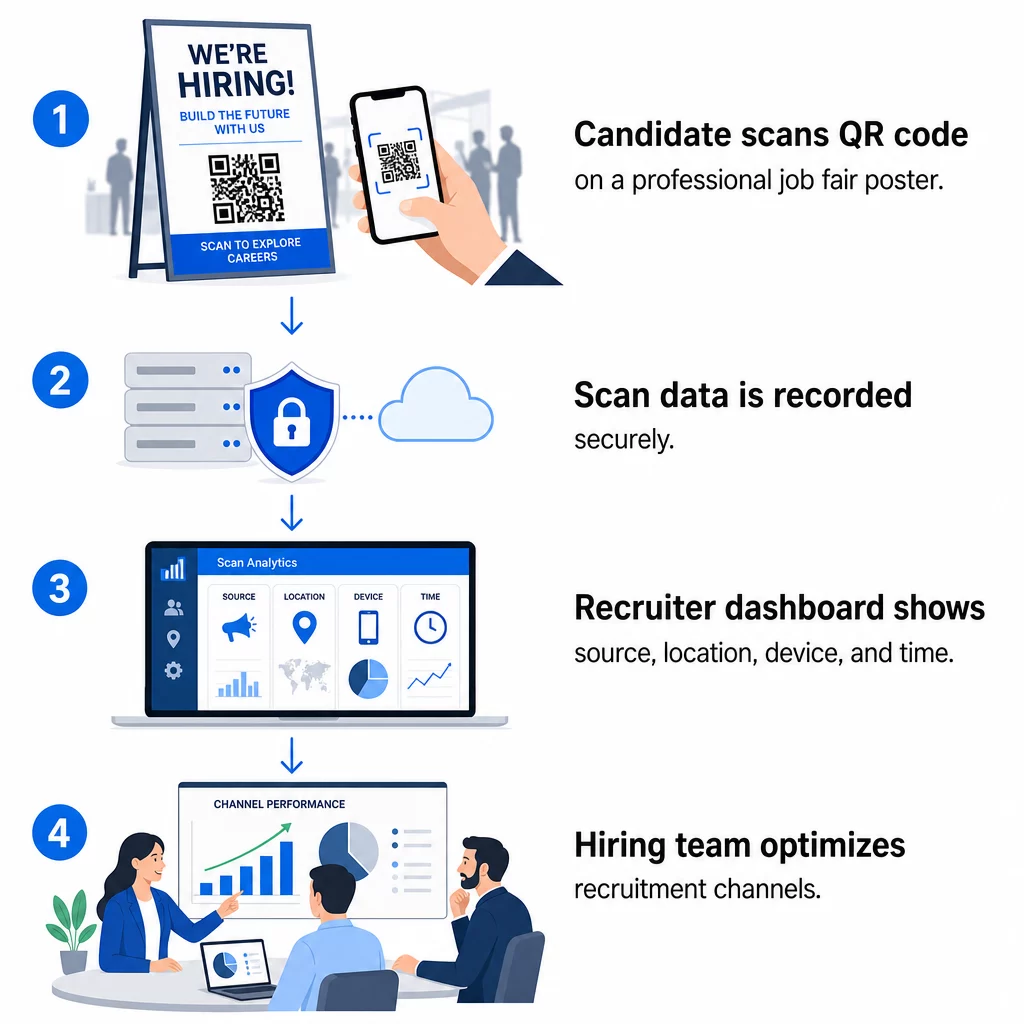
- Número de escaneos – escaneos totales y únicos a lo largo del tiempo
- Marca de tiempo – cuándo es más probable que los candidatos interactúen
- Datos de ubicación – de qué ciudades o regiones provienen tus solicitudes
- Tipo de dispositivo y sistema operativo – confirmando si tu flujo de aplicación móvil realmente funciona
Estos datos te ayudan a responder preguntas prácticas: ¿Están tus materiales de feria de empleo generando seguimientos? ¿El código QR de tu póster supera al de tu correo electrónico? ¿Qué ubicaciones de publicación atraen a candidatos que completan la solicitud completa?
Puedes aprender más sobre cómo leer y actuar sobre estos datos en la guía de Pageloot sobre seguimiento de escaneos de códigos QR y análisis.
Añadir parámetros UTM para una atribución más profunda
Si tu equipo utiliza Google Analytics, puedes añadir parámetros UTM a la URL a la que apunta tu código QR. Esto te permite rastrear el tráfico impulsado por QR junto con tus otros canales sin ninguna conciliación manual. Un código colocado en una feria de empleo universitaria podría usar `utm`source=careerfair` y `utm`medio=qrcode`, lo que facilita comparar ese canal con los anuncios de LinkedIn o el tráfico de bolsas de trabajo en GA4.
La guía de Pageloot sobre parámetros UTM para códigos QR detalla las convenciones de nomenclatura y la configuración de informes.
Rastrear cada canal de reclutamiento Use el Generador de códigos QR dinámicos para crear códigos rastreables y etiquetados con UTM para cada punto de contacto de reclutamiento y ver exactamente qué canales están atrayendo candidatos cualificados.
Códigos QR estáticos vs. dinámicos en el reclutamiento
No todos los códigos QR necesitan ser dinámicos, pero la mayoría de las aplicaciones de reclutamiento se benefician de ello. Aquí tienes una comparación práctica:
| FUNCIÓN | Código QR estático | Código QR dinámico |
|---|---|---|
| Destino editable después de la impresión | No | Sí |
| Análisis de escaneos | No | Sí |
| Funciona después de que la oferta de trabajo se cierra | No (si la URL se rompe) | Sí (redirigir a una nueva oferta) |
| Requiere suscripción | No | Sí |
| Mejor para | Materiales de referencia permanentes | Campañas activas, ferias de empleo, anuncios impresos |
La principal ventaja de los códigos dinámicos en el reclutamiento es la flexibilidad. Si un puesto se cubre antes de que tus materiales impresos sean retirados, puedes redirigir ese código QR a un puesto similar vacante o a una página de solicitud general – sin necesidad de reimprimir. Para un desglose detallado, consulta la comparación de Pageloot de códigos QR estáticos vs. dinámicos.
Creación de códigos QR de marca en los que los candidatos confían
Los códigos QR genéricos en blanco y negro se escanean, pero los de marca funcionan mejor y refuerzan tu identidad de empleador. El de Pageloot generador de códigos QR te permite incrustar el logotipo de tu empresa, aplicar colores de marca y elegir entre plantillas de diseño para que cada código parezca una parte deliberada de tus materiales en lugar de una ocurrencia tardía.
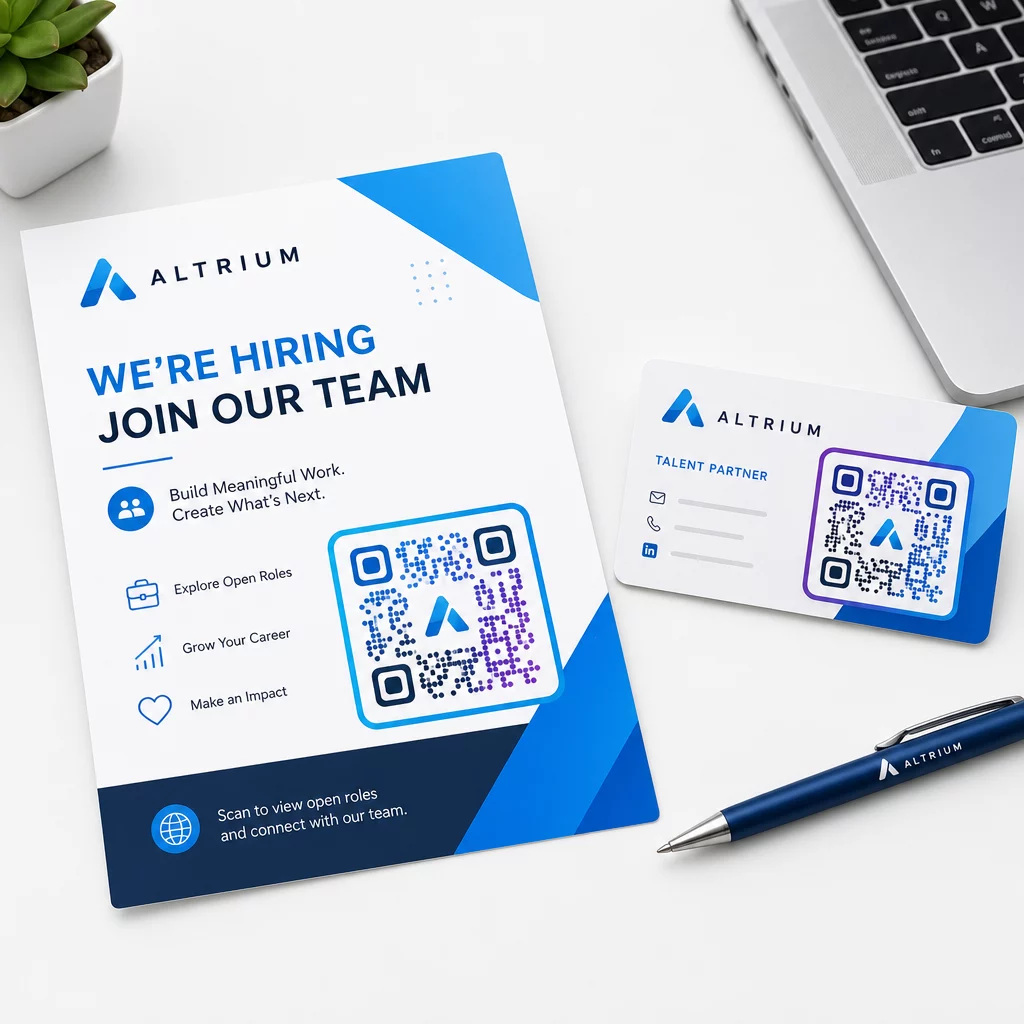
Algunas pautas prácticas para materiales de reclutamiento impresos:
- Para tarjetas de presentación, use un tamaño mínimo de código QR de 0.8 × 0.8 pulgadas para asegurar una escaneabilidad confiable.
- Para pósteres y folletos, apunte a al menos 1.2 × 1.2 pulgadas, con espacio en blanco claro alrededor del código.
- Mantenga una relación de contraste de al menos 4:1 entre los módulos oscuros y el fondo.
- Imprima a 300 PPP para asegurar que el código se mantenga nítido y escaneable.
Los códigos QR de marca y bien dimensionados señalan profesionalismo y animan a los candidatos a seguir adelante. Para más información sobre destinos amigables con dispositivos móviles después del escaneo, consulte la guía de Pageloot sobre mejores prácticas para páginas de destino de códigos QR móviles.
Consideraciones de Cumplimiento para Datos de Candidatos
Los códigos QR recopilan datos, y esos datos conllevan responsabilidades. Las empresas de personal en EE. UU. deben estar al tanto de algunos requisitos básicos al construir flujos de trabajo de reclutamiento basados en QR:
- Mantenimiento de registros de la EEOC: La ley federal exige a los empleadores retener todos los registros de solicitud –incluidos los enviados a través de formularios vinculados por QR– durante al menos un año a partir de la fecha en que se creó el registro. Los contratistas federales con 150 o más empleados y contratos de al menos $150,000 deben retener los registros durante dos años.
- Autoidentificación voluntaria: Si sus formularios vinculados a QR recopilan información demográfica para informes de EEO, esa participación debe ser voluntaria, mantenerse separada de los materiales de solicitud y nunca usarse en las decisiones de contratación.
- Obligaciones de privacidad: Si su plataforma hace promesas de privacidad a los candidatos –explícita o implícitamente–, usted está obligado a cumplirlas. Asegúrese de que cualquier formulario vinculado a QR y página de destino incluya un aviso de privacidad claro y que los datos de los candidatos se almacenen de forma segura.
- ADA y herramientas algorítmicas: Si su flujo de trabajo QR se conecta a alguna herramienta de selección automatizada, la guía de la EEOC exige que esas herramientas se evalúen para detectar un posible impacto dispar en grupos protegidos, incluidos los candidatos con discapacidades.
Estos requisitos no complican la adopción de códigos QR, sino que dan forma a cómo se diseña la recopilación de datos en el otro extremo del escaneo.
Cómo Pageloot Apoya a los Equipos de Reclutamiento
La plataforma de Pageloot ofrece a las empresas de personal las herramientas para crear, gestionar y analizar códigos QR en cada etapa del reclutamiento. Con la confianza de más de 20.000 empresas en 110 países, la plataforma incluye:
- UNA Generador de códigos QR dinámicos para códigos editables y rastreables
- UNA Generador de código QR para Google Forms para enlaces instantáneos a formularios de solicitud y selección
- UNA generador de códigos QR de enlaces para dirigir a los candidatos a cualquier oferta de empleo o página de destino
- Un herramienta de código QR de asistencia para registros de eventos y seguimiento de candidatos
- Un panel de análisis en tiempo real que rastrea el número de escaneos, la ubicación, el dispositivo y el momento
- Controles completos de marca, incluyendo logotipos, colores y plantillas de diseño
- Soporte para más de 25 tipos de códigos QR en formatos impresos y digitales
Una prueba gratuita de 14 días te da acceso a códigos dinámicos, análisis y personalización de marca antes de comprometerte con un plan de pago.
Empieza con los códigos QR de reclutamiento Crea códigos de marca y rastreables para tu próxima feria de empleo, campaña de correo electrónico o publicación impresa con el Generador de códigos QR de Pageloot – gratis para probar durante 14 días, no se requiere tarjeta de crédito.
Convirtiendo los datos QR en decisiones de contratación más inteligentes
Los datos de escaneo que generan tus códigos QR no son solo una métrica de vanidad, son un ciclo de retroalimentación para tu estrategia de reclutamiento. Si tus códigos QR de eventos generan un alto volumen de escaneos pero pocas solicitudes completadas, el problema probablemente sea la experiencia móvil al otro lado del escaneo. Si la ubicación de tus carteles en una ciudad supera a otra, eso te informa dónde enfocar tu próxima tirada de impresión.
Con el tiempo, combinar los análisis de escaneo QR con los datos de tu sistema de seguimiento de candidatos te permite construir una imagen más clara de qué puntos de contacto realmente se convierten en contrataciones, y cuáles están desperdiciando presupuesto. Ese es el cambio del reclutamiento reactivo a la contratación basada en datos.
Preguntas frecuentes
No. Cualquier smartphone moderno con una aplicación de cámara integrada puede escanear un código QR sin descargar software adicional. Esto elimina una barrera significativa para la participación, particularmente en eventos presenciales donde los candidatos pueden dudar en instalar nuevas aplicaciones.
Sí, pero solo si usas un código QR dinámico. Los códigos dinámicos codifican una URL de redirección corta que puedes apuntar a un nuevo destino en cualquier momento desde tu panel de control de Pageloot. Si un trabajo se cierra o un enlace de formulario cambia, puedes redirigir el código sin reimprimir un solo folleto o póster.
El código QR en sí mismo recopila datos a nivel de escaneo – marca de tiempo, tipo de dispositivo, sistema operativo y ubicación geográfica del escaneo. No recopila información de identidad personal a menos que el candidato envíe activamente un formulario después de escanear. Cualquier dato personal recopilado a través de formularios vinculados se rige por su política de privacidad y la legislación laboral aplicable, incluidos los requisitos de mantenimiento de registros de la EEOC.