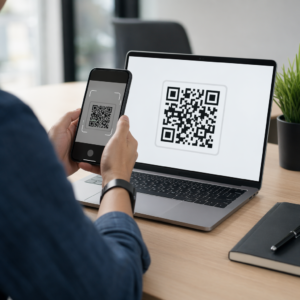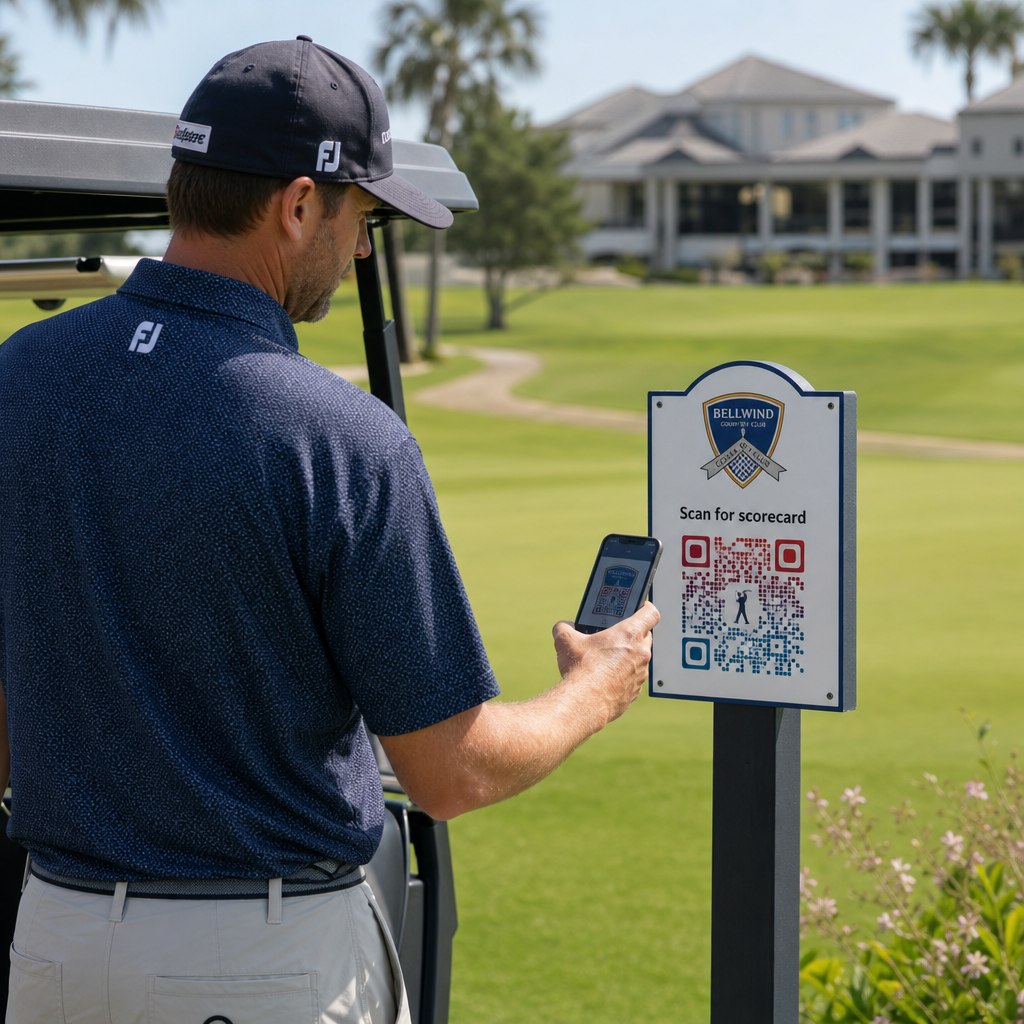
¿Está buscando formas prácticas de modernizar su instalación de golf? Los procesos basados en papel, la señalización obsoleta y las oportunidades de interacción perdidas cuestan a los campos tiempo y ingresos cada temporada. Esta guía le muestra las formas más efectivas de usar códigos QR en toda su instalación, desde tarjetas de puntuación digitales y marcadores de tee hasta pagos y comentarios de los jugadores.
¿Por qué los campos de golf están adoptando códigos QR?
La participación en el golf en EE. UU. alcanzó un máximo histórico de 48.1 millones de participantes totales en 2025, un aumento del 50% en la última década. Con aproximadamente 16,000 campos compitiendo por esa demanda, la experiencia del jugador se ha convertido en un diferenciador clave, y los códigos QR ofrecen una forma de bajo costo y alto impacto para mejorarla.
Los códigos QR funcionan codificando una URL, documento u otro destino en una imagen escaneable. Cuando un jugador apunta la cámara de su smartphone al código, se abre instantáneamente el contenido que haya vinculado, no se requiere descarga de aplicación para la mayoría de los dispositivos modernos. Las instalaciones de golf pueden colocar estos códigos en materiales impresos, señalización, carritos de golf y marcadores de tee para conectar el campo físico con recursos digitales.
La verdadera ventaja operativa proviene de códigos QR dinámicos – códigos que le permiten actualizar el contenido vinculado en cualquier momento sin reimprimir el código físico. Si el enlace de su tarjeta de puntuación cambia, su menú se actualiza o el mapa de su campo se revisa, simplemente cambia el destino en su panel de control. Para un desglose completo de cómo funciona esto, consulte el diferencias entre códigos QR estáticos y dinámicos.
Tarjetas de puntuación digitales mediante código QR
Una de las aplicaciones más prácticas para cualquier instalación de golf es reemplazar las tarjetas de puntuación de papel con versiones digitales accesibles mediante código QR.
Una tarjeta de puntuación digital es cualquier interfaz compatible con dispositivos móviles que permite a los jugadores registrar su puntuación hoyo por hoyo en su smartphone. Los jugadores escanean un código QR en el primer tee, en la tienda profesional o en el carrito, y la tarjeta de puntuación se abre directamente en su navegador – sin papel, sin lápiz, sin redistribución después de las rondas.
Las Reglas de Golf de la USGA confirman que una tarjeta de puntuación puede estar en cualquier formato de papel o electrónico aprobado por el Comité, siempre que permita registrar las puntuaciones por hoyo, sea certificada por el jugador y el marcador, e identifique correctamente cada hoyo. Los Comités pueden incluso exigir a los jugadores que utilicen una tarjeta de puntuación electrónica en lugar de una de papel. Esto le da a su instalación total flexibilidad para hacer oficial el cambio tanto para competiciones como para rondas casuales.
Desde el punto de vista operativo, las tarjetas de puntuación digitales reducen la prisa por el papeleo posterior a la ronda, dan al personal visibilidad en tiempo real del progreso de la ronda y alimentan las tablas de clasificación en vivo durante los torneos. Los jugadores se benefician del seguimiento de puntuaciones integrado, el historial de rondas y las estadísticas de juego que el papel nunca ofreció.
Para configurar esto, vincule la URL de su plataforma de tarjeta de puntuación digital a un código QR de enlace y coloque ese código en:
- Señalización del primer tee
- Carritos de golf (pegatinas montadas en el carrito o tarjetas laminadas)
- Tarjetas de puntuación impresas como suplemento
- El mostrador de registro de la tienda profesional
Usar un código QR dinámico aquí es especialmente práctico: si cambia de proveedor de tarjetas de puntuación o actualiza la URL, actualiza el enlace en su panel de control y cada código impreso sigue funcionando.
Cambie a tarjetas de puntuación digitales sin reimprimir Cree un código QR dinámico para el enlace de su tarjeta de puntuación y actualice el destino en cualquier momento sin tocar sus materiales impresos. Pruebe el Generador de códigos QR gratis por 14 días.
Códigos QR de marcadores de tee e información de hoyos
Los códigos QR en los marcadores de tee dan a los jugadores acceso instantáneo a diseños de hoyos, tablas de yardas, reglas locales y consejos de juego, contenido que de otro modo requeriría inserciones impresas o pantallas en la casa club.
Un enfoque común es vincular el código QR de cada marcador de tee a un PDF compatible con dispositivos móviles o a una página de destino específica para ese hoyo. Los jugadores escanean en el tee, ven el diagrama del hoyo, entienden la línea óptima y juegan más rápido y con más confianza. Esto es particularmente valioso para los visitantes primerizos que navegan por un campo desconocido.
Puede crear esto usando un Generador de código QR para PDF si sus guías de hoyos son documentos PDF, o un generador de códigos QR de enlaces si aloja el contenido en una página web o página de destino. Los operadores centrados en la sostenibilidad también han utilizado códigos QR en los marcadores de tee para información de reglas locales de “Escanear y Aprender”, reemplazando las hojas de reglas impresas y reduciendo el tiempo administrativo en el campo.
Menús de la tienda profesional y la casa club
Si su casa club o cafetería de paso sirve alimentos y bebidas, un menú con código QR elimina el costo y la molestia de reimprimir menús físicos cada vez que cambian los artículos o los precios. Los jugadores escanean el código en el bar, la ventana del almacén de carritos o una mesa en el área de comedor y ven un menú digital actual. Cuando su cocina cambia las ofertas para la temporada, actualiza el contenido vinculado, no el código QR en sí.
De Pageloot Generador de códigos QR para menús admite tanto menús en PDF como menús basados en la web, y le permite añadir el logotipo de su club y los colores de su marca para mantener el código consistente con la identidad visual de su instalación. Para la colocación, un código QR en un cartel de mesa en el área de comedor es uno de los formatos más efectivos – los jugadores lo ven a la altura de los ojos y tienen un momento natural para escanearlo mientras están sentados.
Pagos sin contacto en el campo
Los códigos QR pueden simplificar el pago en varios puntos de contacto: la tienda profesional, el carrito de bebidas, el campo de prácticas y el registro de torneos. Los jugadores escanean un código QR de pago vinculado a su procesador de pagos y completan la transacción en su teléfono sin manejar efectivo o un terminal de tarjeta.
Puede crear un código QR vinculado a pagos utilizando un Generador de código QR de PayPal o un estándar código QR de enlace que apunte a su página de pago. Estos funcionan bien en carritos de bebidas, expositores de mercancía y en cualquier lugar donde un terminal físico sea poco práctico.
Navegación del campo y códigos QR de ubicación
Para instalaciones grandes, los jugadores a menudo necesitan ayuda para encontrar servicios específicos – la instalación de práctica, la casa de descanso, una tienda profesional satélite o la entrada de la casa club desde el estacionamiento. Un Código QR de Google Maps abre la ubicación de su instalación o un punto específico en la propiedad directamente en la aplicación de mapas del jugador con un solo escaneo.
Son útiles en:
- Señalización direccional en las entradas del campo
- Paquetes de bienvenida de torneos
- Páginas de contacto del sitio web para jugadores que navegan desde fuera del sitio
Acceso Wi-Fi para jugadores y personal
¿Ofrece Wi-Fi en la casa club, el vestuario o el área de comedor? Un código QR de Wi-Fi permite a los jugadores conectarse instantáneamente sin que el personal necesite dictar una contraseña. Los jugadores escanean el código y se conectan automáticamente – no se requiere entrada manual. Puede crear uno usando el de Pageloot generador de códigos QR introduciendo el nombre de su red, el tipo de seguridad y la contraseña, y luego publicando el código resultante en la casa club o en el área de preparación de carritos.
Comentarios de los jugadores y reseñas de Google
Después de una ronda, los jugadores a menudo están en la disposición adecuada para dejar una reseña o completar un formulario de comentarios – pero la fricción mata el seguimiento. Un código QR en la tarjeta de puntuación, el recibo o un letrero cerca de la salida elimina esa fricción por completo.
- UNA código QR para reseñas de Google envía a los jugadores directamente a su página de reseñas de Google Business, convirtiéndolo en una acción de un solo toque.
- UNA código QR de comentarios del cliente puede enlazar a una encuesta donde los jugadores califiquen el ritmo de juego, las condiciones del campo, el personal y las comodidades.
Coloque estos códigos donde los jugadores pausan naturalmente después de terminar – la mesa del anotador, la zona de entrega de bolsas, el bar – y combínelos con una simple pregunta como “¿Cómo estuvo su ronda hoy?”
Señalización, Marketing y promociones de eventos
Los códigos QR funcionan en prácticamente todas las superficies impresas de su instalación. La señalización de entrada a torneos y los folletos pueden enlazar directamente a una página de registro en línea. Los carteles de la casa club y del campo de prácticas pueden apuntar a una página de destino de consulta de membresía. La señalización de patrocinadores en los tees puede enlazar al sitio web de un patrocinador, haciendo que los paquetes de patrocinio sean más medibles y valiosos para los socios. Las promociones estacionales son especialmente fáciles de gestionar – actualice el destino de un código QR publicado cuando cambien las ofertas y no se requiere una nueva impresión.
Para la señalización exterior, siga la guía de colocación de códigos QR y coloque los códigos entre 3.5 y 5.5 pies del suelo a la altura de los ojos, con un fondo limpio y de alto contraste. Los códigos colocados en superficies reflectantes o curvas se escanean mal, así que opte por sustratos planos con acabado mate siempre que sea posible.
Seguimiento del rendimiento de los códigos QR
Una ventaja que la señalización en papel nunca ofreció es el compromiso medible. Los códigos QR dinámicos registran cada escaneo con datos que incluyen ubicación, tipo de dispositivo, hora del día, escaneos totales y escaneos únicos. Esto le indica qué tees obtienen la mayor actividad de tarjetas de puntuación, qué estaciones de menú impulsan la mayoría de los pedidos de comida y qué materiales de marketing generan tráfico real.
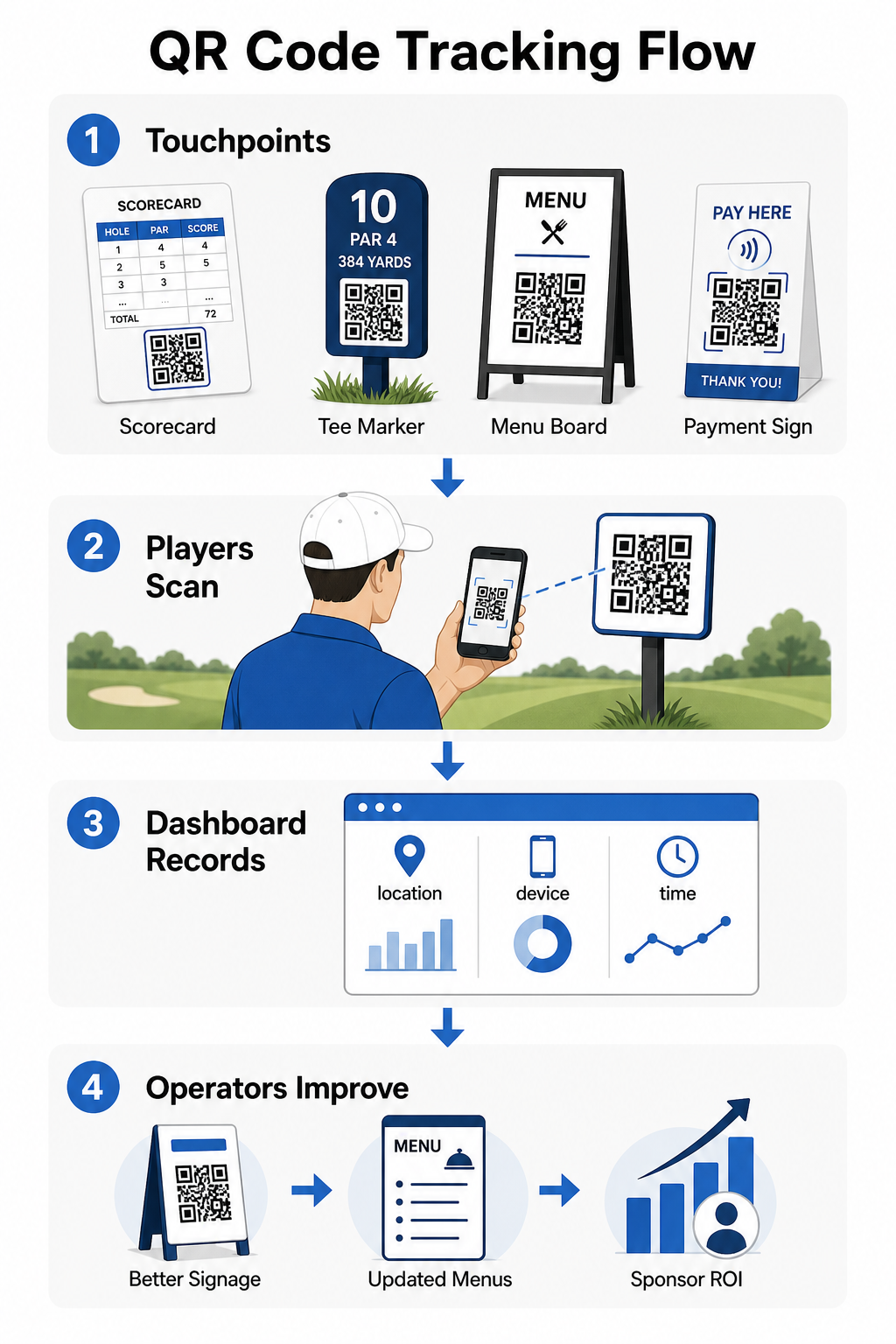
Puede usar estos datos para refinar la colocación, mejorar la señalización de bajo rendimiento y demostrar el ROI en las activaciones de patrocinadores. Aprenda más sobre cómo funciona el seguimiento de códigos QR y qué métricas monitorear en toda su instalación.
Vea exactamente dónde interactúan los jugadores Rastree los escaneos por ubicación, dispositivo y hora en toda su instalación desde un solo panel. Empiece con las soluciones de códigos QR de Pageloot y acceda a análisis en tiempo real de cada código que implemente.
Conceptos básicos de diseño y colocación para entornos de golf
Antes de imprimir códigos QR para uso exterior o de alto tráfico, algunas consideraciones técnicas son significativamente importantes para el rendimiento en el mundo real.
Contraste es el factor más crítico. Use un color de módulo oscuro sobre un fondo claro y apunte a un relación de contraste de al menos 4:1 entre el patrón oscuro y su fondo. Esto asegura un escaneo fiable en condiciones de iluminación exterior variables, desde mañanas nubladas hasta el sol brillante de la tarde.
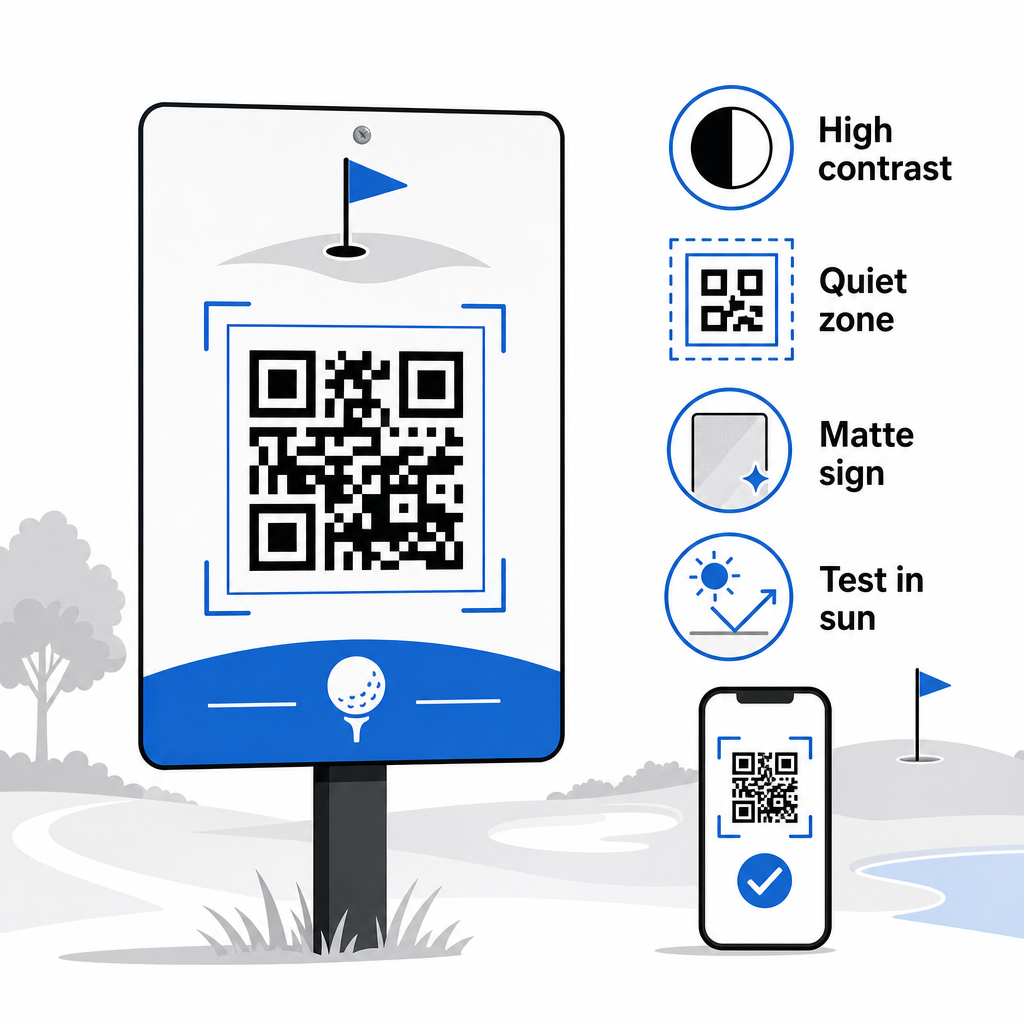
Tamaño debe coincidir con la distancia de escaneo esperada. Para marcadores de tee o códigos montados en carritos escaneados a la distancia de un brazo, 2 × 2 cm es la línea base mínima, pero más grande siempre es mejor para uso en exteriores. Una regla práctica: por cada 10 cm de distancia de escaneo esperada, aumente el ancho del código en 1 cm.
Zona tranquila se refiere al margen claro de espacio en blanco que rodea el código QR. Abarrotar el código con texto o gráficos directamente adyacentes causará fallos de escaneo, así que preserve ese borde por todos los lados.
Logotipos pueden mejorar el atractivo visual y reforzar la identidad de marca de su club dentro del propio código QR, pero mantenga cualquier logotipo en no más del 30% del área del código y use una alta corrección de errores (nivel Q o H) para mantener la fiabilidad. Los detalles completos están disponibles en Directrices de legibilidad de códigos QR de Pageloot.
Pruebas siempre debe realizarse antes de imprimir a gran escala. Escanee cada código en múltiples dispositivos y en el entorno real – luz solar exterior brillante, entornos interiores con poca luz y condiciones de deslumbramiento – para confirmar que funciona como se espera. Obtenga más información sobre cómo usar códigos QR de manera efectiva antes de su primera implementación.
Los códigos QR ofrecen a los operadores de golf una forma práctica y actualizable de conectar cada punto de contacto físico en el campo con contenido digital útil. Las instalaciones más efectivas los utilizan de forma consistente en tarjetas de puntuación, señalización, menús y participación de los jugadores, y rastrean el rendimiento para seguir mejorando. Comience con uno o dos casos de uso de alto impacto, mida los resultados y expanda a partir de ahí. Visite Pageloot’s generador de códigos QR para crear su primer código, o explore soluciones de códigos QR específicas de la industria para encontrar el formato adecuado para su instalación.
Preguntas frecuentes
Sí. Las Reglas de Golf de la USGA establecen que una tarjeta de puntuación puede estar en cualquier formato de papel o electrónico aprobado por el Comité, siempre que permita introducir las puntuaciones por hoyo, sea certificada por el jugador y el marcador, y esté correctamente identificada para cada hoyo. Los Comités pueden incluso exigir tarjetas de puntuación electrónicas en lugar de las de papel. Confirme siempre la aprobación con su comité de torneo antes de usarla.
Si usas un código QR dinámico, actualizas la URL de destino en tu panel de control y los códigos impresos existentes redirigen automáticamente al nuevo contenido – no se requiere reimprimir marcadores de salida, pegatinas de carrito o señalización. Los códigos QR estáticos codifican la URL de forma permanente, por lo que cualquier cambio de enlace requiere producir nuevos materiales impresos.
Utilice colores de alto contraste – módulos oscuros sobre un fondo claro con una relación de contraste de al menos 4:1. Dimensione los códigos para la distancia de escaneo esperada utilizando la regla 10:1: 1 cm de ancho de código por cada 10 cm de distancia. Elija materiales planos con acabado mate para evitar el deslumbramiento, y pruebe cada código en condiciones de iluminación exterior reales antes de la implementación. Las directrices completas de legibilidad de códigos QR cubren detalles adicionales sobre el tamaño, el contraste y las zonas de silencio.