Lên kế hoạch cho một buổi tưởng niệm trong khi đang đau buồn đã đủ khó khăn rồi – việc tìm cách chia sẻ cáo phó, video tưởng niệm, hoặc chương trình tang lễ với khách mời không nên làm tăng thêm gánh nặng đó. Nếu không có một cầu nối đơn giản giữa tài liệu in ấn và nội dung kỹ thuật số, những lời tri ân ý nghĩa thường không được nhìn thấy. Hướng dẫn này chỉ cho bạn chính xác cách sử dụng mã QR để kết nối một buổi lễ vật lý với những ký ức kỹ thuật số quan trọng nhất.
Tại sao mã QR lại có ý nghĩa trong các buổi lễ tưởng niệm
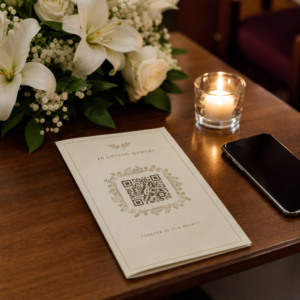
Các buổi lễ tang quy tụ mọi người ở mọi lứa tuổi, nhiều người từ nơi khác đến, tất cả đều muốn tưởng nhớ người thân yêu của họ. Một mã QR được in trên chương trình buổi lễ, thiệp tưởng niệm, hoặc chương trình tang lễ mang đến cho mỗi khách mời một kết nối tức thì với nội dung phong phú hơn – một video tưởng niệm, một thư viện ảnh, một cáo phó trực tuyến, hoặc một sổ lưu bút kỹ thuật số – mà không yêu cầu họ phải tìm kiếm, gõ, hoặc hỏi xin một liên kết.
Quyền sở hữu điện thoại thông minh phổ biến ngay cả ở người lớn tuổi: 90% người trưởng thành ở Hoa Kỳ từ 50–64 tuổi và 78% người từ 65 tuổi trở lên sở hữu một chiếc. Điều đó có nghĩa là phần lớn khách mời tại một buổi lễ tưởng niệm đã được trang bị để quét mã QR bằng camera tích hợp của điện thoại, không cần ứng dụng riêng biệt.
Ngoài sự tiện lợi, mã QR còn giải quyết một vấn đề phối hợp thực sự cho các gia đình quản lý cả việc tham dự trực tiếp và từ xa. Nhiều nhà tang lễ hiện cung cấp dịch vụ phát trực tiếp để các thành viên gia đình ở xa có thể tham gia ảo, với các bản ghi thường được lưu lại như một đài tưởng niệm kỹ thuật số vĩnh viễn. Một mã QR trên một tấm thiệp kỷ niệm vật lý mang lại cho những người tham dự trực tiếp quyền truy cập tương tự vào bản ghi đó rất lâu sau khi buổi lễ kết thúc – biến một vật kỷ niệm in ấn thành một kết nối lâu dài.
Bạn có thể liên kết mã QR tưởng niệm đến những gì
Loại mã QR phù hợp phụ thuộc vào nội dung kỹ thuật số bạn muốn khách mời truy cập. Dưới đây là những trường hợp sử dụng phổ biến nhất cho các buổi lễ tưởng niệm.
Cáo phó trực tuyến hoặc trang tưởng niệm. Liên kết khách mời trực tiếp đến một trang tưởng niệm nơi gia đình và bạn bè có thể để lại tin nhắn, chia sẻ ảnh và thắp nến ảo. Sử dụng Trình tạo mã QR liên kết để trỏ mã đến bất kỳ URL nào, bao gồm cáo phó được lưu trữ bởi nhà tang lễ hoặc một nền tảng tưởng niệm chuyên dụng.
Video tưởng niệm hoặc tri ân. Một video kỷ niệm cuộc đời của ai đó là một trong những điều ý nghĩa nhất bạn có thể chia sẻ. Nếu bạn đã tải video tưởng niệm lên YouTube, Tạo mã QR YouTube cho phép khách mời quét và xem trực tiếp từ điện thoại của họ. Để xem hướng dẫn đầy đủ, hãy xem hướng dẫn về cách tạo mã QR cho video.
Chương trình tang lễ kỹ thuật số hoặc chương trình buổi lễ. Một chương trình in là một vật kỷ niệm truyền thống, nhưng phiên bản PDF có thể bao gồm nhiều hơn – ảnh, lời bài thánh ca, bài đọc, một câu chuyện cuộc đời đầy đủ. Tải lên chương trình của bạn và tạo mã bằng Chuyển PDF sang QR. Khách mời giữ thẻ vật lý; PDF cung cấp cho họ phiên bản đầy đủ để xem lại tại nhà.
Thư viện ảnh. Quét mở ra một bộ sưu tập ảnh trải dài suốt cuộc đời. Tạo mã QR hình ảnh cho phép bạn tạo một thư viện có thể chia sẻ mà khách mời có thể xem và lưu từ điện thoại của họ.
Nhiều liên kết trên một trang. Nếu bạn muốn khách mời truy cập cáo phó, video tưởng niệm, album ảnh và liên kết quyên góp tất cả từ một lần quét duy nhất, Trình tạo mã QR liên kết có thể xây dựng một trang đích đơn giản tổ chức mọi thứ ở một nơi.
Chia sẻ mọi thứ từ một lần quét duy nhất Cần khách mời truy cập video tưởng niệm, thư viện ảnh và cáo phó trực tuyến từ một mã QR? Sử dụng Trình tạo mã QR liên kết để xây dựng một trang đích tập hợp tất cả lại với nhau.
Cách tạo mã QR cho buổi lễ tưởng niệm
Tạo mã QR tưởng niệm chỉ mất vài phút. Đây là quá trình từ đầu đến cuối.
Đầu tiên, hãy thu thập nội dung kỹ thuật số của bạn. Tải video tưởng niệm của bạn lên YouTube, lưu trữ chương trình PDF của bạn, hoặc xác nhận URL của cáo phó trực tuyến bạn muốn liên kết đến. Tiếp theo, chọn trình tạo phù hợp với loại nội dung của bạn – trình tạo PDF cho tài liệu, trình tạo YouTube cho video, hoặc trình tạo liên kết cho bất kỳ URL nào.

Sau khi bạn đã chọn một trình tạo, hãy dán liên kết hoặc tải tệp lên và công cụ sẽ tạo một mã có thể quét được ngay lập tức. Từ đó, tùy chỉnh giao diện: điều chỉnh màu sắc để phù hợp với thẩm mỹ của buổi tưởng niệm, giữ đơn giản với màu đen cổ điển trên nền trắng, hoặc thêm một khung nhỏ với văn bản như “Quét để xem lời tri ân” để khách mời biết điều gì sẽ xảy ra. Khi bạn hài lòng, hãy tải xuống mã ở định dạng sẵn sàng in – SVG, EPS, hoặc PDF – để in độ phân giải cao trên các chương trình, thiệp tưởng niệm, hoặc bản tin dịch vụ.
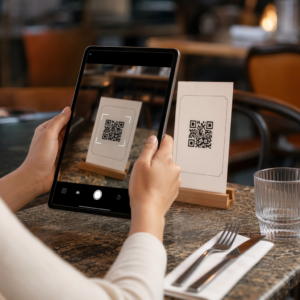
Trước khi bất cứ thứ gì được in, hãy tự mình kiểm tra mã trên cả thiết bị iPhone và Android để xác nhận nó mở đúng nội dung. Để xem hướng dẫn chi tiết về cách chuyển đổi tài liệu thành mã QR, hãy xem hướng dẫn về cách chuyển đổi tệp thành mã QR.
Tạo mã QR tưởng niệm của bạn Sẵn sàng bắt đầu? Sử dụng Tạo mã QR miễn phí để tạo mã trong vài phút – không cần kinh nghiệm kỹ thuật.
Tại sao Mã QR động là lựa chọn tốt hơn cho các buổi tưởng niệm
Khi lập kế hoạch một buổi lễ dưới áp lực thời gian, sai sót xảy ra. Một liên kết thay đổi, một video được tải lên lại, hoặc gia đình quyết định chuyển đổi nền tảng cáo phó sau khi các chương trình đã được in.
A mã QR động giải quyết vấn đề này bằng cách tách mã đã in khỏi đích mà nó trỏ đến. Bản thân mã không bao giờ thay đổi, nhưng trang mà nó hướng khách đến có thể được cập nhật bất cứ lúc nào từ một bảng điều khiển. Nếu bạn đã in 200 chương trình tang lễ và sau đó phát hiện liên kết video tưởng niệm bị hỏng, bạn cập nhật đích trong vài giây – không cần in lại, không lãng phí, không có những chỉnh sửa khó xử tại buổi lễ.
Mã QR động cũng cung cấp phân tích quét: có bao nhiêu người đã quét mã, khi nào và từ đâu. Đối với các gia đình muốn hiểu mức độ phổ biến của một lời tưởng niệm, hoặc đối với những người lập kế hoạch tang lễ điều phối các buổi lễ cho nhiều gia đình, dữ liệu đó cung cấp cái nhìn sâu sắc có ý nghĩa về cách khách đã tương tác với nội dung tưởng niệm.
Các Tạo mã QR động xử lý tất cả những điều này từ một bảng điều khiển duy nhất.
Chỉnh sửa Mã QR tưởng niệm của bạn Sau khi in Các chương trình đã in trước khi hoàn thiện liên kết video tưởng niệm? Với một Mã QR động, bạn có thể cập nhật đích bất cứ lúc nào – không cần in lại.
Mẹo thiết kế cho Mã QR tưởng niệm
Ngoại hình quan trọng trong bối cảnh một buổi tang lễ hoặc tưởng niệm. Một mã QR được thiết kế tốt hòa hợp một cách tôn trọng vào các tài liệu in trong khi vẫn dễ quét. Hãy ghi nhớ những hướng dẫn thực tế này.

- Sử dụng độ tương phản cao. Mã tối trên nền sáng là sự kết hợp đáng tin cậy nhất. Một mã đen trên giấy trắng hoặc kem quét nhất quán trên tất cả các thiết bị và điều kiện ánh sáng. Để được hướng dẫn chi tiết về màu sắc, hãy xem các phương pháp hay nhất về độ tương phản màu của mã QR.
- Giữ nó đủ lớn. In mã QR của bạn với kích thước tối thiểu 0,8 × 0,8 inch (khoảng 2 × 2 cm) để quét ở cự ly gần. Trên một chương trình gấp hoặc thẻ tưởng niệm, kích thước từ 1 đến 1,5 inch hoạt động đáng tin cậy cho hầu hết khách.
- Giữ vùng yên tĩnh. Để lại một lề rõ ràng, không in ít nhất bốn chiều rộng mô-đun xung quanh mã ở tất cả các cạnh. Đặt văn bản hoặc đường viền trang trí quá gần các cạnh khiến máy quét khó phát hiện hơn nơi mã bắt đầu và kết thúc.
- Thêm nhãn kêu gọi hành động. Một dòng ngắn bên dưới mã – “Quét để xem video tưởng niệm” hoặc “Quét để xem trang tưởng niệm” – hướng dẫn những khách có thể không quen thuộc với mã QR.
- Bao gồm URL như một phương án dự phòng. In liên kết đích bằng văn bản nhỏ gần mã để những khách gặp khó khăn khi quét, hoặc những người thích gõ, vẫn có thể truy cập nội dung.
Để có tài liệu tham khảo đầy đủ hơn về kích thước, vùng yên tĩnh và độ tương phản, hãy xem các phương pháp hay nhất để đọc mã QR.
Nơi đặt Mã QR tại một buổi tưởng niệm
Vị trí xác định liệu khách có thực sự sử dụng mã hay không. Bảng dưới đây ánh xạ các vị trí in và hiển thị phổ biến với nội dung hoạt động tốt nhất tại mỗi vị trí.
| VỊ TRÍ ĐẶT MÃ | Nên liên kết gì |
|---|---|
| Thứ tự buổi lễ hoặc chương trình đã in | Video tưởng niệm, phiên bản kỹ thuật số của chương trình |
| Thẻ tưởng niệm hoặc thẻ cầu nguyện | Cáo phó trực tuyến, thư viện ảnh |
| Thẻ trưng bày sắp xếp hoa | Trang quyên góp tưởng niệm, lời tưởng niệm trực tuyến |
| Bàn sổ lưu niệm | Sổ lưu niệm trực tuyến hoặc trang tưởng niệm |
| Bàn tưởng niệm với ảnh | Thư viện ảnh, video câu chuyện cuộc đời |
| Thông báo qua email hoặc trang web tưởng niệm | Tất cả những điều trên thông qua một trang đích đa liên kết |
Đối với các buổi lễ có cả người tham dự trực tiếp và từ xa, việc đặt mã QR nổi bật trong các thông báo qua email đảm bảo các thành viên gia đình ở xa có thể truy cập cùng nội dung tưởng niệm như những người có mặt trong phòng.
Giúp nội dung tưởng niệm dễ tiếp cận với tất cả khách
Không phải mọi khách đều cảm thấy thoải mái khi quét mã QR, và khả năng tiếp cận quan trọng trong bối cảnh này hơn hầu hết. Một vài bước đơn giản đảm bảo không ai bị bỏ lại.
- Hiển thị URL cùng với mã. In địa chỉ web đầy đủ bằng văn bản dễ đọc để khách có thể nhập nó vào trình duyệt nếu cần.
- Hướng dẫn người chủ trì hoặc một thành viên gia đình. Yêu cầu ai đó hướng dẫn khách bằng lời nói đến mã QR trong buổi lễ – một lời nhắc đơn giản như “chương trình bao gồm một mã QR để xem video tưởng niệm tại nhà” loại bỏ mọi sự do dự.
- Chọn thiết kế lớn, độ tương phản cao. Khách lớn tuổi với camera điện thoại chất lượng thấp hơn hoặc thị lực kém hưởng lợi từ các mã lớn hơn được in với độ tương phản mạnh giữa mã và nền của nó.
- Kiểm tra trên thiết bị cũ hơn. Nếu bạn có thể mượn một chiếc điện thoại đã ba hoặc bốn năm tuổi, hãy quét mã trên đó trước khi in để xác nhận nó hoạt động trên nhiều loại phần cứng.
Của Pageloot Giải pháp mã QR cho mọi ngành bao gồm các cân nhắc về thiết kế và khả năng tiếp cận trên nhiều môi trường vật lý khác nhau nếu bạn muốn khám phá thêm các trường hợp sử dụng.
Một mã QR trên một tấm thiệp tưởng niệm hoặc chương trình tang lễ biến một vật kỷ niệm in đơn giản thành một kết nối lâu dài đến lời tri ân, các bức ảnh và những lời chia sẻ về cuộc đời của một người. Chọn một mã động để bạn có thể cập nhật điểm đến một cách tự do sau khi in, điều chỉnh kích thước phù hợp với chất liệu mà nó xuất hiện trên, giữ độ tương phản cao và luôn bao gồm URL làm phương án dự phòng. Khi được thực hiện một cách chu đáo, đó là một trong những điều đơn giản nhất bạn có thể làm để làm cho một buổi lễ tưởng niệm cảm thấy trọn vẹn đối với mọi khách mời – cho dù họ đang ở trong phòng hay tưởng niệm từ xa.
Bắt đầu với Tạo mã QR miễn phí để xây dựng mã QR tưởng niệm đầu tiên của bạn ngay hôm nay.
Câu hỏi thường gặp
Vâng, nếu bạn sử dụng một mã QR động. Các mã động trỏ đến một URL chuyển hướng mà bạn kiểm soát từ một bảng điều khiển. Nếu liên kết video tưởng niệm thay đổi hoặc bạn di chuyển cáo phó sang một nền tảng khác, bạn cập nhật đích đến và mã đã in tiếp tục hoạt động mà không cần in lại. Trình tạo mã QR động cho phép bạn thực hiện những thay đổi này ngay lập tức.
Nếu video được lưu trữ trên YouTube, sử dụng Trình tạo mã QR YouTube – sao chép liên kết chia sẻ của video, dán nó vào trình tạo và mã sẽ mở video trực tiếp khi được quét. Nếu video được lưu trữ ở nơi khác, sử dụng Trình tạo mã QR liên kết với URL video trực tiếp, hoặc tạo một mã động thông qua Trình tạo mã QR động để bạn có thể cập nhật điểm đến nếu video bị di chuyển.
Luôn in URL đích bằng chữ nhỏ bên cạnh mã QR để khách muốn gõ địa chỉ có thể truy cập trực tiếp cùng nội dung. Đối với khách ít thoải mái với điện thoại thông minh, hãy nhờ một thành viên gia đình hoặc người chủ trì nhắc ngắn gọn về mã trong buổi lễ. Cung cấp nhiều đường dẫn truy cập – mã QR, URL in sẵn và một email trực tiếp kèm liên kết – đảm bảo mọi người có thể tiếp cận lời tri ân bất kể mức độ thoải mái về kỹ thuật của họ.