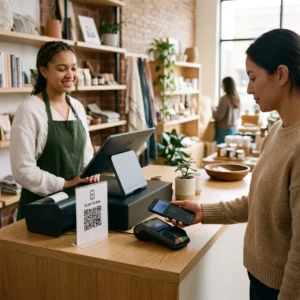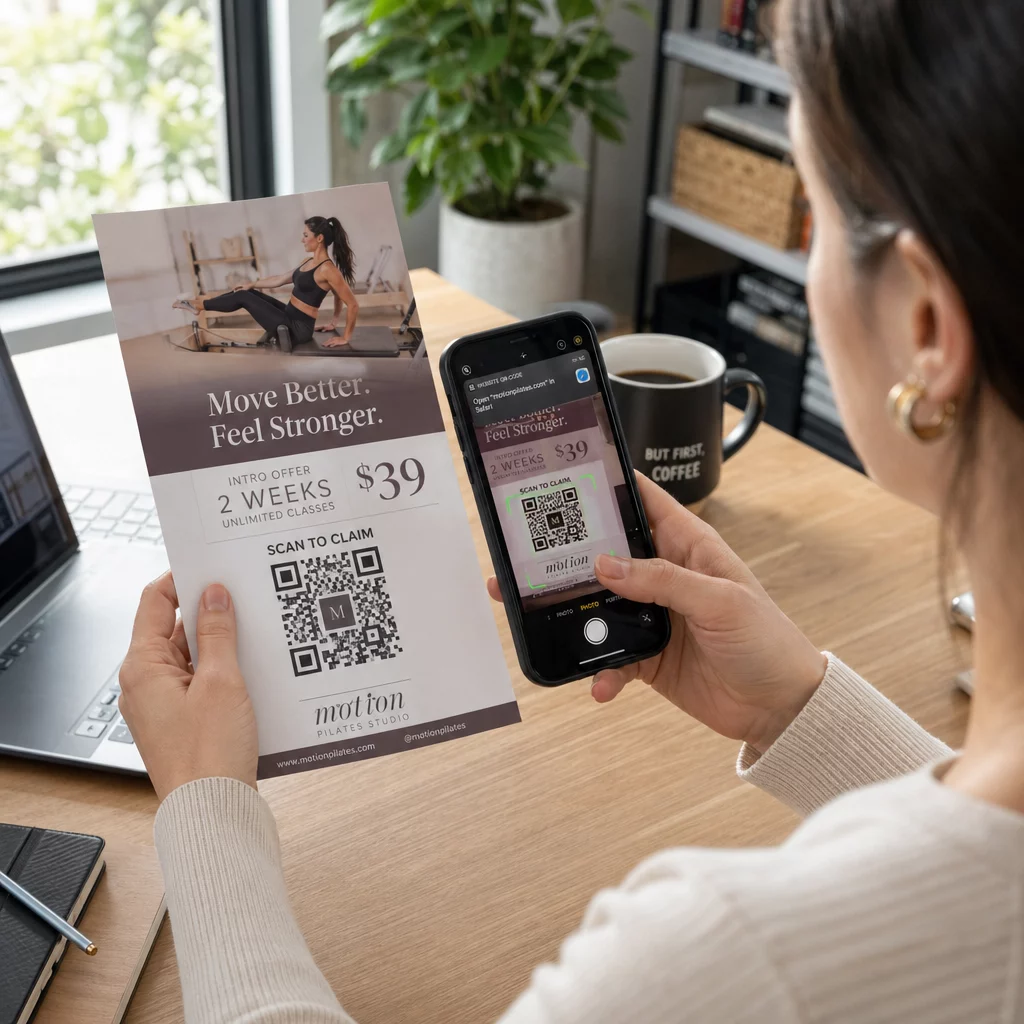
คิวอาร์โค้ดบนใบปลิวคือโค้ดบนใบปลิวที่คุณพิมพ์ ซึ่งจะเปิดหน้าเว็บ แบบฟอร์ม หรือไฟล์เมื่อผู้อ่านสแกน หากต้องการสร้าง ให้สร้างโค้ดใน เครื่องสร้างรหัส QRดาวน์โหลดเป็น SVG หรือ PDF วางลงในเค้าโครงของคุณให้มีความกว้างอย่างน้อย 0.8 นิ้ว (2 ซม.) โดยมีขอบสีขาวชัดเจน และเพิ่มข้อความกระตุ้นการตัดสินใจสั้นๆ ข้างๆ ทดสอบด้วยโทรศัพท์สองเครื่องก่อนพิมพ์ ขั้นตอน ขนาด และกฎการจัดวางอยู่ด้านล่าง
ทำไมรหัส QR จึงควรอยู่บนใบปลิว
ใบปลิวมีพื้นที่จำกัด หากคุณพยายามใส่รายละเอียดสินค้าหรือตารางเวลางานทุกอย่างลงไป การออกแบบจะดูแน่นและอ่านยาก คิวอาร์โค้ดช่วยให้ผู้อ่านเข้าถึงเมนูดิจิทัล แบบฟอร์มลงทะเบียน คูปอง หรือแค็ตตาล็อกฉบับเต็มได้เพียงแตะครั้งเดียว ในขณะที่ใบปลิวยังคงสะอาดตา นี่คือวิธีที่ รหัส QR เชื่อมโยงการตลาดสิ่งพิมพ์และดิจิทัล: ใบปลิวได้รับความสนใจ และการสแกนจะนำผู้อ่านไปยังขั้นตอนถัดไป
คิวอาร์โค้ดยังช่วยให้คุณวัดผลแคมเปญสิ่งพิมพ์ได้อีกด้วย ด้วยโค้ดไดนามิก คุณสามารถดูได้ว่าการสแกนแต่ละครั้งเกิดขึ้นเมื่อใด ที่ไหน และบนอุปกรณ์ใด เพื่อให้คุณทราบว่าใบปลิวและตำแหน่งใดที่ดึงดูดผู้คนเข้ามา
รหัส QR แบบคงที่ vs. แบบไดนามิก: คุณควรใช้แบบไหน?
เลือกประเภทก่อนออกแบบใบปลิว รหัส QR แบบคงที่และแบบไดนามิก ทำงานต่างกันหลังการพิมพ์
รหัส QR แบบคงที่ จัดเก็บปลายทางโดยตรงในรูปแบบ ปลายทางไม่สามารถเปลี่ยนแปลงได้หลังการพิมพ์ และโค้ดไม่มีวันหมดอายุ แบบคงที่ก็เพียงพอแล้วเมื่อลิงก์จะไม่เปลี่ยนแปลง เช่น การเข้าสู่ระบบ Wi-Fi หรือหน้าเว็บไซต์ถาวร และเมื่อคุณไม่ต้องการจำนวนการสแกน
รหัส QR แบบไดนามิก ชี้ไปยังลิงก์เปลี่ยนเส้นทางสั้นๆ ที่คุณจัดการในบัญชี คุณสามารถเปลี่ยนปลายทางได้หลังจากแจกจ่ายใบปลิวไปแล้ว โดยไม่ต้องพิมพ์ซ้ำ หากคุณโปรโมตกิจกรรมรายสัปดาห์ คุณสามารถสลับหน้าลงทะเบียนได้ทุกสัปดาห์ โค้ดไดนามิกยังมีข้อมูลน้อยกว่า ดังนั้นรูปแบบจึงเรียบง่ายกว่าและมักจะสแกนได้ง่ายขึ้นในสภาพแสงน้อย
สำหรับใบปลิวที่ใช้งานในหลายสถานที่หรือนานกว่าหนึ่งสัปดาห์ การใช้โค้ดไดนามิกมักจะคุ้มค่าเพราะคุณจะได้รับ การติดตามรหัส QR พร้อมจำนวนการสแกน สถานที่ และอุปกรณ์ โค้ดไดนามิกมาพร้อมกับการทดลองใช้ฟรี 14 วัน และแผนบริการจะแสดงอยู่ใน หน้าราคา Pageloot. การสแกนไม่จำกัดจำนวน และมีนโยบายคืนเงินภายใน 30 วันสำหรับแผนบริการ รหัสแบบไดนามิกจะหยุดทำงานเมื่อแผนรายเดือนหรือรายปีสิ้นสุดลง ดังนั้นโปรดเปิดใช้งานแผนบริการไว้ในขณะที่ใบปลิวยังคงใช้งานอยู่
วิธีสร้างรหัส QR สำหรับใบปลิวใน 5 ขั้นตอน
ทำตามขั้นตอนเหล่านี้เพื่อเพิ่มรหัส QR ลงในใบปลิว:
- เลือกว่ารหัสจะเปิดอะไร เลือกปลายทางที่ใช้งานได้บนโทรศัพท์เพียงหนึ่งเดียว: URL เว็บไซต์, เอกสาร PDF, เอ Google Formหรือ ก หน้าติดต่อ vCard. ใช้เครื่องมือสร้างที่ตรงกับเนื้อหา
- สร้างและปรับแต่ง. เปิด เครื่องสร้างรหัส QR และวางลิงก์ของคุณ หากคุณต้องการให้แบรนด์ของคุณปรากฏบนรหัส ให้ใช้ สร้าง QR Code ใส่โลโก้. รักษขนาดโลโก้ให้เล็กและใช้สีเข้มบนพื้นหลังสีอ่อน
- ดาวน์โหลดสำหรับพิมพ์ ดาวน์โหลดไฟล์ SVG หรือ PDF หากมี เพราะไฟล์เวกเตอร์จะคมชัดในทุกขนาด หากคุณมีเพียงไฟล์ PNG ให้ดาวน์โหลดในขนาดใหญ่ (แถบเลื่อนของเครื่องมือสร้างสามารถปรับได้ถึง 2000 px) และอย่าขยายขนาดในเลย์เอาต์ของคุณ
- วางลงในเครื่องมือออกแบบของคุณ นำเข้าไฟล์ไปยัง Canva, Adobe Illustrator หรือแอปพลิเคชันจัดวางอื่น ๆ กำหนดขนาด เว้นขอบสีขาวรอบ ๆ และวางคำกระตุ้นการตัดสินใจ (call to action) ไว้ข้าง ๆ
- ทดสอบก่อนพิมพ์. พิมพ์หนึ่งชุดในขนาดจริง สแกนด้วย iPhone และโทรศัพท์ Android ในสภาพแสงปกติของห้อง จากระยะที่ผู้อ่านจะถือใบปลิว
สร้างรหัส QR แบบกำหนดเองของคุณ พร้อมที่จะเพิ่มรหัส QR ที่มีแบรนด์และติดตามได้ลงในใบปลิวถัดไปของคุณแล้วหรือยัง? ใช้ สร้าง QR Code ใส่โลโก้ เพื่อออกแบบโค้ดที่ตรงกับเอกลักษณ์แบรนด์ของคุณ.
มาตรฐานการออกแบบสำหรับการสแกนที่เชื่อถือได้
ใบปลิวที่ออกแบบมาอย่างดีก็ยังล้มเหลวได้หากรหัสสแกนยาก ทำตาม แนวทางการกำหนดขนาด QR โค้ดสำหรับสื่อสิ่งพิมพ์ และตรวจสอบสามจุดนี้
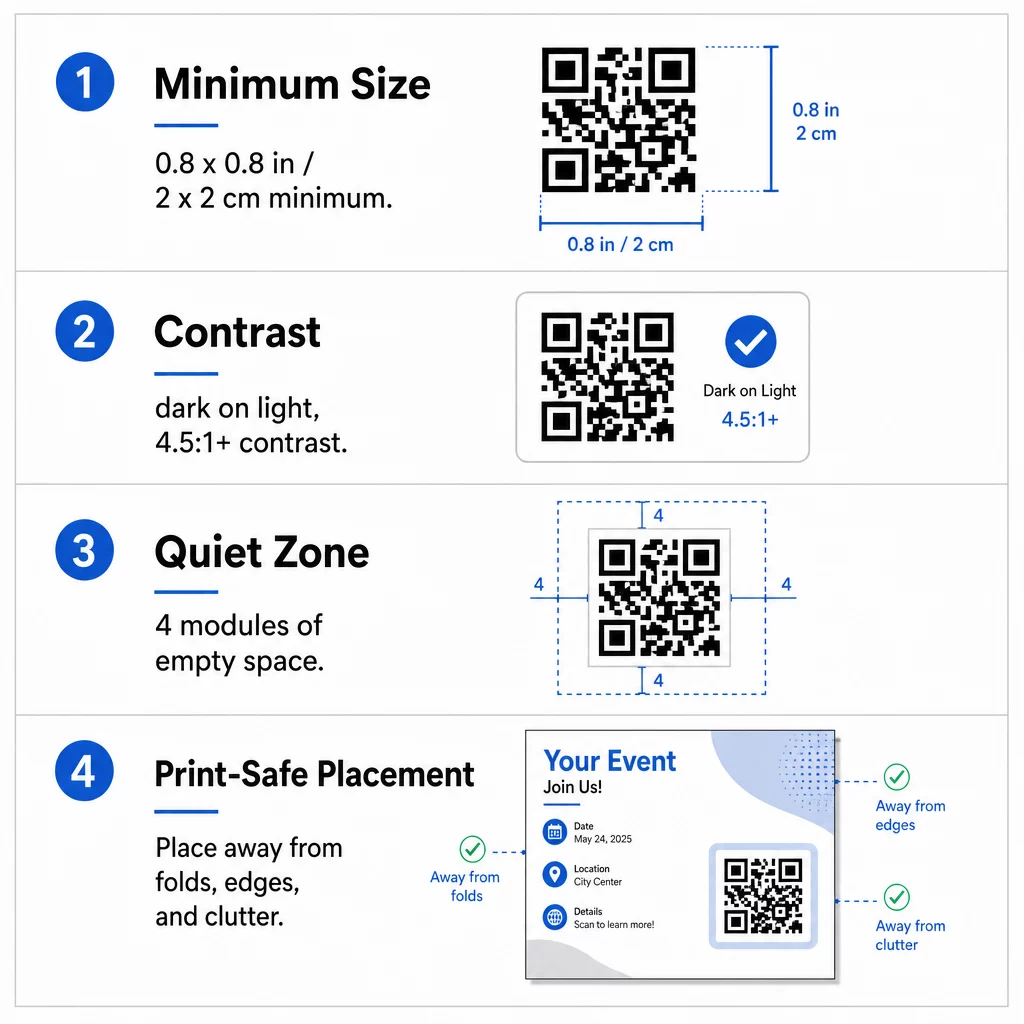
ขนาด: บนใบปลิวที่ถือด้วยมือ (A5, A4 หรือ US Letter) ควรกำหนดขนาดรหัสอย่างน้อย 0.8 × 0.8 นิ้ว (2 × 2 ซม.). รหัสที่ใหญ่ขึ้นประมาณ 1 ถึง 1.5 นิ้ว จะสแกนได้ง่ายกว่าและใช้พื้นที่น้อย สำหรับใบปลิวที่ผู้คนสแกนจากระยะไกล ให้ใช้ กฎ 10:1: ความกว้างของรหัสหนึ่งนิ้วต่อระยะการสแกนสิบนิ้ว ใบปลิวบนผนังที่สแกนจากระยะ 20 นิ้ว ต้องการรหัสที่กว้างอย่างน้อย 2 นิ้ว
ความคมชัด: ใช้โมดูลสีเข้มบนพื้นหลังสีอ่อน อัตราส่วน อัตราส่วนคอนทราสต์ อย่างน้อย 4.5:1 แนะนำสำหรับการสแกนที่น่าเชื่อถือ และ 7:1 หรือสูงกว่าจะดีกว่า อย่ากลับสี (รหัสสีอ่อนบนพื้นหลังสีเข้ม) และอย่าวางรหัสบนรูปภาพ
พื้นที่ว่างรอบโค้ด (Quiet zone): เว้นขอบที่ชัดเจนอย่างน้อย สี่โมดูล (ช่องสี่เหลี่ยมเล็กๆ) ทั้งสี่ด้าน. ข้อความ, เส้น หรือรูปภาพภายในขอบนี้อาจขัดขวางไม่ให้เครื่องสแกนพบรหัส
การจัดวางเชิงกลยุทธ์และการเขียนคำกระตุ้นการตัดสินใจที่ชัดเจน
ตำแหน่งที่คุณวางโค้ดและข้อความที่คุณเขียนข้างๆ มีผลต่อจำนวนการสแกน รหัส QR ในการตลาด ปฏิบัติตามกฎเกณฑ์ที่ใช้งานได้จริงบางประการ.
บนใบปลิวขนาด A4 หรือ A5 ตำแหน่งที่ดีคือมุมล่างขวา กึ่งกลางด้านล่าง หรือใต้ข้อเสนอหลักโดยตรง หลีกเลี่ยงจุดเหล่านี้:
- รอยพับ รอยยับ และขอบโค้ง ซึ่งทำให้รูปแบบบิดเบี้ยว
- กระดาษผิวมันหรือมีลวดลาย ซึ่งแสงสะท้อนหรือพื้นผิวลดคอนทราสต์
- บริเวณที่องค์ประกอบการออกแบบอื่น ๆ ไปรบกวนโซนเงียบ
- ด้านหลังของใบปลิวที่ผู้คนอาจไม่พลิกกลับมาดู
โค้ดเพียงอย่างเดียวไม่ค่อยกระตุ้นให้เกิดการกระทำ เพิ่ม คำกระตุ้นการตัดสินใจ (CTA) ที่บอกว่าผู้อ่านจะได้รับอะไร: “สแกนเพื่อรับส่วนลด 20%”, “สแกนเพื่อตอบรับ”, “สแกนเพื่อดูเมนู” เพิ่มคำแนะนำสั้น ๆ เช่น “เล็งกล้องโทรศัพท์ของคุณไปที่โค้ด” สำหรับผู้อ่านที่ไม่คุ้นเคยกับ QR โค้ด วาง CTA ไว้เหนือหรือข้างโค้ดโดยตรง สิ่งเหล่านี้ แนวทางปฏิบัติที่ดีที่สุดสำหรับการอ่านรหัส QR ช่วยเหลือผู้คนทุกกลุ่มอายุ นอกจากนี้ ตรวจสอบให้แน่ใจว่าหน้าเว็บที่โค้ดเปิดขึ้นนั้นเป็นมิตรกับมือถือและโหลดเร็ว
การติดตามและวิเคราะห์ประสิทธิภาพของใบปลิว
เพื่อดูว่าใบปลิวใดได้ผล ให้แต่ละช่องทางการจัดจำหน่ายมีโค้ดเป็นของตัวเอง หรือมี พารามิเตอร์ UTM. ตัวอย่างเช่น ใช้โค้ดหนึ่งสำหรับงานแสดงสินค้า และอีกโค้ดหนึ่งสำหรับเคาน์เตอร์ร้านค้า จากนั้น Google Analytics จะแสดงปริมาณการเข้าชมต่อใบปลิว คุณจึงสามารถเปรียบเทียบสถานที่ต่าง ๆ ได้
ด้วยโค้ดแบบไดนามิก คุณยังสามารถ ติดตามการสแกน QR โค้ดแบบเรียลไทม์ และดูเวลา ตำแหน่ง และประเภทอุปกรณ์ หากพื้นที่ใดมีประสิทธิภาพไม่ดี ให้เปลี่ยนปลายทางของโค้ดนั้นเป็นข้อเสนอท้องถิ่นที่เกี่ยวข้องมากขึ้น ใบปลิวที่พิมพ์ยังคงเหมือนเดิม
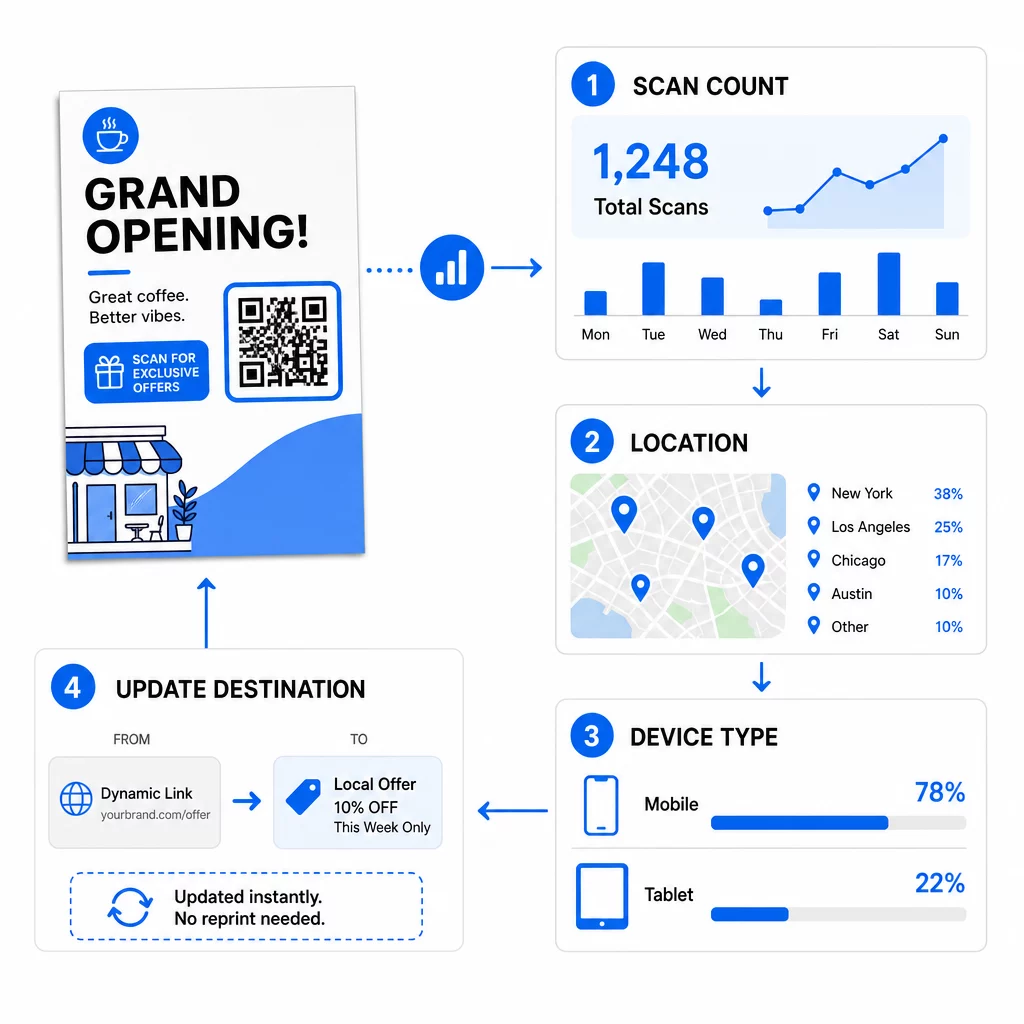
ตรวจสอบประสิทธิภาพแคมเปญของคุณ ต้องการดูว่าใบปลิวใดที่สร้างการเข้าชมมากที่สุดใช่หรือไม่ ใช้ เครื่องสร้างรหัส QR เพื่อสร้างโค้ดแบบไดนามิกที่ติดตามได้ และดูข้อมูลการสแกนในแดชบอร์ดของคุณ
QR โค้ดบนใบปลิวสแกนไม่ได้? ตรวจสอบสิ่งเหล่านี้
- เล็กเกินไป: หากต่ำกว่า 0.8 นิ้ว (2 ซม.) โทรศัพท์หลายเครื่องจะสแกนไม่ติด ขยายขนาดโค้ด
- คอนทราสต์ต่ำหรือสีกลับด้าน: ใช้โค้ดสีเข้มบนพื้นหลังสีอ่อน
- ไม่มีขอบขาว: คืนค่าโซนเงียบขนาดสี่โมดูล
- งานพิมพ์เบลอ: ไฟล์ PNG ขนาดเล็กที่ถูกยืดออกจะพิมพ์ออกมาไม่คมชัด ใช้ SVG หรือ PDF หรือ PNG ที่มีขนาดใหญ่ขึ้น
- ข้อมูลมากเกินไป: ลิงก์ปลายทางที่ยาวมากทำให้เกิดรูปแบบที่หนาแน่น ใช้ลิงก์สั้น ๆ หรือโค้ดแบบไดนามิก
- ปลายทางเสีย: เปิดลิงก์ด้วยตัวเอง หน้าที่ถูกลบหรือโค้ดไดนามิกที่หมดอายุจะทำให้เกิดข้อผิดพลาดในการสแกน แม้ว่าโค้ดจะปกติก็ตาม
การเพิ่มคิวอาร์โค้ดลงในใบปลิวใช้เวลาเพียงไม่กี่นาที และให้ผลลัพธ์ที่สามารถวัดได้ เลือกประเภทโค้ดที่ถูกต้อง ปฏิบัติตามกฎขนาดและคอนทราสต์ วางโค้ดในตำแหน่งที่ผู้คนจะเห็น และเขียนคำกระตุ้นการตัดสินใจ (CTA) ที่ชัดเจน
คำถามที่พบบ่อย
สำหรับใบปลิวขนาดมาตรฐานที่ถือด้วยมือ รหัส QR ควรมีขนาดอย่างน้อย 0.8 × 0.8 นิ้ว (2 × 2 ซม.) หากใบปลิวมีไว้สำหรับสแกนจากระยะไกล ให้ใช้หลักอัตราส่วน 10:1: ทำให้รหัสมีความกว้างหนึ่งนิ้วสำหรับทุกๆ สิบนิ้วของระยะการสแกนที่คาดไว้.
ใช่ แต่เฉพาะในกรณีที่คุณใช้คิวอาร์โค้ดแบบไดนามิก โค้ดแบบไดนามิกจะส่งผ่าน URL เปลี่ยนเส้นทางสั้นๆ ที่คุณสามารถอัปเดตได้จากแดชบอร์ดของคุณได้ตลอดเวลา โค้ดแบบคงที่จะฝังปลายทางลงในรูปแบบโดยตรงและไม่สามารถเปลี่ยนแปลงได้หลังจากพิมพ์แล้ว.
คิวอาร์โค้ดแบบไดนามิกมาพร้อมกับแดชบอร์ดวิเคราะห์ที่แสดงจำนวนการสแกนทั้งหมด, ผู้ใช้ที่ไม่ซ้ำกัน, ตำแหน่งทางภูมิศาสตร์ และการมีส่วนร่วมตามช่วงเวลา คุณยังสามารถแนบพารามิเตอร์ UTM ไปยัง URL ปลายทางของคุณเพื่อติดตามการโต้ตอบเหล่านี้ได้โดยตรงภายใน Google Analytics.
SVG หรือ PDF, เนื่องจากไฟล์เวกเตอร์ยังคงความคมชัดไม่ว่าจะพิมพ์ที่ขนาดใดก็ตาม หากคุณใช้ PNG ให้ดาวน์โหลดไฟล์ขนาดใหญ่และอย่าขยายขนาดในเลย์เอาต์ของคุณ
คิวอาร์โค้ดแบบคงที่ไม่มีวันหมดอายุ คิวอาร์โค้ดแบบไดนามิกจะหยุดทำงานเมื่อแพลนรายเดือนหรือรายปีที่สร้างโค้ดเหล่านั้นสิ้นสุดลง ดังนั้น โปรดรักษาแพลนให้ใช้งานได้ต่อเนื่องในขณะที่ใบปลิวมีการเผยแพร่