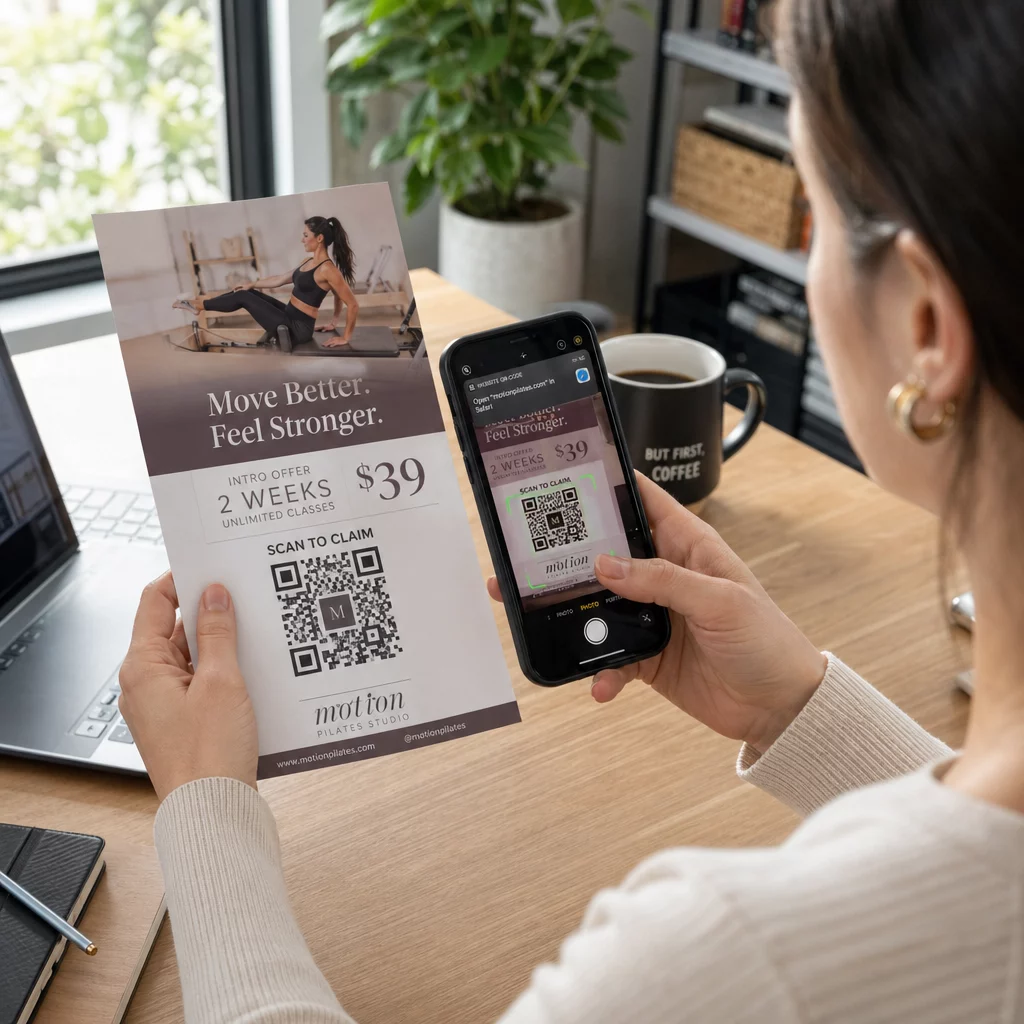
رمز الاستجابة السريعة للمطوية هو رمز على مطويتك المطبوعة يفتح صفحة ويب أو نموذجًا أو ملفًا عندما يمسحه القارئ. لإنشاء واحد، قم بإنشاء الرمز في مولد رمز الاستجابة السريعة (QR code)، قم بتنزيله بتنسيق SVG أو PDF، وضعه في تصميمك بعرض 0.8 بوصة (2 سم) على الأقل مع حدود بيضاء واضحة، وأضف دعوة قصيرة لاتخاذ إجراء بجانبه. اختبره بهاتفين قبل الطباعة. الخطوات والأحجام وقواعد الوضع موجودة أدناه.
لماذا تنتمي رموز QR إلى المنشورات
المطوية تحتوي على مساحة صغيرة. إذا حاولت وضع كل تفاصيل المنتج أو جدول الفعاليات عليها، يصبح التصميم مزدحمًا ويصعب قراءته. يمنح رمز الاستجابة السريعة القراء وصولاً بنقرة واحدة إلى قائمة رقمية، أو نموذج تسجيل، أو قسيمة، أو كتالوج كامل، بينما تبقى المطوية نظيفة. هكذا يعمل تربط رموز QR التسويق المطبوع والرقمي: المطوية تجذب الانتباه، والمسح ينقل القارئ إلى الخطوة التالية.
يتيح لك رمز الاستجابة السريعة أيضًا قياس حملة مطبوعة. باستخدام رمز ديناميكي، يمكنك معرفة متى وأين وعلى أي جهاز حدث كل مسح ضوئي، حتى تعرف أي المطويات والمواقع تجذب الناس.
رموز QR الثابتة مقابل الديناميكية: أيهما يجب أن تستخدم؟
اختر النوع قبل تصميم المطوية. رموز QR الثابتة والديناميكية تتصرف بشكل مختلف بعد الطباعة.
رموز QR الثابتة تخزن الوجهة مباشرة في النمط. لا يمكن تغيير الوجهة بعد الطباعة، والرمز لا ينتهي أبدًا. يكفي الرمز الثابت عندما لا يتغير الرابط، على سبيل المثال تسجيل دخول لشبكة Wi-Fi أو صفحة موقع ويب دائمة، وعندما لا تحتاج إلى أرقام المسح.
رموز QR الديناميكية تشير إلى رابط إعادة توجيه قصير تديره في حساب. يمكنك تغيير الوجهة بعد توزيع المطويات، دون الحاجة لإعادة الطباعة. إذا كنت تروج لحدث أسبوعي، يمكنك تبديل صفحة التسجيل كل أسبوع. تحتوي الرموز الديناميكية أيضًا على بيانات أقل، لذا يكون النمط أبسط وغالبًا ما يتم مسحه بسهولة أكبر في الإضاءة الضعيفة.
بالنسبة للمطويات التي يتم عرضها في أكثر من مكان أو لأكثر من أسبوع، عادة ما يكون الرمز الديناميكي يستحق العناء لأنك تحصل على تتبع رمز الاستجابة السريعة مع عدد المسحات والمواقع والأجهزة. تأتي الرموز الديناميكية مع نسخة تجريبية مجانية لمدة 14 يومًا، والخطط مدرجة على صفحة أسعار Pageloot. المسح الضوئي غير محدود، وهناك ضمان استرداد الأموال لمدة 30 يومًا على الخطط. يتوقف الرمز الديناميكي عن العمل عند انتهاء الخطة الشهرية أو السنوية، لذا حافظ على الخطة نشطة بينما النشرة الإعلانية متداولة.
كيفية إنشاء رمز QR لنشرة إعلانية في 5 خطوات
اتبع هذه الخطوات لإضافة رمز QR إلى نشرة إعلانية:
- اختر ما يفتحه الرمز. اختر وجهة واحدة تعمل على الهاتف: عنوان URL لموقع ويب، أو مستند PDF، أ Google Forms، أو أ صفحة اتصال vCard. استخدم المنشئ الذي يتناسب مع المحتوى.
- أنشئ وخصص. افتح ال مولد رمز الاستجابة السريعة (QR code) والصق رابطك. إذا كنت تريد وضع علامتك التجارية على الرمز، فاستخدم مولد باركود QR مع شعار. حافظ على حجم الشعار صغيراً والألوان داكنة على خلفية فاتحة.
- تحميل للطباعة. قم بتنزيل SVG أو PDF إذا كان متاحًا، لأن ملفات المتجهات تبقى واضحة بأي حجم. إذا كان لديك فقط PNG، فقم بتنزيله بحجم كبير (يصل شريط تمرير المنشئ إلى 2000 بكسل) ولا تقم بتكبيره في تصميمك.
- ضعه في أداة التصميم الخاصة بك. استورد الملف إلى Canva أو Adobe Illustrator أو أي تطبيق تصميم آخر. اضبط الحجم، اترك حدًا أبيض حوله، وضع دعوتك إلى اتخاذ إجراء بجانبه.
- اختبر قبل الطباعة. اطبع نسخة واحدة بالحجم النهائي. امسحها ضوئيًا بهاتف iPhone وهاتف Android، في إضاءة الغرفة العادية، من المسافة التي سيحمل بها القارئ النشرة الإعلانية.
أنشئ رمز QR المخصص الخاص بك هل أنت مستعد لإضافة رمز QR ذي علامة تجارية وقابل للتتبع إلى نشرتك الإعلانية التالية؟ استخدم الـ مولد باركود QR مع شعار لتصميم رمز يتناسب مع هوية علامتك التجارية.
معايير التصميم للمسح الموثوق
حتى النشرة الإعلانية المصممة جيدًا تفشل إذا كان الرمز صعب المسح. اتبع الـ إرشادات حجم رمز الاستجابة السريعة للمواد المطبوعة وتحقق من هذه النقاط الثلاث.
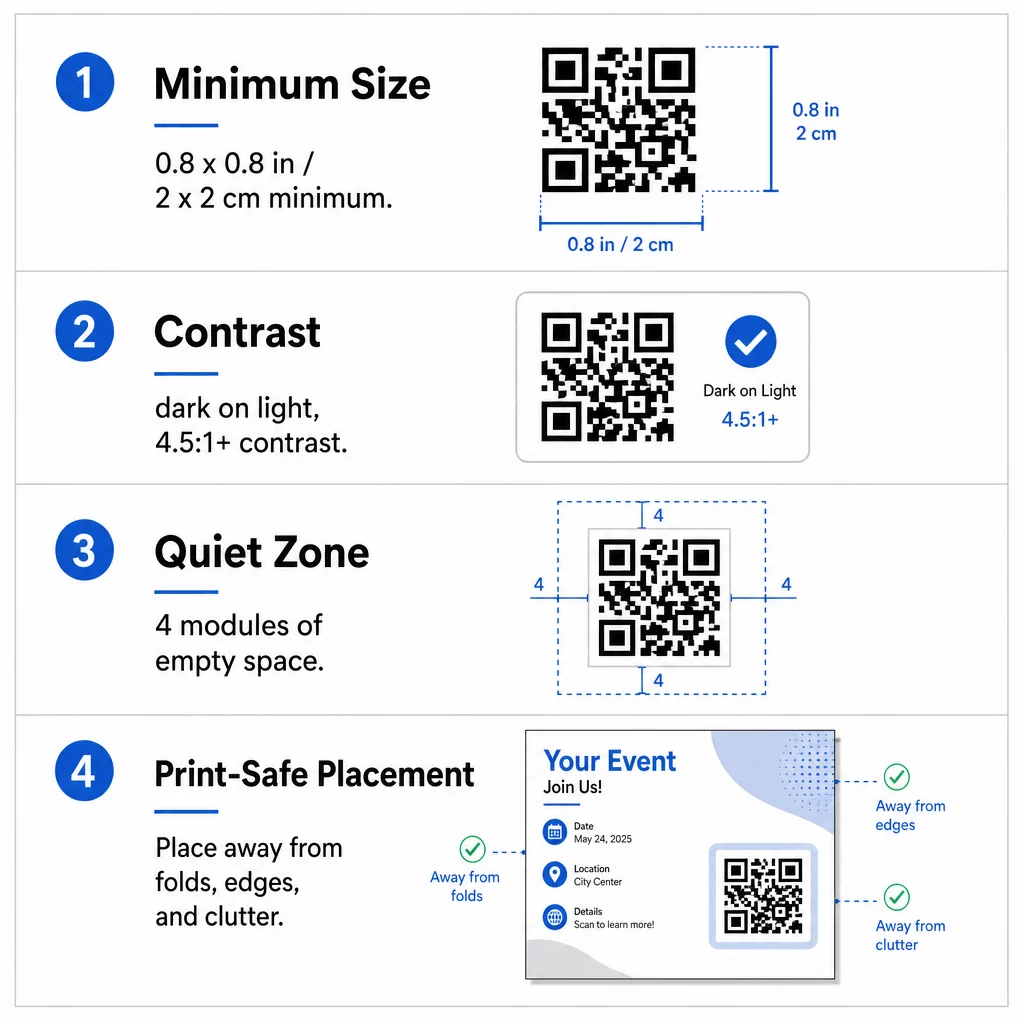
بحجم: على نشرة إعلانية يدوية (A5، A4 أو US Letter)، اجعل الرمز بحجم لا يقل عن 0.8 × 0.8 بوصة (2 × 2 سم). الرمز الأكبر، حوالي 1 إلى 1.5 بوصة، أسهل في المسح ويكلف مساحة قليلة. بالنسبة للنشرات الإعلانية التي يمسحها الأشخاص من مسافة أبعد، استخدم قاعدة 10:1: بوصة واحدة من عرض الرمز لكل عشر بوصات من مسافة المسح. نشرة إعلانية على الحائط تُمسح من مسافة 20 بوصة تحتاج إلى رمز بعرض 2 بوصة على الأقل.
التباين: استخدم وحدات داكنة على خلفية فاتحة. نسبة نسبة تباين لا يقل عن 4.5:1 يوصى بها للمسح الموثوق، ونسبة 7:1 أو أعلى أفضل. لا تعكس الألوان (رمز فاتح على خلفية داكنة) ولا تضع الرمز على صورة.
المنطقة الهادئة: اترك حدودًا واضحة لا تقل عن أربعة وحدات (المربعات الصغيرة) على الجوانب الأربعة. النصوص أو الخطوط أو الصور داخل هذا الحد يمكن أن تمنع الماسح الضوئي من العثور على الرمز.
التنسيب الاستراتيجي وكتابة دعوة واضحة للعمل
مكان وضع الرمز وما تكتبه بجانبه كلاهما يغيران عدد عمليات المسح. رموز QR في المواد التسويقية يتبع بعض القواعد العملية.
على نشرة إعلانية بحجم A4 أو A5، الأماكن الجيدة هي الزاوية السفلية اليمنى، أو المنتصف السفلي، أو مباشرة تحت العرض الرئيسي. تجنب هذه الأماكن:
- الثنيات، التجاعيد، والحواف المنحنية، التي تشوه النمط
- الورق اللامع أو المنسوج حيث يقلل الوهج أو التعرج من التباين
- الأماكن التي تتكدس فيها عناصر التصميم الأخرى على المنطقة الهادئة
- الجزء الخلفي من النشرة الإعلانية الذي قد لا يقلبه الناس أبدًا
الرمز وحده نادرًا ما يدفع إلى اتخاذ إجراء. أضف دعوة لاتخاذ إجراء (CTA) التي تخبر القارئ بما سيحصل عليه: “امسح للحصول على خصم 20%”، “امسح لتأكيد الحضور”، “امسح لرؤية القائمة”. أضف تلميحًا قصيرًا مثل “وجه كاميرا هاتفك نحو الرمز” للقراء الجدد على رموز QR. ضع دعوة الإجراء مباشرة فوق الرمز أو بجانبه. هذه أفضل الممارسات لقابلية قراءة رمز الاستجابة السريعة تساعد جميع الفئات العمرية. وتأكد أيضًا من أن الصفحة التي يفتحها الرمز متوافقة مع الجوال وتحمل بسرعة.
تتبع وتحليل أداء النشرات الإعلانية
لمعرفة أي النشرات الإعلانية تعمل بشكل أفضل، خصص لكل قناة توزيع رمزًا خاصًا بها أو خاصًا بها معلمات UTM. على سبيل المثال، استخدم رمزًا واحدًا لمعرض تجاري وآخر لطاولة متجر. بعد ذلك، تعرض تحليلات Google حركة المرور لكل نشرة إعلانية، حتى تتمكن من مقارنة الأماكن.
باستخدام رمز ديناميكي يمكنك أيضًا تتبع عمليات مسح رمز QR في الوقت الفعلي وترى الوقت والموقع ونوع الجهاز. إذا كان أداء منطقة ما سيئًا، فغيّر وجهة ذلك الرمز إلى عرض محلي أكثر صلة. وتبقى النشرة الإعلانية المطبوعة كما هي.
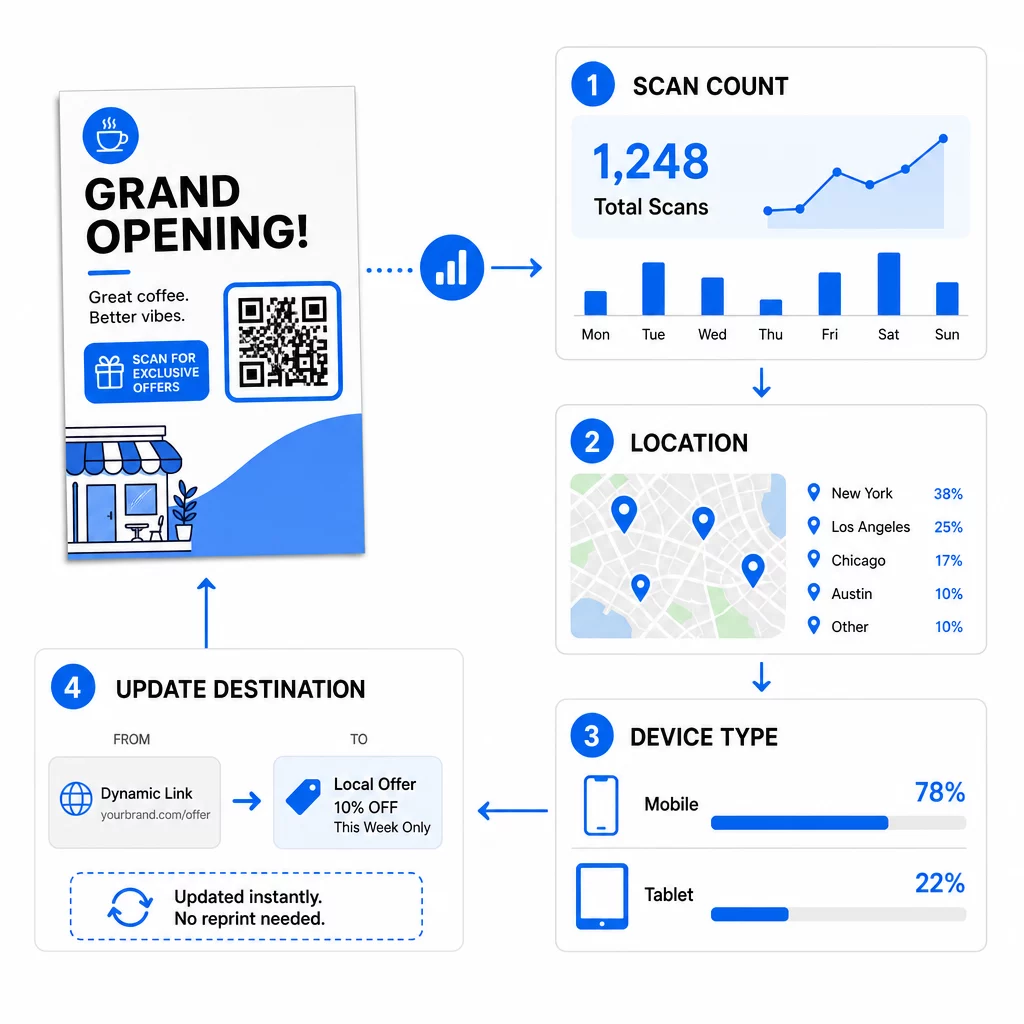
راقب أداء حملتك هل تريد معرفة أي النشرات الإعلانية تجلب أكبر قدر من الزيارات؟ استخدم الـ مولد رمز الاستجابة السريعة لإنشاء رموز ديناميكية قابلة للتتبع ورؤية بيانات المسح في لوحة التحكم الخاصة بك.
رمز QR على النشرة الإعلانية لا يعمل؟ تحقق من هذه الأمور
- صغير جداً: أقل من 0.8 بوصة (2 سم)، تفشل العديد من الهواتف في قراءته. قم بتكبير الرمز.
- تباين منخفض أو ألوان معكوسة: استخدم رمزًا داكنًا على خلفية فاتحة.
- لا يوجد إطار أبيض: أعد المنطقة الهادئة المكونة من أربع وحدات.
- طباعة ضبابية: صورة PNG صغيرة تم تمديدها تطبع بشكل غير واضح. استخدم SVG أو PDF، أو صورة PNG أكبر.
- الكثير من البيانات: رابط وجهة طويل جدًا يجعل النمط كثيفًا. استخدم رابطًا قصيرًا أو رمزًا ديناميكيًا.
- وجهة معطلة: افتح الرابط بنفسك. الصفحة المحذوفة أو الرمز الديناميكي المنتهي الصلاحية يسبب خطأ في المسح حتى لو كان الرمز سليمًا.
إضافة رمز QR إلى منشور إعلاني تستغرق بضع دقائق وتمنحك نتيجة قابلة للقياس. اختر نوع الرمز المناسب، واتبع قواعد الحجم والتباين، وضع الرمز حيث يراه الناس، واكتب عبارة واضحة للحث على اتخاذ إجراء.
الأسئلة الشائعة
بالنسبة للمنشور اليدوي القياسي، يجب أن يكون رمز الاستجابة السريعة (QR code) بحجم 0.8 × 0.8 بوصة (2 × 2 سم) على الأقل. إذا كان المنشور مخصصًا للمسح الضوئي من مسافة بعيدة، طبق نسبة 10:1: اجعل الرمز بعرض بوصة واحدة لكل عشر بوصات من مسافة المسح المتوقعة.
نعم، ولكن فقط إذا استخدمت رمز QR ديناميكيًا.
تتضمن رموز QR الديناميكية لوحة تحكم تحليلية تعرض إجمالي عمليات المسح، والمستخدمين الفريدين، والمواقع الجغرافية، ومستوى التفاعل المستند إلى الوقت. يمكنك أيضًا إرفاق معلمات UTM بعنوان URL الوجهة الخاص بك لتتبع هذه التفاعلات مباشرةً داخل جوجل أناليتكس.
ملفات SVG أو PDF، لأن ملفات المتجهات تبقى واضحة وحادة مهما كان حجم الطباعة. إذا كنت تستخدم PNG، قم بتنزيل نسخة كبيرة ولا تقم بتكبيرها في تصميمك.
رموز QR الثابتة لا تنتهي صلاحيتها أبدًا. تتوقف الرموز الديناميكية عن العمل عند انتهاء الخطة الشهرية أو السنوية التي أنشأتها، لذا حافظ على الخطة نشطة بينما المنشور الإعلاني قيد التداول.