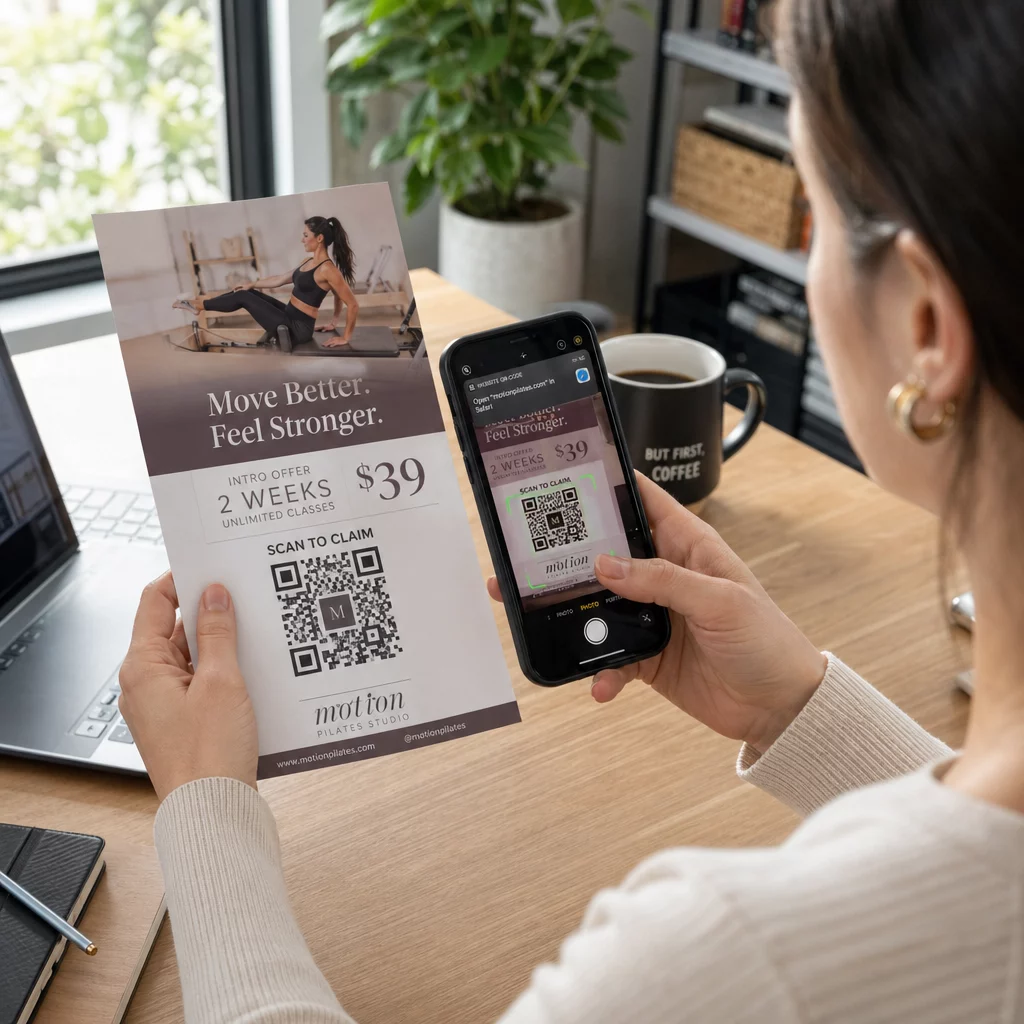
Mã QR tờ rơi là một mã trên tờ rơi đã in của bạn mà khi người đọc quét nó sẽ mở một trang web, biểu mẫu hoặc tệp. Để tạo một mã, hãy tạo mã trong một trình tạo mã QR, tải xuống dưới dạng SVG hoặc PDF, đặt nó vào bố cục của bạn với chiều rộng tối thiểu 0.8 inch (2 cm) và có một đường viền trắng rõ ràng, sau đó thêm một lời kêu gọi hành động ngắn bên cạnh. Hãy thử nghiệm với hai điện thoại trước khi in. Các bước, kích thước và quy tắc đặt mã được trình bày bên dưới.
Tại sao mã QR nên có trên tờ rơi
Một tờ rơi có ít không gian. Nếu bạn cố gắng đưa mọi chi tiết sản phẩm hoặc lịch trình sự kiện lên đó, thiết kế sẽ trở nên lộn xộn và khó đọc. Mã QR cung cấp cho người đọc quyền truy cập chỉ bằng một chạm vào một menu kỹ thuật số, một biểu mẫu đăng ký, một phiếu giảm giá hoặc một danh mục đầy đủ, trong khi tờ rơi vẫn sạch sẽ. Đây là cách mà mã QR kết nối tiếp thị in ấn và kỹ thuật số: tờ rơi thu hút sự chú ý, và thao tác quét đưa người đọc đến bước tiếp theo.
Mã QR cũng cho phép bạn đo lường một chiến dịch in ấn. Với một mã động, bạn có thể thấy khi nào, ở đâu và trên thiết bị nào mỗi lượt quét đã xảy ra, để bạn biết tờ rơi và địa điểm nào thu hút được người dùng.
Mã QR tĩnh so với mã QR động: Bạn nên sử dụng loại nào?
Chọn loại mã trước khi thiết kế tờ rơi. Mã QR tĩnh và động hoạt động khác nhau sau khi in.
Mã QR tĩnh lưu trữ đích đến trực tiếp trong mẫu mã. Đích đến không thể thay đổi sau khi in, và mã không bao giờ hết hạn. Mã tĩnh là đủ khi liên kết sẽ không thay đổi, ví dụ như thông tin đăng nhập Wi-Fi hoặc một trang web vĩnh viễn, và khi bạn không cần số liệu quét.
Mã QR động trỏ đến một liên kết chuyển hướng ngắn mà bạn quản lý trong một tài khoản. Bạn có thể thay đổi đích đến sau khi tờ rơi được phân phát, mà không cần in lại. Nếu bạn quảng bá một sự kiện hàng tuần, bạn sẽ thay đổi trang đăng ký mỗi tuần. Mã động cũng chứa ít dữ liệu hơn, vì vậy mẫu mã đơn giản hơn và thường quét dễ dàng hơn trong điều kiện ánh sáng yếu.
Đối với các tờ rơi được chạy ở nhiều nơi hoặc trong hơn một tuần, mã động thường đáng giá vì bạn nhận được Theo dõi mã QR với số lượt quét, vị trí và thiết bị. Mã động đi kèm với bản dùng thử miễn phí 14 ngày, và các gói được liệt kê trên trang giá của Pageloot. Lượt quét không giới hạn và có đảm bảo hoàn tiền trong 30 ngày cho các gói dịch vụ. Mã động sẽ ngừng hoạt động khi gói hàng tháng hoặc hàng năm kết thúc, vì vậy hãy duy trì gói hoạt động khi tờ rơi vẫn đang được lưu hành.
Cách tạo mã QR cho tờ rơi trong 5 bước
Thực hiện các bước sau để thêm mã QR vào tờ rơi:
- Chọn nội dung mà mã sẽ mở. Chọn một điểm đến hoạt động trên điện thoại: một URL trang web, một tài liệu PDF, Một Google Form, hoặc một trang liên hệ vCard. Sử dụng trình tạo phù hợp với nội dung.
- Tạo và tùy chỉnh. Mở trình tạo mã QR và dán liên kết của bạn. Nếu bạn muốn thương hiệu của mình hiển thị trên mã, hãy sử dụng Tạo mã QR có logo ở giữa. Giữ logo nhỏ và màu sắc tối trên nền sáng.
- Tải xuống để in. Tải xuống SVG hoặc PDF nếu có, vì các tệp vector luôn sắc nét ở mọi kích thước. Nếu bạn chỉ có PNG, hãy tải xuống ở kích thước lớn (thanh trượt của trình tạo lên đến 2000 px) và không phóng to nó trong bố cục của bạn.
- Đặt nó vào công cụ thiết kế của bạn. Nhập tệp vào Canva, Adobe Illustrator hoặc ứng dụng bố cục khác. Đặt kích thước, để lại một đường viền trắng xung quanh và đặt lời kêu gọi hành động của bạn bên cạnh nó.
- Kiểm tra trước khi in. In một bản sao ở kích thước cuối cùng. Quét nó bằng iPhone và điện thoại Android, trong điều kiện ánh sáng phòng bình thường, từ khoảng cách mà người đọc sẽ cầm tờ rơi.
Tạo Mã QR Tùy chỉnh của Bạn Sẵn sàng thêm mã QR có thương hiệu, có thể theo dõi vào tờ rơi tiếp theo của bạn? Sử dụng Tạo mã QR có logo ở giữa để thiết kế một mã phù hợp với nhận diện thương hiệu của bạn.
Tiêu chuẩn Thiết kế để Quét Đáng tin cậy
Một tờ rơi được thiết kế tốt vẫn sẽ thất bại nếu mã khó quét. Hãy tuân theo Hướng dẫn kích thước mã QR cho tài liệu in ấn và kiểm tra ba điểm này.
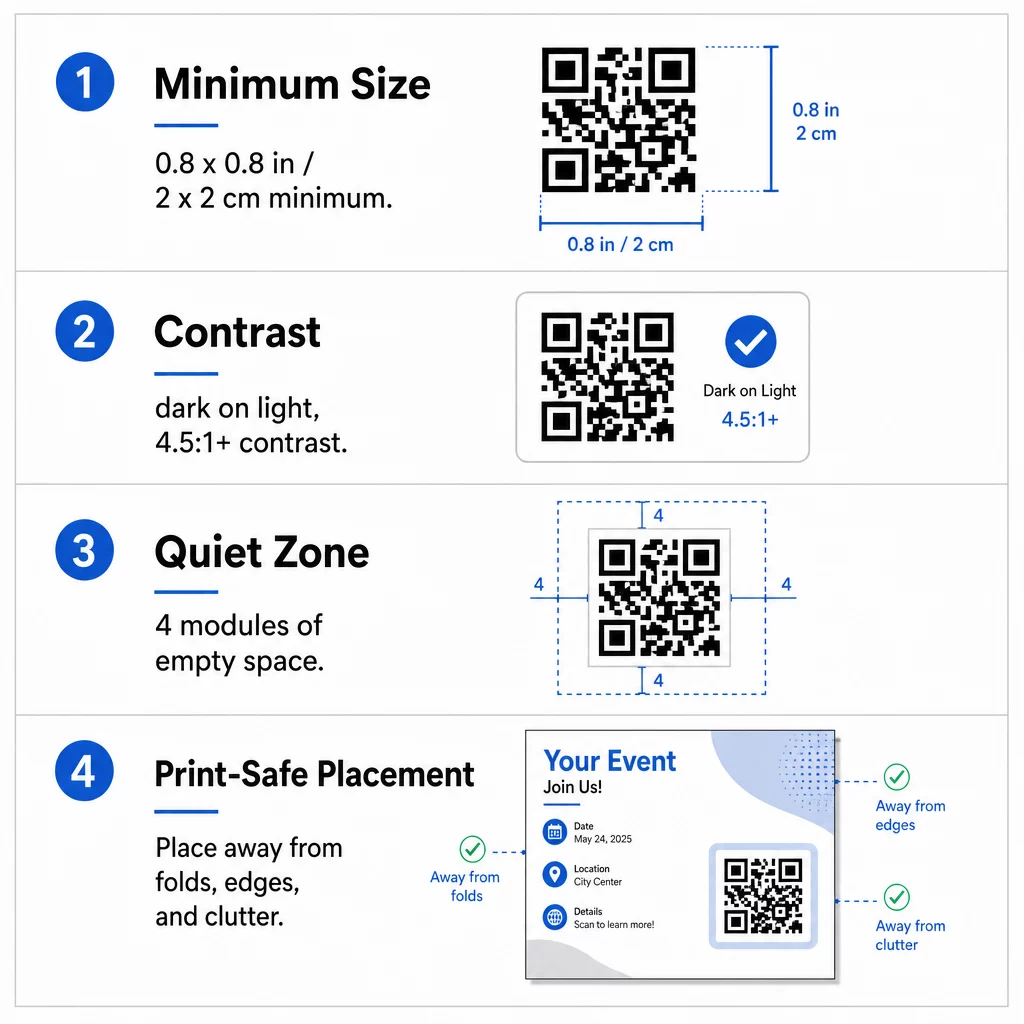
Kích thước: Trên một tờ rơi cầm tay (A5, A4 hoặc US Letter), hãy làm cho mã có kích thước ít nhất 0,8 × 0,8 inch (2 × 2 cm). Một mã lớn hơn, khoảng 1 đến 1.5 inch, dễ quét hơn và tốn ít không gian. Đối với các tờ rơi mà mọi người quét từ xa hơn, hãy sử dụng quy tắc 10:1: chiều rộng mã một inch cho mỗi mười inch khoảng cách quét. Một tờ rơi trên tường được quét từ khoảng cách 20 inch cần mã rộng ít nhất 2 inch.
Độ tương phản: Sử dụng các mô-đun tối trên nền sáng. Tỷ lệ tỷ lệ tương phản ít nhất 4.5:1 được khuyến nghị để quét đáng tin cậy, và 7:1 hoặc cao hơn thì tốt hơn. Không đảo ngược màu sắc (mã sáng trên nền tối) và không đặt mã lên ảnh.
Vùng yên tĩnh: Để lại một đường viền rõ ràng ít nhất bốn mô-đun (các ô vuông nhỏ) ở cả bốn phía. Văn bản, đường kẻ hoặc hình ảnh bên trong đường viền này có thể ngăn máy quét tìm thấy mã.
Vị trí chiến lược và Viết lời kêu gọi hành động (CTA) rõ ràng
Vị trí đặt mã và nội dung bạn viết bên cạnh đều ảnh hưởng đến số lượt quét. mã QR đúng cách trong tiếp thị tuân theo một vài quy tắc thực tế.
Trên tờ rơi A4 hoặc A5, các vị trí tốt là góc dưới bên phải, giữa phía dưới hoặc ngay bên dưới ưu đãi chính. Tránh các vị trí sau:
- Các nếp gấp, nếp nhăn và cạnh cong, làm biến dạng hình mẫu
- Giấy bóng hoặc giấy có vân khiến độ chói hoặc hạt làm giảm độ tương phản
- Các vị trí mà các yếu tố thiết kế khác chiếm dụng vùng yên tĩnh
- Mặt sau của tờ rơi mà mọi người có thể không bao giờ lật lại
Một mã QR đơn độc hiếm khi thúc đẩy hành động. Hãy thêm một lời kêu gọi hành động (CTA) cho biết người đọc sẽ nhận được gì: “Quét để giảm giá 20%”, “Quét để RSVP”, “Quét để xem thực đơn”. Thêm một gợi ý ngắn gọn như “Hướng camera điện thoại của bạn vào mã” cho những người đọc mới biết đến mã QR. Đặt CTA ngay phía trên hoặc bên cạnh mã. Những điều này các phương pháp hay nhất để đọc mã QR giúp đỡ mọi lứa tuổi. Ngoài ra, hãy đảm bảo trang mà mã mở ra thân thiện với thiết bị di động và tải nhanh.
Theo dõi và Phân tích Hiệu suất Tờ rơi
Để xem tờ rơi nào hiệu quả, hãy cung cấp cho mỗi kênh phân phối một mã riêng hoặc một thông số UTM. Ví dụ, sử dụng một mã cho một triển lãm thương mại và một mã khác cho quầy hàng. Google Analytics sau đó sẽ hiển thị lưu lượng truy cập cho mỗi tờ rơi, vì vậy bạn có thể so sánh các địa điểm.
Với mã động, bạn cũng có thể theo dõi các lần quét mã QR theo thời gian thực và xem thời gian, địa điểm và loại thiết bị. Nếu một khu vực hoạt động kém, hãy thay đổi đích đến của mã đó thành một ưu đãi địa phương phù hợp hơn. Tờ rơi đã in vẫn giữ nguyên.
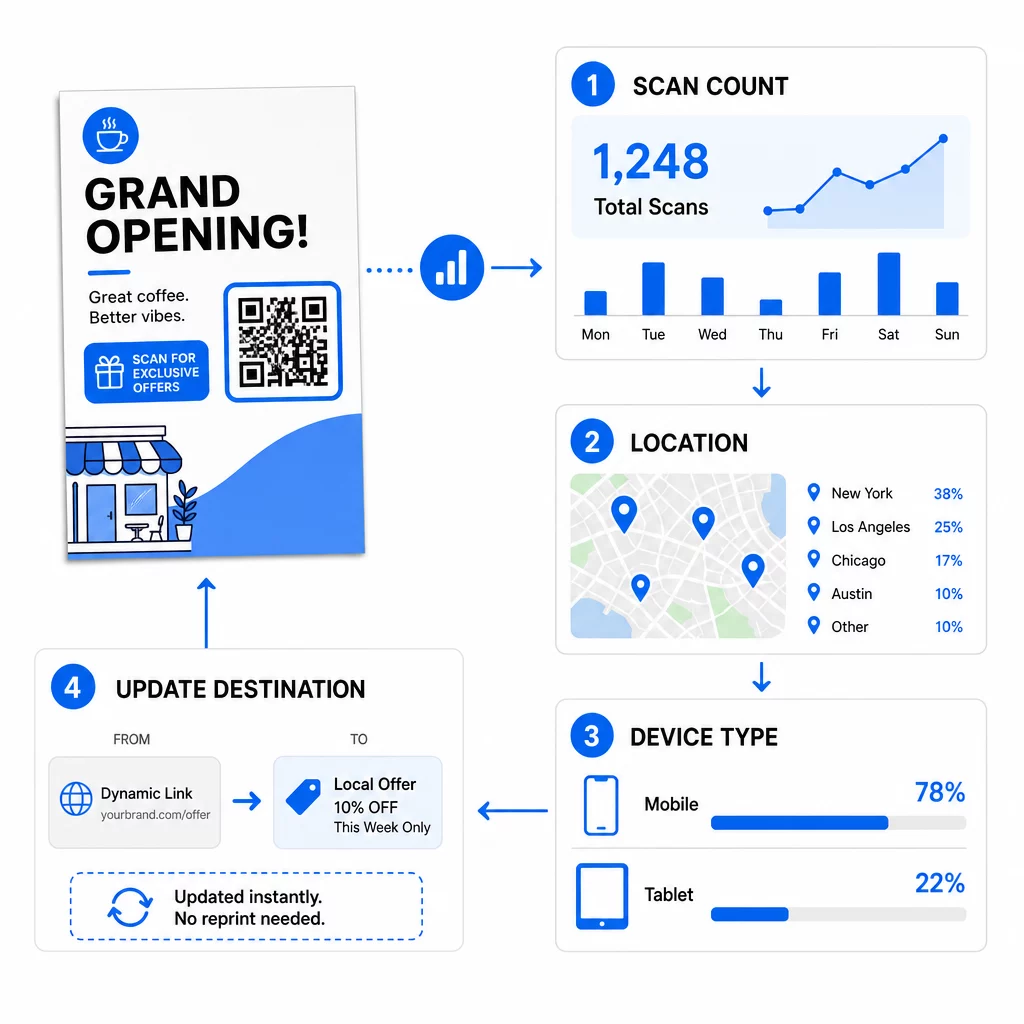
Theo dõi hiệu suất chiến dịch của bạn Bạn muốn xem tờ rơi nào đang tạo ra nhiều lưu lượng truy cập nhất? Sử dụng Trình tạo mã QR để tạo các mã động, có thể theo dõi và xem dữ liệu quét trong bảng điều khiển của bạn.
Mã QR trên tờ rơi không quét được? Kiểm tra những điều này
- Quá nhỏ: Dưới 0,8 inch (2 cm), nhiều điện thoại không thể quét được. Hãy phóng to mã.
- Độ tương phản thấp hoặc màu sắc đảo ngược: Sử dụng mã tối trên nền sáng.
- Không có đường viền trắng: Khôi phục vùng yên tĩnh bốn mô-đun.
- In mờ: Một tệp PNG nhỏ bị kéo giãn sẽ in ra mờ. Sử dụng SVG hoặc PDF, hoặc một tệp PNG lớn hơn.
- Quá nhiều dữ liệu: Một liên kết đích rất dài tạo ra một mẫu dày đặc. Sử dụng một liên kết ngắn hoặc một mã động.
- Đích đến bị hỏng: Tự mở liên kết. Một trang đã bị xóa hoặc một mã động đã hết hạn sẽ gây ra lỗi quét ngay cả khi mã vẫn hoạt động bình thường.
Thêm mã QR vào tờ rơi chỉ mất vài phút và mang lại cho bạn kết quả có thể đo lường được. Chọn loại mã phù hợp, tuân thủ các quy tắc về kích thước và độ tương phản, đặt mã ở nơi mọi người dễ nhìn thấy và viết một CTA rõ ràng.
Câu hỏi thường gặp
Đối với một tờ rơi cầm tay tiêu chuẩn, mã QR nên có kích thước tối thiểu 0.8 × 0.8 inch (2 × 2 cm). Nếu tờ rơi được thiết kế để quét từ xa, hãy áp dụng tỷ lệ 10:1: tạo mã có chiều rộng một inch cho mỗi mười inch khoảng cách quét dự kiến.
Vâng, nhưng chỉ khi bạn đã sử dụng mã QR động. Mã động định tuyến qua một URL chuyển hướng ngắn mà bạn có thể cập nhật từ bảng điều khiển của mình bất cứ lúc nào. Mã tĩnh nhúng đích đến trực tiếp vào mẫu và không thể thay đổi sau khi in.
Mã QR động bao gồm một bảng điều khiển phân tích hiển thị tổng số lượt quét, người dùng duy nhất, vị trí địa lý và mức độ tương tác theo thời gian. Bạn cũng có thể đính kèm các tham số UTM vào URL đích của mình để theo dõi các tương tác này trực tiếp trong Google Analytics.
SVG hoặc PDF, vì các tệp vector giữ được độ sắc nét ở mọi kích thước in. Nếu bạn sử dụng PNG, hãy tải xuống một tệp lớn và không phóng to nó trong bố cục của bạn.
Mã QR tĩnh không bao giờ hết hạn. Mã động sẽ ngừng hoạt động khi gói dịch vụ hàng tháng hoặc hàng năm đã tạo ra chúng kết thúc, vì vậy hãy duy trì gói dịch vụ hoạt động trong khi tờ rơi vẫn đang được lưu hành.