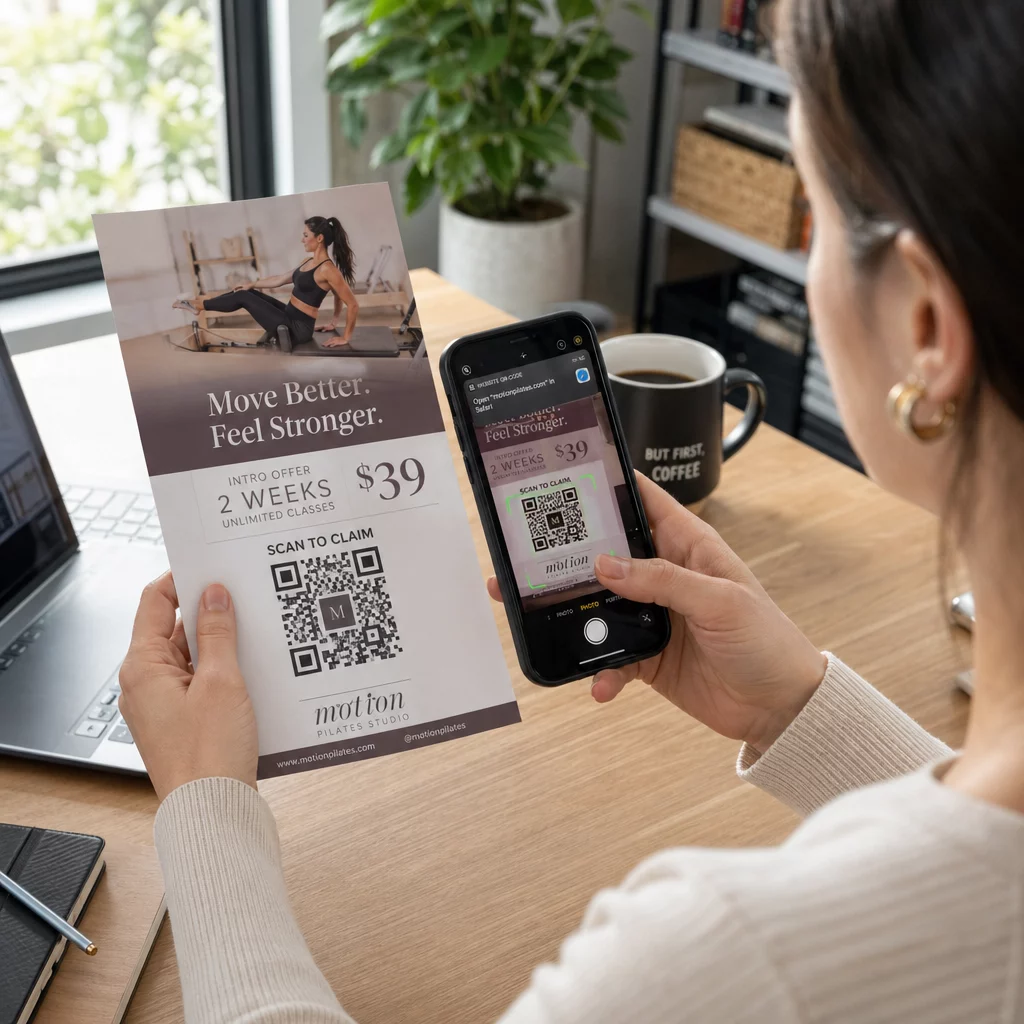
Een flyer QR-code is een code op je gedrukte flyer die een webpagina, formulier of bestand opent wanneer een lezer deze scant. Om er een te maken, creëer je de code in een QR-codegenerator, download deze als SVG of PDF, plaats deze in je lay-out met een breedte van minstens 0,8 inch (2 cm) met een duidelijke witte rand, en voeg er een korte call-to-action naast toe. Test deze met twee telefoons voordat je afdrukt. De stappen, formaten en plaatsingsregels staan hieronder.
Waarom QR-codes op flyers thuishoren
Een flyer heeft weinig ruimte. Als je probeert elk productdetail of evenementenrooster erop te plaatsen, wordt het ontwerp overvol en moeilijk leesbaar. Een QR-code geeft lezers met één tik toegang tot een digitaal menu, een registratieformulier, een kortingsbon of een volledige catalogus, terwijl de flyer overzichtelijk blijft. Dit is hoe QR-codes print- en digitale marketing verbinden: de flyer krijgt aandacht en de scan brengt de lezer naar de volgende stap.
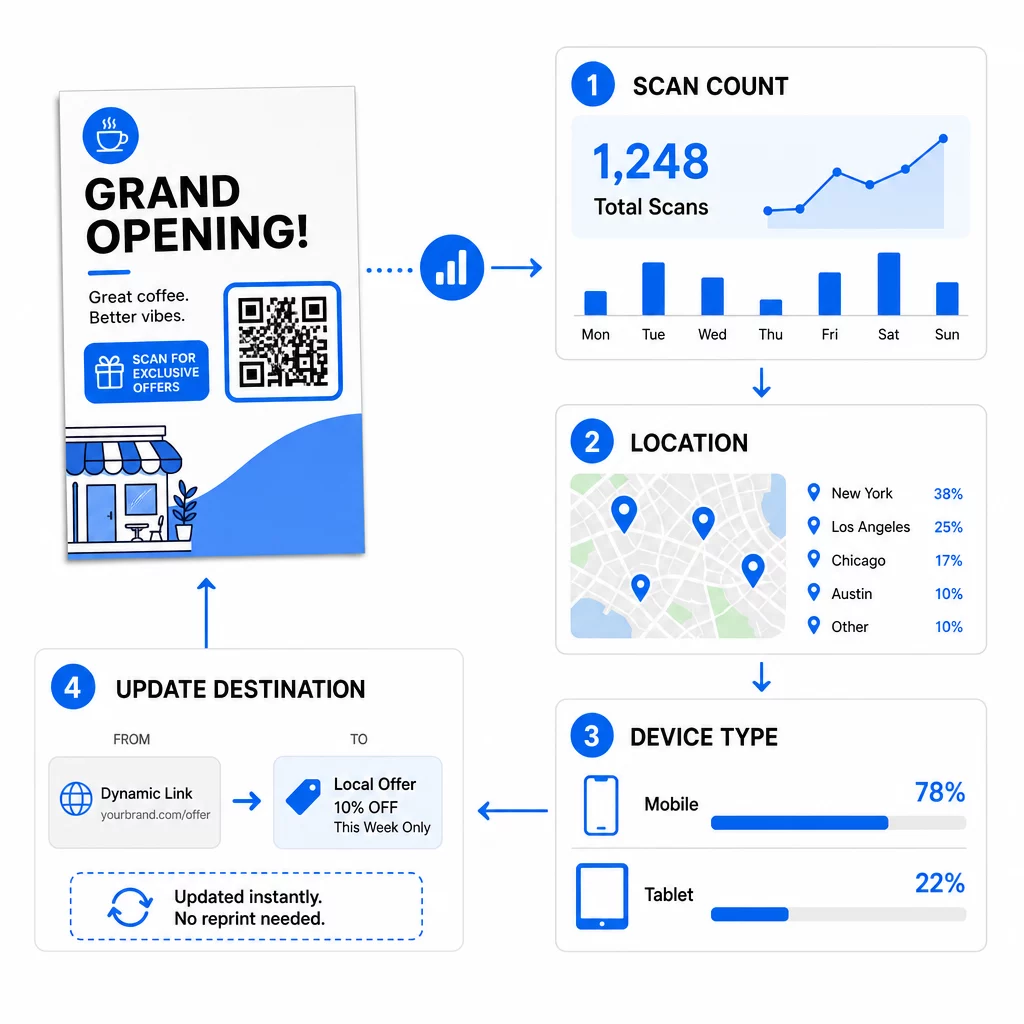
Een QR-code stelt je ook in staat om een gedrukte campagne te meten. Met een dynamische code kun je zien wanneer, waar en op welk apparaat elke scan plaatsvond, zodat je weet welke flyers en locaties mensen trekken.
Statische versus dynamische QR-codes: welke moet u gebruiken?
Kies het type voordat je de flyer ontwerpt. Statische en dynamische QR-codes gedragen zich anders na het afdrukken.
Statische QR codes slaan de bestemming direct op in het patroon. De bestemming kan na het afdrukken niet worden gewijzigd en de code verloopt nooit. Statisch is voldoende wanneer de link niet zal veranderen, bijvoorbeeld een Wi-Fi-login of een permanente webpagina, en wanneer je geen scannummers nodig hebt.
Dynamische QR codes verwijzen naar een korte omleidingslink die je beheert in een account. Je kunt de bestemming wijzigen nadat de flyers zijn verspreid, zonder opnieuw te hoeven afdrukken. Als je een wekelijks evenement promoot, wissel je de registratiepagina elke week. Dynamische codes bevatten ook minder gegevens, dus het patroon is eenvoudiger en scant vaak gemakkelijker bij slecht licht.
Voor flyers die op meer dan één plaats of langer dan één week worden gebruikt, is dynamisch meestal de moeite waard omdat je QR-code tracking met scanstatistieken, locaties en apparaten. Dynamische codes worden geleverd met een gratis proefperiode van 14 dagen, en abonnementen staan vermeld op de Pageloot prijspagina. Scans zijn onbeperkt en er geldt een 30-dagen geld-terug-garantie op abonnementen. Een dynamische code werkt niet meer wanneer een maandelijks of jaarlijks abonnement eindigt, dus houd het abonnement actief zolang de flyer in omloop is.
Hoe maak je een QR-code voor een flyer in 5 stappen
Volg deze stappen om een QR-code aan een flyer toe te voegen:
- Kies wat de code opent. Kies één bestemming die werkt op een telefoon: een website-URL, een PDF-document, een Google Form, of een vCard-contactpagina. Gebruik de generator die overeenkomt met de inhoud.
- Genereren en aanpassen. Open de QR-codegenerator en plak je link. Als je je merk op de code wilt, gebruik dan de QR code met logo maken. Houd het logo klein en de kleuren donker op licht.
- Downloaden om af te drukken. Download SVG of PDF indien beschikbaar, want vectorbestanden blijven scherp op elk formaat. Als je alleen PNG hebt, download het dan op een groot formaat (de generator schuifregelaar gaat tot 2000 px) en vergroot het niet in je lay-out.
- Plaats het in je ontwerptool. Importeer het bestand in Canva, Adobe Illustrator of een andere lay-outapplicatie. Stel de grootte in, laat er een witte rand omheen en plaats je call-to-action ernaast.
- Test voor het afdrukken. Print één exemplaar op definitief formaat. Scan het met een iPhone en een Android-telefoon, bij normaal kamerlicht, vanaf de afstand waarop een lezer de flyer zal vasthouden.
Maak uw aangepaste QR-code Klaar om een branded, traceerbare QR-code toe te voegen aan uw volgende flyer? Gebruik de QR code met logo maken om een code te ontwerpen die past bij uw merkidentiteit.
Ontwerpstandaarden voor betrouwbaar scannen
Een goed ontworpen flyer faalt nog steeds als de code moeilijk te scannen is. Volg de richtlijnen voor de grootte van QR-codes voor drukwerk en controleer deze drie punten.
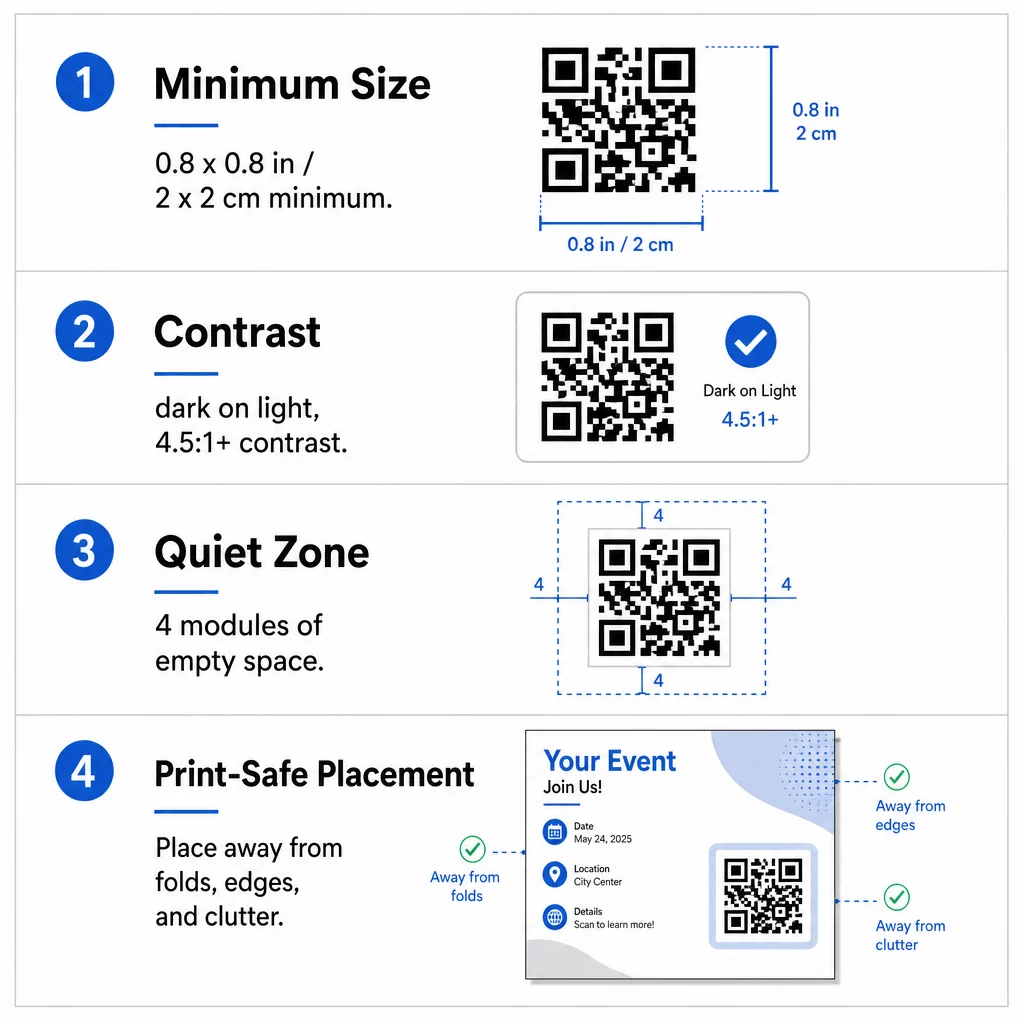
Maat: Op een flyer in de hand (A5, A4 of US Letter), maak de code minstens 0,8 × 0,8 inch (2 × 2 cm). Een grotere code, van ongeveer 1 tot 1,5 inch, is gemakkelijker te scannen en neemt weinig ruimte in beslag. Voor flyers die mensen van verderaf scannen, gebruik de 10:1 regel: één inch breedte van de code voor elke tien inch scanafstand. Een flyer aan een muur die vanaf 20 inch afstand wordt gescand, heeft een code van minimaal 2 inch breed nodig.
Contrast: Gebruik donkere modules op een lichte achtergrond. Een contrastverhouding van minimaal 4.5:1 wordt aanbevolen voor betrouwbaar scannen, en 7:1 of hoger is beter. Keer de kleuren niet om (lichte code op een donkere achtergrond) en plaats de code niet op een foto.
Stille zone: Laat een duidelijke rand van minstens vier modules (de kleine vierkantjes) aan alle vier de zijden. Tekst, lijnen of afbeeldingen binnen deze rand kunnen voorkomen dat de scanner de code vindt.
Strategische Plaatsing en het Schrijven van een Duidelijke CTA
Waar je de code plaatst en wat je ernaast schrijft, beïnvloedt allebei het aantal scans. plaatsing van QR-codes in marketing volgt een paar praktische regels.
Op een A4- of A5-flyer zijn goede plaatsen de rechterbenedenhoek, het midden onderaan, of direct onder de hoofdaanbieding. Vermijd deze plekken:
- Vouwen, kreukels en gebogen randen, die het patroon vervormen
- Glanzend of gestructureerd papier waar schittering of textuur het contrast vermindert
- Plaatsen waar andere ontwerpelementen de rustzone verdringen
- De achterkant van een flyer die mensen misschien nooit omdraaien
Een code alleen leidt zelden tot actie. Voeg een call-to-action (CTA) die zegt wat de lezer krijgt: “Scan voor 20% korting”, “Scan om je aan te melden”, “Scan om het menu te zien”. Voeg een korte hint toe zoals “Richt je telefooncamera op de code” voor lezers die nieuw zijn met QR-codes. Plaats de CTA direct boven of naast de code. Deze best practices voor de leesbaarheid van QR-codes helpen alle leeftijdsgroepen. Zorg er ook voor dat de pagina die de code opent mobielvriendelijk is en snel laadt.
Prestaties van flyers volgen en analyseren
Om te zien welke flyers werken, geef elk distributiekanaal zijn eigen code of zijn eigen UTM-parameters. Gebruik bijvoorbeeld één code voor een beurs en een andere voor een winkelbalie. Google Analytics toont dan het verkeer per flyer, zodat je locaties kunt vergelijken.
Met een dynamische code kun je ook QR-code scans in realtime te volgen en tijd, locatie en apparaattype zien. Als een gebied slecht presteert, wijzig dan de bestemming van die code naar een relevantere lokale aanbieding. De gedrukte flyer blijft hetzelfde.
Monitor de prestaties van uw campagne Wil je zien welke flyers het meeste verkeer genereren? Gebruik de QR-codegenerator om dynamische, traceerbare codes te maken en scan gegevens te zien in je dashboard.
QR-code op flyer scant niet? Controleer deze punten
- Te klein: Onder 0,8 inch (2 cm) falen veel telefoons. Vergroot de code.
- Laag contrast of omgekeerde kleuren: Gebruik een donkere code op een lichte achtergrond.
- Geen witte rand: Herstel de vier-module rustzone.
- Vage afdruk: Een kleine PNG die is uitgerekt, print onscherp. Gebruik SVG of PDF, of een grotere PNG.
- Te veel data: Een zeer lange bestemmingslink creëert een dicht patroon. Gebruik een korte link of een dynamische code.
- Verbroken bestemming: Open de link zelf. Een verwijderde pagina of een verlopen dynamische code geeft een scanfout, zelfs als de code in orde is.
Het toevoegen van een QR-code aan een flyer kost een paar minuten en geeft een meetbaar resultaat. Kies het juiste codetype, volg de regels voor grootte en contrast, plaats de code waar mensen deze zullen zien, en schrijf een duidelijke CTA.
Veelgestelde vragen
Voor een standaard handflyer moet de QR-code minstens 0,8 × 0,8 inch (2 × 2 cm) zijn. Als de flyer bedoeld is om van een afstand te worden gescand, pas dan de 10:1 verhouding toe: maak de code één inch breed voor elke tien inch verwachte scanafstand.
Ja, maar alleen als je een dynamische QR-code hebt gebruikt. Dynamische codes leiden via een korte omleidings-URL die je op elk moment vanuit je dashboard kunt bijwerken. Statische codes sluiten de bestemming direct in het patroon in en kunnen na het afdrukken niet meer worden gewijzigd.
Dynamische QR-codes bevatten een analyse-dashboard dat het totaal aantal scans, unieke gebruikers, geografische locaties en tijdgebonden betrokkenheid toont. Je kunt ook UTM-parameters aan je bestemmings-URL koppelen om deze interacties direct binnen Google Analytics te volgen.
SVG of PDF, omdat vectorbestanden scherp blijven bij elke afdrukmaat. Als je PNG gebruikt, download dan een grote en vergroot deze niet in je lay-out.
Statische QR-codes verlopen nooit. Dynamische codes werken niet meer wanneer het maand- of jaarplan dat ze heeft aangemaakt afloopt, dus houd het plan actief zolang de flyer in omloop is.