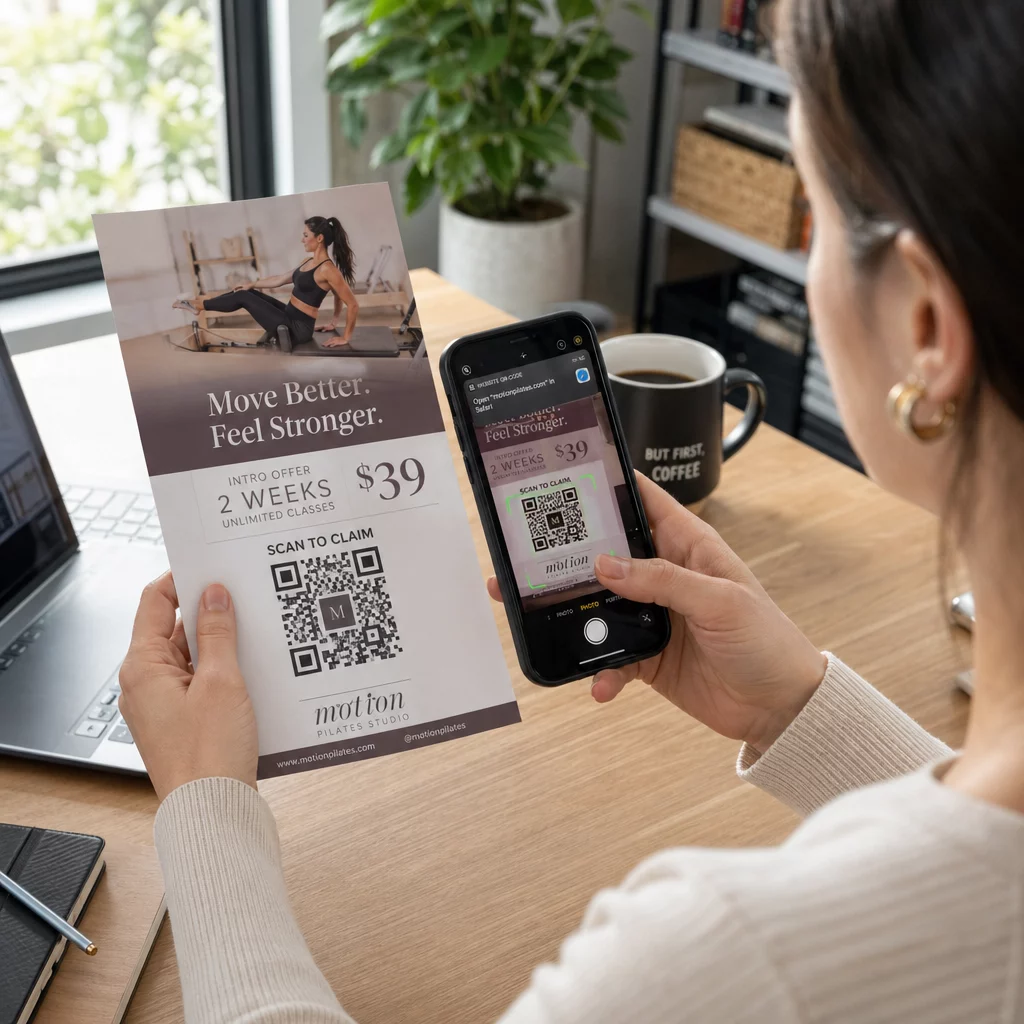
קוד QR לפלייר הוא קוד על הפלייר המודפס שלך, שפותח דף אינטרנט, טופס או קובץ כאשר קורא סורק אותו. כדי ליצור אחד כזה, צור את הקוד ב- מחולל קודי QR, הורד אותו כ-SVG או PDF, מקם אותו בעיצוב שלך ברוחב של לפחות 0.8 אינץ' (2 ס"מ) עם גבול לבן ברור, והוסף קריאה קצרה לפעולה לידו. בדוק אותו עם שני טלפונים לפני ההדפסה. השלבים, הגדלים וכללי המיקום מפורטים למטה.
למה קודי QR שייכים לפליירים
לפלייר יש מעט מקום. אם תנסה להתאים עליו כל פרט מוצר או לוח זמנים של אירוע, העיצוב יהפוך צפוף וקשה לקריאה. קוד QR מעניק לקוראים גישה בלחיצה אחת לתפריט דיגיטלי, טופס הרשמה, קופון או קטלוג מלא, בעוד הפלייר נשאר נקי. כך קודי QR מחברים שיווק מודפס ודיגיטלי: הפלייר מושך תשומת לב, והסריקה מעבירה את הקורא לשלב הבא.
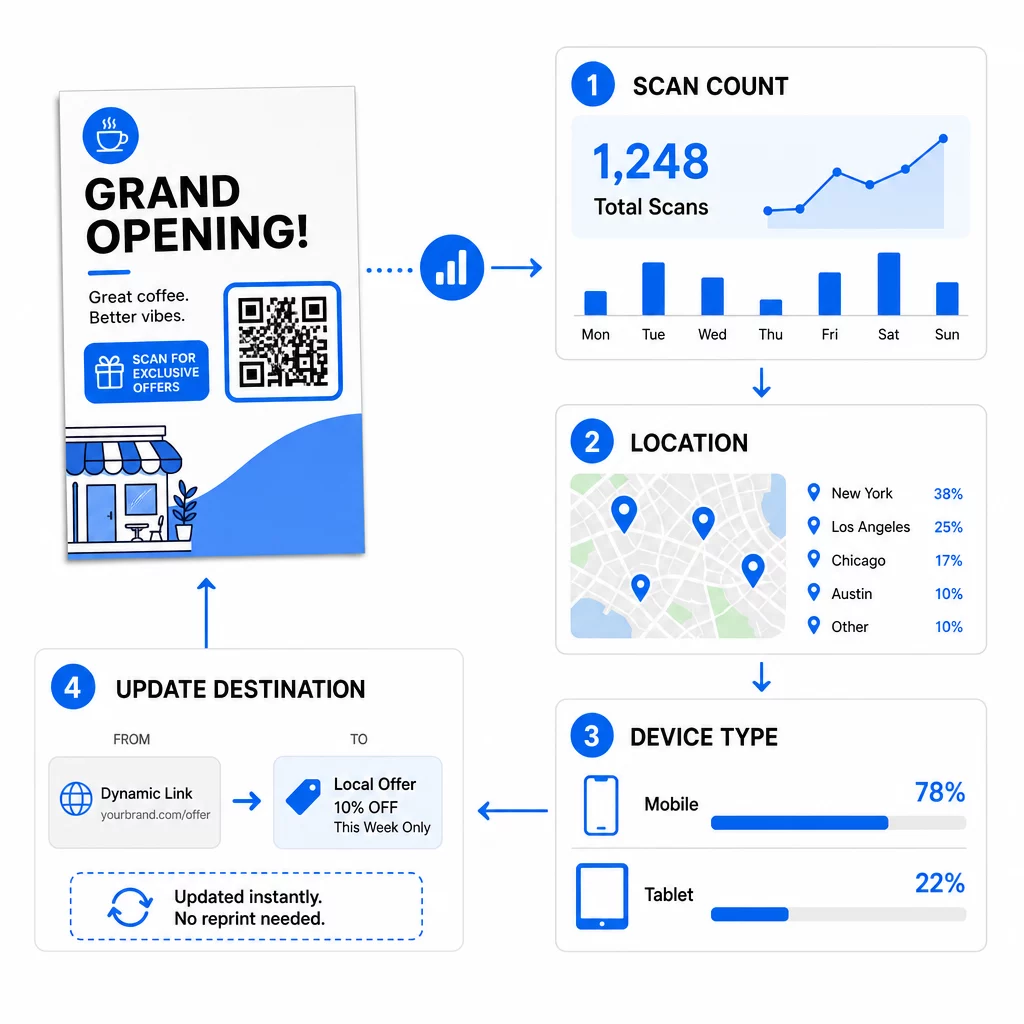
קוד QR גם מאפשר לך למדוד קמפיין מודפס. עם קוד דינמי תוכל לראות מתי, היכן ובאיזה מכשיר התרחשה כל סריקה, כך תדע אילו פליירים ומיקומים מביאים אנשים.
קודי QR סטטיים לעומת דינמיים: באילו כדאי להשתמש?
בחר את הסוג לפני שאתה מעצב את הפלייר. קודי QR סטטיים ודינמיים מתנהגים באופן שונה לאחר ההדפסה.
קודי QR סטטיים מאחסנים את היעד ישירות בתבנית. לא ניתן לשנות את היעד לאחר ההדפסה, והקוד לעולם אינו פג תוקף. קוד סטטי מספיק כאשר הקישור לא ישתנה, למשל התחברות ל-Wi-Fi או דף אינטרנט קבוע, וכאשר אינך זקוק למספרי סריקות.
קודי QR דינמיים מצביעים לקישור הפניה קצר שאתה מנהל בחשבון. תוכל לשנות את היעד לאחר הפצת הפליירים, ללא צורך בהדפסה חוזרת. אם אתה מקדם אירוע שבועי, אתה מחליף את דף ההרשמה מדי שבוע. קודים דינמיים גם מכילים פחות נתונים, ולכן התבנית פשוטה יותר ולעיתים קרובות נסרקת בקלות רבה יותר בתאורה חלשה.
עבור פליירים שמופצים ביותר ממקום אחד או ליותר משבוע אחד, קוד דינמי בדרך כלל משתלם כי אתה מקבל מעקב אחר קוד QR עם ספירת סריקות, מיקומים ומכשירים. קודים דינמיים מגיעים עם ניסיון חינם למשך 14 יום, ותוכניות מפורטות ב- דף התמחור של Pageloot.סריקות הן ללא הגבלה, וקיימת אחריות להחזר כספי תוך 30 יום על התוכניות. קוד דינמי מפסיק לעבוד כאשר תוכנית חודשית או שנתית מסתיימת, לכן יש לשמור על התוכנית פעילה כל עוד הפלייר נמצא במחזור.
איך ליצור קוד QR לפלייר ב-5 שלבים
בצעו את השלבים הבאים כדי להוסיף קוד QR לפלייר:
- בחרו מה הקוד פותח. בחרו יעד אחד שעובד בטלפון: כתובת אתר, מסמך PDF, א טופס Google, או א דף איש קשר vCard. השתמשו במחולל התואם את התוכן.
- צור והתאם אישית. פתח את ה מחולל קודי QR והדביקו את הקישור שלכם. אם אתם רוצים את המותג שלכם על הקוד, השתמשו ב- יצירת QR מעוצב עם לוגו. שמרו על הלוגו קטן ועל הצבעים כהים על רקע בהיר.
- הורידו להדפסה. הורידו SVG או PDF אם זמין, מכיוון שקבצי וקטור נשארים חדים בכל גודל. אם יש לכם רק PNG, הורידו אותו בגודל גדול (הסליידר של המחולל מגיע עד 2000 פיקסלים) ואל תגדילו אותו בפריסה שלכם.
- מקמו אותו בכלי העיצוב שלכם. ייבאו את הקובץ ל-Canva, Adobe Illustrator או יישום פריסה אחר. הגדירו את הגודל, השאירו שוליים לבנים סביבו, והניחו את קריאת הפעולה שלכם לידו.
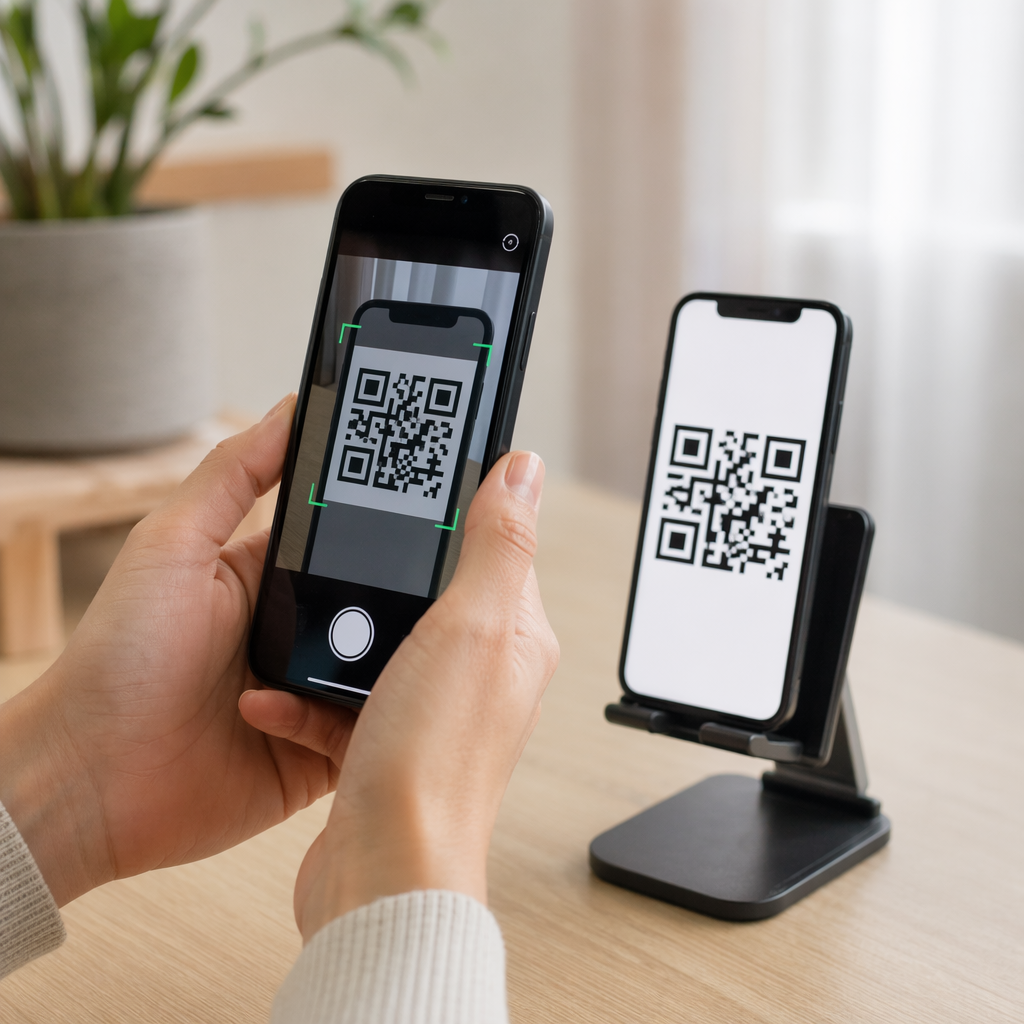
- בדקו לפני ההדפסה. הדפיסו עותק אחד בגודל הסופי. סרקו אותו עם אייפון וטלפון אנדרואיד, בתאורת חדר רגילה, מהמרחק שבו קורא יחזיק את הפלייר.
צור את קוד ה-QR המותאם אישית שלך מוכן להוסיף קוד QR ממותג וניתן למעקב לפלייר הבא שלך? השתמש ב- יצירת QR מעוצב עם לוגו כדי לעצב קוד התואם את זהות המותג שלך.
תקני עיצוב לסריקה אמינה
פלייר מעוצב היטב עדיין ייכשל אם הקוד קשה לסריקה. בצעו את ה- הנחיות לגודל קוד QR עבור חומרי הדפסה ובדקו את שלוש הנקודות הללו.
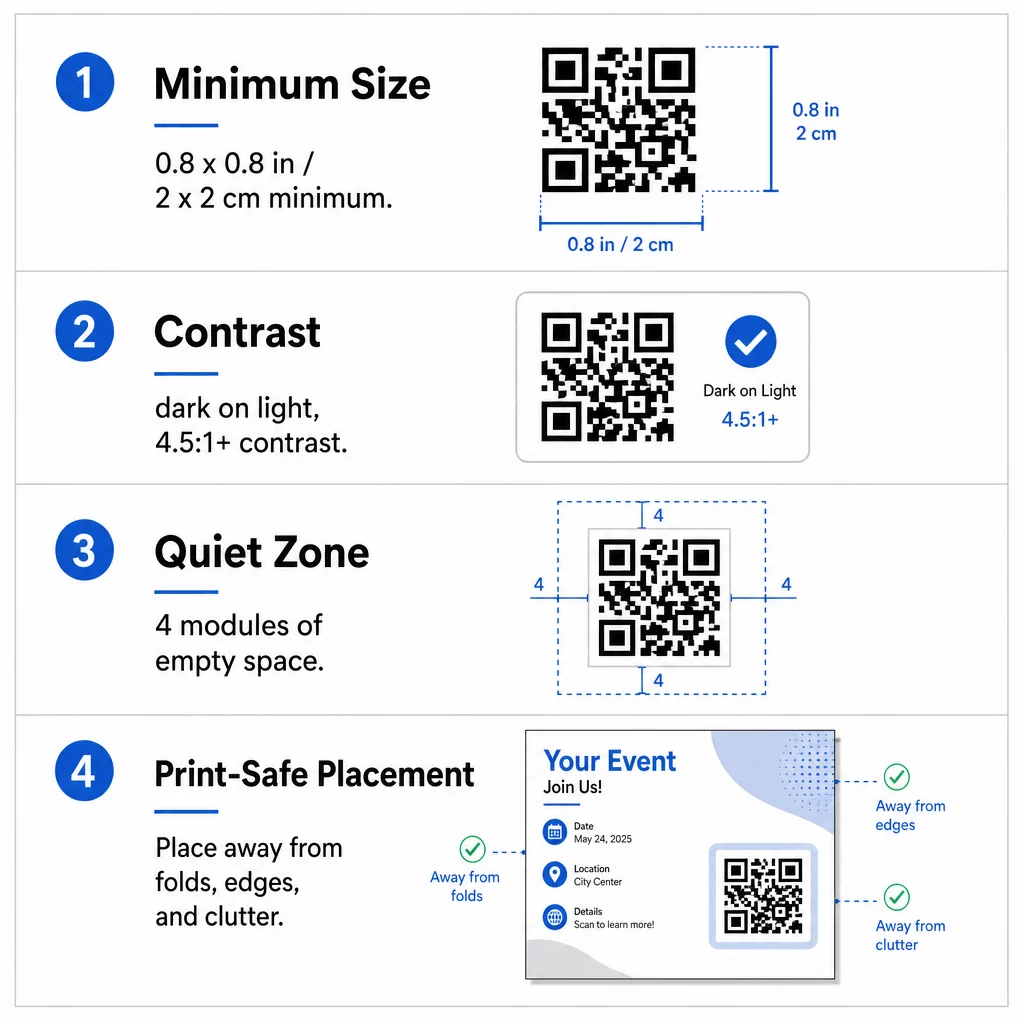
גודל: בפלייר ידני (A5, A4 או US Letter), הפכו את הקוד להיות לפחות 0.8 × 0.8 אינץ' (2 × 2 ס"מ). קוד גדול יותר, בסביבות 1 עד 1.5 אינץ', קל יותר לסריקה וגוזל מעט מקום. עבור פליירים שאנשים סורקים ממרחק רב יותר, השתמשו ב- כלל 10:1: אינץ' אחד של רוחב קוד לכל עשרה אינצ'ים של מרחק סריקה. פלייר על קיר שנסרק ממרחק 20 אינץ' זקוק לקוד ברוחב 2 אינץ' לפחות.
ניגודיות: השתמשו במודולים כהים על רקע בהיר. יחס ניגודיות של יחס ניגודיות של לפחות 4.5:1 מומלץ לסריקה אמינה, ו-7:1 או גבוה יותר עדיף. אל תהפכו את הצבעים (קוד בהיר על רקע כהה) ואל תניחו את הקוד על תמונה.
אזור שקט: השאירו שוליים ברורים של לפחות ארבעה מודולים (הריבועים הקטנים) מכל ארבעת הצדדים. טקסט, קווים או תמונות בתוך שוליים אלו יכולים למנוע מהסורק למצוא את הקוד.
מיקום אסטרטגי וכתיבת קריאה ברורה לפעולה (CTA)
המיקום של הקוד ומה שכותבים לידו משפיעים על מספר הסריקות. קודי QR בשיווק עוקב אחר כמה כללים מעשיים.
על פלייר בגודל A4 או A5, מקומות טובים הם הפינה הימנית התחתונה, המרכז התחתון, או ישירות מתחת להצעה המרכזית. הימנע ממקומות אלו:
- קפלים, קמטים וקצוות מעוגלים, המעוותים את התבנית
- נייר מבריק או בעל טקסטורה שבו סנוור או גרעיניות מפחיתים את הניגודיות
- מקומות שבהם אלמנטים עיצוביים אחרים מצטופפים באזור השקט
- גב של פלייר שאנשים אולי לעולם לא יהפכו
קוד לבדו רק לעיתים רחוקות מניע לפעולה. הוסף קריאה לפעולה (CTA) שאומרת מה הקורא מקבל: "סרוק לקבלת 20% הנחה", "סרוק כדי לאשר הגעה", "סרוק כדי לראות את התפריט". הוסף רמז קצר כגון "כוון את מצלמת הטלפון שלך אל הקוד" לקוראים חדשים לקודי QR. מקם את הקריאה לפעולה ישירות מעל או ליד הקוד. אלה שיטות עבודה מומלצות לקריאות קודי QR עוזרים לכל קבוצות הגיל. כמו כן, ודא שהדף שהקוד פותח מותאם לנייד ונטען במהירות.
מעקב וניתוח ביצועי פליירים
כדי לראות אילו פליירים עובדים, תן לכל ערוץ הפצה קוד משלו או פרמטרי UTM. לדוגמה, השתמש בקוד אחד לתערוכה ובקוד אחר לדלפק חנות. גוגל אנליטיקס מציג אז תנועה לפי פלייר, כך שתוכל להשוות מקומות.
עם קוד דינמי תוכל גם לעקוב אחר סריקות קוד QR בזמן אמת ולראות זמן, מיקום וסוג מכשיר. אם אזור אחד מניב ביצועים גרועים, שנה את יעד הקוד הזה להצעה מקומית רלוונטית יותר. הפלייר המודפס נשאר זהה.
עקבו אחר ביצועי הקמפיין שלכם רוצה לראות אילו פליירים מניעים את התנועה הרבה ביותר? השתמש ב- מחולל קודי QR כדי ליצור קודים דינמיים וניתנים למעקב ולראות נתוני סריקה בלוח המחוונים שלך.
קוד QR בפלייר לא נסרק? בדוק את אלה
- קטן מדי: מתחת ל-0.8 אינץ' (2 ס"מ), טלפונים רבים נכשלים. הגדל את הקוד.
- ניגודיות נמוכה או צבעים הפוכים: השתמש בקוד כהה על רקע בהיר.
- אין גבול לבן: שחזר את האזור השקט של ארבעה מודולים.
- הדפסה מטושטשת: קובץ PNG קטן שנמתח מודפס מטושטש. השתמש ב-SVG או PDF, או בקובץ PNG גדול יותר.
- יותר מדי נתונים: קישור יעד ארוך מאוד יוצר תבנית צפופה. השתמש בקישור קצר או בקוד דינמי.
- יעד שבור: פתח את הקישור בעצמך. דף שנמחק או קוד דינמי שפג תוקפו גורם לשגיאת סריקה גם אם הקוד תקין.
הוספת קוד QR לפלייר אורכת מספר דקות ונותנת לך תוצאה מדידה. בחר את סוג הקוד הנכון, עקוב אחר כללי הגודל והניגודיות, מקם את הקוד במקום שאנשים יראו אותו, וכתוב קריאה ברורה לפעולה (CTA).
שאלות נפוצות
עבור פלייר ידני סטנדרטי, קוד ה-QR צריך להיות לפחות 0.8 × 0.8 אינץ' (2 × 2 ס"מ). אם הפלייר מיועד להיסרק מרחוק, יש ליישם את יחס 10:1: יש ליצור את הקוד ברוחב אינץ' אחד על כל עשרה אינץ' של מרחק סריקה צפוי.
כן, אבל רק אם השתמשת בקוד QR דינמי. קודים דינמיים מנותבים דרך כתובת URL קצרה להפניה מחדש שאתה יכול לעדכן מלוח המחוונים שלך בכל עת. קודים סטטיים מטמיעים את היעד ישירות לתוך התבנית ולא ניתן לשנותם לאחר ההדפסה.
קודי QR דינמיים כוללים לוח מחוונים אנליטי המציג סך סריקות, משתמשים ייחודיים, מיקומים גיאוגרפיים ומעורבות מבוססת זמן. ניתן גם לצרף פרמטרי UTM לכתובת ה-URL של היעד שלך כדי לעקוב אחר אינטראקציות אלו ישירות בתוך גוגל אנליטיקס.
SVG או PDF, מכיוון שקובצי וקטור נשארים חדים בכל גודל הדפסה. אם אתה משתמש ב-PNG, הורד קובץ גדול ואל תגדיל אותו בפריסה שלך.
קודי QR סטטיים לעולם אינם פגים. קודים דינמיים מפסיקים לעבוד כאשר התוכנית החודשית או השנתית שיצרה אותם מסתיימת, לכן, שמור על התוכנית פעילה כל עוד הפלייר נמצא במחזור.