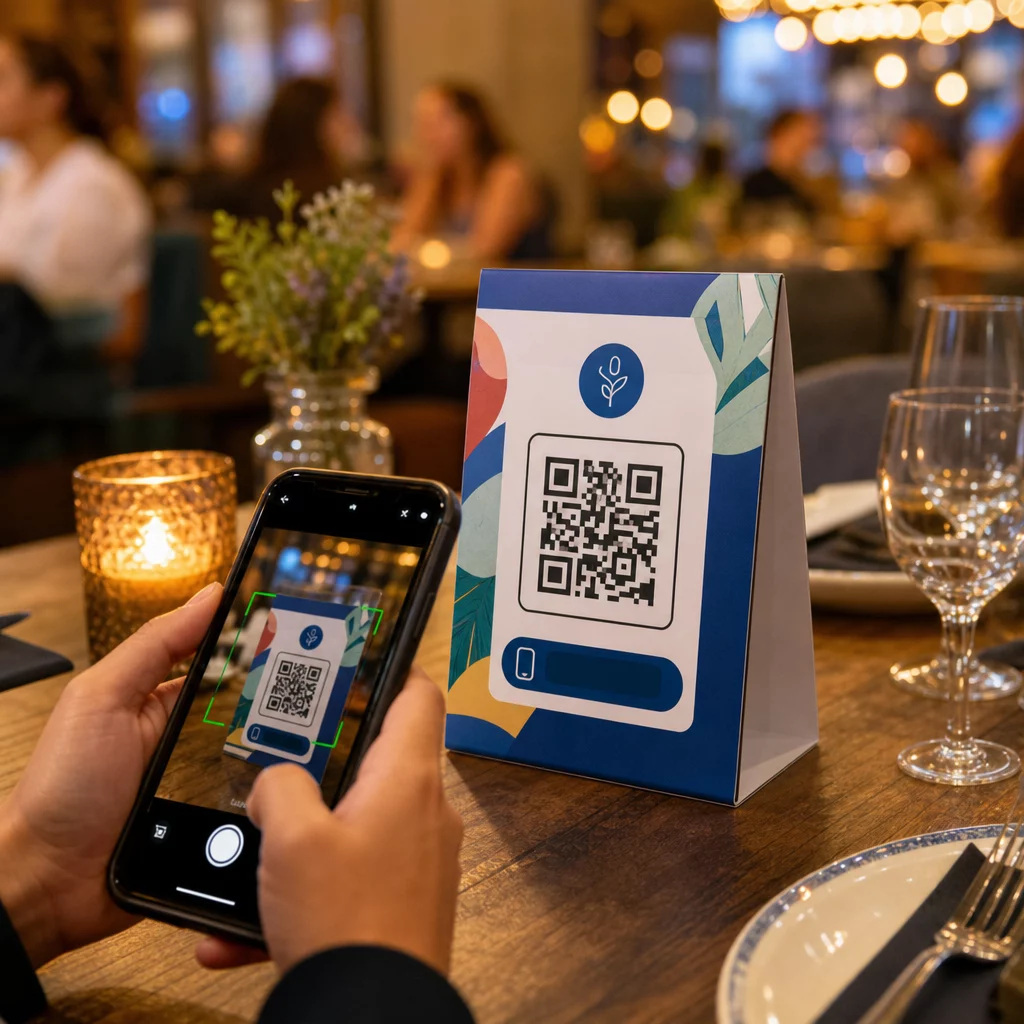
Gör dina bordsryttare något mer än att hålla ett ljus eller samla damm mellan serveringarna? Statiska tryckta kort lämnar pengar på bordet – bokstavligen. Att lägga till en QR-kod förvandlar varje bordsryttare till en interaktiv kontaktpunkt som kopplar sittande kunder till ditt digitala innehåll på några sekunder.
Vad gör QR-koder på bordsryttare värda att använda
En bordsryttare sitter direkt framför en kund under den mest engagerande delen av deras besök: ögonblicket de sitter och väntar. Denna väntetid är en verklig möjlighet, och en skanningsbar QR-kod fyller den med något användbart.
För restauranger och hotell- och restaurangföretag, QR-koder på bordsryttare effektiviserar verksamheten på sätt som gynnar både personal och gäster. Kunder kan bläddra i en digital meny, lägga en beställning eller betala en räkning utan att vänta på en servitör. För återförsäljare, bordsryttare placerade på disken med QR-koder kan visa kampanjer, registreringar till lojalitetsprogram eller produktdetaljer i exakt det ögonblick ett köpbeslut fattas.
Siffrorna bekräftar detta. Restauranger och hotell- och restaurangföretag leder QR-kodsanvändningen med 75 %, och forskning visar att 60 % av alla restaurang-QR-skanningar sker när koderna placeras direkt på bordet – på klistermärken eller bordsryttare. Formatet fungerar eftersom det möter kunderna där de redan är.
Välja rätt typ av QR-kod för din bordsryttare
Alla QR-koder gör inte samma jobb. Att matcha kodtypen med ditt mål är det viktigaste beslutet du kommer att fatta innan du skriver ut.
Menyåtkomst är det vanligaste användningsfallet. En meny-QR-kod låter dig ladda upp en PDF eller bygga en mobiloptimerad landningssida som gäster kan bläddra i från sina smartphones. Eftersom dessa koder är dynamiska kan du uppdatera rätter, priser eller dagens specialiteter utan att röra den tryckta bordsryttaren. Detta eliminerar ensamt den återkommande kostnaden för att trycka om menyer varje gång något ändras.
Kontaktlös betalning är det andra högvärdiga användningsfallet. En PayPal QR-kod låter kunder skanna och betala direkt från sitt bord, vilket minskar väntetiderna och avlastar din front-of-house-personal. För restauranger specifikt, QR-kodbetalningar påskyndar bordsomsättningen och minskar friktionen vid kortbetalning.
Kampanjer och kuponger fungerar bra på butiksdiskar. En kupong-QR-kod länkar till en landningssida där kunder kan hämta rabatter, lojalitetsförmåner eller tidsbegränsade erbjudanden medan de fortfarande är i köpögonblicket.
PDF-dokument passar platser som behöver dela detaljerat innehåll – allergiinformation, vinlistor, evenemangsprogram eller produktkataloger. En PDF QR-kod levererar filen omedelbart till vilken smartphone som helst utan att kräva en app.
Direktlänkar ger dig mest flexibilitet. En QR-kod för länk kan peka på vad som helst: ett bokningssystem, en social medieprofil, en Google-recensionssida eller ett anmälningsformulär för lojalitetsprogram.
Redo att konfigurera QR-koder för bordsställ? Skapa anpassningsbara, spårbara QR-koder för dina menyer, betalningar och kampanjer med hjälp av Pageloot QR-kodgenerator. Starta din kostnadsfria 14-dagars provperiod – inget kreditkort krävs.
Hur man konfigurerar ett QR-kodbeställningssystem på bordsställ
Om ditt mål är ett komplett beställningsflöde vid bordet, är installationen enkel. Den guide för QR-kodbeställningssystem går igenom processen i detalj, men de viktigaste stegen är:
- Bygg eller ladda upp din digitala meny som en PDF eller mobiloptimerad sida
- Generera en dynamisk QR-kod länkad till den menyn
- Anpassa koden med dina varumärkesfärger, logotyp och en uppmaningsram
- Skriv ut och placera koden på varje bordsställ
- Testa varje kod genom att skanna från en smartphone före driftsättning
Dynamiska koder är starkt att föredra för detta arbetsflöde. De gör att du kan uppdatera den länkade menyn, byta ut säsongsinnehåll eller omdirigera till en ny URL utan att skriva ut ett enda bordsställ igen. Detta är särskilt användbart för restauranger som hanterar dagens rätter eller roterande menyer.
Design- och utskriftsspecifikationer som faktiskt spelar roll
En QR-kod som inte går att skanna förstör kundupplevelsen. Att få de tekniska detaljerna rätt innan utskrift sparar dig från att skriva ut en hel omgång igen.
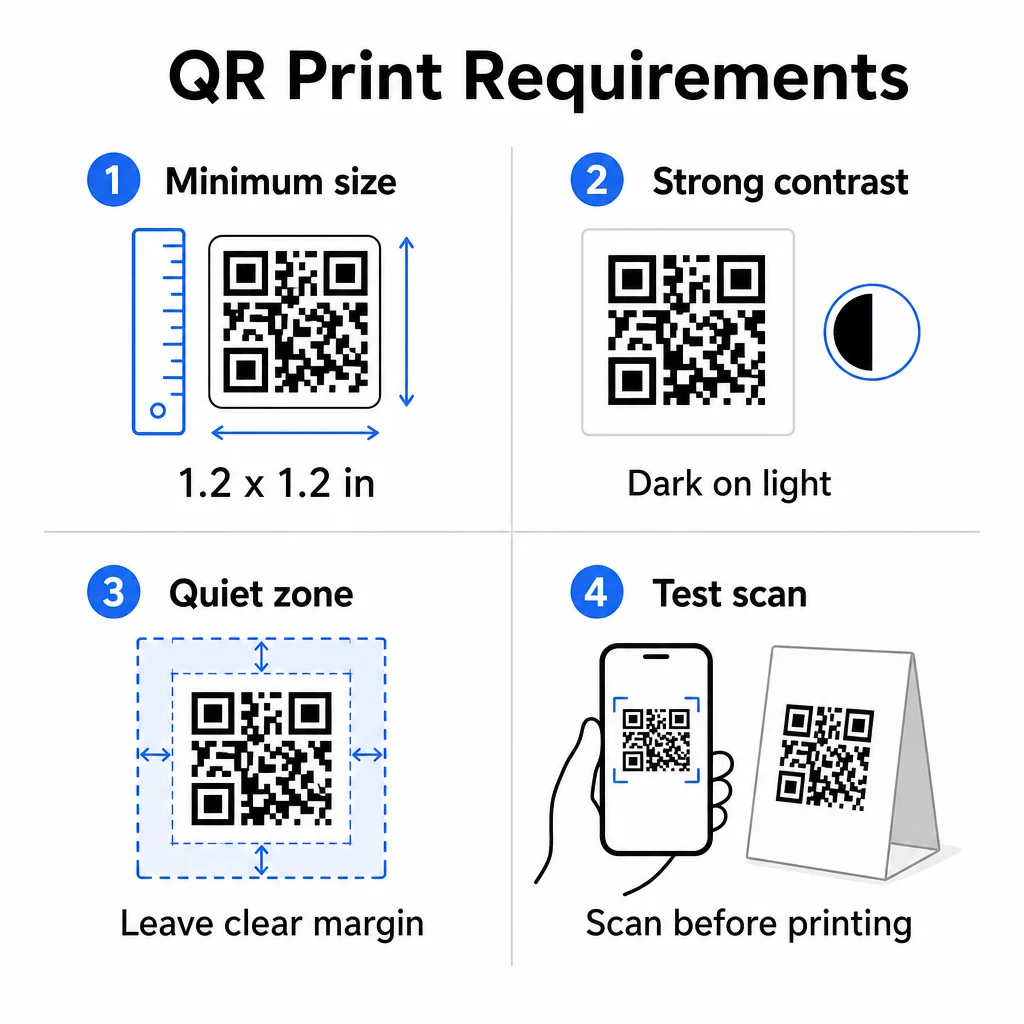
Storlek: För bordsställ som används på nära håll är den minsta tillförlitliga storleken 1,2 × 1,2 tum (3 × 3 cm). En användbar tumregel är förhållandet 10:1 – kodens bredd bör vara ungefär en tiondel av det förväntade skanningsavståndet. Vid ett typiskt bord är en 1,2-tums kod bekvämt skanningsbar av de flesta smartphonekameror. För mer detaljerad vägledning, se QR-kodstorlek för olika tryckmaterial.
Kontrast: Mörka moduler på en ljus bakgrund är den mest tillförlitliga kombinationen. Svart på vitt förblir guldstandarden. Lågkontrast eller inverterade färgscheman (ljus på mörk) orsakar skanningsfel på vissa enheter. Sikta på ett kontrastförhållande på minst 4,5:1. Den guiden för färgkontrast för QR-koder förklarar vilka färgkombinationer som fungerar och vilka som bör undvikas.
Tyst zon: Lämna en tydlig vit marginal på minst fyra moduler runt hela koden – ungefär 0,25 tum. Utan denna buffert har skannrar svårt att hitta kodgränsen, särskilt när den placeras nära text eller grafik.
Utskriftskvalitet: Använd vektorbaserade exportformat (SVG, EPS eller PDF) istället för lågupplösta PNG-filer. Suddiga eller pixlade moduler är en av de främsta orsakerna till skanningsfel på tryckt material.
Testning: Skanna alltid ett fysiskt prov innan du trycker hela upplagan. Testa på flera enheter, under de faktiska ljusförhållandena på din plats och från det avstånd en sittande gäst realistiskt skulle hålla sin telefon. Den guide för bästa praxis för QR-kodläsbarhet täcker vad du ska kontrollera och hur du åtgärdar vanliga problem.
Vad du ska länka din bordsdisplay-QR-kod till
Destinationen är lika viktig som själva koden. Här är de mest effektiva användningsområdena inom hotell- och restaurangbranschen samt detaljhandeln:
- Digital meny – ge gästerna omedelbar tillgång till hela din meny, inklusive foton, beskrivningar, allergiinformation och dagens specialerbjudanden
- Onlinebeställning – låt kunder lägga beställningar direkt från sin plats utan att vänta på en servitör
- Betalningssida – låt kunder betala sin räkning genom att skanna, vilket minskar friktionen vid kassan
- Anmälan till lojalitetsprogram – fånga kundmejl och bygga en direktmarknadsföringslista
- Kampanjer och kuponger – visa tidsbegränsade rabatter exakt när köpintentionen är som högst
- Profil i sociala medier – öka ditt följe genom att hänvisa nöjda kunder till din Instagram- eller Google-recensionssida
- Platsdelning – länka till din Google Maps-listning så att gäster kan dela din plats med vänner på vägen
Spåra prestanda med dynamiska QR-koder
En av de mest underutnyttjade fördelarna med bordsställs-QR-koder är analys. Med en dynamisk QR-kod kan du övervaka hur många gånger varje kod skannas, vid vilken tid på dygnet, på vilken enhetstyp och från vilken plats. Denna data berättar vilka bord som får mest engagemang, vilka kampanjer som driver flest klick och om en menyuppdatering påverkade kundinteraktionen.
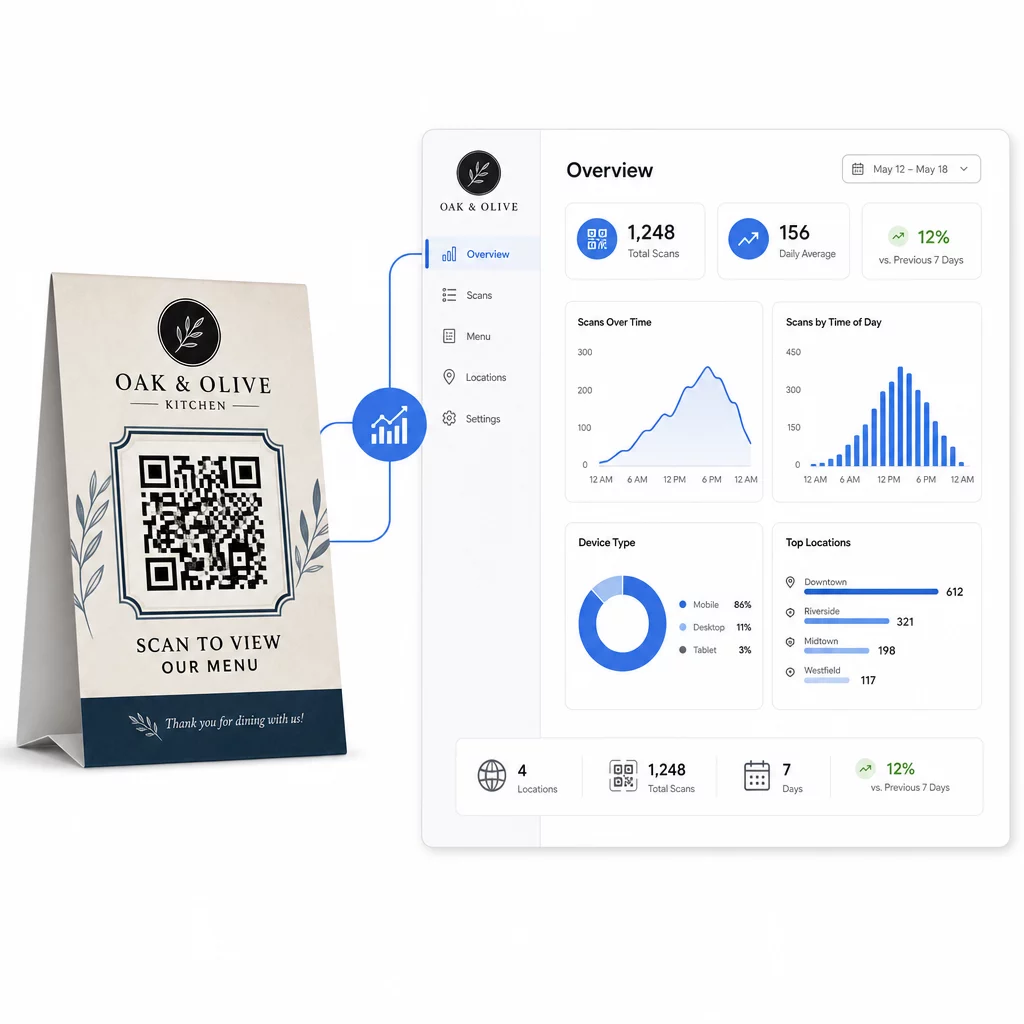
Pageloots Dynamisk QR-kodgenerator tillhandahåller en centraliserad instrumentpanel där du kan spåra allt detta i realtid, uppdatera länkat innehåll över alla bordsställ samtidigt och göra designändringar utan att röra ditt tryckta material.
För företag med flera platser förvandlar denna kontrollnivå bordsställ från statiskt tryckt material till en mätbar marknadsföringskanal.
Spåra varje skanning över varje bord Använda sig av Pageloots dynamiska QR-kodgenerator för att uppdatera innehåll, övervaka skanningsanalys och hantera alla dina bordsställskoder från en instrumentpanel.
Vanliga frågor
För skanning vid bordet bör QR-koden vara minst 1,2 × 1,2 tum (3 × 3 cm). Detta möjliggör tillförlitlig skanning på de korta avstånd som är typiska för en sittande gäst. Om din design inkluderar en logotypöverlagring eller ett komplext färgschema, öka storleken med 20–30 % för att bibehålla skanningsbarheten.
Dynamiska QR-koder rekommenderas starkt för bordsställ. De gör att du kan uppdatera det länkade innehållet – som en meny, kampanj eller betalningssida – utan att behöva trycka om. De tillhandahåller också skanningsanalys så att du kan spåra engagemang över tid. Statiska koder är endast lämpliga om målinnehållet aldrig kommer att ändras.
En QR-kod på en bordsdisplay kan länka till en digital meny, en sida för onlinebeställning, en betalningsportal, en landningssida för kupong- eller lojalitetsprogram, en sociala medieprofil, ett PDF-dokument eller vilken URL som helst. Den bästa destinationen beror på din företagstyp och vad du vill att kunden ska göra i det ögonblicket under deras besök.