ホーム > ユースケース > QR Codes for Table Tents: A Setup Guide for Restaurants and Retailers
QR table tent

QR Codes for Table Tents: A Setup Guide for Restaurants and Retailers

Learn how to set up QR codes on table tents for restaurants and retailers. Connect customers to digital menus, payments, and promotions in seconds.
Updated on 6月 10, 2026
目次

Are your table tents doing anything beyond holding a candle or collecting dust between services? Static printed cards leave money on the table – literally. Adding a QR code turns every table tent into an interactive touchpoint that connects seated customers to your digital content in seconds.

What Makes Table Tent QR Codes Worth Using

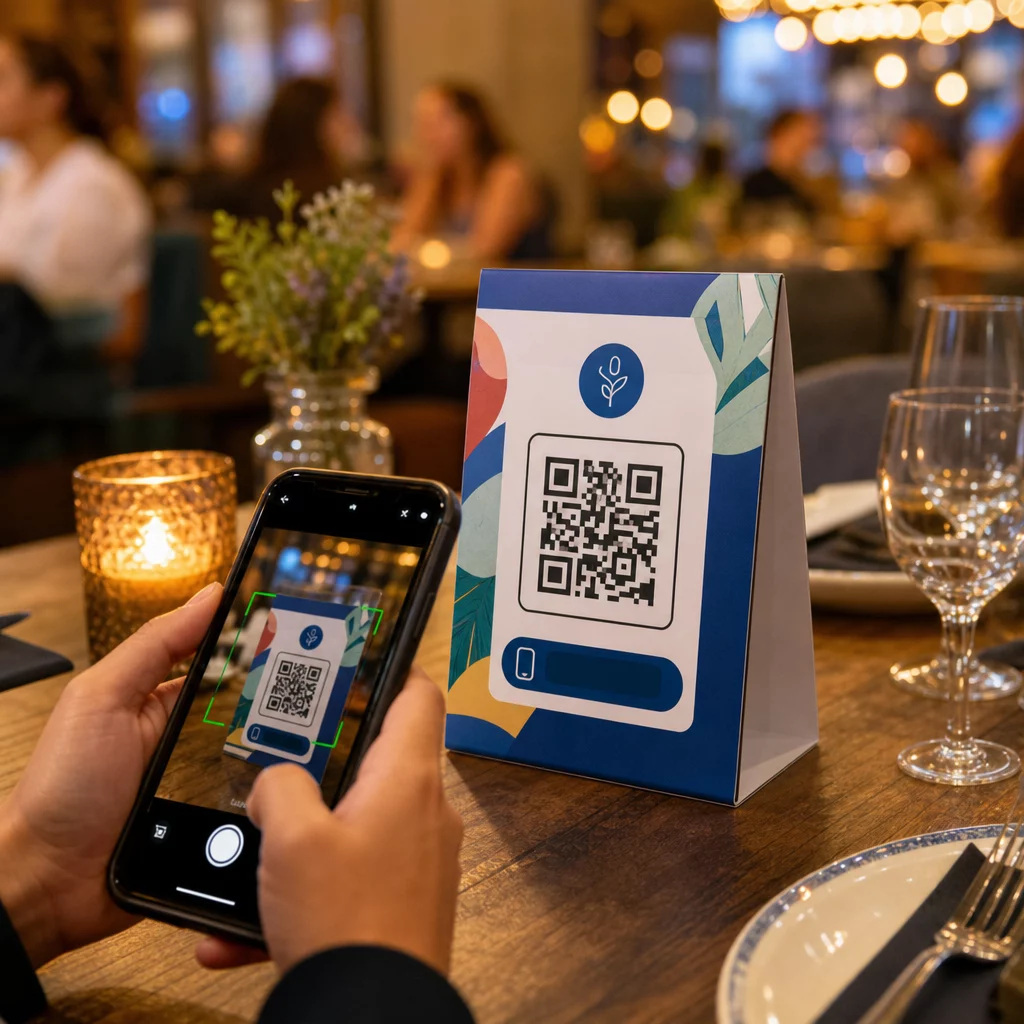
A table tent sits directly in front of a customer during the highest-engagement window of their visit: the moment they are seated and waiting. That dwell time is a genuine opportunity, and a scannable QR code fills it with something useful.

のために restaurants and hospitality businesses, QR codes on table tents streamline operations in ways that benefit both staff and guests. Customers can browse a digital menu, place an order, or pay a bill without waiting for a server. For retailers, counter-placed table tents with QR codes can surface promotions, loyalty program sign-ups, or product details at the exact moment a purchase decision is being made.

The numbers back this up. Restaurants and hospitality businesses lead QR code adoption at 75%, and research shows that 60% of all restaurant QR scans happen when codes are placed directly on the table – on stickers or table tents. The format works because it meets customers where they already are.

Choosing the Right QR Code Type for Your Table Tent

Not every QR code does the same job. Matching the code type to your goal is the most important decision you will make before printing.

Menu access is the most common use case. A メニューのQRコードをスキャンする場合でも lets you upload a PDF or build a mobile-optimized landing page that guests can browse from their smartphones. Because these codes are dynamic, you can update dishes, prices, or daily specials without touching the printed table tent. This alone eliminates the recurring cost of reprinting menus every time something changes.

Contactless payment is the second high-value use case. A PayPal QR code lets customers scan and pay directly from their table, cutting wait times and reducing the load on your front-of-house team. For restaurants specifically, QR code payments speed up table turnover and reduce card processing friction.

Promotions and coupons work well on retail counter displays. A coupon QR code links to a landing page where customers can claim discounts, loyalty rewards, or limited-time offers while they are still in the buying moment.

PDF documents suit venues that need to share detailed content – allergen information, wine lists, event programs, or product catalogs. A PDF QRコード delivers the file instantly to any smartphone without requiring an app.

Direct links give you the most flexibility. A リンクQRコード can point to anything: a reservation system, a social media profile, a Google review page, or a loyalty sign-up form.

Ready to Set Up Table Tent QR Codes? Create customizable, trackable QR codes for your menus, payments, and promotions using the Pageloot QRコードジェネレータ. Start your free 14-day trial – no credit card required.

How to Set Up a QR Code Ordering System on Table Tents

If your goal is a full table-side ordering flow, the setup is straightforward. The QR code ordering system guide walks through the process in detail, but the core steps are:

  • Build or upload your digital menu as a PDF or mobile-optimized page
  • Generate a dynamic QR code linked to that menu
  • Customize the code with your brand colors, logo, and a call-to-action frame
  • Print and place the code on each table tent
  • Test every code by scanning from a smartphone before deployment

Dynamic codes are strongly preferred for this workflow. They allow you to update the linked menu, swap out seasonal content, or redirect to a new URL without reprinting a single table tent. This is especially useful for restaurants managing daily specials or rotating menus.

Design and Print Specifications That Actually Matter

A QR code that fails to scan destroys the customer experience. Getting the technical details right before printing saves you from reprinting an entire batch.

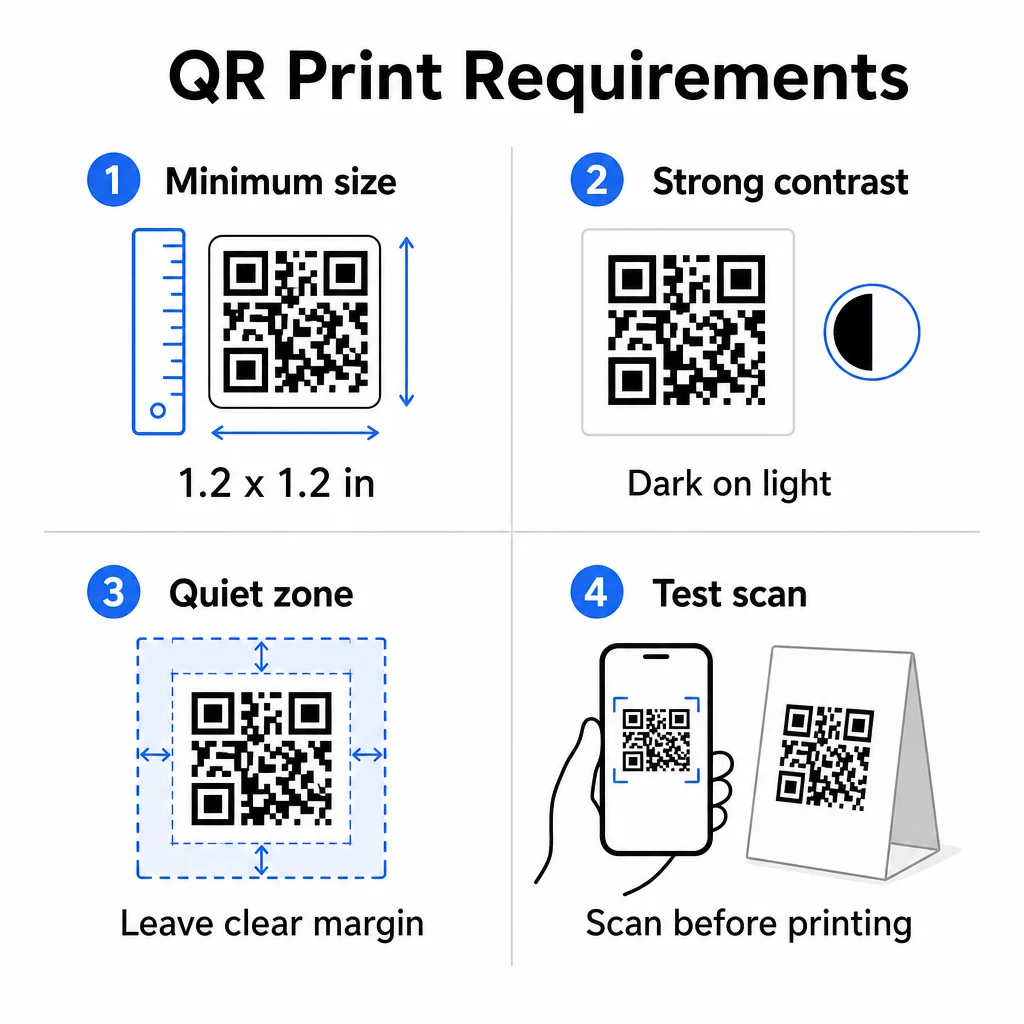
QR print specifications

サイズです。 For table tents used at close range, the minimum reliable size is 1.2 × 1.2 inches (3 × 3 cm). A useful rule of thumb is the 10:1 ratio – the code’s width should be roughly one-tenth of the expected scanning distance. At a typical table, a 1.2-inch code is comfortably scannable by most smartphone cameras. For more detailed guidance, see 異なる印刷素材におけるQRコードのサイズ設定.

コントラスト: Dark modules on a light background is the most reliable combination. Black on white remains the gold standard. Low-contrast or inverted color schemes (light on dark) cause scanning failures on some devices. Aim for a contrast ratio of at least 4.5:1. The QRコードのカラーコントラストガイド explains which color combinations work and which to avoid.

クワイエットゾーン: Leave a clear white margin of at least four modules around the entire code – roughly 0.25 inches. Without this buffer, scanners struggle to locate the code boundary, especially when placed near text or graphics.

Print quality: Use vector export formats (SVG, EPS, or PDF) rather than low-resolution PNGs. Blurry or pixelated modules are a leading cause of scan failure on printed materials.

Testing: Always scan a physical proof before printing the full run. Test across multiple devices, under the actual lighting conditions of your venue, and from the distance a seated guest would realistically hold their phone. The QR code readability best practices guide covers what to check and how to fix common issues.

What to Link Your Table Tent QR Code To

The destination matters as much as the code itself. Here are the most effective uses across hospitality and retail industries:

  • Digital menu – give guests instant access to your full menu, including photos, descriptions, allergen info, and daily specials
  • Online ordering – allow customers to place orders directly from their seat without waiting for a server
  • Payment page – let customers settle their bill by scanning, reducing checkout friction
  • Loyalty program sign-up – capture customer emails and build a direct marketing list
  • Promotions and coupons – surface time-sensitive discounts exactly when purchase intent is highest
  • Social media profile – grow your following by directing satisfied customers to your Instagram or Google review page
  • 位置情報の共有 – link to your Google Maps listing so guests can share your location with friends on the way

Tracking Performance with Dynamic QR Codes

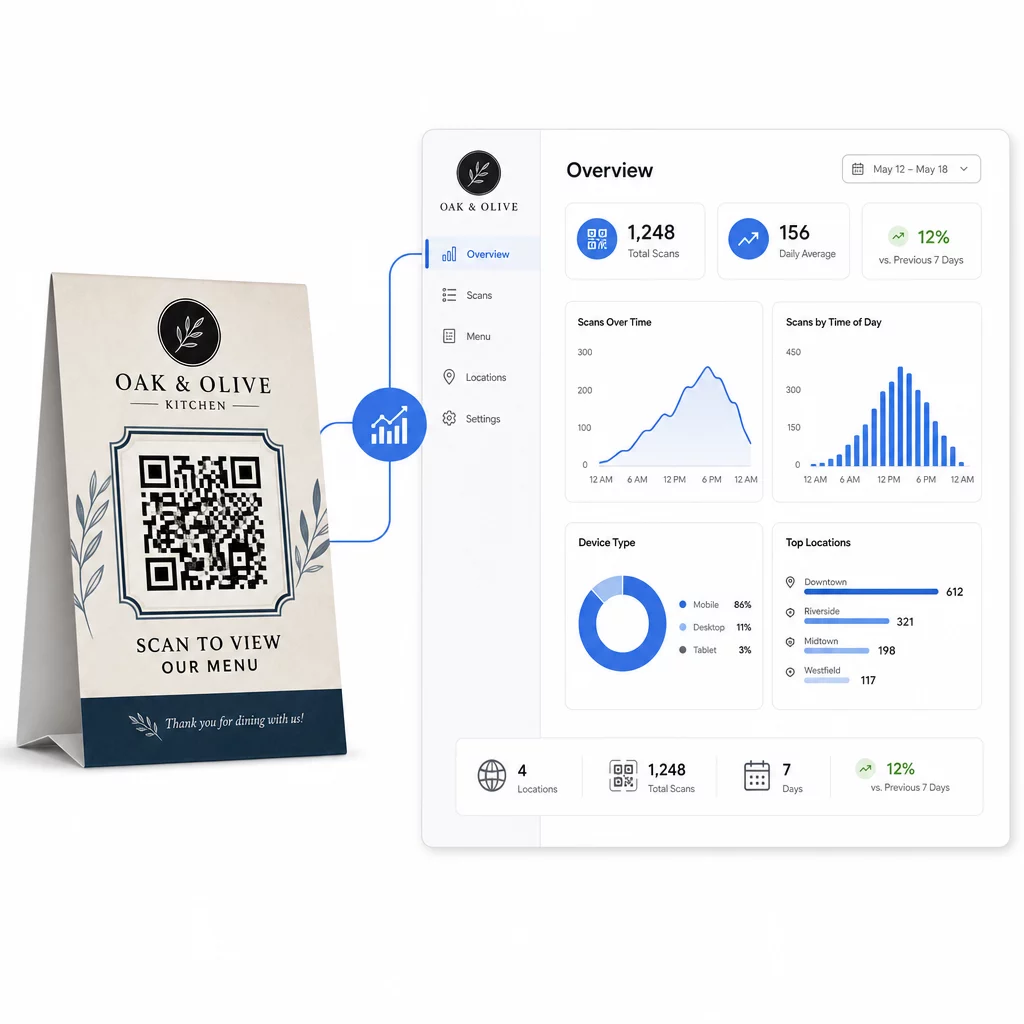
One of the most underused advantages of table tent QR codes is analytics. With a dynamic QR code, you can monitor how many times each code is scanned, at what time of day, on which device type, and from which location. This data tells you which tables get the most engagement, which promotions drive the most clicks, and whether a menu update affected customer interaction.

動的QR分析

Pagelootの ダイナミックQRコードジェネレーター provides a centralized dashboard where you can track all of this in real time, update linked content across all table tents simultaneously, and make design changes without touching your printed materials.

For businesses running multiple locations, this level of control turns table tents from static print collateral into a measurable marketing channel.

Track Every Scan Across Every Table 使用 Pageloot’s Dynamic QR Code Generator to update content, monitor scan analytics, and manage all your table tent codes from one dashboard.

よくある質問

What size should a QR code be on a table tent?

For table-side scanning, the QR code should be at least 1.2 × 1.2 inches (3 × 3 cm). This supports reliable scanning at the close distances typical of a seated guest. If your design includes a logo overlay or complex color scheme, increase the size by 20–30% to maintain scannability.

Should I use a static or dynamic QR code on a table tent?

Dynamic QR codes are strongly recommended for table tents. They allow you to update the linked content – such as a menu, promotion, or payment page – without reprinting. They also provide scan analytics so you can track engagement over time. Static codes are only suitable if the destination content will never change.

What can a QR code on a table tent link to?

A table tent QR code can link to a digital menu, an online ordering page, a payment portal, a coupon or loyalty program landing page, a social media profile, a PDF document, or any URL. The best destination depends on your business type and what you want the customer to do at that moment in their visit.

著者について

Siim KostabiはPagelootのコンテンツリードです。Pagelootの革新的なQRコード生成サービスについて執筆しています。5年以上にわたるQRコードに関する深い専門知識を持つSiimは、この分野の専門家です。QRテクノロジーを活用してデジタルインタラクションを簡素化・拡張する上で、大きな進歩を遂げています。.

カテゴリー
について詳しくはこちら
✅ QRコードの#1ソリューション

オンラインでQRコードを作成する必要がある場合は QRコードを作る ここで無料で
ページルートは #1のGo-Toソリューション でQRコードを作成してスキャンすることができます。

QO-20

ブログジェネ

売上、レビュー、フォロワーを増やすために 20,000 を超えるブランドから信頼されています。

クライアントのロゴ
トップブランドから信頼される
5 のうち 4.8 と評価しました

4.86 / 5つ星評価

ユーゴ・ローラン
ユーゴ・ローラン
レストランオーナー
最も簡単で信頼性の高いQRコードジェネレータです。PDFファイルを即座にアップロードできます。レストランのメニューがデジタル化されました。
ルーカス・ジャンセン
ルーカス・ジャンセン
不動産開発業者
これは優れたツールで、QRコードでちょうど欲しいところに連れて行ってくれます。私たちは位置情報のQRコードしか使っていませんが、とても便利な機能がたくさんあります。
エマ・モレッティ
エマ・モレッティ
小売製品
使いやすいし、早い。素晴らしい機能で、完璧な画像を作成してくれるので、社員は私のvCardをダウンロードすることができます。
ユーゴ・ローラン
ユーゴ・ローラン
レストランオーナー
最も簡単で信頼性の高いQRコードジェネレータです。PDFファイルを即座にアップロードできます。レストランのメニューがデジタル化されました。
ルーカス・ジャンセン
ルーカス・ジャンセン
不動産開発業者
これは優れたツールで、QRコードでちょうど欲しいところに連れて行ってくれます。私たちは位置情報のQRコードしか使っていませんが、とても便利な機能がたくさんあります。
エマ・モレッティ
エマ・モレッティ
小売製品
使いやすいし、早い。素晴らしい機能で、完璧な画像を作成してくれるので、社員は私のvCardをダウンロードすることができます。
QRコードをもっと見る
QRコードジェネレーターが観光産業を救う方法
QRコードレスキュー 観光業界
あらゆるものをデジタル体験に変えよう 3分以内に。

14日間の無料トライアル。

クレジットカードは必要ありません。

初回購入で30%オフ

次のコードを使用してください:

MP3ファイルを共有

PDF QRコードを作成するにはサインアップしてください

必要なものをすべてアップロードして表示する。

  • オーディオファイル
  • ポッドキャスト
  • 音楽

サインアップで14日間無料トライアル。.
トライアル終了後、QRコードは期限切れになります。.

オーディオmp3 QRコードを作成するにはサインアップしてください

フレームでより多くのスキャンを獲得

QRコードにフレームを追加するにはサインアップしてください

コールトゥアクションフレームは、お客様が簡単にQRコードと対話できるようにします。ぜひお試しください。

サインアップで14日間無料トライアル。.
トライアル終了後、QRコードは期限切れになります。.

QRコードにフレームを追加するにはサインアップしてください

シェイプでスタイルを追加

より多くの図形を作成するにはサインアップしてください

QRコードは四角いものである必要はありません。あなたのブランドのイメージに合わせて変えてみてください。

サインアップで14日間無料トライアル。.
トライアル終了後、QRコードは期限切れになります。.

より多くの図形を作成するにはサインアップしてください

QRコードにロゴを追加

QRコードにロゴを追加するにはサインアップしてください

QRコードにロゴやブランドを入れることで、目立たせることができます。

サインアップで14日間無料トライアル。.
トライアル終了後、QRコードは期限切れになります。.

QRコードにロゴを追加するにはサインアップしてください

スマートなApp Storeリダイレクト

アプリストアのQRコードを作成するにはサインアップしてください

スマートなApp StoreのQRコードに、あなたのアプリのリンクを追加します。ユーザーは、デバイスに応じてリダイレクトされます。

サインアップで14日間無料トライアル。.
トライアル終了後、QRコードは期限切れになります。.

アプリストアのQRコードを作成するにはサインアップしてください

QRコードに画像をアップロード

画像QRコードを作成するにはサインアップしてください

画像を簡単に共有できます。どんな画像も、数秒でダイナミックに変化します。

サインアップで14日間無料トライアル。.
トライアル終了後、QRコードは期限切れになります。.

画像QRコードを作成するにはサインアップしてください

PDFファイルを共有

PDF QRコードを作成するにはサインアップしてください

必要なものをすべてアップロードして表示する。

  • メニュー&プライスリスト
  • 指示
  • 任意の書類

サインアップで14日間無料トライアル。.
トライアル終了後、QRコードは期限切れになります。.

PDF QRコードを作成するにはサインアップしてください

印刷せずに後で編集

再度印刷せずにQRコードを編集するにはサインアップしてください

ダイナミックQRコードは、新たにQRコードを印刷することなく、QRコードの内容を変更することができます。

サインアップで14日間無料トライアル。.
トライアル終了後、QRコードは期限切れになります。.

再度印刷せずにQRコードを編集するにはサインアップしてください

いつ?どこで?QRコードのスキャンを追跡

QRコードを追跡するにはサインアップしてください

どのQRコードが最も多くスキャンされ、何が最も顧客を喜ばせているのかを知ることができます。

サインアップで14日間無料トライアル。.
トライアル終了後、QRコードは期限切れになります。.

QRコードを追跡するにはサインアップしてください

印刷可能なファイルが利用可能

PDFやSVGのようなベクターQRコードを作成するにはサインアップしてください

.eps、.pdf、.svg

QRコードをHD解像度でダウンロードしたいですか?すぐに印刷できるベクターまたはピクセル形式を入手しましょう。

サインアップで14日間無料トライアル。.
トライアル終了後、QRコードは期限切れになります。.

PDFやSVGのようなベクターQRコードを作成するにはサインアップしてください

しばらくお待ちください。あなたのQRコードは ロード... ロード...

あなただけのものに

サインアップしてQRコードを後で保存してください

異なる色、ロゴ、コールトゥアクションフレームで素晴らしいQRコードを作成することで、より多くのスキャンを得ることができます。

サインアップで14日間無料トライアル。.
トライアル終了後、QRコードは期限切れになります。.

サインアップしてQRコードを後で保存してください