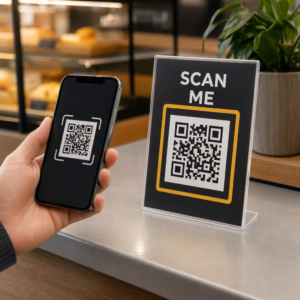
Går du från mässor med en hög visitkort och ingen tydlig uppföljningsplan? Manuell datainsamling saktar ner dig, och leads blir snabbt kalla. Den här guiden visar dig hur du använder QR-koder för att automatiskt fånga, organisera och följa upp med eventleads – så varje handslag förvandlas till en spårbar kontakt.
Varför traditionell insamling av eventleads inte räcker till
På de flesta konferenser och mässor samlar yrkesverksamma in kontaktuppgifter genom att byta visitkort eller anteckna. Problemet: de flesta av dessa kort hamnar på ett skrivbord, aldrig inmatade i ett CRM. Även när de är det, är manuell datainmatning långsam, felbenägen och inte i takt med moderna säljuppföljningar.
Fönstret för att agera på en eventlead är kort. Uppföljning efter mässan beskrivs allmänt som perioden då event-ROI vinns eller förloras – varma leads svalnar snabbt, och en försenad eller generisk första kontakt kan döda en annars lovande konversation. Du behöver ett system som omedelbart samlar in data, dirigerar den till rätt plats och utlöser uppföljning utan att du behöver göra det manuellt.
QR-koder täpper till den luckan genom att koppla en fysisk interaktion – att ge någon ett kort, peka på en banderoll eller placera en kod på ett bord – med ett digitalt arbetsflöde som körs automatiskt.
Vad som gör en QR-kod effektiv för leadinsamling
Alla QR-koder är inte lika användbara för att generera eventleads. En statisk QR-kod pekar på en fast destination och ger dig ingen data om vem som skannade den, när eller var. En dynamisk QR-kod, däremot, använder en kort omdirigeringslänk som kan uppdateras när som helst och loggar skanningsaktivitet inklusive tid, enhetstyp och plats.
För insamling av eventleads är dynamiska koder avgörande av tre skäl:
- Du kan ändra destinations-URL:en efter utskrift – användbart när du deltar i flera evenemang med en enda uppsättning tryckt material
- Du får realtidsanalys av skanningsvolym och publikbeteende
- Du kan integrera destinationen med ditt CRM eller din automationsplattform utan att röra den tryckta koden
De Dynamisk QR-kodgenerator från Pageloot låter dig skapa redigerbara koder, uppdatera destinationer mellan evenemang och spåra prestanda från en central instrumentpanel.
Ställ in spårbara eventkoder före din nästa mässa Använd Dynamisk QR-kodgenerator för att skapa redigerbara, analysklara QR-koder som dirigerar deltagare direkt in i ditt arbetsflöde för leadinsamling.
Steg 1: Designa ett visitkort byggt för leadinsamling
Ditt visitkort är den fysiska utlösaren för hela det digitala arbetsflödet. För att det ska fungera måste själva kortet vara värt att behålla – och QR-koden måste vara omedelbart skanningsbar.
Praktiska överväganden:
- Använd premiummaterial: Hållbara kort (plast eller kartong) är mindre benägna att kastas bort än tunna pappersalternativ. Kortets upplevda värde återspeglar ditt varumärke.
- Placera QR-koden framträdande: Baksidan av kortet fungerar bra. Följ Pageloots rekommendation om minimistorlek på 0,8 × 0,8 tum för visitkorts-QR-koder för att säkerställa tillförlitlig skanning över olika enhetstyper.
- Inkludera en tydlig uppmaning till handling: Text som “Skanna för att få din kostnadsfria konsultation” eller “Skanna för att hålla kontakten” berättar för mottagaren exakt varför de ska skanna och vad de får.
- Varumärkesanpassa koden: Att lägga till din logotyp och dina varumärkesfärger till QR-koden ökar förtroendet och skanningsfrekvensen. Generiska svartvita koder känns opersonliga; varumärkesanpassade koder känns avsiktliga.
Om du vill inkludera kontaktuppgifter direkt i koden – så att deltagare kan spara din information utan att fylla i ett formulär – en vCard QR-kod låter dig bädda in ditt namn, telefonnummer, e-post och webbplats i ett format som omedelbart överförs till en smartphones kontaktapp.
Steg 2: Bygg en landningssida anpassad för evenemanget
Destinationen din QR-kod pekar till är lika viktig som koden själv. En generisk hemsida är en missad möjlighet. En specialbyggd landningssida som refererar till det specifika evenemanget skapar omedelbar relevans och ökar antalet ifyllda formulär.
En välstrukturerad landningssida för evenemang inkluderar:
- Ett personligt välkomnande (“Kul att träffa dig på [Evenemangsnamn] – här är vad jag lovade”)
- Ett kort formulär som endast begär viktig information: namn, e-post och en kvalificerande fråga relevant för ditt erbjudande
- Ett tydligt incitament för att skicka in – exklusivt innehåll, en gratis konsultation, tillgång till en community eller en nedladdningsbar resurs
Håll formuläret mobilanpassat. Nästan varje skanning på ett evenemang kommer att ske på en smartphone, så ett rörigt eller långsamt laddande formulär dödar konverteringar innan de ens börjar. Den QR-kodgenerator för Google Formulär erbjuder ett snabbt sätt att länka ett mobilvänligt formulär till din QR-kod, med svar som matas direkt in i Google Sheets för enkel granskning.
Efter att formuläret har skickats in, omdirigera deltagarna till en tack-sida med en sekundär uppmaning till handling – prenumerera på ett nyhetsbrev, gå med i en community, titta på en relevant video. Detta förlänger interaktionen bortom den initiala skanningen.
Steg 3: Anslut ditt formulär till ett automatiserat arbetsflöde
Lead-insamling skapar endast värde om datan omedelbart flyttas till något användbart. Att manuellt ladda ner ett kalkylblad efter evenemanget och mejla folk två veckor senare är inte en uppföljningsstrategi – det är en missad möjlighet.
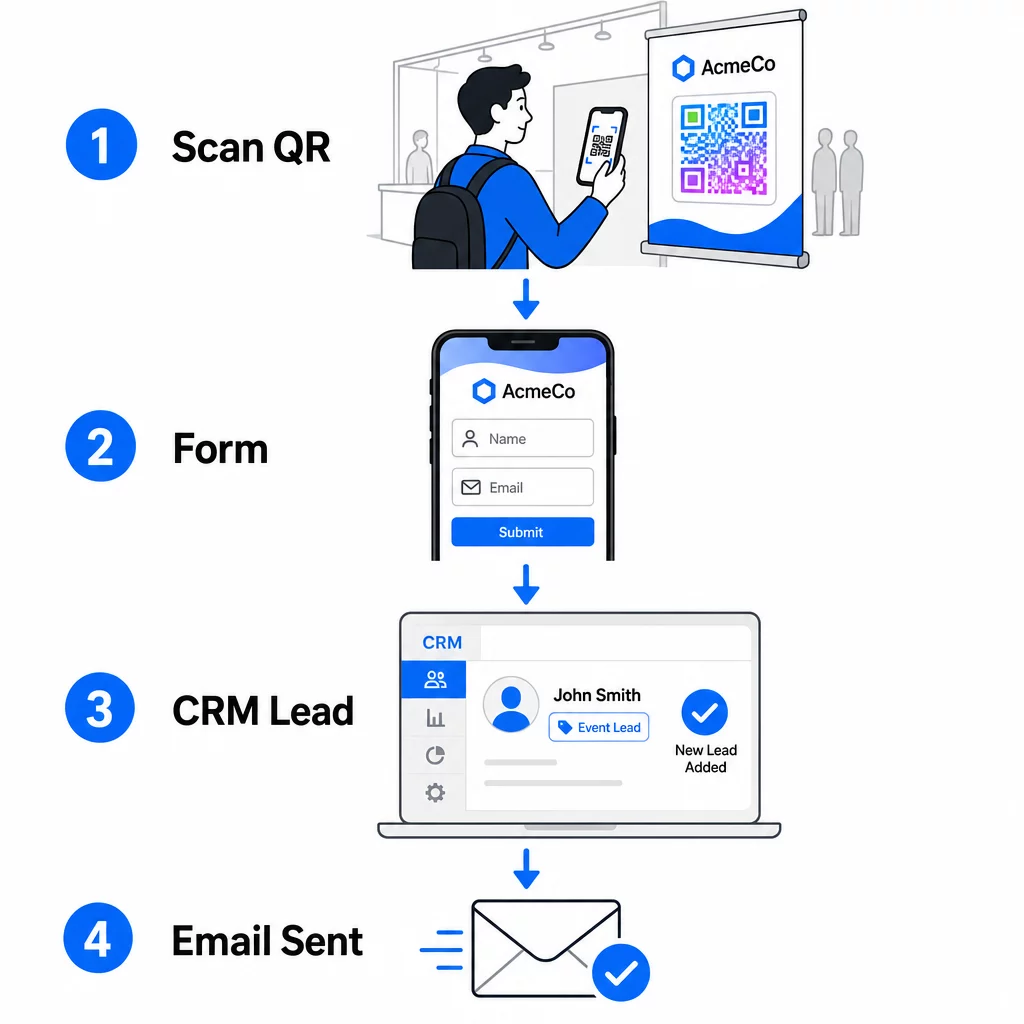
Ställ in ditt arbetsflöde innan du anländer till evenemanget:
- CRM-integration: Dirigera varje formulärinlämning direkt till ditt CRM, taggad med evenemangets namn och datum för senare segmentering
- Omedelbart uppföljningsmejl: Utlös ett automatiserat e-postmeddelande i samma ögonblick som någon skickar in formuläret – tacka dem, leverera den utlovade resursen och sätt förväntningar för nästa steg
- Leadpoängsättning eller dirigering: Om du använder ett CRM med leadpoängsättning, konfigurera händelsetaggen för att prioritera uppföljning av ditt säljteam
- Kalkylbladsexport: För prisdragningar eller närvarospårning, autoexportera inskickade bidrag till ett Google Sheet som du kan granska i realtid
För en djupare titt på att koppla dynamiska QR-koder till CRM-arbetsflöden, guiden om att bygga dynamiska QR-koder för CRM-incheckningar går igenom URL-kodning, sammanslagningsfält och webhook-inställning i detalj. Du kan också utforska Automatisering av arbetsflöden för QR-kodsskanning för steg-för-steg-vägledning om hur du kopplar skanningshändelser till plattformar som Zapier eller Make.
Automatisera ditt arbetsflöde för eventleads Koppla din QR-kodgenerator för event till ditt CRM och din e-postplattform så att varje skanning utlöser omedelbar, personlig uppföljning – utan manuell ansträngning.
Steg 4: Uppmuntra skanningen
Deltagare på en mässa eller konferens blir uppvaktade av dussintals montrar och kontakter. En QR-kod ensam tvingar inte fram handling – värdet bakom den gör det.
Effektiva incitament för insamling av eventleads inkluderar:
- En deltagande i en prisdragning (en gratis konsultation, produktprov eller tjänstekredit som dras i slutet av evenemanget)
- Omedelbar tillgång till exklusivt innehåll – en guide, checklista eller mall relevant för publiken
- Medlemskap i en privat gemenskap eller tidig tillgång till en produkt eller resurs
- En personlig granskning, bedömning eller rekommendation levererad efter evenemanget
Incitamentet bör vara tillräckligt specifikt för att kännas värdefullt och ha tillräckligt låg friktion för att någon ska agera på det mitt i en konversation. “Skanna här för att delta i utlottningen av en 60-minuters strategisession” är mer övertygande än “skanna för att lära dig mer.”
Steg 5: Hantera flera evenemang med en enda uppsättning kort
En av de mest praktiska fördelarna med dynamiska QR-koder är att du inte behöver trycka om material för varje evenemang. Eftersom destinations-URL:en lagras i en omdirigering – inte i själva kodmönstret – kan du uppdatera vart koden skickar deltagare utan att röra det tryckta kortet.
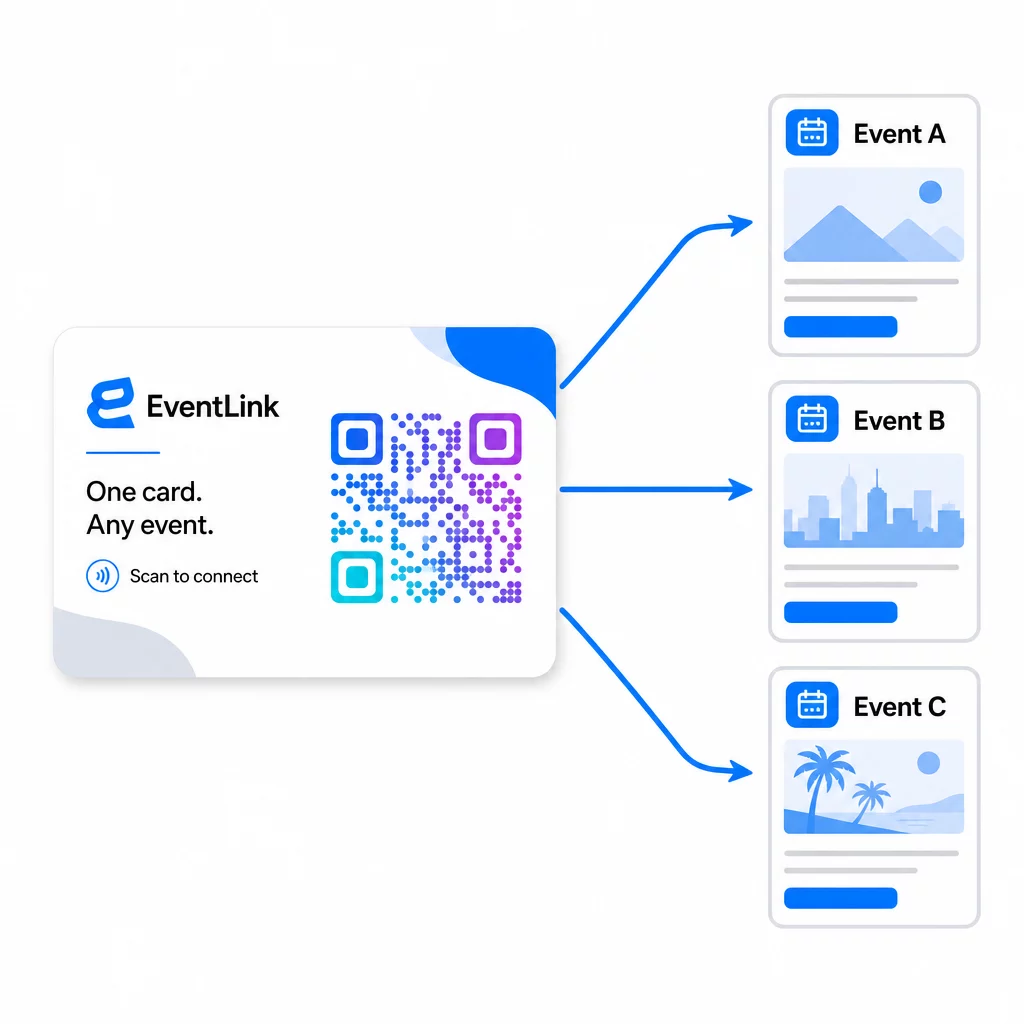
Detta innebär:
- Före varje evenemang, uppdatera din landningssida för att referera till det specifika evenemangsnamnet och målgruppen
- Mellan evenemang, omdirigera koden till din huvudwebbplats, en universell leadmagnet eller din kontaktsida
- Om ett erbjudande löper ut eller en landningssida slutar fungera, åtgärda det omedelbart från din instrumentpanel – ingen omtryckning, inga döda länkar som når riktiga människor
Denna flexibilitet gäller även för monterdisplayer, flygblad och tryckta skyltar. En enda tryckt banderoll med en QR-kod kan tjäna flera evenemang med olika erbjudanden, målgrupper och uppföljningssekvenser, så länge den underliggande koden är dynamisk.
Steg 6: Spåra prestanda och förfina
En QR-kodkampanj som inte mäts kan inte förbättras. Dynamiska QR-koder ger dig skanningsdata inklusive totalt antal skanningar, unika skanningar, enhetstyper, geografisk plats och tidsmönster. Denna data berättar om din kortplacering fungerar, vilka evenemang som genererar de mest engagerade leads och om din landningssida konverterar.
Använd denna data för att svara på praktiska frågor efter varje evenemang:
- Vilken procentandel av de personer som fick ditt kort skannade det faktiskt?
- Skedde skanningarna under evenemanget eller dagarna efter – vilket tyder på fördröjt uppföljningsbeteende?
- Vilka enhetstyper dominerade, och var din landningssida fullt optimerad för dem?
- Hur jämfördes konverteringsgraden på formuläret mellan evenemang med olika incitament?
Guiden till verktyg för QR-kodspårning vid evenemang täcker hur man utvärderar och tolkar skanningsanalys i ett evenemangssammanhang.
En anmärkning om samtycke och efterlevnad
Att samla in kontaktinformation vid evenemang innebär att du omfattas av tillämpliga dataskyddslagar. I USA finns det ingen enskild federal integritetslag, men flera regler gäller för marknadsföring efter evenemang:
- De CAN-SPAM Act kräver att varje kommersiellt e-postmeddelande du skickar innehåller ett tydligt sätt för mottagare att avregistrera sig, och du måste respektera dessa avregistreringsförfrågningar inom 10 arbetsdagar.
- Om du samlar in data från invånare i Kalifornien, kräver California Privacy Rights Act att du informerar konsumenter om hur deras data samlas in och används, och att du tillåter dem att få tillgång till, korrigera eller radera den.
- De FCC:s samtyckesregler för telemarketing och SMS-marknadsföring kräver separat, specifikt samtycke för varje avsändare – ett generellt samtycke för flera parter som erhållits via ett enda formulär är inte tillräckligt.
Det säkraste tillvägagångssättet: gör ditt formulärs samtyckesspråk explicit. Ange tydligt vem som kommer att kontakta dem, i vilket syfte och hur de kan avregistrera sig. För RSVP- och evenemangsregistreringsflöden, är att hosta ditt formulär på en säker HTTPS-sida och inkludera transparenta upplysningar om dataanvändning både en juridisk baslinje och en förtroendesignal.
QR-kod vs. visitkort: En praktisk jämförelse
| Tillvägagångssätt | Datainmatning | CRM-integration | Återanvändbarhet | STATISTIK |
|---|---|---|---|---|
| Visitkort i papper | Manuell | Kräver manuell inmatning | Engångshändelse | Inga |
| NFC-kort | Automatisk | Beror på app | Återanvändbar | Begränsad |
| QR-kod (statisk) | Formulärbaserad | Via formulärverktyg | Återanvändbar | Inga |
| QR-kod (dynamisk) | Formulärbaserad | Automatiserad via webhook | Återanvändbar, uppdateringsbar | Fullständig skanningsanalys |
Dynamiska QR-koder löser också ett praktiskt problem som ofta uppstår med NFC-kort: NFC kräver att den mottagande enheten är i nära anslutning och, i vissa konfigurationer, ber om åtkomst på systemnivå. En QR-kod kräver inget från mottagarens enhet utöver en kamera – ingen app, ingen inställningsändring, inga behörigheter beviljade i stunden.
Vanliga frågor
Inte om du använder en dynamisk QR-kod. En dynamisk kod pekar på en omdirigerings-URL som du kan uppdatera när som helst från din kontrollpanel, så att du kan ändra målsidan före varje evenemang utan att trycka om dina kort eller material.
Håll det fokuserat och mobilvänligt. Inkludera ett personligt välkomnande som refererar till evenemanget, ett kort formulär med högst tre till fyra fält, och ett specifikt incitament för att skicka in – såsom en gratis konsultationslottning eller en nedladdningsbar resurs. Undvik lång text eller flera konkurrerande uppmaningar till handling på samma sida.
Gör ditt samtyckesspråk explicit på formuläret. Ange tydligt vem som kommer att kontakta personen, i vilket syfte och hur de kan välja bort det. Se till att din landningssida hostas på HTTPS, efterkom avanmälningsförfrågningar omgående enligt CAN-SPAM Act, och granska tillämpliga statliga lagar – såsom California Privacy Rights Act – om din publik inkluderar invånare i dessa stater.