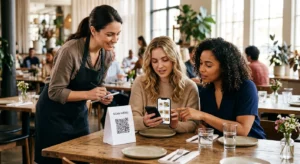
Odchádzate z veľtrhov s hromadou vizitiek a bez jasného plánu následných krokov? Manuálny zber dát vás spomaľuje a potenciálni zákazníci rýchlo vychladnú. Táto príručka vám ukáže, ako používať QR kódy na automatické zachytávanie, organizovanie a následné spracovanie potenciálnych zákazníkov z podujatí – takže každé podanie ruky sa zmení na sledovateľný kontakt.
Prečo tradičné získavanie potenciálnych zákazníkov na podujatiach zlyháva
Na väčšine konferencií a veľtrhov zbierajú profesionáli kontaktné údaje výmenou vizitiek alebo písaním poznámok. Problém: väčšina týchto kariet skončí na stole, nikdy sa nedostane do CRM. A aj keď sa dostanú, manuálne zadávanie dát je pomalé, náchylné na chyby a nesúladné s tempom moderného obchodného následného spracovania.
Časové okno na spracovanie potenciálneho zákazníka z podujatia je krátke. Následné spracovanie po výstave je všeobecne opisované ako obdobie, kedy sa ROI podujatia získa alebo stratí – teplí potenciálni zákazníci rýchlo vychladnú a oneskorený alebo všeobecný prvý kontakt môže zabiť inak sľubnú konverzáciu. Potrebujete systém, ktorý okamžite zachytáva dáta, smeruje ich na správne miesto a spúšťa následné kroky bez toho, aby ste to museli robiť manuálne.
QR kódy túto medzeru uzatvárajú spojením fyzickej interakcie – podania vizitky, ukázania na banner alebo umiestnenia kódu na stôl – s digitálnym pracovným postupom, ktorý beží automaticky.
Čo robí QR kód efektívnym pre získavanie potenciálnych zákazníkov
Nie všetky QR kódy sú rovnako užitočné pre generovanie potenciálnych zákazníkov na podujatiach. Statický QR kód odkazuje na pevné miesto určenia a neposkytuje vám žiadne údaje o tom, kto ho skenoval, kedy alebo kde. A dynamický QR kód, naopak, používa krátky presmerovací odkaz, ktorý je možné kedykoľvek aktualizovať a zaznamenáva aktivitu skenovania vrátane času, typu zariadenia a polohy.
Pre získavanie potenciálnych zákazníkov na podujatiach sú dynamické kódy nevyhnutné z troch dôvodov:
- Môžete zmeniť cieľovú URL po vytlačení – užitočné pri účasti na viacerých podujatiach s jednou dávkou tlačených materiálov
- Získate analýzy v reálnom čase o objeme skenovania a správaní publika
- Môžete integrovať cieľ s vaším CRM alebo automatizačnou platformou bez toho, aby ste sa dotkli vytlačeného kódu
Ten Dynamický QR kód generátor od Pageloot vám umožňuje vytvárať upraviteľné kódy, aktualizovať ciele medzi podujatiami a sledovať výkon z centrálneho ovládacieho panela.
Nastavte si sledovateľné kódy podujatí pred vašou ďalšou výstavou Použi Dynamický QR kód generátor na vytvorenie upraviteľných QR kódov pripravených na analýzu, ktoré smerujú účastníkov priamo do vášho pracovného postupu získavania potenciálnych zákazníkov.
Krok 1: Navrhnite vizitku určenú na získavanie potenciálnych zákazníkov
Vaša vizitka je fyzickým spúšťačom celého digitálneho pracovného postupu. Aby to fungovalo, samotná karta musí stáť za to, aby si ju človek ponechal – a QR kód musí byť okamžite skenovateľný.
Praktické úvahy:
- Používajte prémiové materiály: Odolné karty (plastové alebo z kartónu) sa s menšou pravdepodobnosťou vyhodia ako krehké papierové alternatívy. Vnímaná hodnota karty sa odráža na vašej značke.
- Umiestnite QR kód viditeľne: Zadná strana karty funguje dobre. Dodržujte odporúčanie Pageloot pre minimálnu veľkosť 0,8 × 0,8 palca pre QR kódy na vizitkách na zabezpečenie spoľahlivého skenovania naprieč rôznymi typmi zariadení.
- Zahrňte jasnú výzvu k akcii: Text ako “Naskenujte a získajte bezplatnú konzultáciu” alebo “Naskenujte a zostaňte v kontakte” hovorí príjemcovi presne, prečo by mal skenovať a čo získa.
- Označte kód značkou: Pridanie vášho loga a farieb značky do QR kódu zvyšuje dôveru a mieru skenovania. Generické čiernobiele kódy pôsobia neosobne; značkové kódy pôsobia zámerne.
Ak chcete zahrnúť kontaktné údaje priamo do kódu – aby si účastníci mohli uložiť vaše informácie bez odoslania formulára – a QR kód vCard vám umožní vložiť vaše meno, telefónne číslo, e-mail a webovú stránku vo formáte, ktorý sa okamžite prenesie do aplikácie kontaktov smartfónu.
Krok 2: Vytvorte vstupnú stránku prispôsobenú udalosti
Destinácia, na ktorú váš QR kód odkazuje, je rovnako dôležitá ako samotný kód. Generická domovská stránka je premárnená príležitosť. Účelovo vytvorená pristávacia stránka ktorá odkazuje na konkrétnu udalosť, vytvára okamžitú relevantnosť a zvyšuje mieru dokončenia formulára.
Dobre štruktúrovaná pristávacia stránka udalosti zahŕňa:
- Personalizované privítanie (“Rád som vás stretol na [Názov udalosti] – tu je to, čo som sľúbil”)
- Krátky formulár vyžadujúci len základné informácie: meno, e-mail a jednu kvalifikačnú otázku relevantnú pre vašu ponuku
- Jasná motivácia na odoslanie – exkluzívny obsah, vstup na bezplatnú konzultáciu, prístup do komunity alebo stiahnuteľný zdroj
Udržujte formulár prispôsobený pre mobilné zariadenia. Takmer každé skenovanie na udalosti sa uskutoční na smartfóne, takže preplnený alebo pomaly sa načítavajúci formulár zabíja konverzie skôr, ako začnú. Ten Formulár Google ako QR kód: generátor ponúka rýchly spôsob, ako prepojiť mobilný formulár s vaším QR kódom, pričom odpovede sa priamo ukladajú do Google Sheets pre jednoduchú kontrolu.
Po odoslaní formulára presmerujte účastníkov na ďakovnú stránku s sekundárnou výzvou k akcii – prihláste sa na odber newslettera, pripojte sa ku komunite, pozrite si relevantné video. Toto rozširuje interakciu za počiatočné skenovanie.
Krok 3: Pripojte svoj formulár k automatizovanému pracovnému postupu
Získavanie potenciálnych zákazníkov vytvára hodnotu len vtedy, ak sa dáta okamžite presunú niekam užitočne. Manuálne sťahovanie tabuľky po udalosti a posielanie e-mailov ľuďom o dva týždne neskôr nie je stratégia následnej komunikácie – je to premárnená príležitosť.
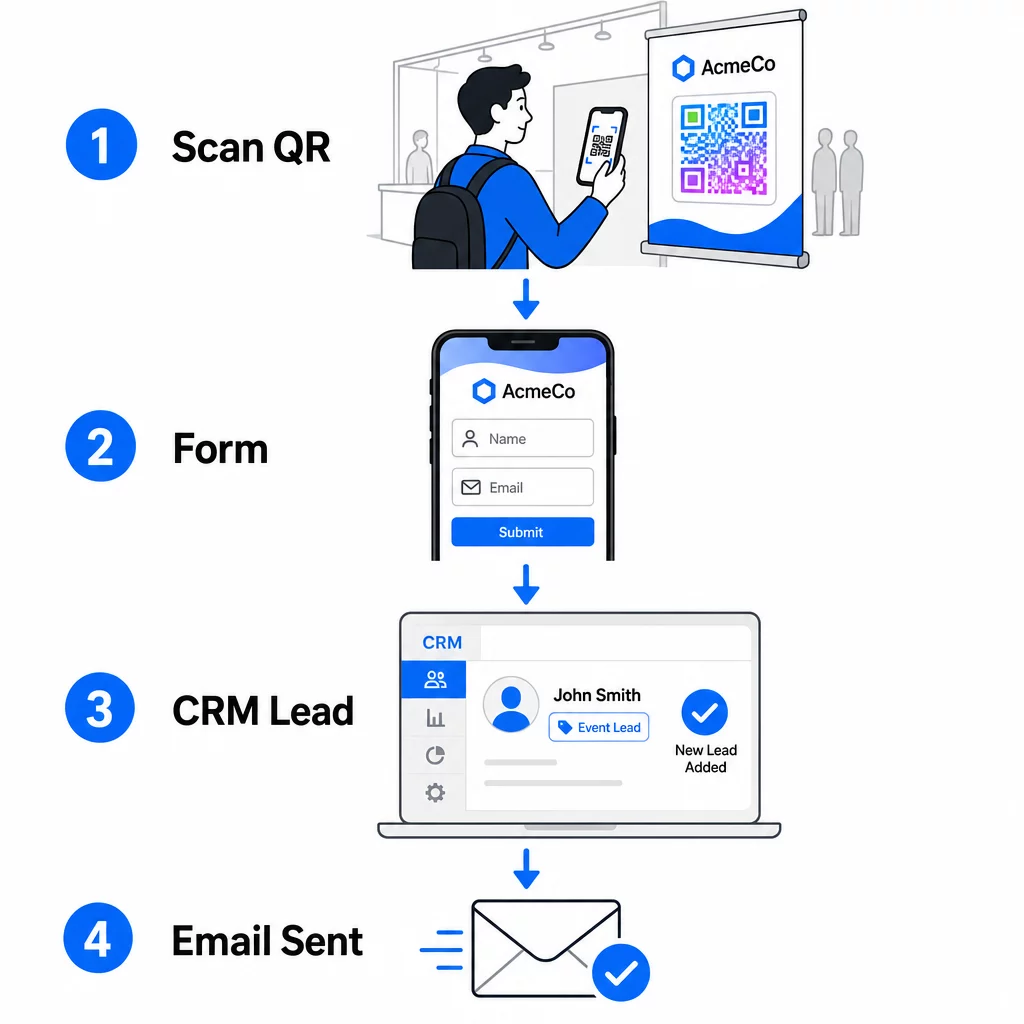
Nastavte si svoj pracovný postup predtým, ako prídete na udalosť:
- Integrácia CRM: Smerujte každé odoslanie formulára priamo do vášho CRM, označené názvom a dátumom udalosti pre neskoršiu segmentáciu
- Okamžitý následný e-mail: Spustite automatický e-mail v momente, keď niekto odošle formulár – poďakujte sa im, doručte sľúbený zdroj a stanovte očakávania pre ďalšie kroky
- Bodovanie alebo smerovanie potenciálnych zákazníkov: Ak používate CRM s bodovaním potenciálnych zákazníkov, nakonfigurujte značku udalosti tak, aby uprednostnila následné kroky vášho obchodného tímu
- Export do tabuľky: Pre žrebovanie cien alebo sledovanie účasti automaticky exportujte odoslané údaje do tabuľky Google, ktorú môžete kontrolovať v reálnom čase
Pre hlbší pohľad na prepojenie dynamických QR kódov s pracovnými postupmi CRM, sprievodca na vytvárania dynamických QR kódov pre registrácie do CRM podrobne prechádza kódovaním URL, zlučovacími poľami a nastavením webhookov. Môžete tiež preskúmať Automatizácia pracovného postupu skenovania QR kódu pre podrobné pokyny k prepojeniu udalostí skenovania s platformami ako Zapier alebo Make.
Automatizujte svoj pracovný postup pre potenciálnych zákazníkov z udalostí Pripojte svoj Generátor QR kódov na podujatie k vášmu CRM a e-mailovej platforme, aby každé skenovanie spustilo okamžité, personalizované následné kroky – bez manuálnej námahy.
Krok 4: Motivujte k skenovaniu
Účastníci veľtrhu alebo konferencie sú oslovovaní desiatkami stánkov a kontaktov. Samotný QR kód nevyvoláva akciu – robí to hodnota, ktorá sa za ním skrýva.
Efektívne stimuly pre získavanie potenciálnych zákazníkov z udalostí zahŕňajú:
- Vstup do žrebovania cien (bezplatná konzultácia, vzorka produktu alebo kredit za službu vyžrebovaný na konci podujatia)
- Okamžitý prístup k exkluzívnemu obsahu – sprievodca, kontrolný zoznam alebo šablóna relevantná pre publikum
- Členstvo v súkromnej komunite alebo skorý prístup k produktu či zdroju
- Personalizovaný audit, posúdenie alebo odporúčanie doručené po udalosti
Motivácia by mala byť dostatočne špecifická, aby pôsobila hodnotne, a dostatočne nenáročná, aby na ňu niekto reagoval uprostred rozhovoru. “Naskenujte tu a zapojte sa do súťaže o 60-minútovú strategickú reláciu” je presvedčivejšie ako “naskenujte pre viac informácií.”
Krok 5: Spravujte viacero udalostí s jednou dávkou kariet
Jednou z najpraktickejších výhod dynamických QR kódov je, že nemusíte pretláčať materiály pre každú udalosť. Pretože cieľová URL adresa je uložená v presmerovaní – nie v samotnom vzore kódu – môžete aktualizovať, kam kód posiela účastníkov, bez toho, aby ste sa dotkli vytlačenej karty.
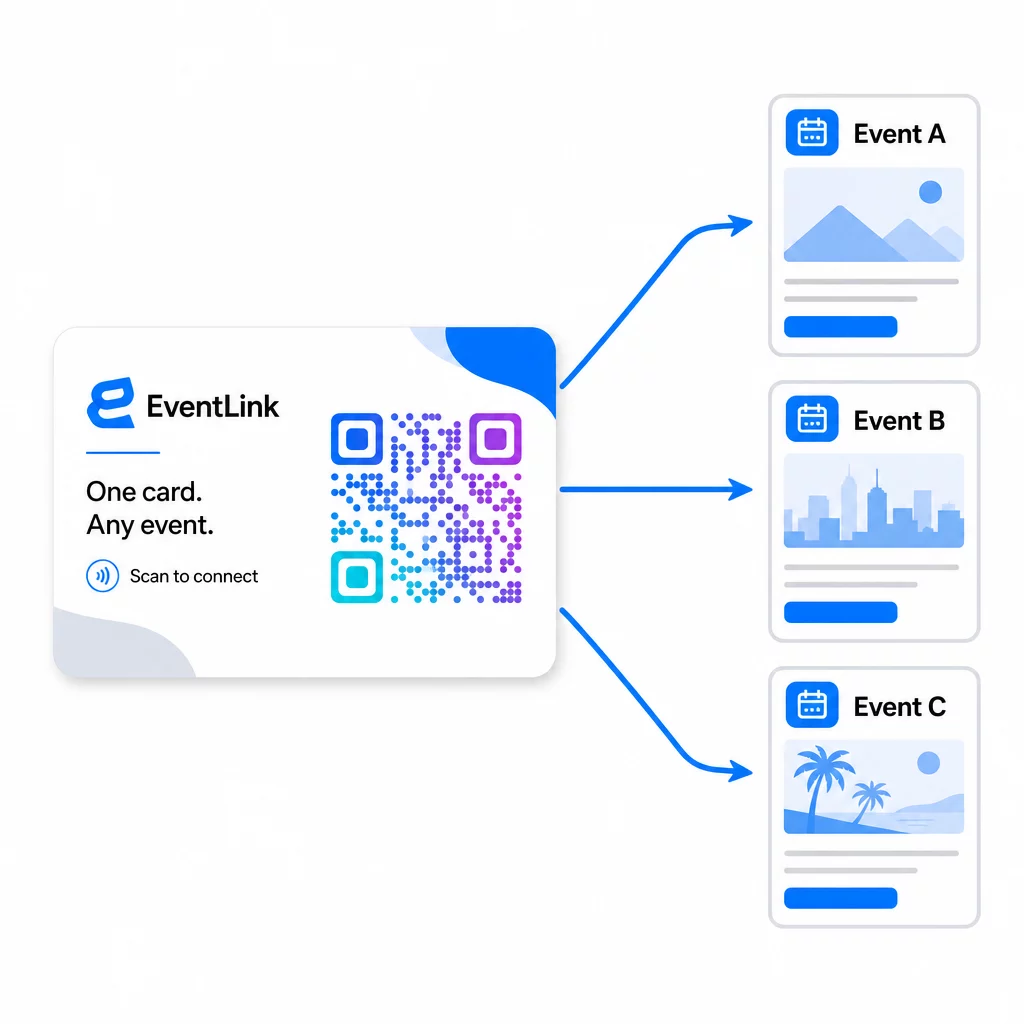
To znamená:
- Pred každou udalosťou aktualizujte svoju vstupnú stránku tak, aby odkazovala na konkrétny názov udalosti a publikum
- Medzi udalosťami presmerujte kód na svoju hlavnú webovú stránku, univerzálny lead magnet alebo kontaktnú stránku
- Ak ponuka vyprší alebo vstupná stránka prestane fungovať, okamžite to opravte z vášho ovládacieho panela – žiadne pretláčanie, žiadne nefunkčné odkazy, ktoré by sa dostali k skutočným ľuďom
Táto flexibilita platí aj pre výstavné stánky, letáky a tlačené značenie. Jeden vytlačený banner s QR kódom môže slúžiť viacerým udalostiam s rôznymi ponukami, publikami a následnými sekvenciami, pokiaľ je základný kód dynamický.
Krok 6: Sledujte výkon a zdokonaľujte
Kampaň s QR kódmi, ktorá sa nemeria, sa nedá zlepšiť. Dynamické QR kódy vám poskytujú údaje na úrovni skenovania vrátane celkového počtu skenov, jedinečných skenov, typov zariadení, geografickej polohy a vzorov dennej doby. Tieto údaje vám povedia, či umiestnenie vašej karty funguje, ktoré udalosti generujú najviac angažovaných potenciálnych zákazníkov a či sa vaša vstupná stránka konvertuje.
Použite tieto údaje na zodpovedanie praktických otázok po každej udalosti:
- Aké percento ľudí, ktorí dostali vašu kartu, ju skutočne naskenovalo?
- Nastali skeny počas udalosti alebo v nasledujúcich dňoch – čo naznačuje oneskorené následné správanie?
- Ktoré typy zariadení dominovali a bola vaša vstupná stránka pre ne plne optimalizovaná?
- Ako sa porovnávali miery konverzie na formulári naprieč udalosťami s rôznymi stimulmi?
Sprievodca k nástrojom na sledovanie udalostí pomocou QR kódov pokrýva, ako vyhodnocovať a interpretovať analytiku skenov v kontexte udalosti.
Poznámka k súhlasu a dodržiavaniu predpisov
Zber kontaktných informácií na podujatiach znamená, že podliehate platným zákonom o ochrane osobných údajov. V USA neexistuje jediný federálny zákon o ochrane súkromia, ale na post-eventový marketing sa vzťahuje niekoľko pravidiel:
- Ten Zákon CAN-SPAM vyžaduje, aby každý komerčný e-mail, ktorý odošlete, obsahoval jasný spôsob, ako sa príjemcovia môžu odhlásiť, a tieto žiadosti o odhlásenie musíte rešpektovať do 10 pracovných dní.
- Ak zbierate údaje od obyvateľov Kalifornie, Zákon o právach na súkromie v Kalifornii vyžaduje, aby ste informovali spotrebiteľov o tom, ako sa ich údaje zbierajú a používajú, a aby ste im umožnili k nim pristupovať, opravovať ich alebo ich vymazať.
- Ten Pravidlá súhlasu FCC pre telemarketing a marketing prostredníctvom textových správ vyžadujú samostatný, špecifický súhlas pre každého odosielateľa – všeobecný súhlas viacerých strán získaný prostredníctvom jedného formulára nie je dostatočný.
Najbezpečnejší prístup: urobte jazyk súhlasu vo vašom formulári explicitným. Jasne uveďte, kto ich bude kontaktovať, na aký účel a ako sa môžu odhlásiť. Pre toky RSVP a registrácie na podujatia, hostenie vášho formulára na zabezpečenej HTTPS stránke a zahrnutie transparentných zverejnení o používaní údajov je právnym základom aj signálom dôvery.
QR kód vs. vizitka: Praktické porovnanie
| Prístup | Zadávanie dát | Integrácia CRM | Opätovná použiteľnosť | ANALYTIKA |
|---|---|---|---|---|
| Papierová vizitka | Manuálne | Vyžaduje manuálny vstup | Jednorazová udalosť | Žiadne |
| NFC karta | Automatické | Závisí od aplikácie | Opakovane použiteľné | Obmedzené |
| QR kód (statický) | Na základe formulára | Cez nástroj na formuláre | Opakovane použiteľné | Žiadne |
| QR kód (dynamický) | Na základe formulára | Automatizované cez webhook | Opakovane použiteľné, aktualizovateľné | Analýzy úplného skenovania |
Dynamické QR kódy tiež riešia praktický problém, ktorý často vzniká pri NFC kartách: NFC vyžaduje, aby bolo prijímacie zariadenie v tesnej blízkosti a v niektorých konfiguráciách vyzýva na prístup na úrovni systému. QR kód nevyžaduje od zariadenia príjemcu nič okrem fotoaparátu – žiadnu aplikáciu, žiadnu zmenu nastavení, žiadne povolenia udelené v danom okamihu.
Často kladené otázky
Nie, ak použijete dynamický QR kód. Dynamický kód odkazuje na presmerovaciu URL adresu, ktorú môžete kedykoľvek aktualizovať z vášho ovládacieho panela, takže môžete zmeniť cieľovú vstupnú stránku pred každou udalosťou bez opätovnej tlače vašich kariet alebo materiálov.
Udržujte ho sústredený a prispôsobený pre mobilné zariadenia. Zahrňte personalizované privítanie, ktoré odkazuje na udalosť, krátky formulár s maximálne tromi až štyrmi poľami a špecifickú motiváciu na odoslanie – ako je vstup do žrebovania o bezplatnú konzultáciu alebo stiahnuteľný zdroj. Vyhnite sa dlhým textom alebo viacerým konkurenčným výzvam na akciu na tej istej stránke.
Jasne uveďte jazyk súhlasu vo formulári. Jasne uveďte, kto bude osobu kontaktovať, na aký účel a ako sa môže odhlásiť. Zabezpečte, aby bola vaša vstupná stránka hostovaná na HTTPS, okamžite rešpektujte žiadosti o odhlásenie, ako to vyžaduje zákon CAN-SPAM Act, a preverte príslušné štátne zákony – ako napríklad California Privacy Rights Act – ak vaše publikum zahŕňa obyvateľov týchto štátov.