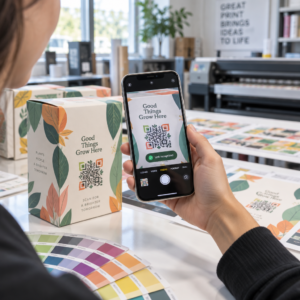
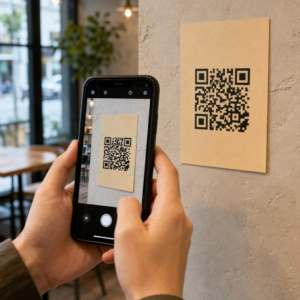
Ar išeinate iš parodų su vizitinių kortelių krūva ir be aiškaus tolesnių veiksmų plano? Rankinis duomenų rinkimas jus lėtina, o potencialūs klientai greitai atšąla. Šis vadovas parodo, kaip naudoti QR kodus, kad automatiškai užfiksuotumėte, sutvarkytumėte ir toliau bendrautumėte su renginio potencialiais klientais – kad kiekvienas paspaudimas ranka virstų stebimu kontaktu.
Kodėl tradicinis renginių potencialių klientų fiksavimas yra nepakankamas
Daugumoje konferencijų ir parodų specialistai renka kontaktinius duomenis keisdamiesi vizitinėmis kortelėmis arba užsirašinėdami. Problema: dauguma tų kortelių atsiduria ant stalo, niekada neįvedamos į CRM. Net ir įvedus, rankinis duomenų įvedimas yra lėtas, linkęs į klaidas ir neatitinka šiuolaikinio pardavimų tolesnių veiksmų tempo.
Laikas veikti pagal renginio potencialų klientą yra trumpas. Tolesni veiksmai po parodos plačiai apibūdinami kaip laikotarpis, kai renginio IG yra laimima arba prarandama – šilti potencialūs klientai greitai atšąla, o pavėluotas arba bendras pirmasis prisilietimas gali sugadinti kitaip perspektyvų pokalbį. Jums reikia sistemos, kuri nedelsiant fiksuoja duomenis, nukreipia juos į tinkamą vietą ir inicijuoja tolesnius veiksmus, nereikalaujant, kad tai darytumėte rankiniu būdu.
QR kodai užpildo šią spragą, sujungdami fizinę sąveiką – įteikiant kam nors kortelę, nurodant į reklamjuostę arba padedant kodą ant stalo – su skaitmenine darbo eiga, kuri veikia automatiškai.
Kas daro QR kodą efektyvų potencialių klientų fiksavimui
Ne visi QR kodai yra vienodai naudingi renginių potencialių klientų generavimui. Statinis QR kodas nukreipia į fiksuotą paskirties vietą ir nesuteikia jums duomenų apie tai, kas jį nuskenavo, kada ar kur. A dinaminis QR kodas, priešingai, naudoja trumpą peradresavimo nuorodą, kurią galima bet kada atnaujinti ir kuri registruoja nuskaitymo veiklą, įskaitant laiką, įrenginio tipą ir vietą.
Renginių potencialių klientų fiksavimui dinaminiai kodai yra būtini dėl trijų priežasčių:
- Galite pakeisti paskirties URL po spausdinimo – naudinga dalyvaujant keliuose renginiuose su viena spausdintų medžiagų partija
- Gaunate realaus laiko analizę apie nuskaitymų skaičių ir auditorijos elgesį
- Galite integruoti paskirties vietą su savo CRM arba automatizavimo platforma, neliesdami atspausdinto kodo
Tas Dinaminis QR kodo generatorius iš Pageloot leidžia jums kurti redaguojamus kodus, atnaujinti paskirties vietas tarp renginių ir stebėti našumą iš centrinės prietaisų skydelio.
Nustatykite stebimus renginių kodus prieš kitą parodą Naudoti Dinaminis QR kodo generatorius sukurti redaguojamus, analizei paruoštus QR kodus, kurie nukreipia dalyvius tiesiai į jūsų potencialių klientų fiksavimo darbo eigą.
1 žingsnis: sukurkite vizitinę kortelę, skirtą potencialių klientų fiksavimui
Jūsų vizitinė kortelė yra fizinis viso skaitmeninio darbo eigos paleidiklis. Kad ji veiktų, pati kortelė turi būti verta išsaugoti – o QR kodas turi būti iškart nuskaitomas.
Praktiniai aspektai:
- Naudokite aukščiausios kokybės medžiagas: Patvarios kortelės (plastikinės arba iš storo popieriaus) rečiau išmetamos nei plonos popierinės alternatyvos. Suvokiama kortelės vertė atspindi jūsų prekės ženklą.
- Aiškiai matomoje vietoje patalpinkite QR kodą: Kortelės nugarėlė puikiai tinka. Laikykitės Pageloot minimalaus dydžio rekomendacijos: 0.8 × 0.8 colio vizitinių kortelių QR kodams siekiant užtikrinti patikimą nuskaitymą visų tipų įrenginiuose.
- Įtraukite aiškų raginimą veikti: Tekstas, pvz., “Nuskaitykite, kad gautumėte nemokamą konsultaciją” arba “Nuskaitykite, kad palaikytumėte ryšį”, tiksliai pasako gavėjui, kodėl jie turėtų nuskaityti ir ką gaus.
- Prekės ženklo kodas: Pridėjus savo logotipą ir prekės ženklo spalvas prie QR kodo, padidėja pasitikėjimas ir nuskaitymo dažnis. Bendriniai juodai balti kodai atrodo beasmeniai; prekės ženklo kodai atrodo apgalvoti.
Jei norite įtraukti kontaktinius duomenis tiesiai į kodą – kad dalyviai galėtų išsaugoti jūsų informaciją nepildydami formos – a „vCard“ QR kodas leidžia įterpti jūsų vardą, telefono numerį, el. paštą ir svetainę tokiu formatu, kuris akimirksniu persikelia į išmaniojo telefono kontaktų programėlę.
2 žingsnis: Sukurkite renginiui pritaikytą nukreipimo puslapį
Paskirties vieta, į kurią nukreipia jūsų QR kodas, yra tokia pat svarbi kaip ir pats kodas. Bendras pagrindinis puslapis yra praleista galimybė. Specialiai sukurtas nukreipiamasis puslapis kuriame nurodomas konkretus renginys, sukuria tiesioginį aktualumą ir padidina formos užpildymo rodiklius.
Gerai struktūrizuotame renginio nukreipiamajame puslapyje yra:
- Asmeninis pasveikinimas (“Puiku susitikti su jumis [Renginio pavadinimas] – štai ką pažadėjau”)
- Trumpa forma, prašanti tik esminės informacijos: vardo, el. pašto ir vieno kvalifikacinio klausimo, susijusio su jūsų pasiūlymu
- Aiškus paskatinimas pateikti – išskirtinis turinys, nemokama konsultacija, prieiga prie bendruomenės arba atsisiunčiamas išteklius
Forma turi būti pritaikyta mobiliesiems įrenginiams. Beveik kiekvienas nuskaitymas renginyje vyks išmaniuoju telefonu, todėl perkrauta arba lėtai įkeliama forma nužudo konversijas dar joms neprasidėjus. The Google formos QR kodo generatorius siūlo greitą būdą susieti mobiliesiems pritaikytą formą su jūsų QR kodu, o atsakymai tiesiogiai patenka į „Google Sheets“ lengvam peržiūrėjimui.
Po formos pateikimo nukreipkite dalyvius į padėkos puslapį su antruoju raginimu veikti – užsiprenumeruoti naujienlaiškį, prisijungti prie bendruomenės, žiūrėti susijusį vaizdo įrašą. Tai pratęsia sąveiką po pirminio nuskaitymo.
3 žingsnis: Prijunkite savo formą prie automatizuoto darbo eigos
Potencialių klientų fiksavimas sukuria vertę tik tada, jei duomenys nedelsiant perkeliami į naudingą vietą. Rankinis skaičiuoklės atsisiuntimas po renginio ir el. laiškų siuntimas žmonėms po dviejų savaičių nėra tolesnės veiklos strategija – tai praleista galimybė.
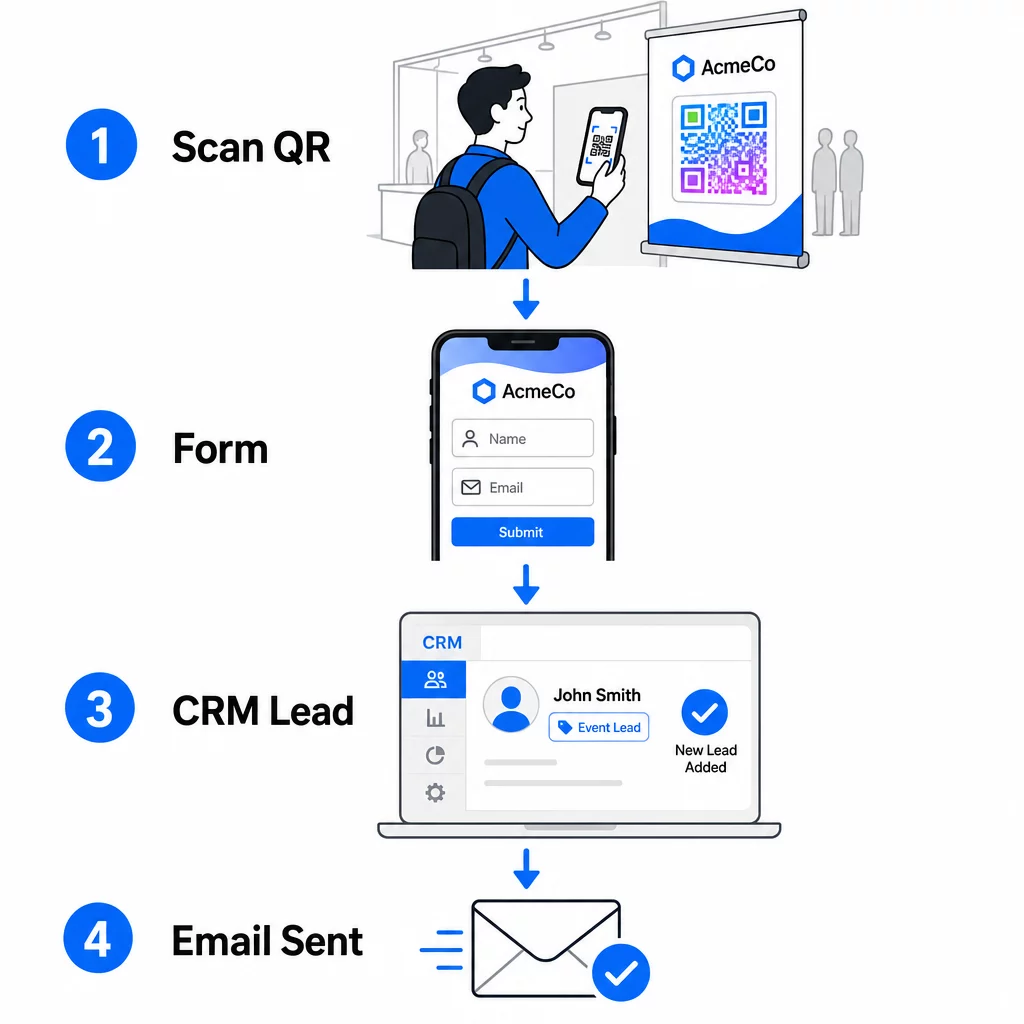
Nustatykite savo darbo eigą prieš atvykdami į renginį:
- CRM integracija: Kiekvieną formos pateikimą nukreipkite tiesiai į savo CRM, pažymėtą renginio pavadinimu ir data, kad vėliau būtų galima segmentuoti
- Momentinis tolesnis el. laiškas: Suaktyvinkite automatinį el. laišką tą pačią akimirką, kai kas nors pateikia formą – padėkokite jiems, pristatykite pažadėtą išteklių ir nustatykite lūkesčius dėl tolesnių veiksmų
- Potencialių klientų vertinimas arba nukreipimas: Jei naudojate CRM su potencialių klientų vertinimu, sukonfigūruokite įvykio žymę, kad jūsų pardavimų komanda teiktų pirmenybę tolesniems veiksmams
- Skaičiuoklės eksportavimas: Norėdami vykdyti prizų traukimus arba stebėti dalyvavimą, automatiškai eksportuokite pateiktus duomenis į „Google“ skaičiuoklę, kurią galite peržiūrėti realiuoju laiku
Norėdami išsamiau susipažinti su dinaminių QR kodų prijungimu prie CRM darbo eigų, vadovas apie dinaminių QR kodų kūrimą CRM registracijoms išsamiai aprašo URL kodavimą, sujungimo laukus ir „webhook“ nustatymą. Taip pat galite ištirti QR kodo nuskaitymo darbo eigos automatizavimas kad gautumėte nuoseklias instrukcijas, kaip prijungti nuskaitymo įvykius prie tokių platformų kaip „Zapier“ ar „Make“.
Automatizuokite savo renginio potencialių klientų darbo eigą Prijunkite savo Renginių QR kodų generatorius prie savo CRM ir el. pašto platformos, kad kiekvienas nuskaitymas sukeltų nedelsiamą, suasmenintą tolesnį veiksmą – be rankinio darbo.
4 žingsnis: Paskatinkite nuskaitymą
Parodos ar konferencijos dalyvius vilioja dešimtys stendų ir kontaktų. Vien QR kodas nepriverčia veikti – tai daro jo vertė.
Efektyvios paskatos renginio potencialių klientų pritraukimui apima:
- Dalyvavimas prizų traukime (nemokama konsultacija, produkto pavyzdys arba paslaugų kreditas, ištrauktas renginio pabaigoje)
- Tiesioginė prieiga prie išskirtinio turinio – vadovo, kontrolinio sąrašo ar šablono, atitinkančio auditorijos poreikius
- Narystė privačioje bendruomenėje arba ankstyva prieiga prie produkto ar ištekliaus
- Suasmenintas auditas, įvertinimas ar rekomendacija, pateikta po renginio
Paskata turėtų būti pakankamai konkreti, kad atrodytų vertinga, ir pakankamai mažai trikdanti, kad kas nors ja pasinaudotų pokalbio metu. “Nuskaitykite čia, kad dalyvautumėte loterijoje ir laimėtumėte 60 minučių strategijos sesiją” yra patraukliau nei “nuskaitykite, kad sužinotumėte daugiau”.”
5 žingsnis: Valdykite kelis renginius su viena kortelių partija
Vienas praktiškiausių dinaminių QR kodų privalumų yra tai, kad jums nereikia perspausdinti medžiagos kiekvienam renginiui. Kadangi paskirties URL yra saugomas peradresavime, o ne pačiame kodo šablone, galite atnaujinti, kur kodas siunčia dalyvius, neliesdami atspausdintos kortelės.
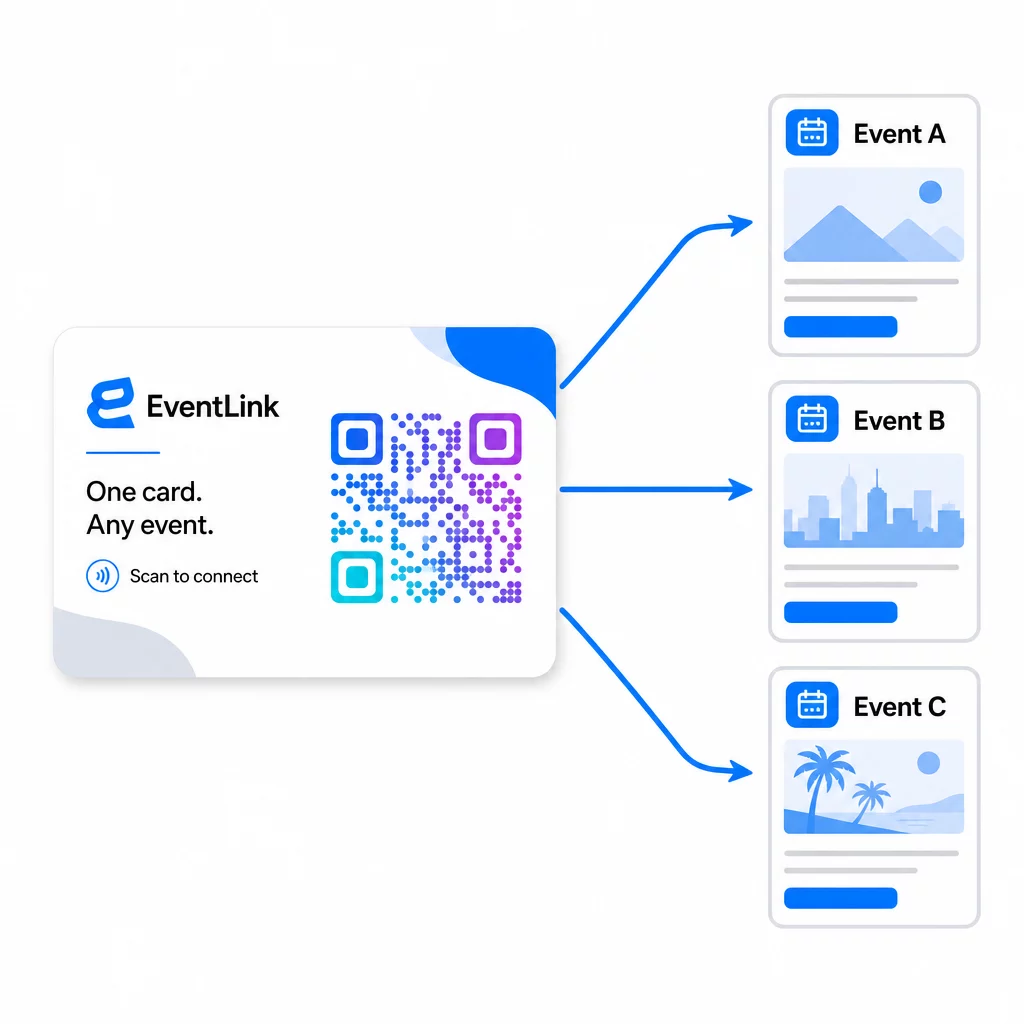
Tai reiškia:
- Prieš kiekvieną renginį atnaujinkite savo nukreipimo puslapį, kad jame būtų nurodytas konkretus renginio pavadinimas ir auditorija
- Tarp renginių nukreipkite kodą į savo pagrindinę svetainę, universalų potencialių klientų pritraukimo magnetą arba savo kontaktų puslapį
- Jei pasiūlymas baigiasi arba nukreipimo puslapis nustoja veikti, ištaisykite tai iškart iš savo prietaisų skydelio – nereikia perspausdinti, jokių neveikiančių nuorodų, pasiekiančių realius žmones
Šis lankstumas taip pat taikomas stendų ekspozicijoms, skrajutėms ir spausdintoms iškaboms. Vienas atspausdintas plakatas su QR kodu gali būti naudojamas keliems renginiams su skirtingais pasiūlymais, auditorijomis ir tolesnių veiksmų sekomis, jei pagrindinis kodas yra dinaminis.
6 žingsnis: Stebėkite našumą ir tobulinkite
QR kodo kampanija, kuri nėra matuojama, negali būti patobulinta. Dinaminiai QR kodai suteikia nuskaitymo lygio duomenis, įskaitant bendrą nuskaitymų skaičių, unikalius nuskaitymus, įrenginių tipus, geografinę vietą ir dienos laiko modelius. Šie duomenys parodo, ar jūsų kortelės išdėstymas veikia, kurie renginiai generuoja labiausiai įsitraukusius potencialius klientus ir ar jūsų nukreipimo puslapis konvertuoja.
Naudokite šiuos duomenis, kad atsakytumėte į praktinius klausimus po kiekvieno renginio:
- Kiek procentų žmonių, gavusių jūsų kortelę, ją iš tikrųjų nuskenavo?
- Ar nuskaitymai įvyko renginio metu ar po kelių dienų – rodantys atidėtą tolesnių veiksmų elgesį?
- Kokie įrenginių tipai dominavo ir ar jūsų nukreipimo puslapis buvo jiems visiškai optimizuotas?
- Kaip formos konversijos rodikliai skyrėsi renginiuose su skirtingomis paskatomis?
Vadovas QR kodų renginių sekimo įrankiai apima, kaip įvertinti ir interpretuoti nuskaitymo analizę renginio kontekste.
Pastaba dėl sutikimo ir atitikties
Kontaktinės informacijos rinkimas renginiuose reiškia, kad jums taikomi galiojantys duomenų privatumo įstatymai. JAV nėra vieno federalinio privatumo įstatymo, tačiau kelios taisyklės taikomos po renginio vykdomai rinkodarai:
- Tas CAN-SPAM įstatymas reikalauja, kad kiekviename jūsų siunčiamame komerciniame el. laiške būtų aiškus būdas gavėjams atsisakyti prenumeratos, ir jūs turite patenkinti šiuos atsisakymo prašymus per 10 darbo dienų.
- Jei renkate duomenis iš Kalifornijos gyventojų, Kalifornijos privatumo teisių aktas reikalauja informuoti vartotojus, kaip jų duomenys renkami ir naudojami, ir leisti jiems prieiti prie jų, juos taisyti ar ištrinti.
- Tas FCC sutikimo taisyklės telemarketingui ir tekstinių žinučių rinkodarai reikalauja atskiro, konkretaus sutikimo kiekvienam siuntėjui – bendras kelių šalių sutikimas, gautas per vieną formą, nėra pakankamas.
Saugiausias būdas: padarykite savo formos sutikimo kalbą aiškią. Aiškiai nurodykite, kas su jais susisieks, kokiu tikslu ir kaip jie gali atsisakyti. Dėl RSVP ir renginių registracijos srautų, formos talpinimas saugiame HTTPS puslapyje ir skaidrių duomenų naudojimo atskleidimų įtraukimas yra ir teisinis pagrindas, ir pasitikėjimo signalas.
QR kodas vs. vizitinė kortelė: praktinis palyginimas
| Požiūris | Duomenų įvedimas | CRM integracija | Pakartotinis naudojimas | ANALITIKA |
|---|---|---|---|---|
| Popierinė vizitinė kortelė | Rankinis | Reikalingas rankinis įvedimas | Vienkartinis įvykis | Jokių |
| NFC kortelė | Automatinis | Priklauso nuo programėlės | Daugkartinio naudojimo | Ribotas |
| QR kodas (statinis) | Formos pagrindu | Per formos įrankį | Daugkartinio naudojimo | Jokių |
| QR kodas (dinaminis) | Formos pagrindu | Automatizuota per webhook'ą | Daugkartinio naudojimo, atnaujinamas | Viso nuskaitymo analizė |
Dinaminiai QR kodai taip pat sprendžia praktinę problemą, kuri dažnai kyla su NFC kortelėmis: NFC reikalauja, kad priimantis įrenginys būtų arti ir, kai kuriose konfigūracijose, prašo sistemos lygio prieigos. QR kodas nereikalauja nieko iš gavėjo įrenginio, išskyrus kamerą – jokios programėlės, jokių nustatymų keitimo, jokių leidimų suteikimo tuo metu.
Dažniausiai užduodami klausimai
Ne, jei naudojate dinaminį QR kodą. Dinaminis kodas nukreipia į peradresavimo URL, kurį galite bet kada atnaujinti iš savo prietaisų skydelio, todėl galite pakeisti paskirties nukreipimo puslapį prieš kiekvieną renginį, neperspausdindami savo kortelių ar medžiagos.
Laikykite jį sutelktą ir pritaikytą mobiliesiems įrenginiams. Įtraukite asmeninį pasveikinimą, kuriame minimas renginys, trumpą formą, turinčią ne daugiau kaip tris ar keturis laukelius, ir konkretų paskatinimą už pateikimą – pavyzdžiui, nemokamos konsultacijos galimybę arba atsisiunčiamą išteklių. Venkite ilgo teksto ar kelių konkuruojančių raginimų veikti tame pačiame puslapyje.
Sutikimo kalbą formoje padarykite aiškią. Aiškiai nurodykite, kas susisieks su asmeniu, kokiu tikslu ir kaip jie gali atsisakyti. Užtikrinkite, kad jūsų nukreipimo puslapis būtų talpinamas HTTPS protokolu, nedelsdami vykdykite atsisakymo prašymus, kaip reikalauja CAN-SPAM įstatymas, ir peržiūrėkite taikomus valstijos įstatymus – pvz., Kalifornijos privatumo teisių įstatymą – jei jūsų auditoriją sudaro tų valstijų gyventojai.