Verlassen Sie Messen mit einem Stapel Visitenkarten und ohne klaren Nachfassplan? Manuelle Datenerfassung verlangsamt Sie, und Leads kühlen schnell ab. Dieser Leitfaden zeigt Ihnen, wie Sie QR-Codes verwenden, um Event-Leads automatisch zu erfassen, zu organisieren und nachzuverfolgen – so wird jeder Händedruck zu einem nachverfolgbaren Kontakt.
Warum die traditionelle Event-Lead-Erfassung zu kurz greift
Auf den meisten Konferenzen und Messen sammeln Fachleute Kontaktdaten, indem sie Visitenkarten austauschen oder Notizen machen. Das Problem: Die meisten dieser Karten landen auf einem Schreibtisch und werden nie in ein CRM eingegeben. Selbst wenn sie es werden, ist die manuelle Dateneingabe langsam, fehleranfällig und nicht synchron mit dem Tempo der modernen Vertriebsnachverfolgung.
Das Zeitfenster, um auf einen Event-Lead zu reagieren, ist kurz. Die Nachbereitung nach der Messe wird weithin als die Periode beschrieben, in der der Event-ROI gewonnen oder verloren wird – warme Leads kühlen schnell ab, und eine verzögerte oder generische erste Kontaktaufnahme kann ein ansonsten vielversprechendes Gespräch zunichtemachen. Sie benötigen ein System, das Daten sofort erfasst, an den richtigen Ort leitet und die Nachverfolgung auslöst, ohne dass Sie dies manuell tun müssen.
QR-Codes schließen diese Lücke, indem sie eine physische Interaktion – jemandem eine Karte reichen, auf ein Banner zeigen oder einen Code auf einem Tisch platzieren – mit einem digitalen Workflow verbinden, der automatisch abläuft.
Was einen QR-Code für die Lead-Erfassung effektiv macht
Nicht alle QR-Codes sind gleichermaßen nützlich für die Generierung von Event-Leads. Ein statischer QR-Code verweist auf ein festes Ziel und liefert Ihnen keine Daten darüber, wer ihn wann oder wo gescannt hat. Ein dynamischer QR-Code, hingegen verwendet einen kurzen Weiterleitungslink, der jederzeit aktualisiert werden kann und Scan-Aktivitäten einschließlich Zeit, Gerätetyp und Standort protokolliert.
Für die Event-Lead-Erfassung sind dynamische Codes aus drei Gründen unerlässlich:
- Sie können die Ziel-URL nach dem Drucken ändern – nützlich, wenn Sie mehrere Veranstaltungen mit einer einzigen Charge gedruckter Materialien besuchen
- Sie erhalten Echtzeit-Analysen zu Scan-Volumen und Zielgruppenverhalten
- Sie können das Ziel mit Ihrem CRM oder Ihrer Automatisierungsplattform integrieren, ohne den gedruckten Code zu berühren
Die Dynamischer QR-Code Generator von Pageloot ermöglicht es Ihnen, bearbeitbare Codes zu erstellen, Ziele zwischen Veranstaltungen zu aktualisieren und die Leistung von einem zentralen Dashboard aus zu verfolgen.
Richten Sie nachverfolgbare Event-Codes vor Ihrer nächsten Messe ein Verwenden Sie die Dynamischer QR-Code Generator um bearbeitbare, analysebereite QR-Codes zu erstellen, die Teilnehmer direkt in Ihren Lead-Erfassungs-Workflow leiten.
Schritt 1: Entwerfen Sie eine Visitenkarte, die für die Lead-Erfassung konzipiert ist
Ihre Visitenkarte ist der physische Auslöser für den gesamten digitalen Workflow. Damit es funktioniert, muss die Karte selbst es wert sein, aufbewahrt zu werden – und der QR-Code muss sofort scannbar sein.
Praktische Überlegungen:
- Verwenden Sie hochwertige Materialien: Robuste Karten (aus Kunststoff oder Karton) werden seltener weggeworfen als dünne Papieralternativen. Der wahrgenommene Wert der Karte spiegelt sich in Ihrer Marke wider.
- Platzieren Sie den QR-Code prominent: Die Rückseite der Karte eignet sich gut. Befolgen Sie Pageloots Empfehlung zur Mindestgröße von 0,8 × 0,8 Zoll für Visitenkarten-QR-Codes um ein zuverlässiges Scannen über verschiedene Gerätetypen hinweg zu gewährleisten.
- Fügen Sie einen klaren Call-to-Action hinzu: Texte wie “Scannen Sie, um Ihre kostenlose Beratung zu erhalten” oder “Scannen Sie, um in Verbindung zu bleiben” sagen dem Empfänger genau, warum er scannen sollte und was er bekommt.
- Branden Sie den Code: Das Hinzufügen Ihres Logos und Ihrer Markenfarben zum QR-Code erhöht das Vertrauen und die Scanraten. Generische Schwarz-Weiß-Codes wirken unpersönlich; gebrandete Codes wirken beabsichtigt.
Wenn Sie Kontaktdaten direkt in den Code aufnehmen möchten – damit Teilnehmer Ihre Informationen speichern können, ohne ein Formular ausfüllen zu müssen – ein vCard QR-Code ermöglicht es Ihnen, Ihren Namen, Ihre Telefonnummer, E-Mail-Adresse und Website in einem Format einzubetten, das sofort in die Kontakte-App eines Smartphones übertragen wird.
Schritt 2: Erstellen Sie eine auf die Veranstaltung zugeschnittene Landing Page
Das Ziel, auf das Ihr QR-Code verweist, ist genauso wichtig wie der Code selbst. Eine generische Homepage ist eine verpasste Gelegenheit. Eine speziell erstellte Landingpage die auf das spezifische Ereignis verweist, schafft sofortige Relevanz und erhöht die Ausfüllraten von Formularen.
Eine gut strukturierte Event-Landingpage beinhaltet:
- Eine personalisierte Begrüßung (“Schön, Sie bei [Veranstaltungsname] getroffen zu haben – hier ist, was ich versprochen habe”)
- Ein kurzes Formular, das nur wesentliche Informationen abfragt: Name, E-Mail und eine qualifizierende Frage, die für Ihr Angebot relevant ist
- Ein klarer Anreiz zur Einreichung – exklusive Inhalte, ein kostenloser Beratungstermin, Zugang zu einer Community oder eine herunterladbare Ressource
Halten Sie das Formular mobilfreundlich. Fast jeder Scan auf einer Veranstaltung erfolgt über ein Smartphone, daher tötet ein überladenes oder langsam ladendes Formular Konversionen, bevor sie überhaupt beginnen. Das Google Forms QR-Code erstellen bietet eine schnelle Möglichkeit, ein mobilfreundliches Formular mit Ihrem QR-Code zu verknüpfen, wobei die Antworten direkt in Google Sheets zur einfachen Überprüfung eingespeist werden.
Nach dem Absenden des Formulars leiten Sie die Teilnehmer auf eine Dankesseite mit einem sekundären Call-to-Action weiter – abonnieren Sie einen Newsletter, treten Sie einer Community bei, sehen Sie sich ein relevantes Video an. Dies erweitert die Interaktion über den anfänglichen Scan hinaus.
Schritt 3: Verbinden Sie Ihr Formular mit einem automatisierten Workflow
Die Lead-Erfassung schafft nur dann Wert, wenn die Daten sofort an einen nützlichen Ort gelangen. Eine Tabelle nach der Veranstaltung manuell herunterzuladen und den Leuten zwei Wochen später eine E-Mail zu senden, ist keine Follow-up-Strategie – es ist eine verpasste Gelegenheit.
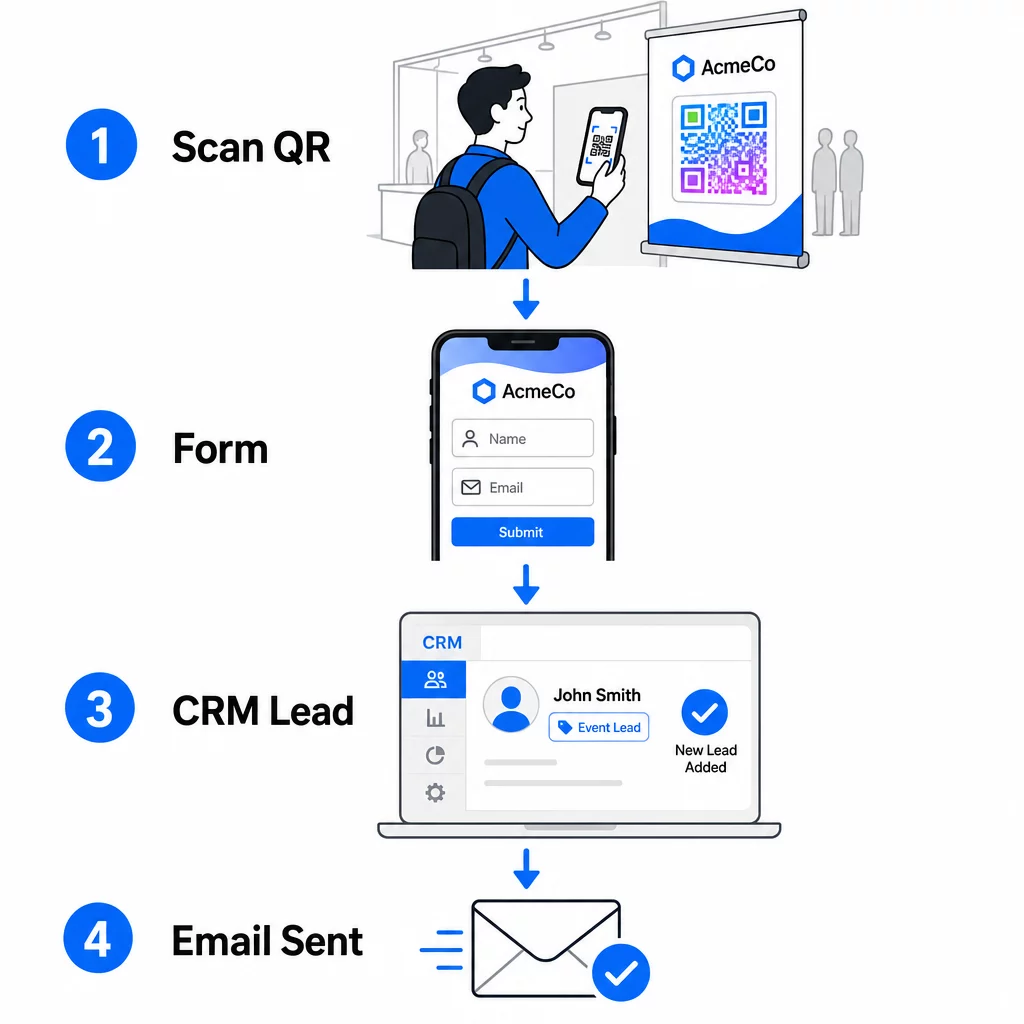
Richten Sie Ihren Workflow ein, bevor Sie zur Veranstaltung kommen:
- CRM-Integration: Leiten Sie jede Formularübermittlung direkt in Ihr CRM, versehen mit dem Veranstaltungsnamen und -datum zur späteren Segmentierung
- Sofortige Follow-up-E-Mail: Lösen Sie eine automatisierte E-Mail aus, sobald jemand das Formular absendet – danken Sie ihnen, liefern Sie die versprochene Ressource und legen Sie Erwartungen für die nächsten Schritte fest
- Lead-Scoring oder -Routing: Wenn Sie ein CRM mit Lead-Scoring verwenden, konfigurieren Sie das Event-Tag, um die Nachverfolgung durch Ihr Vertriebsteam zu priorisieren
- Tabellenexport: Für Verlosungen oder Anwesenheitsverfolgung exportieren Sie Einreichungen automatisch in ein Google Sheet, das Sie in Echtzeit überprüfen können
Für einen tieferen Einblick in die Verbindung dynamischer QR-Codes mit CRM-Workflows, führt der Leitfaden zu Erstellung dynamischer QR-Codes für CRM-Check-ins detailliert durch URL-Kodierung, Merge-Felder und Webhook-Einrichtung. Sie können auch erkunden Automatisierung des QR-Code-Scan-Workflows für eine Schritt-für-Schritt-Anleitung zum Verbinden von Scan-Ereignissen mit Plattformen wie Zapier oder Make.
Automatisieren Sie Ihren Event-Lead-Workflow Verbinden Sie Ihre QR-Code für Veranstaltungen erstellen mit Ihrem CRM und Ihrer E-Mail-Plattform, sodass jeder Scan eine sofortige, personalisierte Nachverfolgung auslöst – ohne manuellen Aufwand.
Schritt 4: Anreize für den Scan schaffen
Besucher einer Messe oder Konferenz werden von Dutzenden von Ständen und Kontakten angesprochen. Ein QR-Code allein zwingt nicht zum Handeln – der Wert dahinter tut es.
Effektive Anreize zur Erfassung von Event-Leads sind:
- Eine Teilnahme an einer Verlosung (eine kostenlose Beratung, ein Produktmuster oder ein Serviceguthaben, das am Ende der Veranstaltung verlost wird)
- Sofortiger Zugang zu exklusiven Inhalten – ein Leitfaden, eine Checkliste oder eine Vorlage, die für das Publikum relevant ist
- Mitgliedschaft in einer privaten Community oder früher Zugang zu einem Produkt oder einer Ressource
- Ein personalisiertes Audit, eine Bewertung oder Empfehlung, die nach der Veranstaltung geliefert wird
Der Anreiz sollte spezifisch genug sein, um wertvoll zu wirken, und reibungsarm genug, damit jemand mitten im Gespräch darauf reagiert. “Hier scannen, um an der Verlosung einer 60-minütigen Strategie-Session teilzunehmen” ist überzeugender als “scannen, um mehr zu erfahren.”
Schritt 5: Mehrere Veranstaltungen mit einem Satz Karten verwalten
Einer der praktischsten Vorteile dynamischer QR-Codes ist, dass Sie Materialien nicht für jede Veranstaltung neu drucken müssen. Da die Ziel-URL in einer Weiterleitung gespeichert ist – und nicht im Code-Muster selbst – können Sie aktualisieren, wohin der Code die Teilnehmer sendet, ohne die gedruckte Karte zu ändern.
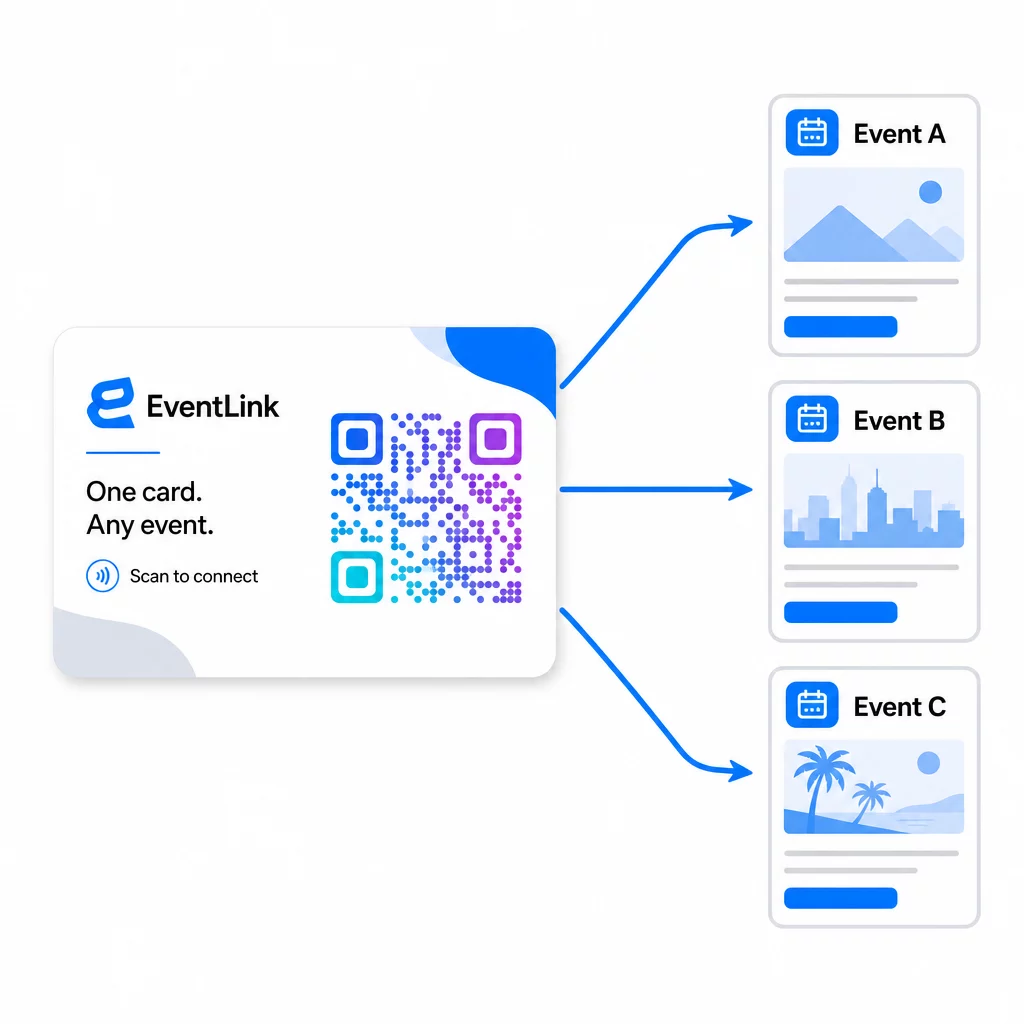
Das bedeutet:
- Aktualisieren Sie vor jeder Veranstaltung Ihre Landingpage, um auf den spezifischen Veranstaltungsnamen und das Publikum zu verweisen
- Leiten Sie den Code zwischen den Veranstaltungen auf Ihre Hauptwebsite, einen universellen Lead-Magneten oder Ihre Kontaktseite um
- Wenn ein Angebot abläuft oder eine Landingpage nicht mehr funktioniert, beheben Sie dies sofort von Ihrem Dashboard aus – kein Neudruck, keine toten Links, die echte Menschen erreichen
Diese Flexibilität gilt auch für Messestände, Flyer und gedruckte Beschilderungen. Ein einzelnes gedrucktes Banner mit einem QR-Code kann für mehrere Veranstaltungen mit unterschiedlichen Angeboten, Zielgruppen und Follow-up-Sequenzen verwendet werden, solange der zugrunde liegende Code dynamisch ist.
Schritt 6: Leistung verfolgen und verfeinern
Eine QR-Code-Kampagne, die nicht gemessen wird, kann nicht verbessert werden. Dynamische QR-Codes liefern Ihnen Scan-Daten, einschließlich der Gesamtzahl der Scans, eindeutiger Scans, Gerätetypen, geografischer Standort und Tageszeitmuster. Diese Daten zeigen Ihnen, ob Ihre Kartenplatzierung funktioniert, welche Veranstaltungen die engagiertesten Leads generieren und ob Ihre Landingpage konvertiert.
Nutzen Sie diese Daten, um nach jeder Veranstaltung praktische Fragen zu beantworten:
- Welcher Prozentsatz der Personen, die Ihre Karte erhalten haben, hat sie tatsächlich gescannt?
- Erfolgten die Scans während der Veranstaltung oder in den folgenden Tagen – was auf ein verzögertes Follow-up-Verhalten hindeutet?
- Welche Gerätetypen dominierten, und war Ihre Landingpage vollständig für sie optimiert?
- Wie haben sich die Konversionsraten auf dem Formular bei Veranstaltungen mit unterschiedlichen Anreizen verglichen?
Der Leitfaden zu QR-Code-Event-Tracking-Tools behandelt, wie Scan-Analysen im Kontext einer Veranstaltung bewertet und interpretiert werden.
Ein Hinweis zu Zustimmung und Compliance
Das Sammeln von Kontaktinformationen bei Veranstaltungen bedeutet, dass Sie den geltenden Datenschutzgesetzen unterliegen. In den USA gibt es kein einziges föderales Datenschutzgesetz, aber mehrere Regeln gelten für das Marketing nach der Veranstaltung:
- Die CAN-SPAM Act verlangt, dass jede kommerzielle E-Mail, die Sie senden, eine klare Möglichkeit für Empfänger zum Abbestellen enthält, und Sie müssen diese Abbestellungsanfragen innerhalb von 10 Werktagen erfüllen.
- Wenn Sie Daten von Einwohnern Kaliforniens sammeln, verlangt der California Privacy Rights Act von Ihnen, Verbraucher darüber zu informieren, wie ihre Daten gesammelt und verwendet werden, und ihnen zu ermöglichen, darauf zuzugreifen, sie zu korrigieren oder zu löschen.
- Die Die Zustimmungsregeln der FCC für Telemarketing und SMS-Marketing erfordern eine separate, spezifische Zustimmung für jeden Absender – eine pauschale Mehrparteien-Zustimmung, die über ein einziges Formular eingeholt wird, ist nicht ausreichend.
Der sicherste Ansatz: Machen Sie die Zustimmungssprache Ihres Formulars explizit. Geben Sie klar an, wer sie kontaktieren wird, zu welchem Zweck und wie sie sich abmelden können. Für RSVP- und Event-Registrierungsabläufe, ist das Hosten Ihres Formulars auf einer sicheren HTTPS-Seite und das Einbeziehen transparenter Offenlegungen zur Datennutzung sowohl eine rechtliche Grundlage als auch ein Vertrauenssignal.
QR-Code vs. Visitenkarte: Ein praktischer Vergleich
| Ansatz | Dateneingabe | CRM-Integration | Wiederverwendbarkeit | ANALYSE |
|---|---|---|---|---|
| Papier-Visitenkarte | Handbuch | Erfordert manuelle Eingabe | Einzelnes Ereignis | Keine |
| NFC-Karte | Automatisch | Abhängig von der App | Wiederverwendbar | Begrenzt |
| QR-Code (statisch) | Formularbasiert | Über Formular-Tool | Wiederverwendbar | Keine |
| QR-Code (dynamisch) | Formularbasiert | Automatisiert über Webhook | Wiederverwendbar, aktualisierbar | Vollständige Scan-Analysen |
Dynamische QR-Codes lösen auch ein praktisches Problem, das oft bei NFC-Karten auftritt: NFC erfordert, dass das empfangende Gerät sich in unmittelbarer Nähe befindet und fordert in einigen Konfigurationen Systemzugriff an. Ein QR-Code erfordert vom Gerät des Empfängers nichts außer einer Kamera – keine App, keine Einstellungsänderung, keine sofort erteilten Berechtigungen.
Häufig gestellte Fragen
Nicht, wenn Sie einen dynamischen QR-Code verwenden. Ein dynamischer Code verweist auf eine Weiterleitungs-URL, die Sie jederzeit von Ihrem Dashboard aus aktualisieren können, sodass Sie die Ziel-Landingpage vor jeder Veranstaltung ändern können, ohne Ihre Karten oder Materialien neu drucken zu müssen.
Halten Sie es fokussiert und mobilfreundlich. Fügen Sie eine personalisierte Begrüßung hinzu, die sich auf die Veranstaltung bezieht, ein kurzes Formular mit nicht mehr als drei bis vier Feldern und einen spezifischen Anreiz für die Einreichung – wie die Teilnahme an einer kostenlosen Beratung oder eine herunterladbare Ressource. Vermeiden Sie lange Texte oder mehrere konkurrierende Handlungsaufforderungen auf derselben Seite.
Machen Sie Ihre Zustimmungssprache auf dem Formular explizit. Geben Sie klar an, wer die Person kontaktieren wird, zu welchem Zweck und wie sie sich abmelden kann. Stellen Sie sicher, dass Ihre Landingpage auf HTTPS gehostet wird, bearbeiten Sie Abmeldeanfragen umgehend, wie es der CAN-SPAM Act vorschreibt, und überprüfen Sie die anwendbaren staatlichen Gesetze – wie den California Privacy Rights Act –, wenn Ihr Publikum Einwohner dieser Staaten umfasst.