Kas lahkute messidelt visiitkaartide virnaga ja ilma selge järelplaanita? Käsitsi andmete kogumine aeglustab teid ja müügivihjed jahtuvad kiiresti. See juhend näitab, kuidas kasutada QR-koode ürituste müügivihjete automaatseks kogumiseks, korraldamiseks ja jälgimiseks – nii muutub iga käepigistus jälgitavaks kontaktiks.
Miks traditsiooniline ürituste müügivihjete kogumine ei toimi piisavalt hästi
Enamikul konverentsidel ja messidel koguvad spetsialistid kontaktandmeid visiitkaarte vahetades või märkmeid kritseldades. Probleem: enamik neist kaartidest jõuab lauale, ilma et neid kunagi CRM-i sisestataks. Isegi kui neid sisestatakse, on käsitsi andmesisestus aeglane, veaohtlik ja ei ole sünkroonis kaasaegse müügijäreltegevuse tempoga.
Aken ürituse müügivihjega tegelemiseks on lühike. Järeltegevust pärast üritust kirjeldatakse laialdaselt kui perioodi, mil ürituse ROI kas võidetakse või kaotatakse – soojad müügivihjed jahtuvad kiiresti ning viivitatud või üldine esimene kontakt võib tappa muidu paljutõotava vestluse. Vajate süsteemi, mis kogub andmeid koheselt, suunab need õigesse kohta ja käivitab järeltegevuse, ilma et peaksite seda käsitsi tegema.
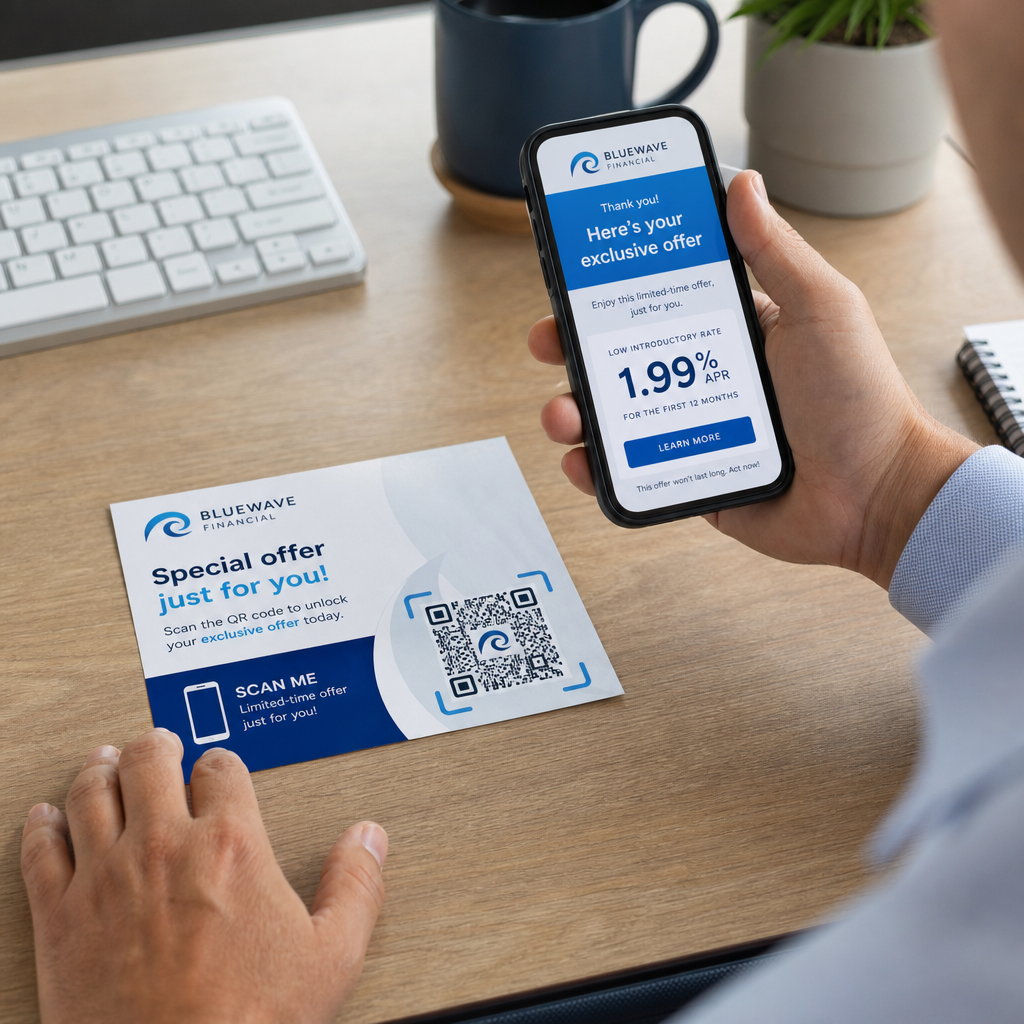
QR-koodid täidavad selle lünga, ühendades füüsilise interaktsiooni – kellelegi kaardi ulatamise, bännerile osutamise või koodi lauale asetamise – automaatselt toimiva digitaalse töövooga.
Mis teeb QR-koodi müügivihjete kogumisel tõhusaks
Kõik QR-koodid ei ole ürituste müügivihjete genereerimiseks võrdselt kasulikud. Staatiline QR-kood osutab fikseeritud sihtkohale ega anna teile andmeid selle kohta, kes seda skaneeris, millal või kus. A dünaamiline QR-kood, vastupidi, kasutab lühikest ümbersuunamislinki, mida saab igal ajal uuendada ja mis logib skaneerimistegevust, sealhulgas aega, seadme tüüpi ja asukohta.
Ürituste müügivihjete kogumiseks on dünaamilised koodid olulised kolmel põhjusel:
- Saate siht-URL-i pärast printimist muuta – kasulik mitmel üritusel osalemisel ühe trükimaterjalide partiiga
- Saate reaalajas analüüsi skaneerimismahu ja publiku käitumise kohta
- Saate sihtkoha integreerida oma CRM-i või automatiseerimisplatvormiga, puudutamata trükitud koodi
See Dünaamilise QR koodi generaator Pagelootist võimaldab teil luua muudetavaid koode, uuendada sihtkohti ürituste vahel ja jälgida jõudlust kesksest juhtpaneelist.
Seadistage jälgitavad ürituste koodid enne järgmist näitust Kasuta Dünaamilise QR koodi generaator et luua muudetavaid, analüüsivalmis QR-koode, mis suunavad osalejad otse teie müügivihjete kogumise töövoogu.
1. samm: Kujundage visiitkaart, mis on loodud müügivihjete kogumiseks
Teie visiitkaart on kogu digitaalse töövoo füüsiline käivitaja. Selle toimimiseks peab kaart ise olema hoidmist väärt – ja QR-kood peab olema koheselt skaneeritav.
Praktilised kaalutlused:
- Kasutage esmaklassilisi materjale: Vastupidavad kaardid (plastik või kartong) visatakse tõenäolisemalt ära kui õhukesed paberist alternatiivid. Kaardi tajutav väärtus peegeldab teie brändi.
- Asetage QR-kood silmapaistvalt: Kaardi tagakülg sobib hästi. Järgige Pagelooti minimaalse suuruse soovitust 0,8 × 0,8 tolli visiitkaardi QR-koodide jaoks et tagada usaldusväärne skaneerimine erinevatel seadmetüüpidel.
- Lisage selge üleskutse tegevusele: Tekst nagu “Skaneeri, et saada tasuta konsultatsioon” või “Skaneeri, et püsida ühenduses” ütleb vastuvõtjale täpselt, miks nad peaksid skaneerima ja mida nad saavad.
- Brändige kood: Logo ja brändivärvide lisamine QR-koodile suurendab usaldust ja skaneerimismäärasid. Üldised mustvalged koodid tunduvad isikupäratud; bränditud koodid tunduvad tahtlikud.
Kui soovite lisada kontaktandmed otse koodi – et osalejad saaksid teie teabe salvestada ilma vormi esitamata – siis vCard QR-kood võimaldab teil manustada oma nime, telefoninumbri, e-posti ja veebisaidi vormingus, mis kandub koheselt nutitelefoni kontaktirakendusse.
2. samm: Looge sündmusele kohandatud sihtleht
Sihtkoht, kuhu teie QR-kood viitab, on sama oluline kui kood ise. Üldine koduleht on kasutamata võimalus. Spetsiaalselt loodud sihtleht mis viitab konkreetsele sündmusele, loob kohese asjakohasuse ja suurendab vormi täitmise määra.
Hästi struktureeritud sündmuse sihtleht sisaldab:
- Isikupärastatud tervitus (“Tore oli teiega kohtuda [Sündmuse nimi] – siin on see, mida ma lubasin”)
- Lühike vorm, mis küsib ainult olulist teavet: nimi, e-post ja üks kvalifitseeriv küsimus, mis on teie pakkumisega seotud
- Selge stiimul esitamiseks – eksklusiivne sisu, tasuta konsultatsiooni sissekanne, juurdepääs kogukonnale või allalaaditav ressurss
Hoidke vorm mobiilile optimeeritud. Peaaegu iga skaneerimine sündmusel toimub nutitelefonis, seega segamini või aeglaselt laadiv vorm tapab konversioonid enne, kui need algavad. Google vorm: QR-koodi generaator pakub kiiret viisi mobiilisõbraliku vormi linkimiseks teie QR-koodiga, kus vastused edastatakse otse Google Sheetsi lihtsaks ülevaatamiseks.
Pärast vormi esitamist suunake osalejad tänulehele, kus on teine üleskutse – tellige uudiskiri, liituge kogukonnaga, vaadake asjakohast videot. See laiendab interaktsiooni esialgsest skaneerimisest kaugemale.
3. samm: Ühendage oma vorm automatiseeritud töövooga
Plii kogumine loob väärtust ainult siis, kui andmed liiguvad koheselt kuhugi kasulikku. Pärast sündmust käsitsi tabeli allalaadimine ja inimestele kahe nädala pärast e-kirjade saatmine ei ole järelstrateegia – see on kasutamata võimalus.
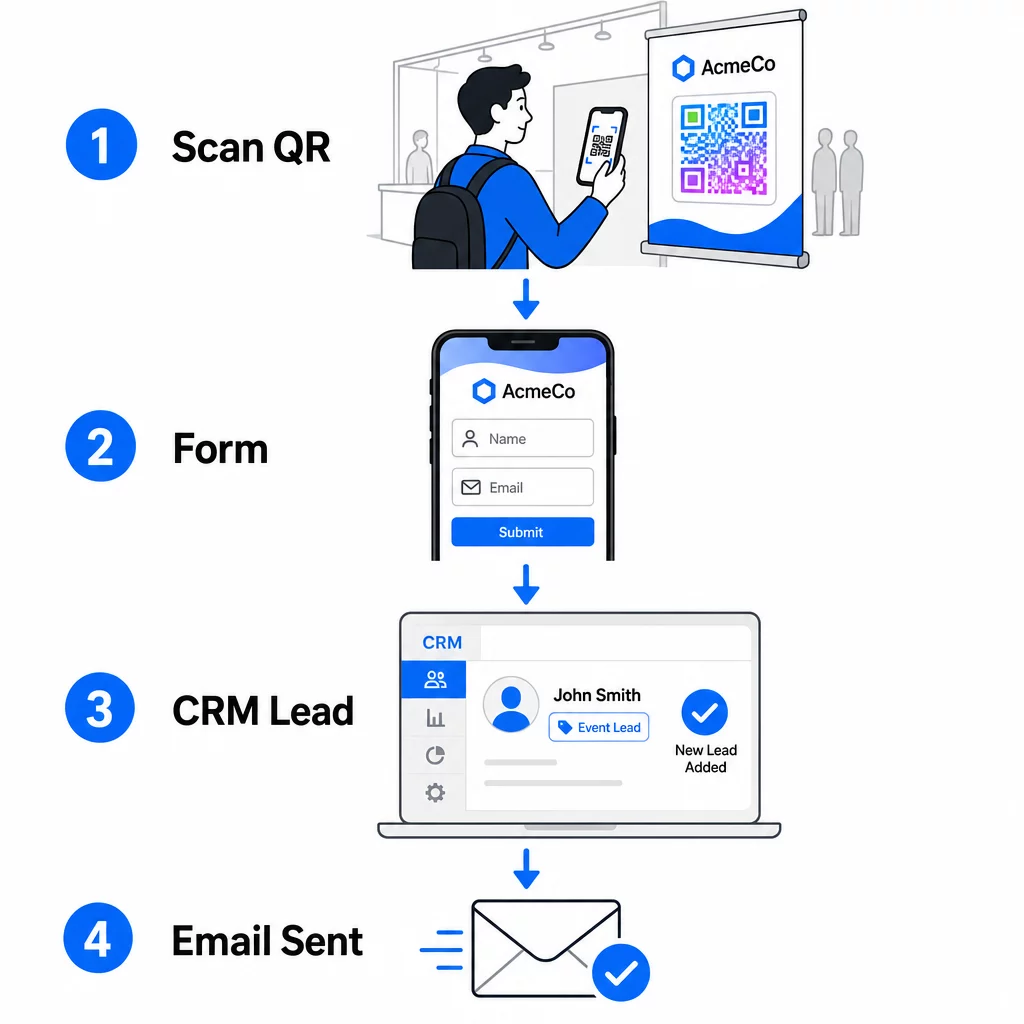
Seadistage oma töövoog enne sündmusele saabumist:
- CRM-i integreerimine: Suunake iga vormi esitamine otse oma CRM-i, märgistatuna sündmuse nime ja kuupäevaga hilisemaks segmenteerimiseks
- Kohene järelmeil: Käivitage automatiseeritud e-kiri kohe, kui keegi vormi esitab – tänage neid, edastage lubatud ressurss ja seadke ootused järgmisteks sammudeks
- Plii skoorimine või suunamine: Kui kasutate CRM-i plii skoorimisega, konfigureerige sündmuse silt, et prioriseerida teie müügimeeskonna järeltegevust
- Tabeli eksport: Auhinnalooside või osavõtu jälgimiseks eksportige esitused automaatselt Google'i tabelisse, mida saate reaalajas üle vaadata
Dünaamiliste QR-koodide ühendamise kohta CRM-i töövoogudega sügavama ülevaate saamiseks on juhend aadressil dünaamiliste QR-koodide loomine CRM-i sisseregistreerimiseks käsitleb üksikasjalikult URL-i kodeerimist, liitmisvälju ja veebihaagi seadistamist. Samuti saate uurida QR-koodi skaneerimise töövoo automatiseerimine samm-sammult juhiseid skaneerimissündmuste ühendamiseks platvormidega nagu Zapier või Make.
Automatiseerige oma sündmuse plii töövoog Ühendage oma Ürituse QR koodi loomine oma CRM-i ja e-posti platvormiga, et iga skaneerimine käivitaks kohese, isikupärastatud järeltegevuse – ilma käsitsi pingutuseta.
Samm 4: Soodustage skaneerimist
Messil või konverentsil osalejaid kõnetavad kümned boksid ja kontaktid. Ainuüksi QR-kood ei sunni tegutsema – seda teeb selle taga olev väärtus.
Tõhusad stiimulid sündmuse plii hõivamiseks hõlmavad:
- Auhinnaloosi osalemine (tasuta konsultatsioon, tootenäidis või teenuse krediit, mis loositakse sündmuse lõpus)
- Kohene juurdepääs eksklusiivsele sisule – juhend, kontrollnimekiri või mall, mis on publikule asjakohane
- Liikmelisus privaatses kogukonnas või varajane ligipääs tootele või ressursile
- Isikupärastatud audit, hinnang või soovitus, mis edastatakse pärast sündmust
Soodustus peaks olema piisavalt spetsiifiline, et tunduda väärtuslik, ja piisavalt madala hõõrdumisega, et keegi sellele vestluse käigus reageeriks. “Skaneeri siin, et osaleda 60-minutilise strateegiasessiooni võitmises” on veenvam kui “skaneeri, et rohkem teada saada.”
5. samm: Hallake mitut sündmust ühe kaardipartiiga
Üks dünaamiliste QR-koodide kõige praktilisemaid eeliseid on see, et te ei pea iga sündmuse jaoks materjale uuesti trükkima. Kuna siht-URL on salvestatud ümbersuunamisse – mitte koodimustrisse endasse – saate värskendada, kuhu kood osalejaid saadab, ilma trükitud kaarti puudutamata.
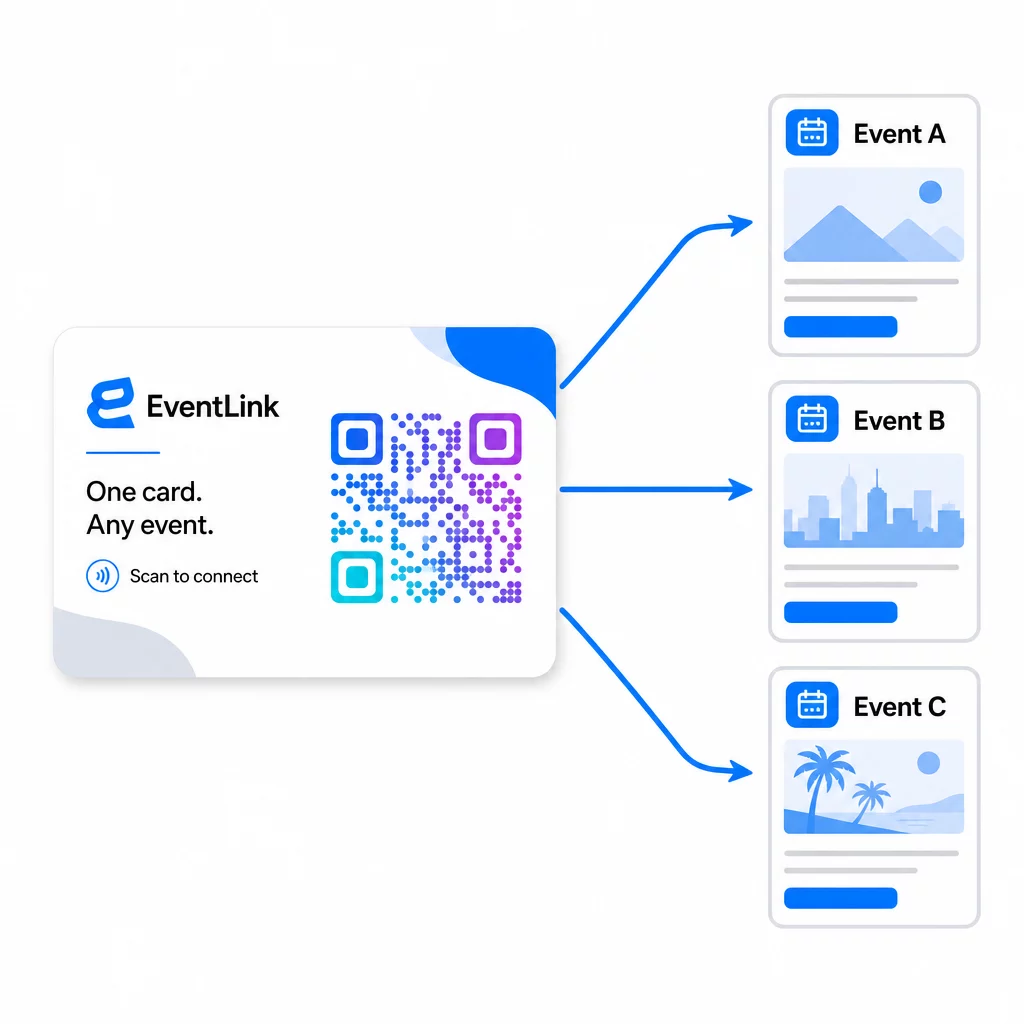
See tähendab:
- Enne iga sündmust värskendage oma sihtlehte, et see viitaks konkreetsele sündmuse nimele ja sihtrühmale
- Sündmuste vahel suunake kood ümber oma peamisele veebisaidile, universaalsele müügivihje magnetile või oma kontaktilehele
- Kui pakkumine aegub või sihtleht lakkab töötamast, parandage see koheselt oma juhtpaneelilt – ei mingit uuesti trükkimist, ei mingeid surnud linke, mis jõuaksid reaalsete inimesteni
See paindlikkus kehtib ka stendide, flaierite ja trükitud siltide kohta. Üksainus trükitud bänner QR-koodiga saab teenindada mitut sündmust erinevate pakkumiste, sihtrühmade ja järeltegevuste jadadega, eeldusel, et aluskood on dünaamiline.
6. samm: Jälgige jõudlust ja täiustage
Mõõtmata QR-koodi kampaaniat ei saa parandada. Dünaamilised QR-koodid annavad teile skaneerimistaseme andmeid, sealhulgas skaneerimiste koguarvu, unikaalseid skaneerimisi, seadmetüüpe, geograafilist asukohta ja kellaaja mustreid. Need andmed näitavad teile, kas teie kaardi paigutus töötab, millised sündmused genereerivad kõige kaasatud müügivihjeid ja kas teie sihtleht konverteerib.
Kasutage neid andmeid, et vastata praktilistele küsimustele pärast iga sündmust:
- Milline protsent inimestest, kes teie kaardi said, selle tegelikult skaneerisid?
- Kas skaneerimised toimusid sündmuse ajal või järgnevatel päevadel – viidates viivitatud järeltegevusele?
- Millised seadmetüübid domineerisid ja kas teie sihtleht oli nende jaoks täielikult optimeeritud?
- Kuidas võrdlesid vormi konversioonimäärad erinevate stiimulitega üritustel?
Juhend QR-koodi ürituste jälgimise tööriistad käsitleb, kuidas hinnata ja tõlgendada skaneerimisanalüütikat ürituse kontekstis.
Märkus nõusoleku ja vastavuse kohta
Kontaktandmete kogumine üritustel tähendab, et teile kehtivad kohaldatavad andmekaitseseadused. USA-s puudub ühtne föderaalne privaatsusseadus, kuid üritusejärgsele turundusele kehtivad mitmed reeglid:
- See CAN-SPAM Act nõuab, et iga saadetud kommertse-kiri sisaldaks selget viisi adressaatidele loobumiseks ja te peate neid loobumistaotlusi täitma 10 tööpäeva jooksul.
- Kui kogute andmeid California elanikelt, siis California Privacy Rights Act nõuab, et teavitaksite tarbijaid, kuidas nende andmeid kogutakse ja kasutatakse, ning lubaksite neil andmetele juurde pääseda, neid parandada või kustutada.
- See FCC’s consent rules telemarketingi ja tekstisõnumite turunduse jaoks nõuavad iga saatja jaoks eraldi spetsiifilist nõusolekut – ühe vormi kaudu saadud üldine mitmepoolne nõusolek ei ole piisav.
Kõige ohutum lähenemine: tehke oma vormi nõusolekukeel selgesõnaliseks. Öelge selgelt, kes nendega ühendust võtab, mis eesmärgil ja kuidas nad saavad loobuda. Jaoks RSVP ja ürituste registreerimisvood, on vormi majutamine turvalisel HTTPS-lehel ja läbipaistvate andmekasutuse avalduste lisamine nii juriidiline alus kui ka usaldussignaal.
QR-kood vs. visiitkaart: praktiline võrdlus
| Lähenemine | Andmesisestus | CRM-i integreerimine | Taaskasutatavus | STATISTIKA |
|---|---|---|---|---|
| Paberist visiitkaart | Kasutusjuhend | Nõuab käsitsi sisestamist | Ühekordne sündmus | Puuduvad |
| NFC-kaart | Automaatne | Sõltub rakendusest | Korduvkasutatav | Piiratud |
| QR-kood (staatiline) | Vormipõhine | Vormitööriista kaudu | Korduvkasutatav | Puuduvad |
| QR-kood (dünaamiline) | Vormipõhine | Automatiseeritud veebihaagi kaudu | Korduvkasutatav, uuendatav | Täielik skaneerimise analüütika |
Dünaamilised QR-koodid lahendavad ka praktilise mure, mis sageli tekib NFC-kaartidega: NFC nõuab vastuvõtva seadme lähedust ja mõnes konfiguratsioonis küsib süsteemitaseme juurdepääsu. QR-kood ei nõua vastuvõtja seadmelt midagi peale kaamera – ei rakendust, ei seadete muutmist, ei hetkel antud lube.
Korduma kippuvad küsimused
Mitte siis, kui kasutate dünaamilist QR-koodi. Dünaamiline kood osutab ümbersuunamise URL-ile, mida saate oma juhtpaneelilt igal ajal värskendada, nii et saate enne iga sündmust sihtlehte muuta, ilma et peaksite oma kaarte või materjale uuesti printima.
Hoidke see fookuses ja mobiilisõbralikuna. Lisage isikupärastatud tervitus, mis viitab sündmusele, lühike vorm, mis sisaldab kuni kolm-neli välja, ja konkreetne stiimul esitamise eest – näiteks tasuta konsultatsiooni sissekanne või allalaaditav ressurss. Vältige pikka teksti või mitut konkureerivat üleskutset samal lehel.
Muutke oma nõusoleku keel vormil selgesõnaliseks. Märkige selgelt, kes isikuga ühendust võtab, mis eesmärgil ja kuidas nad saavad loobuda. Veenduge, et teie sihtleht oleks majutatud HTTPS-is, täitke loobumistaotlused viivitamatult vastavalt CAN-SPAM seadusele ja vaadake üle kohaldatavad osariigi seadused – näiteks California privaatsusõiguste seadus –, kui teie sihtrühma kuuluvad nende osariikide elanikud.