Vai kopīgojat sensitīvus dokumentus vai ekskluzīvu saturu, izmantojot QR kodus, bet uztraucaties par nesankcionētu piekļuvi? Kad fiziskie kodi parādās publiskās vietās, ikviens tos var skenēt, lai apskatītu konfidenciālus failus vai iekšējās galvenās lapas. Pievienojot paroles aizsardzību savām galamērķa saitēm un failiem, nodrošināsiet, ka jūsu saturam piekļūst tikai autorizēti lietotāji.
Vai pašu QR kodu var aizsargāt ar paroli?
Standarta statiskie QR kodi nevar glabāt paroles savos pikseļu rakstos. Statisks kods vienkārši pārvērš vienkāršu tekstu vai fiksētu tīmekļa saiti skenējamā grafikā, kas nozīmē, ka jebkurš viedtālruņa lasītājs dekodē tieši tos pašus galapunktu datus nekavējoties pēc skenēšanas.
Lai nodrošinātu piekļuvi, paroles aizsardzībai jānotiek vai nu pārvirzīšanas līmenī, vai mērķa galamērķī. To var panākt, izmantojot divas galvenās pieejas:
- Pārvirzīšanas līmeņa aizsardzība: Izmantojot Dinamisks QR kodu ģenerators lai pārtvertu skenēšanu un pieprasītu paroles autentifikāciju pirms apmeklētāju pārvirzīšanas uz mērķa resursu.
- Galamērķa līmeņa aizsardzība: Aizsargājot resursdatora vidi vai tieši aizsargājot failu (piemēram, izveidojot ar paroli aizsargātu dokumentu) pirms tā saistīšanas.
Abas metodes novērš nesankcionētu lietotāju piekļuvi konfidenciāliem resursiem, pat ja jūsu fiziskais QR kods ir redzams publiskā vietā.
Galvenās metodes QR koda satura nodrošināšanai
Pareizās ieviešanas izvēle ir atkarīga no tā, vai jūs nodrošināt vietnes saiti, iekšēju dokumentu vai pagaidu pasākuma saturu.
Dinamiskā QR koda piekļuves kontrole
Dinamiskie QR kodi paļaujas uz īsu pārvirzīšanas saiti, nevis galīgās URL adreses cieto kodēšanu attēlā. Šī īsā saite ļauj jums pārvaldīt drošības iestatījumus platformā, kurā tiek mitināts kods. Jūs varat iespējot paroles prasības, jebkurā laikā atjaunināt galamērķa saiti vai pilnībā atsaukt piekļuvi, nepārdrukājot fiziskos materiālus.
Ar paroli aizsargātas failu augšupielādes
Ja jūs kopīgojat failus tieši, varat tos aizsargāt ar paroli pirms pārvēršanas skenējamā grafikā. Izmantojot PDF QR kodu ģenerators, varat augšupielādēt šifrētu PDF failu vai mitināt savu dokumentu drošā platformā, kas prasa autentifikāciju. Lietotāji, kuri skenē kodu, piekļūst dokumentu skatītājam, taču viņiem ir jāievada pareizi akreditācijas dati, lai atvērtu un izlasītu failu.
Derīguma termiņi un lietošanas ierobežojumi
Piekļuves kontrole sniedzas tālāk par parolēm. Varat apvienot akreditācijas datu prasības ar noteikumiem, piemēram, kalendāra derīguma termiņiem vai maksimālo skenēšanas skaitu. Šo parametru iestatīšana nodrošina, ka pēc piedāvājuma vai iekšējās sanāksmes beigām saite automātiski deaktivizējas. Uzziniet vairāk par satura dzīves ciklu kontroli mūsu ceļvedī par to, kā iestatīt QR kodu derīguma termiņus.
Aizsargājiet savu digitālo saturu jau šodien Aizsargājiet savus sensitīvos failus un ierobežotās saites ar elastīgām piekļuves kontrolēm, izveidojot kodus ar mūsu Dinamisks QR kodu ģenerators.
Kā soli pa solim iestatīt ar paroli aizsargātu QR kodu
Veiciet šīs darbības, lai izveidotu ar paroli aizsargātu piekļuves plūsmu jūsu uzņēmuma vai mārketinga materiāliem:
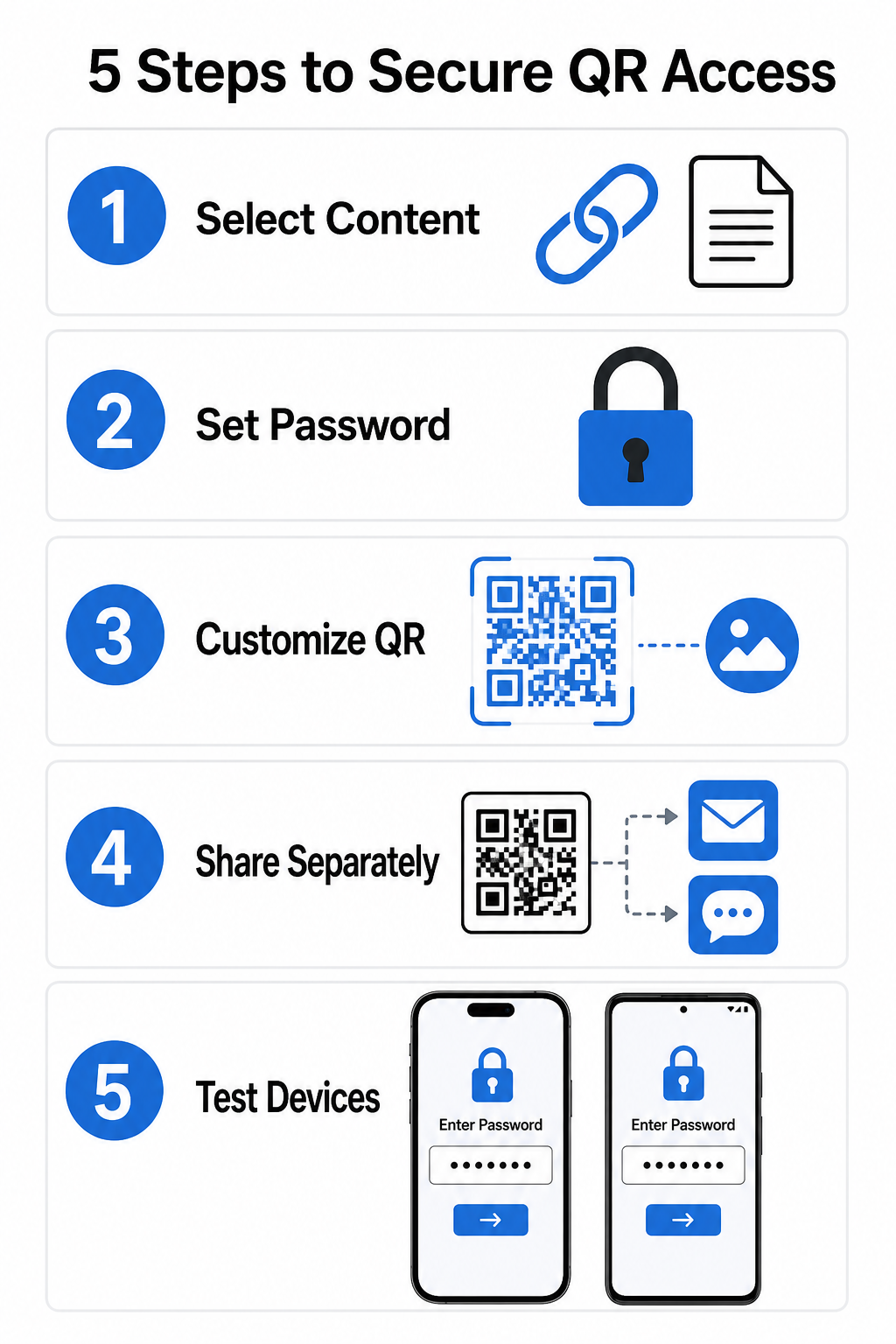
- Izvēlieties satura veidu: Izvēlieties formātu, ko vēlaties kopīgot, piemēram, vietnes URL, izmantojot saites QR koda ģenerators vai dokumentu failu.
- Konfigurēt piekļuves drošību: Iespējojiet paroles prasības savā dinamiskās pārvaldības panelī vai lietojiet paroles aizsardzību tieši mērķa failam pirms augšupielādes.
- Pielāgojiet vizuālo dizainu: Pievienojiet zīmola krāsas, pielāgotus rāmjus un oficiālu logotipu, izmantojot elastīgu QR kodu ģenerators , lai veidotu lietotāju uzticību un samazinātu krāpšanas riskus.
- Izplatīt akreditācijas datus atsevišķi: Kopīgojiet paroli ar autorizētiem lietotājiem, izmantojot atsevišķu kanālu, piemēram, e-pasta apstiprinājumu, iepazīšanās pakotnes vai tiešās ziņas, nevis novietojiet to blakus kodam.
- Pārbaudiet vairākās ierīcēs: Skenējiet kodu, izmantojot gan iOS, gan Android kameru lietotnes, lai pārliecinātos, ka paroles pieprasījums tiek pareizi aktivizēts pirms drukāšanas vai publicēšanas.
Labākā prakse drošai QR kodu ieviešanai
Piekļuves aizsardzības ieviešana prasa ievērot kiberdrošības standartus, lai novērstu datu noplūdes un neatļautas skenēšanas:
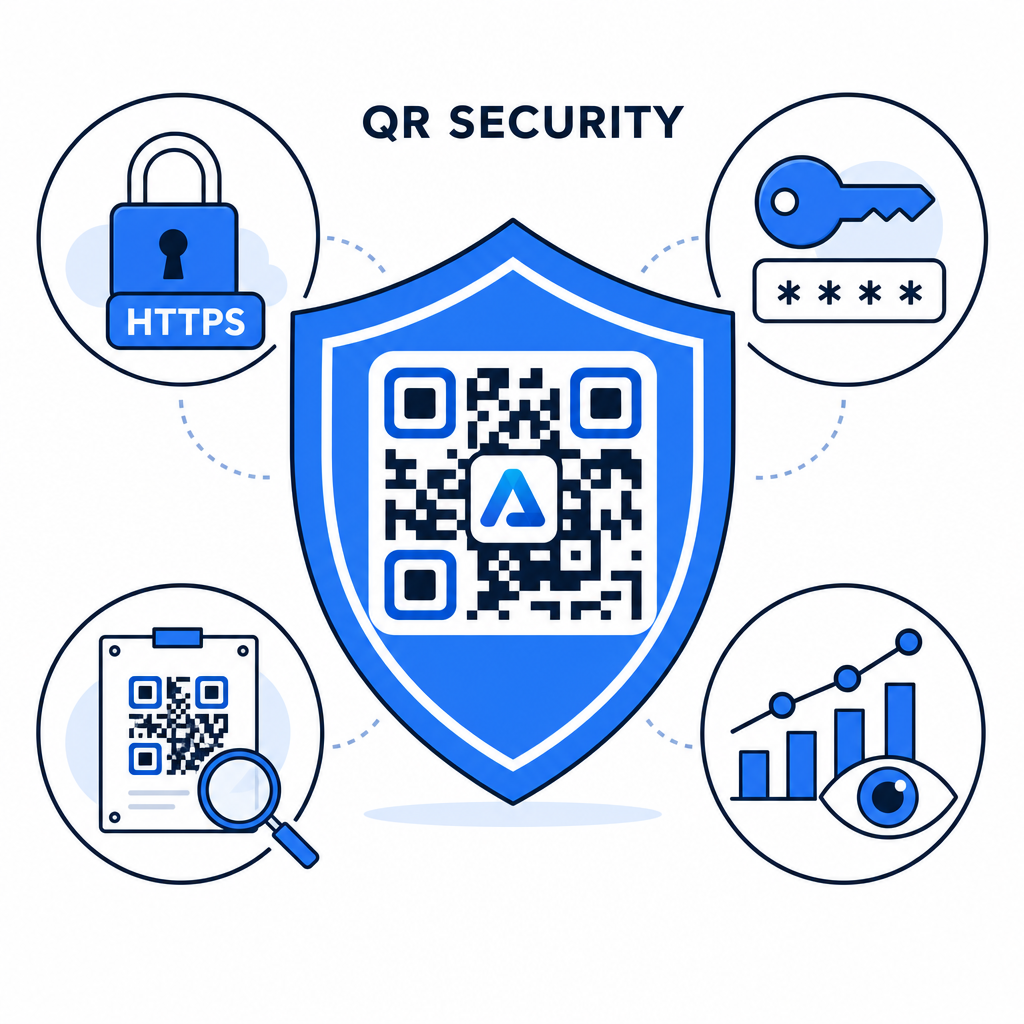
- Izmantojiet spēcīgus paroļu standartus: Pieprasiet, lai paroles būtu vismaz 15 rakstzīmes garas, lai nodrošinātu vienfaktora aizsardzību un novērstu automatizētus minēšanas mēģinājumus.
- Pieprasiet HTTPS galapunktus: Pārliecinieties, vai mērķa serveris izmanto SSL šifrēšanu, lai aizsargātu datus pārsūtīšanas laikā. Vairāk varat lasīt par kā šifrēšana aizsargā QR koda datus padziļinātai drošības izpratnei.
- Regulāri pārbaudiet fiziskos displejus: Regulāri pārraugiet drukātos saskares punktus publiskās vietās, lai nodrošinātu, ka fiziskie kodi nav mainīti vai pārklāti ar neatļautām uzlīmēm, mazinot galvenos QR kodu privātuma riskus.
- Pārraugiet piekļuves analītiku: Pārraugiet skenēšanas biežumu, atrašanās vietas un lietotāja aģenta datus savā pārvaldības panelī, lai identificētu aizdomīgus datplūsmas modeļus vai neatļautus piekļuves mēģinājumus.
Viegli pārvaldiet un aizsargājiet savus failus Pārveidojiet savas konfidenciālās rokasgrāmatas un dokumentus izsekojamās, drošās digitālās saitēs ar mūsu PDF QR kodu ģenerators.
Aizsargājiet savus saskares punktus ar paroļu piekļuves kontroli
Fizisko QR saskares punktu savienošana pārī ar digitālās piekļuves kontroli nodrošina nevainojamu lietotāja pieredzi, vienlaikus saglabājot privātus patentētus dokumentus, iekšējās veidlapas un ekskluzīvus mārketinga materiālus. Izvietojot dinamiskus kodus ar paroļu pieprasījumiem, šifrētiem galapunktiem un proaktīvu uzraudzību, jūs saglabājat pilnīgu kontroli pār savu koplietoto saturu.
Izpētiet mūsu visaptverošo ceļvedi par Drošu QR kodu ģenerēšanas labākā prakse lai šodien ieviestu visaptverošu drošību visos jūsu drukātajos un digitālajos saskares punktos.
Biežāk uzdotie jautājumi
Nē. Statiskie QR kodi tieši kodē fiksētus datus to rakstā un nevar izraisīt paroles pieprasījumus. Lai ierobežotu piekļuvi, izmantojiet dinamisko QR kodu platformu vai nodrošiniet pašu galamērķa lapu vai failu.
Sūtiet paroles pa atsevišķu saziņas kanālu, piemēram, e-pasta apstiprinājumu, SMS, pasākuma nozīmīti vai drošu ievadpaketi. Nekad nedrukājiet paroli blakus fiziskajam QR kodam.
Dinamiskie QR kodi ļauj atjaunināt galamērķa saites, drošības iestatījumus vai paroles piekļuves noteikumus tieši no jūsu vadības paneļa jebkurā laikā, nepārprintējot fiziskos materiālus.