Jaatko arkaluonteisia asiakirjoja tai eksklusiivista sisältöä QR-koodien kautta, mutta oletko huolissasi luvattomasta pääsystä? Kun fyysiset koodit ilmestyvät julkisille paikoille, kuka tahansa voi skannata ne nähdäkseen luottamuksellisia tiedostoja tai sisäisiä laskeutumissivuja. Salasanasuojauksen lisääminen kohdelinkkeihisi ja tiedostoihisi varmistaa, että vain valtuutetut käyttäjät pääsevät sisältöösi.
Voidaanko QR-koodi itsessään salasanasuojata?
Tavalliset staattiset QR-koodit eivät voi tallentaa salasanoja pikselikuvioihinsa. Staattinen koodi yksinkertaisesti muuntaa pelkän tekstin tai kiinteän verkkolinkin skannattavaksi grafiikaksi, mikä tarkoittaa, että mikä tahansa älypuhelimen lukija purkaa täsmälleen saman päätepistedatan välittömästi skannauksen jälkeen.
Pääsyn turvaamiseksi salasanasuojaus on toteutettava joko uudelleenohjaustasolla tai kohdesivustolla. Tämän voi saavuttaa kahdella pääasiallisella tavalla:
- Uudelleenohjaustason suojaus: Käyttämällä Dynaaminen QR-koodi generaattori siepata skannauksen ja vaatia salasanatodennusta ennen vierailijoiden ohjaamista kohderesurssiin.
- Kohdetason suojaus: Suojaamalla isäntäympäristön tai suojaamalla tiedoston suoraan (kuten luomalla salasanalla suojatun asiakirjan) ennen sen linkittämistä.
Molemmilla menetelmillä estetään luvattomia käyttäjiä näkemästä luottamuksellisia resursseja, vaikka fyysinen QR-koodisi olisi esillä julkisella paikalla.
Tärkeimmät menetelmät QR-koodin sisällön turvaamiseksi
Oikean toteutuksen valinta riippuu siitä, suojaatko verkkosivulinkkiä, sisäistä asiakirjaa vai väliaikaista tapahtuman sisältöä.
Dynaamisten QR-koodien pääsynhallinta
Dynaamiset QR-koodit perustuvat lyhyeen uudelleenohjauslinkkiin sen sijaan, että lopullinen URL-osoite olisi kovakoodattu kuvaan. Tämän lyhyen linkin avulla voit hallita suojausasetuksia koodia isännöivällä alustalla. Voit ottaa käyttöön salasanavaatimuksia, päivittää kohdelinkin milloin tahansa tai peruuttaa pääsyn kokonaan tulostamatta fyysisiä materiaalejasi uudelleen.
Salasanalla suojatut tiedostolataukset
Jos jaat tiedostoja suoraan, voit suojata tiedoston salasanalla ennen sen muuntamista skannattavaksi grafiikaksi. Kun käytät PDF QR-koodi generaattori, voit ladata salatun PDF-tiedoston tai isännöidä asiakirjaasi turvallisella alustalla, joka vaatii tunnistautumisen. Koodin skannaavat käyttäjät pääsevät asiakirjan katseluohjelmaan, mutta heidän on annettava oikeat tunnistetiedot tiedoston avaamiseksi ja lukemiseksi.
Vanhentumispäivämäärät ja käyttörajoitukset
Käyttöoikeuksien hallinta ulottuu salasanoja pidemmälle. Voit yhdistää tunnistetietovaatimukset sääntöihin, kuten kalenterin vanhentumisiin tai enimmäisskannausmääriin. Näiden parametrien asettaminen varmistaa, että kun tarjous tai sisäinen kokous päättyy, linkki deaktivoituu automaattisesti. Lue lisää sisällön elinkaarien hallinnasta oppaastamme koskien kuinka asettaa QR-koodeille vanhentumispäivämäärät.
Turvaa digitaalinen sisältösi tänään Suojaa arkaluontoiset tiedostosi ja rajoitetut linkkisi joustavilla käyttöoikeuksien hallintatoiminnoilla luomalla koodeja meidän avullamme Dynaaminen QR-koodi generaattori.
Kuinka asettaa salasanasuojattu QR-koodi vaihe vaiheelta
Seuraa näitä vaiheita luodaksesi salasanalla suojatun pääsyvirran yrityksellesi tai markkinointimateriaaleillesi:
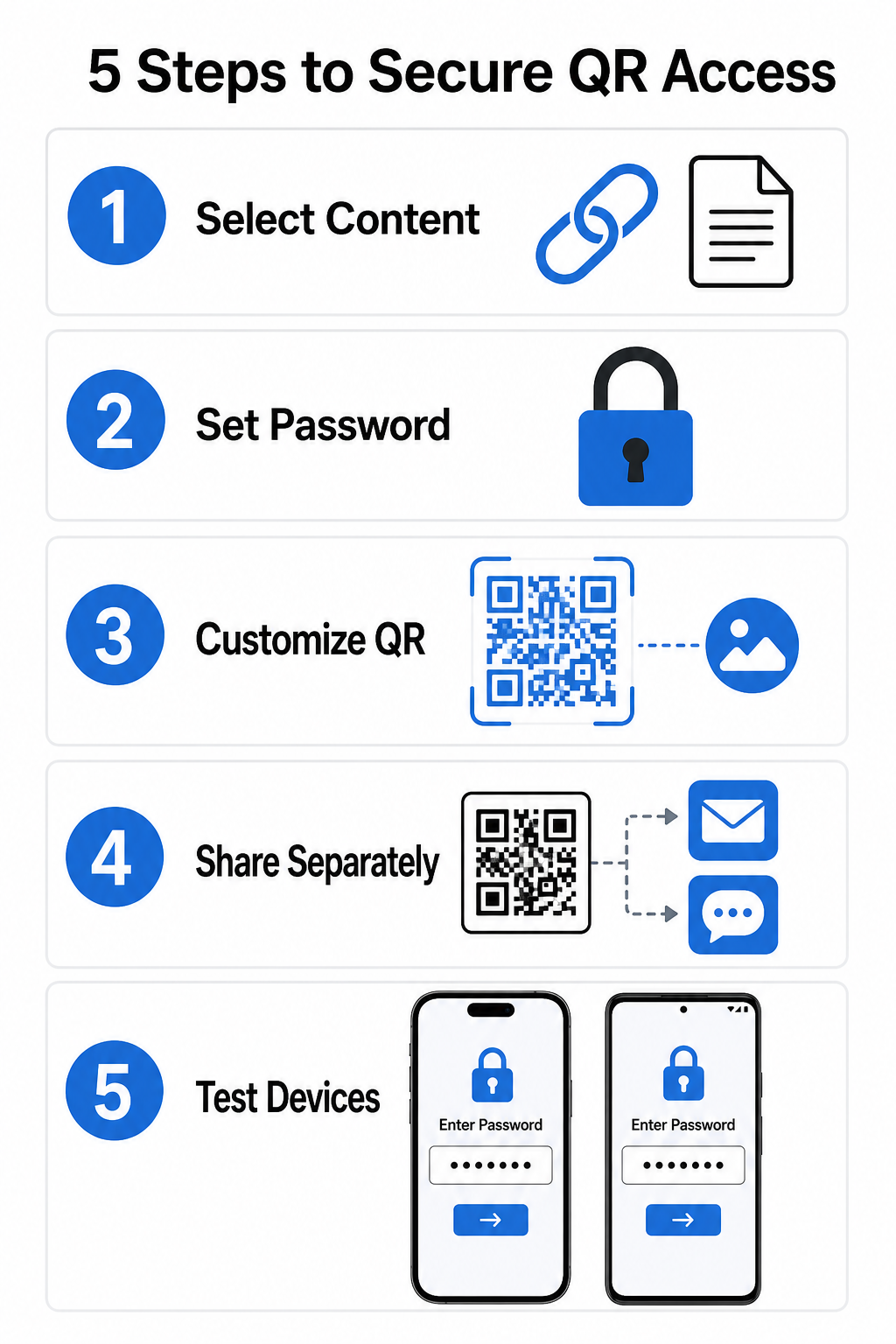
- Valitse sisältötyyppisi: Valitse jaettava muoto, kuten verkkosivuston URL-osoite käyttämällä linkin QR-koodigeneraattori tai tiedostoa.
- Määritä pääsyn suojaus: Ota salasanavaatimukset käyttöön dynaamisessa hallintapaneelissasi tai käytä salasanasuojausta suoraan kohdetiedostoosi ennen lataamista.
- Mukauta visuaalista suunnittelua: Lisää brändivärejä, mukautettuja kehyksiä ja virallinen logo käyttämällä joustavaa QR-koodigeneraattori rakentaaksesi käyttäjien luottamusta ja vähentääksesi petosriskejä.
- Jaa tunnistetiedot erikseen: Jaa salasana valtuutettujen käyttäjien kanssa erillisen kanavan kautta, kuten sähköpostivahvistuksen, tervetuliaispakettien tai suorien viestien kautta, sen sijaan, että sijoitat sen koodin lähelle.
- Testaa useilla laitteilla: Skannaa koodi sekä iOS- että Android-kamerosovelluksilla varmistaaksesi, että salasanakehote käynnistyy oikein ennen tulostamista tai julkaisemista.
Parhaat käytännöt turvalliseen QR-koodin käyttöönottoon
Pääsyn suojauksen käyttöönotto edellyttää kyberturvallisuusstandardien noudattamista tietovuotojen ja luvattomien skannausten estämiseksi:
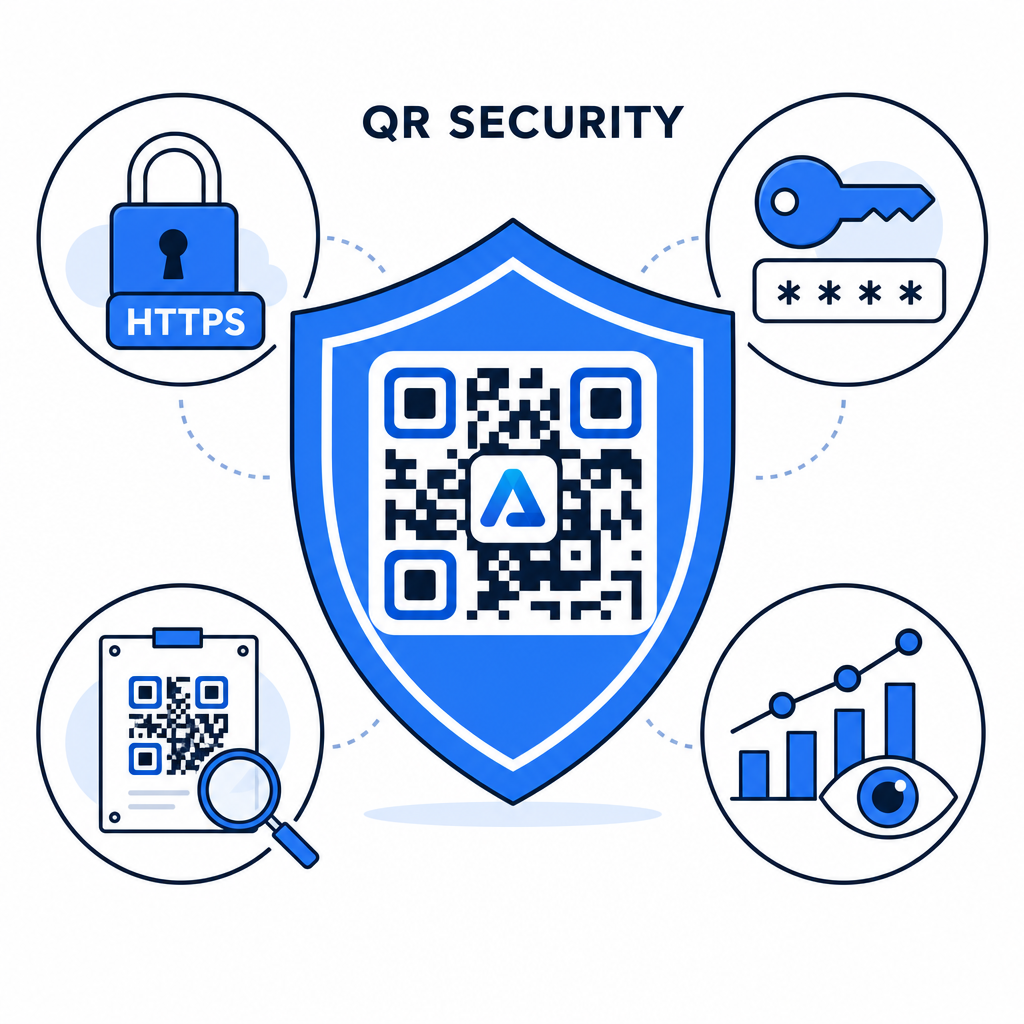
- Käytä vahvoja salasanastandardeja: Vaadi salasanojen olevan vähintään 15 merkkiä pitkiä yksikertaisessa todennuksessa estääksesi automaattiset arvausyritykset.
- Vaadi HTTPS-päätepisteitä: Varmista, että kohdepalvelin käyttää SSL-salausta tiedon suojaamiseen siirron aikana. Voit lukea lisää aiheesta miten salaus suojaa QR-koodidataa syvällisempien tietoturvatietojen saamiseksi.
- Tarkasta fyysiset näytöt säännöllisesti: Tarkkaile säännöllisesti julkisilla alueilla olevia painettuja kosketuspisteitä varmistaaksesi, ettei fyysisiä koodeja ole muutettu tai peitetty luvattomilla peittokuvilla, lieventäen avain QR-koodien tietosuojariskit.
- Seuraa pääsyanalytiikkaa: Seuraa skannausvälejä, sijainteja ja käyttäjäagenttitietoja hallintapaneelissasi tunnistaaksesi epäilyttävät liikennemallit tai luvattomat pääsyyritykset.
Hallinnoi ja suojaa tiedostojasi vaivattomasti Muunna luottamukselliset käsikirjasi ja asiakirjasi seurattaviksi, turvallisiksi digitaalisiksi linkeiksi meidän PDF QR-koodi generaattori.
Suojaa kosketuspisteesi salasanapääsynhallinnalla
Fyysisten QR-kosketuspisteiden yhdistäminen digitaalisiin pääsynhallintoihin tarjoaa saumattoman käyttökokemuksen samalla kun se pitää omat asiakirjat, sisäiset lomakkeet ja eksklusiiviset markkinointimateriaalit yksityisinä. Ottamalla käyttöön dynaamisia koodeja salasanakehotteilla, salatuilla päätepisteillä ja ennakoivalla seurannalla säilytät täydellisen hallinnan jaetusta sisällöstäsi.
Tutustu kattavaan oppaaseemme aiheesta turvalliset QR-koodin luomisen parhaat käytännöt toteuttaaksesi päästä päähän -turvallisuuden painetuissa ja digitaalisissa kosketuspisteissäsi jo tänään.
Usein kysytyt kysymykset
Ei. Staattiset QR-koodit koodaavat kiinteän tiedon suoraan kuvioon eivätkä voi käynnistää salasanakehotteita. Pääsyn rajoittamiseksi käytä dynaamista QR-koodialustaa tai suojaa kohdesivu tai tiedosto itse.
Lähetä salasanat erillisen viestintäkanavan kautta, kuten sähköpostivahvistus, tekstiviesti, tapahtumapassi tai turvallinen perehdytyspaketti. Älä koskaan tulosta salasanaa fyysisen QR-koodin viereen.
Dynaamisten QR-koodien avulla voit päivittää kohdelinkkejä, tietoturva-asetuksia tai salasanan käyttöoikeussääntöjä suoraan hallintapaneelistasi milloin tahansa, ilman että sinun tarvitsee tulostaa fyysisiä materiaaleja uudelleen.