Ви ділитеся конфіденційними документами або ексклюзивним контентом за допомогою QR-кодів, але турбуєтеся про несанкціонований доступ? Коли фізичні коди з'являються в громадських місцях, будь-хто може їх відсканувати, щоб переглянути конфіденційні файли або внутрішні цільові сторінки. Додавання захисту паролем до ваших посилань призначення та файлів гарантує доступ до вашого контенту лише авторизованим користувачам.
Чи може сам QR-код бути захищеним паролем?
Стандартні статичні QR-коди не можуть зберігати паролі всередині своїх піксельних шаблонів. Статичний код просто перетворює звичайний текст або фіксоване веб-посилання на графіку, яку можна сканувати, що означає, що будь-який пристрій для читання смартфонів декодує точно ті ж дані кінцевої точки відразу після сканування.
Для забезпечення безпечного доступу захист паролем має відбуватися або на рівні перенаправлення, або на рівні цільового призначення. Цього можна досягти двома основними підходами:
- Захист на рівні перенаправлення: Використання Динамічний QR код: генератор для перехоплення сканування та запиту автентифікації за паролем перед перенаправленням відвідувачів до цільового ресурсу.
- Захист на рівні призначення: Захист хост-середовища або безпосередній захист файлу (наприклад, створення документа, захищеного паролем) перед його прив'язкою.
Обидва методи запобігають перегляду конфіденційних ресурсів неавторизованими користувачами, навіть якщо ваш фізичний QR-код відображається в громадському місці.
Основні методи захисту вмісту QR-коду
Вибір правильної реалізації залежить від того, чи захищаєте ви посилання на веб-сайт, внутрішній документ або тимчасовий вміст події.
Контроль доступу до динамічного QR-коду
Динамічні QR-коди покладаються на коротке посилання для перенаправлення, а не на жорстке кодування остаточної URL-адреси в зображенні. Це коротке посилання дозволяє керувати налаштуваннями безпеки на платформі, що розміщує код. Ви можете включити вимоги до пароля, оновити посилання призначення в будь-який час або повністю відкликати доступ без повторного друку ваших фізичних матеріалів.
Завантаження файлів, захищених паролем
Якщо ви надсилаєте файли безпосередньо, ви можете захистити файл паролем перед перетворенням його на графіку, яку можна сканувати. Використовуючи QR-код у форматі PDF, ви можете завантажити зашифрований PDF або розмістити свій документ на захищеній платформі, що вимагає автентифікації. Користувачі, які сканують код, потрапляють до переглядача документів, але повинні ввести правильні облікові дані, щоб відкрити та прочитати файл.
Терміни дії та обмеження використання
Контроль доступу виходить за межі паролів. Ви можете поєднати вимоги до облікових даних з правилами, такими як закінчення терміну дії за календарем або максимальна кількість сканувань. Встановлення цих параметрів гарантує, що після завершення пропозиції або внутрішньої зустрічі посилання автоматично деактивується. Дізнайтеся більше про керування життєвими циклами контенту в нашому посібнику про те, як встановити терміни дії для QR-кодів.
Захистіть свій цифровий контент сьогодні Захистіть свої конфіденційні файли та обмежені посилання за допомогою гнучкого контролю доступу, створюючи коди за допомогою нашого Динамічний QR код: генератор.
Як налаштувати QR-код, захищений паролем, крок за кроком
Виконайте ці кроки, щоб створити потік доступу, захищений паролем, для ваших бізнес- або маркетингових матеріалів:
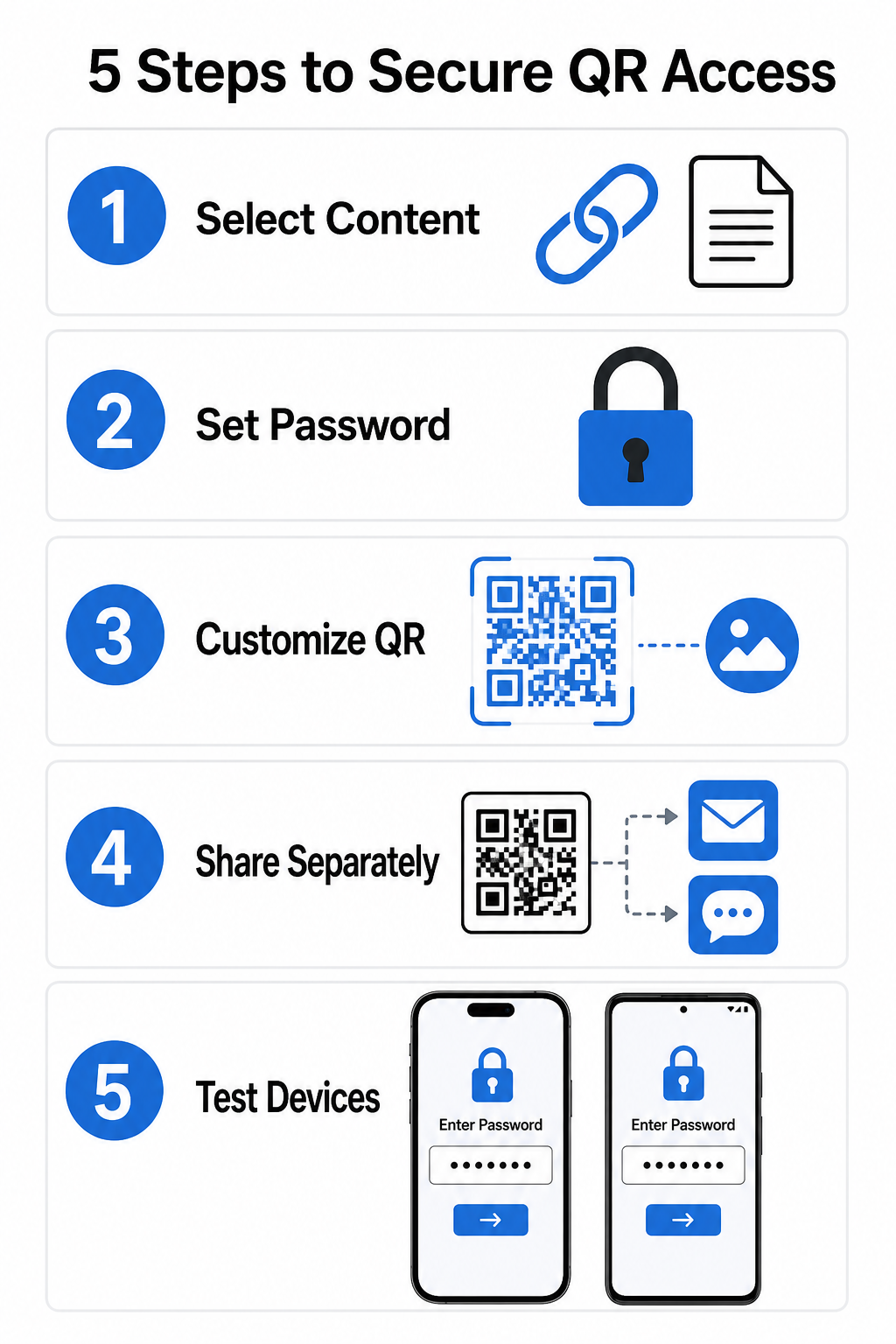
- Виберіть тип контенту: Виберіть формат, який ви хочете надати, наприклад URL-адресу веб-сайту, використовуючи генератор QR-кодів посилань або файл документа.
- Налаштуйте безпеку доступу: Увімкніть вимоги до пароля на вашій динамічній панелі керування або застосуйте захист паролем безпосередньо до цільового файлу перед завантаженням.
- Налаштуйте візуальний дизайн: Додайте фірмові кольори, власні рамки та офіційний логотип, використовуючи гнучкий генератор QR-кодів , щоб побудувати довіру користувачів та зменшити ризики шахрайства.
- Розповсюджуйте облікові дані окремо: Поділіться паролем з авторизованими користувачами через окремий канал, такий як підтвердження електронною поштою, вітальні пакети або прямі повідомлення, замість того, щоб розміщувати його поруч із кодом.
- Протестуйте на кількох пристроях: Відскануйте код за допомогою програм камери як iOS, так і Android, щоб переконатися, що запит пароля спрацьовує правильно перед друком або публікацією.
Рекомендації щодо безпечного розгортання QR-кодів
Впровадження захисту доступу вимагає дотримання стандартів кібербезпеки для запобігання витокам даних та несанкціонованим скануванням:
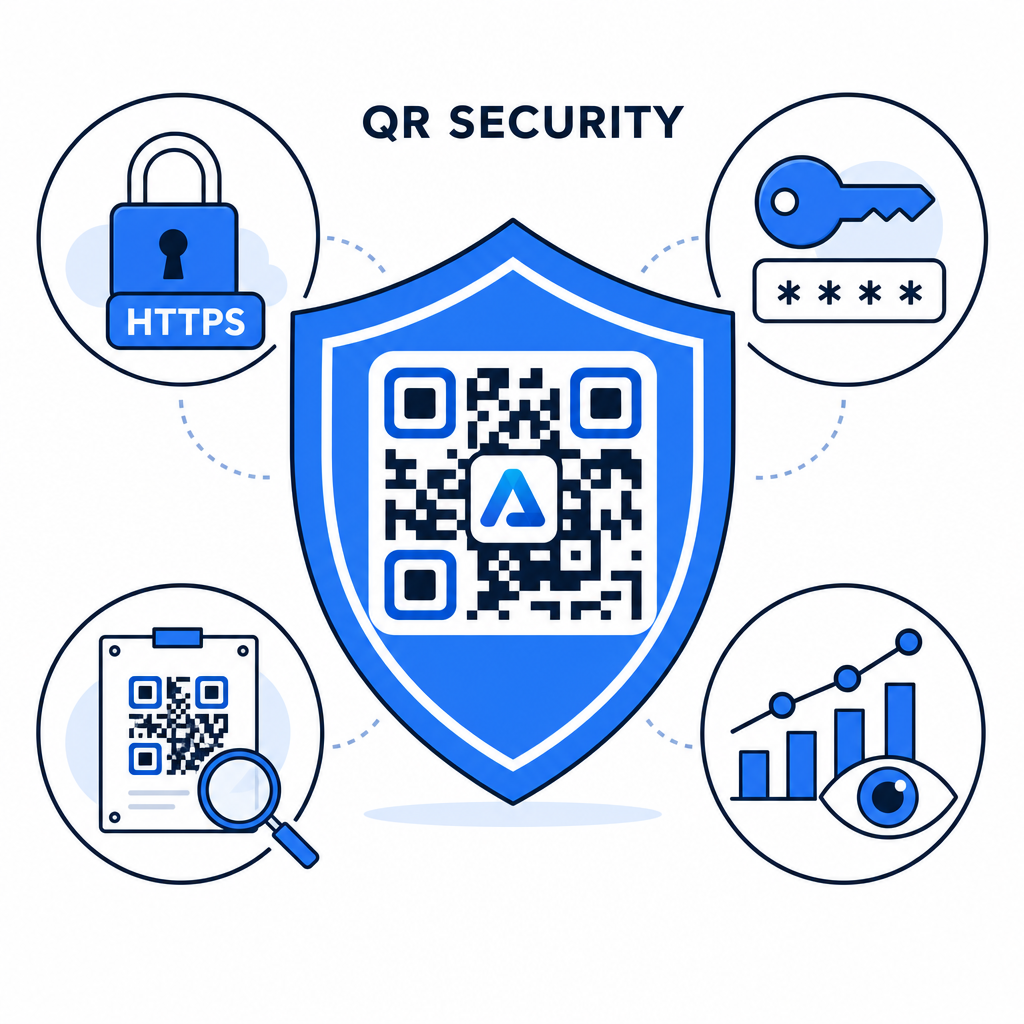
- Використовуйте надійні стандарти паролів: Вимагайте, щоб паролі мали щонайменше 15 символів для однофакторного захисту, щоб запобігти автоматичним спробам відгадування.
- Вимагайте кінцевих точок HTTPS: Переконайтеся, що сервер призначення використовує SSL-шифрування для захисту даних під час передачі. Ви можете дізнатися більше про те, як шифрування захищає дані QR-коду для глибшого розуміння безпеки.
- Регулярно перевіряйте фізичні дисплеї: Регулярно відстежуйте друковані точки контакту в громадських місцях, щоб переконатися, що фізичні коди не були змінені або прикриті несанкціонованими накладками, що зменшує ключові ризики конфіденційності QR-кодів.
- Моніторинг аналітики доступу: Відстежуйте частоту сканувань, місцезнаходження та дані агента користувача на своїй панелі керування, щоб виявити підозрілі шаблони трафіку або спроби несанкціонованого доступу.
Керуйте та Захищайте Свої Файли Без Зусиль Перетворіть свої конфіденційні посібники та документи на цифрові посилання, які можна відстежувати та захищати, за допомогою наших QR-код у форматі PDF.
Захистіть Свої Точки Контакту За Допомогою Керування Доступом За Паролем
Поєднання фізичних QR-точок контакту з цифровими елементами керування доступом забезпечує безперебійний користувацький досвід, зберігаючи конфіденційними власні документи, внутрішні форми та ексклюзивні маркетингові матеріали. Розгортаючи динамічні коди з запитами пароля, зашифрованими кінцевими точками та проактивним моніторингом, ви зберігаєте повний контроль над спільним контентом.
Ознайомтеся з нашим докладним посібником щодо безпечні найкращі практики генерації QR-кодів щоб сьогодні впровадити наскрізну безпеку для ваших друкованих та цифрових точок контакту.
Поширені запитання
Ні. Статичні QR-коди кодують фіксовані дані безпосередньо в шаблон і не можуть викликати запити пароля. Щоб обмежити доступ, використовуйте платформу динамічних QR-кодів або захистіть саму цільову сторінку чи файл.
Надсилайте паролі через окремий канал зв'язку, такий як підтвердження електронною поштою, SMS, бейдж події або захищений пакет для адаптації. Ніколи не друкуйте пароль поруч із фізичним QR-кодом.
Динамічні QR-коди дозволяють вам оновлювати цільові посилання, налаштування безпеки або правила доступу за паролем безпосередньо з вашої інформаційної панелі в будь-який час без повторного друку фізичних матеріалів.