Vai jums ir grūtības panākt, lai skatītāji iesaistītos jūsu video saturā vairāk nekā tikai nospiežot atskaņošanas pogu? Pasīva skatīšanās neļauj klientiem spert nākamo soli, kā rezultātā tiek palaistas garām konversijas iespējas. Šajā ceļvedī paskaidrots, kā izmantot QR kodus, lai uzsāktu interaktīvas video pieredzes, kas veicina izmērāmu iesaisti un augstāku klikšķu skaitu.
Fizisko telpu un digitālās mijiedarbības savienošana
Tradicionālais video mārketings bieži darbojas kā vienvirziena iela, kurā auditorija skatās bez skaidras mijiedarbības iespējas. Interaktīvie video maina šo dinamiku, ļaujot lietotājiem noklikšķināt, iepirkties vai izvēlēties savu stāsta ceļu tieši atskaņotājā. Statistika liecina, ka šie interaktīvie formāti var sasniegt līdz pat 10 reizes augstāku klikšķu skaitu nekā standarta, lineārie video.
Šo augstas veiktspējas digitālo pieredzi savienošanai ar fiziskiem mārketinga materiāliem ir nepieciešams uzticams tilts. Tā kā līdz 2026. gadam vairāk nekā 102 miljoni amerikāņu ir paredzēti skenēt QR kodus, šie rīki ir kļuvuši par standartu, lai savienotu bezsaistes auditoriju ar tiešsaistes saturu. Tas ir īpaši svarīgi jaunākām demogrāfiskām grupām, jo aptuveni puse tūkstošgades un Z paaudzes patērētāju tagad izmanto QR kodus vismaz reizi nedēļā.
Interaktīvo video QR kodu stratēģiskās izmantošanas gadījumi
QR kodu ieviešana video saturam ietver vairāk nekā tikai saiti uz atskaņošanas pogu. Mārketinga speciālistiem mērķis ir radīt aizraujošu pieredzi, kas šķiet personalizēta un reaģē uz lietotāja tūlītējo vidi.
- Iepērkamu produktu demonstrācijas: Novietojiet kodu uz produkta iepakojuma, kas palaiž video, kurā lietotāji var pieskarties ekrānā redzamajiem priekšmetiem, lai tos pievienotu digitālajam grozam.
- Instrukciju iepazīstināšana: Iekļaujiet kodus fiziskajās montāžas rokasgrāmatās, lai aktivizētu soli pa solim video pamācības, kas samazina klientu neapmierinātību un nepieciešamību pēc atbalsta pieteikumiem.
- Zaru stāsta mārketings: palaidiet “izvēlies-savu-piedāvājumu” stila videoklipu no skrejlapas vai reklāmas stenda, lai saglabātu lietotāju iesaistīšanos ilgāk, tiem pētot dažādus iznākumus.
- Virtuālās tūres un nekustamais īpašums: Klātienes norādes var palaist 360 grādu interaktīvas tūres vai video apskatus, ļaujot potenciālajiem pircējiem nekavējoties redzēt īpašuma potenciālu.
Izveidojiet savu pirmo video QR kodu Gatavs pārvērst savus statiskos mārketinga materiālus ieskaujošā video pieredzē? Izmantojiet Video QR koda ģenerators lai augšupielādētu un kopīgotu savu saturu dažu sekunžu laikā.
Tehniskie standarti uzticamai skenēšanai
Lai nodrošinātu, ka jūsu interaktīvā video pieredze veiksmīgi tiek palaista katru reizi, jums jāievēro noteikti tehniskie standarti. Kods, kas netiek skenēts vai ved uz nedarbojošos saiti, nekavējoties traucēs lietotāja pieredzi un samazinās jūsu kampaņas IA.
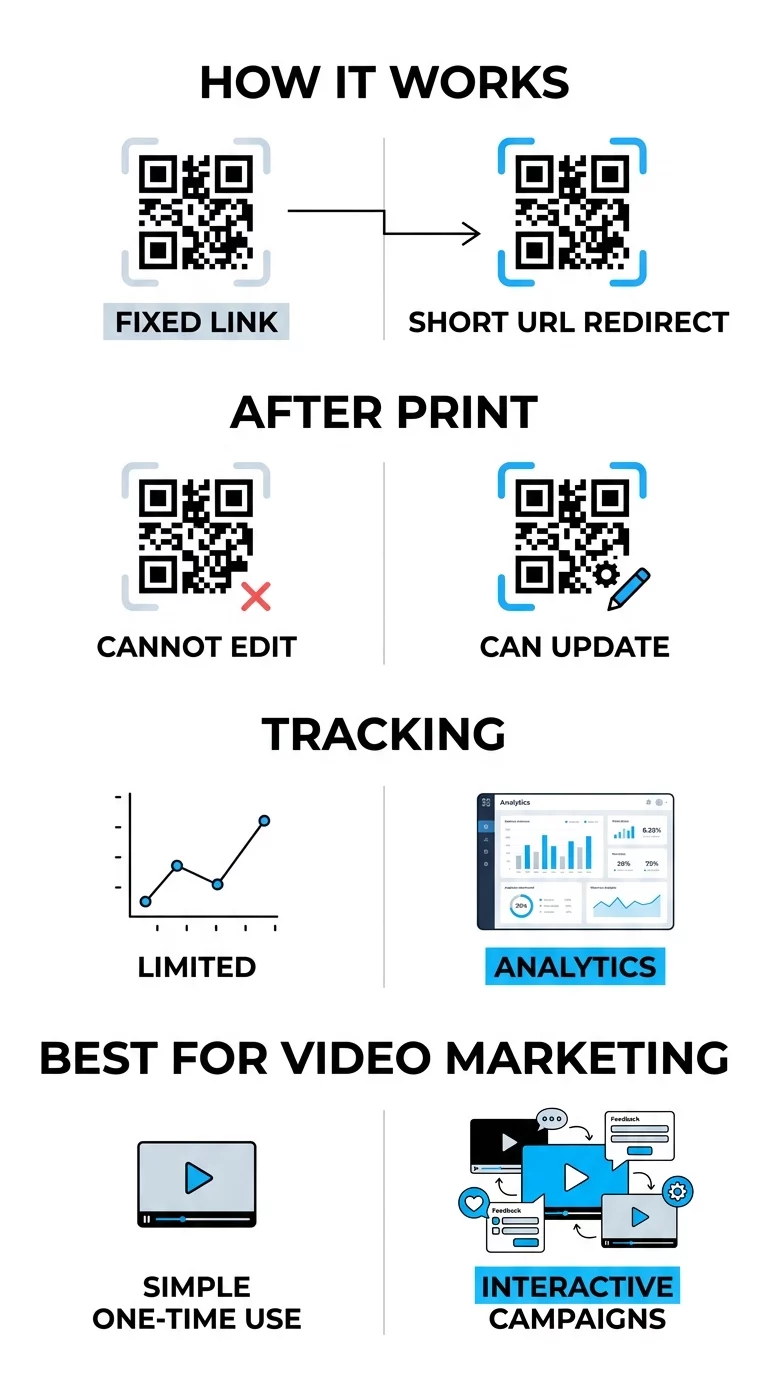
Uzsākot interaktīvas kampaņas, ir būtiski izmantot dinamiskie QR kodi nevis statiskos. Statiskie kodi glabā datus tieši modelī, padarot tos pastāvīgus un neizsekojamus. Turpretim dinamiskie kodi izmanto īsu pārvirzīšanas URL, kas ļauj atjaunināt galamērķa saiti vai interaktīvo galveno lapu pat pēc materiālu izdrukāšanas.
Augsts kontrasts ir arī skenējamības pamats. Iztēlojieties skeneri kā ātrgaitas lasītāju, kam nepieciešama skaidra atšķirība starp kodu un tā fonu; tumšākas krāsas absorbē gaismu, bet gaišākas krāsas to atstaro. Tumša uz gaiša krāsu shēmas uzturēšana nodrošina, ka kameras sensors var precīzi atšķirt modeli. Turklāt galvenajai lapai jābūt piemērotai mobilajām ierīcēm, jo gandrīz visas QR skenēšanas notiek viedtālruņos.
Veiktspējas un iesaistes rādītāju izsekošana
Viena no lielākajām QR kodu izmantošanas priekšrocībām interaktīvam video ir spēja vākt detalizētus datus. By QR kodu skenēšanas izsekošana reāllaikā, jūs varat precīzi redzēt, kā jūsu auditorija mijiedarbojas ar jūsu saturu, un attiecīgi pielāgot savu stratēģiju.
- Kopējās pret unikālajām skenēšanām: Šis rādītājs palīdz noteikt jūsu kampaņas kopējo sasniedzamību un identificēt, cik daudz individuālu lietotāju atgriežas pie satura.
- Ģeogrāfiskie dati: Nosakiet, kuras fiziskās atrašanās vietas vai konkrēti reģioni ģenerē visvairāk video skatījumu, lai labāk sadalītu savu mārketinga budžetu.
- Ierīce un operētājsistēma: Izpratne par to, vai jūsu auditorija izmanto iOS vai Android, palīdz optimizēt video atskaņotāja interaktīvos elementus.
- Laika tendences: Pārraugiet, kad jūsu auditorija ir visaktīvākā, lai efektīvāk plānotu nākotnes palaišanas vai reklāmas kampaņas.
Pārraugiet savas kampaņas veiktspēju Vai vēlaties redzēt, kur tieši un kad jūsu klienti skenē jūsu video materiālus? Izmantojiet QR kodu ģenerators lai izveidotu izsekojamus kodus un piekļūtu pilnam veiktspējas informācijas panelim.
Izvietojuma stratēģijas maksimālai redzamībai
Fiziskā jūsu QR koda izvietošana ir tikpat svarīga kā digitālais saturs, ko tas aktivizē. Ja lietotājs neredz kodu vai nesaprot skenēšanas priekšrocības, interaktīvā pieredze paliks neizmantota.
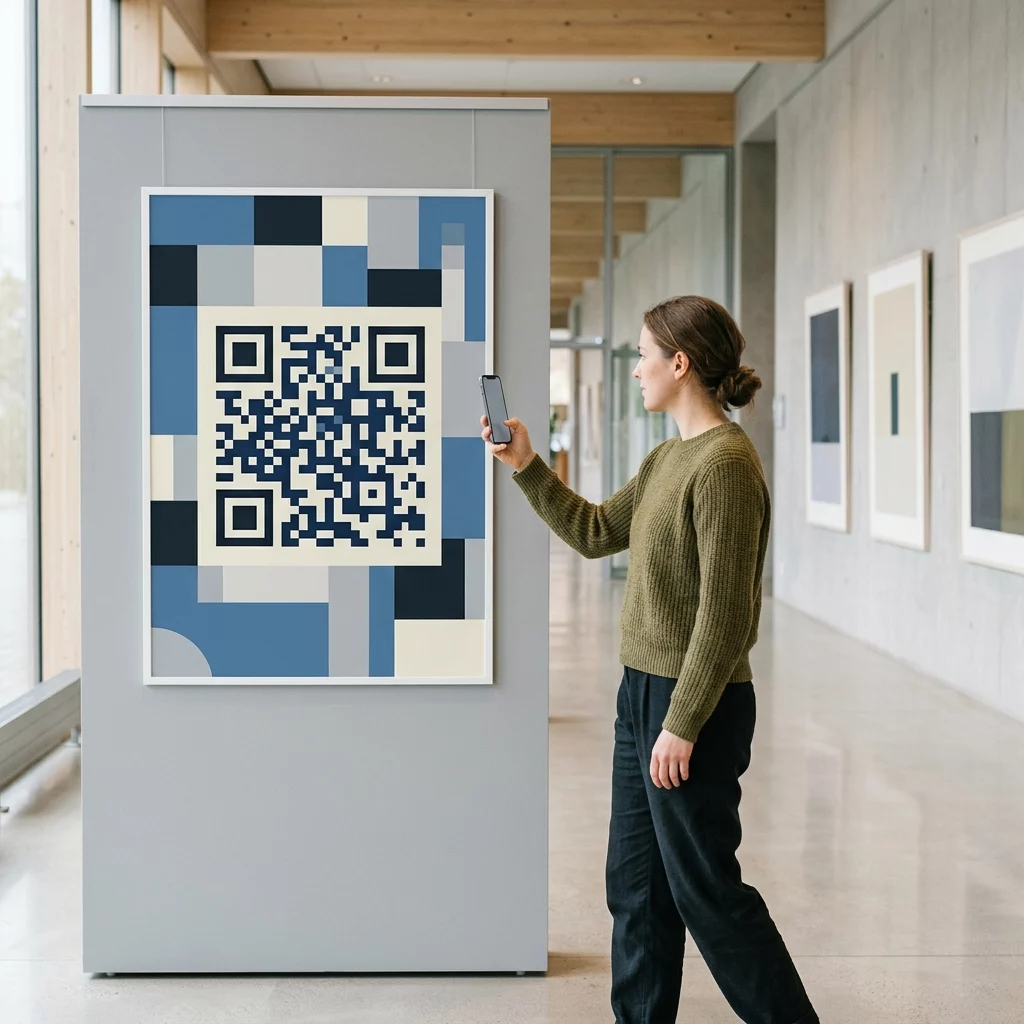
Novietojiet kodus acu līmenī, parasti starp 3,5 un 5,5 pēdām no zemes, lai nodrošinātu, ka tie atrodas lietotāja dabiskajā redzes laukā. Digitālajos displejos vai prezentāciju slaidiem nodrošiniet, ka kods paliek redzams vismaz 15 sekundes, lai skatītājiem būtu laiks atvērt savas kameras. Jums vajadzētu iekļaut arī skaidru aicinājumu uz darbību (CTA), piemēram, “Skenējiet, lai redzētu to darbībā”, kas nodrošina lietotājam iemeslu iesaistīties. Koda pielāgošana ar jūsu zīmola krāsām un logotipu var vēl vairāk palielināt uzticību un atpazīstamību, padarot lietotājus biežāk skenējošus.
Biežāk uzdotie jautājumi
Jā, ja vien izmantojat dinamisku QR kodu. Šie kodi ļauj jums jebkurā laikā atjaunināt mērķa URL vai saturu, izmantojot centrālo vadības paneli, bez nepieciešamības pārdrukāt jūsu materiālus.
Tas ir atkarīgs no ģeneratora un lietotāja ierīces. Specializēta YouTube QR koda ģeneratora izmantošana nodrošina viedas pāradresācijas, kas var tieši aktivizēt YouTube lietotni, nodrošinot vienmērīgāku skatīšanās pieredzi.
Jums vajadzētu uzturēt augstu kontrasta attiecību un izmantot matētus apdares materiālus drukātiem materiāliem, lai novērstu atspīdumu. Vienmēr testējiet kodu vairākās ierīcēs un dažādos apgaismojuma apstākļos pirms pilnīgas izplatīšanas.
Lai uzsāktu veiksmīgu interaktīvu video kampaņu, jums jāizvēlas pareizais saturs un pārvaldības platforma, kas nodrošina izsekošanu un elastību, kas nepieciešama optimizācijai. Ievērojot šīs tehniskās un stratēģiskās vadlīnijas, jūs varat pārvērst pasīvus skatītājus aktīvos dalībniekos. Apmeklējiet mūsu ceļvedi par kā izveidot QR kodus videoklipiem lai sāktu veidot savu pirmo interaktīvo pieredzi jau šodien.