ホーム > ブログ > How Long Should You Retain QR Code Analytics Data?
QR analytics review

How Long Should You Retain QR Code Analytics Data?

Determine the right retention period for QR code analytics data. Balance campaign reporting needs with privacy compliance under GDPR, CCPA, and industry rules.
Updated on 6月 10, 2026
目次

How long should you hold onto QR code scan data before it becomes a liability instead of an asset? Keeping data too long exposes you to compliance risk; deleting it too soon leaves gaps in your campaign reporting. This guide breaks down the key factors that determine the right retention period for your analytics data.

What QR Code Analytics Data Actually Gets Collected

Before you can set a retention period, you need to know what you’re retaining. When someone scans a ダイナミックQRコード, the scan routes through a tracking server before sending the user to the final destination. That process captures a range of data points, which may include:

  • Scan timestamps (date and time of each scan)
  • Geographic location (country, region, city – derived from IP address or GPS with consent)
  • Device type and operating system
  • Total scan count and unique scan count
  • Referral source or campaign identifier

Static QR codes, by contrast, embed data directly into the code pattern and collect nothing – there is no server redirect, so no analytics data is generated at all. If tracking matters to your campaign, dynamic QR codes are the practical starting point.

The sensitivity of the data you collect directly influences how long you should keep it. Location data tied to an individual scan, for example, is more sensitive than an aggregated weekly scan count, and the two should be governed by different retention rules.

The Core Principle: Keep Data Only as Long as Necessary

No single regulation sets a universal number of days or years for analytics data retention. Instead, U.S. privacy guidance – from the FTC, CCPA/CPRA, and sector-specific rules – converges on a common standard: retain personal data only as long as is reasonably necessary for the purpose for which it was collected, then delete or securely destroy it.

The FTC has reinforced this in enforcement actions, requiring companies to implement retention policies that “limit retention of personal data to the shortest time necessary to fulfill the purposes for which it was collected.” Similarly, the CPRA requires businesses to disclose their retention periods at or before the point of data collection and prohibits retaining personal information longer than reasonably necessary for the disclosed purpose.

In practice, this means your retention period is not an arbitrary number – it needs to be justified by a documented business purpose.

Track Your QR Code Campaigns in Real Time Create dynamic QR codes with built-in analytics and manage retention settings from one dashboard. Get started with the ダイナミックQRコードジェネレーター.

Factors That Determine Your Retention Period

Your Reporting and Campaign Cycle

The most practical anchor for a retention period is your actual reporting cadence. Ask yourself: how far back do you regularly need to pull scan data to make a decision?

For most marketing campaigns, a 30- to 90-day window covers the active phase of a campaign. If you run quarterly reviews, you need at least 90 days of data. Annual reporting cycles or seasonal comparison analysis may justify retaining scan-level data for 12 to 14 months.

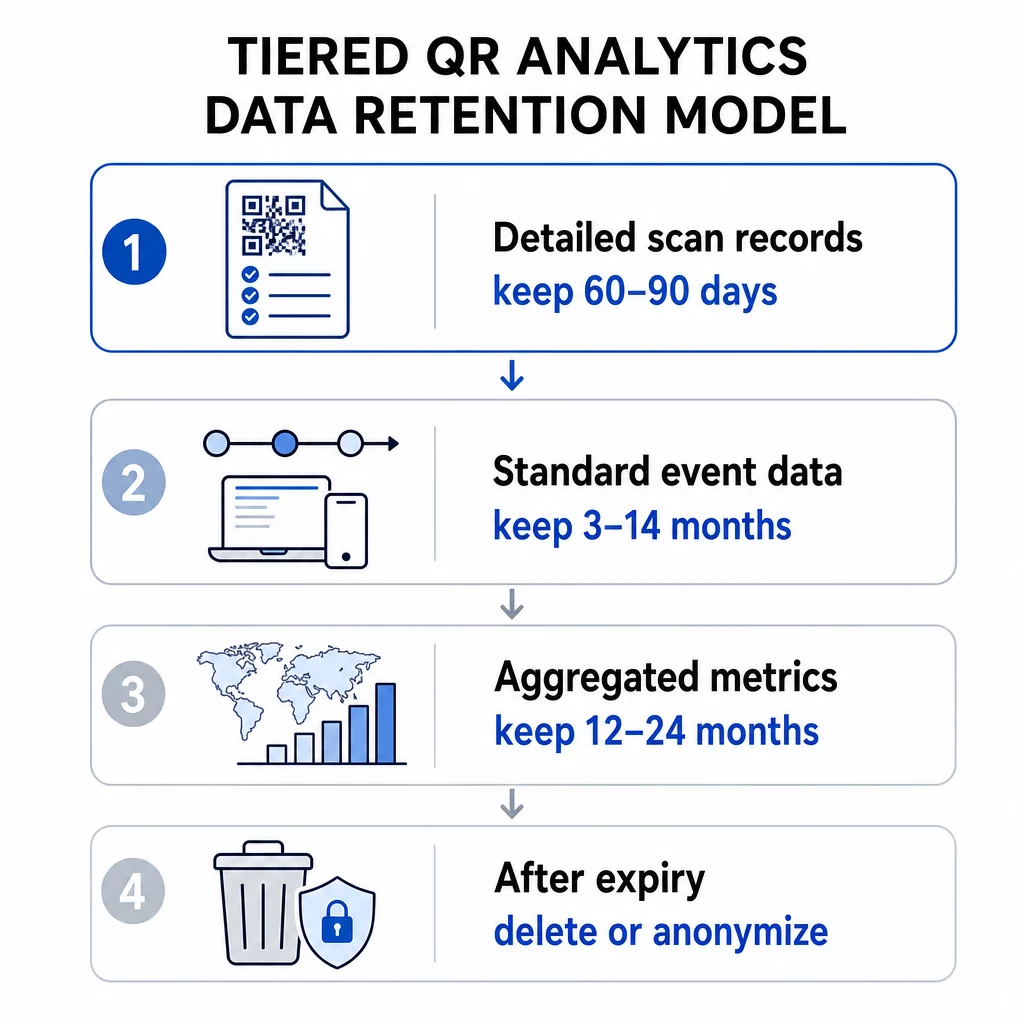
Aggregated data – total scans per week, scan counts by region – can often be retained longer than individual-level event data, because it carries lower privacy risk. A tiered approach works well here: keep detailed scan records for a shorter window (e.g., 60–90 days) and retain rolled-up metrics for a longer period (e.g., 12–24 months).

QR retention tiers

Your QR Code Platform’s Built-In Limits

Your analytics platform may enforce its own retention ceiling regardless of what your policy says. Platform-level limits are a practical reality to plan around.

For reference, tools like Google Analytics 4 offer user-level and event-level data retention settings of 2 months or 14 months on standard properties, with longer options available on enterprise tiers. Once that window expires, detailed user data is deleted from GA4 servers – standard aggregated reports remain, but exploration-level analysis of older data is no longer possible.

When evaluating QRコードのサブスクリプションプラン, check the scan history window each tier provides. Entry-level plans may offer 60 days of scan history, while higher tiers extend that window. Your plan’s data window becomes the practical upper limit on how far back you can analyze scan behavior.

Legal and Regulatory Requirements

Different industries carry additional retention obligations that override general best practices:

  • ヘルスケア: Organizations subject to HIPAA must implement encryption, access controls, and audit trails. QR codes used for patient-facing services inherit these requirements.
  • Financial services: Regulations like the Gramm-Leach-Bliley Act and PCI DSS require detailed record-keeping of user interactions, including those initiated via QR codes used in transactions or account access.
  • Education: Institutions using QR codes for student services must navigate FERPA requirements, particularly around records tied to identifiable students.
  • Retail and e-commerce: Payment-related QR codes fall under PCI compliance obligations, and consumer protection laws may require retaining certain transaction-related records for audit purposes.

のために GDPR-compliance guidance specific to QR code campaigns, the key obligations are obtaining explicit consent before collecting personal data, publishing a plain-language privacy notice that states your retention period, and honoring deletion requests within required timeframes.

Data Sensitivity and Granularity

Not all QR code analytics data carries the same risk. A country-level scan count is far less sensitive than a precise GPS coordinate tied to a timestamp and device ID. Your retention policy should reflect this distinction.

A workable tiered framework looks like this:

  • Aggregated metrics (total scans, scan-by-region counts): retain for 12–36 months to support trend and seasonal analysis
  • Standard event data (timestamps, device type, OS): retain for 3–14 months depending on reporting needs and platform limits
  • Location data with individual-level granularity (city-level or GPS-based): retain for the shortest defensible window, typically 30–90 days, and only with documented user consent
  • Security and audit logs: typically retained for up to 180 days for incident response purposes

Geolocation analytics for QR codes requires special attention, since IP-based and GPS-based tracking carry different consent obligations and different risk profiles at retention time.

Storage Costs and Operational Efficiency

Retaining data indefinitely is not free. Storing and processing large volumes of historical scan data creates overhead that grows with your campaign scale. Beyond cost, large unmanaged datasets are harder to secure and audit. Archiving older aggregated data – rather than keeping everything in an active query layer – is a practical middle ground between deleting data prematurely and accumulating unnecessary storage costs.

How to Implement a Defensible Retention Policy

Document Your Retention Schedule by Data Type

A single catch-all retention period is harder to defend and harder to enforce. Instead, create a written schedule that lists each category of data you collect, the business purpose for collecting it, the retention period, and the deletion method. This documentation is essential for responding to regulatory audits or user data requests.

Your privacy notice – shown before or at the point of scanning – must reflect these retention periods. Users must be informed of how long their data will be kept before they interact with your QR code.

Automate Deletion

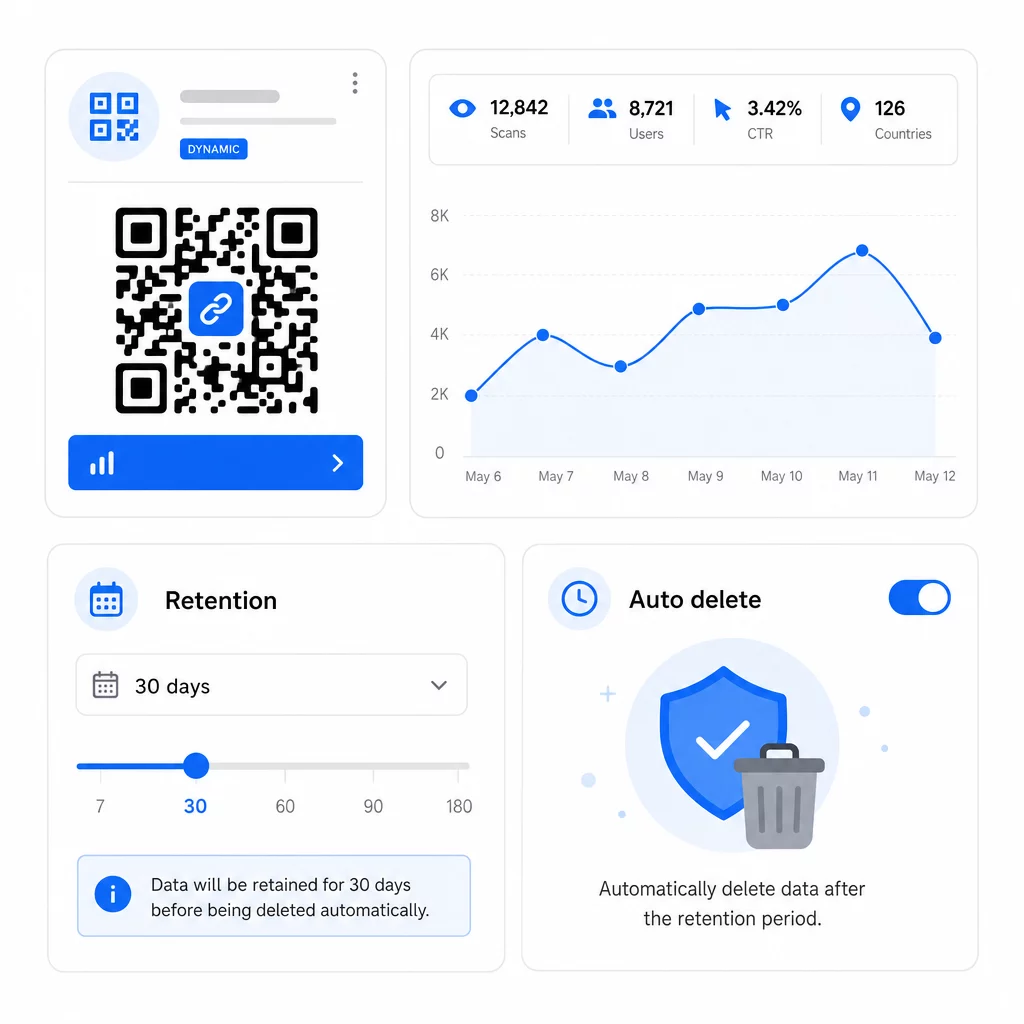
Manual deletion processes create gaps. Configure your analytics platform to automatically delete or anonymize data once the retention window closes. Most enterprise analytics tools support automated retention controls. For your QR code campaigns specifically, use ダイナミックQRコード that let you update tracking settings, redirect rules, and campaign parameters without reprinting physical materials – if your retention needs change, you can adapt without creating a new code.

Automated data deletion

You can also set expiration dates on QR codes to stop collecting new data automatically once a campaign ends, which simplifies downstream retention management.

Honor User Rights Promptly

Under both GDPR and CCPA, users can request access to their data, request deletion, and in some cases request portability. Your retention system must be able to fulfill these requests within required timeframes. This means your data must be organized well enough to locate records associated with a specific user or scan event – another reason to avoid indefinite, unstructured data accumulation.

Audit Your Policy Regularly

Retention requirements shift as regulations evolve and as your campaigns change. Schedule a policy review at least annually to confirm that:

  • Deletion schedules are running as configured
  • No data categories are being retained beyond their stated period
  • Your privacy notices still accurately reflect current practices
  • Any new data types introduced by new campaign formats are covered by the policy

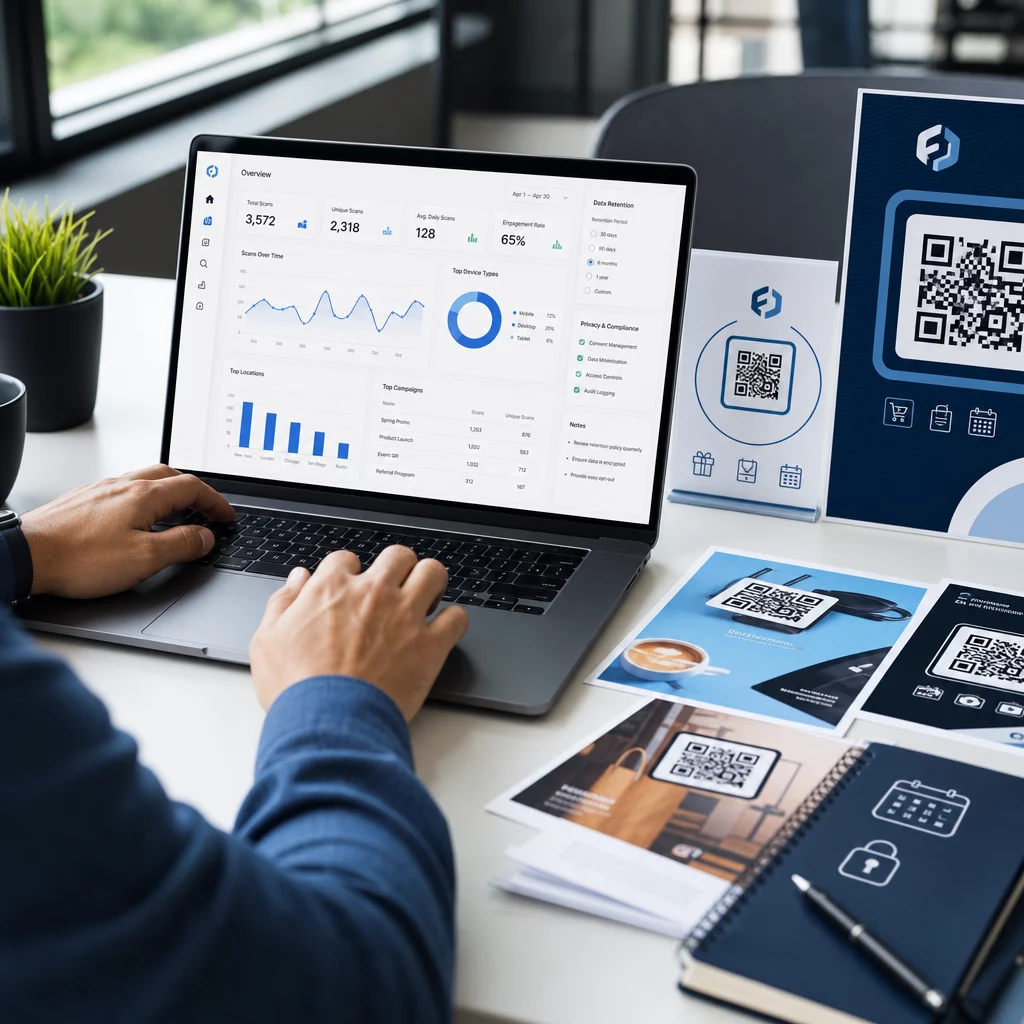
For more on building a complete analytics tracking system, the guide to QR code analytics dashboards covers how to set up tracking parameters and integrate scan data with your broader reporting workflow.

Manage QR Code Data from One Place Pageloot’s platform lets you create, edit, and track dynamic QR codes with real-time analytics – so you have the data you need without accumulating more than you should. Explore the QRコードジェネレーター で始めることができる。

Practical Retention Ranges by Use Case

使用事例 Recommended Data Type Suggested Retention Window
Short-term promotional campaign Event-level scan data 60–90 days after campaign end
Seasonal marketing (annual comparison) Aggregated scan metrics 12–24 months
Ongoing product packaging QR codes Aggregated metrics; event-level for active analysis 14 months rolling
Healthcare or finance QR codes Varies; follow HIPAA/PCI DSS requirements Per sector regulation
Security and audit logs Access and deletion records Up to 180 days

These ranges are starting points, not legal advice. Your specific obligations depend on the nature of the data collected, the jurisdictions where your users are located, and any sector-specific rules that apply to your business.

The bottom line: shorter retention periods reduce compliance exposure, lower storage costs, and build user trust. Keep detailed scan data as long as it actively informs decisions, move to aggregated retention for trend analysis, and delete everything else on a documented schedule you can defend.

よくある質問

Does the type of QR code affect what data is retained?

Yes. Static QR codes do not collect or store any analytics data – there is no server redirect, so no scan information is captured. Dynamic QR codes route scans through a tracking server, which logs data points like timestamps, device type, location, and scan counts. Only dynamic QR codes generate analytics data subject to retention policies.

How does my QR code subscription plan affect data retention?

Platform-level retention windows vary by plan tier. Entry-level subscriptions may provide access to only the last 60 days of scan history, while higher-tier plans extend that window. If your reporting or compliance needs require longer historical access, verify the scan history window before committing to a plan. Your platform’s retention ceiling is a practical constraint regardless of your internal policy.

What should my privacy notice say about data retention?

Under CCPA/CPRA and GDPR principles, your privacy notice must disclose how long each category of personal data will be retained, or explain the criteria used to determine that period. It should be shown at or before the point of data collection – typically before a user interacts with your QR code. Write it in plain language and update it whenever your retention periods change.

著者について

Siim KostabiはPagelootのコンテンツリードです。Pagelootの革新的なQRコード生成サービスについて執筆しています。5年以上にわたるQRコードに関する深い専門知識を持つSiimは、この分野の専門家です。QRテクノロジーを活用してデジタルインタラクションを簡素化・拡張する上で、大きな進歩を遂げています。.

カテゴリー
について詳しくはこちら
✅ QRコードの#1ソリューション

オンラインでQRコードを作成する必要がある場合は QRコードを作る ここで無料で
ページルートは #1のGo-Toソリューション でQRコードを作成してスキャンすることができます。

BL-0170

売上、レビュー、フォロワーを増やすために 20,000 を超えるブランドから信頼されています。

クライアントのロゴ
トップブランドから信頼される
5 のうち 4.8 と評価しました

4.86 / 5つ星評価

ユーゴ・ローラン
ユーゴ・ローラン
レストランオーナー
最も簡単で信頼性の高いQRコードジェネレータです。PDFファイルを即座にアップロードできます。レストランのメニューがデジタル化されました。
ルーカス・ジャンセン
ルーカス・ジャンセン
不動産開発業者
これは優れたツールで、QRコードでちょうど欲しいところに連れて行ってくれます。私たちは位置情報のQRコードしか使っていませんが、とても便利な機能がたくさんあります。
エマ・モレッティ
エマ・モレッティ
小売製品
使いやすいし、早い。素晴らしい機能で、完璧な画像を作成してくれるので、社員は私のvCardをダウンロードすることができます。
ユーゴ・ローラン
ユーゴ・ローラン
レストランオーナー
最も簡単で信頼性の高いQRコードジェネレータです。PDFファイルを即座にアップロードできます。レストランのメニューがデジタル化されました。
ルーカス・ジャンセン
ルーカス・ジャンセン
不動産開発業者
これは優れたツールで、QRコードでちょうど欲しいところに連れて行ってくれます。私たちは位置情報のQRコードしか使っていませんが、とても便利な機能がたくさんあります。
エマ・モレッティ
エマ・モレッティ
小売製品
使いやすいし、早い。素晴らしい機能で、完璧な画像を作成してくれるので、社員は私のvCardをダウンロードすることができます。
QRコードをもっと見る
Scanning food package QR
QRコードの 食品包装
QRコードタイプの選択
使用方法 動的QRコード
QRパンフレットを持つマーケター
どのように QRコードの編集
あらゆるものをデジタル体験に変えよう 3分以内に。

14日間の無料トライアル。

クレジットカードは必要ありません。

初回購入で30%オフ

次のコードを使用してください:

MP3ファイルを共有

PDF QRコードを作成するにはサインアップしてください

必要なものをすべてアップロードして表示する。

  • オーディオファイル
  • ポッドキャスト
  • 音楽

サインアップで14日間無料トライアル。.
トライアル終了後、QRコードは期限切れになります。.

オーディオmp3 QRコードを作成するにはサインアップしてください

フレームでより多くのスキャンを獲得

QRコードにフレームを追加するにはサインアップしてください

コールトゥアクションフレームは、お客様が簡単にQRコードと対話できるようにします。ぜひお試しください。

サインアップで14日間無料トライアル。.
トライアル終了後、QRコードは期限切れになります。.

QRコードにフレームを追加するにはサインアップしてください

シェイプでスタイルを追加

より多くの図形を作成するにはサインアップしてください

QRコードは四角いものである必要はありません。あなたのブランドのイメージに合わせて変えてみてください。

サインアップで14日間無料トライアル。.
トライアル終了後、QRコードは期限切れになります。.

より多くの図形を作成するにはサインアップしてください

QRコードにロゴを追加

QRコードにロゴを追加するにはサインアップしてください

QRコードにロゴやブランドを入れることで、目立たせることができます。

サインアップで14日間無料トライアル。.
トライアル終了後、QRコードは期限切れになります。.

QRコードにロゴを追加するにはサインアップしてください

スマートなApp Storeリダイレクト

アプリストアのQRコードを作成するにはサインアップしてください

スマートなApp StoreのQRコードに、あなたのアプリのリンクを追加します。ユーザーは、デバイスに応じてリダイレクトされます。

サインアップで14日間無料トライアル。.
トライアル終了後、QRコードは期限切れになります。.

アプリストアのQRコードを作成するにはサインアップしてください

QRコードに画像をアップロード

画像QRコードを作成するにはサインアップしてください

画像を簡単に共有できます。どんな画像も、数秒でダイナミックに変化します。

サインアップで14日間無料トライアル。.
トライアル終了後、QRコードは期限切れになります。.

画像QRコードを作成するにはサインアップしてください

PDFファイルを共有

PDF QRコードを作成するにはサインアップしてください

必要なものをすべてアップロードして表示する。

  • メニュー&プライスリスト
  • 指示
  • 任意の書類

サインアップで14日間無料トライアル。.
トライアル終了後、QRコードは期限切れになります。.

PDF QRコードを作成するにはサインアップしてください

印刷せずに後で編集

再度印刷せずにQRコードを編集するにはサインアップしてください

ダイナミックQRコードは、新たにQRコードを印刷することなく、QRコードの内容を変更することができます。

サインアップで14日間無料トライアル。.
トライアル終了後、QRコードは期限切れになります。.

再度印刷せずにQRコードを編集するにはサインアップしてください

いつ?どこで?QRコードのスキャンを追跡

QRコードを追跡するにはサインアップしてください

どのQRコードが最も多くスキャンされ、何が最も顧客を喜ばせているのかを知ることができます。

サインアップで14日間無料トライアル。.
トライアル終了後、QRコードは期限切れになります。.

QRコードを追跡するにはサインアップしてください

印刷可能なファイルが利用可能

PDFやSVGのようなベクターQRコードを作成するにはサインアップしてください

.eps、.pdf、.svg

QRコードをHD解像度でダウンロードしたいですか?すぐに印刷できるベクターまたはピクセル形式を入手しましょう。

サインアップで14日間無料トライアル。.
トライアル終了後、QRコードは期限切れになります。.

PDFやSVGのようなベクターQRコードを作成するにはサインアップしてください

しばらくお待ちください。あなたのQRコードは ロード... ロード...

あなただけのものに

サインアップしてQRコードを後で保存してください

異なる色、ロゴ、コールトゥアクションフレームで素晴らしいQRコードを作成することで、より多くのスキャンを得ることができます。

サインアップで14日間無料トライアル。.
トライアル終了後、QRコードは期限切れになります。.

サインアップしてQRコードを後で保存してください