I tuoi subappaltatori si affidano ancora a telefonate, piani stampati ed elenchi di controllo cartacei per rimanere coordinati? La cattiva comunicazione e i dati di progetto scadenti rappresentano quasi la metà di tutte le rilavorazioni nei cantieri edili statunitensi, costando all'industria miliardi ogni anno. I codici QR ti offrono un modo pratico per colmare queste lacune, mettendo le informazioni giuste nelle mani giuste nel momento in cui sono necessarie.
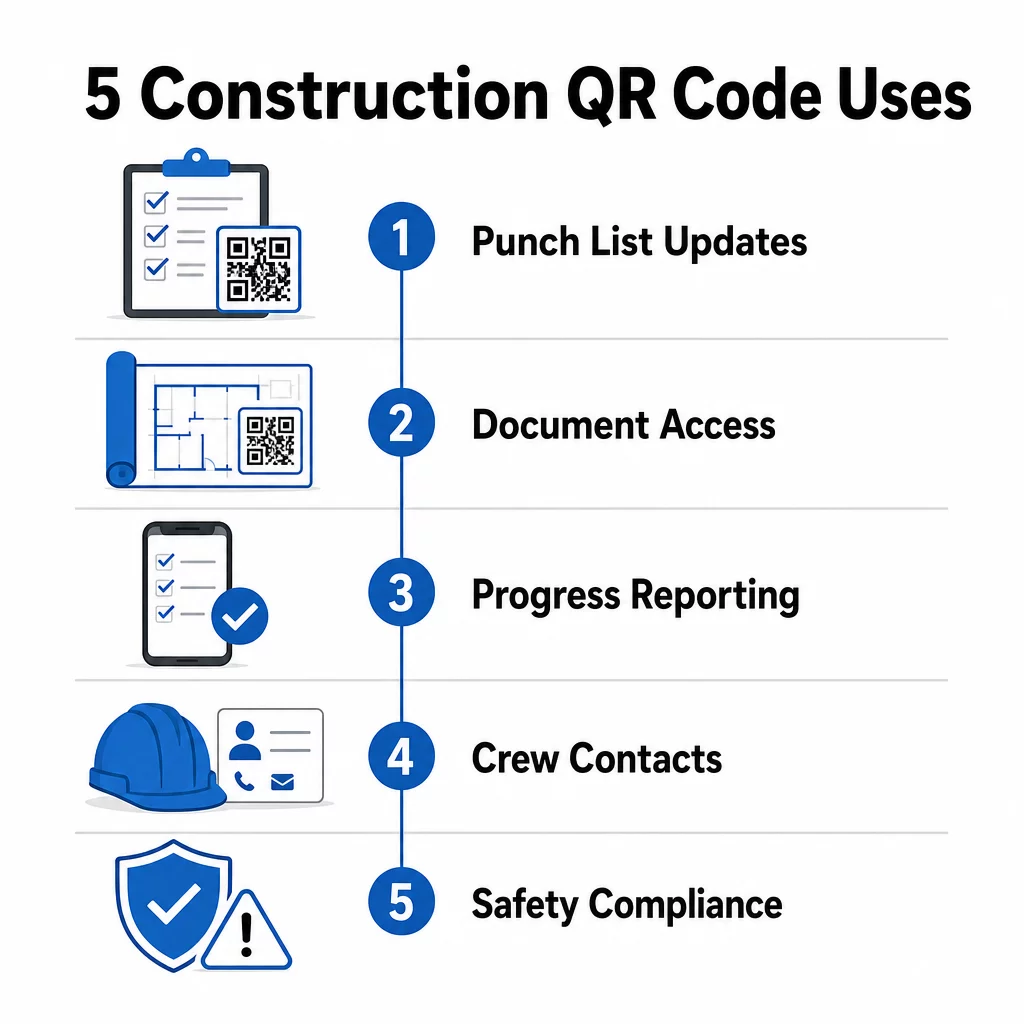
Ecco uno sguardo a cinque modi concreti in cui i project manager edili possono utilizzare i codici QR per migliorare la comunicazione con i subappaltatori, dalla gestione degli elenchi di controllo alla conformità della sicurezza.
Gestione degli elenchi di controllo e aggiornamenti delle attività
Gli elenchi di controllo cartacei rallentano tutti. Gli aggiornamenti impiegano ore per raggiungere il campo, la calligrafia viene interpretata male e gli elementi completati vengono contestati senza alcuna documentazione. Sostituirli con i codici QR crea una linea diretta tra il cantiere e il sistema di gestione del progetto.
Posiziona un codice QR in ogni zona di lavoro o allegalo a un ordine di lavoro. Quando un subappaltatore lo scansiona, vede immediatamente le sue attività assegnate attuali con eventuali revisioni recenti già applicate. Può contrassegnare gli elementi come completati con un timestamp e una foto, segnalare problemi e lasciare note, tutto dal suo telefono, senza chiamare l'ufficio.
Il vantaggio chiave è che i codici QR dinamici si aggiornano automaticamente. Un codice posizionato durante i lavori di fondazione può in seguito visualizzare elenchi di controllo per l'intelaiatura, attività di finitura o requisiti di ispezione finale. Aggiorni il contenuto collegato una volta, e ogni scansione da quel momento in poi riflette il cambiamento – nessuna ristampa richiesta.
Per i subappaltatori che gestiscono più cantieri, i codici QR forniscono anche accesso immediato a istruzioni specifiche del progetto, specifiche dei materiali e requisiti speciali legati a ciascuna zona.
Mantieni gli elenchi di controllo aggiornati senza ristampare Utilizzare il Generatore di QR code dinamici per creare codici che riflettano automaticamente gli ultimi aggiornamenti delle attività, in modo che i tuoi subappaltatori lavorino sempre con informazioni aggiornate.
Condivisione di documenti e accesso istantaneo
I progetti di costruzione generano enormi quantità di documenti – progetti, specifiche, ordini di modifica, sottomissioni e protocolli di sicurezza. Quando i subappaltatori lavorano con disegni obsoleti, si verificano errori. Quando devono rintracciare l'ultima versione, si perde tempo.
Collegare i codici QR a documenti ospitati nel cloud risolve entrambi i problemi. Un subappaltatore scansiona il codice su un piano stampato o un cartello del sito e apre immediatamente la versione più attuale di quel documento sul suo telefono – nessun login, nessuna ricerca, nessuna attesa.
Il sito Generatore di QR code per PDF è particolarmente utile qui. Carica i tuoi manuali di sicurezza, schede tecniche o disegni dettagliati come PDF, genera un codice e posizionalo ovunque sia rilevante – su segnaletica del sito, piani stampati o attrezzature. Quando gli architetti rivedono i disegni o i project manager aggiornano le specifiche, il contenuto collegato si aggiorna istantaneamente. Ogni scansione fornisce l'ultima versione senza toccare il codice fisico.
Puoi anche generare codici QR che si collegano direttamente a Google Docs per documenti che necessitano di frequenti modifiche collaborative, o usa il generatore di codici QR di link per connettere i lavoratori a qualsiasi risorsa ospitata nel cloud.
Per indicazioni sulla conversione di file di qualsiasi tipo in codici scansionabili, consulta la guida da file a codice QR o scopri di più su generazione di codici QR per file cloud.
Monitoraggio e Rapporti sui Progressi
Attendere i controlli settimanali per comprendere i progressi del cantiere è una ricetta per le sorprese. I codici QR consentono ai subappaltatori di inviare aggiornamenti in tempo reale, dal campo, senza app aggiuntive o inserimento manuale dei dati.
Affiggi codici QR nelle zone di lavoro chiave. Quando un subappaltatore ne scansiona uno, può compilare un semplice modulo che copre la percentuale di completamento, l'utilizzo dei materiali o le note sulla qualità. Collega quei moduli usando il Generatore di QR code per Google Form in modo che le risposte confluiscano direttamente in una dashboard condivisa che i supervisori possono monitorare su tutte le attività e le posizioni attive.
La documentazione fotografica si integra naturalmente in questo flusso di lavoro. Un subappaltatore scansiona il codice della zona, carica foto prima e dopo o scatti di avanzamento, e quelle immagini vengono immediatamente allegate al record dell'attività pertinente. Questo crea un registro visivo con data e ora per il controllo qualità, la risoluzione delle controversie e la verifica della fatturazione.
Poiché i codici QR utilizzano collegamenti dinamici, i moduli a cui si connettono possono evolvere con il progetto. Un codice utilizzato durante la preparazione del sito può successivamente indirizzare a moduli di avanzamento dell'intelaiatura, quindi a liste di controllo per l'ispezione dei sistemi – il tutto senza generare un nuovo codice o ristampare nulla.
Tracciamento delle analisi di scansione offre ai project manager un ulteriore livello di supervisione. Puoi vedere quali codici vengono scansionati, con quale frequenza e da quali posizioni – aiutandoti a identificare le zone in cui la segnalazione potrebbe essere in ritardo e ad affrontare i colli di bottiglia prima che influenzino la pianificazione.
Informazioni di Contatto e Coordinamento dell'Equipaggio
In un cantiere affollato, gli elenchi di contatti diventano rapidamente obsoleti. Le persone cambiano ruolo, i numeri di telefono vengono salvati in modo errato e i turni cambiano senza che tutti ricevano la comunicazione. I codici QR rendono il coordinamento dell'equipaggio significativamente più affidabile.
I subappaltatori possono aggiungere codici QR ai loro biglietti da visita o badge identificativi che, una volta scansionati, salvano istantaneamente i loro dettagli di contatto completi – nome, azienda, linea diretta, email e contatto di emergenza – sul telefono dello scanner. Nessun inserimento manuale significa nessun errore di trascrizione.
I codici di contatto dinamici sono particolarmente pratici quando il personale cambia durante un progetto. Aggiorna le informazioni collegate una volta, e chiunque scansioni il codice da quel momento in poi ottiene i dettagli attuali. Per team più grandi, affiggi codici QR in roulotte da cantiere o sale relax che si collegano a strumenti di pianificazione in tempo reale, così i lavoratori vedono sempre il turno attuale, il luogo della riunione o l'assegnazione dell'equipaggio senza aspettare un messaggio di gruppo.
Scopri come QR code per l'edilizia può supportare il coordinamento dell'equipaggio insieme ad altre esigenze di gestione del sito.
Conformità alla Sicurezza e Controllo degli Accessi
Gli standard di costruzione dell'OSHA richiedono ai datori di lavoro di effettuare ispezioni di sicurezza regolari, fornire formazione ai lavoratori e mantenere una documentazione accessibile sulla comunicazione dei pericoli, incluse le Schede di Dati di Sicurezza e i registri di formazione. I sistemi basati su carta rendono questo onere di conformità più difficile del necessario.
I codici QR posizionati agli ingressi del sito o nelle aree di lavoro offrono ai subappaltatori accesso istantaneo ai protocolli di sicurezza attuali pertinenti a quella zona – avvisi di pericolo, DPI richiesti e regole specifiche del sito – senza dover cercare tra raccoglitori o rintracciare un supervisore. Quando le normative OSHA cambiano o le condizioni del sito si modificano, aggiorni il documento collegato una volta e ogni scansione successiva riflette automaticamente le nuove informazioni.
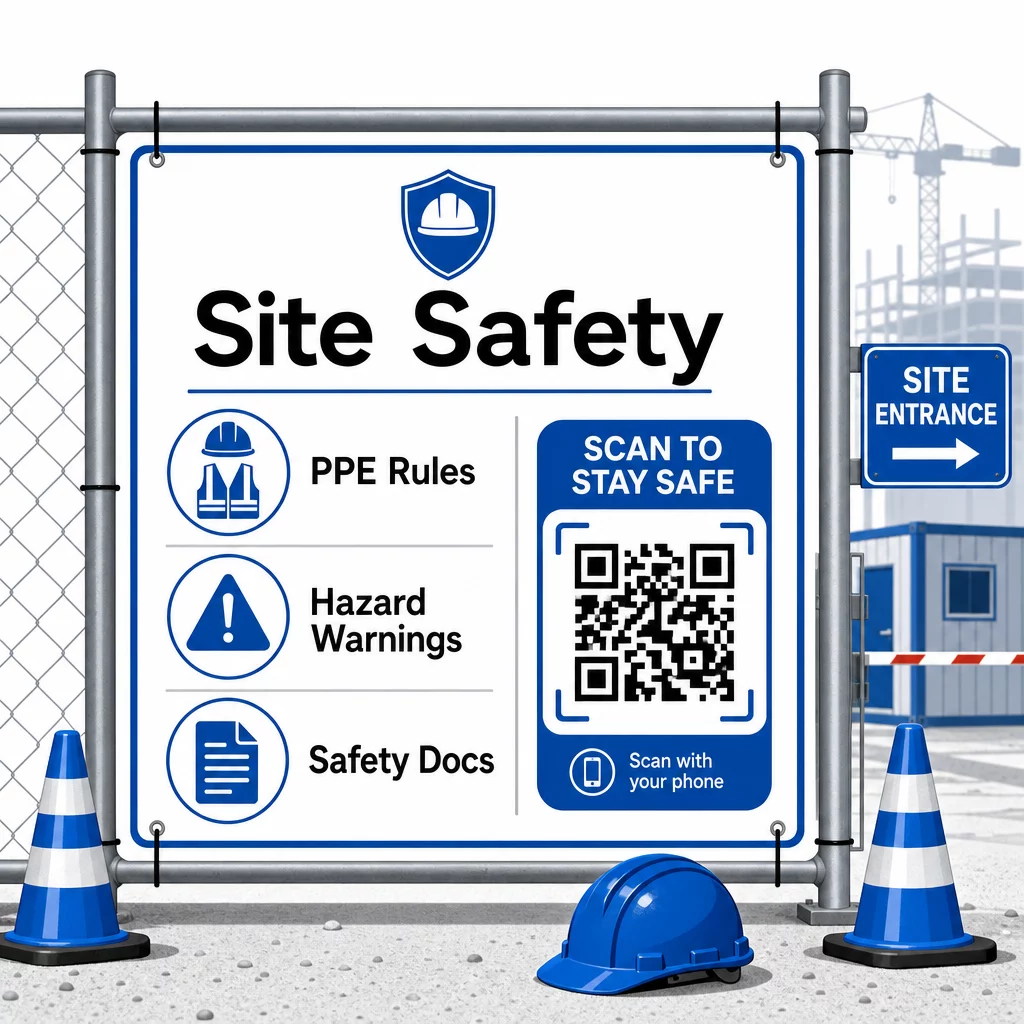
Per il controllo degli accessi, i sistemi di check-in abilitati ai QR possono verificare le credenziali, confermare la formazione sulla sicurezza completata e registrare l'ingresso digitalmente – eliminando la necessità di chiavi fisiche o fogli di accesso manuali.
La verifica della formazione è altrettanto semplice. I subappaltatori scansionano un codice per visualizzare i certificati digitali dei corsi di sicurezza completati, rendendo la verifica sul posto da parte dei supervisori rapida e affidabile.
Per i documenti di conformità sensibili, segui migliori pratiche per la generazione sicura di codici QR per limitare l'accesso al personale autorizzato e mantenere un registro digitale di chi ha visualizzato le informazioni e quando. Tale traccia di audit è inestimabile durante le ispezioni o le indagini sugli incidenti.
L'analisi contribuisce anche alla gestione della sicurezza. Puoi tracciare quali protocolli vengono consultati più frequentemente, identificare le aree in cui potrebbe essere necessaria una formazione aggiuntiva e confermare che i lavoratori abbiano esaminato i briefing richiesti prima di iniziare il lavoro.
Digitalizza la Tua Documentazione di Sicurezza Utilizzare il Generatore di QR code per PDF per collegare manuali di sicurezza, schede SDS e documenti di conformità a codici scansionabili – quindi aggiornare istantaneamente il contenuto quando le normative cambiano.
Confronto tra Codici QR e Metodi Tradizionali
I guadagni in efficienza diventano chiari quando si esamina ogni sfida di comunicazione fianco a fianco.
| Fattore | Metodi tradizionali | Approccio con Codici QR |
|---|---|---|
| Velocità di consegna delle informazioni | Aggiornamenti ritardati di ore o giorni | Scansione istantanea |
| Processo di aggiornamento dei documenti | Ristampa e ridistribuisci | Aggiorna il contenuto collegato una volta |
| Tracciamento degli accessi | Manuale, spesso incompleto | Analisi automatizzata delle scansioni |
| Archiviazione | Sistemi di archiviazione fisici | Basato su cloud, scalabile |
| Resistenza agli agenti atmosferici | Carta danneggiata in condizioni sfavorevoli | File digitali inalterati |
| Registri di conformità alla sicurezza | Registri cartacei, facili da perdere | Traccia di controllo digitale con timestamp |
La curva di apprendimento è minima. I subappaltatori portano già smartphone e sanno come scansionare i codici QR. Inviare un aggiornamento sullo stato di avanzamento o visualizzare una planimetria diventa veloce come aprire la fotocamera.
Per i team che gestiscono più subappaltatori in diverse specializzazioni, creare codici distinti per ogni ruolo – gli elettricisti ottengono moduli di ispezione, gli idraulici accedono a liste di controllo idrauliche, i supervisori di cantiere vedono la pianificazione dell'equipaggio – riduce la confusione e assicura che ogni lavoratore raggiunga esattamente ciò di cui ha bisogno.
Per indicazioni sul posizionamento e sulle dimensioni per assicurarti che i tuoi codici vengano scansionati in modo affidabile in condizioni di campo, consulta il le migliori pratiche per la leggibilità dei codici QR.
Se stai valutando se utilizzare codici statici o dinamici per applicazioni specifiche, il confronto tra codici QR statici e dinamici copre le differenze chiave e quando ogni tipo ha senso. Per la maggior parte dei casi d'uso di comunicazione nel settore edile, i codici dinamici sono la scelta giusta – si aggiornano senza ristampa e forniscono gli strumenti analitici necessari per gestire un cantiere complesso e multi-specializzato.
Pageloot soluzioni di codici QR per l'edilizia supportano l'intera gamma di questi casi d'uso, dalla documentazione di sicurezza alla condivisione di planimetrie alla coordinazione dell'equipaggio, con personalizzazione del marchio e una dashboard centralizzata per la gestione di tutti i tuoi codici attivi.
Inizia a implementare i codici QR nel tuo prossimo progetto con gli strumenti gratuiti per codici QR di Pageloot e dai ai tuoi subappaltatori l'accesso istantaneo alle informazioni che mantiene il lavoro in movimento.
Domande frequenti
No. Qualsiasi moderna fotocamera di smartphone può scansionare un codice QR senza un'app dedicata. I lavoratori devono semplicemente aprire la fotocamera, puntarla sul codice e toccare la notifica che appare per aprire il contenuto collegato nel loro browser.
Con i codici QR dinamici, aggiorni il contenuto collegato una volta nella tua dashboard e ogni scansione successiva riflette automaticamente la nuova versione. Il codice fisico stesso non cambia e non ha bisogno di essere ristampato o sostituito.
I codici QR dinamici collegati alla documentazione di sicurezza creano un registro digitale di quali informazioni erano disponibili in loco e quando sono state aggiornate l'ultima volta. Le analisi delle scansioni mostrano quali protocolli i lavoratori hanno consultato e quando, fornendo una traccia di controllo che dimostra gli sforzi attivi di conformità agli ispettori.