Subcontractorii dumneavoastră se bazează încă pe apeluri telefonice, planuri tipărite și liste de verificare pe hârtie pentru a rămâne coordonați? Comunicarea deficitară și datele slabe ale proiectului reprezintă aproape jumătate din toate refacerile pe șantierele de construcții din S.U.A. – costând industria miliarde în fiecare an. Codurile QR vă oferă o modalitate practică de a reduce aceste lacune, punând informațiile corecte în mâinile potrivite în momentul în care sunt necesare.
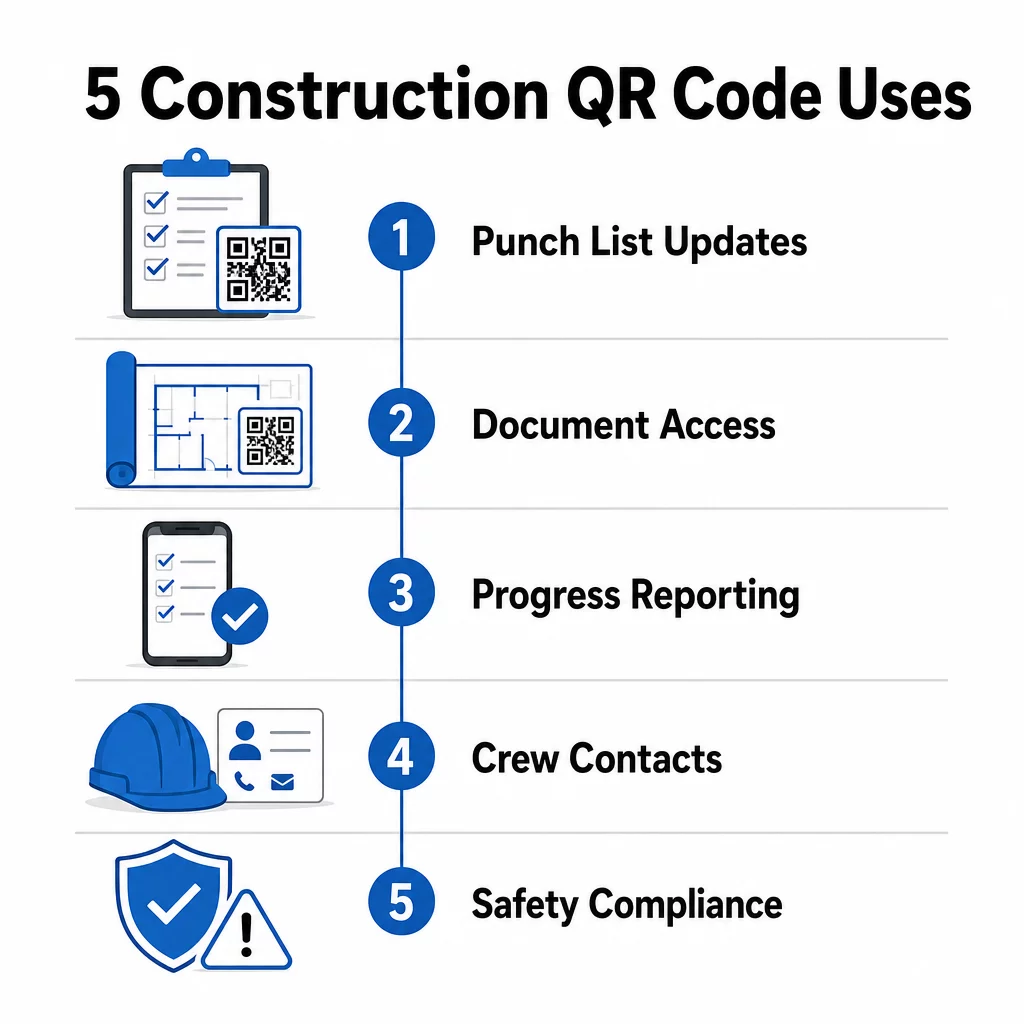
Iată o privire asupra a cinci moduri concrete în care managerii de proiect din construcții pot utiliza codurile QR pentru a îmbunătăți comunicarea cu subcontractanții – de la gestionarea listelor de verificare la conformitatea cu siguranța.
Gestionarea Listelor de Verificare și Actualizări de Sarcini
Listele de verificare pe hârtie încetinesc pe toată lumea. Actualizările durează ore întregi pentru a ajunge pe teren, scrisul de mână este interpretat greșit, iar elementele finalizate sunt contestate fără nicio documentație. Înlocuirea lor cu coduri QR creează o linie directă între șantier și sistemul dumneavoastră de management al proiectului.
Plasați un cod QR la fiecare zonă de lucru sau atașați unul la o comandă de lucru. Când un subcontractant îl scanează, vede imediat sarcinile curente alocate, cu orice revizuiri recente deja aplicate. Pot marca elementele ca fiind finalizate cu o ștampilă de timp și o fotografie, pot semnala probleme și pot lăsa notițe – totul de pe telefonul lor, fără a suna la birou.
Avantajul cheie este că codurile QR dinamice se actualizează automat. Un cod plasat în timpul lucrărilor de fundație poate afișa ulterior liste de verificare pentru structură, sarcini de finisare sau cerințe de inspecție finală. Actualizați conținutul legat o singură dată, iar fiecare scanare de la acel moment înainte reflectă modificarea – nu este necesară retipărirea.
Pentru subcontractanții care gestionează mai multe șantiere, codurile QR oferă, de asemenea, acces imediat la instrucțiuni specifice proiectului, specificații de materiale și cerințe speciale legate de fiecare zonă.
Mențineți Listele de Verificare Actualizate Fără Retipărire Folosește Generator cod QR dinamic pentru a crea coduri care reflectă automat cele mai recente actualizări de sarcini, astfel încât subcontractanții dumneavoastră să lucreze întotdeauna cu informații curente.
Partajarea Documentelor și Acces Instantaneu
Proiectele de construcții generează cantități enorme de documente – planuri, specificații, ordine de modificare, documente de depunere și protocoale de siguranță. Când subcontractanții lucrează cu desene învechite, apar greșeli. Când trebuie să găsească cea mai recentă versiune, se pierde timp.
Legarea codurilor QR la documente găzduite în cloud rezolvă ambele probleme. Un subcontractant scanează codul de pe un plan tipărit sau un panou de șantier și deschide imediat cea mai recentă versiune a acelui document pe telefonul său – fără autentificare, fără căutare, fără așteptare.
Cel Generator cod QR PDF este deosebit de util aici. Încărcați manualele de siguranță, fișele de specificații sau desenele detaliate ca PDF-uri, generați un cod și plasați-l oriunde este relevant – pe semnalizarea șantierului, planuri tipărite sau echipamente. Când arhitecții revizuiesc desenele sau managerii de proiect actualizează specificațiile, conținutul legat se reîmprospătează instantaneu. Fiecare scanare livrează cea mai recentă versiune fără a atinge codul fizic.
Puteți genera, de asemenea, coduri QR care se leagă direct la documente Google pentru documente care necesită editare colaborativă frecventă, sau utilizați generatorul de coduri QR pentru link-uri pentru a conecta lucrătorii la orice resursă găzduită în cloud.
Pentru îndrumări privind conversia fișierelor de orice tip în coduri scanabile, consultați ghidul fișier la cod QR sau aflați mai multe despre generarea de coduri QR pentru fișierele din cloud.
Urmărirea și Raportarea Progresului
Așteptarea verificărilor săptămânale pentru a înțelege progresul șantierului este o rețetă pentru surprize. Codurile QR permit subcontractanților să trimită actualizări în timp real, de pe teren, fără aplicații suplimentare sau introducere manuală de date.
Afișați coduri QR în zonele cheie de lucru. Când un subcontractant scanează unul, poate completa un formular simplu care acoperă procentul de finalizare, utilizarea materialelor sau notele de calitate. Conectați acele formulare folosind Generator cod QR Google Forms astfel încât răspunsurile să se alimenteze direct într-un tablou de bord partajat pe care supervizorii îl pot monitoriza pentru toate meseriile și locațiile active.
Documentația foto se integrează natural în acest flux de lucru. Un subcontractant scanează codul zonei, încarcă fotografii înainte și după sau fotografii de progres, iar acele imagini sunt atașate imediat la înregistrarea sarcinii relevante. Acest lucru creează o înregistrare vizuală cu marcaj temporal pentru controlul calității, soluționarea disputelor și verificarea facturării.
Deoarece codurile QR utilizează linkuri dinamice, formularele la care se conectează pot evolua odată cu proiectul. Un cod utilizat în timpul pregătirii șantierului poate ulterior să direcționeze către formulare de progres pentru structură, apoi către liste de verificare pentru inspecția sistemelor – toate fără a genera un nou cod sau a retipări nimic.
Urmărirea analizei scanărilor oferă managerilor de proiect un strat suplimentar de supraveghere. Puteți vedea ce coduri sunt scanate, cât de des și din ce locații – ajutându-vă să identificați zonele în care raportarea ar putea fi deficitară și să abordați blocajele înainte ca acestea să afecteze programul.
Informații de Contact și Coordonarea Echipei
Pe un șantier aglomerat, listele de contacte se învechesc rapid. Oamenii își schimbă rolurile, numerele de telefon sunt salvate incorect, iar schimburile se modifică fără ca toată lumea să primească notificarea. Codurile QR fac coordonarea echipei semnificativ mai fiabilă.
Subcontractanții pot adăuga coduri QR pe cărțile lor de vizită sau pe ecusoanele de identitate care, atunci când sunt scanate, salvează instantaneu detaliile complete de contact – nume, companie, linie directă, e-mail și contact de urgență – pe telefonul scanerului. Fără introducere manuală înseamnă fără erori de transcriere.
Codurile de contact dinamice sunt deosebit de practice atunci când personalul se schimbă în timpul unui proiect. Actualizați informațiile legate o singură dată, iar oricine scanează codul de atunci înainte primește detaliile curente. Pentru echipe mai mari, postați coduri QR în remorcile de lucru sau în sălile de pauză, care să facă legătura cu instrumente de programare în timp real, astfel încât lucrătorii să vadă întotdeauna tura curentă, locația întâlnirii sau repartizarea echipajului fără a aștepta un mesaj text de grup.
Explorați cum Coduri QR pentru construcții poate sprijini coordonarea echipajului alături de alte nevoi de gestionare a șantierului.
Conformitate cu Siguranța și Controlul Accesului
Standardele de construcție OSHA impun angajatorilor să efectueze inspecții regulate de siguranță, să ofere instruire lucrătorilor și să mențină documentația accesibilă de comunicare a pericolelor, inclusiv Fisele de Date de Siguranță și înregistrările de instruire. Sistemele bazate pe hârtie fac această povară de conformitate mai dificilă decât ar trebui să fie.
Codurile QR plasate la intrările pe șantier sau în zonele de lucru oferă subcontractanților acces instantaneu la protocoalele de siguranță curente relevante pentru acea zonă – avertismente de pericol, EIP necesar și reguli specifice șantierului – fără a căuta prin dosare sau a urmări un supraveghetor. Atunci când reglementările OSHA se modifică sau condițiile șantierului se schimbă, actualizați documentul legat o singură dată și fiecare scanare ulterioară reflectă automat noile informații.
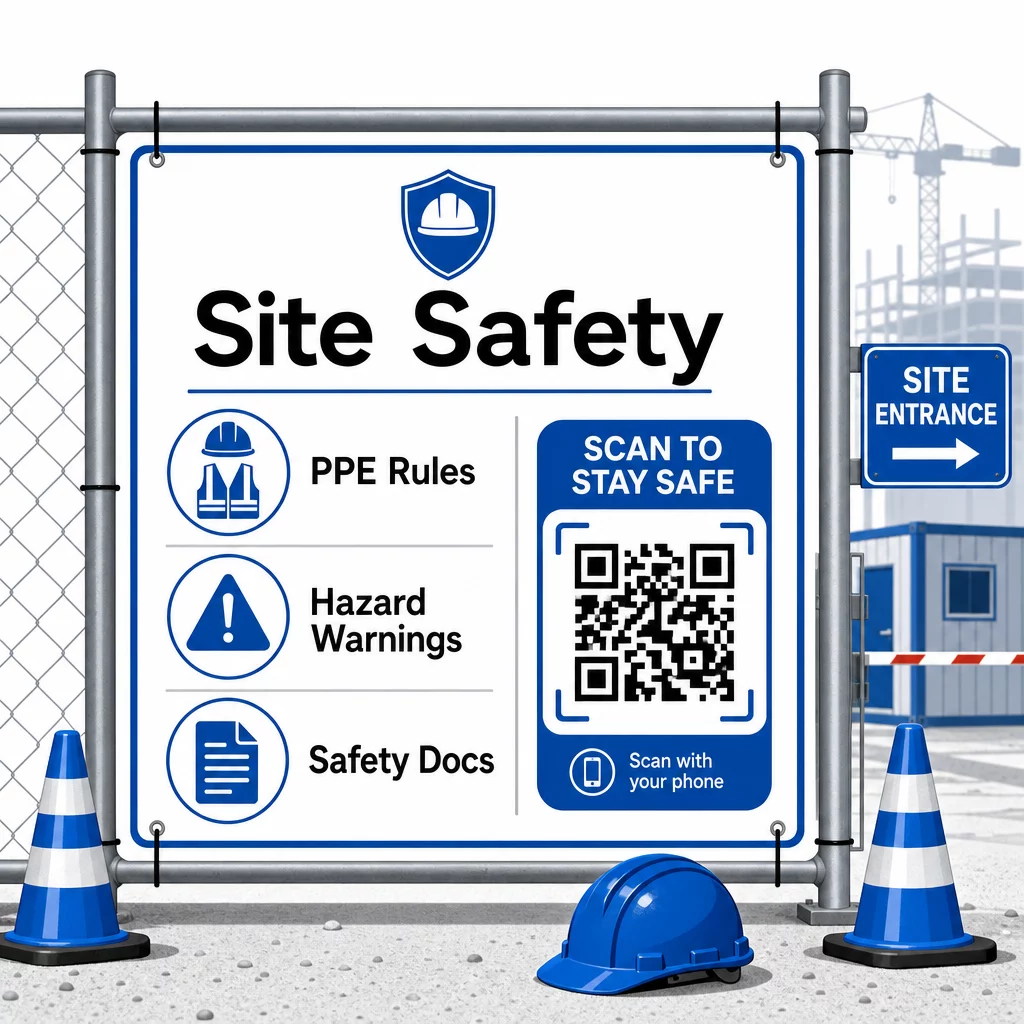
Pentru controlul accesului, sistemele de check-in activate prin QR pot verifica acreditările, confirma instruirea de siguranță finalizată și înregistra intrarea digital – eliminând necesitatea cheilor fizice sau a foilor de înregistrare manuală.
Verificarea instruirii este la fel de simplă. Subcontractanții scanează un cod pentru a afișa certificate digitale ale cursurilor de siguranță finalizate, făcând verificarea la fața locului de către supraveghetori rapidă și fiabilă.
Pentru documente de conformitate sensibile, urmați cele mai bune practici pentru generarea sigură de coduri QR pentru a restricționa accesul personalului autorizat și a menține un jurnal digital cu cine a vizualizat informațiile și când. Această pistă de audit este inestimabilă în timpul inspecțiilor sau investigațiilor de incidente.
Analizele contribuie, de asemenea, la gestionarea siguranței. Puteți urmări ce protocoale sunt accesate cel mai frecvent, identifica zonele în care ar putea fi necesară instruire suplimentară și confirma că lucrătorii au revizuit informările necesare înainte de a începe lucrul.
Digitalizați-vă Documentația de Siguranță Folosește Generator cod QR PDF pentru a lega manualele de siguranță, fișele SDS și documentele de conformitate de coduri scanabile – apoi actualizați conținutul instantaneu când reglementările se schimbă.
Compararea Codurilor QR cu Metodele Tradiționale
Câștigurile de eficiență devin clare atunci când priviți fiecare provocare de comunicare una lângă alta.
| Factor | Metode tradiționale | Abordarea Codurilor QR |
|---|---|---|
| Viteza de livrare a informațiilor | Actualizări întârziate cu ore sau zile | Scanare instantanee |
| Proces de actualizare a documentelor | Retipărire și redistribuire | Actualizați conținutul legat o singură dată |
| Urmărirea accesului | Manual, adesea incomplet | Analize automate de scanare |
| Stocare | Sisteme fizice de arhivare | Bazat pe cloud, scalabil |
| Rezistență la intemperii | Hârtie deteriorată în condiții precare | Fișiere digitale neafectate |
| Înregistrări de conformitate cu siguranța | Jurnale pe hârtie, ușor de pierdut | Urmă digitală de audit cu marcaje temporale |
Curba de învățare este minimă. Subcontractorii au deja smartphone-uri și știu cum să scaneze coduri QR. Trimiterea unei actualizări de progres sau vizualizarea unui plan devine la fel de rapidă ca deschiderea camerei.
Pentru echipele care gestionează mai mulți subcontractori din diferite meserii, crearea de coduri distincte pentru fiecare rol – electricienii primesc formulare de inspecție, instalatorii accesează liste de verificare pentru instalații sanitare, șefii de șantier văd programarea echipelor – reduce confuzia și asigură că fiecare muncitor ajunge exact la ceea ce are nevoie.
Pentru ghiduri de plasare și dimensionare care să asigure scanarea fiabilă a codurilor dumneavoastră în condiții de șantier, consultați cele mai bune practici pentru lizibilitatea codurilor QR.
Dacă evaluați dacă să utilizați coduri statice sau dinamice pentru aplicații specifice, atunci comparația codurilor QR statice vs. dinamice acoperă diferențele cheie și când fiecare tip are sens. Pentru majoritatea cazurilor de utilizare a comunicării în construcții, codurile dinamice sunt alegerea potrivită – se actualizează fără a fi nevoie de retipărire și oferă analizele necesare pentru a gestiona un șantier complex, cu mai multe meserii.
Pageloot soluții de coduri QR pentru construcții susțin întreaga gamă a acestor cazuri de utilizare, de la documentația de siguranță la partajarea planurilor și coordonarea echipelor, cu personalizare a brandului și un tablou de bord centralizat pentru gestionarea tuturor codurilor dumneavoastră active.
Începeți implementarea codurilor QR în următorul dumneavoastră proiect cu instrumentele gratuite de coduri QR de la Pageloot și oferiți subcontractorilor dumneavoastră acces instantaneu la informații care mențin lucrul în mișcare.
Întrebări frecvente
Nu. Orice cameră de smartphone modernă poate scana un cod QR fără o aplicație dedicată. Lucrătorii pur și simplu își deschid camera, o îndreaptă către cod, și ating notificarea care apare pentru a deschide conținutul legat în browserul lor.
Cu coduri QR dinamice, actualizați conținutul legat o singură dată în tabloul de bord și fiecare scanare ulterioară reflectă automat noua versiune. Codul fizic în sine nu se modifică și nu trebuie retipărit sau înlocuit.
Codurile QR dinamice legate de documentația de siguranță creează o înregistrare digitală a informațiilor disponibile pe șantier și când au fost actualizate ultima dată. Analizele scanărilor arată ce protocoale au accesat lucrătorii și când, oferind o pistă de audit care demonstrează eforturi active de conformitate inspectorilor.