Taşeronlarınız hala koordinasyonu sağlamak için telefon görüşmelerine, basılı planlara ve kağıt eksiklik listelerine mi güveniyor? Yanlış iletişim ve yetersiz proje verileri, ABD'deki inşaat şantiyelerindeki tüm yeniden işlerin neredeyse yarısını oluşturuyor ve sektöre her yıl milyarlarca dolara mal oluyor. QR kodları, bu boşlukları kapatmak için pratik bir yol sunarak, doğru bilgiyi ihtiyaç duyulduğu anda doğru ellere ulaştırır.
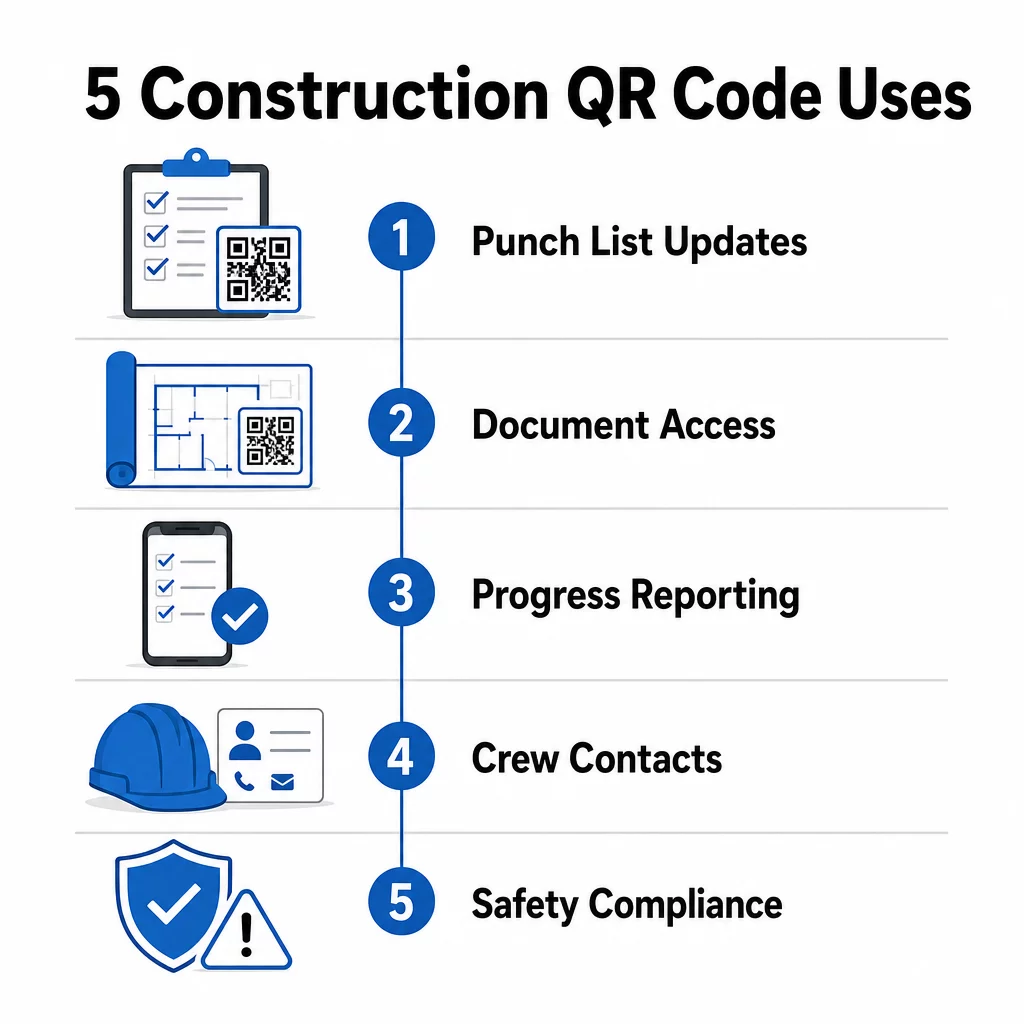
İşte inşaat proje yöneticilerinin taşeron iletişimini iyileştirmek için QR kodlarını kullanabileceği beş somut yol – eksiklik listesi yönetiminden güvenlik uyumluluğuna kadar.
Eksiklik Listesi Yönetimi ve Görev Güncellemeleri
Kağıt eksiklik listeleri herkesi yavaşlatır. Güncellemelerin sahaya ulaşması saatler sürer, el yazıları yanlış okunur ve tamamlanan maddeler belgesiz olarak tartışılır. Bunları QR kodlarıyla değiştirmek, şantiye ile proje yönetim sisteminiz arasında doğrudan bir hat oluşturur.
Her çalışma bölgesine bir QR kodu yerleştirin veya bir iş emrine ekleyin. Bir taşeron kodu taradığında, mevcut atanmış görevlerini, uygulanan son revizyonlarla birlikte anında görür. Öğeleri zaman damgası ve fotoğrafla tamamlandı olarak işaretleyebilir, sorunları işaretleyebilir ve not bırakabilirler – tüm bunları ofisi aramadan telefonlarından yapabilirler.
Temel avantaj şudur ki dinamik QR kodları otomatik olarak güncellenir. Temel çalışmaları sırasında yerleştirilen bir kod, daha sonra iskelet kontrol listelerini, bitirme görevlerini veya son denetim gereksinimlerini gösterebilir. Bağlantılı içeriği bir kez güncellersiniz ve o andan itibaren yapılan her tarama değişikliği yansıtır – yeniden yazdırmaya gerek kalmaz.
Birden fazla şantiyede çalışan taşeronlar için QR kodları, her bölgeye özel proje talimatlarına, malzeme özelliklerine ve özel gereksinimlere anında erişim sağlar.
Eksiklik Listelerini Yeniden Yazdırmadan Güncel Tutun Kullan Dinamik QR Kod Oluşturucu en son görev güncellemelerini otomatik olarak yansıtan kodlar oluşturmak için, böylece taşeronlarınız her zaman güncel bilgilerle çalışır.
Belge Paylaşımı ve Anında Erişim
İnşaat projeleri muazzam miktarda evrak işi üretir – planlar, şartnameler, değişiklik emirleri, sunumlar ve güvenlik protokolleri. Taşeronlar güncel olmayan çizimlerle çalıştığında hatalar meydana gelir. En son sürümü bulmak zorunda kaldıklarında zaman kaybedilir.
QR kodlarını bulut tabanlı belgelere bağlamak her iki sorunu da çözer. Bir taşeron, basılı bir plandaki veya şantiye tabelasındaki kodu tarar ve o belgenin en güncel sürümünü telefonunda anında açar – oturum açma, arama veya bekleme yok.
Bu PDF QR Kod Oluşturucu burada özellikle faydalıdır. Güvenlik kılavuzlarınızı, şartname sayfalarınızı veya detaylı çizimlerinizi PDF olarak yükleyin, bir kod oluşturun ve ilgili olduğu her yere yerleştirin – şantiye tabelalarına, basılı planlara veya ekipmanlara. Mimarlar çizimleri revize ettiğinde veya proje yöneticileri şartnameleri güncellediğinde, bağlantılı içerik anında yenilenir. Her tarama, fiziksel koda dokunmadan en son sürümü sunar.
Ayrıca doğrudan bağlantı veren QR kodları da oluşturabilirsiniz Google Dokümanlar sık sık ortak düzenleme gerektiren belgeler için veya şunu kullanın bağlantı QR kod oluşturucunuzun çalışanları bulut tabanlı herhangi bir kaynağa bağlamak için.
Herhangi bir türdeki dosyaları taranabilir kodlara dönüştürme konusunda rehberlik için, bkz. dosyadan QR koduna rehberi veya hakkında daha fazla bilgi edinin bulut dosyaları için QR kodları oluşturma.
İlerleme Takibi ve Raporlama
Şantiye ilerlemesini anlamak için haftalık kontrol beklemek, sürprizlere davetiye çıkarmaktır. QR kodları, taşeronların sahadan, ek uygulamalar veya manuel veri girişi olmadan gerçek zamanlı güncellemeler göndermesine olanak tanır.
Anahtar çalışma bölgelerine QR kodları yerleştirin. Bir taşeron birini taradığında, tamamlanma yüzdesi, malzeme kullanımı veya kalite notlarını içeren basit bir form doldurabilir. Bu formları kullanarak bağlayın Google Form QR Kod Oluşturucu böylece yanıtlar, süpervizörlerin tüm aktif iş kolları ve konumlar arasında izleyebileceği paylaşılan bir panoya doğrudan beslenir.
Fotoğraf dokümantasyonu bu iş akışına doğal olarak entegre olur. Bir taşeron bölge kodunu tarar, öncesi ve sonrası fotoğraflarını veya ilerleme çekimlerini yükler ve bu görüntüler ilgili görev kaydına anında eklenir. Bu, kalite kontrol, anlaşmazlık çözümü ve faturalandırma doğrulaması için zaman damgalı görsel bir kayıt oluşturur.
QR kodları dinamik bağlantılar kullandığı için, bağlandıkları formlar projeyle birlikte gelişebilir. Saha hazırlığı sırasında kullanılan bir kod, daha sonra iskelet ilerleme formlarına, ardından sistem denetim kontrol listelerine yönlendirebilir – tüm bunlar yeni bir kod oluşturmaya veya herhangi bir şeyi yeniden yazdırmaya gerek kalmadan.
Tarama analizlerini takip etmek proje yöneticilerine ek bir denetim katmanı sağlar. Hangi kodların ne sıklıkta ve hangi konumlardan tarandığını görebilirsiniz – bu, raporlamanın geciktiği bölgeleri belirlemenize ve darboğazları programı etkilemeden önce gidermenize yardımcı olur.
İletişim Bilgileri ve Ekip Koordinasyonu
Yoğun bir şantiyede, iletişim listeleri hızla güncelliğini yitirir. İnsanlar rol değiştirir, telefon numaraları yanlış kaydedilir ve vardiyalar herkesin haberi olmadan değişir. QR kodları, ekip koordinasyonunu önemli ölçüde daha güvenilir hale getirir.
Taşeronlar, tarandığında ad, şirket, doğrudan hat, e-posta ve acil durum irtibat kişisi gibi tam iletişim bilgilerini anında tarayıcının telefonuna kaydeden QR kodlarını kartvizitlerine veya kimlik kartlarına ekleyebilirler. Manuel giriş olmaması, yazım hatası olmaması anlamına gelir.
Dinamik iletişim kodları, bir proje sırasında personel değiştiğinde özellikle pratiktir. Bağlantılı bilgiyi bir kez güncelleyin ve o noktadan itibaren kodu tarayan herkes güncel ayrıntıları alır. Daha büyük ekipler için, iş römorklarına veya mola odalarına canlı planlama araçlarına bağlanan QR kodları asın, böylece çalışanlar bir grup mesajı beklemek zorunda kalmadan her zaman güncel vardiyayı, toplantı yerini veya ekip görevlendirmesini görürler.
Nasıl olduğunu keşfedin İnşaat için QR kodlar diğer saha yönetimi ihtiyaçlarının yanı sıra ekip koordinasyonunu da destekleyebilir.
Güvenlik Uyumluluğu ve Erişim Kontrolü
OSHA'nın inşaat standartları, işverenlerin düzenli güvenlik denetimleri yapmasını, işçi eğitimi sağlamasını ve Güvenlik Veri Sayfaları ile eğitim kayıtları dahil olmak üzere erişilebilir tehlike iletişim belgelerini muhafaza etmesini gerektirir. Kağıt tabanlı sistemler bu uyum yükünü gereğinden daha zor hale getirir.
Saha girişlerine veya çalışma alanlarına yerleştirilen QR kodları, alt yüklenicilere o bölgeyle ilgili güncel güvenlik protokollerine (tehlike uyarıları, gerekli KKD ve sahaya özel kurallar) klasörleri karıştırmadan veya bir amiri bulmaya çalışmadan anında erişim sağlar. OSHA düzenlemeleri değiştiğinde veya saha koşulları farklılaştığında, bağlantılı belgeyi bir kez güncellersiniz ve sonraki her tarama yeni bilgiyi otomatik olarak yansıtır.
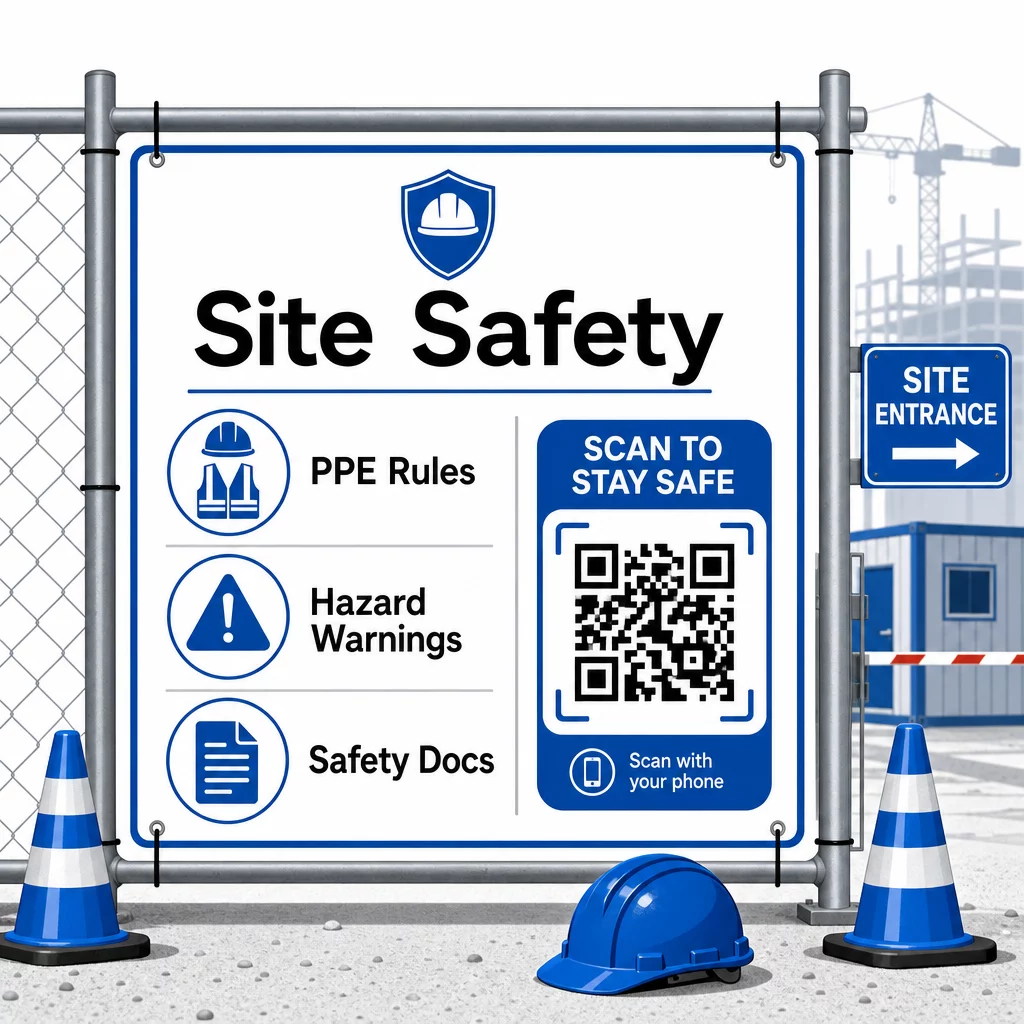
Erişim kontrolü için, QR özellikli giriş sistemleri kimlik bilgilerini doğrulayabilir, tamamlanmış güvenlik eğitimini onaylayabilir ve girişi dijital olarak kaydedebilir; böylece fiziksel anahtarlara veya manuel giriş formlarına olan ihtiyacı ortadan kaldırır.
Eğitim doğrulaması da aynı derecede basittir. Alt yükleniciler, tamamlanmış güvenlik kurslarının dijital sertifikalarını görüntülemek için bir kodu tarar, bu da amirler tarafından yerinde doğrulamayı hızlı ve güvenilir hale getirir.
Hassas uyum belgeleri için, şunları takip edin güvenli QR kodu oluşturma en iyi uygulamaları erişimi yetkili personelle kısıtlamak ve bilgiyi kimin ne zaman görüntülediğine dair dijital bir kayıt tutmak için. Bu denetim izi, denetimler veya olay soruşturmaları sırasında paha biçilmezdir.
Analitikler de güvenlik yönetimine katkıda bulunur. Hangi protokollere en sık erişildiğini takip edebilir, ek eğitime ihtiyaç duyulabilecek alanları belirleyebilir ve çalışanların işe başlamadan önce gerekli brifingleri gözden geçirdiğini doğrulayabilirsiniz.
Güvenlik Belgelerinizi Dijitalleştirin Kullan PDF QR Kod Oluşturucu güvenlik kılavuzlarını, SDS sayfalarını ve uyum belgelerini taranabilir kodlara bağlamak için – ardından düzenlemeler değiştiğinde içeriği anında güncelleyin.
QR Kodlarını Geleneksel Yöntemlerle Karşılaştırma
Her iletişim sorununa yan yana baktığınızda verimlilik kazanımları netleşir.
| Faktör | Geleneksel Yöntemler | QR Kod Yaklaşımı |
|---|---|---|
| Bilgi teslim hızı | Güncellemeler saatler veya günler gecikmeli | Anında tarama |
| Belge güncelleme süreci | Yeniden bas ve dağıt | Bağlantılı içeriği bir kez güncelle |
| Erişim takibi | Manuel, genellikle eksik | Otomatik tarama analizi |
| Depolama | Fiziksel dosyalama sistemleri | Bulut tabanlı, ölçeklenebilir |
| Hava koşullarına dayanıklılık | Kötü koşullarda kağıt hasar görür | Dijital dosyalar etkilenmez |
| Güvenlik uyumluluk kayıtları | Kağıt kayıtlar, kaybolması kolay | Zaman damgalarıyla dijital denetim izi |
Öğrenme eğrisi minimaldir. Taşeronlar zaten akıllı telefon taşıyor ve QR kodlarını nasıl tarayacaklarını biliyorlar. Bir ilerleme güncellemesi göndermek veya bir planı açmak, kamerayı açmak kadar hızlı hale gelir.
Farklı meslek gruplarından birden fazla taşeronu yöneten ekipler için, her rol için ayrı kodlar oluşturmak – elektrikçiler denetim formlarına ulaşır, tesisatçılar tesisat kontrol listelerine erişir, saha amirleri ekip çizelgesini görür – karışıklığı azaltır ve her çalışanın tam olarak ihtiyacı olana ulaşmasını sağlar.
Kodlarınızın saha koşullarında güvenilir bir şekilde taranmasını sağlamak için yerleştirme ve boyutlandırma rehberliği için, inceleyin QR kodu okunabilirliği için en iyi uygulamaları.
Belirli uygulamalar için statik mi yoksa dinamik kodları mı kullanacağınızı tartıyorsanız, statik ve dinamik QR kodu karşılaştırması temel farklılıkları ve her türün ne zaman mantıklı olduğunu kapsar. Çoğu inşaat iletişimi kullanım durumu için, dinamik kodlar doğru seçimdir – yeniden basılmadan güncellenirler ve karmaşık, çoklu meslekli bir şantiyeyi yönetmek için gereken analizleri sağlarlar.
Pageloot'un inşaat QR kod çözümleri bu kullanım durumlarının tüm yelpazesini, güvenlik belgelerinden plan paylaşımına ve ekip koordinasyonuna kadar, marka özelleştirmesi ve tüm aktif kodlarınızı yönetmek için merkezi bir kontrol paneli ile destekler.
Bir sonraki projenizde QR kodlarını uygulamaya başlayın Pageloot'un ücretsiz QR kod araçları ve taşeronlarınıza işin ilerlemesini sağlayan anında bilgi erişimi sağlayın.
Sıkça sorulan sorular
Hayır. Herhangi modern bir akıllı telefon kamerası, özel bir uygulama olmadan bir QR kodunu tarayabilir. Çalışanlar sadece kameralarını açar, kodu işaret eder ve tarayıcılarında bağlantılı içeriği açmak için görünen bildirime dokunur.
Dinamik QR kodları ile bağlantılı içeriği kontrol panelinizde bir kez güncellersiniz ve sonraki her tarama yeni sürümü otomatik olarak yansıtır. Fiziksel kodun kendisi değişmez ve yeniden basılmasına veya değiştirilmesine gerek kalmaz.
Güvenlik belgelerine bağlı dinamik QR kodları, sahada hangi bilgilerin mevcut olduğuna ve en son ne zaman güncellendiğine dair dijital bir kayıt oluşturur. Tarama analizleri, çalışanların hangi protokollere ne zaman eriştiğini göstererek, denetçilere aktif uyum çabalarını gösteren bir denetim izi sağlar.